
Anonymity · guide
Mullvad Browser: what Mullvad and the Tor Project say it does
By Alberto Gulotta · Updated · 16 min read
Mullvad Browser is free and open source, and Mullvad says it asked the Tor Project to develop it for use with a trustworthy VPN instead of the Tor Network. Here is what Mullvad and the Tor Project say it changes, what it sends out, how it differs from Tor Browser, and where the pages we read disagree.
| Question | Answer | Where it comes from |
|---|---|---|
| Is it free? | Mullvad says it is open source and free of charge, with or without Mullvad VPN | Mullvad, Tor Project, European Alternatives |
| Who develops it? | The Tor Project, in collaboration with Mullvad VPN; Mullvad distributes it | Tor Project |
| Which systems does it run on? | Linux (64-bit only), Windows 10 or later (64-bit only), macOS Sonoma (14) or later | GitHub |
| Does it hide my IP address? | Mullvad says that without a trustworthy VPN the IP address is not masked | Mullvad, European Alternatives |
| How does it differ from Tor Browser? | The Tor Project says the differences are very small apart from how each connects, and lists three Tor features Mullvad Browser lacks | Tor Project |
What it is and who is behind it
Mullvad’s product page starts from a problem: a visitor can be identified through an IP address, third-party cookies, tracking scripts and browser fingerprints, so masking the IP address is not enough to stop data collection. Mullvad says that is why it asked the Tor Project to develop a browser designed to minimize tracking and fingerprints. The Tor Project’s FAQ gives the short version: Mullvad Browser is Tor Browser without the Tor Network, free and open source, developed by the Tor Project in collaboration with Mullvad VPN and distributed by Mullvad.
The announcement is dated 3 April 2023 and came from Mullvad VPN and the Tor Project. In it the CEO of Mullvad VPN, Jan Jonsson, says there had been “a gap in the market” for a privacy browser as good as the Tor Project’s but built for a VPN rather than the Tor Network. The Tor Project’s executive director, Isabela Fernandes, is quoted on the aim: more privacy options for everyday browsing. The post also says Mullvad VPN was founded in 2009.
The GitHub page for the project lists the systems it runs on: Linux (64-bit only), with .deb and .rpm packages available through Mullvad’s repositories, Windows 10 or later (64-bit only), and macOS Sonoma (14) or later. It says the browser is signed by the Tor Browser developers and licensed under the Mozilla Public License v2, and that the main branch holds only the readme, with the source code in specific branches and tags. Like Tor Browser, it is based on Firefox; Mullvad says new Firefox features are audited and reviewed before they are considered for addition.
On money, Mullvad says it earns nothing from the browser, that its income comes from the VPN service and that the browser is a complement to it. European Alternatives, which lists Mullvad Browser as a Swedish open source product with a free plan, points out that Mullvad has a vested interest in promoting its VPN. The Tor Project gives its own reason for taking part: the collaboration has let it address legacy code issues for Tor Browser.
What it changes in the browser
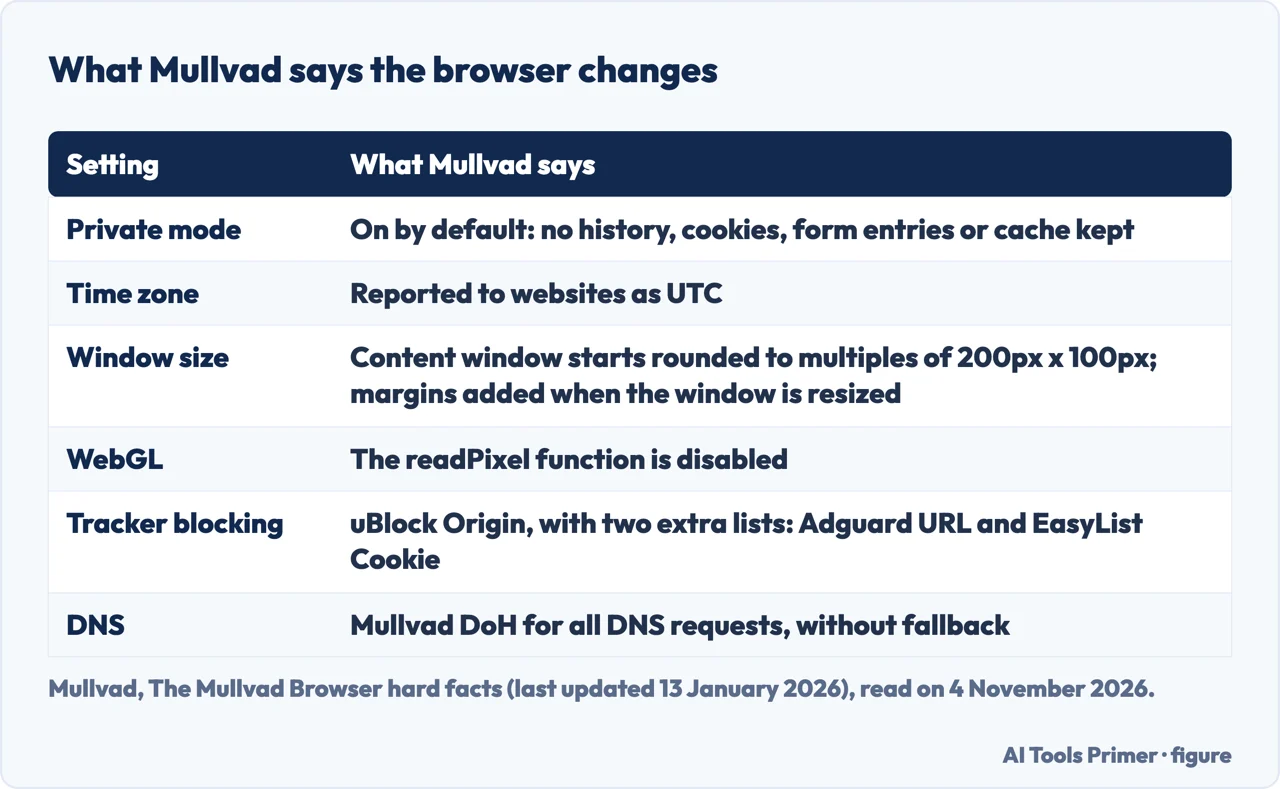
Mullvad’s hard facts page, last updated on 13 January 2026, is the list of settings. Private browsing mode is on by default, so the page says visited pages, form and search entries, download list entries, cookies and cached web content are not saved. What is saved is the bookmarks created, the extension settings and the cache for internal interface components. Third-party cookies are isolated in separate cookie jars during a session, one per domain, which Mullvad says stops an advertiser’s trackers on different sites from being connected to each other.
For fingerprinting, the page says privacy.resistFingerprinting is turned on. Its list of the main changes includes a time zone reported as UTC, only some installed fonts offered to webpages, a common version number and operating system reported, a disguised keyboard layout and language, disguised webcam and microphone capabilities, site-specific zoom settings not applied, and the WebSpeech, gamepad, sensors and performance web APIs disabled. The WebGL readPixel function is disabled too; in another article Mullvad explains that this stops websites from reading back a rendered triangle, a method used to fingerprint a browser.
Window size is the next signal. By default the browser starts with a content window rounded to a multiple of 200px x 100px, to avoid exposing the screen dimensions. The strategy, the page says, is to put users in a couple of buckets so that they are harder to single out. When a window is resized, for example by maximizing it or going full screen, letterboxing adds margins so the window stays close to the size wanted while remaining in those buckets. The page describes the technique as developed by Mozilla and presented in 2019. The grey bars that Mullvad’s FAQ mentions around websites are this letterboxing, which it says stops tracking scripts from identifying a visitor by window size.
Behind the settings is one idea, which Mullvad calls hiding in the crowd: all users should look alike. The hard facts page says the browser is engineered to have a nearly identical fingerprint across its users per operating system, and adds that Mullvad is not perfect. The same logic shapes the tracker blocking. Mullvad says it uses uBlock Origin to block third-party trackers and nothing more, because more attempts to block them can reveal an identity, and it does not recommend that users change settings. Its article cites a paradox described by the computer scientist and security researcher Peter Eckersley: extensions added for privacy can make a user more visible. Two lists are added to the default uBlock Origin setup: Adguard URL Tracking Protection, which strips tracking parameters from addresses, and EasyList Cookie, which removes cookie banners.
What it sends out, and what New identity does
Mullvad’s product page says telemetry was removed. The hard facts page is more specific: telemetry and crash reporting are disabled at compile time, and the pingsender executable, which would send telemetry to Mozilla, is removed. It then lists the only connections the browser makes by itself, seven in all: the browser update (Mullvad), the Mullvad Browser Extension update (Mullvad), Mullvad DoH (Mullvad), the NoScript and uBlock Origin update (Mozilla), certificates through OCSP, a domains update and the uBlock Origin filter list updates. The two statements do not contradict each other, but removing telemetry is not the same as making no connections.
The same page lists other choices in the interface: no phishing and malware protection, which Mullvad says it left out so that the browser does not contact Mozilla or Google to check addresses and downloads; no password manager, which it says is better kept as a separate tool; HTTPS-Only Mode on in all windows; Do Not Track disabled; and DuckDuckGo as the default search engine, with no search suggestions because enabling them leaks what is typed to the search engine before Enter is pressed.
DNS requests go to Mullvad DoH, without fallback, according to the page, and the settings offer a version with ad blocking. A separate Mullvad Browser Extension is meant for users of Mullvad VPN: it shows connection details, checks for IP, WebRTC and DNS leaks, and connects to Mullvad’s SOCKS5 proxy servers with one click.
The New identity button closes all tabs and windows and clears private information such as cookies and browsing history, after a warning that activity and downloads will stop. Mullvad’s own warning says that clicking it will not change the IP address, and that a VPN and a manual server switch are needed for that. TechRadar, which calls the option Reset Identity, also says it does not change the IP address.
The three security levels
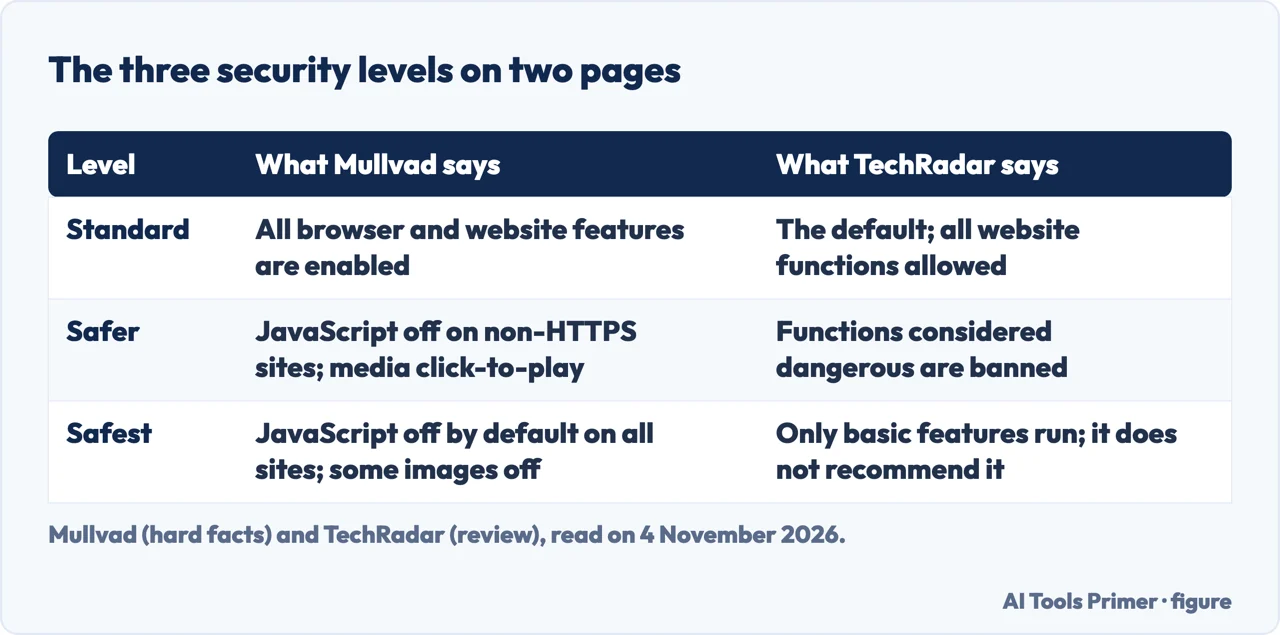
Security levels are set in the browser’s security settings, where TechRadar says the choice is made under the Security tab, and Mullvad’s page describes three. Standard enables all browser and website features. Safer disables website features that are often dangerous, which may cost some sites their functionality: JavaScript is disabled on all non-HTTPS sites, some fonts and math symbols are disabled, and audio and video are click-to-play. Safest allows only the features required for static sites and basic services: JavaScript is disabled by default on all sites, some fonts, icons, math symbols and images are disabled, and audio and video are click-to-play. Mullvad adds that the features can be enabled again at any time by adjusting the level.
The page names NoScript as the back end of the levels, with extra protections such as cross-site scripting filtering; its icon is hidden by default and can be added from the Customize Toolbar menu. TechRadar lists the same three levels and says the Safest mode can heavily restrict what a user can do online, which is why the review does not recommend it. The pages we read do not say which level suits a given person.
Mullvad Browser or Tor Browser
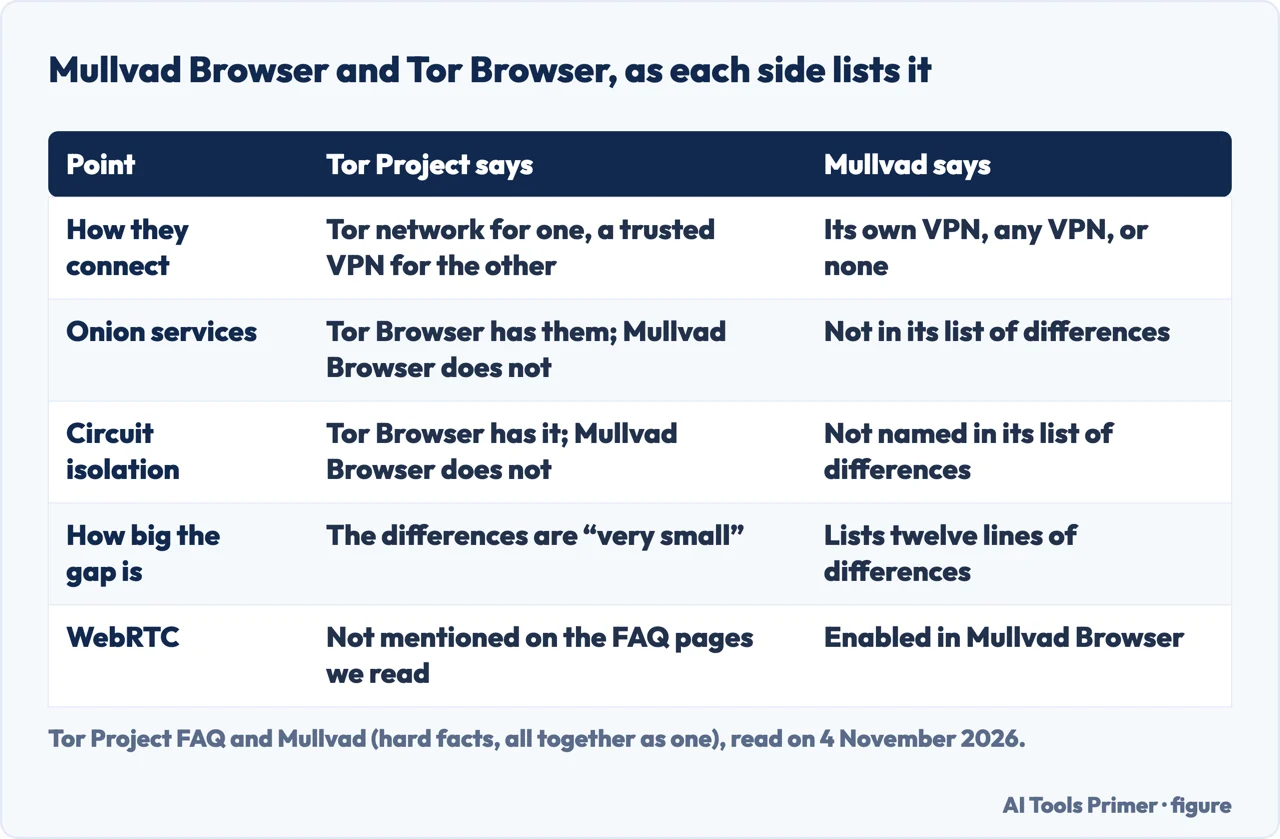
The Tor Project’s FAQ says that, apart from the way the two connect to the internet, the differences are very small and come down to individual preference and use cases. It lists three Tor features that Mullvad Browser does not offer: circuit isolation and its integration with the new identity function; access to onion services, including onionsites, Onion-Location redirects, onion authentication and SecureDrop integration; and the built-in censorship circumvention in Tor Browser’s connection settings and connection assist. Our Tor Browser guide covers the other side.
Mullvad’s list of differences runs to twelve lines. It names: no Tor Network patches, no multilanguage support, no onboarding patches, different branding and installer metadata, WebRTC enabled, the Web Audio API enabled because WebRTC needs it, uBlock Origin and the Mullvad Browser Extension, NoScript’s cross-tab identity leak protection disabled by default, Mullvad DoH, a cryptocurrency protection specific to Tor Browser removed, no drag and drop protections, and no download warning popup, the one that says to use Tails to open downloads.
The route differs too. Mullvad’s article says Tor Browser encrypts traffic in three layers and sends it through three relays run by volunteers, while Mullvad Browser, used with Mullvad VPN, connects through the encrypted VPN tunnels and servers of Mullvad. It can be used with any VPN, and even without one, though Mullvad says it does not recommend that.
On who it suits, the Tor Project says to use Mullvad Browser if the aim is a privacy-enhanced browser to connect with a trusted VPN, with defaults meant against mass surveillance, data mining and tracking of the kind big tech companies employ. It adds that the browser offers protections similar to Tor Browser’s but is best suited to the threat model of corporate mass surveillance by big tech companies. Mullvad says that without a trustworthy VPN the IP address is not masked, and advises a VPN to hide the traffic from the internet provider; European Alternatives says the browser alone cannot protect against IP tracking. Our Mullvad VPN page reads the VPN side.
Where the pages disagree, and what we could not check
TechRadar’s review, published on 12 July 2023 and carrying an affiliate commission notice, concludes that Mullvad Browser is perfect for those who want VPN-like security in a browser without paying for a VPN. Mullvad and European Alternatives each put the key point differently: without a trustworthy VPN the IP address is not masked, and the browser alone does not protect against IP tracking. The review also describes the browser as founded in April 2023 and as working with the Mullvad VPN, while Mullvad and the Tor Project say it can be used with any VPN or none. As a drawback the review lists that the browser is new, so claims about performance are hard to believe without evidence.
On the reset button the two accounts differ. TechRadar says Reset Identity removes cookies, browsing history, bookmarks and tabs. Mullvad’s hard facts page says private browsing keeps the bookmarks created, and describes New identity as closing tabs and windows and clearing cookies and browsing history, without naming bookmarks. The pages do not refer to each other, and we did not press the button, so we cannot say which is right.
The Tor Project calls the differences with Tor Browser very small, while Mullvad’s list runs to twelve lines, WebRTC enabled among them. The statements do not contradict each other as such, but the pages we read do not weigh the entries against each other.
We installed nothing and tested nothing. The pages we read do not mention an independent audit of the browser or a test of how many users share one fingerprint, and European Alternatives points to a browser privacy test that we did not open. We also did not open the Reddit thread and the Softonic download page that Google listed, the home page of Mullvad VPN, or the Tor Project’s FAQ answers on trust and on outgoing connections. The pages we read do not give the current version or the size of the download. Mullvad’s hard facts page is dated 13 January 2026 and the review 12 July 2023, so anything changed since is not in what we read.
Where to start
Four ways in.
- “What does it change?”
- What it changes in the browser — changes
- “Does it phone home?”
- What it sends out, and what New identity does — sends
- “Is it Tor Browser with a VPN?”
- Mullvad Browser or Tor Browser — tor
- “Do the pages agree?”
- Where the pages disagree — disagree
Browsers read the same way
What a browser blocks the moment it is installed, and what the pages say it still leaves visible.
Tor, private windows and a VPN
Three different tools that sit next to a privacy browser, each page keeping to one question.
Questions people also ask
Is Mullvad Browser free?
Mullvad says it is open source and free of charge, whether or not the user is a Mullvad VPN customer. The Tor Project calls it free and open-source, and European Alternatives says it is free to use. Mullvad says it earns nothing from the browser and that its income comes from the VPN service.
How safe is the Mullvad Browser?
The pages we read describe protections and do not mention an independent audit or a test. Mullvad lists what it changes; the Tor Project says the browser is best suited to the threat model of corporate mass surveillance by big tech companies. Without a trustworthy VPN, Mullvad says the IP address is not masked.
Is Mullvad banned in Russia?
The pages we read are about the browser and do not mention Russia. The pages we read give no information on availability in any country.
Is Mullvad still trustworthy?
That question is about the company, and the pages we read are about the browser; they do not mention an independent audit of it. Our Mullvad VPN page reads the VPN’s no-logging policy and audits. The Tor Project’s FAQ has a question headed “Why should I trust Mullvad Browser?”, whose answer we did not read.
Not covered here. We tested nothing in the browser. The statements come from Mullvad’s pages, the Tor Project’s FAQ, the GitHub page, a TechRadar review and a European Alternatives listing, all read on 4 November 2026.
The search volume and difficulty behind this page come from a Semrush reading of 29 August 2026, which expired on 28 October 2026, past the 60 days the site normally allows, and is used with the owner’s authorisation until it is read again.
Sources
- Mullvad — Free the internet with Mullvad Browser — mullvad.net, read 4 November 2026.
- Mullvad — The Mullvad Browser hard facts: list of settings and modifications — mullvad.net, read 4 November 2026.
- Mullvad — All together as one: This is how the Mullvad Browser works — mullvad.net, read 4 November 2026.
- Mullvad — Mullvad VPN and the Tor Project team up to release the Mullvad Browser (3 April 2023) — mullvad.net, read 4 November 2026.
- GitHub — mullvad/mullvad-browser — github.com, read 4 November 2026.
- Tor Project — What is Mullvad Browser? — support.torproject.org, read 4 November 2026.
- Tor Project — What is the difference between Mullvad Browser and Tor Browser? — support.torproject.org, read 4 November 2026.
- Tor Project — When should I use Mullvad Browser? — support.torproject.org, read 4 November 2026.
- Tor Project — Why did the Tor Project decide to develop this browser for Mullvad VPN? — support.torproject.org, read 4 November 2026.
- TechRadar — Mullvad browser review (12 July 2023) — www.techradar.com, read 4 November 2026.
- European Alternatives — Mullvad Browser — european-alternatives.eu, read 4 November 2026.
Written by Alberto Gulotta
Founder and editor of AI Tools Primer, writing from Palermo, Italy. Thirty-five years of taking computers apart, starting with a Commodore 64 — the long version is on the about page.
Something wrong on this page? Write to aitoolsprimer@gmail.com and it gets fixed.
Written on 4 November 2026.
Independence and limits
No affiliate links and no paid placements anywhere on this site. Nobody pays to appear here, and no company has seen this page before you did.
This is general information, not professional advice. Where a page touches money, health, safety or the law, it names its source and the date it was read — and your situation may still differ. See the privacy page and the cookie policy.