
Anonymity · guide
Safari vs Chrome privacy, read from Apple and Google pages
By Alberto Gulotta · Updated · 18 min read
Safari vs Chrome privacy, as the two companies word it: the pages Apple and Google publish about their own browsers sit side by side here, covering third-party tracking, private windows and Incognito, Safe Browsing, and Chrome's changed plans. Read on 5 November 2026, with no winner named.
| Question | Answer | Where it comes from |
|---|---|---|
| Does a page name the more private browser? | The pages we read from Apple and Google describe settings and do not rank browsers | Apple Support, Google Chrome Help |
| What does Safari do about third-party trackers? | Prevent cross-site tracking periodically deletes tracking data from third-party providers you do not visit | Apple Support |
| What does Chrome do? | It offers Allow or Block for third-party cookies, and blocks them by default in Incognito | Google Chrome Help |
| What does each private mode keep? | Safari does not save pages or AutoFill; Chrome keeps bookmarks and downloads after Incognito | Apple Support, Google Chrome Help |
| Who checks addresses for phishing? | Safari may send information calculated from the address to Google Safe Browsing and Apple; Chrome runs Safe Browsing itself | Apple Legal, Google Chrome Help |
| What changed in Chrome’s plans? | On 17 October 2025 Google announced it would retire ten Privacy Sandbox technologies, IP Protection among them | Privacy Sandbox |
What the Apple and Google pages say, and how we read them
A claim that one browser is stronger by default can be checked against what each company writes about its own settings, and that is what this page does. The pages we read from Apple and Google describe settings and do not rank the browsers.
This page goes to the companies’ own words instead. We read ten pages on 5 November 2026: four from Apple (three Safari User Guide pages and one Apple Legal page, dated 30 October 2026) and six from Google (three Chrome Help pages on Incognito, cookies and Safe Browsing, one more on how Safe Browsing keeps browsing data private, and two Privacy Sandbox posts). Each statement below is attributed to the company that made it, and where two pages say different things we put them next to each other. We are not ranking the browsers.
One more thing about the pages themselves: the Apple pages do not name Chrome, and the Google pages do not name Safari or Apple. Each describes its own browser, so a row in the tables on this page is two separate descriptions placed side by side, not an answer either company gave to the other.
Tracking between sites: what Apple says, and what Google says about cookies
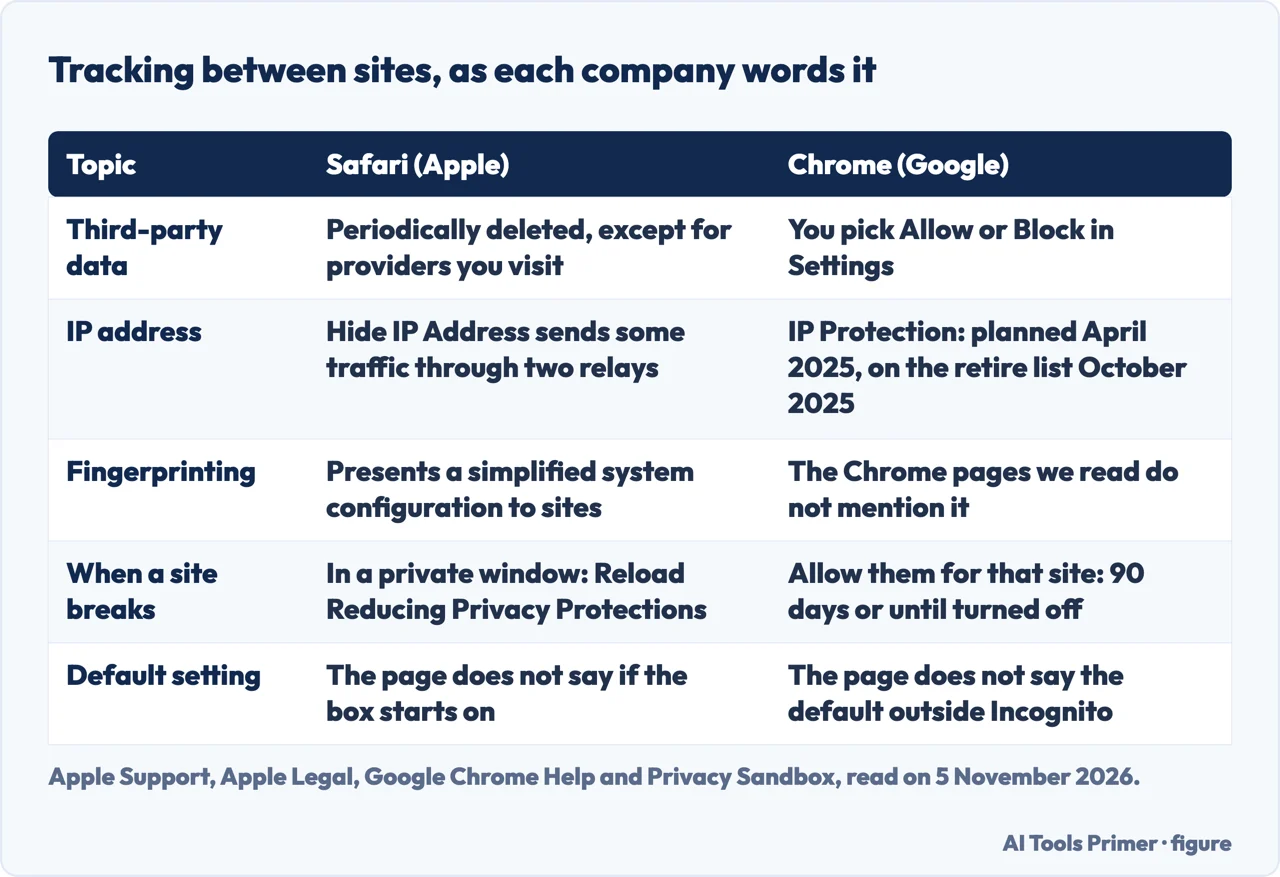
Apple’s page for Safari on a Mac puts the setting under Safari > Settings > Privacy and calls it “Prevent cross-site tracking”. Some websites use third-party content providers, it says, and this option stops them tracking you across websites. Unless you visit and interact with the provider as a first-party website, the provider’s cookies and website data are deleted. The page for the Privacy settings words it as periodically deleting tracking data from third-party content providers, except those you visit. Apple Legal’s Safari & Privacy page, dated 30 October 2026, says the same with the option turned on. The Mac page does not say whether the box is selected when Safari is new.
The same Apple page adds two things. Social media sites often put Share, Like or Comment buttons on other websites, and Apple says those buttons can be used to track your web browsing even if you never use them; Safari blocks that tracking and asks your permission if you still want to use the buttons. And a note on fingerprinting: each time you visit a website, Safari presents a simplified version of your system configuration, so that your Mac looks more like everyone else’s. Our guide to the browser fingerprint covers what sites read.
Apple Legal adds the machinery behind the setting. Intelligent Tracking Prevention uses on-device machine learning to stop trackers while letting websites work normally. Hide IP Address goes further by sending some traffic through two relays run by different entities: the first knows your IP address but not the website, the second knows the website but not your IP address. The Privacy settings page offers two choices, “from Trackers only” and “from Trackers and Websites”, and says the second needs iCloud Private Relay, which comes with an iCloud+ subscription. It also says iCloud+ features are not available in all countries or regions. Apple Legal says Hide IP Address can be switched off at any time. The page for the Privacy settings sends anyone who wants to block all cookies to Safari’s Advanced settings.
Google describes a different mechanism, and describes it as a choice. Chrome’s cookie page separates first-party cookies, created by the site shown in the address bar, from third-party cookies, created by the outside parties whose content the page embeds. Under Settings > Privacy and security > Third-party cookies you pick “Allow third-party cookies” or “Block third-party cookies”. If you block them, all third-party cookies are blocked unless the site is on your exceptions list. The page says third-party cookies are blocked by default in Incognito, and it does not say what the setting is when Chrome is new and you browse normally.
When a blocked site stops working, Chrome’s page describes a temporary allowance. In normal browsing it adds the site to the exceptions list for 90 days or until you turn it off; in Incognito it lasts for the session. A separate option, which Google words as allowing related sites to see your activity in the group, covers sites a company has put in one group: with third-party cookies blocked, it lets sites in the same group see your activity. The page also says features such as ad topics and site-suggested ads limit what sites and their partners can learn about you; note that the 17 October 2025 post lists Topics among the technologies to retire, and the cookie page we read does not say how that fits. Apple Legal describes its own ad feature, Privacy Preserving Ad Measurement: Safari gives websites attribution reports with limited data, using IP address protection, no data storage and no cookies, delayed randomly between 24 and 48 hours, and it can be turned off in Advanced settings.
Read together, the two sets of pages describe two different things. Apple describes data being deleted on a schedule, with exceptions for providers you visit. Google describes cookies being allowed or blocked, with exceptions you add. The pages we read do not measure how well either approach works, and they do not compare it with the other browser.
Private windows and Incognito, side by side
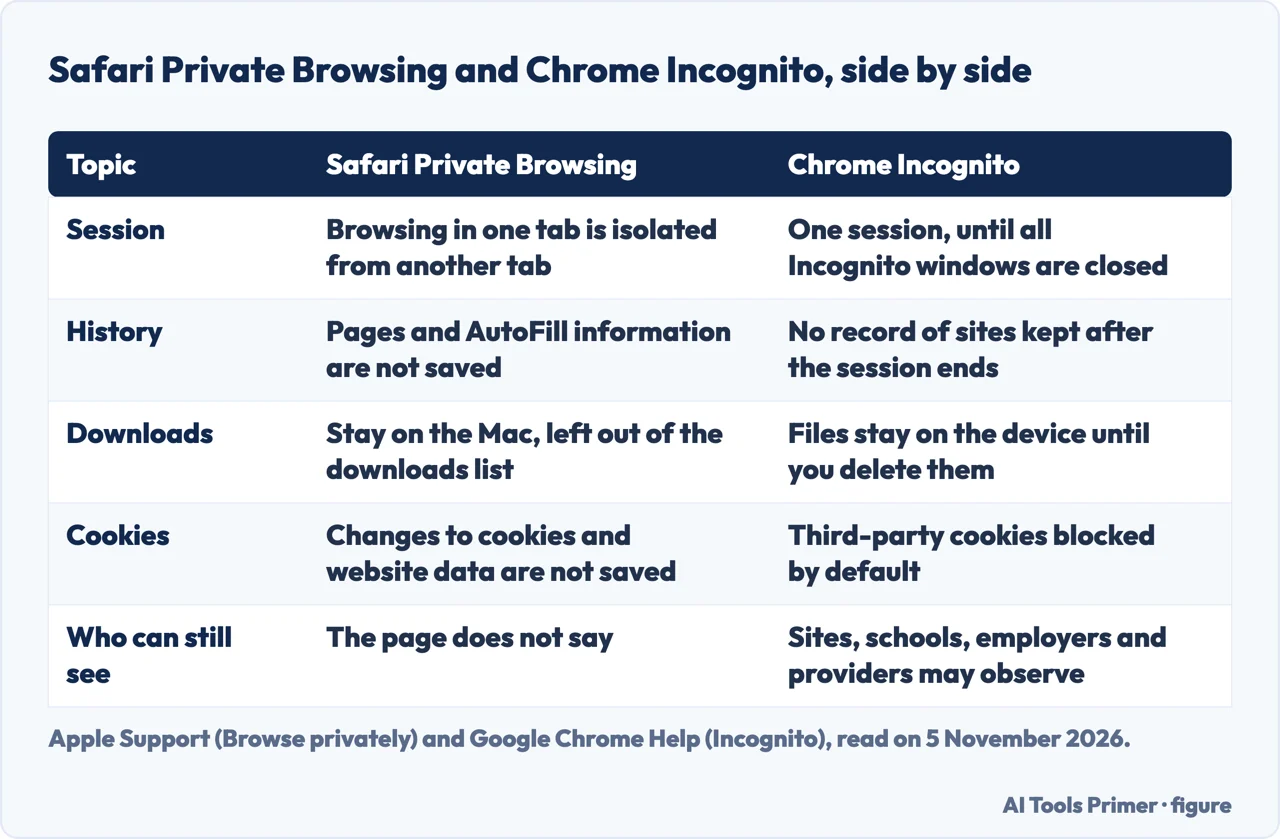
Apple’s page on browsing privately in Safari on a Mac starts a private window from File > New Private Window; the Smart Search field turns dark with white text. The page lists what Private Browsing does:
- Browsing started in one tab is isolated from browsing started in another, so the websites you visit cannot track your browsing across multiple sessions.
- Webpages you visit and your AutoFill information are not saved, and open private pages are not stored in iCloud or shown on your other Apple devices.
- Recent searches stay out of the Smart Search results, and downloads stay on the Mac but out of the downloads list.
- Handoff does not pass private windows to an iPhone or another Mac, and changes to cookies and website data are not saved.
Two further lines on that page matter for a comparison. Websites cannot modify information stored on the Mac, so services normally available at a site may work differently until you use a normal window. And in Private Browsing, the advanced tracking and fingerprinting protection setting is turned on by default: it blocks connections to data collection companies that use advanced fingerprinting techniques and removes known tracking parameters from all addresses. You can switch it on for all browsing. Apple says some website features may be affected, and the remedy it gives is View > Reload Reducing Privacy Protections. Apple Legal adds a small example of what the mode changes: when you translate a page, the page’s address goes to Apple and is kept for up to five years, but only if the page was not viewed in Private Browsing.
Google’s Incognito page opens with a different kind of statement: Incognito limits what is saved to your device. A window starts a separate session, and the session ends when you close all Incognito windows. Chrome does not automatically sign you in to your Google Account or other websites, and after the session it keeps no site data or record of the sites you visited. It keeps the bookmarks you save and the files you download. Third-party cookies are blocked by default, and the page tells you how to allow them temporarily for one site that does not work.
Then comes a sentence the Apple page we read has no match for. Google says that while Incognito can help keep your browsing private on your device, it “doesn’t make you invisible”. Websites you visit, including Google sites, and organisations that manage your network, such as a school, an employer or an internet provider, may be able to observe your activity. Websites that use Google services also share information about their activity with Google, including for advertising. The Apple page we read says what Safari does not save; it does not say who can still see your activity. That is a difference in what each page chose to state, not a finding about either browser.
If the point is Incognito itself, our guide to taking Incognito mode off follows Google’s wording step by step, and the one on blocking incognito mode looks at it from the other side of the room.
Safe Browsing: one service, used two ways
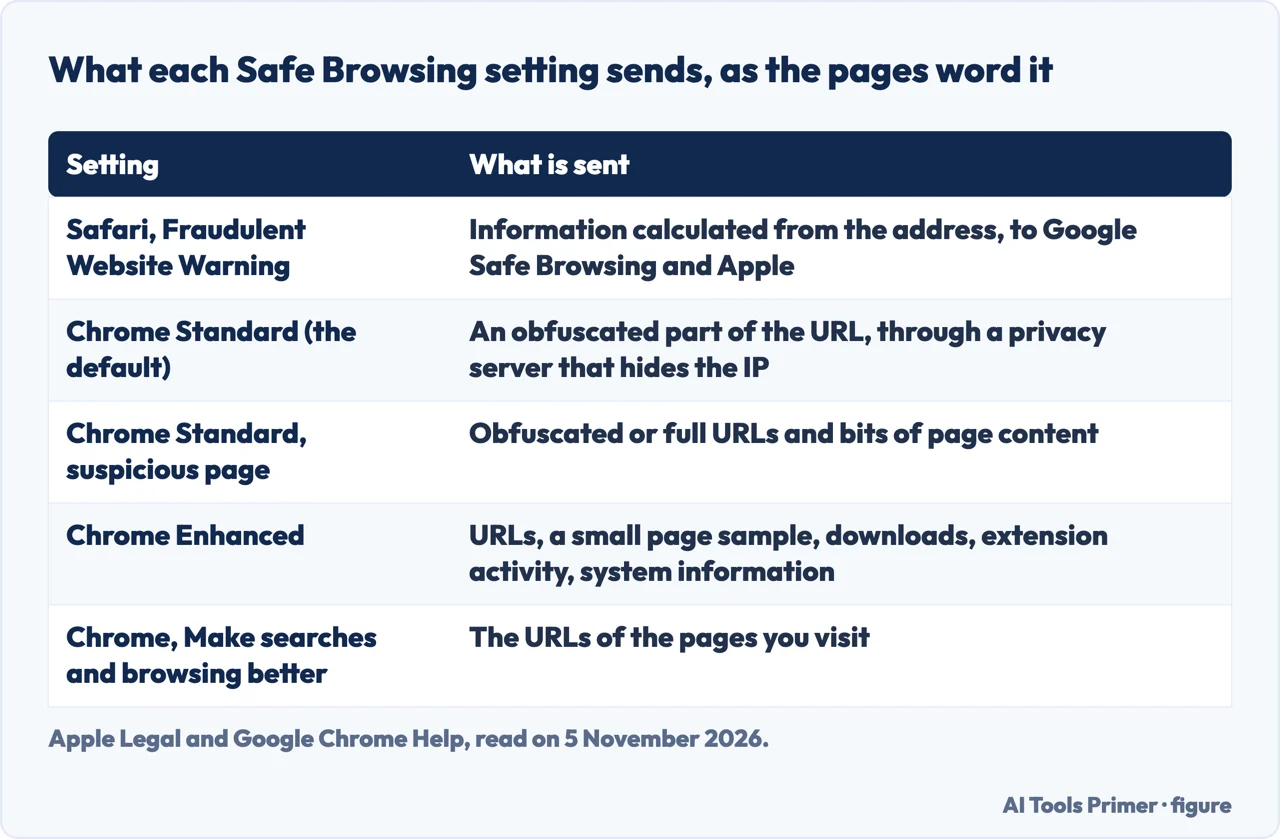
This is the one place where the two sets of pages touch. Apple Legal says that when Fraudulent Website Warning is on, Safari shows a warning if a website is a suspected phishing or malware site. Before you visit, Safari may send information calculated from the website address to Google Safe Browsing and to Apple. For users whose region is mainland China or Hong Kong, Safari may also use Tencent Safe Browsing. The actual website address is never shared with the provider, Apple says, and Google may log your IP address when it receives the information. You can turn the warning off in Safari’s settings.
Chrome runs Safe Browsing directly, and Google’s page offers three levels: Enhanced protection, Standard protection, which is on by default, and No protection, which it marks as not recommended. After a warning you can still choose to visit the site or download the file. The setting is under Settings > Privacy and security > Security.
What each level sends is where the Google pages go into detail. With Standard protection, Chrome keeps a list of unsafe sites and a list of safe ones on the device. If a URL is not on the safe list, Chrome sends “an obfuscated portion of the URL” to Google through a privacy server that hides your IP address, so neither Google nor the company operating the server sees both the URL and your IP address. Full URLs and bits of page content go to Google only when behaviour looks suspicious; the example the page gives is reusing a saved password on an uncommon site. Enhanced protection sends more, in real time: the URLs you visit, a small sample of page content, downloads, extension activity and system information. In return it warns about new risky sites, lets you send suspicious files for scanning, warns about extensions the Chrome Web Store does not trust, and warns about passwords exposed in a breach. If you are signed in, it extends to other Google services, and Google gives Gmail as the example.
The two Google pages do not word Standard protection identically. The page on protection levels says it sends full URLs and bits of page content only if a site does something suspicious. The page on how Safe Browsing keeps browsing data private adds that in that case Chrome may send obfuscated or full URLs. It also says that when the privacy server request fails, or when you browse in Incognito, Chrome checks the site against the list kept on the device, and that some security features are disabled in Incognito to avoid revealing additional data to Google.
A last setting sits outside Safe Browsing. Under You and Google > Google services, “Make searches and browsing better” sends the URLs of the pages you visit when it is switched on, to improve browsing and security. Apple has a different example of address sharing on the same Legal page: Highlights, which may send information calculated from the address to Apple, and webpage translation, which sends the address to Apple unless the page was viewed in Private Browsing.
What changed in Chrome’s plans
Two Privacy Sandbox posts, both by Google’s vice president for the project, change how the cookie page reads. On 22 April 2025 Google said it had decided to maintain its current approach to offering users third-party cookie choice in Chrome and would not roll out a new standalone prompt. Users could keep choosing in Chrome’s Privacy and security settings. The post also said Incognito already blocks third-party cookies by default, and that Google planned to launch IP Protection in the third quarter of 2025.
On 17 October 2025 the second post said that, after weighing feedback and low adoption, Google had decided to retire a list of Privacy Sandbox technologies: Attribution Reporting, IP Protection, On-Device Personalization, Private Aggregation, Protected Audience, Protected App Signals, Related Website Sets, SelectURL, SDK Runtime and Topics. It said it would keep supporting CHIPS and FedCM, maintain Private State Tokens, and keep working on an interoperable attribution standard. A banner on both pages, as we read them on 5 November 2026, says some Privacy Sandbox technologies are being phased out.
The two posts differ on one item. The April post names IP Protection as something coming to Incognito; the October post lists it among the technologies to retire. We also noticed that Chrome’s cookie page, read on the same day, still describes groups of related sites that companies define, while the October post lists Related Website Sets among those to retire. Neither page says that the two are the same feature, and the pages we read do not say whether that setting will change.
For this comparison the practical point is the date. A statement about Chrome’s tracking protections is only as current as the page it comes from, which is why each row on this page carries the date it was read.
What the pages do not say, and how to read them
The pages we read do not say which browser is more private, and they give no independent measurements. Both Apple and Google describe their own browser in their own words, and what they write is about settings, not about which browser is stronger.
Several defaults are also missing. The Apple page for the Mac does not say whether Prevent cross-site tracking is on from the start, and it says advanced tracking and fingerprinting protection is on by default in Private Browsing, not whether it is on elsewhere. Google’s cookie page does not give the starting value for third-party cookies in normal browsing, and it does not name Tracking Protection, so we have not written about it.
The pages also cover different devices. The three Apple Support pages we read are for Safari on the Mac, the Apple Legal page also names the iPhone and iPad, and the Chrome Help pages we read are for desktop. The mobile versions of either browser may differ. We also set aside an older Apple white paper on Safari (November 2019) without using it.
What we did not do: we did not install or test either browser, we did not read independent measurements or reviews of either browser. The table at the top of the page is the short version; the rows above it give the wording and the dates.
Where to start
Four ways in.
- “What does each one do about trackers?”
- Tracking between sites, in two vocabularies — tracking
- “Is a private window enough?”
- Private windows and Incognito, side by side — private
- “Who sees the sites I visit?”
- Safe Browsing, one service used two ways — safe
- “Has anything changed in Chrome?”
- What changed in Chrome’s plans — plans
Other browsers
Brave, Firefox and Mullvad Browser: what each one blocks and sends.
Private windows and what sites read
Incognito, fingerprints and blocking private mode.
Questions people also ask
What is the safest browser to use for privacy?
The pages we read do not rank browsers. Apple and Google each describe their own settings and do not say which browser is more private. This page sets out what they say about third-party tracking, private windows and Safe Browsing, read on 5 November 2026.
Does Safari private browsing actually private?
Apple says Private Browsing does not save the pages you visit or your AutoFill information, keeps open tabs out of iCloud, and isolates browsing in one tab from another, and turns on advanced tracking and fingerprinting protection by default. The Apple page we read does not say who can still see your activity.
What are the disadvantages of using Safari?
The Apple pages we read do not list disadvantages. They do note that sites may work differently in Private Browsing, that advanced tracking protection can affect some site features, and that Hide IP Address for websites needs an iCloud+ subscription.
Why is Apple saying not to use Chrome?
The Apple pages we read do not say that, and they do not name Chrome. The one overlap runs the other way: Apple says Safari may send information calculated from a website address to Google Safe Browsing and to Apple.
Not covered here. We installed and tested neither browser. The statements come from four Apple pages and six Google pages, all read on 5 November 2026.
The search volume and difficulty behind this page come from an Ubersuggest reading of 5 November 2026 (United States), which gives search volume and its own SEO difficulty score, not Semrush’s.
Sources
- Apple Support — Prevent cross-site tracking in Safari on Mac — support.apple.com, read 5 November 2026.
- Apple Support — Change Privacy settings in Safari on Mac — support.apple.com, read 5 November 2026.
- Apple Support — Browse privately in Safari on Mac — support.apple.com, read 5 November 2026.
- Apple Legal — Safari & Privacy — www.apple.com, read 5 November 2026.
- Google Chrome Help — Browse in Incognito mode — support.google.com, read 5 November 2026.
- Google Chrome Help — Delete, allow, and manage cookies in Chrome — support.google.com, read 5 November 2026.
- Google Chrome Help — Choose your Safe Browsing protection level in Chrome — support.google.com, read 5 November 2026.
- Google Chrome Help — How Chrome Safe Browsing keeps your browsing data private — support.google.com, read 5 November 2026.
- Privacy Sandbox — Next steps for Privacy Sandbox and tracking protections in Chrome (22 April 2025) — privacysandbox.google.com, read 5 November 2026.
- Privacy Sandbox — Update on Plans for Privacy Sandbox Technologies (17 October 2025) — privacysandbox.google.com, read 5 November 2026.
Written by Alberto Gulotta
Founder and editor of AI Tools Primer, writing from Palermo, Italy. Thirty-five years of taking computers apart, starting with a Commodore 64 — the long version is on the about page.
Something wrong on this page? Write to aitoolsprimer@gmail.com and it gets fixed.
Written on 5 November 2026.
Independence and limits
No affiliate links and no paid placements anywhere on this site. Nobody pays to appear here, and no company has seen this page before you did.
This is general information, not professional advice. Where a page touches money, health, safety or the law, it names its source and the date it was read — and your situation may still differ. See the privacy page and the cookie policy.