
Anonymity · guide
What is a browser fingerprint, and who uses it?
By Alberto Gulotta · Updated · 17 min read
What is a browser fingerprint? It is an identifier built from the settings and details a browser shows to websites, so a site can recognise it without cookies. Mozilla and EFF describe it as tracking; Stytch, SEON and Fingerprint describe it as fraud protection. Here is what each page says it reads, and what reduces it.
| Question | Answer | Where it comes from |
|---|---|---|
| What is it? | An identifier built from the configuration and settings a browser makes visible to websites | EFF, Mozilla |
| Do cookies matter to it? | EFF says deleting cookies does not help, because the browser’s configuration is what gets analysed | EFF Cover Your Tracks |
| Who uses it? | Fraud and bot systems on one side, advertisers and third-party trackers on the other | Stytch, SEON, EFF |
| Can I see mine? | EFF’s Cover Your Tracks gives a uniqueness score against recent visitors | EFF Cover Your Tracks |
| What reduces it? | Tor Browser makes browsers look alike; Firefox blocks listed fingerprinters and limits what it exposes | EFF, Mozilla |
What a browser fingerprint is
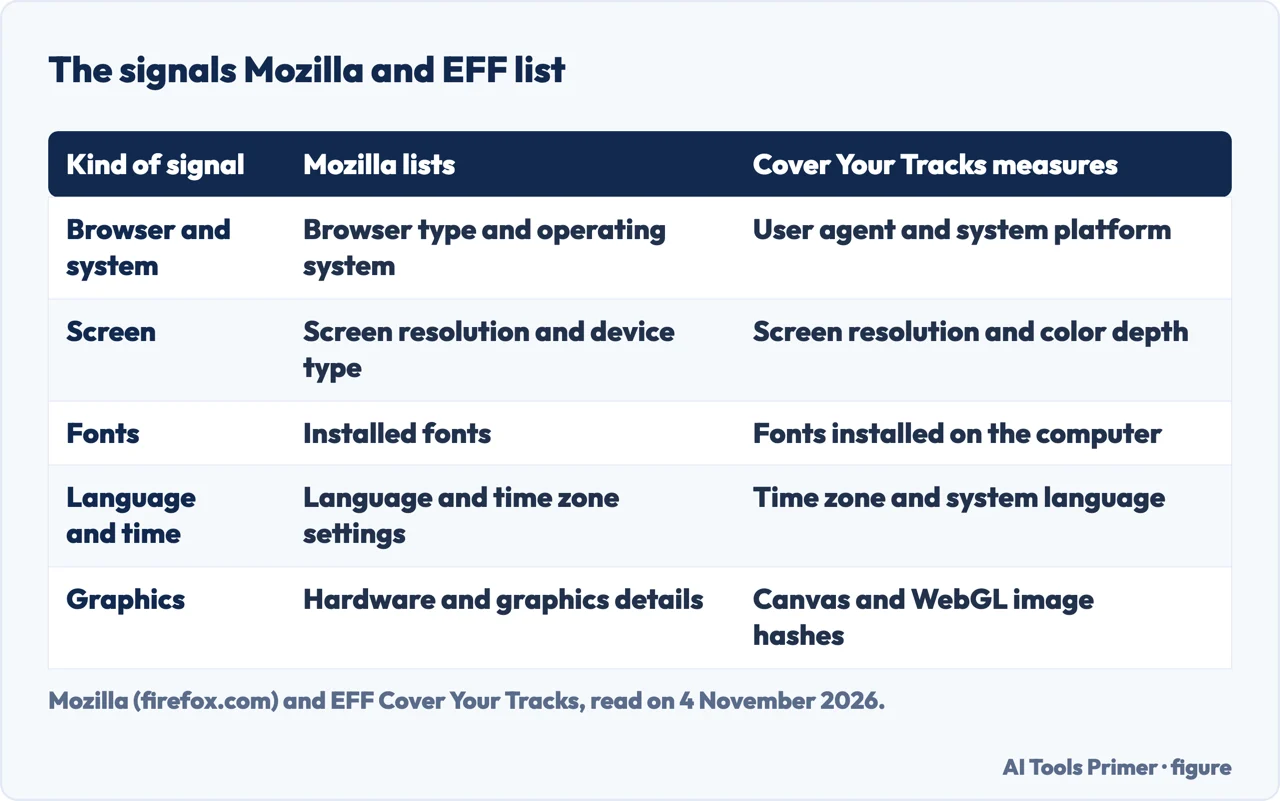
Mozilla’s page defines browser fingerprinting as a hidden way for websites and third parties to identify a browser from a mix of device details, settings and system characteristics. EFF’s Cover Your Tracks describes it as a method of tracking browsers by the configuration and settings information they make visible to websites, in place of IP addresses and unique cookies. Mozilla’s support page adds that when everything a browser exposes is combined, the unique combination can act like a fingerprint and make a person identifiable across the web without cookies.
The two lists of signals overlap without matching. Mozilla names the browser type and operating system, screen resolution and device type, installed fonts, language and time zone, hardware and graphics details, and the user agent, IP address and the way the browser responds to certain scripts or APIs. Cover Your Tracks says it logs the user agent string, the HTTP Accept headers, screen resolution and color depth, time zone, extensions and plugins with their versions, fonts, whether JavaScript runs, which cookies are accepted, a hash of the canvas image, a hash of the WebGL image, the Do Not Track header, the platform, the system language and touchscreen support. Its list still mentions Flash and Java, so we do not treat that part as current.
The security vendors describe the mechanics. Stytch says JavaScript on a website pulls three categories of information, browser usage, device hardware and the history of third-party cookies, and that these are hashed to become a fingerprint and stored on the server. SEON says a small JavaScript snippet collects signals that are already available in normal browsing and combines them into a hash that can be compared with earlier sessions, built from dozens or even hundreds of data points. Fingerprint says a useful fingerprint needs signals that are high in entropy and persistent, weighted by how unique and how durable each one is. It also says its own product gathers more than 100 signals, which is a statement about its product and not about fingerprinting in general.
How a site reads it
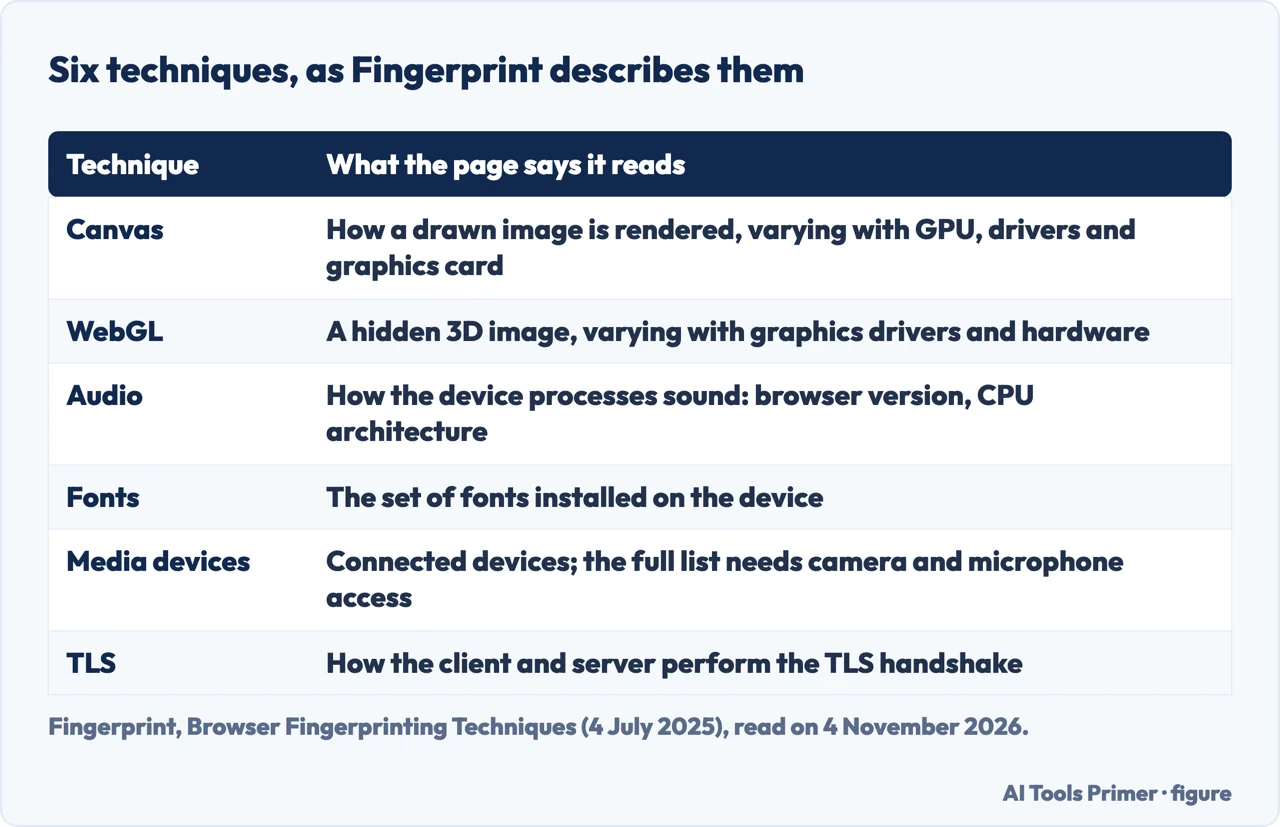
Fingerprint’s page lists six techniques. In canvas fingerprinting a script draws an image, often with text laid over it, captures how the browser rendered it and computes a hash; Fingerprint says devices with different GPUs, drivers or graphics cards render it slightly differently. NordLayer describes the same drawing and the same hash; Avast says only that the way the browser renders the image or text reveals details such as the graphics card and drivers. WebGL works on a hidden three-dimensional image, and SEON says different GPUs display it with different algorithms, so the kind of graphics card can be estimated. Audio fingerprinting reads how a device processes sound: Fingerprint says the browser vendor and version and the CPU architecture influence the result, and SEON says the script uses the AudioContext API and that no audio is recorded, collected or played, so no microphone access is needed.
The remaining three are simpler to state. Font fingerprinting looks at the set of fonts installed on the device. Media device fingerprinting lists connected devices such as cameras and headphones, and both Fingerprint and NordLayer say it is less common because the visitor has to grant microphone and camera access for a complete list. TLS fingerprinting looks at how the client and the server carry out the handshake that sets up an encrypted connection. Mozilla’s page names canvas, WebGL and audio fingerprinting too, and says that some of these techniques depend on subtle differences in how browsers render images or process content.
Why clearing cookies does not reset it
Stytch compares the two directly. It says cookies must be announced to the visitor under regulations while a fingerprint may run without notice, and that cookies sit in the browser, where the visitor can block or clear them, while a fingerprint is stored on the server and the visitor cannot access or delete it. Avast, in a page dated 22 October 2020, says the same about deletion and adds that the European Union regulates cookies. EFF’s Surveillance Self-Defense guide gives the reason: to work for a tracker a fingerprint has to be persistent, so visits can be linked, and unique, so one person can be told from another. It says a fingerprint cannot be removed because it stores nothing on the visitor’s machine, and that in its 2010 study, the project that became Cover Your Tracks, most browsers met both criteria.
Mozilla’s firefox.com page says fingerprinting can track a person for months, even when browser storage is cleared or private browsing is used; that is a browser maker’s claim, not a measurement. How reliable it is differs by page. Stytch says a developer can have a high degree of confidence in a fingerprint but that it may not always be unique, depending on hardware and software. SEON says the device hash is less unique, because anyone with the same phone or laptop and the same browser version produces the same hash. Avast gives a range of 90 to 99 percent for how accurately users are identified, and we did not read a study behind that range. We therefore do not give one accuracy figure.
Who uses it, and for what
On the protection side, Stytch lists bots, fraud and account takeover, and says a returning valid user can be recognised so that fewer authentication steps are asked of them. NordLayer says fraud tools look for unusual window resolutions, older browser versions and virtual machines, and that browser fingerprinting is not a substitute for other authentication systems and should be used with multi-factor authentication. SEON says no single signal proves fraud and that fingerprints change with browser updates, new devices and privacy tools, so they should support risk decisions and not be the only reason to block a visitor. Avast adds botnets and bank fraud as legitimate uses.
On the tracking side, EFF’s guide says fingerprinting is most often carried out by a third party that is loaded on many sites or apps, and that the information is used to target ads or sold to data brokers, though it may also serve fraud and bot detection. Stytch lists marketing and targeted advertising. Avast, which sells anti-tracking software, says website owners and ad networks share fingerprinting to track people across sites and that profiles are sold to data brokers. Fingerprint says some applications, not its own, build detailed profiles of individuals across sites, and that this raises ethical and regulatory concerns.
The tone follows the seller. Stytch, NordLayer, SEON and Fingerprint sell fraud or security products and present the technique as protection; Mozilla, EFF and Avast present it as tracking. The pages also meet in an awkward place. Stytch, SEON and NordLayer each name anti-fingerprinting plugins or unusual setups among the signals that raise a visitor’s risk score, so a defence can itself be read as a signal.
Legality is where the pages split. Stytch says fingerprinting is legal and, like cookies, regulated by GDPR and CCPA. Fingerprint says those laws allow it for security as a legitimate interest, with different requirements for personalisation and tracking. Avast, in 2020, said it was legal in most areas and that the ePrivacy Regulation, which it says is supposed to address fingerprinting, had not yet come into effect; we do not report the position in 2026. Mozilla says laws vary by region and by use. We do not settle the question.
How to look at your own fingerprint
EFF’s Cover Your Tracks is a tool that shows how unique and identifiable a browser makes its owner, and a research project on trackers. It began in 2010 as Panopticlick, gained tracker-blocker testing in 2015 and was relaunched under its present name in 2020. A test produces a report on tracker protections and a uniqueness score compared with visitors EFF has seen recently, and EFF says it uses anonymous results to build the scores of later visitors.
The tracker half of the test simulates three kinds of tracker: a visible ad, a hidden tracking beacon and a domain that has adopted the Do Not Track policy. If the ad or beacon is blocked, the test passes. If they load but their cookies are blocked, EFF reports partial protection, because the site does not get an easy unique identifier but tracking by IP address and other means stays possible. Mozilla’s page also points to Cover Your Tracks, and to web.dev and W3C guides that we did not read.
The other tools come from vendors’ pages. Avast points to AmIUnique, a research project, and its author says the result was a fingerprint unique in that dataset, with more than 75 attributes listed; that is one person’s result in 2020 and not a general finding. Fingerprint offers its own browser fingerprint test and shows an AmIUnique example in which one visitor could be narrowed to a pool of under 0.01 percent of visitors. We ran none of these tests.
What reduces it, and what makes it worse
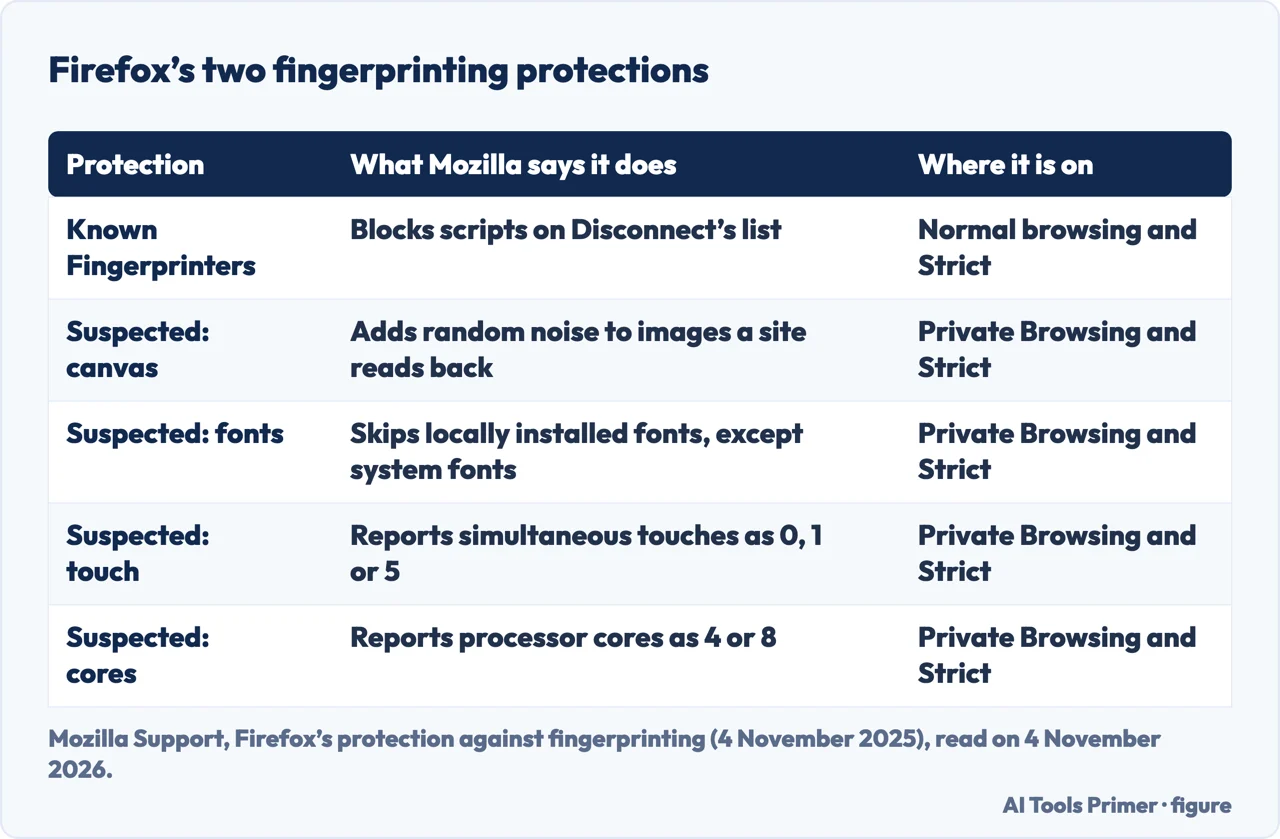
The most specific page on Firefox is Mozilla’s support article, updated on 4 November 2025. It describes two protections. Known Fingerprinters blocks scripts on Disconnect’s fingerprinting list; the article says this does not cover companies that are not on the list and that Mozilla sometimes makes exceptions so sites keep working. For fingerprinting it cannot block, Suspected Fingerprinters has Firefox limit what it exposes: random data is added to canvas images when a site reads them back, locally installed fonts outside the operating system’s standard set are not used, simultaneous touches are reported as 0, 1 or 5, the available screen resolution is reduced and processor cores are reported as 4 or 8.
When they apply is where the two Mozilla pages differ in emphasis. firefox.com presents the protection as built in and describes blocking known fingerprinters and applying broader protections to suspected ones. The support article says Known Fingerprinters is on in normal browsing and with Strict, that both are on in Private Browsing and with Strict, and that Custom lets the user choose. The article lists side effects: a custom font may not be used, emoji detection can fail, some video effects and extended glyphs may misbehave, multi-device touch input may be handled wrongly, a window may be sized unexpectedly and heavy calculations may run slower. The shield icon next to the address bar turns protection off for one site.
The two strategies EFF describes
EFF’s guide says a counter-fingerprinting tool can follow one of two strategies: remove one or both of the two criteria that make fingerprinting work, or keep a list of trackers and block them. Randomising results such as the canvas fingerprint can break persistence, but a tracker may notice that a randomisation tool is in use, which can itself become a characteristic. Making every instance of a browser look the same is the method of Tor Browser. Blocking known trackers, as EFF’s Privacy Badger does, removes most third-party fingerprinters, but trackers not yet identified, and fingerprinting done directly by the site being visited, will most commonly still be permitted.
The guide also says customising settings alone rarely works. Its example is changing the user agent to the most common one: a person on Safari for iOS who presents the Chrome for Windows user agent, and changes nothing else, would appear completely unique. To blend in, it says, a person has to join a pool of users with the same fingerprint, and the safest choice is Tor Browser, Brave or Firefox. The Cover Your Tracks page agrees that Tor Browser is the most realistic protection, adds Privacy Badger or Disconnect for daily use and NoScript for Firefox, and says the defences available in existing browsers are not ideal. Our pages on Tor Browser, Brave and Firefox settings cover the browsers EFF names; our page on Mullvad Browser covers a browser that the pages we read do not mention.
The vendors disagree on details. Fingerprint advises privacy-focused browsers such as Tor and Brave, turning off JavaScript where possible although that may hinder the site, limiting plugins and fonts and avoiding unique configurations. Stytch lists a privacy browser, default settings, a VPN, anti-tracking extensions and clearing history, and warns that anti-fingerprinting extensions typically bring CAPTCHA, a second factor or a block. On private windows, firefox.com says fingerprinting can work even in private browsing, Fingerprint says a VPN and private browsing add layers without necessarily stopping it, and Avast says private browsing, cookie clearing, ad blockers and a VPN are not enough. Our page on incognito mode covers what a private window does delete, and the one on anti-detect browsers covers the tools that fake a profile on purpose. Avast also sells its own browser and anti-tracking program, which we do not describe.
What the pages do not say
The pages we read do not say how many people have a unique fingerprint today. EFF refers to its 2010 study without a figure in the text we read, and Avast gives a range with no study that we opened. They do not say how an ordinary visitor can tell a tracking script from a site’s own, and Avast says only that fingerprinting scripts look like any other script. The EFF pages we read do not give steps for reading the results of the test or a time it takes. They do not compare how common fingerprinting is with cookies; Mozilla’s page says its use has steadily increased over the past decade, which is one browser maker’s claim. They give no list of countries where it is allowed.
We also did not read web.dev, the W3C guidance, AmIUnique or EFF’s 2010 paper, we ran no fingerprint test, and we saw no image on these pages. The Avast text is from 2020 and the Cover Your Tracks list is older than the rest. For where this fits among privacy browsers, proxies and DNS, start from our private browsers entrance.
Where to start
Four ways in.
- “What does a site actually read?”
- What a browser fingerprint is — what
- “Does clearing cookies reset it?”
- Why clearing cookies does not reset it — cookies
- “Can I see mine?”
- How to look at your own fingerprint — look
- “What actually reduces it?”
- What reduces it, and what makes it worse — reduce
Browsers that reduce it
Three browsers, each read on its own page.
What else identifies you
A private window, a faked profile and an address: three more ways a browser is told apart.
Questions people also ask
How do I find my browser fingerprint?
EFF’s Cover Your Tracks compares a browser with recent visitors and gives a uniqueness score, along with a report on tracker protections. Fingerprint offers its own test, and Avast points to AmIUnique. We ran none of them, and the EFF pages we read do not give steps for reading the results.
How to avoid browser fingerprinting?
EFF calls Tor Browser the most realistic protection, since it makes browsers look alike. Mozilla says Firefox blocks known fingerprinters and limits what suspected ones can read, and EFF names Privacy Badger or Disconnect, and NoScript for Firefox, for daily use. EFF also says the defences in existing browsers are not ideal.
How do I change my browser fingerprint?
EFF’s guide warns that changing settings by hand, such as the user agent, rarely works and can make a browser more unique, and recommends joining a pool of similar browsers with Tor Browser, Brave or Firefox. Fingerprint advises limiting plugins and fonts and avoiding unique configurations.
How can I bypass browser fingerprinting?
The pages we read describe reducing it, not getting around it: Firefox adds noise to canvas reads, Tor Browser aims for identical browsers, and Fingerprint suggests turning off JavaScript, which may hinder the site. Stytch and SEON warn that anti-fingerprinting tools can themselves be read as a risk signal.
Not covered here. We tested nothing in a browser and ran no fingerprint test. The statements come from Mozilla’s firefox.com and support pages, two EFF pages, and the pages of Stytch, Fingerprint, SEON, NordLayer and Avast, all read on 4 November 2026.
The search volume and difficulty behind this page come from a Semrush reading of 4 November 2026, the same day as the pages.
Sources
- Mozilla — Browser Fingerprinting Protection (Firefox) — www.firefox.com, read 4 November 2026.
- Mozilla Support — Firefox’s protection against fingerprinting (updated 4 November 2025) — support.mozilla.org, read 4 November 2026.
- EFF — Cover Your Tracks: About — coveryourtracks.eff.org, read 4 November 2026.
- EFF Surveillance Self-Defense — What Is Fingerprinting? (reviewed 27 August 2024) — ssd.eff.org, read 4 November 2026.
- Stytch — What is browser fingerprinting? — stytch.com, read 4 November 2026.
- Fingerprint — Browser Fingerprinting Techniques: 6 Top Methods (4 July 2025) — fingerprint.com, read 4 November 2026.
- SEON — What is Browser Fingerprinting & How Does it Work? (updated 23 June 2026) — seon.io, read 4 November 2026.
- NordLayer — What Is Browser Fingerprinting and How Does It Work? — nordlayer.com, read 4 November 2026.
- Avast — What Is Browser Fingerprinting and How Can You Prevent It? (22 October 2020) — www.avast.com, read 4 November 2026.
Written by Alberto Gulotta
Founder and editor of AI Tools Primer, writing from Palermo, Italy. Thirty-five years of taking computers apart, starting with a Commodore 64 — the long version is on the about page.
Something wrong on this page? Write to aitoolsprimer@gmail.com and it gets fixed.
Written on 4 November 2026.
Independence and limits
No affiliate links and no paid placements anywhere on this site. Nobody pays to appear here, and no company has seen this page before you did.
This is general information, not professional advice. Where a page touches money, health, safety or the law, it names its source and the date it was read — and your situation may still differ. See the privacy page and the cookie policy.