
Anonymity · guide
What can someone do with your IP address? Where pages split
By Alberto Gulotta · Updated · 16 min read
What can someone do with your IP address? ipconfig.io and Bitdefender agree on a rough location, the internet provider, and limiting or banning your connection. They differ on port scans, on what the provider sees and on whether a home address changes. We tested nothing; this page sets the statements side by side.
| Question | Answer | Where it comes from |
|---|---|---|
| Does it show where I am? | An approximate area: about 99.8% right for the country and 66% for a US city within 50 km | MaxMind, ipconfig.io |
| Does it give my name or street address? | MaxMind says the data is never precise enough for that; ipconfig.io says only the provider can tie an IP to a subscriber | MaxMind, ipconfig.io |
| Can it be used to hack a device? | Norton says a port scan can find openings; Bitdefender and ipconfig.io say the IP alone is not enough | Norton, Bitdefender, ipconfig.io |
| What is the plainest risk? | A flood of traffic that takes a connection offline, which ipconfig.io calls an outage rather than a break-in | ipconfig.io, Cloudflare |
| Can I get a new address? | Security.org says unplug the router for five minutes; Bitdefender says restart it or contact the provider | Security.org, Bitdefender |
What an IP address shows to whoever sees it
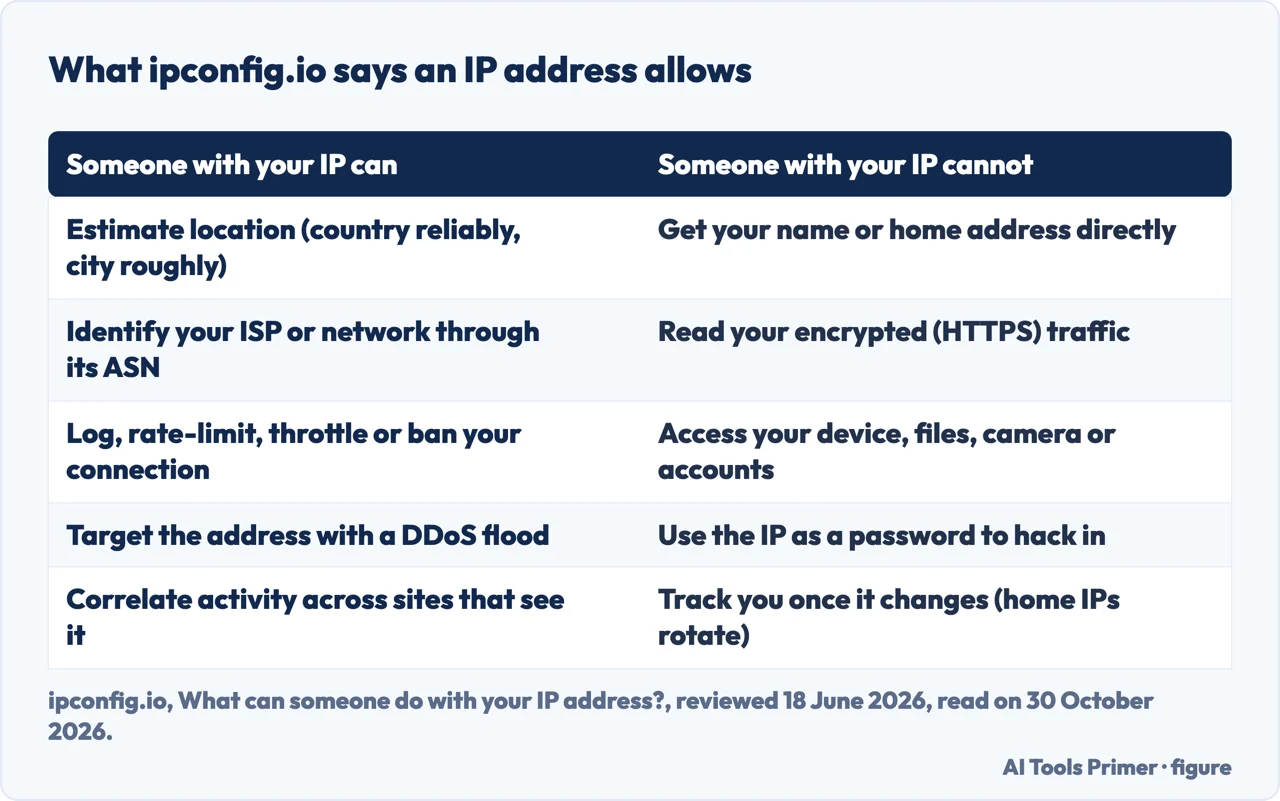
The guide from ipconfig.io, reviewed on 18 June 2026 by the team that maintains it, has, near the top, a table of two columns. In the first, someone with your IP can estimate your location (country reliably, city roughly), identify your internet provider or network through its ASN, log, rate-limit, throttle or ban your connection, target the address with a denial-of-service flood, link your activity across sites that see the same address, and serve you content, prices or blocks by place. In the second, they cannot get your name or home address directly, read your encrypted traffic, reach your device, files, camera or accounts, or use the IP as a password to get in. The guide puts the truth between two extremes: an IP is more revealing than a bare number and far less dangerous than the scare headlines claim.
It follows the table with a command, curl ipconfig.io/json, and calls the network operator the most useful field the lookup returns. The asn_org field names the organization that owns the address: a home provider, a mobile carrier or a hosting provider. That, with the approximate location, is in the guide’s words the bulk of what a site learns from the connection alone.
Bitdefender, which sells a VPN and published its page on 27 March 2026, draws the same line in other words. Its page says an address does not reveal an exact home address or a name, and that it can show an approximate location (country, city or region), the provider, the network, and whether you are on home, work or public Wi-Fi. Its list of uses runs from tracking across websites with cookies and device data to price changes by location, regional blocks, targeted ads, traffic floods, personalised phishing, someone routing illicit activity through your address, and bans from games or platforms. The same page says an address alone is not highly valuable but can be part of datasets that are sold when it is combined with other personal data.
How precise the location is
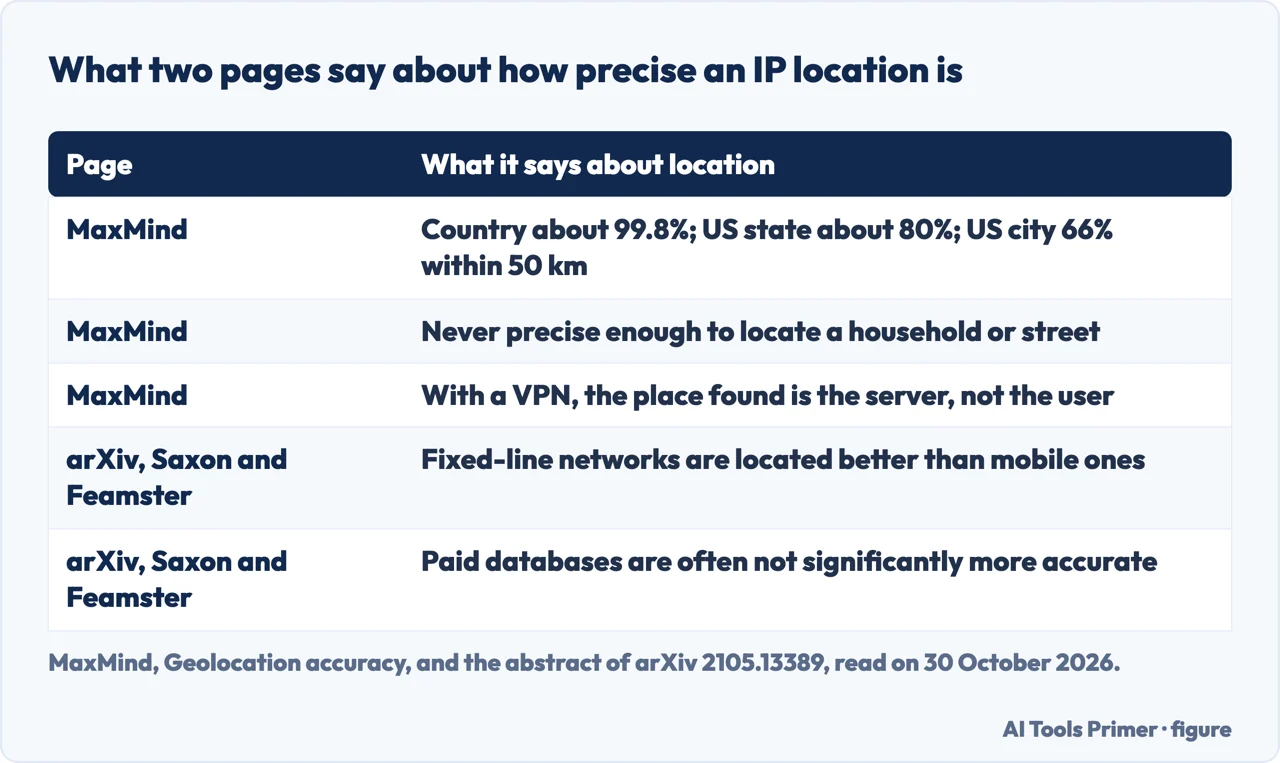
Two pages give numbers. MaxMind, a maker of geolocation data, writes on its support page that it estimates its products identify the country with 99.8% accuracy. For addresses in the United States it estimates around 80% at the level of the state or region and 66% for cities, counted as within a 50 km radius of the city. ipconfig.io repeats the country and city figures and credits MaxMind, 2026. MaxMind adds that it cannot guarantee full accuracy, that accuracy varies with the country, the distance, the type of address (cellular or broadband, IPv4 or IPv6) and the practices of providers, and that its data is never precise enough to identify or locate a specific household, individual or street address.
MaxMind also lists cases where the place found is not where the person is. With a VPN or a hosted website, it may locate the server that runs them, not the user. Addresses on mobile networks may be used by phones across a large distance, and when it cannot be specific it leaves out the city and the postal code: for an address used across the state of Massachusetts, its example gives the continent, the country and the state only. Where it does give a city it adds an accuracy radius, 100 km in the example on its page. Some addresses are missing from its database altogether, which it ties often to privacy opt-out requests or to addresses not routed on the internet, and it says it cannot confirm that an address is missing because of an opt-out request.
The academic reading is the abstract of arXiv 2105.13389, by James Saxon and Nick Feamster, who compared geolocation databases with two commercial datasets of smartphone addresses located through GPS, in large US cities. They report that databases are more accurate on fixed-line than on mobile networks, that university networks are located better than consumer or business ones, and that paid databases are often not significantly more accurate than free ones. The median accuracy was better than 3 km in some contexts, yet the authors conclude that relying on these databases to understand internet access in densely populated cities is “premature”. We read the abstract only.
Not every page stays at that level. Norton, which also sells a VPN, says an address does not give away a house number or street but can expose a city or state, and that bad actors may combine it with a digital footprint to “home in on your address”. AllAboutCookies says malicious parties can combine an IP with GPS and tracking websites to pinpoint a location, “possibly even your home address”. ipconfig.io says an exact address exists in one place, the provider’s subscriber records, which a public lookup tool cannot reach and which are released in response to a lawful request such as a subpoena.
What an IP address lets someone do
Logging, limiting and banning are the plainest uses, and ipconfig.io lists them third, after location and provider. Bitdefender adds that an address-based ban can cost you access even when the activity was not directly yours, and Security.org describes a game administrator banning a player from a match, which it says may effectively blacklist the address on the entire site. Uses by place are on the same lists. Bitdefender says some websites adjust prices by location, naming flights, hotels and services, and that platforms block or limit access by region. Security.org gives YouTube TV, which shows local content only from the city where you live, and Netflix, which provides the library of the country you are in.
Cloudflare’s learning page defines a DDoS attack as a malicious attempt to disrupt the normal traffic of a server, service or network by overwhelming it with a flood of internet traffic from many compromised machines, which can include internet-of-things devices. When a botnet targets a victim, each bot sends requests to the target’s IP address. The strategies the page lists for stopping an attack are rate limiting, a web application firewall, Anycast network diffusion and blackhole routing. ipconfig.io describes the same flood as disruptive but an outage, not a break-in, and says it is mainly a concern for gamers, streamers and people who host services themselves. Bitdefender says it is more common in gaming or targeted harassment situations, and Security.org says a denial-of-service attack can keep you from reaching network resources, including websites, online accounts and email.
ipconfig.io names two more risks. If you have opened ports to the internet, such as a home server, a remote-desktop port or an IP camera, the address tells a scanner where to look, and the guide’s fix is closing or securing those services rather than hiding the address. And an address plus an approximate location can make a scam call or phishing message sound more convincing; in the guide’s words, “The IP is a prop, not the attack.” Norton describes the same route: with the address an attacker can identify your internet provider and spoof emails or calls that seem to come from a service you use.
Security.org’s list goes furthest. It says someone can route illegal activity through your address with proxy techniques and so frame you for crimes, and the page names several serious ones as examples. It says rights holders monitor peer-to-peer networks for addresses tied to downloads of protected music, television shows and films, and that once a law enforcement agency has the address it can go to the provider and demand the name and address of the account holder. It says employers monitor remote workers through IP tracking, and Norton says an employer can use the address to watch the websites visited on a company laptop or desktop. Norton and Security.org both mention selling an address on the dark web; Norton says that with enough sensitive data attached criminals could use it for fraud and identity theft.
Where the pages disagree
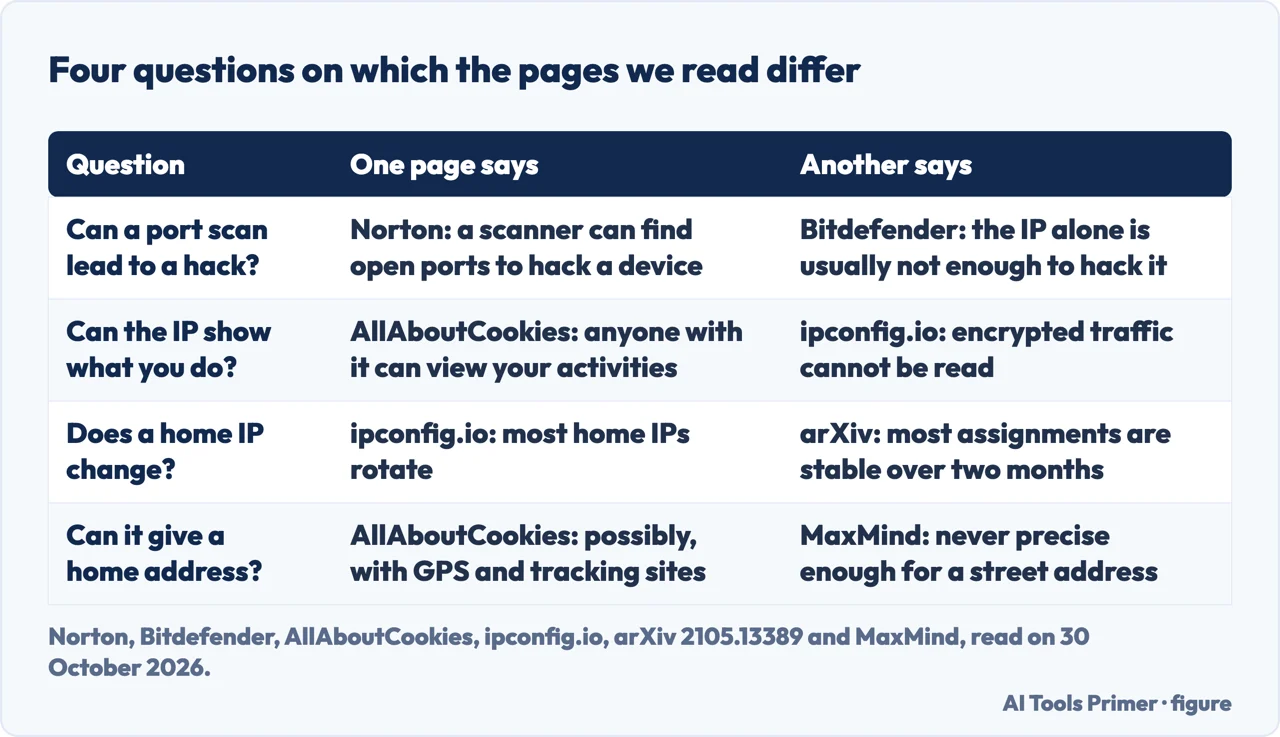
Port scans. Norton says that with an address a criminal could use a port scanner to find open ports or vulnerabilities and use them to hack a phone or computer, after which they could install malware or impersonate you. It also says the address alone does not give away card numbers, bank details or a Social Security number. Bitdefender says an address alone is usually not enough to hack a device, but that attackers may use it as a starting point to scan a network for vulnerabilities, and it points to an updated router and reliable security software. ipconfig.io answers “No, not directly” and places the risk in the services you have opened to the internet. Security.org says an address by itself does not let hackers control your computer or impersonate you online, but that someone who gets in by other means, such as malware, could use it to act in your name. The pages name the same step, and they differ on how far it gets.
Seeing what you do. AllAboutCookies says anyone with your address “can view your online activities”. ipconfig.io lists reading encrypted traffic among the things an address does not allow, and it separates two watchers: the sites you visit see the address and what can be derived from it, while your provider sees the domain of every site you connect to, “even in a private/incognito window”. Bitdefender says an address alone does not let someone see the exact websites you visit, and that your provider can see your browsing activity unless your traffic is encrypted. Bitdefender does not say how much stays visible once traffic is encrypted; ipconfig.io says the domain does.
Whether the address changes. ipconfig.io’s table lists tracking you once the address changes among the things it does not allow, and notes that most home addresses rotate. The arXiv abstract looked at fixed-line broadband and found most assignments “stable over two months”, though stability varies across providers. Both statements are in print, and the pages we read do not say which applies to a given connection. The pages also differ on getting a new address: Security.org says unplugging the router for five minutes gives you a new one, while Bitdefender says it can sometimes be done by restarting the router or contacting the provider.
Who is speaking. Norton and Bitdefender sell a VPN and each page promotes its own product. Security.org links to NordVPN. ipconfig.io has an affiliate link to Proton VPN and says so. MaxMind’s figures are estimates of its own products. Statements from sellers are used here for what their pages say, with the seller named.
How an address gets out, and what the pages suggest
Norton lists ways someone can find your address: public Wi-Fi, visiting websites (the server stores it, and the owner can see every address that has visited), a malicious ad, online gaming, online forms, file-sharing software and fake free Wi-Fi hotspots. Security.org adds email headers, since some email servers list the address, and torrenting, where it is visible in the peers list; the page names Gmail as a service that does not list it, a claim we did not check. AllAboutCookies adds phishing links, which it says expose the address when clicked, and forums, where it says moderators and admins likely have access to members’ identifying information, such as the address used to sign up or post.
On the private window, ipconfig.io says incognito mode only hides history on your own device, and AllAboutCookies says it may seem to hide the address and does not. Our page on incognito mode goes through exactly what it deletes and who can still see everything.
On what to do, ipconfig.io says that for almost everyone, keeping software patched and not exposing services does far more than concealing the address. Norton lists a VPN, privacy settings, updating the router and firewall firmware, a secure router password and care with suspicious links and websites. Bitdefender names an updated router and reliable security software. To replace the address with another, Norton, Bitdefender and Security.org describe a VPN, which shows the server’s address in its place, and Security.org adds a proxy and the Tor software, which it says has faced security challenges in the past. ipconfig.io says the requirement that matters is a verified no-logs policy, because a VPN that records your address only moves the exposure, and that after connecting you should run the lookup again and check that ip, country and asn_org have changed.
Our pages on what a VPN is used for, what a proxy is and the kill switch cover those tools, and the page on encrypted DNS covers what the resolver still sees.
What we did not use
We tested nothing: no lookup, no scan and no VPN. The statements come from eight pages, all read on 30 October 2026. For arXiv we read the abstract, not the paper. The accuracy figures are on the MaxMind and ipconfig.io pages, and the Norton, Bitdefender, Security.org and AllAboutCookies pages we read do not carry them. The pages we read do not say how often an exposed address leads to a successful attack, or how often a provider changes the address of a home connection.
Where to start
Four ways in.
- “What can someone see?”
- What an IP address shows to whoever sees it — shows
- “Can it find my house?”
- How precise the location is — place
- “What can they do with it?”
- What an IP address lets someone do — uses
- “Which pages disagree?”
- Where the pages disagree — split
Swapping the address
The tools that put another address in its place.
What else shows about you
The private window, the name lookup and the browser.
Questions people also ask
Is it safe to give out my IP address?
Bitdefender says that in most situations it is not immediately dangerous, since websites see it every time you connect, but that it can reveal an approximate location and provider and may be used for tracking, ads or network probing. ipconfig.io says patched software and no exposed services do far more for almost everyone than concealing it.
What should you do if someone has your IP address?
Bitdefender says the first step is to change it, which can sometimes be done by restarting the router or contacting the provider, and Security.org says to unplug the router for five minutes. ipconfig.io says closing or securing services you have opened to the internet matters more than hiding the address.
Should I be worried if a scammer has my address?
The pages we read answer this for an IP address. ipconfig.io says an address plus an approximate location can make a scam call or phishing message sound more convincing, and Norton says an attacker who identifies your provider can spoof emails or calls from a service you use. MaxMind says its data is never precise enough to locate a street.
How do you know if someone is accessing your IP address?
The pages we read do not describe a way to see who has looked at an address. Norton says every website you visit stores it and the owner can see each address that has visited. Security.org lists signs that an address has been hacked: odd network activity, performance issues, firewall and antivirus notifications, unauthorized logins and unexpected connections.
Not covered here. We tested nothing. The statements come from eight pages, from ipconfig.io, MaxMind, arXiv, Cloudflare, Norton, Bitdefender, Security.org and AllAboutCookies, all read on 30 October 2026.
The search volume and difficulty behind this page come from a Semrush reading of 29 August 2026, older than the 60 days the site normally allows.
Sources
- ipconfig.io — What can someone do with your IP address? — docs.ipconfig.io, read 30 October 2026.
- MaxMind — Geolocation accuracy — support.maxmind.com, read 30 October 2026.
- arXiv — GPS-Based Geolocation of Consumer IP Addresses (abstract) — arxiv.org, read 30 October 2026.
- Cloudflare — What is a DDoS attack? — www.cloudflare.com, read 30 October 2026.
- Norton — What can someone do with your IP address? — us.norton.com, read 30 October 2026.
- Bitdefender — What can someone do with your IP address? — www.bitdefender.com, read 30 October 2026.
- Security.org — What Can Someone Do With Your IP Address in 2026? — www.security.org, read 30 October 2026.
- AllAboutCookies — What Can Someone Do with Your IP Address — allaboutcookies.org, read 30 October 2026.
Written by Alberto Gulotta
Founder and editor of AI Tools Primer, writing from Palermo, Italy. Thirty-five years of taking computers apart, starting with a Commodore 64 — the long version is on the about page.
Something wrong on this page? Write to aitoolsprimer@gmail.com and it gets fixed.
Written on 30 October 2026.
Independence and limits
No affiliate links and no paid placements anywhere on this site. Nobody pays to appear here, and no company has seen this page before you did.
This is general information, not professional advice. Where a page touches money, health, safety or the law, it names its source and the date it was read — and your situation may still differ. See the privacy page and the cookie policy.