
VPN · guide
What is a VPN used for? Work, censorship, public Wi-Fi
By Alberto Gulotta · Updated · 19 min read
What is a VPN used for? It routes your connection through another network, and the pages we read name different jobs for that. NCSC and Microsoft describe reaching a private network from outside, EFF names two uses, a seller’s page lists more, and FTC and EFF set limits on what a VPN protects.
| Question | Answer | Where it comes from |
|---|---|---|
| What is the core job? | Routing your connection through another network; reaching a private network from outside is the use NCSC, Microsoft and EFF all describe | NCSC, Microsoft Azure, EFF |
| Does it help on public Wi-Fi? | FTC (2023) says connecting is usually safe because “most websites do use encryption”; EFF says a VPN is less necessary for everyone but may shield metadata | FTC, EFF |
| Does it make me anonymous? | FTC says a VPN app generally will not make you entirely anonymous and shifts trust to its provider; EFF says a VPN is not a tool for anonymity | FTC, EFF |
| Will it unblock streaming? | EFF says video streaming platforms increasingly block devices that appear to use a VPN | EFF |
| Who sees my traffic? | The provider sees it all, EFF says, though it is hidden from the ISP and the local network owner | EFF |
| When is it not worth having? | NCSC says an organisation that has fully adopted a zero-trust approach would see little benefit | NCSC |
What a VPN does, before any of the uses
The pages we read agree on the mechanism and differ on the purpose. EFF, in its Surveillance Self-Defense guide, says that when you connect to a VPN, the data you send appears to originate from the VPN itself rather than from your internet service provider. That masks your IP address, and to a website your location appears to be wherever the VPN server is. The FTC’s 2018 blog post for business people who work on the move describes the same thing from the phone’s side: data sent from the phone is first routed through servers controlled by the VPN provider, and a VPN app can make traffic appear to come from those servers. Proton VPN, which sells a VPN, describes an encrypted connection between your device and a VPN server, often called a tunnel, and says websites see the server’s address instead of yours.
What the network in the middle can see changes with it. EFF says a VPN hides your outgoing traffic from your ISP and from the owner of the local network, such as a coffee shop or hotel, but that it is all visible to the VPN provider. EFF cites a 2021 FTC report that found US ISPs share more of your browsing data with third parties than you might expect, and notes a VPN provider could sell that information just as an ISP could. Proton puts the same point as a reason to choose carefully: in many ways the provider replaces your ISP, so it can see your browsing history. The FTC says a VPN app will typically obscure the content of your traffic from your ISP or the public Wi-Fi provider, and calls the result a shift of trust from those networks to the app’s provider rather than anonymity.
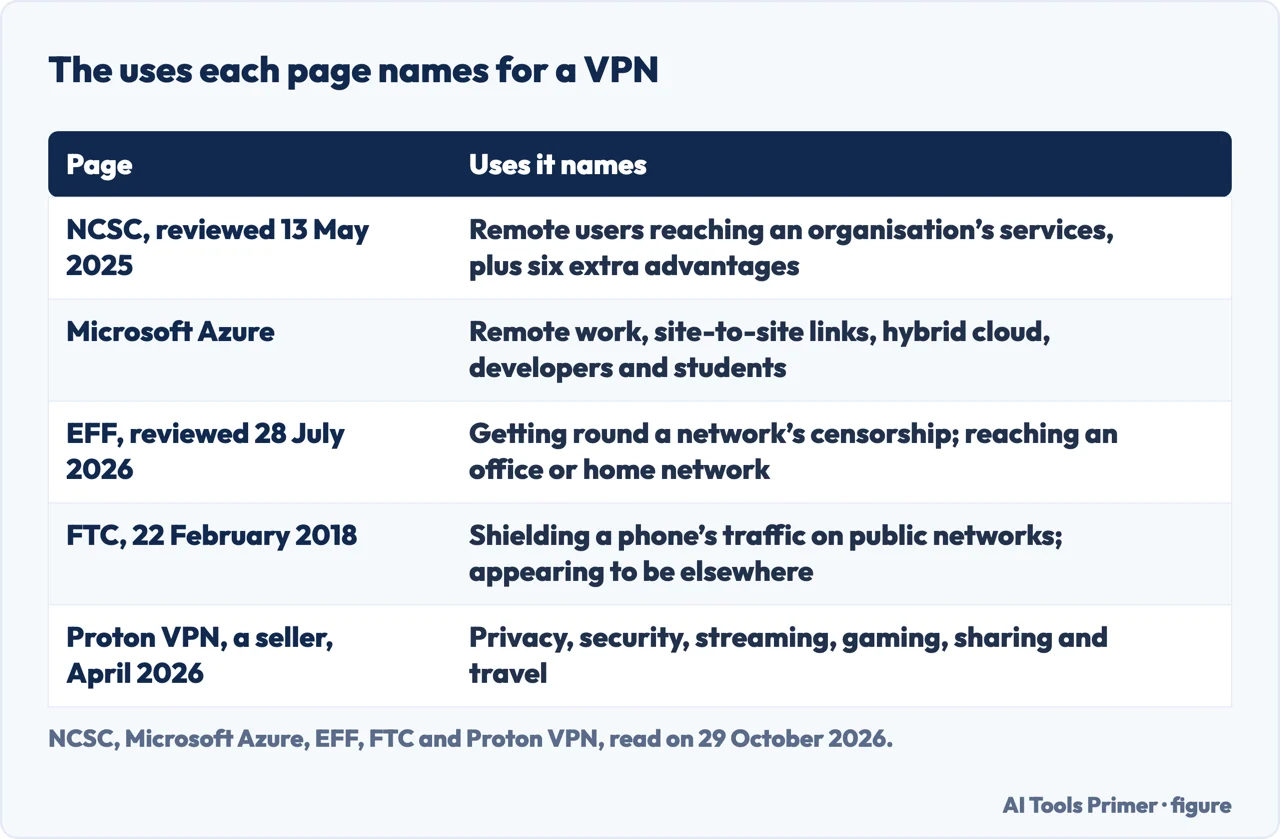
Microsoft’s explainer and NCSC describe the machinery from an organisation’s side. Microsoft says a VPN depends on three technologies, encryption, tunneling and authentication, and that users or devices are authenticated before a tunnel is established. NCSC’s definition is one sentence: VPNs are encrypted network connections that allow remote users to securely access an organisation’s services. The first figure below lines up the uses each of the five pages names.
The uses that hold up in more than one page
The use that appears on the most pages is reaching a private network from outside it. NCSC’s guidance is written for administrators who choose, deploy and configure VPNs for an organisation, and it says individuals typically use VPNs for different reasons and are not covered. The page was published on 29 June 2021 and reviewed on 13 May 2025. Its example is an organisation with offices in several locations that uses VPNs to give remote users access to corporate email and file services.
Microsoft lists five scenarios. Remote work gives employees and contractors access to internal applications, development environments and data without making those systems publicly accessible. Site-to-site connectivity joins branch offices or data centres over the internet. Hybrid and multicloud setups connect on-premises infrastructure to cloud services. Developers use VPNs to build, test and maintain cloud-based apps. And many universities and schools rely on VPNs to give students off-campus access to learning platforms, digital libraries, research databases and lab environments. The Microsoft page shows no date.
EFF’s version is shorter and covers a person at home as well as a company. It says a VPN is best suited to routing your network connection through a different network, and that in practice VPNs are useful in two circumstances. The first is getting round censorship on a network that blocks certain sites or services, such as a school connection or a location that blocks content. The second is connecting to the corporate intranet at your office while you are travelling or at home. EFF adds that a personal VPN you run on your own computer at home can connect you to your home network while you travel.
NCSC lists six further advantages, all framed for organisations:
- Letting legacy systems work remotely even when they were not designed for it, such as SMB file servers.
- A second layer of defence against misconfigured, unpatched or poorly designed internal services.
- Protecting internal servers from external, unauthenticated attackers by limiting network access to authenticated devices.
- Protecting user devices from network attacks, such as ARP spoofing, by preventing direct connections to and from the local network.
- Forcing traffic between a device and external services through internal protective monitoring tools.
- Enabling business monitoring or filtering of users’ traffic, for legal reasons, discipline and duty of care.
The pages we read do not give a share of people who use a VPN for each purpose, so the order of these uses is the order in which the pages name them, not a ranking.
Public Wi-Fi: how the advice changed
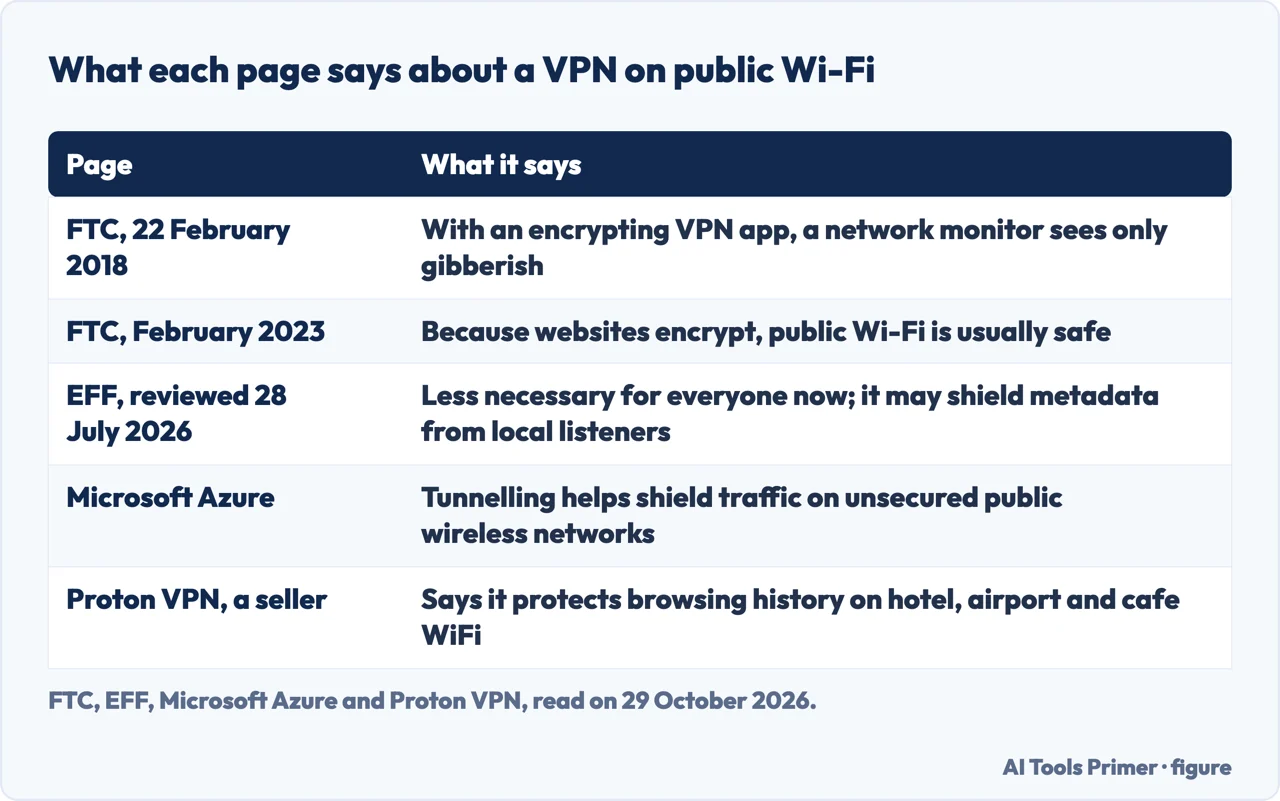
The pages we read give public Wi-Fi three different treatments, in date order. The FTC’s blog post of 22 February 2018 was written for people who work on the move. It says other people on a network that anyone can use, even without a password, can see your traffic, and that with a VPN app that encrypts the data, anyone monitoring the Wi-Fi connection sees only gibberish, even if the site you visit does not encrypt. It also warns that not all VPN apps encrypt: some use protocols that do not encrypt your traffic or encrypt only some of it.
The FTC’s consumer page of February 2023 starts from what changed. In the early days of the internet, it says, hotspots often were not secure and data was at risk because most websites did not use encryption. Today, it says, “most websites do use encryption”, and because of that, connecting through a public Wi-Fi network is usually safe. A lock symbol or https in the address bar shows the connection is encrypted. The page adds that it can be hard to tell whether a mobile app uses encryption, though it says the majority do, and that scammers also encrypt fake websites, so data may be encrypted on its way to the site but not safe from the people running it. Our page on HTTP and HTTPS covers what the padlock does and does not mean.
EFF, in a guide last reviewed on 28 July 2026, tells the same story and then adds a detail. It says a properly configured VPN can protect unencrypted traffic from surveillance on a public network, but that using one on public Wi-Fi used to be a standard recommendation and is not as necessary for everyone now, because the majority of web traffic is encrypted with HTTPS. HTTPS protects the content of your communications, EFF says, not the metadata: your ISP and others along the path can usually see the domain names you visit and when, though not the pages, your login name or your messages. People within range of a public network could listen in and see that metadata. A VPN would potentially protect it from someone listening on the local network, but the VPN provider would see it all. EFF says a person who finds that risk acceptable should not worry about public Wi-Fi, and that a VPN may be useful when the network is one you do not trust and you have a VPN you do trust. It also says a VPN whose software is not updated for security issues such as TunnelVision might not protect you even in the rare case of a compromised public network.
Microsoft says tunneling helps shield traffic from interception, especially on unsecured networks such as a public wireless network. Proton lists protecting your browsing history on hotel, airport and cafe WiFi, and preventing public WiFi hosts from selling it. In the Proton page we read, those lines come without the qualifications FTC and EFF give. The second figure sets the five side by side.
NCSC raises a practical snag for organisations. Captive portals, the login pages on some public Wi-Fi networks, need a direct connection from a browser to the portal before a VPN connects. A forced VPN can therefore be incompatible with them, unless the device can detect the portal and offer an assistant to log in first. NCSC says iOS and macOS have such an assistant built in.
The uses sellers list, and what the sources add
Proton VPN’s page, last updated in April 2026, is the one seller’s page we read in full, and it lists six groups of uses: privacy, security, streaming, gaming, sharing and travel. Under privacy it lists preventing your ISP and government agencies from seeing your browsing history. Under streaming it lists access to geoblocked TV shows while travelling. Gaming covers unblocking geo-restricted games, sharing covers hiding your IP address from peers while using BitTorrent and reaching torrenting sites that your ISP may block, and travel covers watching live TV or streaming services from your home country while you are away. It also says a VPN encrypts your traffic so you can avoid being tracked across the internet and stop your browsing data from being sold to advertisers, and that connecting to a server in another country lets you bypass local censorship and “spoof” your geographic location.
EFF reads the same marketing differently. It says VPN providers often overpromise in advertisements that assert a VPN is the only tool you need against cyber criminals, malware, government surveillance and online tracking, and that those advertisements “vastly oversell the benefits” of VPNs. On censorship, EFF says whether a VPN works depends on several factors. On streaming, it says content providers, especially video streaming platforms, are increasingly blocking devices that appear to use a VPN, so a VPN is not a guaranteed way round geographic restrictions. It also tells readers to keep up with individual countries’ policies on VPNs, including bans.
Tracking is where the pages pull furthest apart. Proton says a VPN lets you avoid being tracked. EFF says that a VPN can protect your location from some companies but that there are many other ways companies may track you, including GPS, web cookies, tracking pixels and fingerprinting. The FTC says sites you visit may be able to tell you are using a VPN app and can still use identifying information you give them directly, such as an email address typed into a form. EFF says that if you want increased anonymity, Tor is a better solution than a VPN. Our pages on the Tor browser and on what a proxy is cover the neighbouring tools.
Free VPNs get a separate warning. The FTC says many VPN apps are free because they sell advertising inside the app, or because they share your information with third parties or redirect your traffic through them. EFF says a VPN can be entirely free and sell your data, and describes freemium services that charge once you reach a data cap. Ad and tracker blocking is another extra: EFF says some VPNs offer it and that it works at the DNS level, which it calls less precise than the blockers built into browser extensions. Proton lists DNS filtering to block ads, trackers and malicious scripts. Our page on private DNS covers what an encrypted lookup does and does not hide.
What a VPN does not change
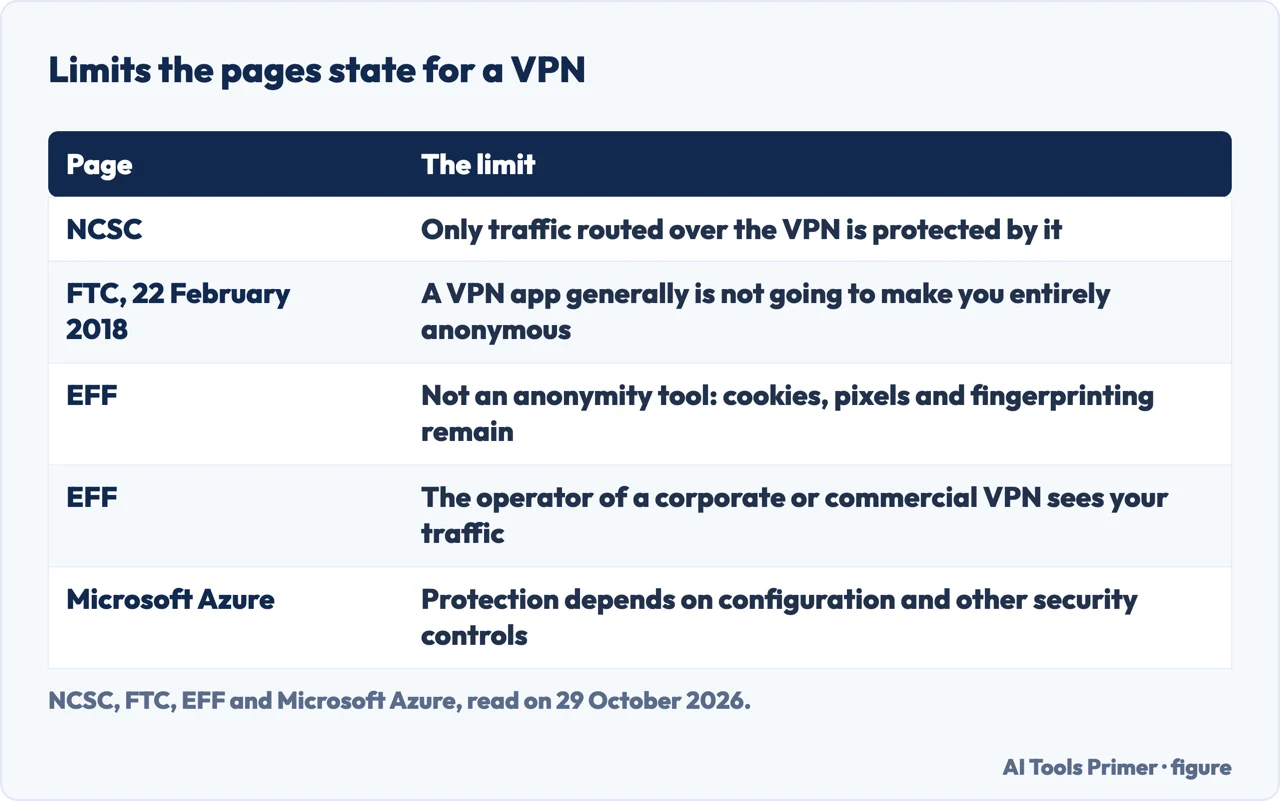
NCSC states the first limit plainly: only traffic routed over the VPN is protected by it. For that reason it generally recommends forcing all traffic through the VPN, and says an optional VPN lets users switch it off and evade protective monitoring, which raises the risk of network attacks. It also names a cost of forcing: if a forced VPN cannot connect, no network traffic from the device is possible unless the VPN is disabled. Our pages on the kill switch and on turning a VPN off look at how that plays out on a device.
Split tunnelling is the same limit by design. NCSC describes it as having some traffic use the VPN while other traffic connects directly, usually to reach internal services without sending everything through the organisation. It says split tunnelling increases the risk that sensitive data will be exposed to an unprotected network, and that native clients generally do not support it. A per-app VPN, where only chosen applications use the tunnel, carries a similar risk, according to the same page.
The protocol matters too. NCSC names TLS and IPsec as the protocols in widest use, says PPTP has fallen out of use because of security concerns, and that WireGuard is growing in popularity and seems promising but is yet to be proven in enterprise contexts. It recommends IPsec and says there is very little difference in risk between IPsec and TLS. EFF agrees on PPTP, calling its encryption broken, and says OpenVPN and WireGuard have become common. The FTC’s 2018 post adds that some VPN apps use protocols that do not encrypt your traffic, or encrypt only some of it.
The software is itself something to defend. NCSC says VPN services are part of an organisation’s internet-exposed attack surface and need to be updated swiftly once security patches are released. The FTC says that using a VPN app means giving it permission to intercept all of your internet traffic, and describes a group of technical researchers who studied almost 300 VPN apps and found potential privacy and security risks in some: some did not use encryption, some asked for sensitive and possibly unexpected privileges, and some shared data with third parties. EFF warns against assuming an app is safe because it is on a major app store, and says a provider may still collect and share user data or distribute malware.
Then there is who runs the network. EFF says a VPN does not protect your data from the private network you use: whoever runs a corporate network sees your traffic, and so does whoever runs a commercial service. Providers can be subject to pressure from governments or law enforcement, EFF says, and many keep as much information as ISPs do. A VPN also does nothing about browsing history saved in your browser or search history in an account you are logged into. The third figure gathers five of these limits.
Finally, EFF says that for many circumstances a VPN is not the most important security step. It lists more impactful ones: strong passwords, two-factor authentication, HTTPS-only mode, encrypting your devices, secure chat apps with end-to-end encryption such as Signal, software updates, encrypted DNS and blocking trackers. For organisations NCSC adds that VPNs are complex to set up, require maintenance, and that a failure could easily cause organisation-wide outages.
Weighing a claim, and what we did not read
The pages offer three ways to weigh a VPN claim. Microsoft says a VPN can improve security by encrypting data in transit, but that overall protection depends on its configuration, its authentication methods and how it is used alongside other security controls. NCSC says whether an organisation needs a VPN depends on its network architecture, and that an organisation that has fully adopted a zero-trust approach would see little benefit. EFF says a claim is not a guarantee, and tells readers to verify what a provider says about logging and data sharing in its privacy policy.
On choosing a provider, the pages overlap. Proton says the most important thing is whether the provider is trustworthy, and asks whether it has a strict no-logs policy, is based in a country with strong privacy laws, and is open source and independently audited. EFF lists claims, trust and transparency, business model, reputation, data collection, ad and tracker blocking, and encryption. On audits, EFF says third-party results made public are a sign a provider takes security seriously, but that practices could change afterwards. Proton’s comparison table carries a footnote about competitors’ audits not being public; that is a seller describing rivals, and we did not check it. EFF says it cannot vouch for any VPN, and tells readers not to use a VPN they do not trust.
We tested no VPN. We did not open the PCMag explainer, the Cyberhaven page, the Malwarebytes page or the Reddit thread on the same subject. The pages we read do not say how much a VPN slows a connection, and NCSC mentions latency only in connection with call apps. Our hub for this subject, the VPN hub, ranks no service, and our pages on VPN routers and on turning a VPN off take the practical questions further.
Where to start
Five ways in.
- “What is it actually for?”
- The uses that hold up in more than one page — uses
- “Is it needed on public Wi-Fi?”
- Public Wi-Fi: how the advice changed — wifi
- “What do the ads promise?”
- The uses sellers list, and what the sources add — sold
- “What does it not cover?”
- What a VPN does not change — limits
- “How do I weigh a claim?”
- Weighing a claim, and what we did not read — decide
Around the tunnel
Routers, kill switches and switching it off.
What else hides or shows
Padlocks, proxies and Tor.
Questions people also ask
Is a VPN actually worth it?
The pages we read give no single verdict. EFF says VPNs are useful in two circumstances, getting round a network’s censorship and reaching an office or home network, and that for many circumstances a VPN is not the most important security step.
Why would someone need a VPN?
NCSC and Microsoft describe remote access to an organisation’s systems. EFF names censorship and reaching an office or home network. A Proton VPN page, from a seller, adds streaming, gaming, sharing and travel.
What are the disadvantages of VPN?
The FTC says a VPN app can intercept all your traffic, shifts trust to its provider, may not encrypt, and may share data when it is free. NCSC adds that VPNs are complex to set up, need maintenance and can cause outages for an organisation.
When shouldn’t you use a VPN?
NCSC says an organisation that has fully adopted zero trust would see little benefit. EFF says streaming platforms increasingly block devices that appear to use a VPN, and tells readers not to use a VPN they do not trust.
Not covered here. We tested no VPN. The statements come from pages by NCSC, the FTC, EFF, Microsoft Azure and Proton VPN, all read on 29 October 2026.
The search volume and difficulty behind this page come from a Semrush reading of 29 August 2026, older than the 60 days the site normally allows.
Sources
- NCSC — Virtual Private Networks (VPNs), device security guidance — www.ncsc.gov.uk, read 29 October 2026.
- FTC — In the market for a VPN app? (22 February 2018) — www.ftc.gov, read 29 October 2026.
- FTC — Are Public Wi-Fi Networks Safe? What You Need To Know (February 2023) — consumer.ftc.gov, read 29 October 2026.
- EFF Surveillance Self-Defense — Choosing the VPN That’s Right for You — ssd.eff.org, read 29 October 2026.
- Microsoft Azure — What is a VPN? — azure.microsoft.com, read 29 October 2026.
- Proton VPN — What is a VPN? (a seller’s page) — protonvpn.com, read 29 October 2026.
Written by Alberto Gulotta
Founder and editor of AI Tools Primer, writing from Palermo, Italy. Thirty-five years of taking computers apart, starting with a Commodore 64 — the long version is on the about page.
Something wrong on this page? Write to aitoolsprimer@gmail.com and it gets fixed.
Written on 29 October 2026.
Independence and limits
No affiliate links and no paid placements anywhere on this site. Nobody pays to appear here, and no company has seen this page before you did.
This is general information, not professional advice. Where a page touches money, health, safety or the law, it names its source and the date it was read — and your situation may still differ. See the privacy page and the cookie policy.