
VPN · guide
What is a VPN router, and what does it change?
By Alberto Gulotta · Updated · 16 min read
What is a VPN router? A router with VPN software built in, which gives a VPN connection to every device on its network. TP-Link and Omada describe two modes; Check Point, Fortinet and Proton VPN describe three ways to get one and list the costs: a higher price, one server at a time, some speed.
| Question | Answer | Where it comes from |
|---|---|---|
| What is it? | A router with VPN software installed, which gives VPN connections to the devices connected to it | TP-Link, Check Point, Fortinet |
| Server or client? | As a server the router hosts the VPN and each device needs client software; as a client it connects out and the devices need none | TP-Link, TP-Link Omada |
| Which devices does it cover? | Devices that cannot run a VPN app, such as printers, consoles and smart TVs; a phone away from home is not covered | Omada, Fortinet, Proton VPN |
| Does it use up the account’s device limit? | Proton VPN says a router counts as one device; TP-Link says some providers allow five devices at once | Proton VPN, TP-Link |
| How do I get one? | Buy a compatible router, buy a preconfigured one, or flash your own router with new firmware | Check Point, Fortinet, Proton VPN |
| What does it cost me? | A higher price, one server at a time, some speed and, for some services, access | Fortinet, Omada, Proton VPN |
What a VPN router is, and what it is not
TP-Link’s consumer blog, dated 22 March 2023, calls a router that has VPN software built in a VPN router and says it can provide VPN connections for the devices connected to it. Check Point describes a router configured to connect directly to a VPN, so that all the traffic of the connected devices goes through it, and adds that such routers are not that different from the ones an internet provider issues: the main difference is the pre-installed VPN. Fortinet puts it as a normal home router with a VPN installed inside, powered by firmware that manages the VPN connections and lets devices connect to the VPN service.
What separates it from a regular router? Omada, a TP-Link line for business networks, answers in an FAQ dated July 2026: a regular router directs traffic between the local network and the internet, and a VPN router does the same but also sets up and ends encrypted VPN tunnels in the hardware, so the devices need no software or settings of their own.
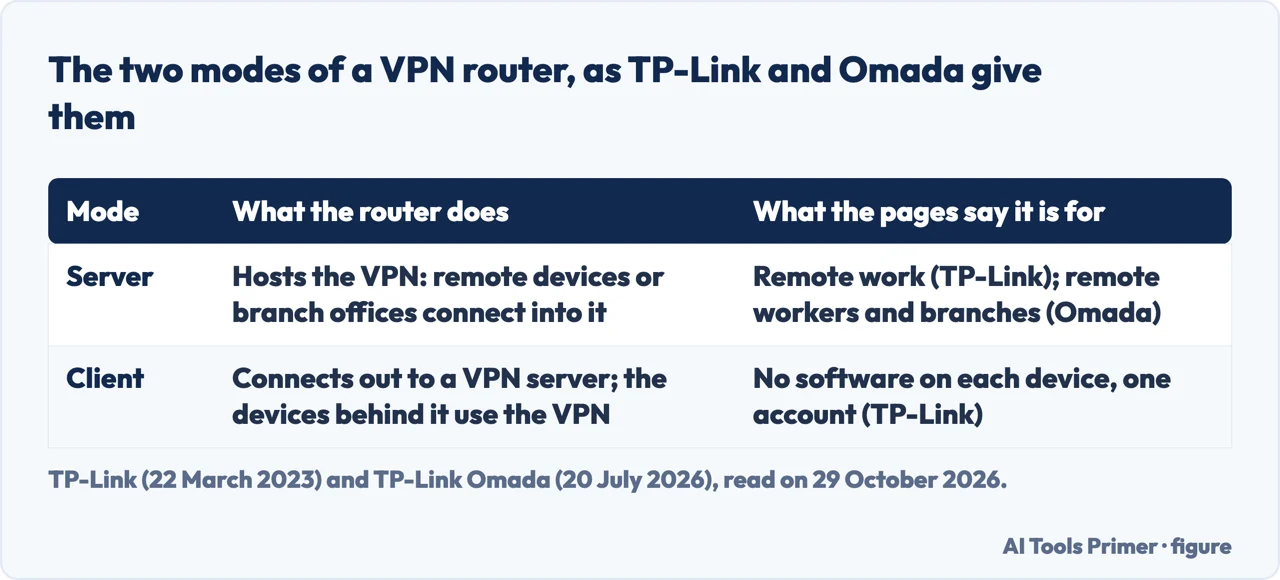
The same pages split the idea in two. TP-Link says a VPN connection has a server and a client. If the router is the server, VPN client software goes on each device, and the data between the router and the devices travels in an encrypted private tunnel. If the router is the client, it connects to a VPN server and every device behind it gets the service with no VPN software of its own. Omada describes the same pair: client mode sends the whole network’s outgoing traffic through an external server, and server mode makes the router a place that remote devices or branch offices connect into.
The pages aim the two modes at different readers. TP-Link’s consumer blog presents the server as a way to reach a company network from home and the client as a way to skip per-device software and account limits. Omada frames both for business networks. Proton VPN, which sells a VPN service, writes about the client case for a home.
Protocols differ too, and the lists do not match. TP-Link says its routers can be set up as L2TP, PPTP, OpenVPN and IPsec servers. Omada names IPsec, OpenVPN, WireGuard and L2TP. Proton VPN names WireGuard, OpenVPN and IKEv2 as protocols to look for in a router. We do not merge them into one list. Omada also writes that a consumer router with third-party VPN client settings in its firmware typically has less processing capacity, protocol support and management than a purpose-built VPN gateway.
Which devices it covers, and which it does not
The reason these pages give most often is coverage for devices that cannot run a VPN app. Omada lists IoT sensors, network printers, IP cameras and guest devices. Fortinet names Xbox One, PlayStation 4, Roku and Apple TV, and adds that once the VPN is working the login details are entered only one time. Proton VPN points to smart speakers and smart TVs, and says a router VPN protects guests without a download on their devices.
The router also changes how the subscription is counted. Proton VPN says a router counts as a single device against the number of VPN connections the account allows at once, however many devices connect to the router. TP-Link’s consumer blog says some providers allow only five devices to use the VPN at the same time, and that a router set as a VPN client is recognized as one account for all the devices behind it. The pages we read do not say whether every provider counts a router the same way.
Away from home, the router does not travel. Proton VPN says the router’s VPN does not protect data on public Wi-Fi or a mobile network, so it still advises installing the app on a phone and a laptop. ExpressVPN, which sells VPN apps, makes the same point in its comparison of routers and apps: a router VPN covers the devices on the home Wi-Fi. That comparison is a seller’s argument for its own product, and we read it that way.
Three ways to get one
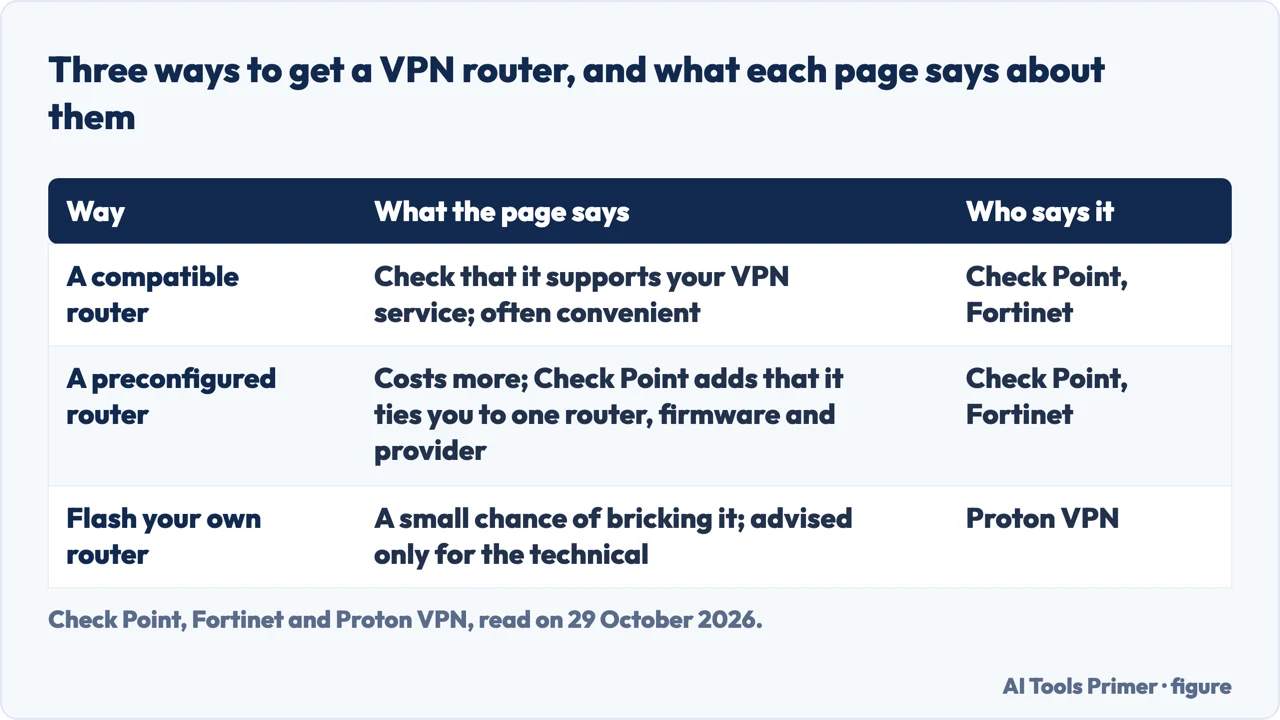
Check Point puts the choice in two: install and configure the VPN software yourself, or buy something that is ready to go. Fortinet and Proton VPN list three routes.
- A router that already supports VPN. Check Point says many standard routers are compatible, and that you should verify the router supports your specific VPN service. Proton VPN says such routers are usually described as having “VPN client” software, which you can find in the manual or by searching the make and model. It also says a combined modem and router from an internet provider is unlikely to connect to a VPN, in which case a separate VPN-compatible router is needed. TP-Link adds that if a provider updates its settings or protocols, the router firmware may need an update.
- A preconfigured router. Check Point says pre-flashed routers come with the firmware for a specific VPN provider, tend to cost more, and tie you to that router, firmware and provider. Fortinet calls the price higher too, and says you tell the seller which VPN service it is for and the files are installed for you. Proton VPN names Flashrouters as a company that sells routers pre-flashed with DD-WRT, and says that with one the VPN server can be switched with a click and the kill switch and auto-connect of Proton VPN are supported.
- Your own router, flashed. Fortinet calls this an inexpensive route for people who do not mind the technical task. Proton VPN warns that there is a small chance of bricking the router and recommends the route only to tech-savvy users. ExpressVPN, a seller, says open-source firmware such as DD-WRT or OpenWrt gives control but has to be done correctly to avoid harming the router.
Check Point gives the flashing steps in this order:
- Choose custom firmware that supports VPN and is compatible with your router model.
- Download it from the developer’s website.
- Type the router’s IP address into a browser, log in and open the firmware upgrade section.
- Upload the file. The router replaces its software and reboots.
- Enter the VPN server address, your credentials and the protocol, which Check Point gives as OpenVPN or IPsec.
Check Point adds that a router you configured yourself can be reset and started over if you do not like the firmware or the service, though it calls that a hassle. Fortinet lists the general idea in four moves: subscribe to a VPN service, make sure the router is compatible, get the provider’s instructions for it, and enter the login details. In Proton VPN’s FreshTomato guide the file to download is an OpenVPN configuration file from the account, with “Router” chosen as the platform.
Proton VPN also raises trust. It says it is almost impossible to verify that a router has no back door, so a new router should come from a brand you trust, and that anyone can review the code of open-source firmware such as DD-WRT and OpenWrt. ExpressVPN lists a fourth route: a separate device, such as a travel router or a small computer running a VPN client, placed between the modem and the main router or running its own Wi-Fi, so that devices connected through it use the VPN and others connect normally.
What it costs you
Fortinet lists three disadvantages. VPN routers tend to cost significantly more than a regular router. The router is limited to the server set up when it was first configured, and a different server means setting it up again. And as more devices connect, the speed each one receives drops. Proton VPN makes the server point too: changing VPN servers can become more difficult, so a router may not suit someone who changes often. ExpressVPN adds that the router applies one location and one set of settings to the whole network, so a change affects the whole household.
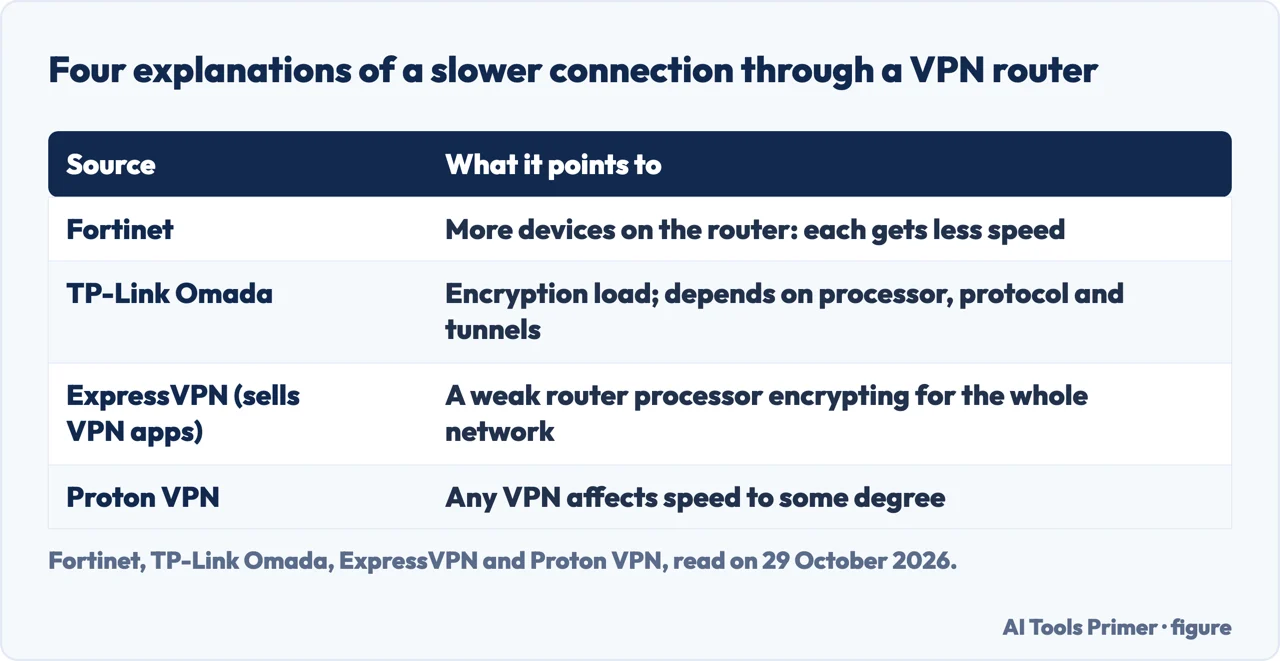
On speed, the pages name different causes, shown in the table below. Fortinet points to the number of devices. Omada says every encrypted connection adds processing load, so the top speed through a tunnel is lower than without one, by an amount that depends on the hardware, the protocol and the number of tunnels; it says WireGuard generally adds less overhead than IPsec. ExpressVPN says most VPN-enabled routers use relatively weak processors, and that a single processor encrypts for every device on the network. Proton VPN says any VPN affects speed to some degree and that the difference may not even be noticeable. None of the pages we read puts a number on the speed lost.
Access can change as well. Proton VPN says that after a VPN is set up on the router you may lose some local services, especially when connected to a server outside your country, and some services block known VPN addresses. It offers a partial workaround: on a multi-band router, put the VPN on one band, for example 5 GHz, and leave the other, 2.4 GHz, without it, then switch between the two Wi-Fi networks. The same applies to a guest network.
Omada adds that a purpose-built gateway costs more than a software VPN subscription and that the first setup of IPsec tunnels, OpenVPN server mode or WireGuard peers needs networking knowledge. ExpressVPN says running a VPN on a router means watching firmware updates, configuration files and changes from the internet provider, and that when something breaks it can be hard to know where to start.
If you are choosing between VPN-compatible routers, Proton VPN says to prioritize Wi-Fi 6 or the latest standard, both the 2.4 and 5 GHz bands, multiple ports and an easy interface. TP-Link names the Archer AX20, AX1800, AX21, AX73 and AX90 as its routers with VPN client support; that is a seller’s list from a post dated March 2023, not our recommendation. For what a newer Wi-Fi standard adds, see our page on Wi-Fi 6E routers.
When the tunnel drops
Two of the pages we read, both from VPN sellers, deal with a VPN that fails. Proton VPN’s FreshTomato guide defines a kill switch on a router as a feature that prevents the devices connected to the router from reaching the internet if the VPN connection fails for any reason. In FreshTomato it is set under Administration, Scripts, Firewall, in two forms: one where every device loses its connection, and one where only devices with specified IP addresses do. Proton VPN also says routers sold pre-flashed by Flashrouters support the kill switch and auto-connect.
ExpressVPN states the risk from the other side. If a router-level VPN drops, it says, the devices can silently fall back to the regular internet connection, and you might keep browsing or streaming without realizing the traffic is no longer protected. It sells apps with a built-in kill switch on each device, so this is a seller’s argument for the apps. Our page on the VPN kill switch covers what it blocks and how to test one.
One more detail from the FreshTomato guide: after a fresh installation or a hard reset, the connection may fail because the router does not have the correct time, and restarting the router usually fixes it by updating the date and time from the internet. Our page on restarting a router gives the steps four makers and providers use. For the other VPN questions, go back to the VPN section.
The business version
Check Point and Omada write for companies, and they describe a different job. Check Point says that when a user connects to an enterprise VPN, the router verifies identity through multi-factor authentication and may check that the device meets corporate standards, such as updated antivirus software or domain membership. It adds that some of these routers disable split tunneling, so a connected user reaches only corporate resources, with no access to local networks or the internet while connected.
Omada says IPsec is typically used for site-to-site tunnels between offices, and OpenVPN and WireGuard are common for remote access. Each site’s gateway keeps a tunnel to the hub location, and traffic between sites stays encrypted in transit. Both pages come from sellers of corporate security or gateways, and neither is a home setup guide.
Where to start
Six ways in.
- “Is it just a router with a VPN in it?”
- What a VPN router is, and what it is not — meaning
- “Does it cover my TV and my phone?”
- Which devices it covers — devices
- “How do I get one?”
- Three ways to get one — getting
- “What is the catch?”
- What it costs you — costs
- “What if the VPN drops?”
- When the tunnel drops — drops
- “Why do offices use them?”
- The business version — business
Around the tunnel
Kill switches, switching off, and private DNS.
The router itself
Wi-Fi standards, restarts and signal.
Questions people also ask
Is it a good idea to put a VPN on your router?
The pages weigh it differently. Proton VPN lists reasons, such as one counted connection, and drawbacks, such as speed, and says a router may not suit someone who changes servers often. TP-Link sees a way around device limits; ExpressVPN, which sells apps, argues for apps. Fortinet says VPN routers cost significantly more. None measures the benefit.
Is a VPN router the same as a regular router?
Omada says a regular router directs traffic between the local network and the internet, and a VPN router does the same and also sets up and ends encrypted VPN tunnels in the hardware, so the devices need no software of their own.
What’s the downside of using a VPN?
On a router, Fortinet lists a higher price, one server at a time and less speed per device as more connect. Proton VPN says any VPN affects speed to some degree and that some services block known VPN addresses.
Do routers have built-in VPNs?
Check Point says many standard routers are VPN-compatible, but you should verify yours supports your VPN service. Proton VPN says to look for “VPN client” in the manual, and that a combined modem and router from a provider is unlikely to connect to a VPN.
Not covered here. We tested nothing on a router. The statements come from seven pages read on 29 October 2026: TP-Link’s consumer blog, a TP-Link Omada post, Fortinet, Check Point, two Proton VPN pages and ExpressVPN. All are written by sellers of routers, security products or VPN services, so each claim above carries the name of who makes it. We also read a page from Ruijie, which follows Fortinet’s page sentence by sentence, and did not count it as a separate source.
TP-Link’s consumer blog is from March 2023 and Proton VPN’s main page from February 2020, so we did not repeat their lists of providers or plans. The search volume and difficulty behind this page come from a Semrush reading of 29 August 2026, older than the 60 days the site normally allows.
Sources
- TP-Link — What is a VPN Router? How do you choose the right one? — www.tp-link.com, read 29 October 2026.
- TP-Link Omada — What Is a VPN Router and How Does It Work? — www.omadanetworks.com, read 29 October 2026.
- Fortinet — What are VPN Routers? How to Set Up VPN on a Router? — www.fortinet.com, read 29 October 2026.
- Check Point — VPN Router - What is it and How it Works — www.checkpoint.com, read 29 October 2026.
- Proton VPN — Why you should set up a VPN on your router (and how to do it) — protonvpn.com, read 29 October 2026.
- Proton VPN — How to set up Proton VPN on a FreshTomato router using OpenVPN — protonvpn.com, read 29 October 2026.
- ExpressVPN — VPN Router: How to Secure Your Home Network — www.expressvpn.com, read 29 October 2026.
Written by Alberto Gulotta
Founder and editor of AI Tools Primer, writing from Palermo, Italy. Thirty-five years of taking computers apart, starting with a Commodore 64 — the long version is on the about page.
Something wrong on this page? Write to aitoolsprimer@gmail.com and it gets fixed.
Written on 29 October 2026.
Independence and limits
No affiliate links and no paid placements anywhere on this site. Nobody pays to appear here, and no company has seen this page before you did.
This is general information, not professional advice. Where a page touches money, health, safety or the law, it names its source and the date it was read — and your situation may still differ. See the privacy page and the cookie policy.