
Software · guide
Wifi booster vs wifi extender: one device, two names
By Alberto Gulotta · Updated · 15 min read
On wifi booster vs wifi extender, the makers who sell both give the same answer: in most home products they are one device under two names. NETGEAR and TP-Link call booster a marketing label for extenders, repeaters and mesh nodes; the device inside the box picks up your router’s signal and sends it on.
So the useful questions are other ones. Does the extender have a band of its own for the link to the router, or does it halve your speed? Where should it go? Is an extender the right fix at all, or would a cable, a mesh system or a better-placed router do more? And is the product even Wi-Fi, since for the FCC a signal booster is a phone amplifier? The sections below take those in turn.
| Name on the box | What it is | Who says so |
|---|---|---|
| Wi-Fi extender, range extender | A device that picks up the router’s signal and rebroadcasts it | NETGEAR, TP-Link |
| Wi-Fi repeater | Technically, an extender that rebroadcasts on the same channel; in practice the same word | TP-Link, Waveform |
| Wi-Fi booster | A marketing label for extenders, repeaters, mesh nodes and access points | NETGEAR, TP-Link |
| Mesh system | A router and satellites that form one network under one name | NETGEAR, TP-Link, eero |
| Access point | A second Wi-Fi source wired to the router by Ethernet | NETGEAR, TP-Link |
| Consumer signal booster | A cell phone amplifier, not Wi-Fi: register it with your carrier first | FCC |
Booster is a label, not a kind of device
NETGEAR’s guide answers the question in one line: are extenders and boosters the same thing? Yes, “in most consumer cases they are the same”, and booster is a general marketing term that covers extenders, repeaters, mesh nodes and wireless access points. TP-Link, which sells the same products, calls booster “an informal marketing term, not an official product category”, and says that most products sold as boosters are simply extenders. Waveform, a retailer, puts it as boosters, repeaters and extenders being “mostly the same thing”.
Not every guide agrees. Glo Fiber, an internet provider, chooses its own definition: for its article, a booster is the broader category, a mesh node, a stronger router or an access point, as opposed to a basic extender. Read that way, “booster or extender” is a question about whether you need more than one device, not about two products.
The same goes for wifi repeater vs extender. TP-Link says that, technically, a repeater rebroadcasts on the same wireless channel it receives on, and that most makers and product listings use the two words interchangeably; what separates a better extender from a basic one is whether it has a dedicated band for talking to the router, whatever the box calls it. Waveform says there is no clearly defined difference between the two.
When a booster is not Wi-Fi at all
There is one place where “booster” names a different device. The Federal Communications Commission uses consumer signal booster for an amplifier that improves cell phone coverage in a home, car, boat or recreational vehicle. Its page lists two things you must do before using one: “Get approval from your wireless provider” and register the specific booster with that provider, giving at least the owner’s name, the make, model and serial number, the location and the date of first use.
Those devices amplify a phone network, not a Wi-Fi network, and the two share shelf space: Waveform, whose guide to Wi-Fi boosters is quoted above, sells cell signal boosters on the same site. If the product page talks about carriers, bars on the phone and registration, it is a cellular booster.
What the extra hop costs
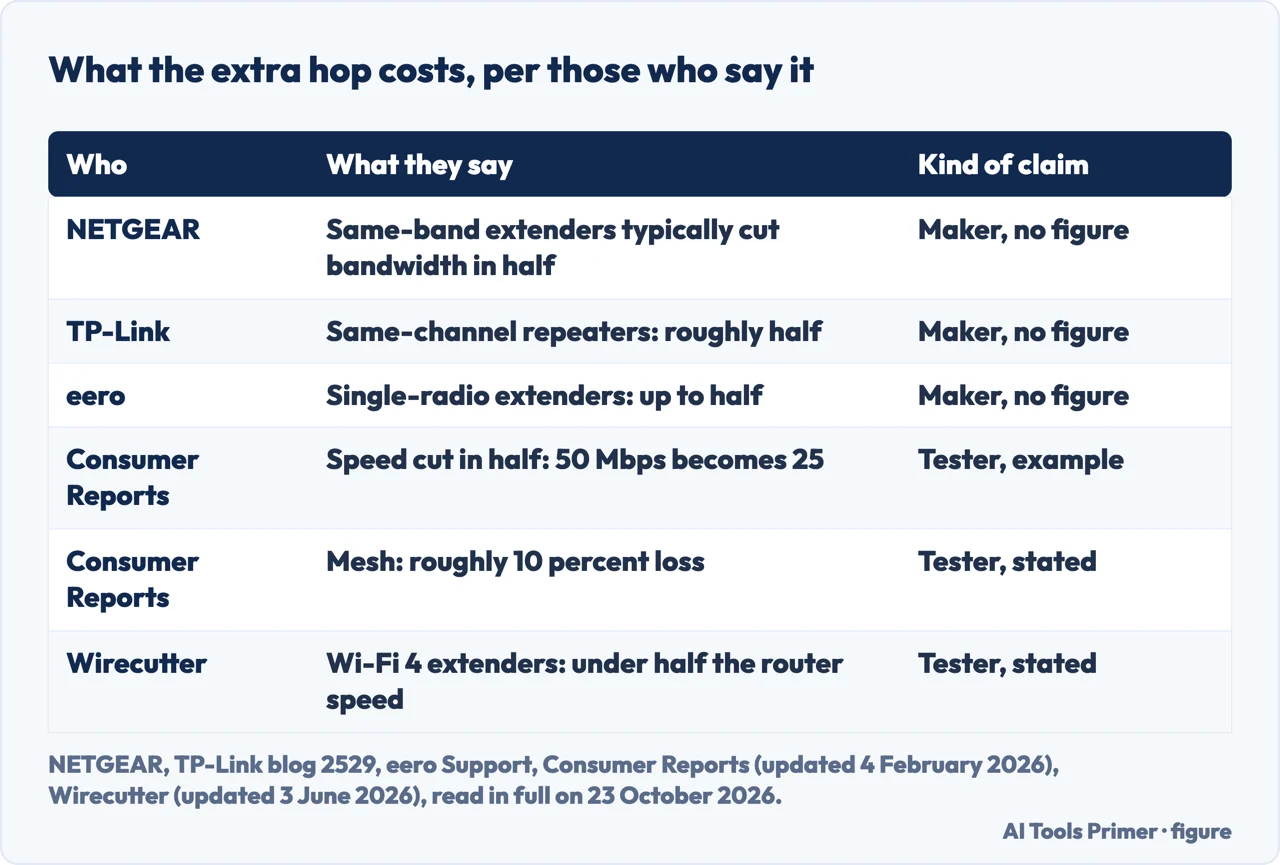
An extender talks to the router over Wi-Fi and then to your devices over Wi-Fi again. NETGEAR’s guide says that traditional extenders, because they receive and retransmit on the same frequency band, “typically cut available bandwidth in half and add latency due to the double-hop transmission process”. eero, which sells mesh systems, says extenders “can cut bandwidth by up to half” because they usually rely on a single radio to listen and to broadcast. TP-Link says the same of repeaters, roughly half, and adds that dual-band and tri-band extenders avoid most of the loss by using one band for the link to the router and another for your devices.
Those are the makers. Consumer Reports, which has tested Wi-Fi extenders since 2020 with a professional throughput suite at 8, 20, 35 and 55 feet, says the same thing: throughput through an extender is cut in half. Its own example is 50 megabits per second next to the router and about 25 on the extended network, before walls take their share; mesh systems, it says, limit the loss to roughly 10 percent. Wirecutter, which tests extenders on a network in a two-storey house, warns about one kind in particular: old 802.11n, or Wi-Fi 4, extenders slow every device on the network and give the devices connected to them less than half the router’s speed.
None of this raises the speed of the internet line itself. NETGEAR’s own answer to whether a booster improves internet speed is “Not always”: it can improve signal strength and reach, “but not your actual internet bandwidth”.
Where to put an extender
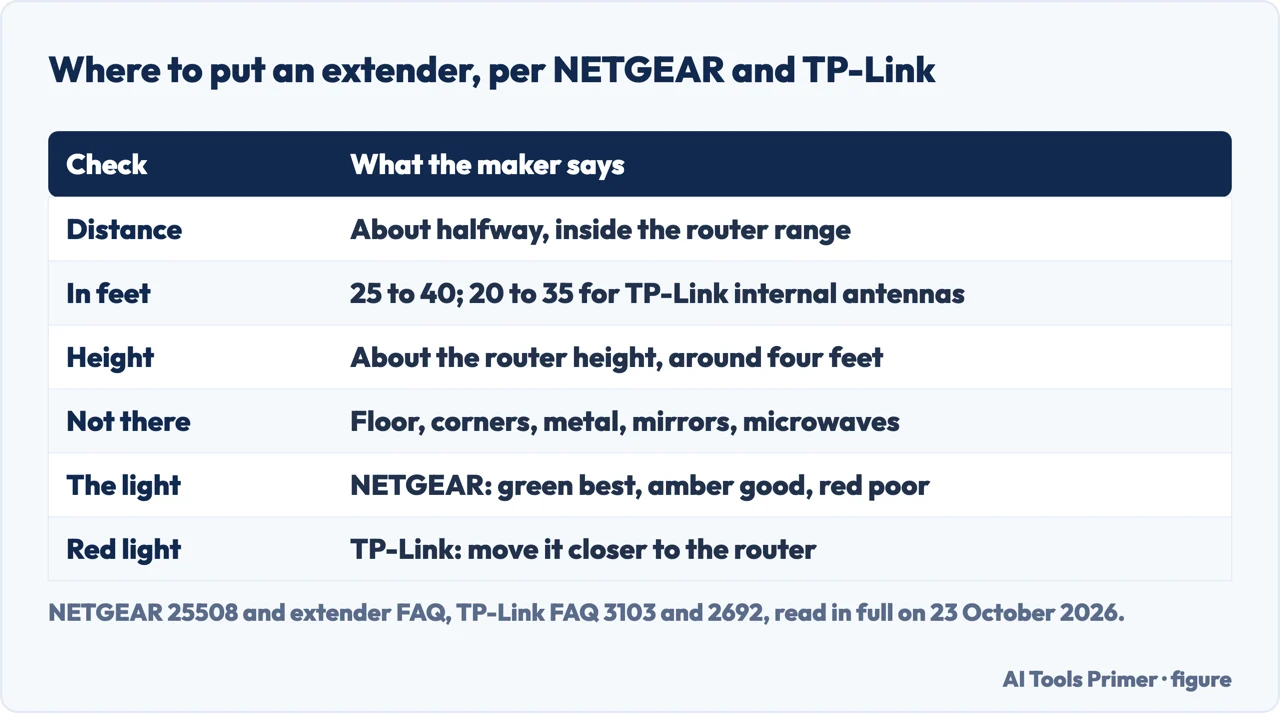
Every maker gives the same first rule. NETGEAR’s support article says the ideal place is half-way between the router and the device that needs the signal, but still within the router’s wireless range; TP-Link says about halfway between the router and the dead zone; Consumer Reports, from its tests, says midway, and that the manufacturers’ instructions say the same. Put it in the dead zone itself and it has nothing to pass on.
The makers then give numbers. NETGEAR’s extender FAQ says 25 to 40 feet from the router, in line of sight if possible, at about the router’s height, around four feet up, facing the router, and away from microwave ovens, cordless phones and baby monitors. TP-Link gives 25 to 40 feet for models with external antennas and 20 to 35 feet for models with internal antennas, the same four feet of height, and not low down, in a corner, or near a mirror, a large metal surface or masonry.
The extender then tells you whether the spot works. On a NETGEAR extender, the Router Link light shows the link to the router: “Green is best, amber is good, while red is poor.” TP-Link says its extender is connected whenever the Signal light is solid, whatever the colour or number of bars, and that a red light means the signal is weak and the extender should be moved closer to the router.
More than one extender
NETGEAR’s FAQ allows it with conditions: put the extenders on opposite ends of the home relative to the router, not too close to each other, and give each one a single hop back to the router rather than chaining one through another, because an extender’s signal is usually weaker than the router’s. Wirecutter, testing in a real house, adds a limit that applies to any of them: signal boosters “can’t extend the signal too far beyond where the router’s original signal gives out”.
When an extender is the wrong fix
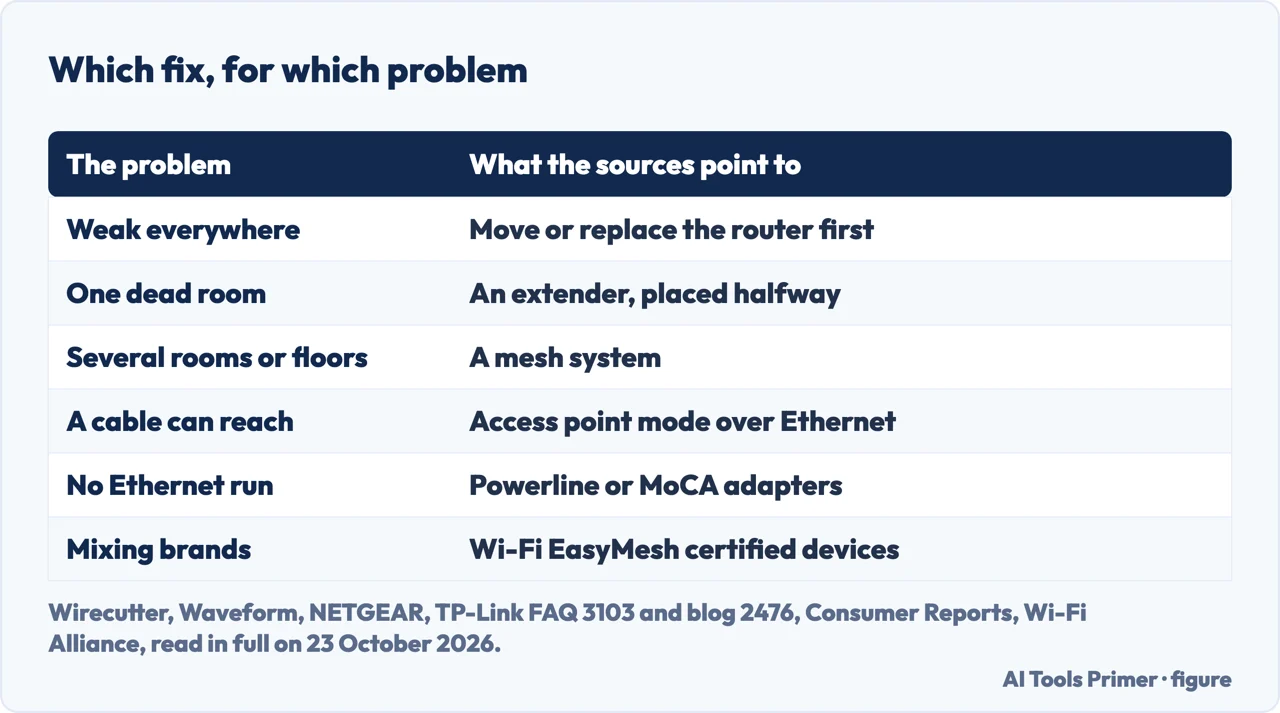
The router first. Wirecutter says to make sure the router is centrally located before you try an extender or a booster, and Waveform says the same, then suggests checking whether an old router needs replacing.
A cable, if one can reach. TP-Link says that when obstacles or distance make the wireless link unstable, you can run an Ethernet cable from the router and switch the extender to Access Point mode; NETGEAR calls wired access points the most reliable way to get good Wi-Fi, though it suggests them mainly for offices and advanced setups. Where no cable can run, NETGEAR names powerline adapters, which use the home’s electrical wiring, and MoCA adapters, which use coaxial cable, as backhaul options, and Waveform recommends a powerline kit for a device that needs a fast wired link.
A mesh system, for more than one room. TP-Link and NETGEAR both draw the same line: an extender for one or two dead zones in a small or medium home, mesh for several rooms, several storeys or a large house. Consumer Reports says an extender is enough for browsing and email in a single dead zone, and points to mesh for 4K video and online games. eero adds a practical difference: some extenders broadcast a separate network name, so you switch by hand as you move, while a mesh keeps one name throughout.
Mixing brands. Mesh systems are often tied to one maker. eero says its devices without Ethernet ports, the eero Beacon and the eero 6 Extender, “can only be used with other eeros”, and TP-Link describes eero, Google Nest and NETGEAR Orbi as brand-locked. Wi-Fi EasyMesh is the Wi-Fi Alliance standard meant to change that: certified access points from different vendors can join one network. TP-Link, which supports it, adds that same-brand EasyMesh setups perform best.
What to read on the box instead of the word booster
- The bands. Dual-band or tri-band, with one band for the link to the router (TP-Link), is what separates an extender that keeps most of its speed from one that halves it.
- The Wi-Fi standard. Wirecutter tells readers to avoid extenders that do not use Wi-Fi 5, 6, 6E or 7, and none of its picks is an 802.11n (Wi-Fi 4) model.
- An Ethernet port. Wirecutter lists it as convenient for wired game consoles and televisions, and it is what TP-Link’s Access Point mode needs: a cable from the router to the extender.
- EasyMesh or a mesh name. If you want one network name and may change brands later, the Wi-Fi EasyMesh certification is the label the Wi-Fi Alliance gives to devices that work with other vendors.
- Carriers and registration. If the page names mobile carriers and asks you to register the device, it is most likely a cell signal booster, the kind the FCC regulates, and not a Wi-Fi device.
Price is not on the list. Consumer Reports writes that “price isn’t a reliable indicator of quality”: in its ratings the cheapest model performed poorly, and so did a much pricier one.
Where to start
Five ways in.
- “Are they different things?”
- The names — names
- “Will it make my internet faster?”
- The extra hop — speed
- “Where do I plug it in?”
- Placement — placement
- “It says to register it.”
- A cell booster — cellular
- “The whole house is weak.”
- Other fixes — other fixes
More on the home network
The pages next to this one: where the router goes, the channel, the 6 GHz band, and a connection that drops.
When the connection is slow or gone
Speed, lag and a connection that does not work, which an extender alone does not fix.
Questions people also ask
Do WiFi boosters really work?
For one weak room, yes, with a cost. Consumer Reports, which tests them, says an extender can be useful for a single dead zone but that throughput through it is cut in half; NETGEAR says traditional extenders typically halve the available bandwidth and add latency. Dual-band models with a band for the router link lose less, according to TP-Link.
What are the downsides of using a WiFi booster?
Speed and latency first: NETGEAR and eero both say an extender with one radio can cut bandwidth by about half. Some broadcast a separate network name, so devices switch by hand, as eero notes, and Wirecutter says old Wi-Fi 4 extenders slow every device on the network.
How far will a WiFi booster reach?
Not much past the router’s own range: Wirecutter says signal boosters cannot extend the signal far beyond where the router’s signal gives out. NETGEAR and TP-Link place the extender 25 to 40 feet from the router, halfway to the dead zone; TP-Link says 20 to 35 feet for models with internal antennas.
Do WiFi boosters work with any router?
Most plain extenders do: NETGEAR says its range extenders work with its own routers and most other wireless routers, including those from internet providers. Mesh satellites are different: eero says its Beacon and eero 6 Extender only work with other eeros. Wi-Fi EasyMesh certified devices are meant to work across brands.
Is a WiFi repeater the same as an extender?
In practice, yes. TP-Link says a repeater technically rebroadcasts on the same channel it receives on, but that most makers use the two words interchangeably; what matters is whether the device has a dedicated band for the router link. Waveform says there is no clearly defined difference.
Not covered here. We did not test any extender, booster or mesh system for this page, and it names no product to buy. The definitions and placement rules are the makers’ own, from NETGEAR, TP-Link and eero; the tested speed figures come from Consumer Reports and Wirecutter, attributed where they are used; the rules on cell signal boosters are the FCC’s. Everything was read on 23 October 2026.
Waveform sells cell signal boosters and its guide carries no date; Glo Fiber is an internet provider writing about its own definition. One result, from the provider Shentel, could not be read from outside its service area and is not used. The videos and the Reddit threads in the results were not watched or read.
The search volume and difficulty behind this page were read in Semrush on 29 August 2026.
Sources
- NETGEAR — WiFi Extender vs Booster: What’s the Real Difference? (last updated 10 September 2025) — www.netgear.com, read 23 October 2026.
- NETGEAR — WiFi Range Extender Frequently Asked Questions — www.netgear.com, read 23 October 2026.
- NETGEAR Support — Where should I place my NETGEAR WiFi range extender? (article 25508, last updated 19 November 2025) — kb.netgear.com, read 23 October 2026.
- TP-Link — Wi-Fi Extender vs. Booster: A Guide to Understanding Home Wi-Fi Coverage (24 June 2026) — www.tp-link.com, read 23 October 2026.
- TP-Link Support — How to Place Your TP-Link Wi-Fi Extender for the Best Signal and Performance (FAQ 3103, updated 17 April 2026) — www.tp-link.com, read 23 October 2026.
- TP-Link Support — Is Your TP-Link Range Extender Working and in the Right Spot? (FAQ 2692, updated 7 May 2026) — www.tp-link.com, read 23 October 2026.
- TP-Link — EasyMesh, OneMesh, and Proprietary Mesh: A Guide to Wi-Fi Mesh Standards (4 June 2026) — www.tp-link.com, read 23 October 2026.
- eero Support — How is eero different from a range extender? — eero.com, read 23 October 2026.
- eero Support — Can I use an eero Beacon or eero 6 Extender with a non-eero router? — eero.com, read 23 October 2026.
- Wi-Fi Alliance — Wi-Fi EasyMesh — www.wi-fi.org, read 23 October 2026.
- Federal Communications Commission — Consumer Signal Boosters — www.fcc.gov, read 23 October 2026.
- Consumer Reports — Should You Buy a WiFi Extender? (updated 4 February 2026; a tester) — www.consumerreports.org, read 23 October 2026.
- Wirecutter — The Best Wi-Fi Extender and Signal Booster (updated 3 June 2026; a tester) — www.nytimes.com, read 23 October 2026.
- Waveform — What’s the difference: WiFi Booster, Repeater or Extender? (undated; a retailer of cell signal boosters) — www.waveform.com, read 23 October 2026.
- Glo Fiber — WiFi Extender vs. Booster: Which Do You Need? (an internet provider) — www.glofiber.com, read 23 October 2026.
Written by Alberto Gulotta
Founder and editor of AI Tools Primer, writing from Palermo, Italy. Thirty-five years of taking computers apart, starting with a Commodore 64 — the long version is on the about page.
Something wrong on this page? Write to aitoolsprimer@gmail.com and it gets fixed.
Written on 23 October 2026.
Independence and limits
No affiliate links and no paid placements anywhere on this site. Nobody pays to appear here, and no company has seen this page before you did.
This is general information, not professional advice. Where a page touches money, health, safety or the law, it names its source and the date it was read — and your situation may still differ. See the privacy page and the cookie policy.