
Software · guide
Wifi 6E router: the 6 GHz band, the devices that use it, the box
By Alberto Gulotta · Updated · 14 min read
A wifi 6E router broadcasts a third band, at 6 GHz, next to the usual 2.4 and 5 GHz. In the US the FCC opened 5,925 to 7,125 MHz for it in 2020. Only devices that support Wi-Fi 6E or later can join that band; everything else connects to the other two, as it would with any router.
So the router is half of it. Before buying, check which of your devices can use 6 GHz, whether your country allows it, and what the speed class on the box actually adds up to. We did not test any router: everything below comes from the makers, the regulators and published tests.
| Band | What the sources say about it |
|---|---|
| 2.4 GHz | The longest range and the best passage through walls, at lower speeds; the most crowded band (Intel, Microsoft) |
| 5 GHz | Faster than 2.4 GHz, with a shorter range (Microsoft) |
| 6 GHz | New with Wi-Fi 6E: 5,925 to 7,125 MHz in the US, up to 1,200 MHz and seven 160 MHz channels; the shortest range of the three, and only Wi-Fi 6E devices or later can join it (FCC, TP-Link, Intel, Microsoft) |
Which of your devices can use the 6 GHz band
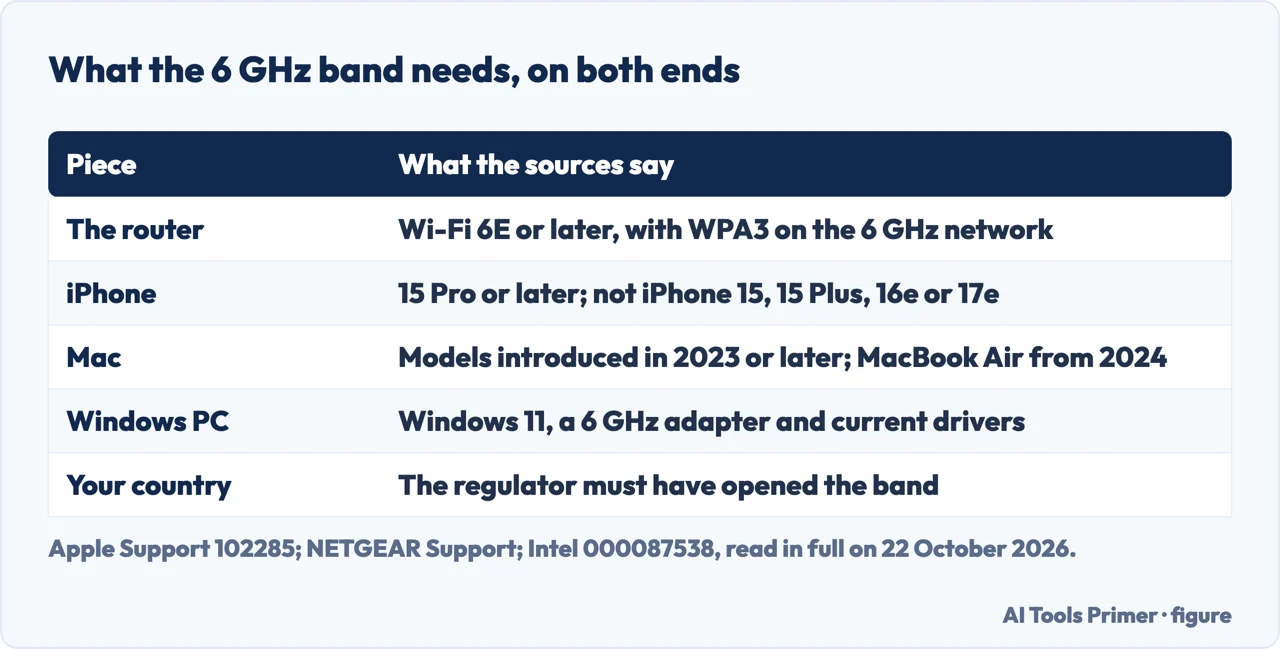
NETGEAR’s support pages put it plainly: the 6 GHz band is exclusive to devices that support Wi-Fi 6E or a later standard, and the router and the device both have to support it. Everything else keeps connecting to the router’s 2.4 GHz and 5 GHz bands, as BroadbandNow’s buying guide also notes. So the useful question is which devices in the house can join the new band.
- iPhone, iPad and Mac. Apple’s article on Wi-Fi 6E and Wi-Fi 7 networks, published on 25 August 2026, lists the iPhone 15 Pro, iPhone 15 Pro Max and later, but not the iPhone 15, iPhone 15 Plus, iPhone 16e or iPhone 17e; the iPad Pro 11-inch (4th generation), iPad Pro 12.9-inch (6th generation) and later; the iPad Air 11-inch and 13-inch (M2) and later; and the MacBook Pro, iMac, Mac mini, Mac Studio and Mac Pro introduced in 2023 or later, with the MacBook Air from 2024. A buying guide that names “the iPhone 15” as a Wi-Fi 6E phone is wrong about the base model.
- Android. NETGEAR gives examples rather than a list: Google added Wi-Fi 6E with the Pixel 6 series, Samsung with the Galaxy S21 Ultra 5G and Z Fold3, and Motorola with the Edge (2021). It adds that many Android devices still do not support the band, so the specification sheet of your own model is the place to check.
- Windows. NETGEAR says a PC needs the latest Windows 11 release, a 6 GHz-capable network adapter and the latest drivers, and that Microsoft is not adding 6 GHz support to Windows 10: with Windows 10, the band stays out of reach even if the adapter could use it. Intel’s troubleshooting article for its AX210 card asks for Wi-Fi driver version 22.70.0 or later and the latest Windows 11, and warns that a card you fit yourself must be approved for 6 GHz by the computer’s maker. Microsoft’s own page lists the same three things: a router that supports Wi-Fi 6E, and a Windows device and network adapter drivers that support it.
Your country decides too. The FCC’s Report and Order of April 2020 set the rules for unlicensed use of 5,925 to 7,125 MHz in the US. TP-Link notes that the European Union opened 480 MHz, from 5,945 to 6,425 MHz, which is room for three 160 MHz channels instead of seven. NETGEAR says the band is not available where regulators have not approved it, that a device maker may enable it only some time after approval, and points to the Wi-Fi Alliance’s map of countries; Apple says its 6 GHz features are not available in all regions.
Reading the box: what AXE5400 adds up to
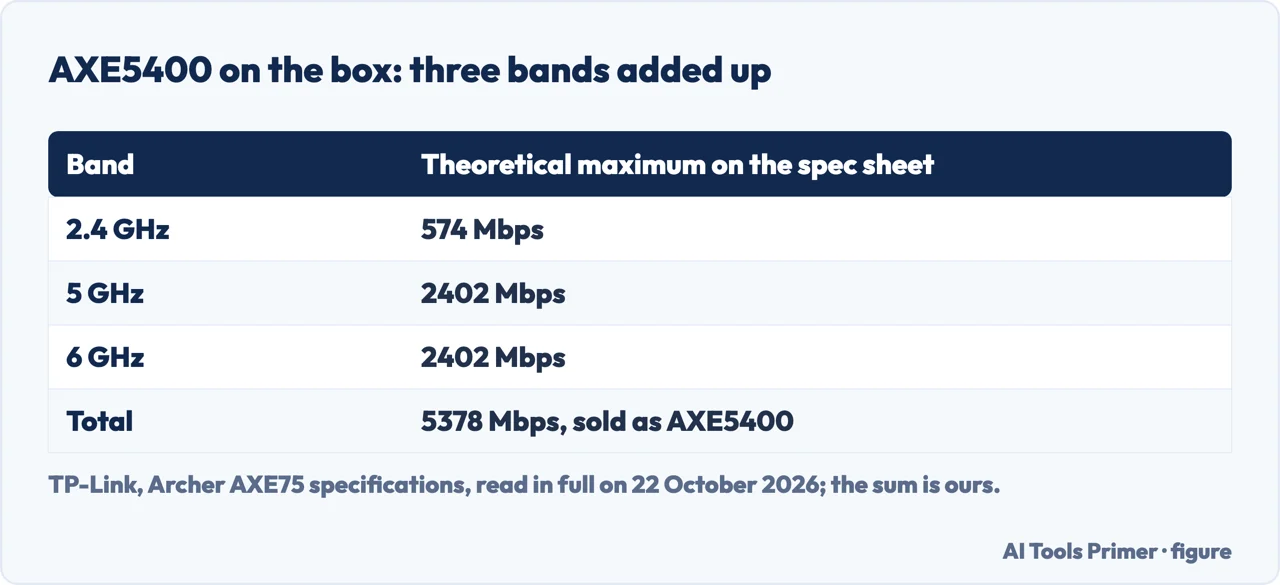
Router names carry a speed class, and the number is a sum. TP-Link’s specifications for the Archer AXE75, sold as an AXE5400 router, give 574 Mbps on 2.4 GHz, 2402 Mbps on 5 GHz and 2402 Mbps on 6 GHz. Added together that is 5378 Mbps, which is where 5400 comes from. A laptop on the 6 GHz band is measured against the 2402, not the 5400, and even that figure is a theoretical maximum: Tom’s Hardware notes that the fine print on the packaging says so.
The rest of the same specification sheet is worth reading before you buy any Wi-Fi 6E router:
- The wired ports. The AXE75 has one 2.5 Gbps WAN/LAN port and four 1 Gbps ports, and TP-Link’s note says actual speed may be limited by the rate of the port, the cable and the internet provider. BroadbandNow’s advice is to match the router to the plan: with gigabit internet, look for a multi-gig WAN port.
- Security. WPA3 should be on the list, because the 6 GHz band will not work without it (see the settings below).
- Transmit power. Under the FCC, the same sheet lists up to 22 dBm on 6 GHz, against 28 dBm on 5 GHz and 29 dBm on 2.4 GHz: on this router, the ceiling for the 6 GHz signal is the lowest of the three.
- The footnotes. TP-Link says the seven 160 MHz channels may not all be available in some regions, and that Wi-Fi 6E features need clients that support them.
How far 6 GHz reaches
NETGEAR and Microsoft say the same thing in different words. NETGEAR: the 6 GHz band has a shorter range than 5 GHz and does not travel as far or through as many walls. Microsoft: a 6 GHz network gives the best performance when you are close to the router, with a shorter range and weaker passage through walls than the other bands. NETGEAR’s practical conclusion is to put the router where you use the 6 GHz device, and to keep it out of the basement, the attic and closets.
How much shorter. A 2020 article by David D. Coleman of Extreme Networks gives the figures. A signal loses about 40 dB in its first meter at 2.4 GHz and 47 dB at 5 GHz, and a 6 GHz signal about 2 dB more than 5 GHz, from roughly 48 to 49 dB depending on the channel. After that, doubling the distance costs another 6 dB whatever the frequency. He concludes that the range difference between 6 GHz and 5 GHz is not as significant as the one between 5 GHz and 2.4 GHz.
What tests found. Excentis, which tests Wi-Fi equipment, measured an access point at eight positions in its test house, on one 5 GHz and one 6 GHz channel at 160 MHz: the 6 GHz coverage was slightly less than the 5 GHz coverage, and one of its two client devices could not see the 6 GHz network at all. Tom’s Hardware tested the Archer AXE75 in a house, about 7 and 25 feet from the router, with a laptop on a Realtek 8852CE adapter, and found “6-GHz performance that’s no faster than the 5-GHz band”. Its suggestion was to keep the band for one flagship device, such as a gaming PC.
NETGEAR adds that a device moving out of 6 GHz range may switch to the 2.4 or 5 GHz band, and that some devices do not switch back when they return, which depends on the device and not on the router.
Three settings that decide whether it works
- WPA3. “WPA3 security is mandatory for devices operating in the 6 GHz wireless band”, NETGEAR writes, and if the router is set to another security version, devices cannot connect to 6 GHz. NETGEAR’s suggestion is WPA3 on 6 GHz and WPA2/WPA3 on the other two bands, which keeps older devices working there.
- One network name. Apple asks for a single name across 2.4, 5 and 6 GHz; if the bands have different names, an iPhone or Mac identifies the network as having limited compatibility and offers to move you to the 5 GHz network. NETGEAR recommends the same name and password on every band, and a separate 6 GHz name only to force a device onto it. Microsoft’s advice runs the other way, and our page on improving the Wi-Fi signal sets the two side by side.
- The channel. 6 GHz devices scan a group of preferred scanning channels first, and NETGEAR says its routers pick one of them; if you set the 6 GHz channel by hand, stay on those. Where the setting sits on each router is on our page about changing the Wi-Fi channel, along with Apple’s Wi-Fi 6E mode switch.
If a 6E device still cannot find the band, NETGEAR’s last step is to reset the device’s network settings and join again.
Wi-Fi 6, 6E or 7
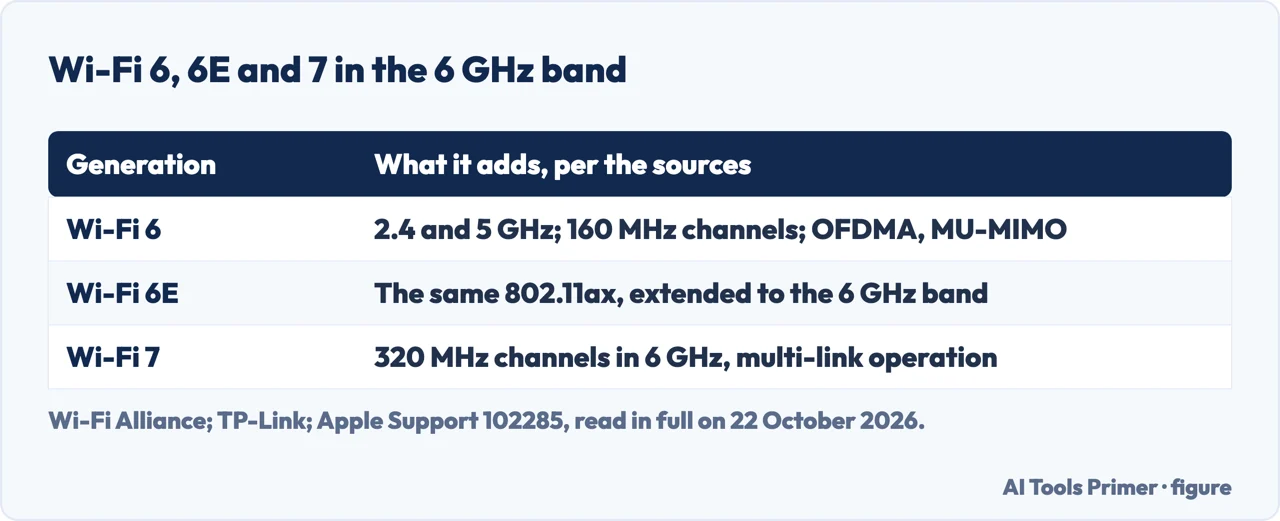
6 and 6E are one standard. TP-Link describes Wi-Fi 6E as Wi-Fi 6 extended to the 6 GHz band: both are 802.11ax, with the same OFDMA, eight-stream MU-MIMO and 1024-QAM, and the E adds the third band. A device without 6 GHz support simply uses the other two bands, as BroadbandNow’s guide puts it.
Wi-Fi 7 builds on the same band. The Wi-Fi Alliance says Wi-Fi 7, introduced in 2024, adds 320 MHz channels in the 6 GHz band, multi-link operation that spreads traffic across links, and 4K-QAM, which it puts at 20% higher transmission rates than 1024-QAM. An Apple device that supports Wi-Fi 6E can join a Wi-Fi 7 network’s 6 GHz band as well: Apple gives the same list of devices for both kinds of network.
Whether 6E is worth it comes back to the first section. BroadbandNow, which is supported by commissions from some of the products it lists, says upgrading is not mandatory if your router works and you own few 6E devices, and recommends it for busy households, crowded buildings and a router meant to last more than four years. Tom’s Hardware’s suggestion points the same way, one 6 GHz device near the router with the band to itself; Excentis adds that congestion avoidance, which it calls the biggest benefit of Wi-Fi 6E, was not part of its test. For more on the generations and their names, see what Wi-Fi stands for.
Where to start
Five ways in.
- “Will my phone use it?”
- The devices — devices
- “What does AXE5400 mean?”
- The box — box
- “Will it reach my bedroom?”
- The range — range
- “My laptop cannot see 6 GHz.”
- The settings — settings
- “Should I wait for Wi-Fi 7?”
- 6, 6E or 7 — six or seven
More on Wi-Fi at home
The signal, the channel and the speed each have a guide of their own.
Questions people also ask
Is a WiFi 6E router worth it?
Only if devices you own can use the 6 GHz band: an iPhone 15 Pro or later, a Mac from 2023 on, a Windows 11 PC with a 6 GHz adapter, or an Android phone whose specifications list Wi-Fi 6E. Everything else uses its 2.4 and 5 GHz bands.
What is a WiFi 6E router?
A Wi-Fi 6 router extended to the 6 GHz band, in TP-Link’s description: it broadcasts on 2.4, 5 and 6 GHz, and the 6 GHz band is open only to Wi-Fi 6E devices or later, with WPA3 security.
Is Wi-Fi 6 or 6E better?
They are the same 802.11ax standard; 6E adds the 6 GHz band, which has more room and, according to NETGEAR and Microsoft, a shorter range than 5 GHz. In Tom’s Hardware’s test of one router, 6 GHz was no faster than 5 GHz.
Is Wi-Fi 7 really better than 6E?
The Wi-Fi Alliance lists what Wi-Fi 7 adds: 320 MHz channels in the 6 GHz band, multi-link operation and 4K-QAM. TP-Link’s footnote makes the general point that a router’s features need clients that support them. Apple says a device that supports Wi-Fi 6E or later can join a Wi-Fi 7 network’s 6 GHz band.
Not covered here. We did not test any router or device: the device lists, settings and figures are those of Apple, NETGEAR, Intel, Microsoft, TP-Link, the FCC and the Wi-Fi Alliance, and the measurements are those published by Extreme Networks, Excentis and Tom’s Hardware, all read on 22 October 2026. NETGEAR’s support pages and the Excentis post carry no date.
This page does not rank routers or quote prices; the shopping results, Reddit threads, forum posts and videos among the search results were not read. Business networks are not covered.
The search volume and difficulty behind this page were read in Semrush on 29 August 2026.
Sources
- Apple Support — Use Wi-Fi 6E or Wi-Fi 7 networks with Apple devices (article 102285) — support.apple.com, read 22 October 2026.
- Apple Support — Recommended settings for Wi-Fi routers and access points (article 102766) — support.apple.com, read 22 October 2026.
- NETGEAR Support — Why can’t my device detect the 6 GHz wireless band? — kb.netgear.com, read 22 October 2026.
- NETGEAR Support — Does my Microsoft Windows PC support 6 GHz WiFi? — kb.netgear.com, read 22 October 2026.
- NETGEAR Support — Does my Android mobile device support 6 GHz WiFi? — kb.netgear.com, read 22 October 2026.
- NETGEAR Support — Is 6 GHz WiFi available in my region? — kb.netgear.com, read 22 October 2026.
- NETGEAR Support — Why does my 6 GHz WiFi device disconnect from, or not automatically reconnect to, my 6 GHz network? — kb.netgear.com, read 22 October 2026.
- Intel — Intel Wi-Fi 6E AX210 Adapter Cannot Connect to a 6 GHz Band (article 000087538) — www.intel.com, read 22 October 2026.
- Intel — 2.4 GHz vs. 5 GHz vs. 6 GHz: What’s the Difference? — www.intel.com, read 22 October 2026.
- Microsoft Support — Wi-Fi problems and your home layout — support.microsoft.com, read 22 October 2026.
- FCC — FCC Opens 6 GHz Band to Wi-Fi and Other Unlicensed Uses (Report and Order FCC-20-51) — www.fcc.gov, read 22 October 2026.
- Wi-Fi Alliance — Wi-Fi CERTIFIED 6 and Wi-Fi CERTIFIED 7 — www.wi-fi.org, read 22 October 2026.
- Wi-Fi Alliance — Regulations enabling 6 GHz Wi-Fi — www.wi-fi.org, read 22 October 2026.
- TP-Link — What is WiFi 6E? — www.tp-link.com, read 22 October 2026.
- TP-Link — WiFi 6E Routers are Coming: Should I Replace My Current Router? — www.tp-link.com, read 22 October 2026.
- TP-Link — Archer AXE75, AXE5400 Tri-Band Gigabit Wi-Fi 6E Router: specifications — www.tp-link.com, read 22 October 2026.
- Extreme Networks, David D. Coleman — How Far Will Wi-Fi 6E Travel in 6 GHz? (4 October 2020) — www.extremenetworks.com, read 22 October 2026.
- Excentis — We tested Wi-Fi 6 versus Wi-Fi 6E: here are the results! — www.excentis.com, read 22 October 2026.
- Tom’s Hardware, Joe Stanganelli — TP-Link Archer AXE75 WiFi 6E Router Review (17 August 2023) — www.tomshardware.com, read 22 October 2026.
- BroadbandNow (supported by commissions) — Best Wi-Fi 6E Routers of 2026, Tested and Reviewed — broadbandnow.com, read 22 October 2026.
Written by Alberto Gulotta
Founder and editor of AI Tools Primer, writing from Palermo, Italy. Thirty-five years of taking computers apart, starting with a Commodore 64 — the long version is on the about page.
Something wrong on this page? Write to aitoolsprimer@gmail.com and it gets fixed.
Written on 22 October 2026.
Independence and limits
No affiliate links and no paid placements anywhere on this site. Nobody pays to appear here, and no company has seen this page before you did.
This is general information, not professional advice. Where a page touches money, health, safety or the law, it names its source and the date it was read — and your situation may still differ. See the privacy page and the cookie policy.