
Audio · guide
How to convert YouTube to MP3 legally, by YouTube’s own rules
By Alberto Gulotta · Updated · 10 min read
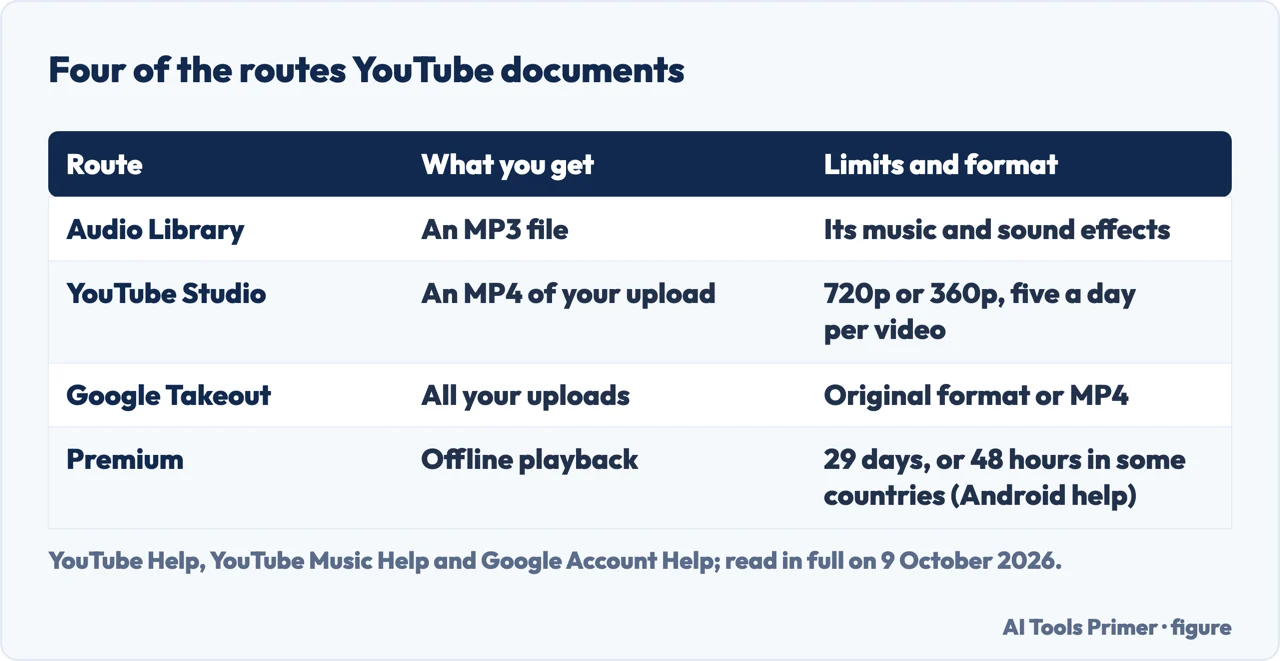
How to convert YouTube to MP3 legally: the terms YouTube serves in the United States forbid downloading content except as expressly authorised by the service or with prior written permission. Among the routes YouTube documents, the Audio Library in YouTube Studio downloads tracks as MP3, and YouTube Studio exports your own uploads as MP4.
| What | What YouTube says |
|---|---|
| Terms, United States version | No downloading of any content except as expressly authorised by the service, or with prior written permission from YouTube and, if applicable, the rights holders |
| Audio Library | Tracks download as MP3 files from YouTube Studio; some need the artist credited |
| Videos you uploaded | On a computer, download as MP4 at 720p or 360p, up to five times a day per video; Google Takeout can export them all |
| YouTube Premium | The Android help page: downloads play offline for up to 29 days, or 48 hours in some countries or regions |
| YouTube Music Premium | Downloads stay if the device reconnects at least once every 30 days |
What YouTube’s terms say
The rule. The terms YouTube serves with the United States setting, from Google LLC and in force since 15 December 2023, list what you are not allowed to do. The first item covers accessing, reproducing, downloading or otherwise using any content except as expressly authorised by the service, or with prior written permission from YouTube and, if applicable, the rights holders.
Copy protection. The same list rules out circumventing or interfering with features that prevent or restrict the copying of content. The terms also say you may view or listen to content for your personal, non-commercial use.
In the European Economic Area and Switzerland. The version served to us from Italy is Google Ireland’s, in force since 30 May 2023. It gives the first exception as specifically permitted by the service and adds a third: as permitted by applicable law. It says that if you live there, the agreement is governed by the laws of your country of residence. Read the version YouTube shows you.
What happens on a breach. YouTube says it can suspend or terminate your Google account, or your access to all or part of the service, if you materially or repeatedly breach the agreement.
What this page does and doesn’t do. It doesn’t name, rate or link converter sites, and it isn’t legal advice. That a download YouTube itself offers counts as expressly authorised by the service is our reading of the terms; YouTube says it can’t give legal guidance. The routes below are the ones in YouTube’s and Google’s own help pages, read in full on 9 October 2026. If the audio is speech you want as text, transcribing a recording starts from a file you already have.
- Sign in to YouTube Studio. YouTube says the Audio Library, with royalty-free music and sound effects to use in your videos, is found only there, and also opens at youtube.com/audiolibrary.
- Select Audio library in the left menu. In the Music tab, search by title, artist or keyword, or filter by genre, mood, attribution and duration.
- Click Play to sample a track, if you want. YouTube says it keeps playing while you browse.
- Hover over the date and click DOWNLOAD. YouTube says this gets you an MP3 file.
- Credit the artist in your video. If you use a track with a Creative Commons licence, YouTube says you must credit the artist in your video’s description; the filter Attribution not required shows the tracks that don’t need it.
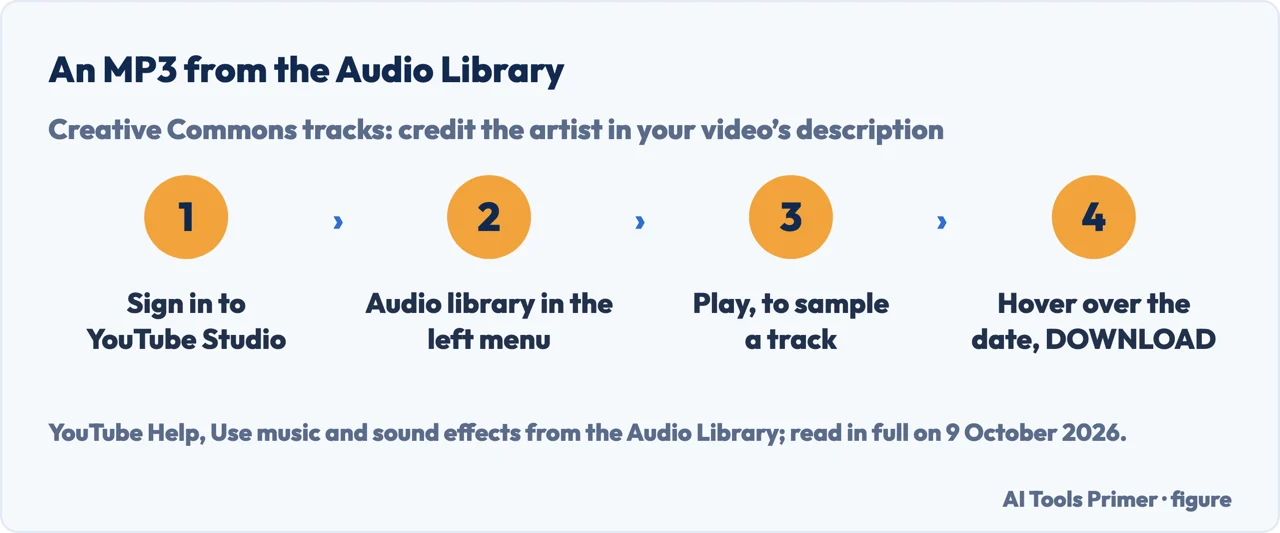
What “copyright-safe” covers. YouTube says Audio Library music and sound effects won’t be claimed by a rights holder through Content ID, and that members of the YouTube Partner Program can monetise videos that use them. It also says it can’t give legal guidance, including on issues with music that can occur off the platform, and that it isn’t responsible for “royalty-free” music from other channels or libraries.
Your own uploads, as a file
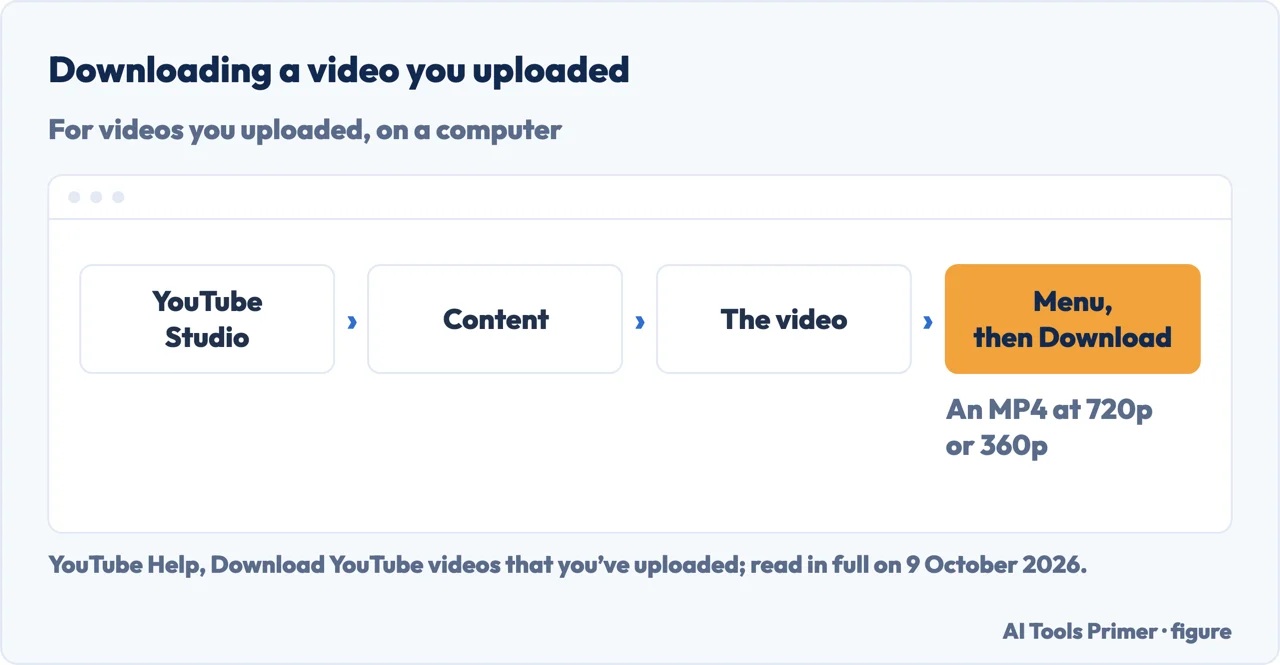
One video, on a computer. In YouTube Studio, select Content, choose the video, then Menu and Download. YouTube says the file is an MP4 at 720p or 360p depending on the video’s size, and that a video can be downloaded up to five times a day.
When it won’t. YouTube lists four reasons: the video has been removed, it has a copyright or Community Guidelines strike, it uses a preapproved audio track, or you have already downloaded it five times in the last 24 hours.
All of them. YouTube says Google Takeout can download all the videos you’ve uploaded, and Google’s Takeout help says to check for a Brand Account if some are missing; Google says they come in their original format or as MP4 with H264 video and AAC audio. YouTube’s help page also says you can’t download other users’ videos.
From MP4 to MP3. Neither download of your uploads is an MP3; taking the audio out of a video file on your own computer is explained in MP4 to MP3.
Premium: offline, inside the app
YouTube Premium. Where Premium is available, YouTube says you can download and watch videos on your mobile device, and download videos on a computer in Chrome, Edge, Firefox and Opera. Its Android help page says downloads play offline for up to 29 days before you reconnect, or up to 48 hours in some countries or regions; you must be signed in to your Premium account to download, and downloads play while signed in to the same account.
YouTube Music Premium. YouTube Music’s Android help page says members can download songs, videos and podcasts to a mobile device, and must reconnect at least once every 30 days to keep them; podcasts can be downloaded without a membership, and users in some countries or regions may see a different product.
What this is not. The help pages read here describe playback inside YouTube’s apps, and none of them describes exporting those downloads as MP3 files: that is our reading of what they say, not a sentence of theirs.
The law, in the United States. The US Copyright Office says that whether a use is fair use depends on all the circumstances, that there is no rule allowing a set number of notes or a percentage of a work, and, on quotes and samples, that in cases of doubt it recommends that permission be obtained. On peer-to-peer networks it says uploading or downloading protected works without the owner’s authority infringes, and that anyone found to have infringed may be liable for statutory damages of up to $30,000 per work, which may rise to $150,000 if the owner proves wilful infringement.
Which versions. The US terms are those in force since 15 December 2023; the help pages give no date. For your own video before it goes up, YouTube’s recommended settings are in uploading to YouTube; for changing a video file’s format, see MP4 and converting, and for making it smaller, compressing video.
Where to start
Five ways in.
- “Is it allowed?”
- The terms — what the terms say
- “I need music for a video.”
- Audio Library — audio library
- “It’s my own video.”
- Your uploads — your own uploads
- “I just want to listen offline.”
- Premium — offline in the app
- “What does the law say?”
- The law — the law
More on audio and video files
Taking the sound out of a video you have, and what to do with it next.
Questions people also ask
What is the safest YouTube to MP3 convertor?
This page doesn’t name or rate converter sites. The MP3 download YouTube documents is in the Audio Library of YouTube Studio, for music and sound effects to use in your videos. For a video you uploaded, YouTube Studio gives an MP4 on a computer; taking the audio out of that file is a separate step on your own computer.
Is YT DLP illegal?
None of the pages read here names yt-dlp. The terms YouTube serves in the US forbid downloading except as expressly authorised or with prior written permission, and forbid getting round features that restrict copying. Whether a use is lawful is a legal question: the US Copyright Office says only a federal court can decide whether a use is fair use.
How can I convert audio from YouTube to MP3?
From the Audio Library in YouTube Studio: play a track, hover over the date and click DOWNLOAD, and YouTube says you get an MP3. For your own uploads, YouTube Studio downloads an MP4, at 720p or 360p, and taking the audio out of that file is a separate step on your computer.
What are the risks of using a YTMP3 converter?
The terms YouTube serves in the United States list downloading content, except as expressly authorised or with permission, among the things you are not allowed to do, and say YouTube can suspend or terminate a Google account for material or repeated breaches. None of the pages read here assesses converter sites.
Not covered here. It does not cover YouTube Music uploads, podcasts by RSS, or the copyright law of countries other than the United States.
Sources
- YouTube — Terms of Service, United States version (Google LLC, effective 15 December 2023): permissions and restrictions, suspension and termination — m.youtube.com, read 9 October 2026.
- YouTube — Terms of Service as served in Italy (Google Ireland, effective 30 May 2023, English courtesy translation): the third exception — www.youtube.com, read 9 October 2026.
- YouTube Help — Use music and sound effects from the Audio Library — support.google.com, read 9 October 2026.
- YouTube Help — Download YouTube videos that you’ve uploaded (computer) — support.google.com, read 9 October 2026.
- Google Account Help — How to download your Google data (Takeout): the format of YouTube videos — support.google.com, read 9 October 2026.
- YouTube Help — Watch videos offline with YouTube Premium (Android) — support.google.com, read 9 October 2026.
- YouTube Music Help — Download music & podcasts to listen offline (Android) — support.google.com, read 9 October 2026.
- YouTube Music Help — Explore YouTube Music Premium benefits — support.google.com, read 9 October 2026.
- U.S. Copyright Office — Fair Use (FAQ) — www.copyright.gov, read 9 October 2026.
Written by Alberto Gulotta
Founder and editor of AI Tools Primer, writing from Palermo, Italy. Thirty-five years of taking computers apart, starting with a Commodore 64 — the long version is on the about page.
Something wrong on this page? Write to aitoolsprimer@gmail.com and it gets fixed.
Written on 9 October 2026.
Independence and limits
No affiliate links and no paid placements anywhere on this site. Nobody pays to appear here, and no company has seen this page before you did.
This is general information, not professional advice. Where a page touches money, health, safety or the law, it names its source and the date it was read — and your situation may still differ. See the privacy page and the cookie policy.