
Breach · guide
What a Have I Been Pwned password check sends and gets back
By Alberto Gulotta · Updated · 16 min read
A Have I Been Pwned password check sends the first five characters of a hash, not the password. The tool hashes the password with SHA-1 on your own device, receives every matching ending and compares them locally. Here is that exchange step by step, the reply size we measured, and what NIST asks of sites.
| Question | Answer | Where it comes from |
|---|---|---|
| What is sent? | The first 5 characters of the password’s SHA-1 hash, which is computed on your own device | HIBP Passwords, Privacy Policy |
| What comes back? | The endings of every stored hash that starts the same way, each with a count; you compare locally | HIBP API page |
| How big is the reply? | Cloudflare gave 478 on average in 2018, HIBP says about 800, and our request on 30 October 2026 returned 1,971 lines | Cloudflare, HIBP, our request |
| What does it cost? | The API page says no subscription and no key, and no rate limit on the Pwned Passwords API | HIBP API page |
| Is a clean result a good password? | Not necessarily: the page says it only means the password is not indexed on the site | HIBP Passwords |
| Why do sites check? | NIST asks verifiers to compare a new password against a blocklist that can include breached passwords | NIST SP 800-63B-4 |
What one check sends
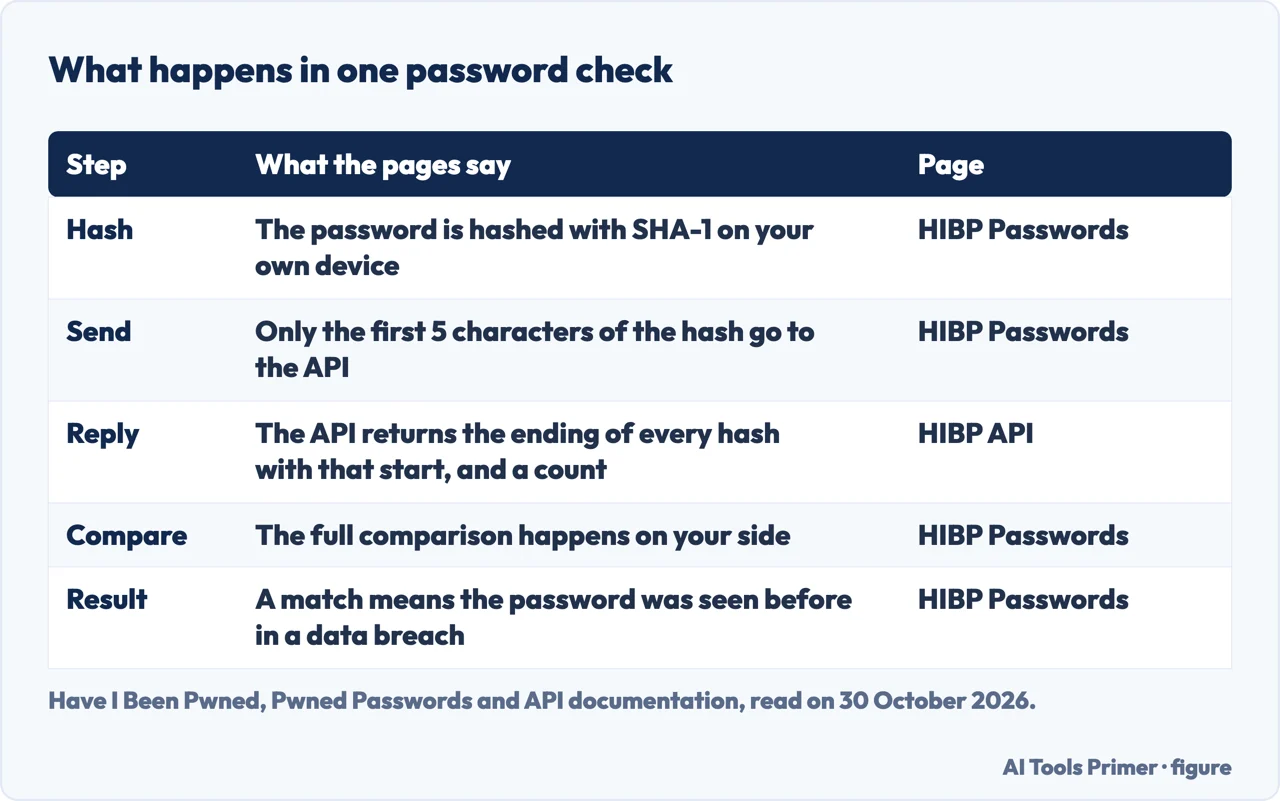
The Pwned Passwords page on Have I Been Pwned (HIBP) says it uses a model called k-anonymity. As the page puts it, the password is hashed locally and only the first 5 characters of the SHA-1 hash are sent to the API; the service returns a list of matching suffixes, and the full comparison happens on your side. HIBP’s privacy policy describes the client-side SHA-1 hash and the first 5 characters sent. The check itself is on the Pwned Passwords page at haveibeenpwned.com/Passwords, which the page calls free and open source, and the page says you can watch the request happen in your browser’s dev tools when you run a search on it. The privacy policy adds that HIBP does not receive the original password or enough information to discover it, and that no identifying information about who the password belongs to is stored.
Cloudflare’s 2018 post gives a worked example with the password test. Its SHA-1 hash is a94a8fe5ccb19ba61c4c0873d391e987982fbbd3, and the first five characters, a94a8, are the prefix. We computed the hash of that word on our own machine with the shasum tool and got the same value. HIBP’s NIST page gives a second example, password123, whose prefix is CBFDA, and shows the request as a GET to https://api.pwnedpasswords.com/range/CBFDA. Both are example passwords taken from the pages. The only thing we sent to the API was the prefix CBFDA.
The API page describes what comes back. When hashes with the same first five characters are in the repository, the API responds with an HTTP 200 and includes the suffix of every hash that begins with the prefix, followed by a count of how many times it appears in the data set. A SHA-1 hash has 40 characters, so with five sent each suffix has 35; the page gives 27 for the NTLM form, which you ask for with ?mode=ntlm. It also says that every possible prefix, from five zeros to five Fs, returns HTTP 200, and that there is no circumstance in which the API should return a 404.
Our reading of that last point is that a 200 cannot tell you whether your password was found; only the list can. To read it, you look for your own suffix. The API page says that if it is not in the response, the password does not exist in the data set, and if it is, the number beside it is how many times it appears.
What comes back, and how big it is
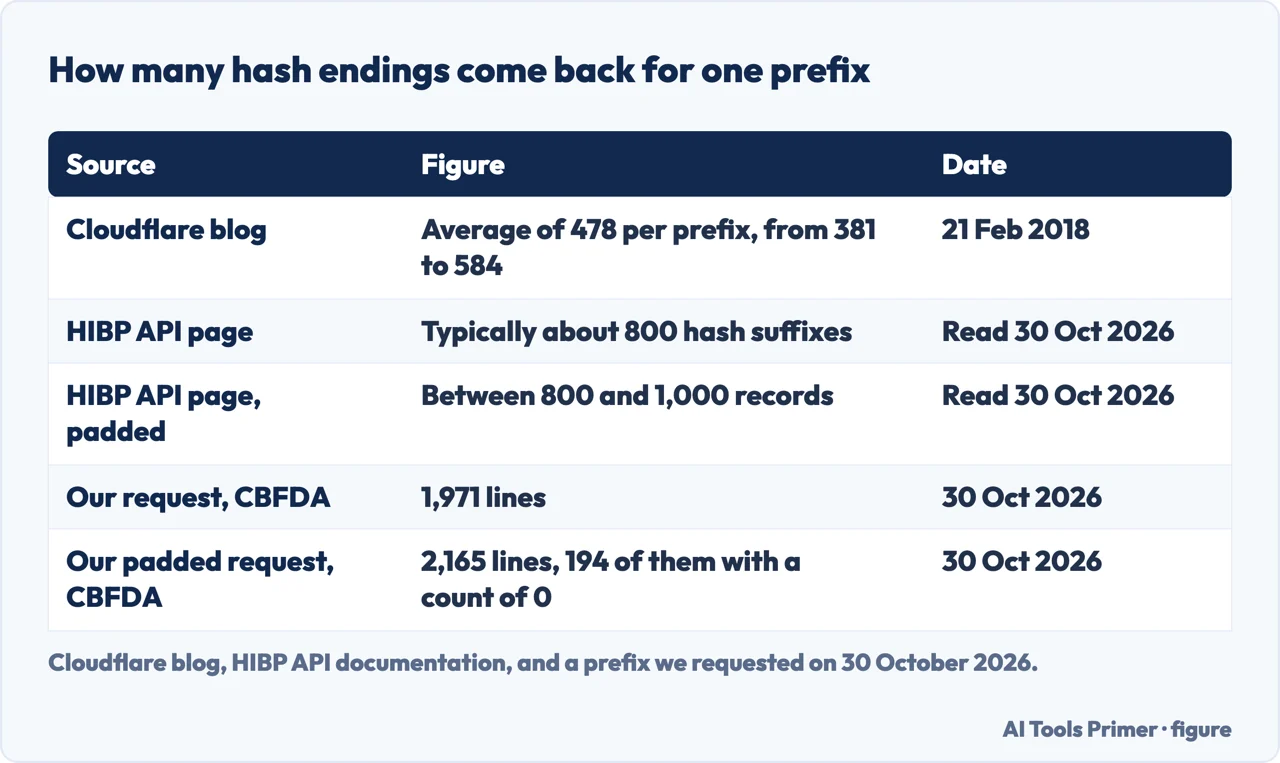
Three pages give three different sizes for the reply to one prefix. Cloudflare’s post of 21 February 2018, written when the data held over half a billion passwords, says the average number of hashes returned was 478, the smallest 381 (for E0812 and E613D) and the largest 584 (for 4A4E8 and for the prefix of five zeros). On the first set of 320 million passwords it gives a median of 305 hashes and replies of 8.6 KB to 16.8 KB, with a median of 12.2 KB. HIBP’s API page, read on 30 October 2026, says a range search typically returns approximately 800 hash suffixes, that the number differs by prefix, and that it will increase as more passwords are added.
We measured it. On 30 October 2026 we asked for the prefix CBFDA and received 1,971 lines. That is one prefix on one day and no other sample, so it shows only that this reply was more than twice the figure on the API page; it says nothing about the average. Cloudflare wrote in 2018 that the prefix 21BD1 contained 475 passwords, but its post does not say which size of data set that count came from, so we draw no comparison with today. In the CBFDA reply, the ending of the hash of password123 was present with a count of more than two million. Counts change over time, and this is a well-known example, not anybody’s real password.
Padding is a second layer. If a request carries the header Add-Padding: true, the API page says the response holds a random number of records between 800 and 1,000, the padded entries always have a count of 0 and can be discarded, and the purpose is that someone able to intercept the encrypted responses cannot work out which prefix was searched for from the size of the response. Our padded request for CBFDA returned 2,165 lines, 194 of them with a count of 0. That is above the 800 to 1,000 the page gives, and 1,971 plus 194 is 2,165. The pages do not explain why a padded reply runs past 1,000 lines, or why 194 zero-count entries were added to a reply that already had 1,971; we report only what we received.
The size of the corpus behind the prefixes is also told differently. Cloudflare wrote of over half a billion in February 2018, up from the original 320 million. HIBP’s API page says hundreds of millions, while its NIST page says the service began with 306 million and now holds billions; the two HIBP pages do not agree. The Passwords page gives no total, only 18 billion or more requests a month. Whoever wants every hash does not have to ask for them one prefix at a time: the API page says all hashes are available for download as SHA-1 or NTLM, that the free Pwned Passwords Downloader on GitHub queries every prefix and saves the results offline, and that the service works best when queried directly because it is fast and always up to date.
Why the hash is not salted, and why a prefix hides you
Cloudflare’s post explains the problem the design solves. Before range queries there were two choices: submit an unsalted hash of the password to a third-party service, where it could potentially be stored for later cracking, or download the entire list of hashes, which the post put at over 30 GB at the time. The hashes have to be unsalted, it says, because salting them makes them computationally difficult to search quickly. K-anonymity is what the post calls the middle way. It also considered Private Set Intersection, a method from academic computer science, and set it aside because the communication overhead was equivalent to downloading the entire set.
The post names two properties that make a short prefix safe to send. The first is the avalanche effect: a small change in a hash gives a very different output, so one hash tells you nothing about another, even when truncated. The post says the prefix 21BD1 held 475 seemingly unrelated passwords. The second is that hashes are fairly uniformly distributed: counting the original 320 million passwords by the first hexadecimal character of the hash, the difference between the largest and smallest group was about 1%. It adds that the number of possible hashes behind a five-character prefix is 16 to the power of 35, about 1.39 × 1042.
Read the post knowing who wrote it. The HIBP Passwords page says the service is made possible by Cloudflare’s support, which provides the global infrastructure, and the post’s author says the work on the range endpoints was done together with Troy Hunt, whose Have I Been Pwned service this is. So the explanation comes from a partner in the design, not from a party outside it. NIST, the third source here, is independent of both, and the NIST pages we read do not mention HIBP.
What the method does not protect
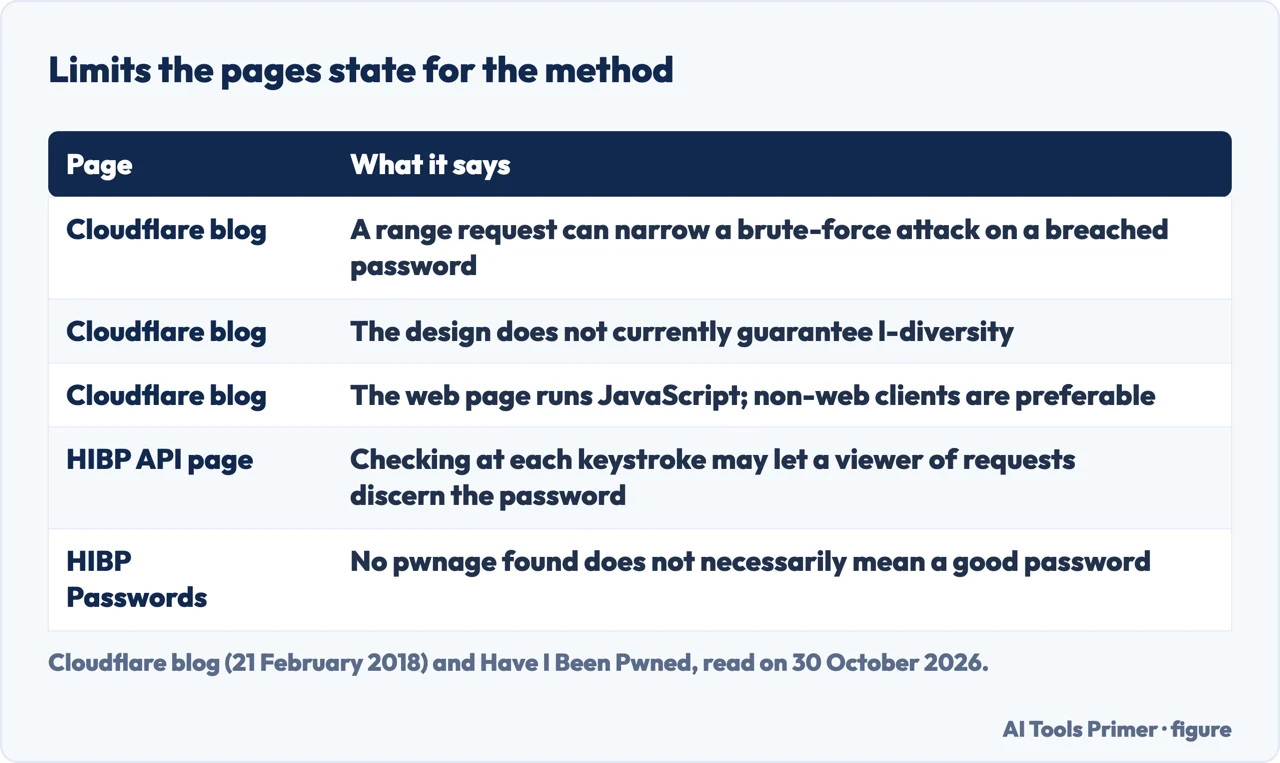
Cloudflare lists its own caveats under the heading “Important Caveats”. The first is that where a password is already breached, a request for a specific range can reduce the search candidates used in a brute-force attack, even though the service has no way of knowing whether the client searched for a breached password. The post suggests that running queries for other prefixes with a deterministic algorithm can reduce the risk. The second is that the implementation does not currently guarantee l-diversity, meaning a bucket may contain a hash used substantially more than the others. The third concerns the web page: it uses a JavaScript client, and if the origin server were hijacked the local computation could be removed and the password sent to the hijacked server, so for technical users the post says requests that do not go through a web client are preferable.
The post also says that, depending on your risks, it is safer to run the service yourself where a service lacks the resources to store the entire database of leaked hashes, and recommends against storing the range queries of your users; if you do store them, it says to keep them only as aggregate analytics that cannot be linked to any password. Separately, the HIBP API page warns against checking at every keystroke. That could give someone able to view inbound requests at Cloudflare enough information to discern the password, and the page recommends waiting until the whole password is entered.
On what HIBP itself keeps, the privacy policy says web server logs are retained for up to 31 days and may include information submitted in a form, browser headers and, in some cases, the IP address. The pages we read do not say whether the requested prefixes are recorded. Our page on whether Have I Been Pwned is safe goes through the logging statements and who runs the service. One more difference worth knowing: the API page says email address searches use six characters of the hash, not five, because the email corpus is significantly larger than the password corpus.
Reading the answer
The Pwned Passwords page has two answers. If the password is not found, it says “Good news - no pwnage found!” and explains that the password was not found in any of the Pwned Passwords loaded into HIBP, which does not necessarily mean it is a good password, merely that it is not indexed on the site. If it is found, the page says the password has been seen a number of times before in data breaches, has previously appeared in a data breach and should never be used, and that if you have ever used it anywhere before you should change it immediately.
The same page gives the reason for checking: password reuse is extremely common and puts accounts at risk, and when credentials are exposed in breaches, attackers can use the known email and password combinations on other accounts. It lists credential stuffing, large breaches and predictable password patterns as the dangers. Our page on credential stuffing covers the first.
The pages we read do not say which site or account a found password came from, and they do not describe steps after a match beyond changing the password wherever it was used. A count is a count of appearances in the data set, not a statement about any person. For the browser-side counterpart of this check, see the Google Password Checkup.
Why sites check at all: the NIST requirement
The requirement sits in NIST SP 800-63B-4, section 3.1.1.2, on the pages.nist.gov web version. When processing a request to establish or change a password, it says, verifiers SHALL compare the prospective secret against a blocklist that contains “known commonly used, expected, or compromised passwords”, and the entire password is compared, not substrings. The text lists what such a list may include: passwords obtained from previous breach corpuses, dictionary words, and context-specific words such as the name of the service, the username and derivatives of them. If the chosen password is on the list, the service must require a different one and give the reason for the rejection, and it must offer guidance afterwards because that discourages trivial modifications of listed passwords.
NIST also limits the list. It says the blocklist should be of sufficient size to stop people choosing passwords attackers are likely to guess before reaching the attempt limit, but that excessively large blocklists are of little incremental security benefit, because the list defends against online attacks that throttling already limits. In its Appendix A the example is the password “password”: under composition rules, a person who would have chosen it is likely to choose “Password1” or “Password1!”. NIST’s text on password authenticators also says that other composition requirements shall not be imposed, and points to Appendix A for the rationale
The same section also sets rules on length, composition and expiry. They are not about checking against leaks, so we do not repeat them here: our page on creating a strong password goes through the length and composition rules, and our page on changing passwords covers expiry.
HIBP’s NIST page ties its service to this text. It says Pwned Passwords launched with 306 million passwords eight days after NIST published the guidance in June 2017, that its data comes from breach and stealer-log data including contributions from the FBI (630 million in December 2025) and the UK’s National Crime Agency (225 million in December 2021), and that Europol also contributed. It also says the service is used directly by 1Password, Bitwarden, GitHub, Mozilla, Cloudflare and Okta. Those are HIBP’s statements about itself, and we did not verify them elsewhere. The page sets out four steps for a site: hash the password with SHA-1, send only the first five characters, compare the returned suffixes locally, and reject or rotate the password on a match.
Where to start
Four ways in.
- “What leaves my device?”
- What one check sends — sends
- “How big is the answer?”
- What comes back, and how big it is — reply
- “What does it not protect?”
- What the method does not protect — limits
- “Why do sites check?”
- Why sites check at all: the NIST requirement — nist
Around a leak
The service, your browser, and what attackers do with a leak.
Passwords themselves
Making one, changing one, or replacing it.
Questions people also ask
Are you trying to check a specific password or secure an entire account?
The pages we read do not say which site or account a found password came from. HIBP’s page says to change a found password immediately if you have used it anywhere. The pages do not describe steps for securing a whole account beyond that.
Do you need help setting up a password manager?
The Pwned Passwords page recommends a password manager to generate and store strong, unique passwords, and links to 1Password, a commercial product. NIST says verifiers SHALL allow password managers and autofill. The pages we read do not walk through a setup; our page on creating a strong password goes further.
Does it really make sense to use Have I Been Pwned?
HIBP gives its reasons: reuse is extremely common, and NIST asks sites to compare passwords against compromised ones. Its own page adds that a clean result does not necessarily mean a good password, and Cloudflare lists limits of the method. The Reddit thread with this title was not read.
Not covered here. The statements come from four pages on the Have I Been Pwned site (Pwned Passwords, NIST, API documentation and Privacy Policy), Cloudflare’s blog post of 21 February 2018 and two NIST SP 800-63B-4 pages, all read on 30 October 2026. We measured two requests to the range API on that day and sent no password.
The search volume and difficulty behind this page come from a Semrush reading of 29 August 2026, older than the 60 days the site normally allows.
Sources
- Have I Been Pwned — Pwned Passwords — haveibeenpwned.com, read 30 October 2026.
- Have I Been Pwned — NIST 800-63B Compliant Password Checking — haveibeenpwned.com, read 30 October 2026.
- Have I Been Pwned — API Documentation v3 (Pwned Passwords) — haveibeenpwned.com, read 30 October 2026.
- Have I Been Pwned — Privacy Policy — haveibeenpwned.com, read 30 October 2026.
- Cloudflare Blog — Validating Leaked Passwords with k-Anonymity (21 February 2018) — blog.cloudflare.com, read 30 October 2026.
- NIST SP 800-63B-4 — Authenticators (section 3.1.1.2) — pages.nist.gov, read 30 October 2026.
- NIST SP 800-63B-4 — Passwords (Appendix A) — pages.nist.gov, read 30 October 2026.
Written by Alberto Gulotta
Founder and editor of AI Tools Primer, writing from Palermo, Italy. Thirty-five years of taking computers apart, starting with a Commodore 64 — the long version is on the about page.
Something wrong on this page? Write to aitoolsprimer@gmail.com and it gets fixed.
Written on 30 October 2026.
Independence and limits
No affiliate links and no paid placements anywhere on this site. Nobody pays to appear here, and no company has seen this page before you did.
This is general information, not professional advice. Where a page touches money, health, safety or the law, it names its source and the date it was read — and your situation may still differ. See the privacy page and the cookie policy.