
Business · guide
CRM for small business: what the pages say about a spreadsheet
By Alberto Gulotta · Updated · 18 min read
A CRM for a small business can be as plain as a notebook or a spreadsheet, SCORE says in an article dated 29 May 2019, while Xero lists five signs that a sheet has stopped keeping up and Salesforce lists six, and the pages we read give no number of customers at which to switch.
| Question | Answer | Where it comes from |
|---|---|---|
| Can a spreadsheet already count as a CRM? | SCORE, in an article dated 29 May 2019, counts a notebook or an Excel sheet as part of your CRM | SCORE |
| When do the pages say software is needed? | Xero says when sheets and sticky notes can no longer keep up; the U.S. Chamber says most small business owners benefit from a CRM | Xero, U.S. Chamber |
| How many signs do the two vendors list? | Xero lists five and Salesforce lists six; they overlap on lost conversations and data | Xero, Salesforce |
| What do paid plans cost? | Xero says typically $10 to $50 per user a month; HubSpot’s Starter starts at $15 a seat | Xero, HubSpot |
| Is there a free plan? | HubSpot: up to two users and 1,000 contacts. Zoho: up to 3 users and 5,000 records | HubSpot, Zoho |
| How long does setup take? | Xero says a few days to a week; a Zoho Bigin page says about 30 minutes for its own product | Xero, Zoho Bigin |
| At what number of customers does a sheet stop working? | The pages we read do not give one | All pages read |
You may already have a CRM
SCORE’s article, dated 29 May 2019, opens by saying that even a reader who does not know what a customer relationship management system is probably uses one. It names a notebook with a page for each customer, an Excel spreadsheet that tracks all the customers and carefully organized labels in an email account as parts of your CRM. Its plain definition is that, “at its most basic”, a CRM is a system that helps you track the interactions you have with current and potential customers. On that reading the question changes: it is less whether to have a CRM than when the one you have stops being enough.
The software version is described in similar terms by Xero and the U.S. Chamber. Xero’s guide, published on 22 April 2026, tells readers to think of a simple CRM as a “digital address book, but smarter” and lists its key features as contact management, sales pipeline tracking, interaction tracking and connections to email, calendars and accounting software. It adds automated reminders for follow-ups, scheduled calls and customers who have not been contacted recently. The U.S. Chamber of Commerce’s small-business site, CO—, defines a CRM in an article published on 25 August 2026 as software for organizing sales and marketing activities and customer data, including contact details, preferences and histories.
What software adds to a notebook or a sheet is spelled out most clearly by SCORE. If the CRM is software, it says, you or your team can set up “reminders at set intervals” so that leads and contacts are contacted regularly, and those tasks are available as reports. It calls aggregation the most important capability: putting all of the information and interactions with a person or business into “a single comprehensive view”, where every email, phone call, meeting or follow-up can be seen in one place. The reports, it says, answer how long it takes to turn a lead into a contact, how long to turn a contact into a buyer, and what the best sources of leads are. Xero’s guide adds that connecting a CRM to email can log conversations automatically, and Salesforce’s page says a CRM can provide reports such as sales forecasts, customer insights and marketing analytics.
A note on who is speaking. Xero sells accounting software and its guide says it integrates with a range of CRM apps; Salesforce, HubSpot and Zoho sell CRM software; the Zoho Bigin page is a comparison written by the seller of that product. Their statements are reported here as what each page says, not as findings. SCORE and the U.S. Chamber do not sell a CRM on the pages we read.
The signs, as two vendors list them
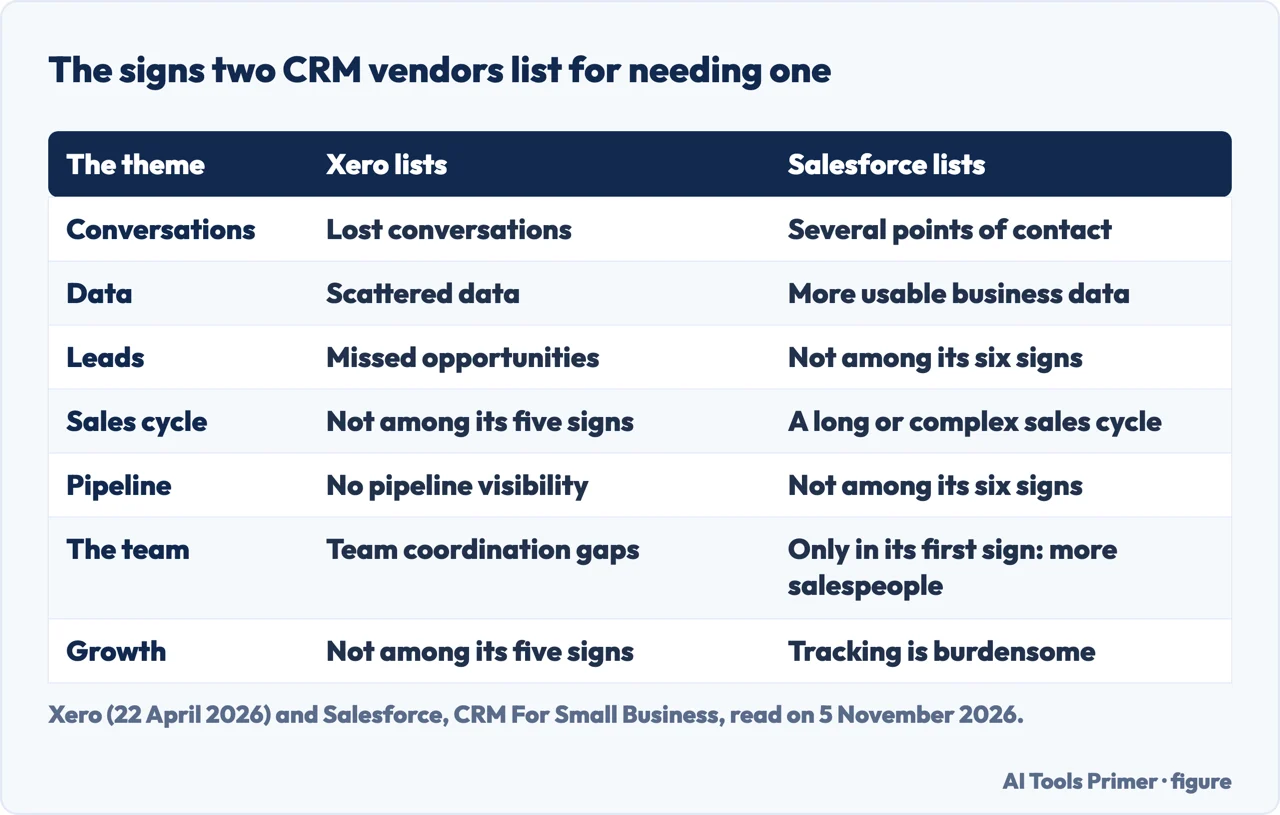
Xero’s guide says a small business needs a simple CRM when spreadsheets and sticky notes can no longer keep up with a growing customer base. It gives five signs to look for:
- Lost conversations. Customer conversations and follow-ups are being forgotten.
- Scattered data. Customer information lives in different spreadsheets and emails.
- No pipeline visibility. It is not possible to see where deals stand or what is coming next.
- Team coordination gaps. Sharing customer information takes too much effort.
- Missed opportunities. Leads fall through the cracks because follow-ups slip.
Salesforce’s page on CRM for small business, which shows no publication date in the text we read on 5 November 2026, gives six signs of its own: a wish for a better way to track prospects and customers; prospects and customers with multiple points of contact; a long or complex sales cycle; a need to improve sales, marketing and customer service; a need for more usable business data; and a priority on business growth.
Where the two lists meet, and where they part
Both lists describe losing track. Xero calls it lost conversations and follow-ups. Salesforce says it is easy to lose track of conversations when several people on a team talk to several people at a customer, and its example asks whether the last conversation was with someone in sales or someone in compliance; a CRM, it says, lets the whole team see all interactions in one place and serves as a “single source of truth”. Both also touch on data. Xero describes it as scattered across spreadsheets and emails. Salesforce says a small business that runs on instinct rather than data may be missing growth opportunities.
They part on the rest. Xero names the pipeline: not being able to see where deals stand. Salesforce does not list that as a sign, and names a long or complex sales cycle instead, where it says a CRM helps keep consistent contact with prospects and keeps a history of each lead. Xero names the team: sharing information costs too much effort. Salesforce’s first sign mentions growth bringing more customers, more salespeople and more information. Salesforce also has a growth sign that reads as a test: it says growth past a certain point becomes challenging without a CRM, and that you will know you have reached it when tracking customers’ purchasing histories feels burdensome or when managing leads is more than manual effort can handle.
Is the spreadsheet the problem? Five pages, five answers
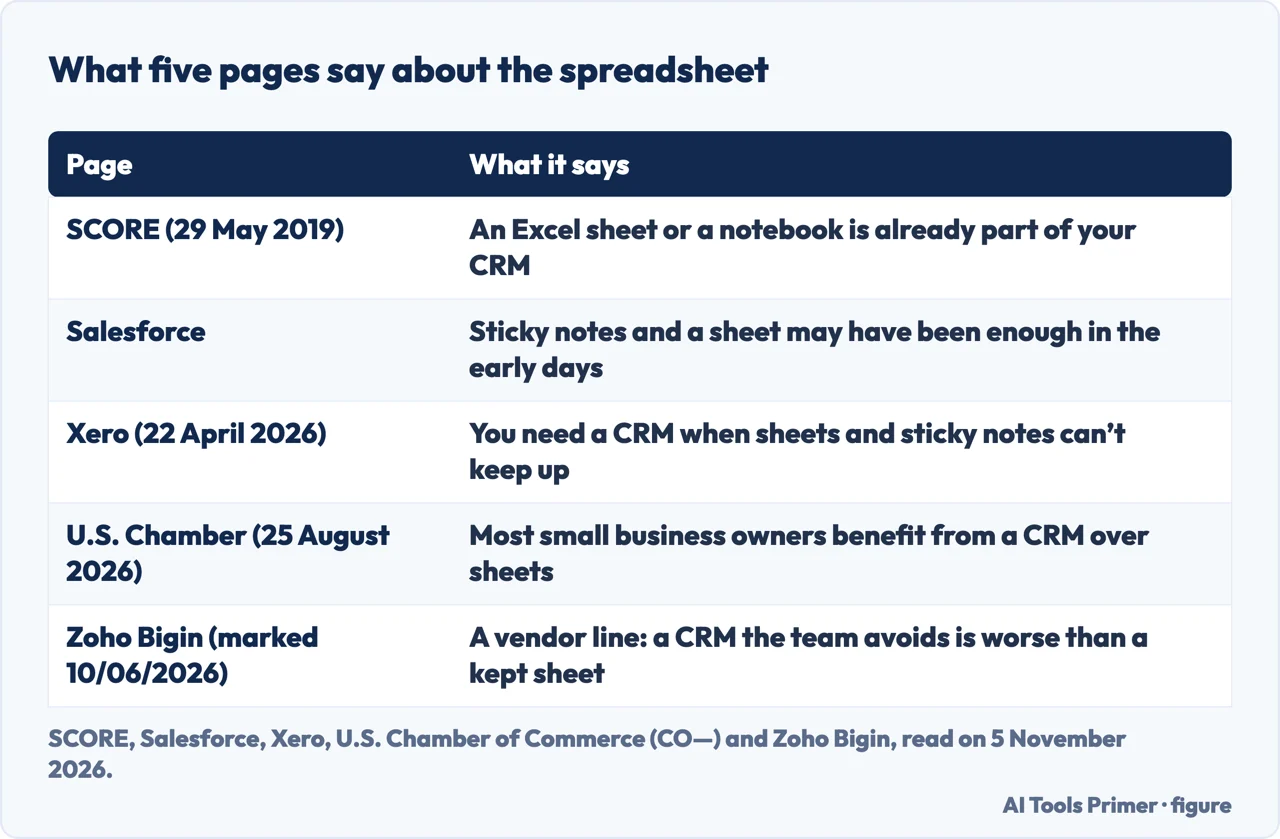
The pages do not agree on where the line sits. SCORE treats the sheet as a CRM already, so for it the choice is between a sheet or notebook and software. Salesforce says that in the early days sticky notes, a spreadsheet and a good memory may have been all a small business needed, and that growth brings more customers, more salespeople and more information. Of the pages we read, Salesforce and, in its FAQ, the Zoho Bigin page (a seller’s page) say a sheet can work at the start; Bigin says spreadsheets and inbox folders work until deals start slipping through the cracks.
Xero places the moment when sheets and sticky notes can no longer keep up. The U.S. Chamber goes further in a general direction: its article, published on 25 August 2026, says most small business owners benefit from using a CRM rather than spreadsheets, and that a CRM is one of the first tools to consider when starting a business. Its list of reasons to consider budgeting for CRM software, which sits in a section on when it makes sense to upgrade from a free CRM to a paid one, includes three that describe manual work and slow follow-up: productivity drops as employees spend more time manually assigning leads and tasks, copying data between platforms, or scoring opportunities; leaders cannot accurately measure performance, close times, or the effect of sales and marketing activities; and following up with new leads takes longer, or opportunities that come after business hours or at the weekend are missed.
A Zoho Bigin page, a comparison marked “as of 10/06/2026” and written by the seller of that product, argues in the other direction on one point. It says a CRM the team avoids is worse than a spreadsheet the team actually updates. That is a seller’s line about adoption, so we report it as a counterweight to the lists of signs and not as a finding.
The number the pages leave out
The pages we read do not give a number of customers, rows or people at which a sheet stops being enough, and they do not give a spending threshold. The pages describe the signs in words: forgotten follow-ups, information in several places, deals that cannot be seen, a team that cannot share, growth that makes tracking burdensome. The Zoho Bigin page puts figures on lost time and missed follow-ups, but they are second-hand statistics from other publishers that we did not check, and they are not a cost for a sheet. That leaves the decision to the reader’s own check against the signs above, and the U.S. Chamber ends its article with a note that before making any business decision you should consult a professional.
What it costs, with the date of each page
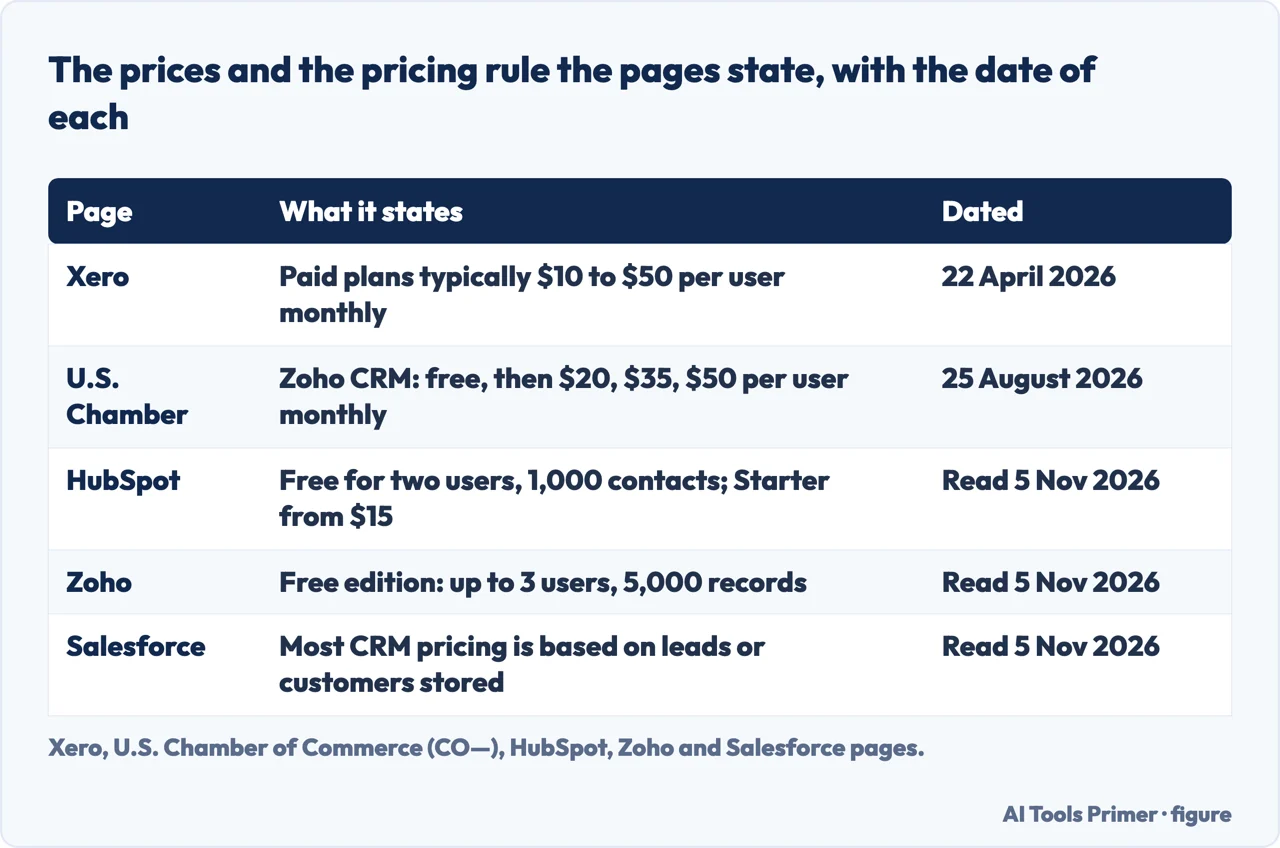
Xero’s guide says many simple CRMs offer free tiers or start around $10 to $30 per user per month, and, in another place, that paid plans for small businesses typically range from $10 to $50 per user per month depending on features. It tells readers to check for hidden costs such as fees to implement or charges for premium support. The U.S. Chamber’s article of 25 August 2026 gives per-seller figures: Zoho CRM is listed as Free, then Standard at $20 per user monthly, Professional at $35 and Enterprise at $50, and the article says Zoho scales from a free version for three users.
HubSpot’s page, read on 5 November 2026, says its free CRM tools cost nothing for up to two users and 1,000 contacts, with no limits on customer data and no expiration date. Its plan table shows Starter as “Starts at $15/month per seat”, Professional at $50 and the top tier at $75. An asterisk on the Starter price says the discount is available to new customers only and that the limits that apply are on HubSpot’s pricing page, which we did not read. Zoho’s free-CRM page, also read on 5 November 2026, says the free edition supports up to 3 users and up to 5,000 records in all modules, with no credit card required.
Salesforce’s page does not give a price for a base plan in the text we read. It says most CRM pricing is based on the number of leads or customers stored in the database, advises paying attention to contact limits because they can raise costs as a business grows, and gives one edition’s contact limit as an example: small businesses can use Marketing Cloud Account Engagement Growth for up to 10,000 contacts. The same page warns that low prices may translate to lower value over time if features are not included by default, and that adding features a la carte can pile up. The Zoho Bigin page lists its own Express plan at $7 per user per month; as a seller’s page for its own plan, we give that figure only as its claim.
Reading the figures side by side
The figures do not line up one to one. Xero counts per user, HubSpot per seat, Zoho per user with a user cap on the free edition and a record cap in all modules, and Salesforce’s page says most CRM pricing is based on the number of leads or customers stored, without giving a base price in the text we read. The pages also carry different dates: Xero 22 April 2026, the U.S. Chamber 25 August 2026, and HubSpot, Zoho and Salesforce as read on 5 November 2026. A price copied from one page into a budget would be a price as of that page’s date. For what the free tiers of HubSpot and Zoho limit in detail, our page on free CRM plans reports what each vendor publishes.
Xero’s checklist for choosing names three tests besides price: features that will actually be used, pricing that scales as the business grows, and data portability, meaning verifying that customer data can be exported if you need to switch platforms later. Its page on scalability also tells readers to confirm the platform can handle projected team growth and to check how much additional users cost.
Moving the sheet across
The U.S. Chamber’s article advises checking first with the vendor for resources or tools, since many provide basic guidance, formatting instructions and online wizards, and then gives nine steps for moving from a spreadsheet:
- Delete duplicate contacts or merge their details into a single row.
- Make sure there are columns for first names, last names and email addresses.
- Look over each column to be sure the data matches its header.
- Note any categories that need a custom field, such as lead source or industry.
- Create the custom fields in the CRM before importing.
- Export each spreadsheet tab as a CSV file.
- Map the columns to CRM fields with the import tool.
- Import a few rows to see whether names, emails and custom fields display correctly.
- Upload the rest of the data and follow the vendor’s instructions for pipelines and tagging contacts.
Our page on the CSV file covers that format. Xero’s start-up steps are shorter and begin from the same place: import contacts from spreadsheets, email contacts and other sources, define the stages of the sales process (its examples are “New Lead”, “Contact Made”, “Proposal Sent” and “Won/Lost”), connect the CRM to email so conversations are logged, and train the team on daily tasks. Zoho’s free-CRM page says records can be filled in by hand or imported from a spreadsheet or another CRM vendor.
On time, the sources differ. Xero says most businesses can be up and running within a week and that most small businesses can set up a simple CRM within a few days to a week, a timeline that includes importing contacts, customizing the pipeline, connecting integrations and training the team. A Zoho Bigin page says its product gets a small team running in about 30 minutes; that is a seller describing its own product, and it is not set against Xero’s range as a like-for-like figure. Xero also advises logging interaction details within 24 hours of customer meetings or calls. For the rules on emailing the people in a customer list, see our page on consent and the rules for business email.
What we did not use
We opened no account and tested no CRM. We did not open the Slack and crm.org rankings, the OnePageCRM page or the Reddit thread, since they are a seller’s ranking, a ranking site, a seller’s page and a discussion. An sba.gov event page on growing a business with a CRM returned a page-not-found error, so we used no text from it. The Zoho Bigin page repeats a figure on the share of salespeople who keep customer data in spreadsheets or email, which it credits to HubSpot in 2024; we did not check it at the source and leave it out. SCORE’s article is from 2019, and Salesforce’s page shows no date in the text we read.
Where to start
Five ways in.
- “Do I already have a CRM?”
- You may already have a CRM — already
- “How do I know the sheet has stopped working?”
- The signs, as two vendors list them — signs
- “Is a spreadsheet really a problem?”
- Is the spreadsheet the problem? Five pages, five answers — sheet
- “What will it cost?”
- What it costs, with the date of each page — cost
- “How do I move my sheet across?”
- Moving the sheet across — move
Customer records and email
Where the records live and who may be emailed.
Sheets and tools
The files a list travels in, and tools that hold the work.
Questions people also ask
What is the best CRM for a small business?
The non-vendor pages we read name no single best one; Zoho’s page calls its own free edition the “#1 free CRM Software”. The U.S. Chamber’s article lists ten free or low-cost CRMs, each marked for a kind of user, and Xero says to choose on features that will actually be used, pricing that scales and data portability.
Can ChatGPT make a CRM?
The pages we read do not describe building a CRM with ChatGPT. SCORE’s article counts a notebook or an Excel sheet as a CRM, and Zoho’s free-CRM page says records can be imported from a spreadsheet.
Which CRM is beginner friendly?
The pages we read do not rank them for beginners. Xero lists an intuitive interface that needs minimal training among the features of a simple CRM, and the U.S. Chamber describes Less Annoying CRM as having a quick setup process and a “minimal learning curve”.
Is there a free CRM for small businesses?
HubSpot’s page says its free CRM covers up to two users and 1,000 contacts with no expiration date, and Zoho’s says its free edition supports up to 3 users and 5,000 records. The U.S. Chamber also lists free plans for Freshsales and Bitrix24.
Not covered here. We tested nothing on an account. The statements come from pages of Xero, Salesforce, SCORE, the U.S. Chamber of Commerce’s CO—, HubSpot, Zoho and Zoho Bigin, all read on 5 November 2026.
The search volume and difficulty behind this page come from an Ubersuggest reading of 5 November 2026, within the 60 days the site normally allows; the difficulty is Ubersuggest’s own score and not Semrush’s, and is to be confirmed with Semrush.
Sources
- Xero — CRM for small business: simple guide to get started (published 22 April 2026) — www.xero.com, read 5 November 2026.
- Salesforce — CRM For Small Business (Your Complete Guide) — www.salesforce.com, read 5 November 2026.
- SCORE — What a Customer Relationship Management (CRM) System Can Do for Your Business (29 May 2019) — score.org, read 5 November 2026.
- U.S. Chamber of Commerce (CO—) — 10 Free or Low-Cost CRM Tools for Small Businesses (25 August 2026) — www.uschamber.com, read 5 November 2026.
- HubSpot — Free CRM Software for Startups & Small Businesses — www.hubspot.com, read 5 November 2026.
- Zoho — Free CRM software for all your business needs — www.zoho.com, read 5 November 2026.
- Zoho Bigin — Best CRM for Small Business: A comprehensive guide (comparison marked as of 10/06/2026) — www.bigin.com, read 5 November 2026.
Written by Alberto Gulotta
Founder and editor of AI Tools Primer, writing from Palermo, Italy. Thirty-five years of taking computers apart, starting with a Commodore 64 — the long version is on the about page.
Something wrong on this page? Write to aitoolsprimer@gmail.com and it gets fixed.
Written on 6 November 2026.
Independence and limits
No affiliate links and no paid placements anywhere on this site. Nobody pays to appear here, and no company has seen this page before you did.
This is general information, not professional advice. Where a page touches money, health, safety or the law, it names its source and the date it was read — and your situation may still differ. See the privacy page and the cookie policy.