
Business · guide
Free project management plans: Trello, Asana, ClickUp, Jira
By Alberto Gulotta · Updated · 13 min read
A free project management plan comes with a limit on people, and the pages we read give different numbers. Trello’s pricing page says up to 10 collaborators per Workspace, Asana’s says 2 users, ClickUp’s says unlimited free members and Jira’s says up to 10 users.
| Question | Answer | Where it comes from |
|---|---|---|
| Which free plan lists no cap on people? | ClickUp’s lists Unlimited Free Members; Trello’s and Jira’s say 10, Asana’s says 2 | The four pricing pages |
| Do the pages agree on Asana? | No: Asana’s says 2 users, while Google’s AI box and a line in Zapier’s guide (Zapier sells app automation software) say up to 10 | Asana, Google, Zapier |
| Which storage figures do the pages give? | ClickUp’s free plan lists 60 MB and Jira’s 2 GB; Trello and Asana give a size per file | The four pricing pages |
| Where do Gantt charts start? | Asana’s Starter plan; on ClickUp’s free plan the pricing page says Trial | Asana, ClickUp |
| What does the first paid plan cost? | From $5 to $10.99 a user, depending on the tool and how it is billed | The four pricing pages |
What the four pricing pages say about people
Each page we read states the head count of its free plan. Trello’s pricing page puts $0 at the top of the Free plan and says it is free for up to 10 collaborators per Workspace. Asana describes its Personal plan as meant for one or two people managing personal projects, lists 2 users, and its comparison table says up to 2 seats per project and team. ClickUp’s Free Forever plan lists Unlimited Free Members. On Atlassian’s page, Jira’s Free plan is free forever for 10 users, and its list of limits ends with up to 10 users.
The four pages count different things. Trello counts collaborators per Workspace, Asana counts seats per project and team, Jira counts users and ClickUp counts members. Asana’s table adds that all paid plans let you add unlimited members, which is the other side of its 2-seat figure. The sections below take the four tools in turn, and the Trello, Asana and ClickUp sections say where the pages we read disagree with one another.
The people figure is not the only limit on a page. Trello states a number of boards, ClickUp a number of Spaces and megabytes, Jira gigabytes and automation steps, and Asana a size for each file. The first figure below puts them side by side.
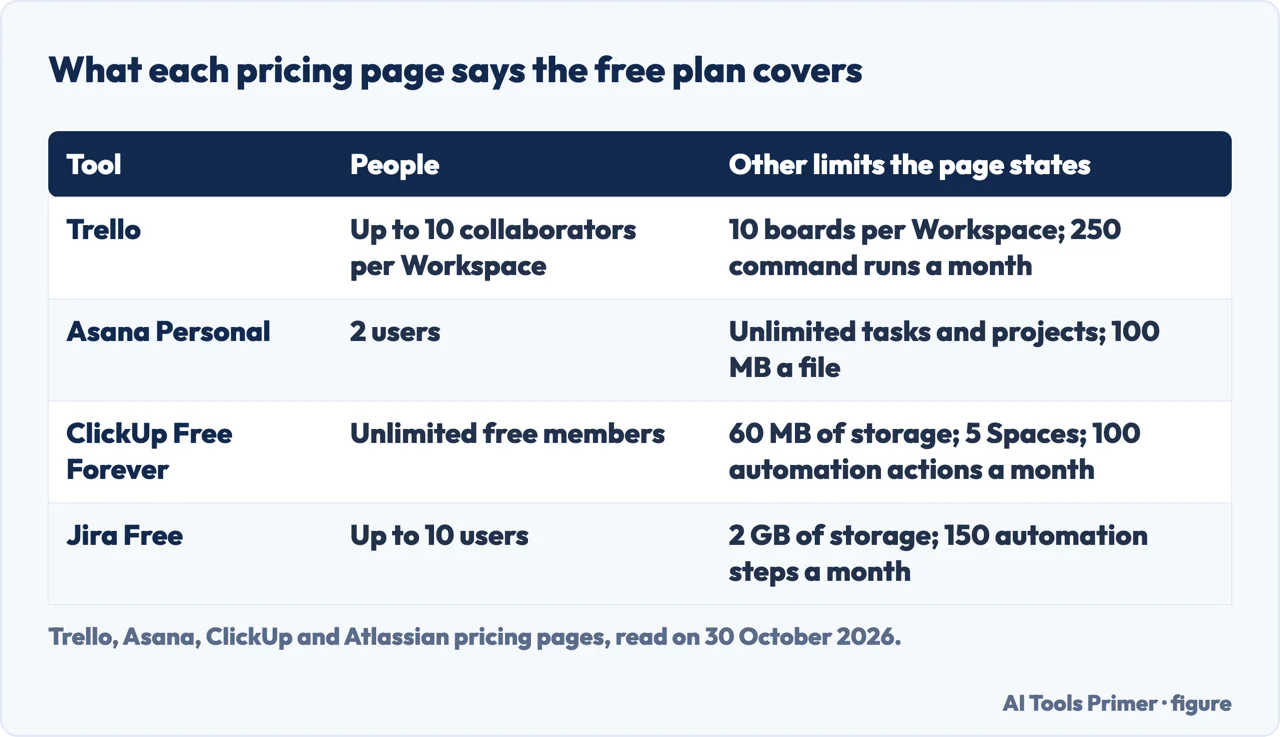
Trello
Trello’s Free plan lists unlimited cards, up to 10 boards per Workspace, unlimited Power-Ups per board, and unlimited storage with 10MB for each file. It also lists 250 Workspace command runs per month, custom backgrounds and stickers, an unlimited activity log, assignee and due dates, the iOS and Android apps and two-factor authentication. Quick capture of to-dos from email, Slack and Microsoft Teams is on the list, with an Inbox to gather them in before they go onto boards.
The paid plans start at Standard, which the page prices at $5 per user a month if billed annually and $6 billed monthly. It lists unlimited boards, card mirroring, custom fields, advanced checklists, unlimited storage with 250MB for each file and 1,000 Workspace command runs per month. Premium is $10 billed annually and $12.50 billed monthly, and it is where the page lists the views Calendar, Timeline, Table, Dashboard and Map. The eesel comparison of Trello and Asana, from a company that sells AI assistants, says the same thing in its own words: those views only unlock on Premium plans and above.
The pages differ on the number of people. Trello’s own page says up to 10 collaborators per Workspace. Zapier’s guide, from a company that sells automation software and last updated in December 2025, describes the free plan as having unlimited cards and members, with 10 boards per workspace, and says elsewhere that it allows unlimited cards and users. The eesel comparison agrees with Trello’s page: up to 10 collaborators and unlimited cards across 10 boards. Trello’s pricing page does not say what happens above 10 collaborators.
Asana
Asana’s page headlines the Personal plan as $0, free forever. It lists 2 users, unlimited tasks and projects, list, board and calendar views, status updates, time tracking through integrations, more than 100 free integrations, and unlimited storage with 100 MB at most for each file. The eesel comparison lists the same plan with the same views and the same 2 users.
Starter is priced at $10.99 per user a month billed annually and $13.49 billed monthly. At the top of its list the page puts no user seat limits, and it then lists Timeline and Gantt views, reporting dashboards, unlimited automations, forms, custom fields and custom templates. Unlimited free guests is also on Starter’s list; the pages we read show it under the paid plans and not under Personal. ClickUp’s guide, which covers Asana as a rival, says the free plan loses timeline views, custom fields, forms, workflow automations and dashboards, and that those need Starter.
This is where the pages disagree most. Asana’s pricing page says 2 users. Google’s AI box, seen on 30 October 2026, said Asana’s free plan allows up to 10 users. Zapier’s guide says both: its summary line for Asana reads unlimited projects and tasks and up to 10 users, while its price line says the free Personal plan has 2 users. ClickUp’s guide says the limit is now 2, down from 10 before November 2025, and that accounts created before that date may still have 10 seats. That November 2025 date comes from one page, and it belongs to a rival of Asana. Asana’s pricing page does not say since when the limit has been 2.
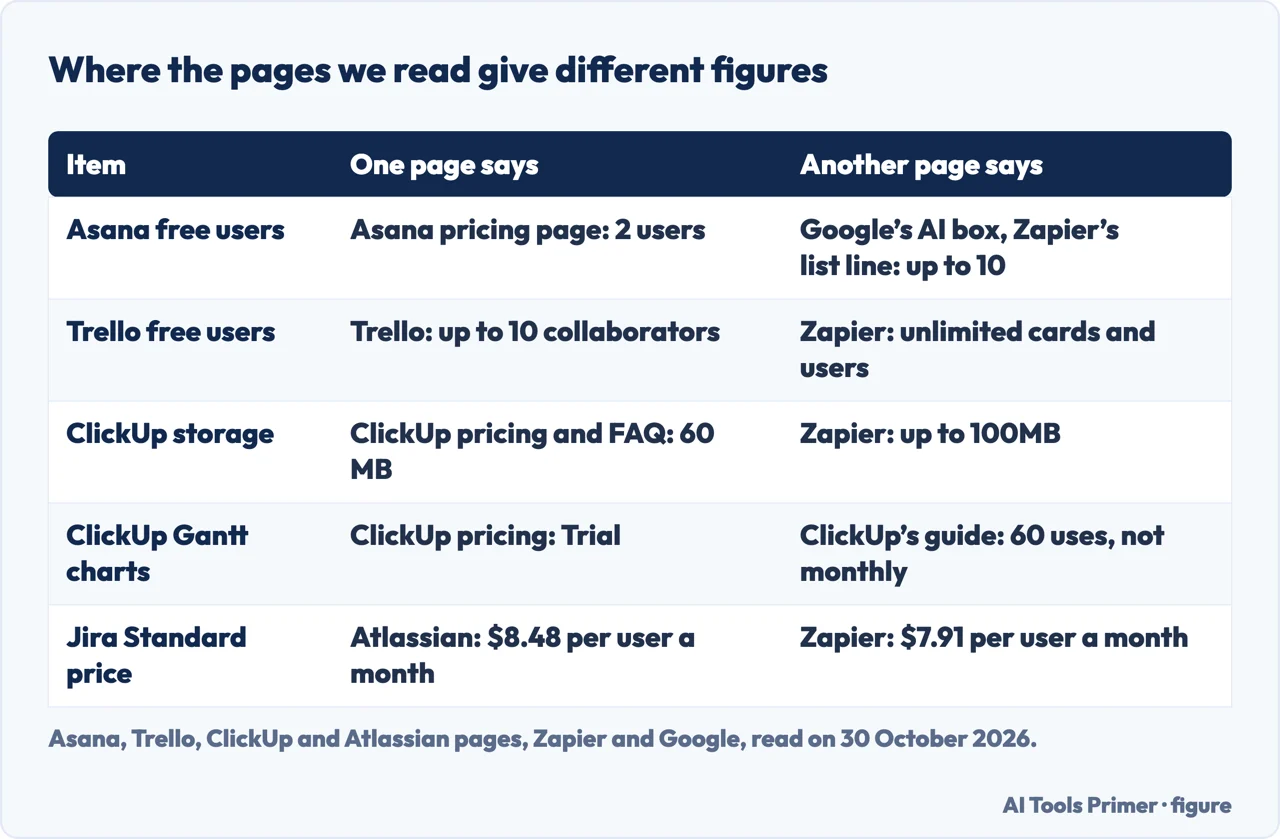
ClickUp and Jira
ClickUp’s Free Forever plan is $0 with no credit card required. Its pricing page lists 60 MB of storage, unlimited tasks and subtasks, Unlimited Free Members, collaborative Docs, Kanban boards, Calendar view, Sprint management, time tracking, video calls and two-factor authentication; the comparison table, however, marks Time Tracking as Trial on the free plan. The comparison table gives the ceilings: 5 Spaces, and 100 automation actions per workspace per month against 1,000 on the Unlimited plan. For Gantt charts and Custom Fields the table says Trial on the free plan, and Included from the Unlimited plan.
ClickUp’s FAQ lists the free features as unlimited tasks and members, 60MB of storage and basic Custom Fields, and it puts unlimited Gantt charts under the Unlimited plan, at $7 per user a month billed yearly. Business is $12. Here the pages differ in two places. Storage is 60 MB on ClickUp’s pricing page, its FAQ and its own guide, while Zapier says up to 100MB. For Gantt charts and Custom Fields, the pricing page says Trial, and ClickUp’s guide says 60 uses of each, lifetime and not monthly. The pricing page does not say how many uses a Trial is. Zapier notes that ClickUp has been reining in its free plan and that some of its views are limited on the free plan now.
Zapier lists Jira as the choice for agile software development teams. Atlassian’s page says what the Free plan includes: unlimited goals, projects, tasks and forms; backlog, list, board, timeline, calendar and summary views; 150 automation steps per subscription per month; 2 GB of storage; and support from the Atlassian Community. Standard lists 400 automation steps per user per month, 250 GB of storage and user roles and permissions; Zapier’s guide says you cannot control user access on the free plan. Zapier, too, lists Jira as free for up to 10 users.
Atlassian’s guide to Jira Cloud plans says what the limit does when you change plans. To change to the Free plan you need 10 users or fewer; over that, it says, the change fails and you stay on your current plan. The guide speaks of changing plans and does not describe a team already on Free. Atlassian’s pricing page covers that case in its FAQ: if you are on the Free plan and exceed the user limit, it says it will automatically upgrade you to a 7-day free trial of the Standard plan.
Where the free plans stop
Zapier’s guide says each tool it chose lets you manage an unlimited number of projects for free. On the pricing pages the wording varies: Asana and Jira say unlimited projects, ClickUp says unlimited tasks and subtasks, and Trello counts boards, with 10 per Workspace. That is a difference in what each page counts, and the pages do not say whether the counts are comparable.
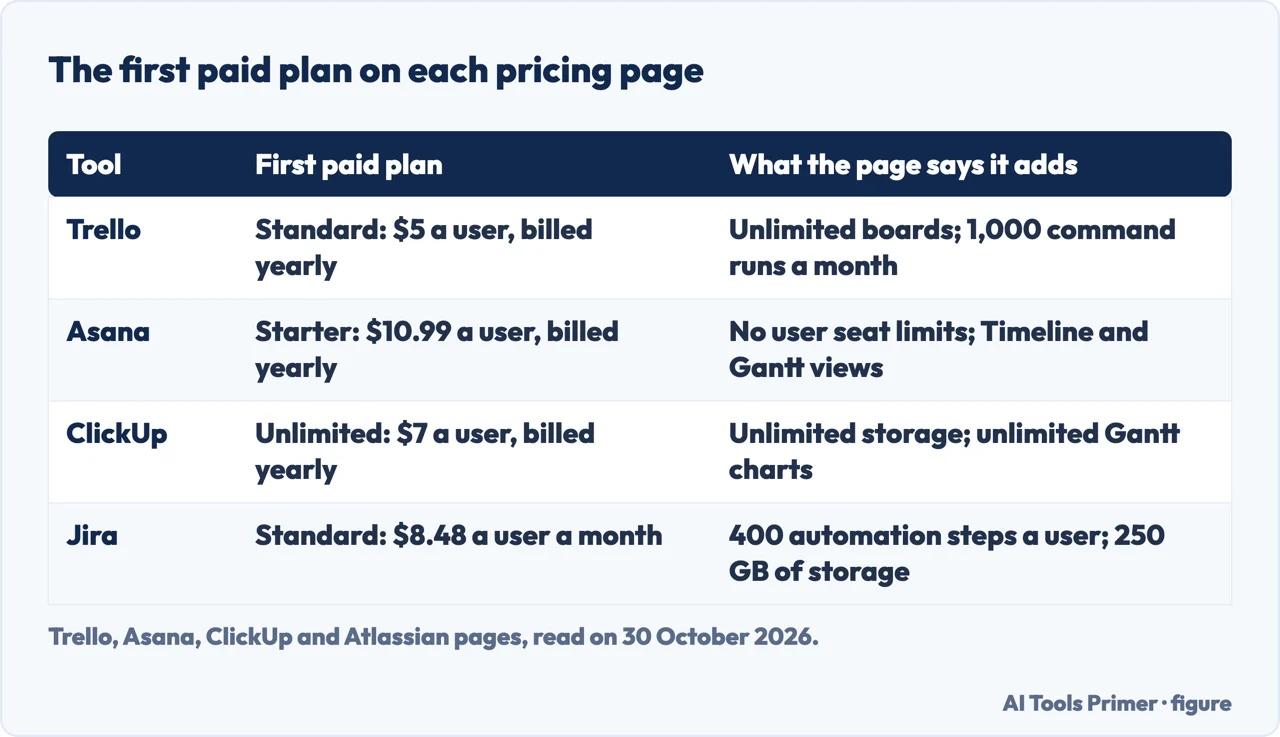
The first paid plan on each page, read on 30 October 2026, is in the third figure. Trello Standard is $5 per user a month billed annually. Asana Starter is $10.99 billed annually and $13.49 billed monthly. ClickUp Unlimited is $7 billed yearly. Jira Standard is $8.48 per user a month on Atlassian’s page, whose text shows a monthly or annual billing switch without saying which one that figure belongs to, while Zapier’s guide gives $7.91; we give Atlassian’s figure because it is the page that sells the plan. Prices on pages like these change, so read the current page before relying on them.
What each paid plan adds is also on the page. Trello lists unlimited boards and more command runs, Asana lists no user seat limits and the Timeline and Gantt views, ClickUp lists unlimited storage and Gantt charts, and Jira lists more automation steps and more storage. The pages we read do not say which free plan suits a team of five over a year, and we do not say either.
What we did not use
We tested nothing on an account; every figure comes from a page, read on 30 October 2026. We did not read the Reddit thread, the Project-Management.com list, the icAgile review, the BDC article, the ProProfs list, the Celoxis article (we read it and left it out, because it comes from the site of a software seller) or Freedcamp’s page, all of which Google listed. Zapier also lists Wrike, with unlimited projects and up to 200 active tasks, and Airtable, with unlimited bases at 1,000 records per base and up to 5 users; we did not check either on its own pages. The Google AI box also named OpenProject, which we did not read. The four questions below are ones this page set out to cover; two of them also came up in Google’s AI box on 30 October 2026.
Where to start
Five ways in.
- “How many people can use it free?”
- What the four pricing pages say about people — people
- “Is Trello free for a team?”
- Trello — trello
- “Why do pages say 2 or 10 for Asana?”
- Asana — asana
- “What does ClickUp or Jira stop?”
- ClickUp and Jira — clickup jira
- “What does it cost when free ends?”
- Where the free plans stop — stops
Free plans and money
What a free tier covers, and what it costs when it ends.
Working together
Meetings, chat and moving work between apps.
Questions people also ask
How many people are on your team?
The pages we read answer by plan. Trello and Jira say up to 10, Asana’s pricing page says 2, and ClickUp’s lists unlimited free members. The pages do not say which plan suits a team of five over a year.
Do you prefer Kanban boards, lists, or Gantt charts?
Asana’s Personal plan lists list, board and calendar views, with Timeline and Gantt from Starter. ClickUp’s free plan lists Kanban boards and Calendar view, with Gantt marked Trial. Jira’s Free plan lists backlog, list, board, timeline, calendar and summary views, and Trello lists Calendar and Timeline under Premium; Zapier’s guide says free Trello users are limited to Kanban.
Is there a free project management tool with no user limit?
ClickUp’s pricing page lists Unlimited Free Members, and its FAQ lists unlimited members. Zapier describes Trello as having unlimited users, which Trello’s own page does not: it says up to 10 collaborators per Workspace.
What does the free plan stop you doing?
Each page names its ceilings: Trello 10 boards and 250 command runs a month, Asana 2 users and its view list, ClickUp 60 MB and 5 Spaces, Jira 10 users, 2 GB and 150 automation steps. Atlassian says moving to Free fails above 10 users.
Not covered here. We tested nothing on an account. The statements come from the pricing pages of Trello, Asana, ClickUp and Atlassian, ClickUp’s FAQ and guide to free plans, Atlassian’s guide to Jira Cloud plans, Zapier’s guide (most recent update December 2025) and an eesel comparison, all read on 30 October 2026, and from the Google AI box seen the same day.
The search volume and difficulty behind this page come from a reading of 29 August 2026, older than the 60 days the site normally allows.
Sources
- Trello — Pricing — trello.com, read 30 October 2026.
- Asana — Pricing — asana.com, read 30 October 2026.
- Asana — Personal plan — asana.com, read 30 October 2026.
- ClickUp — Pricing — clickup.com, read 30 October 2026.
- ClickUp — FAQs — clickup.com, read 30 October 2026.
- ClickUp — Free project management tools — clickup.com, read 30 October 2026.
- Atlassian — Jira pricing — www.atlassian.com, read 30 October 2026.
- Atlassian Support — Explore Jira Cloud plans — support.atlassian.com, read 30 October 2026.
- Zapier — The best free project management software in 2026 — zapier.com, read 30 October 2026.
- eesel AI — Trello vs Asana — www.eesel.ai, read 30 October 2026.
Written by Alberto Gulotta
Founder and editor of AI Tools Primer, writing from Palermo, Italy. Thirty-five years of taking computers apart, starting with a Commodore 64 — the long version is on the about page.
Something wrong on this page? Write to aitoolsprimer@gmail.com and it gets fixed.
Written on 30 October 2026.
Independence and limits
No affiliate links and no paid placements anywhere on this site. Nobody pays to appear here, and no company has seen this page before you did.
This is general information, not professional advice. Where a page touches money, health, safety or the law, it names its source and the date it was read — and your situation may still differ. See the privacy page and the cookie policy.