
Business · guide
Invoicing on its own: what an invoice shows and what free plans cap
By Alberto Gulotta · Updated · 15 min read
Business invoicing software comes after knowing what an invoice must show: GOV.UK lists nine items and adds lines for sole traders. Zoho, Invoice Ninja and Square each offer a free plan, but one counts users, one counts clients and one takes a share of card payments, so no single number compares them.
| Question | Answer | Where it comes from |
|---|---|---|
| What must an invoice carry? | A unique number, both parties’ details, a clear description, the supply and invoice dates, the amounts, VAT if it applies, and the total owed | GOV.UK |
| Must it be on paper? | For VAT invoices the Notice says it is up to you whether you issue paper or electronic ones, and the customer has to agree to receive them electronically | GOV.UK, Notice 700/63 |
| When does a spreadsheet do? | Stripe says one or two clients, straightforward work and no VAT | Stripe |
| What does a free plan limit? | Zoho counts users and invoices a year, Invoice Ninja counts clients, Square takes a share of card payments | Zoho, Invoice Ninja, Square |
| How long are copies kept? | At least six years, say Stripe and Crunch | Stripe, Crunch |
What an invoice must show, whatever the tool costs
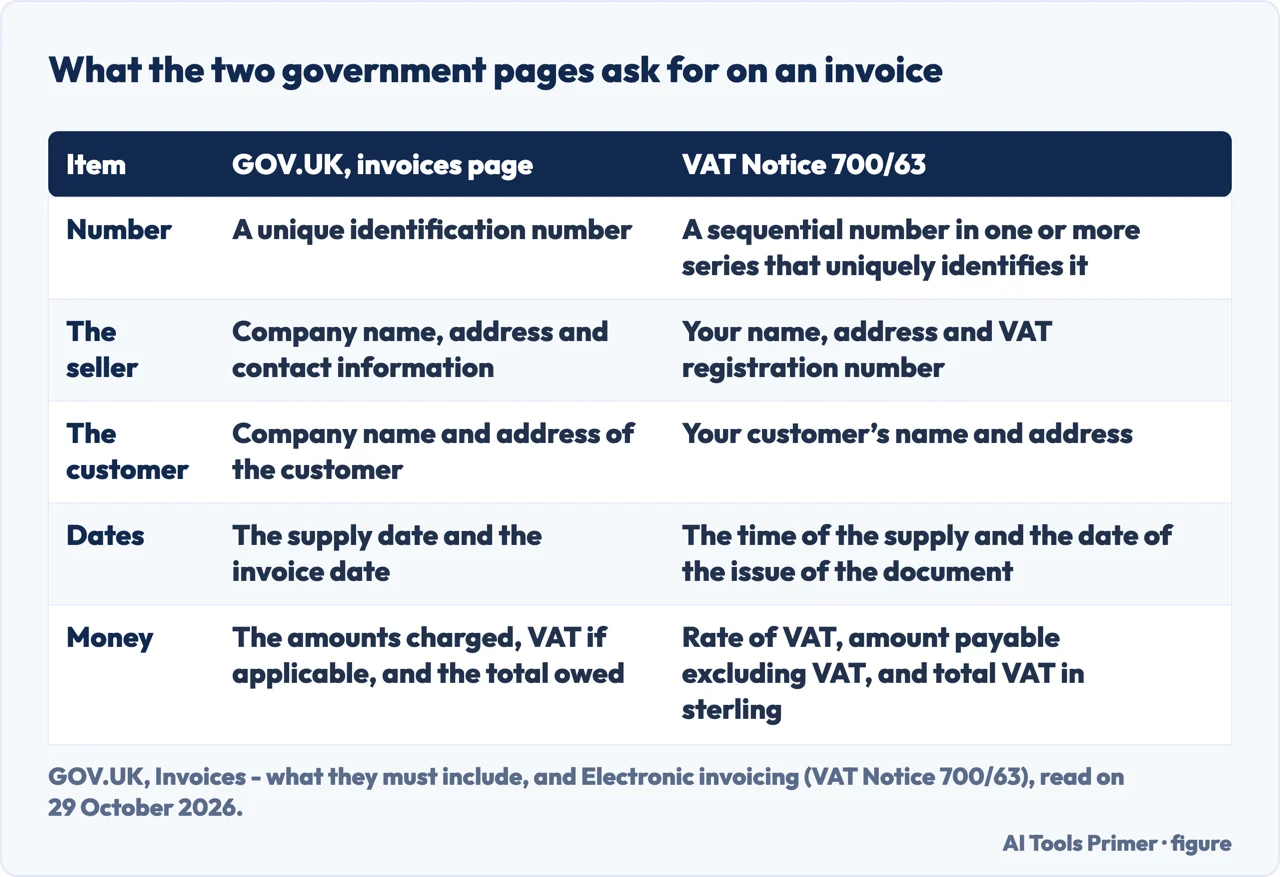
The GOV.UK page on invoices, under the heading “Your invoice must include”, lists nine things: a unique identification number; your company name, address and contact information; the company name and address of the customer you are invoicing; a clear description of what you are charging for; the date the goods or service were provided, which it calls the supply date; the date of the invoice; the amounts being charged; the VAT amount if applicable; and the total amount owed. The full list is on our page on how to write an invoice; here it matters only for what a program must print. A sole trader adds two more: your name and any business name being used, and an address where legal documents can be delivered to you if you are using a business name. For a limited company the page asks for the full company name as it appears on the certificate of incorporation, and, if you put directors’ names on your invoices, the names of all directors.
The same page says you must use VAT invoices if you and your customer are both VAT registered, and that these include more information than non-VAT invoices. The GOV.UK page does not list those extra items; the Notice on electronic invoicing, VAT Notice 700/63, sets out the information a tax invoice needs and says electronic invoices must contain the same information as paper ones. Its table of what a tax invoice needs asks for an identifying number, which it describes as a sequential number based on one or more series that uniquely identifies the document, then the time of the supply, the date of issue, your name, address and VAT registration number, and your customer’s name and address. It goes on to a description of the goods or services, the unit price, the quantity or extent of the services, the rate of VAT, the amount payable excluding VAT, the rate of any cash discount, and the total VAT chargeable, expressed in sterling. It says amounts may be expressed in any currency, but the total VAT must be in sterling where there is a positive rate of VAT due in the UK.
The two pages do not word the number the same way: GOV.UK says a unique identification number, and the Notice says a sequential one for VAT invoices. Our page on how to write an invoice walks through the list for two countries, and the page on making an invoice covers what a generator fills in.
The Notice also answers the paper question. It defines electronic invoicing as the transmission and storage of invoices in an electronic format without duplicate paper documents, in a structured format such as XML or an unstructured one such as PDF, and says it is up to you whether you issue paper or electronic VAT invoices. You may invoice electronically where the authenticity of the origin, the integrity of the invoice data and legibility can all be ensured, and your customer agrees to receive invoices electronically. The Notice adds that you do not need to tell HMRC you intend to issue electronic invoices, but you must be satisfied that your system complies with its requirements.
Invoices without accounts: when a spreadsheet is enough
Stripe, which sells invoicing software, says on its page for UK businesses that a well-structured spreadsheet or document template can get the job done for very simple setups, such as one or two clients, straightforward work and no VAT. It then argues that for many businesses software pays for itself, and gives five reasons: automatic VAT calculation, a payment link on the invoice, recurring invoices, a link to the accounting records, and Making Tax Digital. On that last point Stripe says the programme requires VAT-registered businesses to keep digital records and submit returns using compatible software, so an invoicing tool needs to be on HMRC’s list of compatible products. That is the argument of a company that sells the software, and we read it as such.
Crunch, an online accountancy that also offers its own software, gives a similar list of what a sole trader’s invoice holds: business details, the client’s details, a unique number “ideally in chronological order” with the date, a description with prices, payment terms, VAT, and the total. It says invoicing software is great for automating invoice generation, tracking payments and sending overdue payment reminders, and that you can do all your invoicing yourself. Stripe’s separate page on invoicing and billing adds a caution: automation does not solve everything, and if you do not set clear terms or double-check details, even the most automated system will not save you from errors or payment delays.
Two habits apply to a spreadsheet as much as to a program. Stripe says every invoice needs a unique reference number, that a sequential system such as “INV-001” and “INV-002” works well, and that gaps in the sequence, or reused numbers, can “raise questions during an HMRC audit”. Both Stripe and Crunch say to keep copies of invoices for at least six years, and Stripe adds that this covers invoices you issued and ones you received. Our page on how long to keep records sets out what two tax authorities publish.
Three free plans, three different ceilings
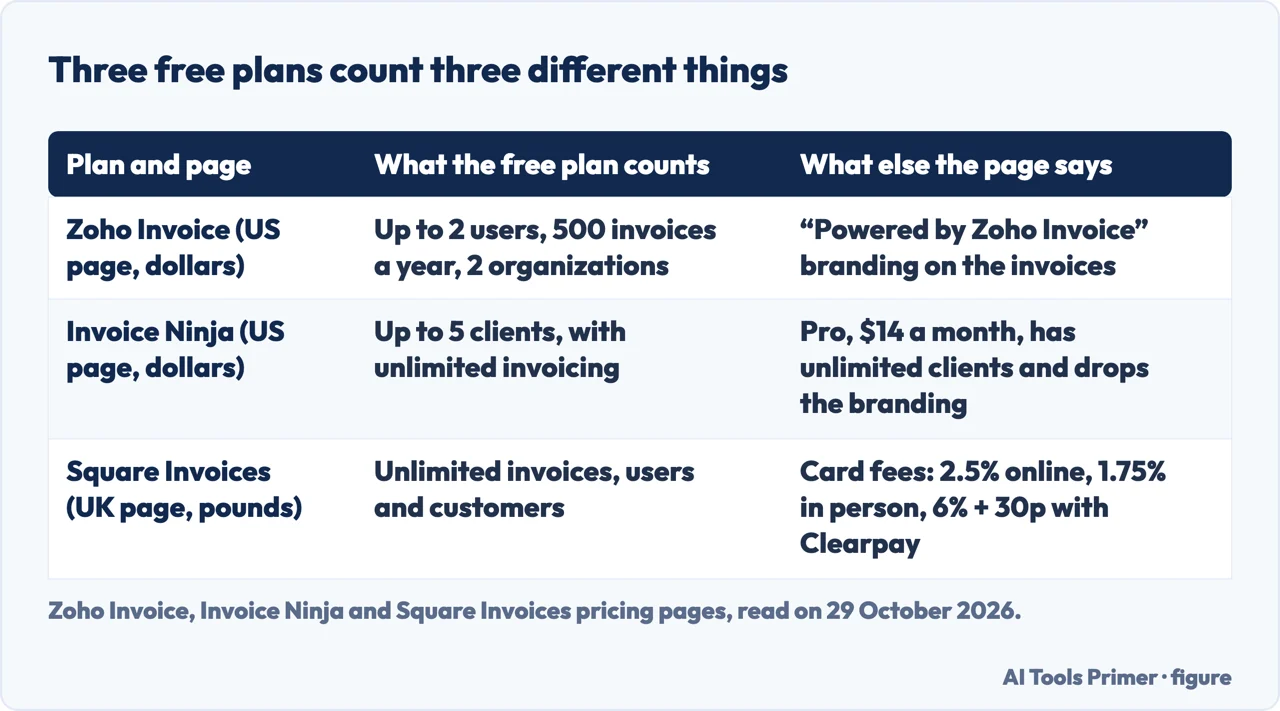
Zoho Invoice’s pricing page for the United States is headed as free for all small businesses. Its answers say you can add up to two users, create a maximum of three projects and send up to 500 invoices per year, and that up to two organizations can sit under one account. The invoices carry “Powered by Zoho Invoice” branding. The page lists tax-compliant invoices in one click, sending by email or as a PDF, automatic payment reminders, customizable templates and recurring invoices among its features. It also says that if a user is inactive for over 180 days, their data is deleted in the subsequent 20 days, and that logging back in or making a backup keeps it.
Invoice Ninja’s pricing page, in dollars, puts its Free plan at $0 with five clients and unlimited invoicing. The free list includes 11 invoice templates, recurring invoices and auto-billing, a client-side portal, online payment gateways, and deposits and partial payments. Its answer on the free plan is that you are never forced to upgrade, and that Pro and Enterprise unlock unlimited clients and more advanced features.
Square’s page for the United Kingdom, in pounds, sets the Free plan at no monthly fees, with unlimited invoicing, estimates and contracts, unlimited users and unlimited customers, sent by email, text message or a link. Instead of a ceiling it charges on payments: 2.5% for an online card payment, 1.75% for an in-person card payment, and 6% plus 30p for a card payment with Clearpay. The page says there are no fees for cheques or cash, and that funds arrive as soon as the next day, or instantly for a fee through Instant Transfer.
These are three different measures. Zoho counts users and invoices a year, Invoice Ninja counts clients, and Square sets no ceiling on invoices, users or customers on its Free plan but takes a share of card payments, so no single number compares them. The pages also use different currencies, dollars for Zoho and Invoice Ninja and pounds for Square, and we have not converted either.
What the free plan leaves out
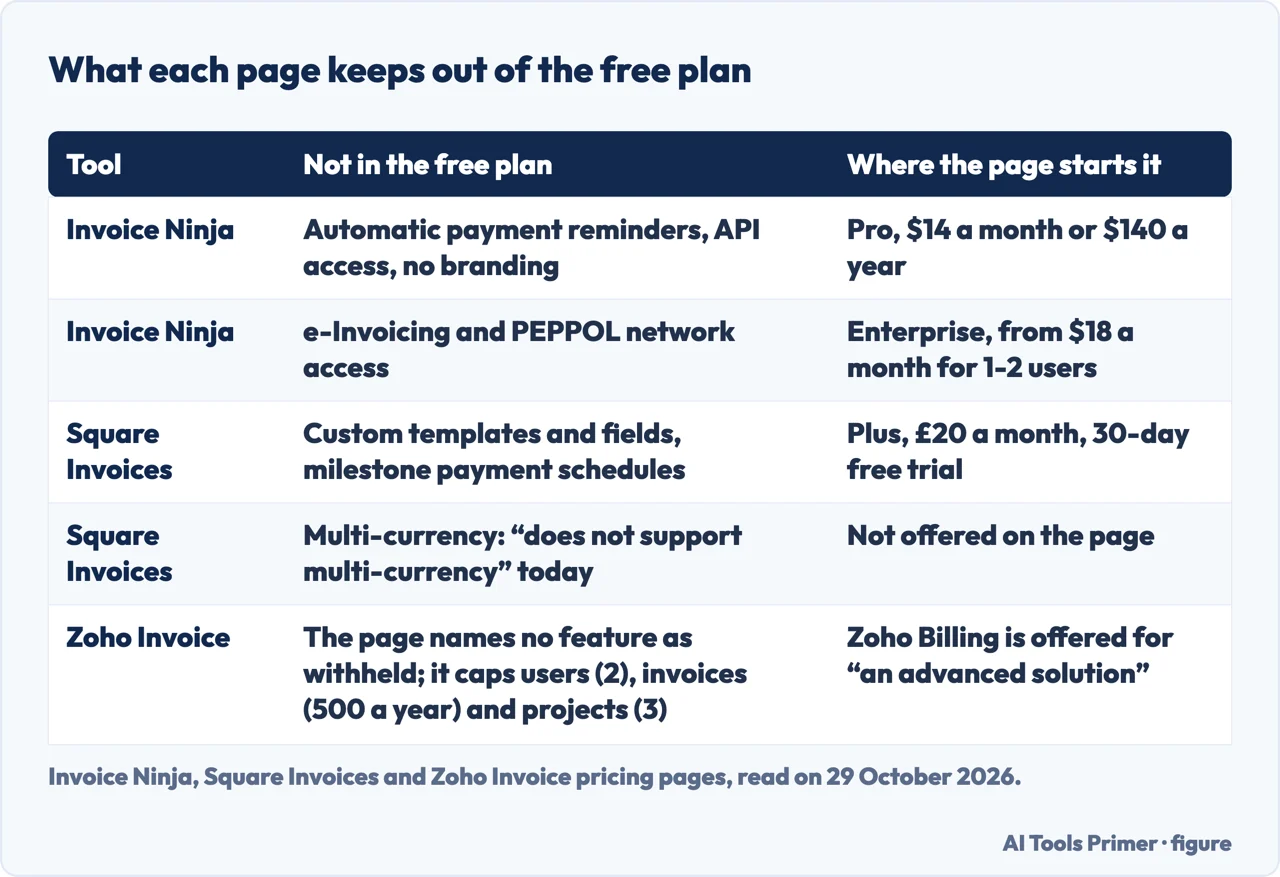
The Invoice Ninja comparison table shows a dash under Free for auto payment reminders and a tick from Pro up. Pro is $14 a month billed monthly, or $140 billed annually, which the page equates to $11.67 a month. It also drops the “Created by Invoice Ninja” label, gives unlimited clients and adds API integration. Enterprise starts from $18 a month for one or two users, and the page puts e-invoicing and PEPPOL network access in Enterprise and Premium only, with 250 PEPPOL credits included in Enterprise. Paid plans come with a 30-day money back promise.
Square’s paid plan, Plus, is £20 a month with a 30-day free trial. It adds multi-package estimates, automatic conversion of an accepted estimate into an invoice, milestone-based payment schedules, reusable custom invoice templates and custom fields. The same page says Square Invoices does not support multi-currency acceptance today, and that it offers integrations with accounting software including FreshBooks and Xero. It also states that over 75% of its invoices get paid within a day, which is Square’s own claim, and the page we read does not say how it was measured.
Reminders show how the three differ. Square’s FAQ mentions auto-reminders and recurring payments among its features, and Zoho lists payment reminders among its features without saying which plan they belong to. In Invoice Ninja they are on the paid side of the table. The pages we read from Zoho, Invoice Ninja and Square do not mention invoice numbering, which is the first item on both GOV.UK pages.
Where “invoicing only” ends is also a matter of the vendor’s own wording. QuickBooks lists a Free plan at $0 a month described as basic accounting and invoicing, so it sits on the accounting side of the line this page draws, and we do not set its dollar prices beside the pound ones.
Checks before you send the first invoice
For VAT, Stripe says that if you are VAT registered, every invoice to another VAT-registered business must be a full VAT invoice showing your VAT number, the VAT rate applied and the VAT amount as a separate line item. It says simplified VAT invoices are allowed for transactions under £250, though full invoices are the safer default, and that the VAT amount must be shown in pounds sterling, which agrees with the Notice. Stripe and Crunch both put the registration threshold at ninety thousand pounds of taxable turnover.
On the due date the pages differ. Stripe’s UK page says that within 30 days of the invoice date is the standard required payment term, unless you negotiate shorter or longer terms. Its page on invoicing and billing lists the assumption that every invoice has a standard 30-day term as a misconception, and says terms should be set to the transaction. Stripe’s UK page also gives a different 30-day rule, that a VAT-registered business must issue an invoice within 30 days of delivering goods or completing a service unless it has agreed other terms with the client in writing; the GOV.UK pages we read state neither 30-day rule. Crunch leaves the choice open, with terms such as “Net 30” for payment within 30 days or “Upon Receipt” for immediate payment. The GOV.UK page on what an invoice must include gives no payment term, and we did not read its next section, “Payment - obligations”. Our page on getting paid covers the card fees that follow.
For late payment, Stripe cites the Late Payment of Commercial Debts (Interest) Act 1998: 8% of the amount owed above the Bank of England base rate on overdue invoices to other businesses, plus a fixed recovery charge of £40 to £100 depending on the invoice value. That comes from Stripe and not from the GOV.UK page we read. Stripe also says that if you plan to charge interest on late payments, you should state that on the invoice.
One claim needs care. Stripe says that beginning in April 2029 e-invoicing will become mandatory for all VAT invoices. The Notice we read says it is up to you whether you issue paper or electronic VAT invoices, and the April 2029 date appears on Stripe’s page while the GOV.UK pages we read do not mention it. Stripe also says there is currently no legally mandated invoice format in the UK, and that a PDF sent by email is common.
What we did not use
We sent no invoice and tested no program, so everything here is what the pages say. We read only the pages listed under Sources, and no other definition or comparison pages. Every pricing page we used belongs to the vendor, and the pages we read do not name a best program from an independent source. Plans and ceilings change, so each figure is dated to the day we read the page, 29 October 2026.
Where to start
Four ways in.
- “What has to be on it?”
- What an invoice must show, whatever the tool costs — must show
- “Is a spreadsheet enough?”
- Invoices without accounts — spreadsheet
- “Which free plan fits?”
- Three free plans, three different ceilings — free plans
- “When is payment due?”
- Checks before you send the first invoice — before sending
Money
Invoicing, accounts and getting paid. This is the wing with legal weight, the one where the cost of choosing badly is measured in an accountant’s hours rather than in a subscription.
Invoices and forms
The documents with legal weight and a deadline attached. Accuracy matters more than design here, and several pages are mostly about what must be on the page.
Questions people also ask
What's the difference between billing and invoicing?
Stripe says invoicing is the process of creating and sending an invoice to request payment, and billing is the overall process of managing owed payments. Billing includes invoicing plus tracking transactions, calculating amounts due and monitoring incoming payments.
How do I invoice someone?
Stripe lists five steps for a UK business: choose a format, assign a unique number, fill in the required details, set payment terms, then send and log the invoice. Crunch gives seven items for a sole trader, from business details to the total due.
What are the legal requirements for an invoice?
GOV.UK lists a unique identification number, both parties’ details, a clear description, the supply date, the invoice date, the amounts, VAT if applicable and the total owed. Stripe adds that there is no legally mandated invoice format in the UK.
What are the payment terms for an invoice?
Stripe’s UK page says within 30 days of the invoice date is the standard required term unless you agree otherwise, while its page on invoicing and billing calls an always-30-day term a misconception; Crunch names “Net 30” and “Upon Receipt” as common choices. The GOV.UK page we read gives no term.
Not covered here. We tested no invoicing program. The statements come from two GOV.UK pages and the pricing or guide pages of Zoho Invoice, Invoice Ninja, Square, QuickBooks, Stripe and Crunch, all read on 29 October 2026.
The search volume and difficulty behind this page come from a Semrush reading of 29 August 2026, older than the 60 days the site normally allows.
Sources
- GOV.UK — Invoices: what they must include — www.gov.uk, read 29 October 2026.
- GOV.UK — Electronic invoicing (VAT Notice 700/63) — www.gov.uk, read 29 October 2026.
- Zoho Invoice — Pricing (United States) — www.zoho.com, read 29 October 2026.
- Invoice Ninja — Pricing plans — invoiceninja.com, read 29 October 2026.
- Square — Invoices (United Kingdom) — squareup.com, read 29 October 2026.
- QuickBooks — Invoicing — quickbooks.intuit.com, read 29 October 2026.
- Stripe — How UK businesses invoice clients — stripe.com, read 29 October 2026.
- Stripe — What is the difference between invoicing and billing? — stripe.com, read 29 October 2026.
- Crunch — A beginner’s guide to sending professional invoices as a sole trader — www.crunch.co.uk, read 29 October 2026.
Written by Alberto Gulotta
Founder and editor of AI Tools Primer, writing from Palermo, Italy. Thirty-five years of taking computers apart, starting with a Commodore 64 — the long version is on the about page.
Something wrong on this page? Write to aitoolsprimer@gmail.com and it gets fixed.
Written on 29 October 2026.
Independence and limits
No affiliate links and no paid placements anywhere on this site. Nobody pays to appear here, and no company has seen this page before you did.
This is general information, not professional advice. Where a page touches money, health, safety or the law, it names its source and the date it was read — and your situation may still differ. See the privacy page and the cookie policy.