
Docs · guide
What a CSV file is, and how to open one without losing zeros
By Alberto Gulotta · Updated · 10 min read
A CSV file holds text data as records, one per line, with the fields separated by commas, as RFC 4180 documents it; CSV stands for comma-separated values. Excel opens one with its default column formats; Microsoft says the Import Text Wizard gives more control, for example to keep leading zeros or read dates in another order.
| Question | Answer | Source |
|---|---|---|
| What CSV stands for | Comma-separated values | RFC 4180 |
| What it holds | Text data: one record per line, fields separated by commas | RFC 4180 |
| Media type and extension | text/csv; extension CSV | RFC 4180 |
| Is there one specification? | No single master specification; RFC 4180 is informational, not an Internet standard, and offers an attempt at a common definition | RFC 4180 |
| How much Excel can import or export | Up to 1,048,576 rows and 16,384 columns | Microsoft |
Versions. Microsoft’s page on importing and exporting text files applies to Excel for Microsoft 365, 2024, 2021, 2019 and 2016; its page on importing a CSV, HTML or text file applies to Excel for Microsoft 365 for Mac, Excel 2024, Excel 2024 for Mac and Excel 2021 for Mac. Moving a table out of a PDF is a different job, in PDF to Excel.
What a CSV file looks like inside
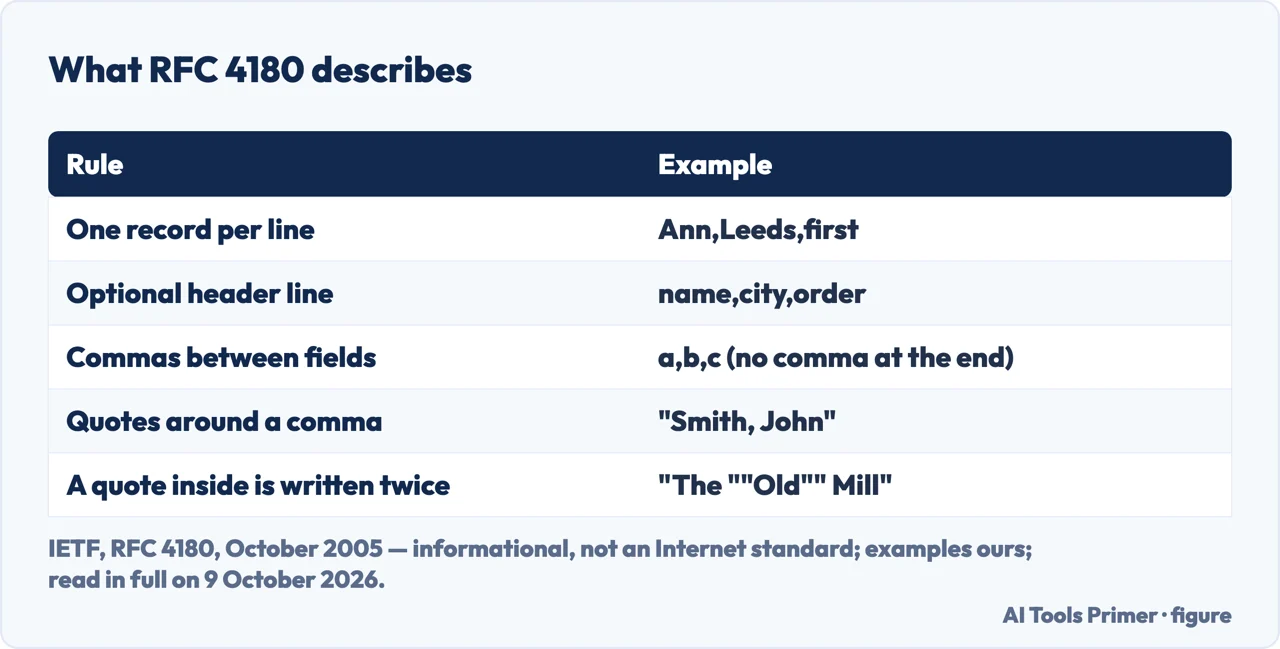
An example. Four lines written by us following the RFC: a header line with the field names, a plain record, a name in double quotes because it contains a comma, and a double quote inside a quoted field written twice. Each line has three fields.
name,city,order
Ann,Leeds,first
"Smith, John",York,second
"The ""Old"" Mill",Hull,third
The seven points of RFC 4180, and what the RFC is
Lines. Each record is on its own line, delimited by a line break, CRLF, though the RFC adds that implementors should be aware that some implementations may use other values; the last record may or may not have one. An optional first line can hold the field names, and should have the same number of fields as the records below.
Fields. Fields are separated by commas, every line should have the same number of them, and the last field must not be followed by a comma. Spaces count as part of a field and should not be ignored.
Quotes. A field may be enclosed in double quotes; one that contains a comma, a double quote or a line break should be. A double quote inside a quoted field must be escaped by writing it twice, as in "b""bb". The RFC notes that some programs, such as Microsoft Excel, do not use double quotes at all.
What the RFC is. It describes itself as information for the Internet community, not an Internet standard of any kind, and says that section documents the format most implementations seem to follow. It was published in October 2005; the IETF page lists it as updated by RFC 7111.
Opening a CSV file in Excel
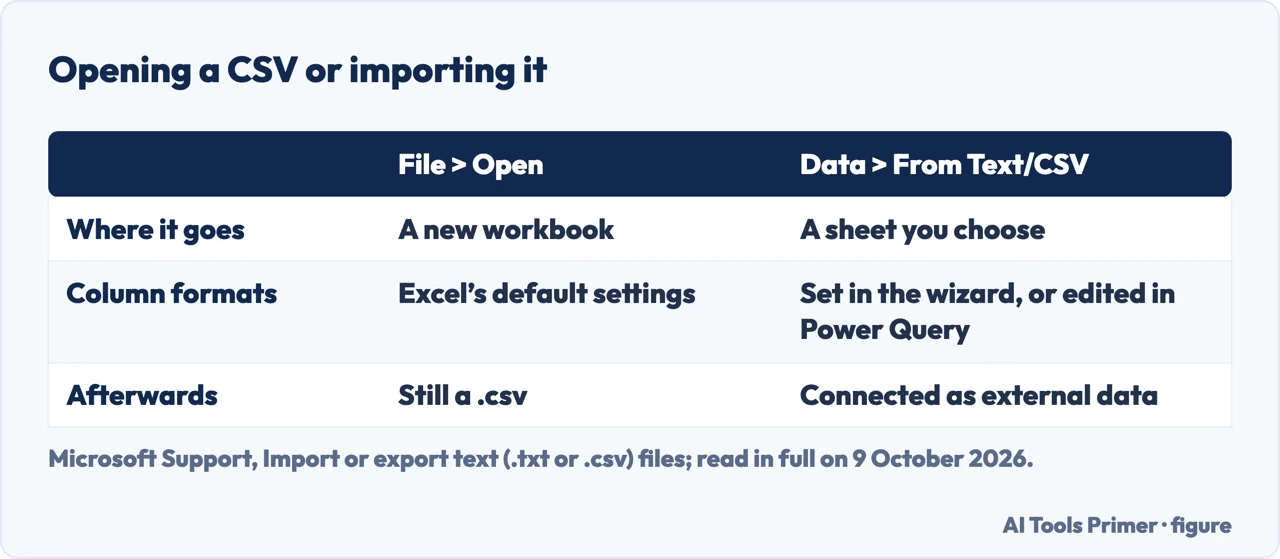
Two ways in. Microsoft gives two: File > Open, choosing Text Files in the file type list, which for a .csv opens it straight into a new workbook; or Data > Get & Transform Data > From Text/CSV, which can import the data into an existing worksheet and opens a preview, where Load loads the data directly to a new worksheet and Transform Data sends it to Power Query first. Its page on importing a CSV, HTML or text file, whose Applies To list is Excel for Microsoft 365 for Mac, Excel 2024, Excel 2024 for Mac and Excel 2021 for Mac, gives Data > Get & Transform Data > Get Data > From File, then a file type such as From Text/CSV.
What Excel does to a CSV when it opens one
It uses its defaults. Microsoft says that when Excel opens a .csv file it uses the current default data format settings to interpret each column, and that for more flexibility you can use the Import Text Wizard. Its two examples: a date column in MDY when Excel’s default is YMD, and a column of numbers with leading zeros that you want as text to keep the zeros.
How to get the wizard. To force Excel to run the Import Text Wizard, Microsoft says, you can change the extension from .csv to .txt before opening the file, or import it by connecting to it with Data > Get & Transform Data > From Text/CSV. Its page gives that route in two versions: one leads to the wizard, where you set the format of each column; the other to a preview with Load and Transform Data, and Microsoft says that if a column does not come in as you want, you can convert it after the import.
The file stays a CSV. Opening a text file in Excel does not change its format: the title bar keeps the .csv extension. When you save as CSV, Microsoft says only the current worksheet is saved, and Excel reminds you that the sheet may contain features text formats don’t support.
Cleaning up after the import. If the data needs it, extra spaces are in removing spaces in Excel, repeated rows in removing duplicates in Excel, and empty rows in removing blank rows in Excel.
Saving a sheet as a CSV file
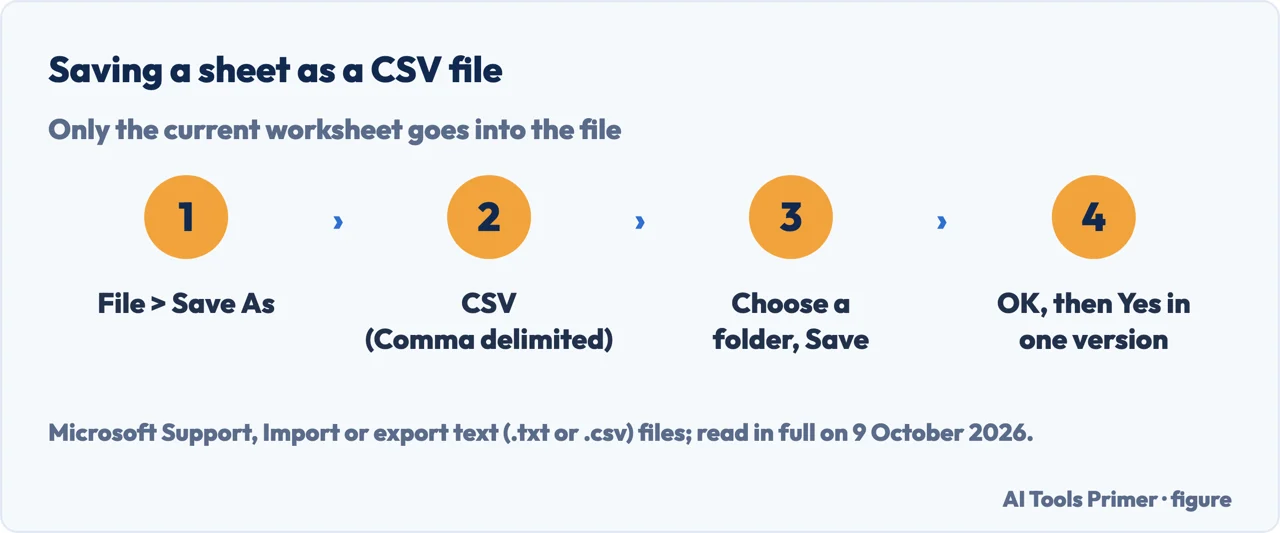
- Open Save As. In Excel, go to File > Save As.
- Choose CSV. In the Save as type box, choose CSV (Comma delimited).
- Pick the place and save. Browse to the folder and select Save.
- Answer the prompts. A dialog box reminds you that only the current worksheet will be saved; click OK if it is the one you want. In one version of Microsoft’s steps a second dialog box says the sheet may contain features text formats don’t support, and Yes keeps only the data; in the other, you may also see an alert below the ribbon that some features might be lost. Microsoft says to repeat the steps for each sheet you need.
When the separator is not a comma
On import. With Get & Transform Data > From Text/CSV, Microsoft says to choose the character from the list under Delimiter after choosing the file and clicking Import; the preview shows the effect at once. In the wizard it is step 2.
On export, for every program. Microsoft says the default list separator for a .csv is a comma and that you can change it in Windows Region settings. In Windows 11: search for Region Settings, select Administrative language settings, then Additional settings under the Formats tab, and type the new character in the List separator box on the Numbers tab; Windows 10 and older versions take a different path to the same box. Microsoft warns that the change affects all applications.
On export, for Excel only. To get a semicolon in Excel alone, Microsoft suggests considering a comma as the decimal separator, which forces Excel to use a semicolon: clear Excel Options > Advanced > Editing options > Use system separators and set the decimal separator to a comma. That also changes how decimal numbers are displayed, so it suggests also considering a period as the thousands separator.
Is a CSV file safe? RFC 4180 says CSV files contain passive text data that should not pose any risks, but that in theory malicious binary data could be included to exploit potential buffer overruns in the program processing it, and that private data can travel in it like in any text. Comparing two exports side by side is in comparing two workbooks.
Where to start
Four ways in.
- “What is inside one?”
- The rules — rules
- “Excel ate my zeros.”
- Opening vs importing — excel changes
- “I need to send a CSV.”
- Saving as CSV — save as csv
- “It uses semicolons.”
- The separator — separator
After the import
Guides for cleaning up a table once it is in Excel.
Questions people also ask
Is a .CSV an Excel file?
Not in our reading: it is a text file that Excel can open, and Microsoft says opening it does not change its format; the title bar keeps the .csv extension. Saving as CSV keeps only the current worksheet, and Excel reminds you that features text formats don’t support may be lost.
How do you create a CSV file?
In Excel, Microsoft says: File > Save As, choose CSV (Comma delimited) in the Save as type box, pick a folder and save. Only the current worksheet goes into the file, so repeat for each sheet you need.
What will open a CSV file?
RFC 4180 lists spreadsheet programs and various data conversion utilities as applications that use the text/csv type. In Excel, File > Open opens a .csv straight into a new workbook; Data > Get & Transform Data > From Text/CSV imports it, with a choice of delimiter.
Is CSV a PDF file?
Not in our reading. RFC 4180 registers CSV as the media type text/csv, with the extension CSV, for text data: records on lines, fields separated by commas. Moving a table from a PDF into a spreadsheet is a separate conversion job.
Not covered here. It does not cover Google Sheets, Numbers, tab-separated files beyond the import options, or reading CSV in a programming language.
Sources
- IETF — RFC 4180, Common Format and MIME Type for Comma-Separated Values (CSV) Files (October 2005) — datatracker.ietf.org, read 9 October 2026.
- Microsoft Support — Import or export text (.txt or .csv) files — support.microsoft.com, read 9 October 2026.
- Microsoft Support — Import data from a CSV, HTML, or text file — support.microsoft.com, read 9 October 2026.
Written by Alberto Gulotta
Founder and editor of AI Tools Primer, writing from Palermo, Italy. Thirty-five years of taking computers apart, starting with a Commodore 64 — the long version is on the about page.
Something wrong on this page? Write to aitoolsprimer@gmail.com and it gets fixed.
Written on 13 October 2026.
Independence and limits
No affiliate links and no paid placements anywhere on this site. Nobody pays to appear here, and no company has seen this page before you did.
This is general information, not professional advice. Where a page touches money, health, safety or the law, it names its source and the date it was read — and your situation may still differ. See the privacy page and the cookie policy.