
Business · guide
Project management tools for small business: what guides and plans say
By Alberto Gulotta · Updated · 17 min read
Project management tools for small business are chosen, the US Chamber guide we read says, by starting from how the team works and what challenges the platform must solve; the SBA and nibusinessinfo.co.uk guides open with other questions. The pricing pages of Trello, Asana, ClickUp and Jira then state how many people, forms and views each plan includes.
| Question | Answer | Where it comes from |
|---|---|---|
| Where do the guides say to start? | The US Chamber says with how your team works and the challenges to solve; nibusinessinfo.co.uk says to assess current and future needs, then to document your business processes | US Chamber, nibusinessinfo.co.uk |
| When is a program needed? | nibusinessinfo.co.uk says software for a project plan is probably best suited to large or complex projects, and that a year planner or calendar can work for a smaller one | nibusinessinfo.co.uk |
| How many people does a free plan count? | Trello says up to 10 collaborators per Workspace, Asana 2 users, Jira up to 10 users, and ClickUp lists Unlimited Free Members | The four pricing pages |
| How long should a trial run? | The SBA’s 2018 checklist says a week or two; the US Chamber says to use free trials or pilot projects | SBA, US Chamber |
| Do the guides rank the tools? | The US Chamber names six examples and BDC lists eleven alphabetically; the pages we read do not state an order of merit | US Chamber, BDC |
Start with how the work arrives
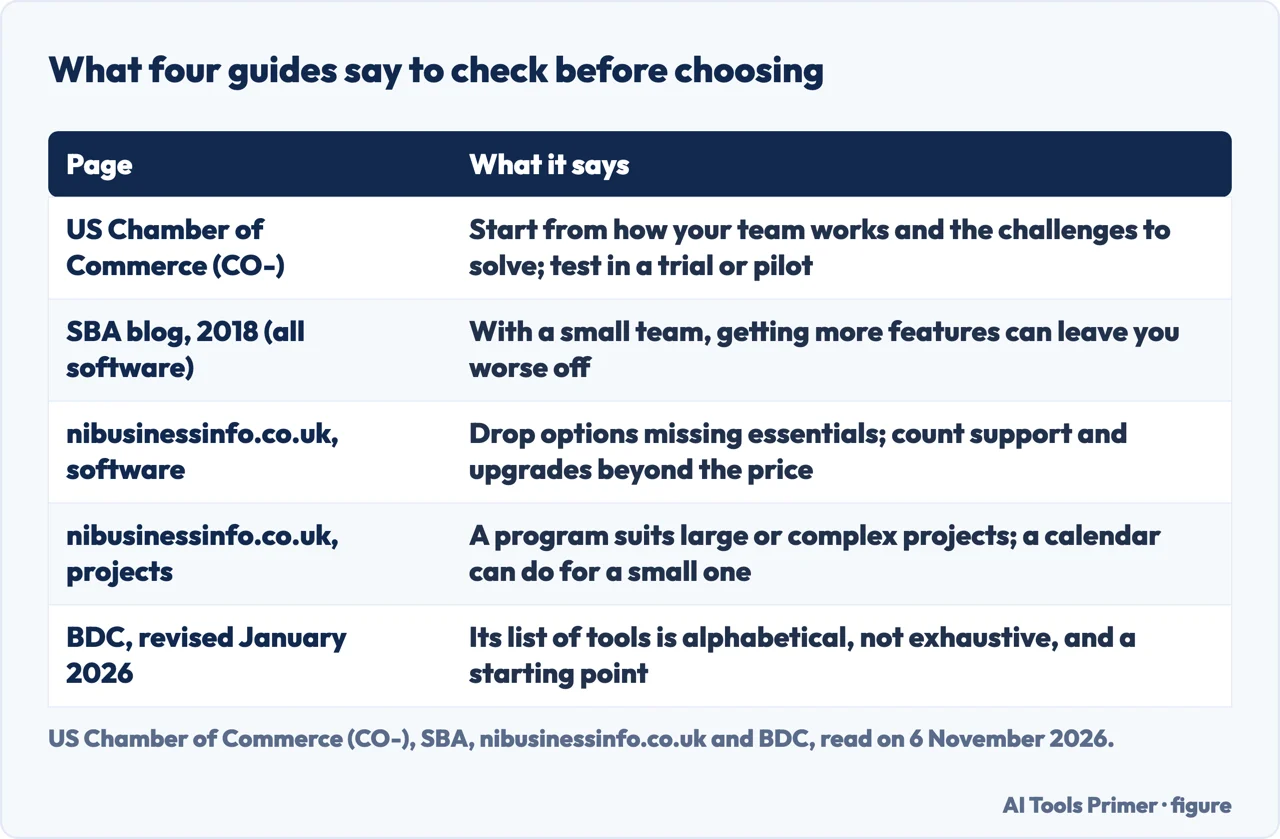
The US Chamber of Commerce runs a small-business site called CO-, and its guide to choosing project management software, published on 27 July 2026, puts the order of the decision in its first sentence on the subject: choosing starts with understanding how your team works and what challenges you need the platform to solve. Its first step, “Understand your business needs”, says to identify the biggest obstacles, such as missed deadlines, poor communication or resource management issues. It adds that every business has its own workflows, so the software should line up with the team structure, the complexity of the projects and the goals of the business, and not push employees to adapt to a system that does not fit.
The nibusinessinfo.co.uk service of Invest Northern Ireland asks a smaller question first. Its page of project templates and tools says you can use a software program to compile a project plan, although this is probably best suited to large or complex projects. For a smaller project, it says, a simple tool such as a year planner or calendar can be effective for working out the timeline. The page does not say how many projects or people tip the balance from a calendar to a program. It also warns that without a central, organised place for project documents, information can be lost or hard to reach very quickly, with a risk of conflicting versions of the same document.
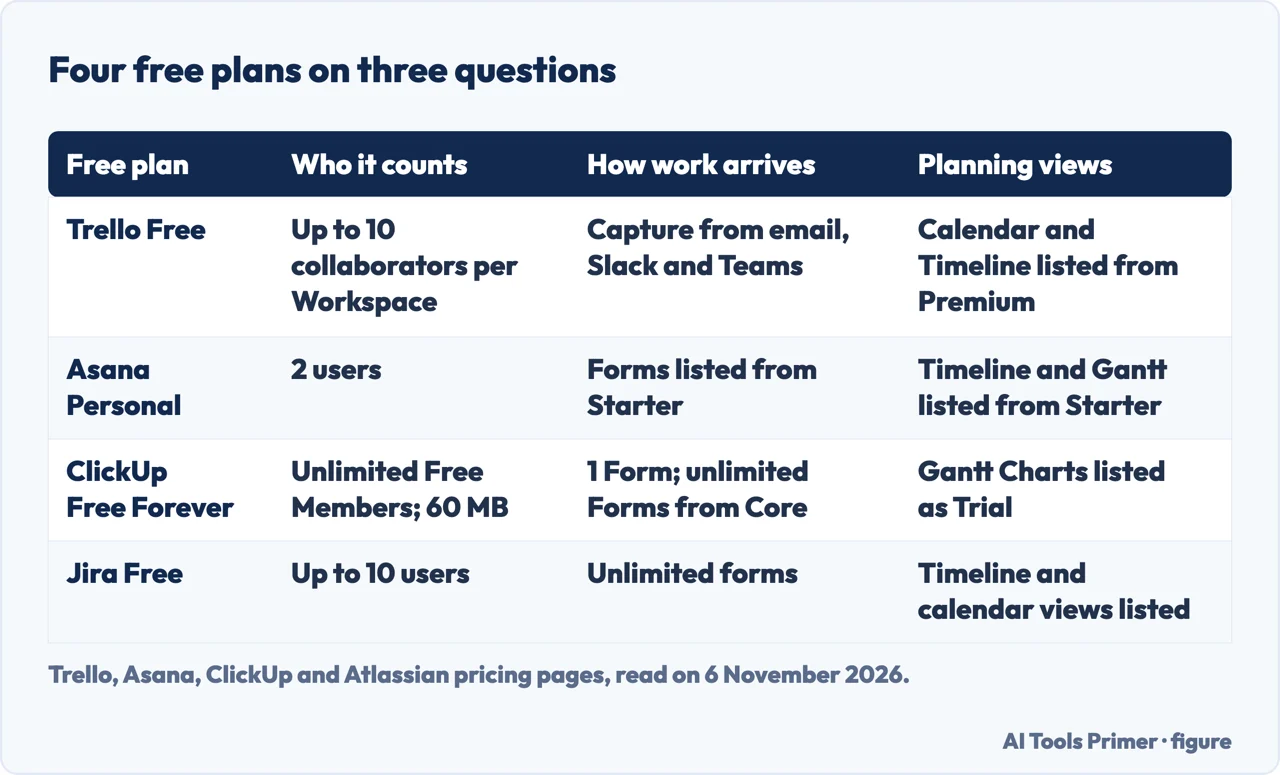
The pricing pages we read start from a different point, which is how a task gets into the tool. Trello’s Free plan lists capturing to-dos from email, Slack and Teams, and an Inbox. Asana’s Starter plan lists forms that capture requests and turn them into tasks; the Personal plan’s list does not mention forms. ClickUp’s Free Forever plan lists 1 Form, and its Core plan lists Unlimited Forms. Jira’s Free plan lists unlimited goals, projects, tasks and forms. So the way work arrives is a line on every page, and it sits in a different plan on each one. The pages we read do not say which of these ways suits which kind of business.
What the guides for small businesses ask
The US Chamber guide gives five considerations. The first is business needs, described above. The second is growth: it says a platform that works for a five-person team may not support larger teams, additional clients or more complex projects later, and asks you to think about how the system would handle more work, new users and changing processes. The third is ease of use. It says even powerful software can fail if employees find it hard to use, and that testing through free trials or pilot projects can show whether employees can fit it into their daily work. The fourth covers collaboration and access, including how easily team members, contractors and clients can see updates. The fifth is long-term value: cost matters, it says, but value goes beyond subscription pricing, and it names training, customer support and software updates. The article does not print a price.
The SBA checklist is older and broader. It was published on 26 June 2018 on the SBA’s blog by Anita Campbell, who is listed as a blog contributor, and it is about business software in general, not project tools. Its six points are testimonials from businesses like yours, a financially strong vendor, ease of use, automation with other systems, the ability to upgrade without switching vendors, and free trials with low-risk terms. On ease of use it says that for a small team more features can leave you worse off, because complexity takes time that people who “wear six other hats” may not have. On integrations it says to look for software that connects with the software you already use, and to avoid building your own custom integrations, which can get costly. On trials it says free trials allow a hands-on evaluation for a week or two, and that after that, with a month-to-month payment plan or the ability to cancel at any time, you are not locked in.
The nibusinessinfo.co.uk page on choosing software adds a method. It suggests drawing your business processes as diagrams, with boxes for processes and arrows for how documents such as invoices move between them. Then you compare your requirements with the available options, eliminate any that miss your essential requirements, and from the rest choose the one with the most beneficial features within your budget. It asks you to count costs beyond the software price, naming support, future upgrades and hardware upgrades, and to check that the software can grow with the business. Among sources of advice it lists software vendors, with the note that they may be biased.
The three guides each ask whether the software can grow with the business, and differ on what they ask you to look at first. The Chamber starts with the team and its obstacles, the SBA with testimonials from businesses like yours, then the vendor and ease of use, and nibusinessinfo.co.uk with your current and future needs, then a written map of your processes. The first figure below puts the four pages we read side by side.
Features the Chamber lists, and where the vendors put them
The US Chamber says platforms vary widely in functionality, so you should identify your must-have features before choosing. It lists eight: task and subtask management, timeline and Gantt chart views, built-in time tracking, resource management tools, collaboration and communication tools, automation, integrations, and custom dashboards and reporting. It then names six examples, in this order: Airtable, Asana, ClickUp, Monday.com, Teamwork.com and Zoho Projects. The article does not state that the order means anything, and it does not say which plan of any tool holds which feature. The pricing pages do.
On timeline and Gantt views, Asana’s page puts Timeline and Gantt in the Starter list, one step above the free Personal plan. ClickUp’s comparison table marks Gantt Charts as Trial on the Free plan and Included from Core, and the Core list says Unlimited Gantt Charts. Jira’s Free list includes timeline and calendar views, among others. Trello’s Premium list is where Calendar, Timeline, Table, Dashboard and Map views appear.
On time tracking, Asana’s Personal plan lists time tracking through integrations, and its Advanced plan lists time tracking that compares estimated and actual effort. ClickUp’s Free Forever list includes time tracking. On resource management, the Asana page lists it in Advanced, balancing workloads within a portfolio. On dashboards, Asana lists reporting dashboards in Starter, and Jira lists AI-driven reports and dashboards in Free.
On automation, the pages count different things. Trello’s Free plan lists 250 Workspace command runs per month and Standard lists 1,000. Asana’s Starter lists unlimited automations. Jira’s Free plan lists 150 automation steps per subscription per month. ClickUp’s comparison table lists 100 automation actions per workspace per month on Free and 1,000 on Core. A run, an automation and a step are three different units, and the pages we read do not say how they convert.
Here the guides and the vendors answer different questions. The Chamber puts Gantt views and resource tools among the features to look for. nibusinessinfo.co.uk says program-based planning is probably best suited to large or complex projects. The vendor pages measure features, as views and automations per plan, and do not say when a small business needs them.
Who the free plan counts
The Chamber warns that a platform that suits five people may not suit more, and the four pages we read give four different answers on head count. Trello’s Free plan is $0 and the page says it is free for up to 10 collaborators per Workspace. It lists unlimited cards, up to 10 boards per Workspace, 250 Workspace command runs per month, and unlimited storage with 10MB per file. Asana’s Personal plan is described as being for one or two people managing personal projects; it lists 2 users, unlimited tasks and projects, list, board and calendar views, and unlimited storage with 100MB per file.
ClickUp’s Free Forever plan is $0 with no credit card required. It lists 60 MB of storage, unlimited tasks and subtasks, Unlimited Free Members, collaborative Docs, Kanban boards, Calendar view, Sprint Management and time tracking. The comparison table on the same page lists 5 Spaces on the Free plan. Jira’s Free plan says it is free forever for 10 users and lists unlimited goals, projects, tasks and forms, 150 automation steps per subscription per month, 2 GB of storage and support from the Atlassian Community.
The pages also count different things. Trello counts collaborators per Workspace, Asana counts seats per project and team, Jira counts users and ClickUp counts members. Asana’s table adds that all paid plans let you add unlimited members, so its limit of 2 seats ends at the paid line. The Asana page does not say whether the 2 users include guests; it lists unlimited free guests in the Starter plan. Trello’s page says a guest on more than one board in a Workspace is billed at the same rate as a member of a Standard or Premium Workspace.
The plan that lists no cap on people, ClickUp’s, is also the one that lists the smallest storage figure and a cap on Spaces, while Jira’s Free plan lists 2 GB and caps people at 10. Our page on free project management plans sets out the limits in full, and the second figure below shows how the four plans answer three questions the guides raise.
Cost, trials and leaving
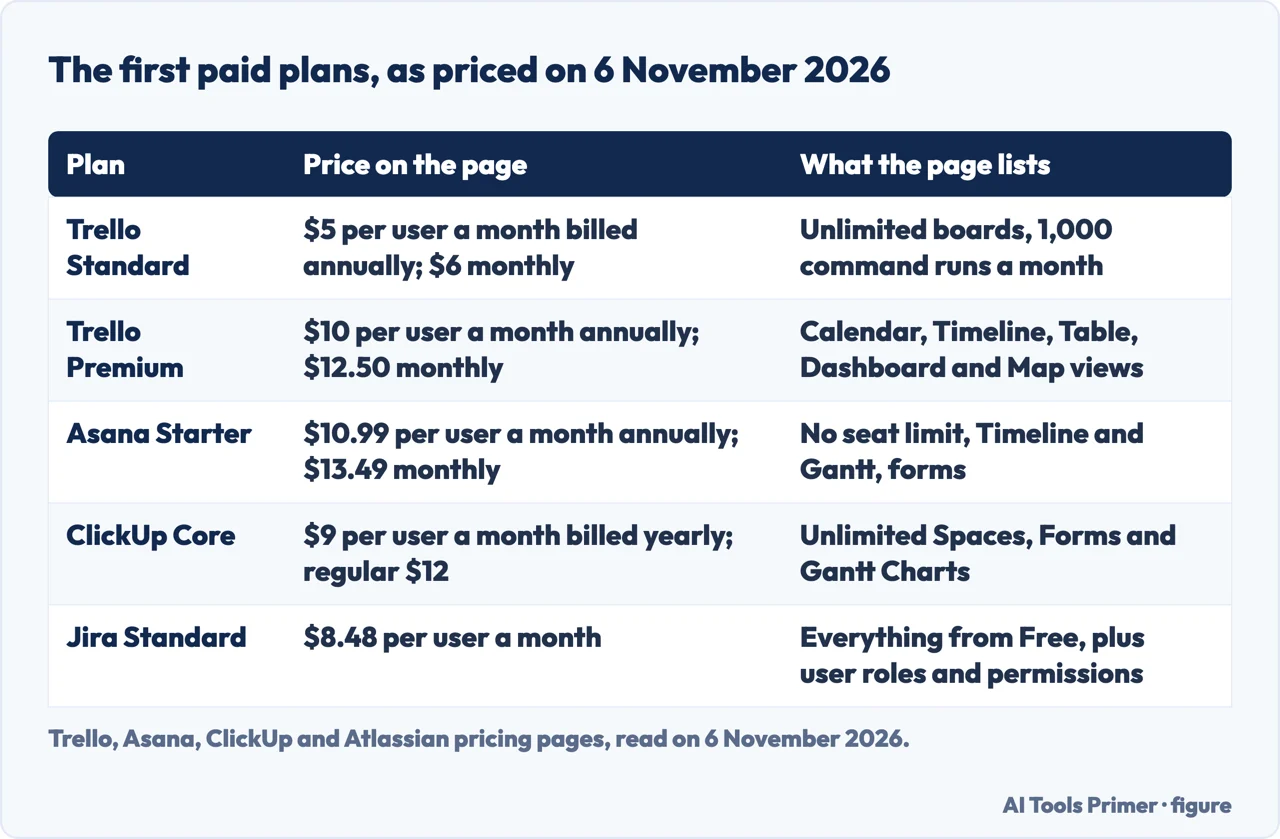
Both the Chamber and the SBA tell you to try before you commit. The Chamber says free trials or pilot projects can show whether employees can use the tool in their daily work. The SBA says a hands-on evaluation of a week or two, followed by a month-to-month plan or the right to cancel at any time, means you are not locked in. The Chamber article does not name a price, and nibusinessinfo.co.uk asks you to count support, upgrades and hardware beyond the price, so the numbers below are only part of the sum.
The prices on the pricing pages, read on 6 November 2026, are in the third figure below, and they change. Trello Standard is $5 per user per month if billed annually ($6 billed monthly) and Premium is $10 ($12.50 billed monthly). Asana Starter is $10.99 per user per month billed annually and $13.49 billed monthly, and Advanced is $24.99 billed annually. ClickUp Core is $9 per user per month billed yearly, with a regular price shown as $12. Jira Standard is $8.48 per user per month. The pages do not state the same billing basis, so the figures are not a like-for-like comparison.
On leaving, Trello’s page is the one that says what the free plan becomes. When a team downgrades from Standard or Premium, it keeps its paid features and unlimited boards until the end of the prepaid period, and then it becomes a free Trello Workspace that can hold 10 boards. Trello also says a user added to a Workspace as a member or as a team admin counts as a billable team member. Asana’s and ClickUp’s pages say a cancelled paid plan runs to the end of the billing period; the Jira page we read does not say what happens to a project after cancelling.
For price comparisons between two of these tools, and for what a board or project export holds, see Trello or Asana. For the tools that track hours, see free time tracking.
Where the pages differ and what they leave out
BDC, the Business Development Bank of Canada, revised its page on free and low-cost project management tools in January 2026. It lists eleven applications alphabetically: Asana, Birdview Project Management, Cerri Work, Casserole.pro, Freedcamp, Nutcache, OneDesk, Paymo, SharePoint Online, Teamwork.com and Wrike. For each it marks the language, the language of support, whether data is stored in Canada, and the mobile apps; some entries are marked as only partly so. The page says the list is not exhaustive and is only a starting point, and that links to outside sites are not an endorsement. It gives no prices and no criteria for choosing. It also points readers who only want to know how much time they spend on a project to a separate list of timesheet tools.
The BDC page names benefits where the Chamber names features: better alignment of project goals, real-time tracking of performance, visibility into other people’s work, improved communication, and time and cost savings from fewer unnecessary emails and meetings. Three entries show how far the tools specialise. Casserole.pro is described as focused on project financial health, comparing estimated budgets with actual costs, connecting to QuickBooks Online, and, per BDC, available in French only. Paymo is described as combining time tracking, project collaboration, task management and invoicing. Freedcamp is described as offering unlimited users and projects, with a paid plan possibly needed for Gantt charts, issue tracking, CRM and Dropbox integration.
Teamwork.com appears on both lists. The Chamber says it is particularly well suited to client-based businesses, agencies and service providers. Teamwork’s own blog, which is a vendor’s page and not a guide, describes the platform as purpose-built for client work, with budgets, billable rates and profitability reports. We use it only for what it says about itself.
The pages we read leave several things open. The US Chamber article gives no prices or plan limits. The BDC page gives no criteria. The SBA checklist predates the others by years and covers software in general. nibusinessinfo.co.uk says program-based planning suits large or complex projects but gives no size. The pages we read do not say which tool to choose for which kind of work, and this page does not either: it ranks nothing, and it carries no affiliate links.
Where to start
Six ways in.
- “Do I need a program or a calendar?”
- Start with how the work arrives — start
- “What do the guides ask me to check?”
- What the guides for small businesses ask — guides
- “Which plan has Gantt, forms or dashboards?”
- Features the Chamber lists, and where the vendors put them — features
- “How many people can use it free?”
- Who the free plan counts — free
- “What does it cost, and how do I leave?”
- Cost, trials and leaving — cost
- “Which tool is best?”
- Where the pages differ and what they leave out — differ
Reaching people
Email marketing and the rules attached to it. The guide on consent is written already, because sending business email to people is a regulated activity nearly everywhere.
Questions people also ask
What are 5 project management tools?
The US Chamber guide names six examples: Airtable, Asana, ClickUp, Monday.com, Teamwork.com and Zoho Projects. BDC lists eleven free or low-cost tools alphabetically, and the pricing pages we read cover Trello, Asana, ClickUp and Jira. The pages we read do not pick five.
What are the top 10 project management tools?
The pages we read do not rank tools. The US Chamber names six examples without stating an order, and BDC lists eleven alphabetically and says the list is not exhaustive and is only a starting point.
What are the best project management tools for 2026?
The pages we read do not name a best. The US Chamber guide, published on 27 July 2026, gives considerations instead: business needs, growth, ease of use, collaboration and access, and long-term value beyond the subscription price.
What tools does PMO use?
Only Teamwork’s own blog, a vendor’s page, has a PMO section, and it names Teamwork.com first; the further pages we read do not mention a project management office. For a small business, the US Chamber lists eight features to look for, among them timeline and Gantt views, time tracking, resource management and dashboards.
Not covered here. This page is written from pages read, not from accounts opened. The statements come from the US Chamber of Commerce’s CO- guide (27 July 2026), BDC’s page on free and low-cost project management tools (revised January 2026), the SBA’s 2018 checklist, two nibusinessinfo.co.uk pages, the pricing pages of Trello, Asana, ClickUp and Atlassian, and Teamwork’s blog, all read on 6 November 2026. For this page we did not read the list pages from Zapier, Project-Management.com and Simular or the Reddit thread, and we left out a list from an email marketing company’s blog.
The search volume and difficulty behind this page come from an Ubersuggest reading of 5 November 2026 (United States), which gives search volume and its own SEO difficulty score, not Semrush’s; a Semrush check is still to be made.
Sources
- US Chamber of Commerce (CO-) — How to Choose and Implement Project Management Software — www.uschamber.com, read 6 November 2026.
- BDC — Project management software: free and low-cost options — www.bdc.ca, read 6 November 2026.
- SBA — Checklist for Choosing Business Software — sba.gov, read 6 November 2026.
- nibusinessinfo.co.uk — How to choose software for your business — www.nibusinessinfo.co.uk, read 6 November 2026.
- nibusinessinfo.co.uk — Project management templates and tools — www.nibusinessinfo.co.uk, read 6 November 2026.
- Trello — Pricing — trello.com, read 6 November 2026.
- Asana — Pricing — asana.com, read 6 November 2026.
- ClickUp — Pricing — clickup.com, read 6 November 2026.
- Atlassian — Jira pricing — www.atlassian.com, read 6 November 2026.
- Teamwork — 10 Best Project Management Tools for Client Projects (2026) — www.teamwork.com, read 6 November 2026.
Written by Alberto Gulotta
Founder and editor of AI Tools Primer, writing from Palermo, Italy. Thirty-five years of taking computers apart, starting with a Commodore 64 — the long version is on the about page.
Something wrong on this page? Write to aitoolsprimer@gmail.com and it gets fixed.
Written on 6 November 2026.
Independence and limits
No affiliate links and no paid placements anywhere on this site. Nobody pays to appear here, and no company has seen this page before you did.
This is general information, not professional advice. Where a page touches money, health, safety or the law, it names its source and the date it was read — and your situation may still differ. See the privacy page and the cookie policy.