
Business · guide
Free time tracking software: Clockify, Toggl, Harvest
By Alberto Gulotta · Updated · 13 min read
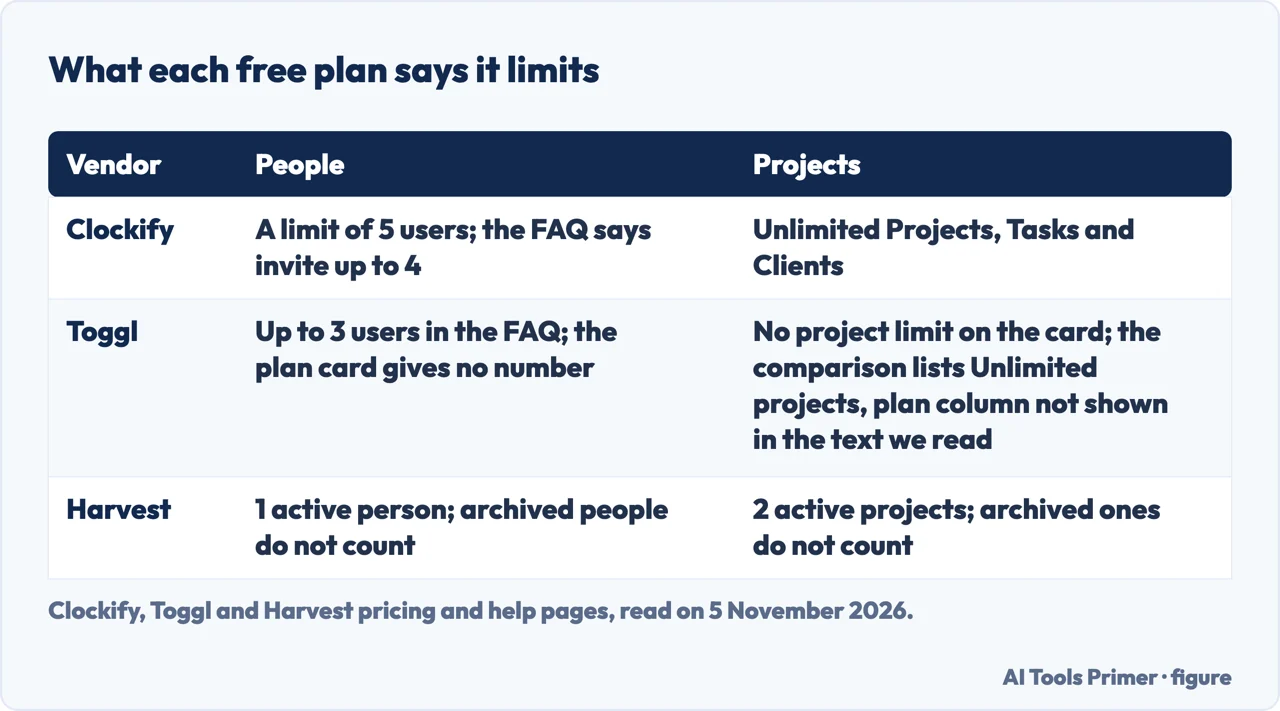
Free time tracking software comes with a limit on people, and the three pages we read give three different ones. Clockify says its free plan has a limit of 5 users, Toggl’s FAQ says up to 3 users, and Harvest’s Help Center says one active person and two active projects.
| Question | Answer | Where it comes from |
|---|---|---|
| How many people does Clockify’s free plan allow? | The pricing FAQ says up to 4 invited people; the plan card and the free-plan page say 5 users | Clockify |
| And Toggl’s? | Up to 3 users, in the FAQ; the plan card says only a limited number of users | Toggl |
| And Harvest’s? | One active person and two active projects | Harvest |
| Which page states a limit on reports? | Only Clockify’s pages state one: a date range of 1 month on its Free plan; the Toggl and Harvest pages we read give no such range | Clockify |
| Which one is best? | The pages we read do not say | All three |
Three pages, three ways of counting people
Each vendor puts a different limit on its free plan, and each states it in a different place. Clockify’s pricing page says in its FAQ that you can track as much time as you want and invite up to 4 people for free, while the Free plan card on the same page says it is for up to 5 users. Clockify’s page about the free plan says the free version has a limit of 5 users and that, for unlimited users, you upgrade to the Basic plan. Read together, four invited people and five users fit if the owner is counted, but the pages we read do not spell that out.
Toggl’s pricing page gives its Free plan a price of $0 and says it is free for a limited number of users, without a number. The number comes in the FAQ: asked whether Toggl is free for teams, the page answers yes, up to 3 users. Harvest counts differently again. Its pricing page lists the Free plan as $0 forever, built for individual freelancers, with 1 seat and 2 projects, and its Help Center says the free version allows only one active person and two active projects, with archived people and archived projects not counting toward either limit.
So the same word, free, covers one person with two projects, three users, and five users with no project cap. The pages we read do not set the three side by side, and all three are vendors describing their own plans, so what follows is what each says, dated to the day we read it, 5 November 2026. Prices are in US dollars and can change.
Clockify: no cap on projects, a cap on people and on reports
Clockify’s page on its free plan says the plan offers unlimited time tracking and an unlimited number of Projects, Tasks and Clients. It lists desktop apps for macOS, Windows and Linux and mobile apps for iOS and Android, and says the free plan integrates with more than 100 web apps. The same page lists an Auto tracker, a Calendar and a Pomodoro timer among the free features, with the Pomodoro timer in the desktop apps for macOS and Windows and in browser extensions.
The limits sit elsewhere. The pricing page says the data range on the Free plan is 1 month, and the free-plan page says you can generate reports for a maximum date range of 1 month. The free-plan page also lists what it calls paid features: Kiosk, Rates, Location, Scheduling, Time off, Approval, Expenses, Invoicing and Team management. Of Rates it says managers can set hourly rates for projects, tasks or team members and that Clockify then calculates the amount earned from billable time; of Invoicing, that it creates invoices based on tracked time and expenses.
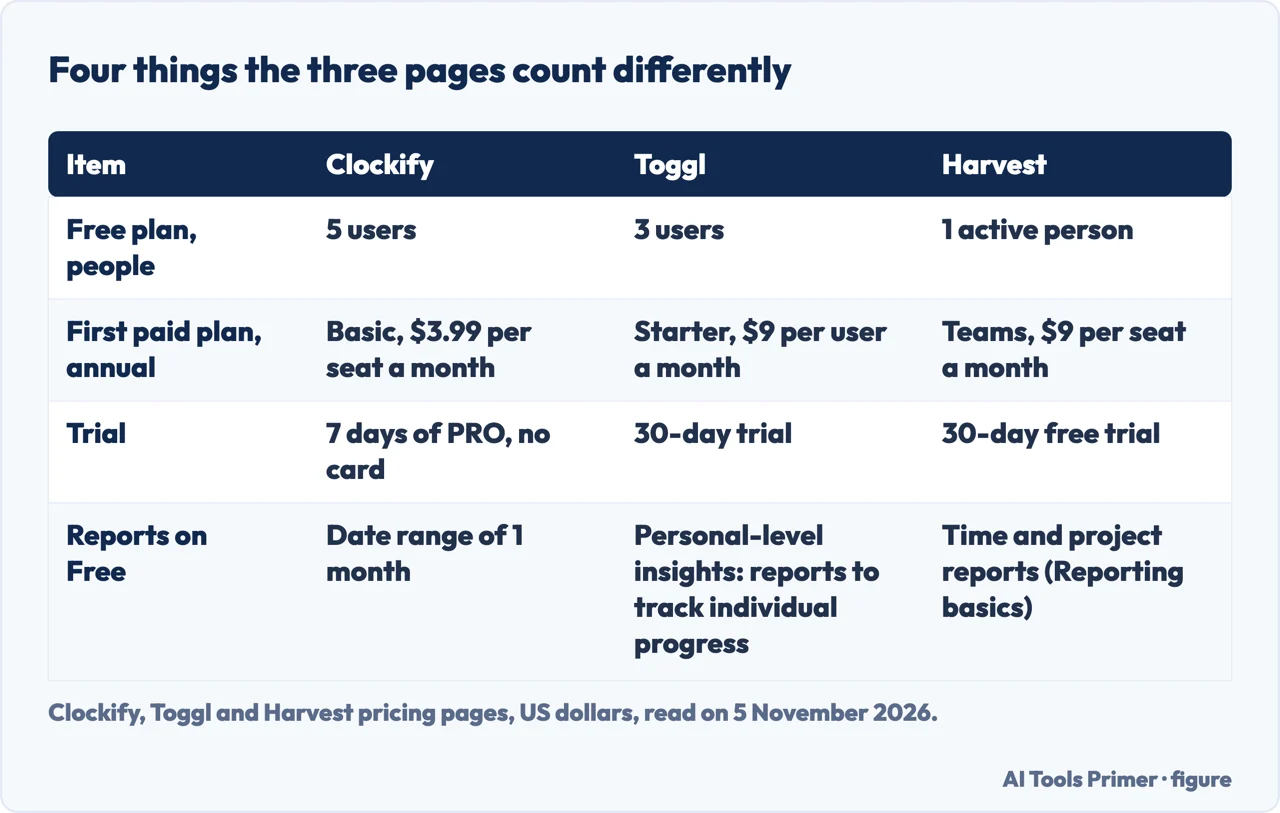
The pricing page orders the paid plans. Basic is “All FREE features, plus” a list that includes adding time for others, required fields, bulk edit, Kiosk, time audit, time estimates, project templates and importing time and users. Standard adds Time off, Invoicing and Recurring invoices, and Pro adds Activity monitoring, Scheduling and Forecasting. Its listed prices, billed annually per seat a month, are $3.99 for Basic, $5.49 for Standard and $7.99 for Pro, or $4.99, $6.99 and $9.99 billed monthly. The page says every active or invited user, the owner included, occupies a paid seat, and that deactivated users do not.
On leaving, the pricing FAQ says that after you cancel and the subscription expires you are downgraded to the free version, that no further charges are made, and that you do not lose any data, because cancelling affects only the extra features. It also offers a free 7-day trial of the PRO features with no credit card required.
Toggl: three users, and billing starts a plan up
Toggl’s Free plan, as its pricing page lists it, has manual and real-time timers, focus mode and calendar integrations; simple planning with tasks, boards and task estimates; Google and Outlook Calendar integrations; and personal-level insights, described as reports to track individual progress. The text we read gives no limit on projects for the Free plan. Its FAQ, asked whether the plan suits a solo user, says it is built to be usable solo and lists one-click tracking, focus mode, calendar integrations, boards, tasks and task estimates. The page also says the Free plan is free forever and that its 30-day trial has no strings attached.
The first paid plan, Starter, is $9 per user a month billed annually, or $12 billed monthly. The page describes it as everything in Free plus billable rates, timeline views, tags and milestones, PTO, public holidays and flexible hours, and team reports. Premium is $16 per user a month billed annually, or $24 billed monthly, and adds labor costs and profitability reports, fixed fee projects, project dashboards comparing time actuals with estimates, timesheet approvals, Jira and Asana integrations and single sign-on. The pricing page also sells Time Off Management and Capacity Management as add-ons, at $2 and $5 per user a month in the text we read.
Where the pages differ is the Free plan’s headcount. Toggl’s card gives no number, its FAQ says 3, Clockify’s pages say 5 and Harvest’s say one active person. The card and the FAQ of the Toggl pricing page we read therefore give different amounts of detail on the same limit.
Harvest: one person, two projects, and invoices with conditions
Harvest’s Free plan is the narrowest in people and the only one of the three whose pricing page lists invoicing and expense tracking among the free features, along with time tracking and Mac and iOS apps. The Help Center lists what the free version cannot do: upload a company logo, attach files to invoices or estimates, integrate with QuickBooks Online or import projects and people from Asana, or import data. It also says you cannot send invoices by email or export them as PDFs without connecting Stripe for payments, which it explains as meaning that, without Stripe, invoices cannot be sent directly from Harvest on the Free plan.
The Help Center says a new account starts with a fully featured free trial (the pricing page gives it as 30 days, with no credit card required), and that when it ends you must choose the free version or a paid account; if you do neither, the trial expires and you lose access until you choose. To switch to the free plan, the account must fit the limits: if it does not, the page says you are prompted to archive people, or to archive or delete projects, until you have no more than one active person and two active projects.
The paid plans start with Teams, from $9 per seat a month billed annually, which the page gives as $108 per seat a year, or $11 billed monthly; Enterprise starts from $14 annually or $17.50 monthly. Harvest’s plans page says Teams and Enterprise can be billed as Flex, usage-based, or as Unlimited, a fixed usage fee. With Flex it says you pay a per-seat rate plus charges for active projects, active clients, active tasks and invoicing above an allowance, and that for new accounts usage-based charges begin at the second paid renewal. The pricing page says the same in one line: as a team grows, additional invoices, projects, clients and tasks are billed based on what you use.
Where free stops, by what you want to do
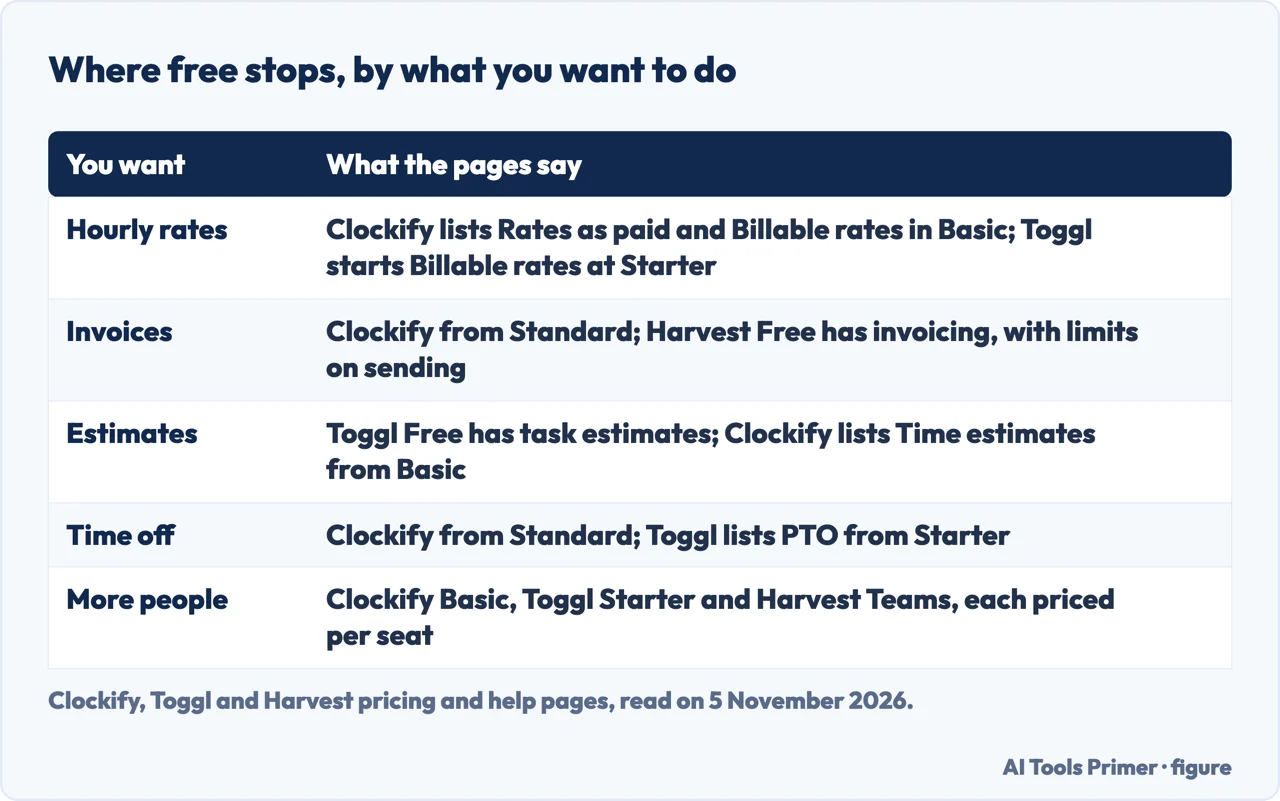
Billing clients. Clockify lists Rates among its paid features, its pricing page lists Billable rates in the Basic plan ($3.99 per seat a month billed annually), and it puts Invoicing in Standard, at $5.49 per seat a month billed annually. Toggl starts Billable rates at Starter, $9 per user. Harvest’s Free plan lists invoicing, with the limits above on logos, attachments and sending. The pages we read do not say which of these a person who bills a few clients a month should pick.
Estimating. Toggl’s Free plan lists task estimates, while its project dashboards of time actuals against estimates are on the Premium list. Clockify’s pricing page lists time estimates in the Basic plan, not in Free.
Growing a team. Clockify’s Basic plan removes the 5-user limit, per its free-plan page, at $3.99 per seat a month billed annually. Toggl moves to Starter at $9 per user and Harvest to Teams at $9 per seat, both billed annually. The three are priced per seat, but only Harvest’s page adds charges for projects, clients, tasks and invoices above an allowance.
Reading the limits first. The figures the pages put limits on are the number of people, the number of active projects, the date range of reports, and what happens to invoices and imports. Our pages on free project management plans and on invoicing on its own look at the same kind of limits for the neighbouring tools.
What we did not use
We tracked no time in any of the three programs, so everything here is what the pages say. We read five pages from three vendors: two from Clockify, one from Toggl and two from Harvest. We did not read the pages of other vendors, the comparison lists of free time tracking apps or any app-store listing. The pages we read do not say how long the free plans keep your data, apart from Clockify’s note that cancelling a paid plan does not lose any. They do not name a best plan for any kind of work, or say how many hours are worth tracking. We read no Microsoft page. Plans and prices change, so each figure is dated to 5 November 2026.
Where to start
Five ways in.
- “How many people can use it free?”
- Three pages, three ways of counting people — limits
- “Is Clockify really free?”
- Clockify — clockify
- “Is Toggl free for a team?”
- Toggl — toggl
- “Can I invoice from the free plan?”
- Harvest — harvest
- “When do I have to pay?”
- Where free stops — stops
Free plans and limits
What a free plan covers, how it counts people, and what it costs when it ends.
Money
Invoicing, accounts and getting paid.
Questions people also ask
Is Clockify truly free?
Clockify’s free-plan page says yes: the free version lets you track as much time as you want, with no credit card required. The same pages set a limit of 5 users and a reports date range of 1 month, and list Kiosk, Rates, Invoicing and others as paid features.
Is there a real-time location tracking app for free?
The pages we read do not answer that. Clockify’s free-plan page lists Location among its paid features, and its pricing page describes GPS tracking as tracking your team’s location and visited client sites while on the clock. Toggl’s FAQ says it does not record location. We did not read a page that offers location tracking free.
What is the best free timer app?
The pages we read do not name one. Each describes its own free plan: Clockify with unlimited projects and 5 users, Toggl with timers, boards and 3 users, Harvest with invoicing, one person and two projects.
Does Microsoft 365 have a timesheet app?
We did not read a Microsoft page, so this page says nothing on it. The three pages we read are from Clockify, Toggl and Harvest.
Not covered here. We tracked no time in any program. The statements come from the Clockify pricing and free-plan pages, the Toggl pricing page, and the Harvest pricing page, plans page and Help Center article, all read on 5 November 2026.
The search volume and difficulty behind this page come from an Ubersuggest reading of 5 November 2026 (United States), which gives search volume and its own SEO difficulty score, not Semrush’s; a Semrush check is still to be made.
Sources
- Clockify — Plans & Pricing — clockify.me, read 5 November 2026.
- Clockify — Clockify Free Plan Features — clockify.me, read 5 November 2026.
- Toggl — Pricing Plans — toggl.com, read 5 November 2026.
- Harvest — Pricing — www.getharvest.com, read 5 November 2026.
- Harvest Help Center — Information about pricing plans — support.getharvest.com, read 5 November 2026.
- Harvest Help Center — Is there a free version of Harvest? — support.getharvest.com, read 5 November 2026.
Written by Alberto Gulotta
Founder and editor of AI Tools Primer, writing from Palermo, Italy. Thirty-five years of taking computers apart, starting with a Commodore 64 — the long version is on the about page.
Something wrong on this page? Write to aitoolsprimer@gmail.com and it gets fixed.
Written on 6 November 2026.
Independence and limits
No affiliate links and no paid placements anywhere on this site. Nobody pays to appear here, and no company has seen this page before you did.
This is general information, not professional advice. Where a page touches money, health, safety or the law, it names its source and the date it was read — and your situation may still differ. See the privacy page and the cookie policy.