
Business · guide
QuickBooks vs Xero: where the pages disagree
By Alberto Gulotta · Updated · 14 min read
QuickBooks vs Xero comes down to pages that disagree. Xero’s page says every plan has unlimited users, while QuickBooks plans run from one user to 25. Xero’s prices differ from page to page, and Intuit sets only its Advanced plan against Xero’s Established. We put the claims side by side, each with the date it was read.
| Question | Answer | Where it comes from |
|---|---|---|
| How many users? | Xero says every plan has unlimited users; QuickBooks runs from 1 to 25 users by plan | Xero, Intuit, Forbes |
| What does Xero cost a month? | $27, $59 and $97 on Xero’s page; $25, $55 and $90 on Forbes and Fishbowl | Xero, Forbes, Fishbowl |
| What does QuickBooks cost a month? | $38, $85, $140 and $340 for four plans; Intuit’s cards show three of them | Forbes, Intuit |
| Is auto-reconcile settled? | Xero says it is in two plans; Intuit calls Xero’s version still in beta | Xero, Intuit |
| What does the smallest plan cap? | Xero Early: 20 invoices and 5 bills; QuickBooks Free: 2 invoices a month | Xero, Intuit, Fishbowl |
| Can I move from QuickBooks to Xero? | Xero describes three steps: a conversion date, a data move, a 1:1 setup call | Xero |
Where the two makers describe each other differently
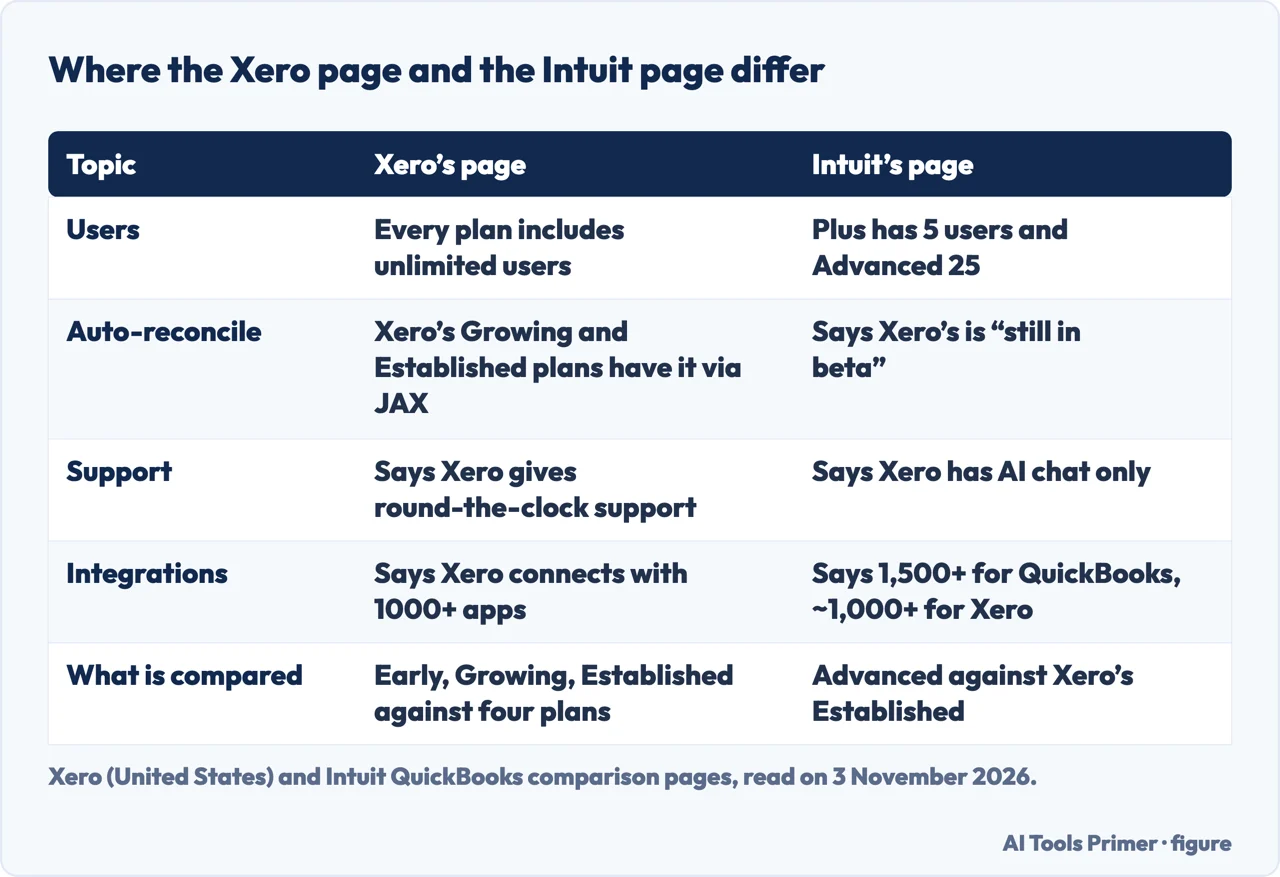
Two of the pages we read belong to the companies themselves, and each one describes the other product. Xero’s page puts Xero against QuickBooks Online in one table. The Xero side lists three plans, Early, Growing and Established, and the QuickBooks side lists Simple Start, Essentials, Plus and Advanced. Intuit’s page is narrower: it sets QuickBooks Online Advanced against Xero Established and says its list of Xero features was accurate as of 1 September 2026. So one page compares whole product lines and the other compares one plan with one plan.
The two pages part ways on several points. On users, Xero says every plan includes unlimited users at no extra cost, and its table says each QuickBooks subscription limits the number of users. On auto-reconciliation, Xero’s table gives it to Xero’s Growing and Established plans through an assistant called JAX, and to QuickBooks’ Plus and Advanced plans through Intuit Assist Agents. Intuit’s page, for its part, says Xero’s version is “still in beta” and adds that some direct bank feeds carry usage fees. Both pages were read on the same day, and the pages we read do not explain either claim. On the bank-feed fees, Xero’s own pricing page does say that usage charges for Xero Payroll, Xero Projects or Xero Expenses, and a chargeable direct bank feed, are invoiced for the previous month, so the fees exist on both sides; the pages do not say which feeds are chargeable or how much.
Support and integrations show the same pattern. Xero’s page promises “round-the-clock support” and 1:1 setup help. Intuit says Xero offers “AI chat only” plus a self-serve help center and a free 90-day onboarding coach call, and lists phone, live chat and priority support for Advanced, with hours of Monday to Friday 6a to 7p Pacific and Saturday and Sunday 6a to 3p. On apps, Xero’s page says “1000+ apps”, while Intuit gives 1,500+ integrations for QuickBooks and about 1,000+ for Xero. Xero also quotes a survey of its own customers, in which 91% agree Xero is easy to use (Xero survey, May to June 2024); that is a figure from the maker and we have not seen how it was gathered.
Fishbowl, Rippling and Forbes add their own versions. Fishbowl, dated 11 September 2026, says Xero has around-the-clock online help through email and chat but no phone line, and that QuickBooks adds phone and chat. Rippling, published on 19 May 2025, says Xero does not provide direct phone, email or live chat support and that users submit a request and wait for a callback, while QuickBooks offers 24/7 live chat and scheduled phone support across all plans. On apps, Forbes’ table says Over 600 for Xero and Over 800 for QuickBooks, and Rippling’s 2025 table says +1000 and +750. The counts run from 600 to 1,500 for the same products, and the pages we read do not explain how each one counted.
Plans and prices, with the date each was read
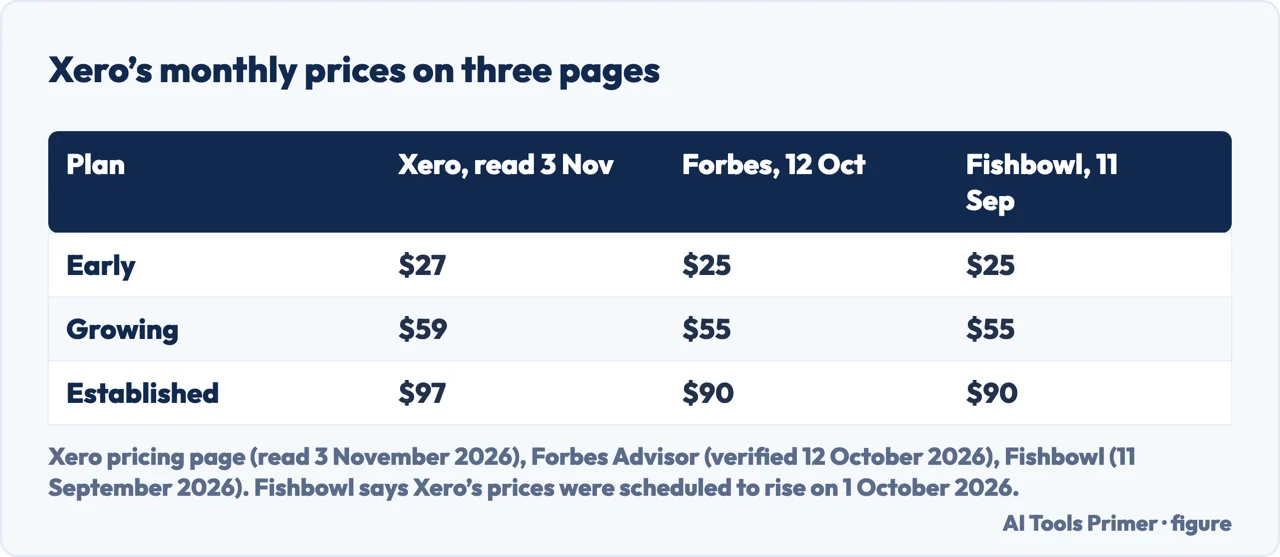
Xero’s pricing page, read on 3 November 2026, shows prices in US dollars a month: $27 for Early, $59 for Growing and $97 for Established. It carries no publication date. It says Xero reserves the right to change pricing at any time, and it advertises 80% off the first three months for new customers in the United States; we leave out the promotional code the page names and do not apply the discount anywhere below.
Forbes Advisor and Fishbowl give lower figures for the same three plans. Forbes Advisor, with an “Audited & Verified” date of 12 October 2026, lists Early at $25 a month, Growing at $55 and Established at $90, all billed monthly. Fishbowl, dated 11 September 2026, gives the same three numbers, says they are as of September 2026 per each platform’s pricing page, and adds that Xero’s prices were scheduled to increase on 1 October 2026. The gap between $25 and $27, $55 and $59, $90 and $97 is therefore something we saw, not something we can explain. The Xero pages we read do not say when $27, $59 and $97 took effect, and they do not mention a price rise.
The QuickBooks side is steadier. Forbes lists Simple Start at $38 a month, Essentials at $85, Plus at $140 and Advanced at $340, billed monthly. Fishbowl gives the same four and says they come after an Intuit price increase in 2026. Intuit’s page shows plan cards at $38, $140 and $340, each with a struck-through price and a 50% off offer for three months, plus a Free plan at $0 a month; the Essentials plan does not appear among the cards on the page we read, although Xero’s table, Forbes and Fishbowl all list it. The pages disagree about the cheaper Xero numbers and agree on the QuickBooks ones, and the pages we read do not say which total a given business would pay over a year.
Users and limits
Users are the place where the two price lists are built differently. Xero charges by plan and, on its own pages, does not count people. QuickBooks counts them. Forbes lists Simple Start with one user plus an accountant, Essentials with three, Plus with five and Advanced with 25. Intuit’s cards say the same for the plans they show: 25 users with access for 3 accountants on Advanced, 5 users with 2 accountants on Plus, and one user with 2 accountants on Simple Start. Its Free plan has one user and no accountant access, and the page invites you to upgrade to a paid plan to bring an accountant in.
Xero’s limits are on documents rather than people. Its comparison table says the Early plan limits you to 20 invoices and 5 bills, and that every other Xero plan has unlimited invoicing and unlimited bills. Its pricing page repeats that Early lets you send quotes and 20 invoices and enter 5 bills. Fishbowl says the same cap applies per month, a detail that the Xero pages we read do not state, and adds that active businesses upgrade quickly, which is Fishbowl’s reading and not Xero’s.
QuickBooks has a cap too, at the free end. Intuit’s Free plan lets you send 2 invoices per month and connect one bank account. The Xero pages we read show three paid plans and a one-month-free offer on the comparison page, and they do not mention a free plan. Our page on invoicing on its own looks at what three free invoicing plans limit.
What costs extra
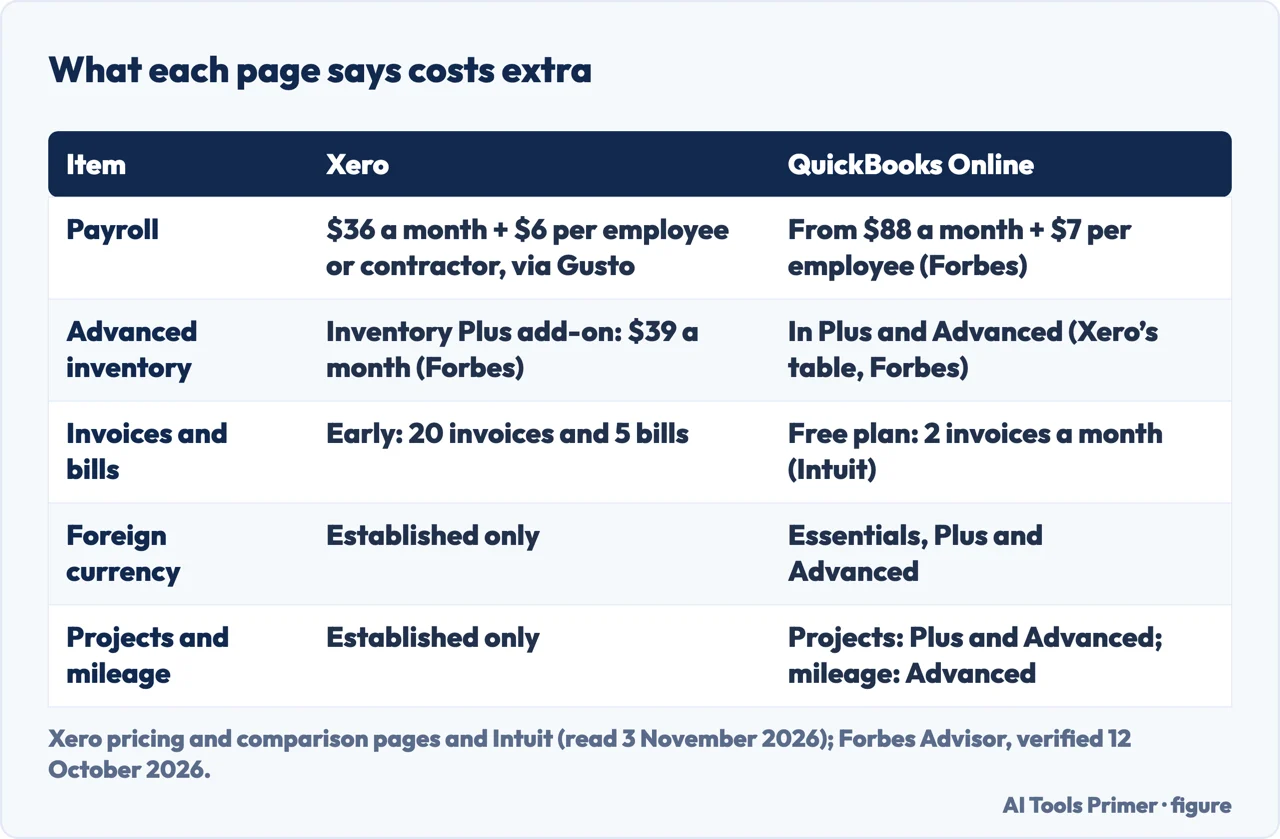
Payroll is an add-on on both sides, and the pages price it differently. Xero’s table calls payroll an optional add-on through Gusto, and its pricing page lists Xero Payroll, powered by Gusto, at an optional $36 a month plus $6 per employee or contractor. QuickBooks’ entry in the same table is simply “optional add-on”. Forbes puts QuickBooks payroll at $88 a month plus $7 per employee for the Core tier that goes with Simple Start, and says Xero payroll requires a Gusto subscription. Fishbowl adds that Xero has built-in payroll only in some countries, so people in the United States add a service such as Gusto or ADP, and that QuickBooks offers full-service payroll in all 50 states.
Inventory follows a similar split. Xero’s table says advanced inventory is an optional add-on, Inventory Plus, in the Growing and Established plans, and that QuickBooks supports it in Plus and Advanced. Forbes puts Xero’s inventory at $39 a month in Growing and Established and says it is not available in Early. Intuit agrees that Inventory Plus is a paid add-on and is not included. Foreign currency, projects and mileage are tied to plan tiers on both sides: Xero’s table gives each of the three to Established only, while QuickBooks gets foreign currency from Essentials, projects from Plus and mileage tracking only in Advanced.
Intuit adds a few more points about Xero, as its own claims: active tracking categories are capped at two, with a third dimension needing a paid reporting add-on, and invoice payments run “via Stripe integration only”. Fishbowl’s table describes Xero invoicing as processing via Stripe or PayPal, so the pages differ even on that. Card fees are a separate cost from any plan, and our page on getting paid sets out what card payments cost per transaction.
Moving from QuickBooks to Xero
The only move the pages we read describe is the one from QuickBooks to Xero, and the page that describes it is Xero’s. It gives three steps. First, pick a conversion date, which it says should be the first day of a month and ideally the start of your fiscal year or sales tax period. Second, either have a Xero partner bring your QuickBooks data across with Jet Convert, which it calls Xero’s migration partner, or import your chart of accounts and contacts yourself and add any unpaid invoices and bills. Third, book personalised 1:1 setup assistance. For the full process Xero points to a step-by-step conversion guide on Xero Central, which we did not read.
Xero says a partner using Jet Convert can move current and previous fiscal year transactions. Its table also compares onboarding: Xero coaches for the first 90 days on its side, and a line it labels Beta for the first 30 days on the QuickBooks side. Intuit’s page separately mentions a free 90-day onboarding coach call for Xero. The pages we read do not say how long the move takes, and the Xero page is where the steps come from.
The pages we read do not describe moving from Xero to QuickBooks, and they do not explain how to export books from either product. Xero also answers a question about QuickBooks Desktop: it says Xero runs in the cloud, can be opened on any device with an internet connection, and has an app for sending invoices and reconciling transactions from a phone. The pages we read do not compare Xero with QuickBooks Desktop in any detail beyond that answer.
What the pages do not say, and what we did not use
We tested neither program, so everything here is what the pages say, and every figure is dated to the day we read it, 3 November 2026. Xero and Intuit sell the products they describe. Forbes says it earns a commission from partner links, and Fishbowl and Rippling sell other software, so each page comes from a company that sells something or earns from links. Forbes also gives verdicts by section, and we do not repeat them. The Rippling article was published on 19 May 2025, so we use it only where we give that date.
The pages we read do not say which Xero plan matches which QuickBooks plan beyond the order of the two tables. They do not give a full year’s cost with discounts and add-ons, or which choice costs less for a given number of users. They do not mention tax rules, and what a business must record and keep depends on its country; our page on how long to keep records covers two tax authorities, and an accountant answers the rest. Fishbowl says that in the United States most accountants know QuickBooks best, and it describes Xero as having a growing base of accountants and bookkeepers; that is Fishbowl’s reading, not a measurement.
We did not open a forum thread or a training-centre blog on the same subject. The Intuit page needed a browser to load, so we read it from a rendered copy.
Where to start
Four ways in.
- “Do the two companies agree?”
- Where the two makers describe each other differently — disagree
- “What does each cost?”
- Plans and prices, with the date each was read — prices
- “What is extra?”
- What costs extra — extra
- “Can I switch?”
- Moving from QuickBooks to Xero — moving
Money
Invoicing, accounts and getting paid. This is the wing with legal weight, the one where the cost of choosing badly is measured in an accountant’s hours rather than in a subscription.
Questions people also ask
Which is better, QuickBooks or Xero?
Forbes gives its own verdicts by section, which we do not repeat. The pages give the points that move the answer: how many users, whether payroll or inventory is needed, which plan, and what an accountant already uses. Fishbowl says most United States accountants know QuickBooks best.
What software is replacing QuickBooks?
The pages we read do not say what is replacing QuickBooks. Xero’s page presents Xero as a QuickBooks alternative and describes a three-step move from QuickBooks to Xero, which is the only move these pages describe.
Why do accountants prefer Xero?
The pages we read do not show accountants preferring Xero. Fishbowl says most United States accountants know QuickBooks best and that Xero has a growing base of accountants and bookkeepers. Xero says every plan lets you add your accountant at no extra cost.
Why are people leaving QuickBooks?
The pages we read do not say why people leave QuickBooks. Fishbowl and Forbes list its plans from $38 to $340 a month, and Fishbowl ties those prices to an Intuit increase in 2026, but the pages do not link that to anyone leaving.
Not covered here. We tested neither program. The statements come from the Xero pages on comparison and plans, an Intuit comparison page, Forbes Advisor, Fishbowl and Rippling, read on 3 November 2026; prices are in US dollars a month as each page gave them.
The search volume and difficulty behind this page come from a Semrush Keyword Overview reading of 3 November 2026 (United States database).
Sources
- Xero — Xero vs QuickBooks: explore our QuickBooks alternative (United States) — www.xero.com, read 3 November 2026.
- Xero — Pricing plans (United States) — www.xero.com, read 3 November 2026.
- Intuit QuickBooks — Xero vs QuickBooks comparison — quickbooks.intuit.com, read 3 November 2026.
- Forbes Advisor — Xero Vs. QuickBooks (2026 comparison) — www.forbes.com, read 3 November 2026 (verified by Forbes on 12 October 2026).
- Fishbowl — Xero vs QuickBooks Online: features, pricing and fit — www.fishbowlinventory.com, read 3 November 2026 (page dated 11 September 2026).
- Rippling — Xero vs. QuickBooks: accounting comparison (published 19 May 2025) — www.rippling.com, read 3 November 2026.
Written by Alberto Gulotta
Founder and editor of AI Tools Primer, writing from Palermo, Italy. Thirty-five years of taking computers apart, starting with a Commodore 64 — the long version is on the about page.
Something wrong on this page? Write to aitoolsprimer@gmail.com and it gets fixed.
Written on 4 November 2026.
Independence and limits
No affiliate links and no paid placements anywhere on this site. Nobody pays to appear here, and no company has seen this page before you did.
This is general information, not professional advice. Where a page touches money, health, safety or the law, it names its source and the date it was read — and your situation may still differ. See the privacy page and the cookie policy.