
Business · guide
Free accounting software for small business: what each plan counts
By Alberto Gulotta · Updated · 17 min read
Free accounting software for small business is free in different units. Wave lists unlimited documents but keeps bank import in Pro, Zoho Books caps yearly revenue and paperwork, QuickBooks Free caps invoices each month, and Akaunting, Manager.io and GnuCash are free once you install them yourself. Each figure is dated to the day it was read.
| Question | Answer | Where it comes from |
|---|---|---|
| What does “free” count? | Features for Wave, revenue and yearly paperwork for Zoho Books, invoices each month for QuickBooks Free, installation for Akaunting, Manager.io and GnuCash | Wave, Zoho, Intuit, Akaunting, Manager, GnuCash |
| Which plan lists unlimited documents? | Wave Starter: estimates, invoices, bills and bookkeeping records; bank import sits in Pro at $19 a month | Wave |
| Which free plan caps revenue? | Zoho Books, at $50K for the financial year, plus 1,000 invoices and 1,000 expenses a year | Zoho |
| What is the tightest monthly cap? | QuickBooks Free: two invoices and one estimate each month, for one user | Intuit |
| Does a free plan last? | Intuit says QuickBooks Free may be offered for a limited time and that it would give notice | Intuit |
Five things a free plan can count
The pages we read use the word free for different limits, and the limit is the thing to compare. Wave counts features. Its Starter plan costs $0 and lists unlimited estimates, invoices, bills and bookkeeping records, so the limit shows up in what the plan leaves out, such as automatic bank import. Zoho Books counts money and paperwork over a year: its free plan stays available while revenue for the financial year does not pass the $50K threshold, and it allows up to 1,000 invoices and 1,000 expenses a year. QuickBooks Free counts by the month: up to two custom invoices and one estimate, two uploaded business receipts and one 1099 contractor.
Akaunting, Manager.io and GnuCash count where the program runs. Akaunting describes the Standard plan of its self-hosted version as free, Manager.io offers a free desktop edition for Windows, Mac and Linux, and GnuCash is software freely licensed under the GNU GPL. In each case you install the program yourself; the US Chamber guide adds that open-source or offline systems can leave you responsible for installation, security, backups and updates. Odoo counts apps: its One App Free plan gives one app with unlimited users, and installing more applications leads to a paid plan.
That is why a single ranking would hide the differences, and why the pages we read give no single best. QuickBooks Free states its cap in invoices each month, while Wave’s Starter plan lists unlimited documents and puts its line at bank import instead. The table above and the three figures set each plan’s own measure side by side, and the sections that follow give the date of the page each one came from.
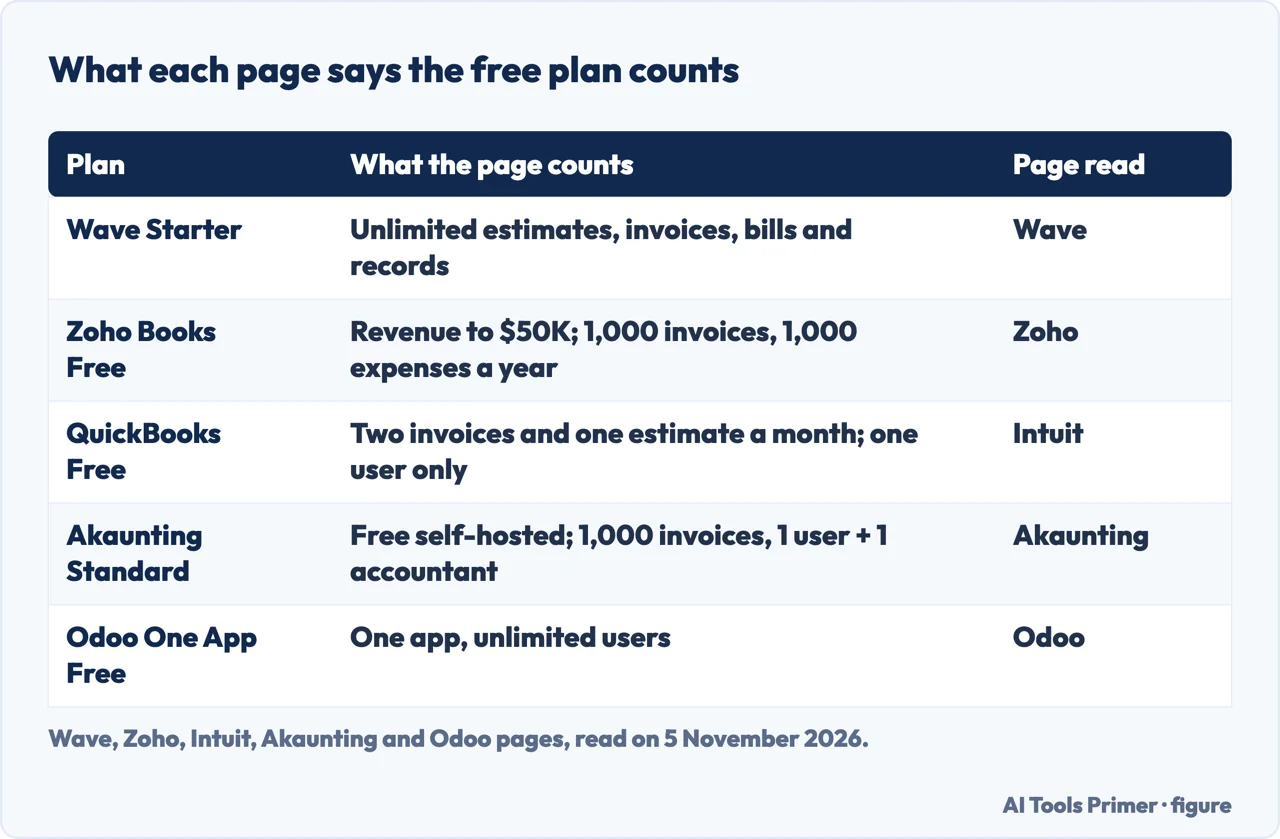
Hosted plans from companies: Wave, Zoho Books and QuickBooks Free
Wave. Wave’s help article, updated October 5, 2026, says the Starter plan is free and includes basic accounting and invoicing features, and that paid features such as online payments, automatic receipt scanning and payroll can be added. The pricing page lists Starter at $0 with unlimited estimates, invoices, bills and bookkeeping records. The Pro plan is $19 USD a month or $190 USD a year, and the page puts auto-import of bank transactions, automatic merging and categorizing of them, and unlimited receipts in Pro. Wave’s Accounting page agrees: automated bank connections and advanced receipt matching need a paid Pro subscription. The same page says Wave uses double-entry accounting.
Wave’s side costs sit outside the $0. Online payments are optional, and Starter pays 2.9% + $0.60 per credit card transaction; the Pro column shows a discounted rate. Receipt capture in Starter is an add-on at $11 a month or $96 a year. The Pro fee is charged per business, not per owner. The pricing page also says live chat and email support run Monday to Friday, 9 AM to 4:45 PM Eastern, marked “with any optional add-on”; the page does not say whether a Starter account without add-ons can reach it.
Zoho Books. The Free plan is $0 for one user plus one accountant, with email support. Its feature list names invoices, quotes, expenses, journals, bank reconciliation, online payments and tracking of 1099 contractors. The limits sit in the FAQ: free while revenue for the financial year stays under $50K, up to 1,000 invoices and 1,000 expenses a year, five scheduled reports and 50 receipt scans a month. Add-ons are not supported in the free plan except document autoscans. The first paid plan, Standard, is $20 a month or $15 a month billed annually, and Zoho offers a 14-day free trial. Zoho’s free-plan page says you can import bank statements and reconcile them.
QuickBooks Free. Intuit’s article, published July 15, 2026, lists what the free plan does: connect one banking institution, create and send up to two custom invoices and one estimate each month, manually upload up to two business receipts a month, manage one 1099 contractor, run three reports (profit and loss, balance sheet and account quick report) and track up to five business trips a month. It is for one user, and the article says you cannot invite your accountant or bookkeeper. Setting up QuickBooks Payments lets you send unlimited invoices instead of staying within the monthly cap. Intuit names QuickBooks Lite as the next step and Simple Start after it; our page on QuickBooks and Xero holds dated prices for the paid plans.
One sentence from Intuit deserves a date. The article calls QuickBooks Free a permanent, $0-per-month plan with monthly caps, and its footnote says Free is currently available at no charge and may be offered for a limited time. If the plan is discontinued, the footnote says Intuit would notify you in advance and provide comparable options. The pages we read do not say what happens to your records in that case.
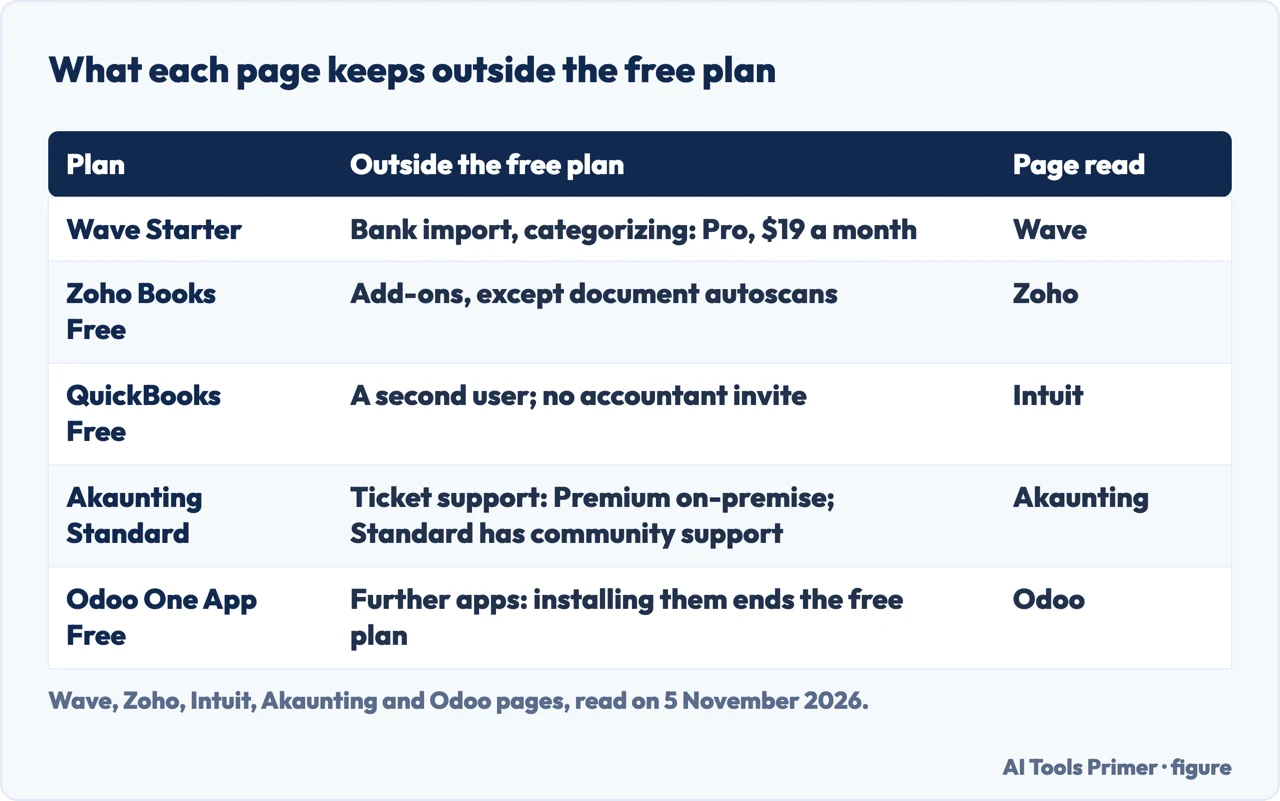
Free to install: Akaunting, Manager.io, GnuCash and Odoo
Akaunting. The home page, which carries a 2025 footer, presents the program as free software, and then narrows it: the Standard plan of the self-hosted version is the free one. The on-premise plans page lists that Standard plan as hosted on your server, with a free download, one company, one user plus one accountant, 1,000 invoices and community support. The Premium on-premise plan is $72 a year or $756 once. The cloud Standard plan, hosted on akaunting.com, is $12 a month or $8 a month on yearly billing, with the same company, user and invoice figures and ticket support. On Akaunting, then, free means you install it and run it yourself.
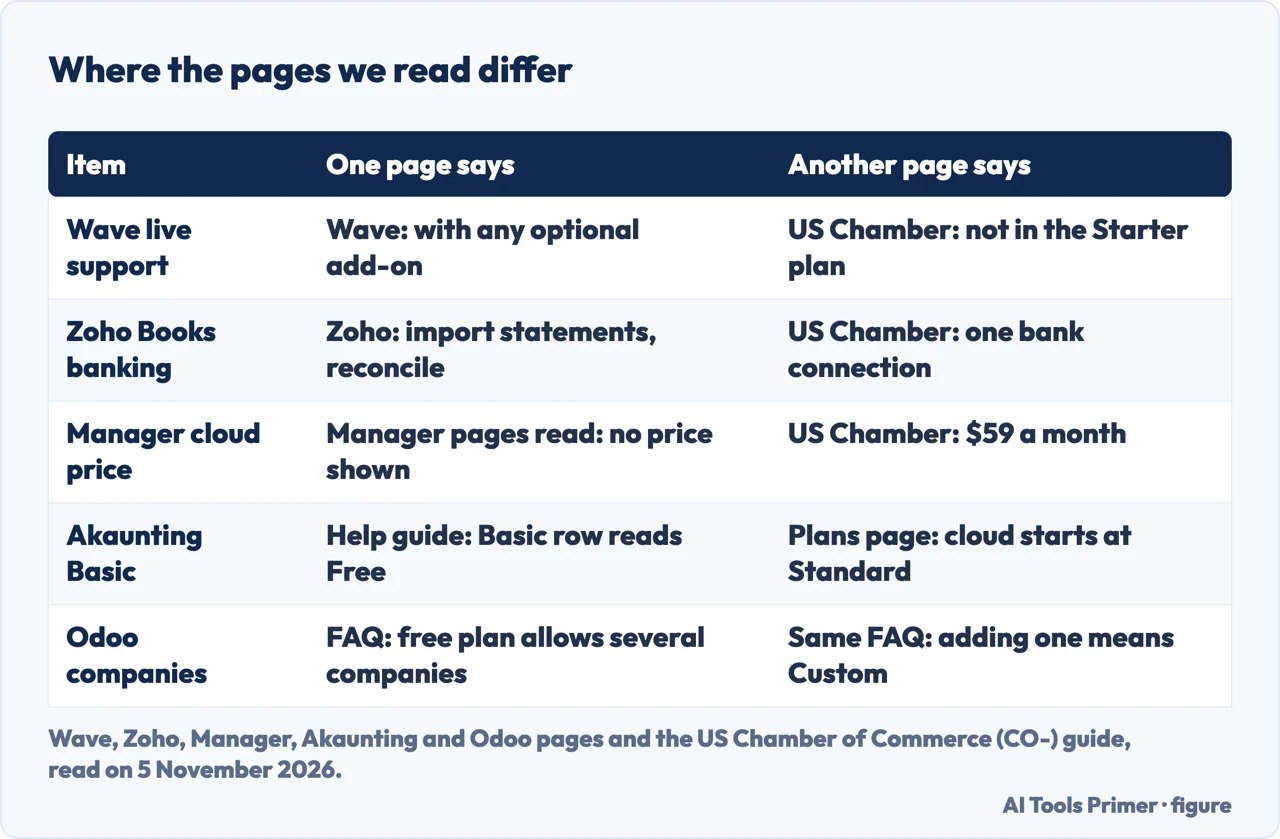
Manager.io. The home page offers the desktop edition for Windows, Mac and Linux and says it can be used for as long as you like, with all features, as much data as you enter, and no ads. Work can be done offline. The comparison page says the desktop edition does not support multi-user access and that you need the cloud edition if several users must work in the file at the same time. The cloud page says Manager does not charge per user or per business, and that you can download a full backup and import it into the desktop edition for free. The pricing page we read shows no price for the cloud edition, and the comparison, cloud and pricing pages we read carry a 2023 footer. The US Chamber of Commerce guide gives $59 a month for Manager.io Cloud; that figure is the Chamber’s and not Manager’s.
GnuCash. The home page calls it personal and small-business financial accounting software, freely licensed under the GNU GPL, for GNU/Linux, BSD, Solaris, Mac OS X and Windows, with a download of version 5.17. Its feature highlights include double-entry accounting and small-business accounting. The page says volunteers develop, maintain, document and translate it, and points to public mailing lists for help. It does not mention how many users it supports. The Chamber guide adds that GnuCash runs only on desktops and needs no cloud account, and lists no paid plans for it.
Odoo. The pricing page shows One App Free at zero: one app and unlimited users. If an app depends on others, the page says those come free too, and it guarantees free use for unlimited users whatever the dependencies. To move to Standard you install more applications; installing Studio or adding companies to the database switches the account to Custom. The page counts a paying user as anyone with access to the backend, and its examples of paying users include a third-party accountant who works in Odoo on your finances. Customers and suppliers who use the portal are not paying users. The prices on that page are in euros, so we do not convert them. The Chamber guide says Odoo lacks purchase order and inventory tools.
Where the pages disagree or stop
Some differences come from pages written at different times. Wave’s help article is dated October 5, 2026, the Chamber guide October 6, 2026, Intuit’s article July 15, 2026 and Akaunting’s help guide September 13, 2026. Manager’s comparison, cloud and pricing pages carry a 2023 footer, and the Manager home page, the Zoho and the Odoo pages we read show no date, so we dated them to the day we read them, 5 November 2026.
Wave’s support is the first case. The pricing page lists live chat and email support “with any optional add-on”. The Chamber guide lists live customer support among the things the Starter plan lacks. Only the first is Wave’s own statement, and it does not settle the Starter case. Users are the second: the Accounting page says you can invite an accountant or bookkeeper as a collaborator without naming a plan, the pricing page lists admin, editor or viewer roles under Pro, and the Chamber guide says Starter has one user and no accountant access.
Zoho Books is the third. Zoho’s free-plan page speaks of importing bank statements and reconciling them. The Chamber guide lists one eligible bank connection among the free plan’s features. The Zoho pages we read do not mention automatic bank connections, so we do not say whether the free plan has one.
Akaunting’s own pages differ in a smaller way. The home page calls the program free but means the self-hosted Standard plan, and the cloud Standard plan is $12 a month. The help guide, updated September 13, 2026, lists a Basic plan for freelancers and one-person businesses and shows its price as Free, while the plans page we read begins at cloud Standard. The same guide groups Basic with Standard as a plan for freelancers with accounting essentials, and says Double-Entry, Bank Feeds, Expense Claims and Roles & Permissions need Premium or higher; it gives no separate feature list for Basic alone. Odoo’s FAQ answers yes when asked whether the free plan allows multiple companies, yet in the answer on upgrading it says that adding companies to your database switches you to the Custom plan.
Some questions stay open. The pages we read do not say which free plan is enough for which kind of business, or at how many invoices a month or what revenue to move to a paid plan. They do not say whether data can be exported from the free plans of Wave, QuickBooks or Zoho Books; Manager.io is the exception, saying you can download a full backup. The pages we read are not tax guides, and neither is this page.
When free stops being enough
The Chamber guide says free cloud apps are often freemium versions of paid products, with basic functions and one user account while advanced features and higher limits sit behind paid tiers. It lists reasons to consider a paid plan. In our paraphrase:
- you want to connect a point-of-sale system, an e-commerce platform or other sales channels and apps;
- you plan to hand bookkeeping tasks to an employee or a virtual assistant;
- you need sales tax for several jurisdictions or transactions in several currencies;
- you manage a growing number of vendors, recurring payments or purchase orders;
- you expect to hire an accountant or bookkeeper for seasonal tax work;
- you buy and sell physical products and need inventory accounting;
- you need detailed reports for forecasting, budgets against actuals or profitability.
Intuit gives its own list for leaving QuickBooks Free: hiring contractors or employees, having lots of receipts, an accountant who needs direct access to your books, advanced inventory or forecasting tools, and connecting sales channels or third-party apps. Set against the caps above, the signals line up with the measures. A shared bookkeeper hits the one-user limits of QuickBooks Free and, by the Chamber’s account, of Wave Starter. Many receipts meet QuickBooks Free’s two a month, or Wave’s paid receipt add-on. Revenue meets Zoho Books’s $50K line. An external accountant working inside Odoo counts as a paying user.
The same sources can be read by need, because bank links and stock are where the plans split. Bank: Wave’s Starter plan has no automatic bank import (Wave puts it in Pro); QuickBooks Free connects one banking institution (Intuit); Zoho’s free-plan page speaks of importing bank statements and reconciling them, and the Chamber guide lists one eligible bank connection for it, which the Zoho pages we read do not confirm. Stock: the Chamber guide says Odoo’s One App Free plan covers accounting and invoicing only, with no inventory or purchase orders, and lists inventory management among the features of the Manager.io desktop edition, which it limits to one user. It also says free software may not suit retailers with large inventories or companies with more than 10 employees, and lists no sales tax support for the Zoho Books free plan. The pages we read do not say how many invoices a month make a paid plan worth it.
The Chamber also puts prices on the step up: Zoho Books Standard at $20 a month or $15 a month billed annually, and Wave Pro at $19 a month or $190 a year, both matching the vendors’ own pages above. For the paid plans of QuickBooks and Xero, see our comparison; for invoicing alone, our invoicing page reads Zoho Invoice, a different product from Zoho Books. Card fees are on getting paid.
What we did not use
We opened no account and tested no program, so everything here is what the pages say. We did not read the TechnologyAdvice list, the Airwallex blog post or the Reddit thread, and we did not use the article from bdc.ca, which is dated 2022 and whose body text did not load. A fetch of Intuit’s QuickBooks Free page returned no text, so we used the Intuit article that explains the plan. We did not read any Xero page. The Chamber guide also covers ZipBooks and LedgerSMB, which we left out. We do not rank the programs: the pages we read do not say which is best.
Where to start
Four ways in.
- “What does free actually count?”
- Five things a free plan can count — counts
- “Which free plans come from companies?”
- Wave, Zoho Books and QuickBooks Free — hosted
- “Which ones do I install myself?”
- Akaunting, Manager.io, GnuCash and Odoo — install
- “When do I outgrow it?”
- When free stops being enough — outgrow
Money, next to this page
Paid plans, invoices and card fees.
Other free plans
Free tools for customers, projects and email.
Questions people also ask
What is the best completely free accounting software?
The pages we read give no single best. Wave lists unlimited documents, Zoho Books caps revenue and yearly paperwork, QuickBooks Free caps invoices each month, and Akaunting, Manager.io and GnuCash are free to install and run yourself. The best fit depends on which cap you would meet first.
Is there any completely free accounting software available?
Manager.io says its desktop edition has no time or usage limits, and GnuCash is freely licensed under the GNU GPL. Both run on a desktop, and Manager says that edition does not support several users. Akaunting’s self-hosted Standard plan is free but has a 1,000-invoice figure.
Is there a program like QuickBooks that is free?
The pages we read name Wave Starter, Zoho Books Free and Akaunting’s self-hosted Standard plan. Each has its own cap: Wave leaves bank import to Pro, Zoho Books sets $50K of revenue, Akaunting sets 1,000 invoices. QuickBooks Free itself allows two invoices a month.
Can ChatGPT do bookkeeping?
The pages we read do not mention ChatGPT. The Chamber guide says paid accounting software often adds AI and automation, such as tools that may catch transaction discrepancies or answer questions in in-app chats. They do not say whether a chatbot can keep your books.
Not covered here. We opened no account and tested no program. The statements come from the pages of Wave, Zoho Books, Intuit, Akaunting, Manager.io, GnuCash and Odoo and from one US Chamber of Commerce guide, all read on 5 November 2026.
The search volume and difficulty behind this page come from an Ubersuggest reading of 5 November 2026 (United States), which gives search volume and its own SEO difficulty score, not Semrush’s; a Semrush check is still to be made.
Sources
- Wave — Pricing — www.waveapps.com, read 5 November 2026.
- Wave — Accounting software — www.waveapps.com, read 5 November 2026.
- Wave Help Center — Is Wave free? — support.waveapps.com, read 5 November 2026.
- Zoho Books — Pricing (United States) — www.zoho.com, read 5 November 2026.
- Zoho Books — Free accounting software — www.zoho.com, read 5 November 2026.
- Intuit QuickBooks — Is QuickBooks free? — quickbooks.intuit.com, read 5 November 2026.
- Akaunting — Free accounting software for small businesses — akaunting.com, read 5 November 2026.
- Akaunting — Plans — akaunting.com, read 5 November 2026.
- Akaunting — Plans for on-premise — akaunting.com, read 5 November 2026.
- Akaunting Help Center — Akaunting Cloud pricing plans — akaunting.com, read 5 November 2026.
- Manager.io — Free accounting software — www.manager.io, read 5 November 2026.
- Manager — Compare editions — www2.manager.io, read 5 November 2026.
- Manager — Cloud edition — www2.manager.io, read 5 November 2026.
- Manager — Cloud edition pricing — www2.manager.io, read 5 November 2026.
- GnuCash — Free accounting software — gnucash.org, read 5 November 2026.
- Odoo — Pricing — www.odoo.com, read 5 November 2026.
- US Chamber of Commerce (CO-) — Best free accounting software for small businesses in 2026 — www.uschamber.com, read 5 November 2026.
Written by Alberto Gulotta
Founder and editor of AI Tools Primer, writing from Palermo, Italy. Thirty-five years of taking computers apart, starting with a Commodore 64 — the long version is on the about page.
Something wrong on this page? Write to aitoolsprimer@gmail.com and it gets fixed.
Written on 5 November 2026.
Independence and limits
No affiliate links and no paid placements anywhere on this site. Nobody pays to appear here, and no company has seen this page before you did.
This is general information, not professional advice. Where a page touches money, health, safety or the law, it names its source and the date it was read — and your situation may still differ. See the privacy page and the cookie policy.