
Business · guide
Trello vs Asana: how each page counts people and exports
By Alberto Gulotta · Updated · 14 min read
Trello vs Asana, as the two pricing pages state it on 3 November 2026: Trello lists $5 and $10 per user a month for Standard and Premium on annual billing, Asana $10.99 and $24.99 for Starter and Advanced. They count paid people, cap free plans and describe exports differently.
| Question | Answer | Where it comes from |
|---|---|---|
| What is the first paid plan per user? | Trello Standard is $5 billed annually and $6 monthly; Asana Starter is $10.99 and $13.49 | Trello and Asana pricing pages |
| How many people does the free plan hold? | Trello says up to 10 collaborators per Workspace; Asana says 2 users on Personal | Trello and Asana pricing pages |
| Can one person pay? | Trello says its paid plans suit teams of one; Asana says it offers no single-user paid plans | Trello pricing page, Asana help article |
| Who is counted as a paid person? | Trello counts every member of a paid Workspace and any guest on more than one board of it; Asana sells seats in steps | Trello pricing page, Asana pricing page |
| Where do the timeline views sit? | Trello lists Timeline in Premium at $10; Asana lists Timeline and Gantt in Starter at $10.99 | Trello and Asana pricing pages |
| Can I export the work? | Trello: JSON for any board member, CSV in Premium Workspaces. Asana: JSON or CSV by project, plan not stated | Atlassian Support, Asana Help Center |
What the two pricing pages charge per person
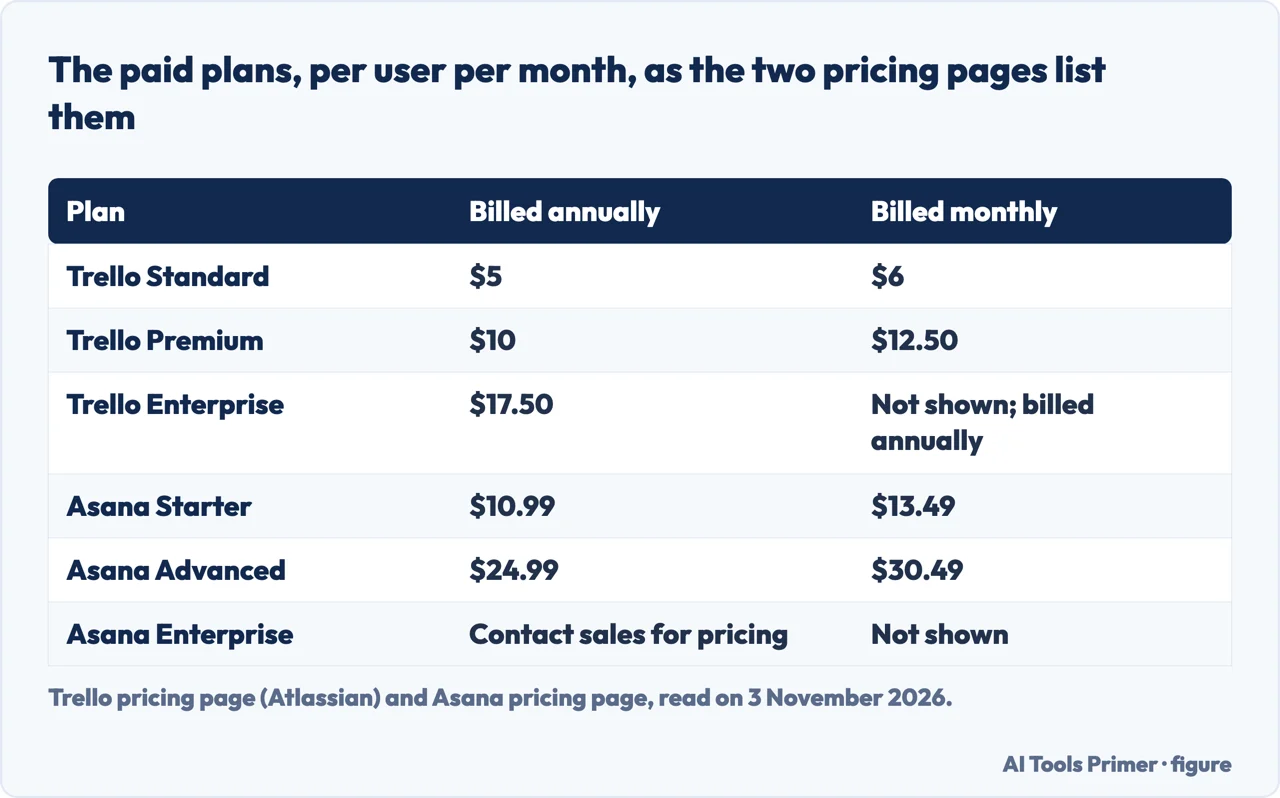
Trello’s pricing page, which carries a 2026 Atlassian copyright, lists four plans. Free is $0. Standard is $5 per user a month if billed annually and $6 billed monthly. Premium is $10 billed annually and $12.50 billed monthly. Enterprise is $17.50 per user a month billed annually, which the page also gives as an annual price of $210.00 per user. Trello’s separate Enterprise page adds a $10k minimum spend threshold when purchasing that plan. The pricing page also says Atlassian Guard is a separate subscription that starts at $4 a month per user, and that the Enterprise plan includes Atlassian Guard Standard.
Asana’s pricing page lists Personal at $0, free forever, then Starter at $10.99 per user a month billed annually and $13.49 billed monthly, and Advanced at $24.99 billed annually and $30.49 billed monthly. Enterprise says to contact sales for pricing, and the page adds that Enterprise+ is available for advanced security and compliance. Asana’s help article on upgrading says annual plans receive a discount equivalent to two months.
The two lists do not line up plan for plan. Trello has three paid plans with prices on the page and Asana has two, each bundled differently, and the first figure shows them side by side. Trello’s Standard blurb mentions AI features, but the text we read gives no request count for them. Asana does give one: Starter and Advanced include 5 AI requests per user a month, up to 50 per account, and the pricing page lists a pay-as-you-go option at $5.99 per user a month billed annually plus $0.60 per AI request billed monthly, and prepaid requests at $0.50 each.
The pages we read do not total a team’s bill. This is our own arithmetic, not a figure from either page, and it uses only the list prices above. Five people on annual billing come to 5 × $5 = $25 a month on Trello Standard and 5 × $10.99 = $54.95 on Asana Starter; at Trello Premium and Asana Advanced the same five come to $50 and $124.95. On monthly billing the same multiplication gives $30 and $67.45 for Standard and Starter, and $62.50 and $152.45 for Premium and Advanced. Our page on free project tools goes further into the free plans of both, so this page keeps to the paid ones.
How each page counts the people
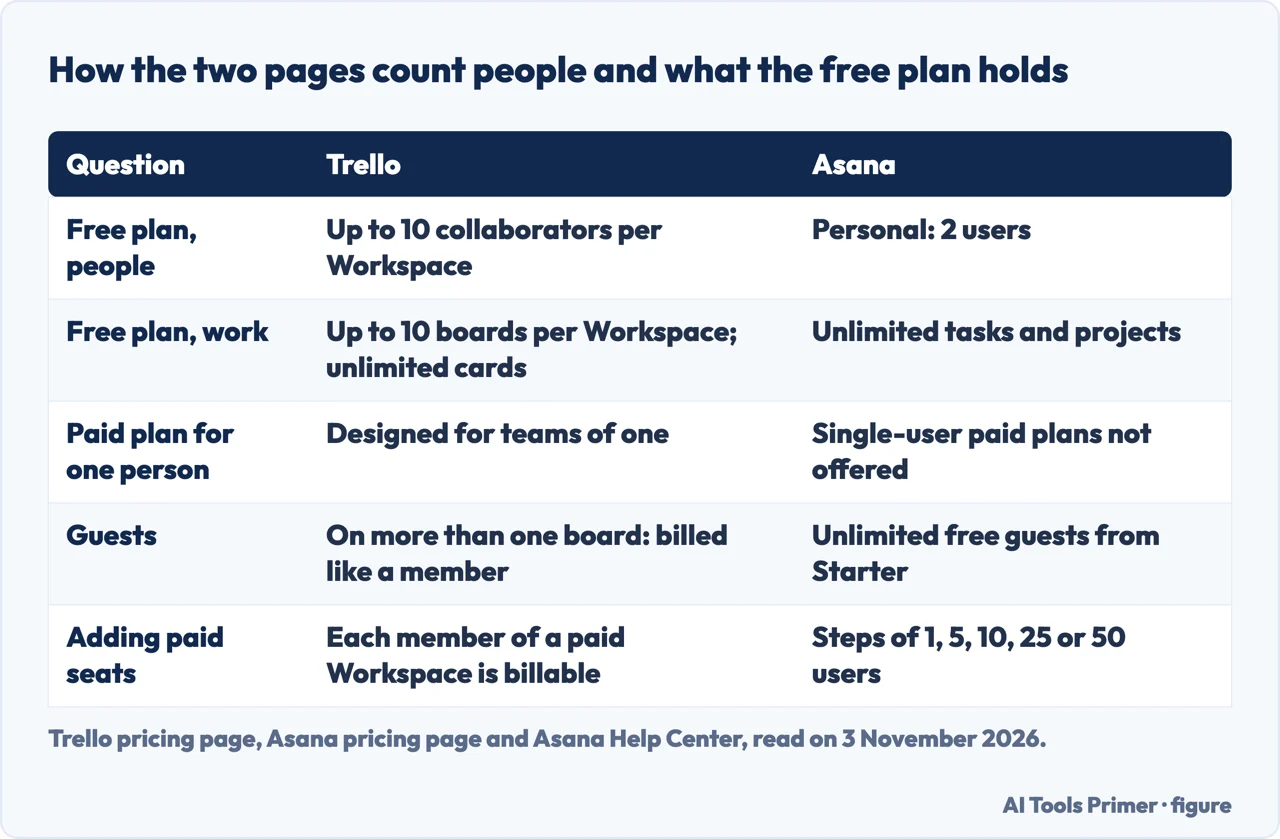
Trello’s FAQ says a user added to a Workspace, whether as a normal member or as a team admin, is a billable team member and is included in the cost of Standard or Premium. A guest who is on more than one board in the Workspace is a Multi-Board Guest and is billed at the same rate as a member. Trello lists single board guests under Standard and multi-board guests under Enterprise. The same FAQ says Standard and Premium are designed for all teams, even teams of one, and that to upgrade you first create a Workspace and then upgrade that Workspace.
The free side has its own count. Trello’s pricing page says Free is for up to 10 collaborators per Workspace, with up to 10 boards. The FAQ adds what happens after a downgrade: the Workspace keeps its Standard or Premium features and unlimited boards until the prepaid period ends, and then becomes a free Workspace that can hold 10 boards. The FAQ also calls Trello a cloud-only product, reached through the web, desktop and mobile apps.
Asana counts differently. Its Personal plan is for one or two people and lists 2 users. The paid plans are sold as seats: the help section on adding people says between 2 and 5 total users seats go up in increments of 1, up to 30 users in increments of 5, up to 100 in increments of 10, up to 500 in increments of 25, and above 500 in increments of 50. Asana’s upgrade article says all its plans are tiered and that it does not currently offer single-user paid plans. It also says that after choosing a paid tier you choose whether to upgrade the whole organization or a single team.
Guests are listed on the Asana side too. Starter lists unlimited free guests, described as guest seats that let clients and contractors collaborate without increasing the license count, and lists no user seat limits. The Enterprise list adds view-only licenses for people who need to see progress. The pages put the same question in different terms: Trello says a paid plan fits a team of one, while Asana says a paid plan starts at two seats.
What caps a plan: boards, files, commands, views and AI
Trello’s Free list gives unlimited cards, up to 10 boards per Workspace, unlimited storage with 10MB per file, and 250 Workspace command runs per month. Standard lists unlimited boards, 250MB per file and 1,000 command runs per month, along with Custom Fields, advanced checklists, card mirroring, the Planner and single board guests. Premium is where the page lists the views Calendar, Timeline, Table, Dashboard and Map, unlimited Workspace command runs, admin and security features and simple data export. Enterprise lists unlimited Workspaces, organization-wide permissions, multi-board guests and 24/7 Enterprise Admin support.
Asana’s Personal list gives unlimited tasks and projects, list, board and calendar views, and unlimited storage with 100MB at most per file. Starter adds Timeline and Gantt views, reporting dashboards, unlimited automations, forms, custom templates and custom fields. Advanced adds portfolios, goals, resource management, approvals and proofing, and time tracking. Enterprise lists SAML sign-in, user provisioning and capacity planning. The limits on the two sides are of different kinds, which is why the second figure sets them in rows: Trello’s free plan counts boards and command runs, Asana’s counts users.
On views, the pages put timeline-style screens at neighbouring prices. Trello lists Calendar and Timeline in Premium at $10 billed annually, and Asana lists Timeline and Gantt in Starter at $10.99. The pages do not say the views are equivalent, and we do not say so either. Asana’s comparison page says Trello’s free plan includes Kanban-style boards, with additional views available on paid plans; Trello’s own pricing page lists its Calendar, Timeline, Table, Dashboard and Map views under Premium.
Asana’s comparison page is a vendor page about a rival, so we report it as Asana’s account. Its table has seven rows of features. It marks Trello as included for four of them, and for the other three, organization-wide reporting, advanced built-in task management and 400+ integrations, it marks Trello as a feature that does not exist. The same page says Trello supports 200+ integrations, and the page sets a footnote date of December 2025 on its customer figure. It shows no prices. Trello’s pages that we read do not mention Asana.
Exporting the work: what each page says
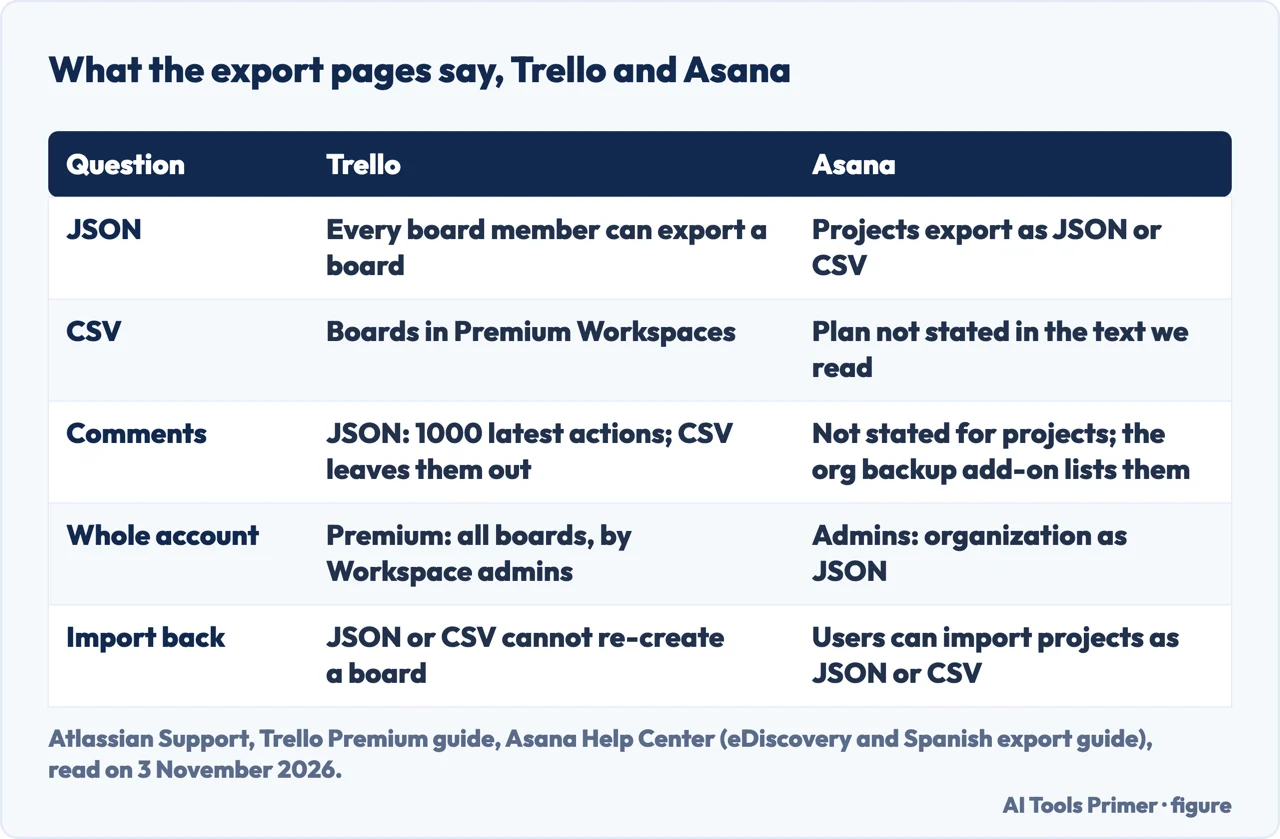
Trello’s export article from Atlassian Support says all board members can export a board to raw JSON, a format it calls not easily read by humans but suited to technical use. It says boards in Premium Workspaces can be exported to CSV, which opens in any spreadsheet program, and that it is not currently possible to import JSON or CSV to re-create a Trello board. Trello’s Premium user guide repeats the CSV point: a member of a Premium Workspace who does not see the CSV option needs to move the board into the upgraded Workspace.
The article spells out what each format holds. JSON exports include the 1000 most recent actions on a board, which includes comments; to export all comments, it points to the option for exporting every board in a Workspace. Comments are not included in the CSV export. With Premium, the Workspace export gives every board in both CSV and JSON, only Workspace admins can create and download it, and ticking Include raw attachments puts the files in a ZIP, while otherwise the export links to attachments hosted on Trello.
Two details trip up a first export. The CSV includes only cards that are not archived, and the article says typing .csv at the end of the board link downloads a file with open and archived cards. Cards in the Inbox cannot be exported at present; the article says to move them to a board first. Trello’s pricing page lists simple data export under Premium, and the older Premium page lists data export among its features.
On the Asana side we read a Help Center guide in Spanish and an English help article on eDiscovery. The Spanish guide says a project can be exported to JSON or CSV text files: open the menu beside the project title, point at Export/Print and choose the file type. It says a search view or the My tasks section can be exported as well. The eDiscovery article says Asana admins can export all the data in an organization as a JSON file from the Admin Console, and that users can also export and import projects as JSON or CSV files.
Neither text says which Asana plan allows a project export. Asana’s pricing page has two relevant rows, but the text we extracted does not show the plans that carry them: one is CSV and PDF export, and the other is organization exports, a complete JSON backup of the organization, which is marked as a compliance management add-on. A 2014 Asana post lists the columns of a project CSV from that year: Task ID, creation, completion and last modified dates, name, assignee, due date, tags, notes, project name and parent task. It is a dated post, and we report it only as what that post lists.
What the pages do not say
The pages we read do not compute the cost of a team of any size; the only totals on this page are our multiplication above. They do not say whether exporting an Asana project needs a paid plan, and the Asana pages we read do not describe limits on an export, such as how many tasks, comments or attachments it holds. Trello is the side that gives such limits, the 1000 actions and the archived-card rule.
Each side is also described by the company that sells it. Trello’s pricing and export pages come from Atlassian, Asana’s pricing and help pages come from Asana, and the comparison page is Asana’s own account of Trello. We used these pages for what each plan lists, and we did not read independent reviews or forum threads for this page. We tested nothing on an account, so how any plan feels to use is not covered here.
Where to start
Five ways in.
- “What does each cost per person?”
- What the two pricing pages charge per person — price
- “Who counts as a paid user?”
- How each page counts the people — count
- “What does the free plan limit?”
- What caps a plan — limits
- “Can I take my work out?”
- Exporting the work — export
- “What is not on the pages?”
- What the pages do not say — gaps
Tools for the work
Customers, projects and invoices in one place.
Money and records
Getting paid, writing the invoice and keeping the copies.
Questions people also ask
What are the disadvantages of Trello?
The pages we read do not list disadvantages. What they state are limits: Free holds up to 10 boards and 10 collaborators per Workspace, JSON exports include the 1000 most recent actions, and CSV export is listed for Premium Workspaces. Asana’s comparison page marks three of seven features as not existing in Trello.
Does anyone still use Trello?
The pages we read do not give a count of Trello users. Trello’s pricing page, with a 2026 Atlassian copyright, lists Free, Standard, Premium and Enterprise plans, and its FAQ describes how paid members are counted.
What replaced Trello?
The pages we read do not say Trello was replaced. Asana’s comparison page, whose own page title offers Trello alternatives, presents Asana as the option for complex projects; that is Asana’s own account, and the pages differ on prices, free limits and exports.
What are the disadvantages of Asana?
The pages we read do not list disadvantages. They state that Personal holds 2 users, that no single-user paid plans are offered, that seats start at 2, and that Starter and Advanced include 5 AI requests per user a month, up to 50 per account, with extra requests priced separately.
Not covered here. We tested nothing on an account. The statements come from the pricing, Enterprise and Premium pages of Trello, Atlassian Support’s export article, the Trello Premium user guide, Asana’s pricing page, comparison page and 2014 export post, and three Asana Help Center articles, all read on 3 November 2026.
The search volume and difficulty behind this page come from a Semrush reading of 3 November 2026, within the 60 days the site allows.
Sources
- Trello — Pricing — trello.com, read 3 November 2026.
- Trello — Enterprise — trello.com, read 3 November 2026.
- Trello — Premium — trello.com, read 3 November 2026.
- Atlassian Support — Export data from Trello — support.atlassian.com, read 3 November 2026.
- Trello Help — Premium user guide — help.trello.com, read 3 November 2026.
- Asana — Pricing — asana.com, read 3 November 2026.
- Asana — Asana vs. Trello — asana.com, read 3 November 2026.
- Asana Help Center — Upgrade or change your Asana plan — help.asana.com, read 3 November 2026.
- Asana Help Center — eDiscovery resource center — help.asana.com, read 3 November 2026.
- Asana Help Center — Importing and exporting projects (Spanish) — help.asana.com, read 3 November 2026.
- Asana — Export Asana projects to CSV (2014 post) — asana.com, read 3 November 2026.
Written by Alberto Gulotta
Founder and editor of AI Tools Primer, writing from Palermo, Italy. Thirty-five years of taking computers apart, starting with a Commodore 64 — the long version is on the about page.
Something wrong on this page? Write to aitoolsprimer@gmail.com and it gets fixed.
Written on 4 November 2026.
Independence and limits
No affiliate links and no paid placements anywhere on this site. Nobody pays to appear here, and no company has seen this page before you did.
This is general information, not professional advice. Where a page touches money, health, safety or the law, it names its source and the date it was read — and your situation may still differ. See the privacy page and the cookie policy.