
Business · guide
Why are my emails going to spam? The rules Google and Yahoo set
By Alberto Gulotta · Updated · 18 min read
Why are my emails going to spam? The pages Google and Yahoo publish for senders point to missing authentication, a high spam rate, invalid DNS records and no easy way to unsubscribe. The two providers state some limits differently, and Yahoo says it cannot guarantee inbox delivery. This page sets their written requirements side by side.
| Question | Answer | Where it comes from |
|---|---|---|
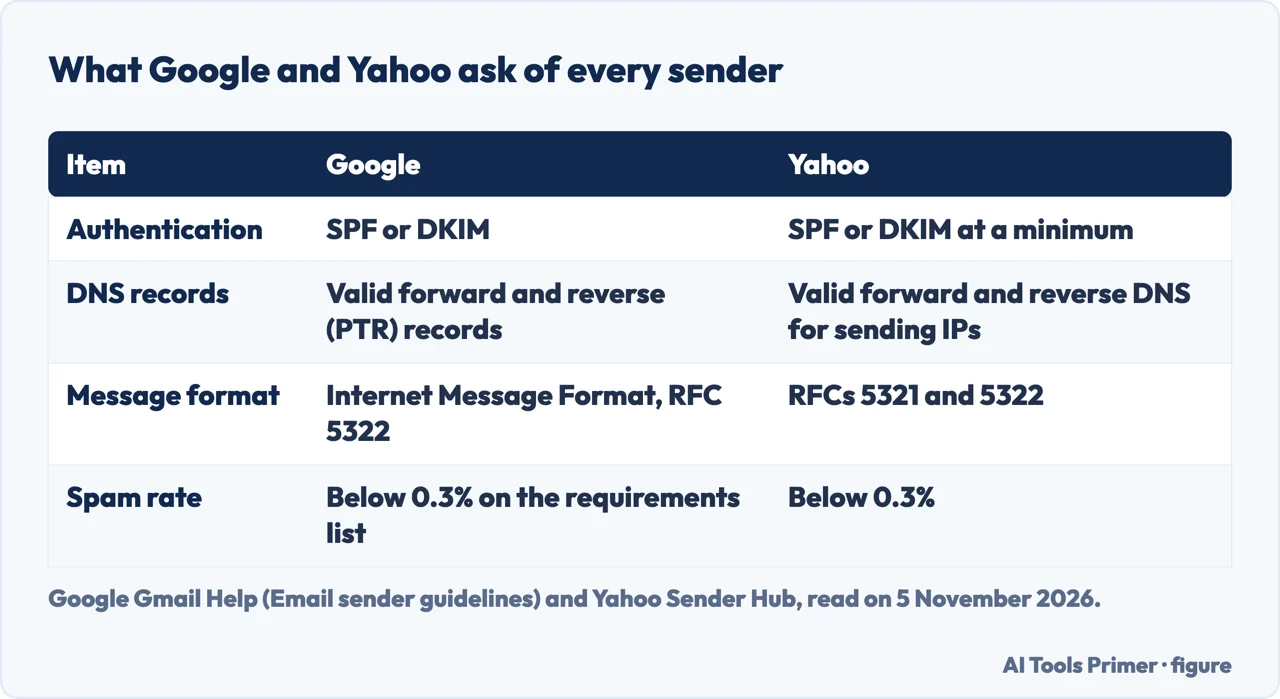
| What do both ask of every sender? | SPF or DKIM, a spam rate below 0.3%, and valid forward and reverse DNS for the sending IP | Gmail Help, Yahoo Sender Hub |
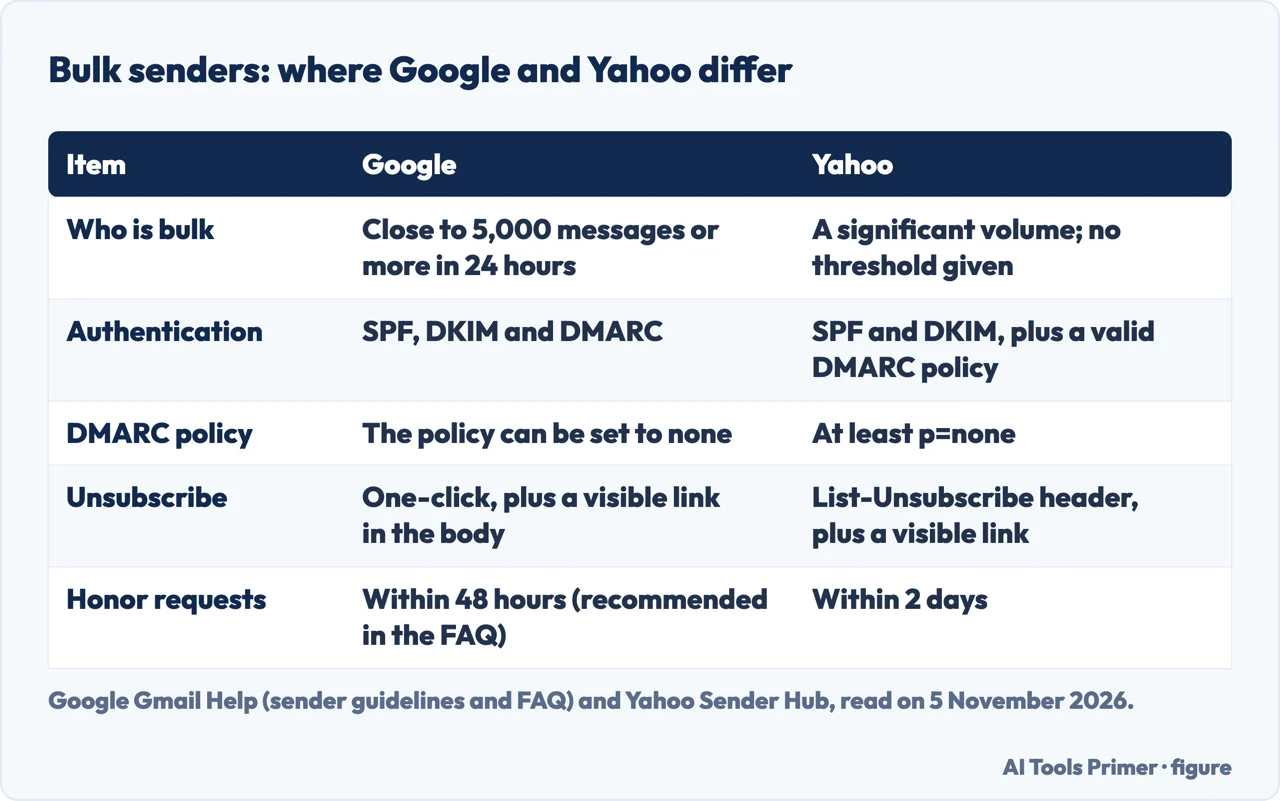
| When do the bulk rules apply? | Google says close to 5,000 messages to Gmail in 24 hours; Yahoo gives no figure | Gmail Help FAQ, Yahoo FAQ |
| What if mail is not authenticated? | Google says it might be marked as spam or rejected with a 5.7.26 error; Yahoo says spam folder or rejection | Gmail Help, Yahoo FAQ |
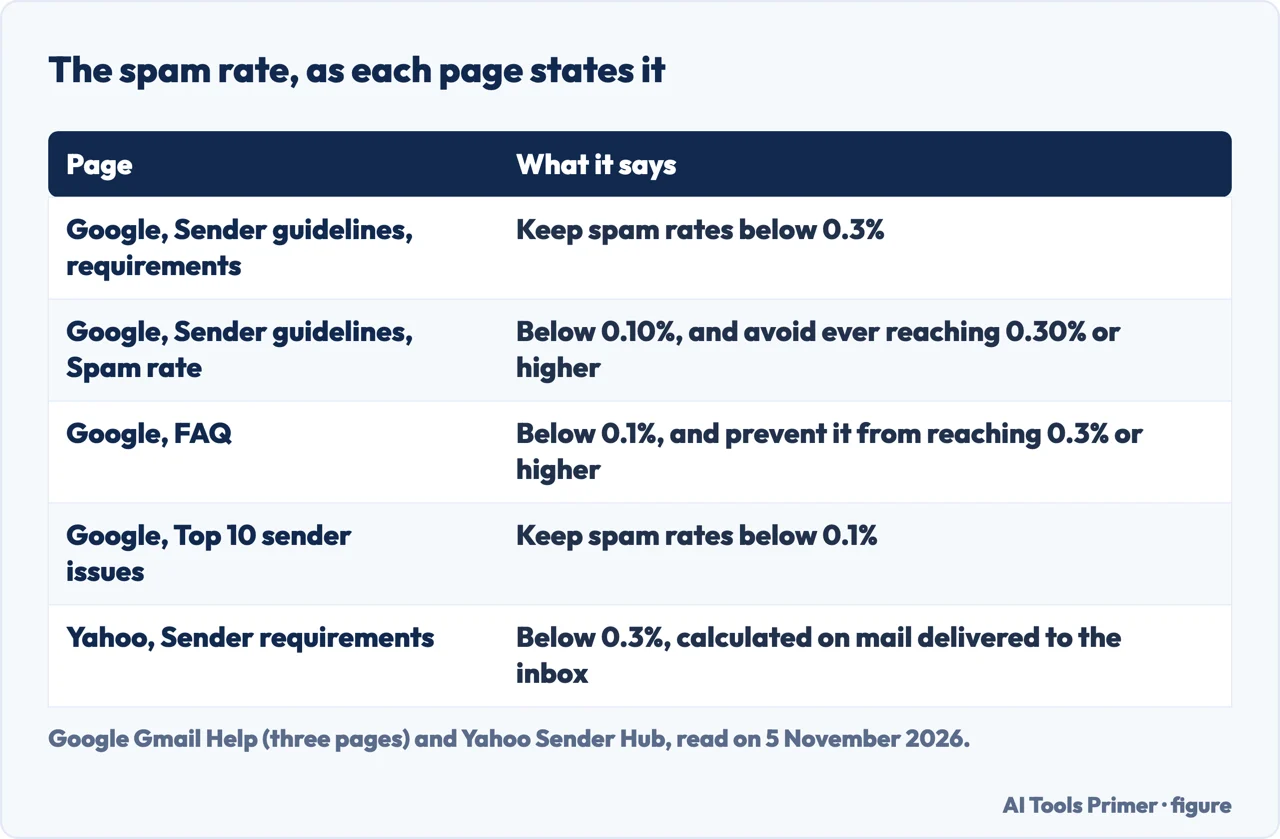
| Is the spam rate the same on every page? | No: Google gives 0.3% on one list and 0.1% on others; Yahoo gives 0.3% | Gmail Help, Yahoo Sender Hub |
| Can a sender ask to be allowed in? | Google does not accept allowlist requests from email providers; Yahoo says it has no whitelisting program | Gmail Help, Yahoo FAQ |
Where the reasons come from
Gmail and Yahoo Mail each publish what they ask of people who send them mail, and those written rules are the best-sourced answer to why a message ends up in the spam folder. Google’s sender guidelines are written for mail sent to personal Gmail accounts, meaning addresses that end in @gmail.com or @googlemail.com, and say that senders must meet them from 1 February 2024. The FAQ adds that from November 2025 Gmail is ramping up enforcement on non-compliant traffic, and that messages which fail the requirements will see disruptions, including temporary and permanent rejections. Yahoo’s page says enforcement of its standards starts in February 2024 and will be rolled out gradually. Its FAQ answers a question about AOL by saying the requirements apply to all domains and consumer email brands hosted by Yahoo Mail.
The pages point to three kinds of cause. The first is authentication: Google says messages that are not authenticated with SPF, DKIM or DMARC might be marked as spam or rejected with a 5.7.26 error. The second is reputation. Google says that if messages from a domain are frequently reported as spam, future messages are more likely to be marked as spam, and that over time user spam reports can lower the domain’s reputation. Yahoo says each IP address and each DKIM domain has a reputation, and its FAQ lists many factors behind it, among them IP, URL, domain and sender reputation, DKIM signatures and DMARC results. The third is how the mail looks and where the addresses came from, which the last two sections cover.
Yahoo adds a detail that changes how the first two fit together. Its FAQ says mail can be redirected to the spam folder for various reasons, and that a combination of poor reputation and high complaints can do it. It names other poor mailing characteristics that can sit alongside reputation: obfuscated URLs in the body of the mail, IPs without a fully qualified domain name in their reverse DNS, and mail that does not comply with the RFCs. Yahoo also says that a user’s own block on a domain or an address overrides its filtering and still puts the mail in the spam folder.
One line on the recipient’s side comes from Google: some legitimate messages may be marked as spam, and when recipients mark valid messages as not spam, future messages from that sender should be delivered to their inbox. The pages we read are written for senders and do not list words that cause a message to be filtered. We did not read Microsoft’s pages, so nothing here describes Outlook.
SPF, DKIM and DMARC: what each page asks for
Google puts it in one sentence: all senders need SPF or DKIM, and bulk senders need SPF, DKIM and DMARC. Yahoo asks for SPF or DKIM at a minimum from all senders and for both, plus a valid DMARC policy, from bulk senders. Google says authenticated messages help protect recipients from spoofing and phishing, protect the sender from being impersonated, and are less likely to be rejected or marked as spam by Gmail.
The Google FAQ sorts the failures by consequence, which the page otherwise leaves out. For a From: header that does not align, messages not authenticated with both SPF and DKIM, missing valid forward and reverse DNS, no TLS, or a format that breaks RFC 5322, it lists temporary or permanent failure codes, or spam foldering as the consequence. For a spam rate above 0.3%, a missing DMARC record, no one-click unsubscribe, or unsubscribe requests not honored within 48 hours, it lists delivery support or mitigations as unavailable. Rejections come with a code and a reason, also visible in Postmaster Tools: 4.7.27 and 5.7.27 for SPF, 4.7.30 and 5.7.30 for DKIM, 4.7.31 for a missing DMARC record, 4.7.32 for a From: that does not align, 4.7.23 and 5.7.25 for a missing PTR record, 4.7.29 and 5.7.29 for no TLS.
SPF. Google describes it as publishing a record at your domain that should include all the senders for the domain, and says that if third-party senders are not included, messages from them are more likely to be marked as spam. RFC 7208, a Standards Track document from the IETF, describes SPF as a way for a domain to authorize the hosts that may use its name and for a receiving host to check that authorization. It also sets a limit that a long record can hit: the include, a, mx, ptr and exists mechanisms and the redirect modifier cause DNS queries, an implementation must limit them to 10 during evaluation, and past that limit it must return “permerror”. The Google and Yahoo pages we read do not mention that limit.
DKIM. Google says receiving servers use it to verify that the domain owner sent the message, and that sending to personal Gmail accounts requires a key of 1024 bits or longer, with 2048 recommended if the domain provider supports it. Yahoo gives the same two lengths: 1024 bits or greater required, 2048 recommended where possible.
DMARC. Google says it tells receiving servers what to do with messages that fail SPF or DKIM, and that the authenticating domain must be the same domain that appears in the From: header. RFC 7489 defines the term the same way: the domain in the From address matches a domain validated by SPF or DKIM, or both. That RFC is Informational, published on the Independent Submission stream and not endorsed by the IETF, and the copy we read lists it as obsoleted by RFC 9989, RFC 9990 and RFC 9991, which we did not read. For a policy of p=none the RFC says receivers should not alter how they treat the messages because of the record; its example record sets the version, p=none and an address for aggregate reports.
The providers part ways on alignment. Google’s FAQ says that for bulk senders only one of SPF and DKIM has to align with the From: domain, that alignment is not required for forwarded or mailing list messages, and that it recommends aligning both and says it is likely to become a requirement eventually. Yahoo says relaxed alignment is acceptable and that the From: domain must align with the SPF domain or the DKIM domain. On enforcement, Yahoo says a domain protected by DMARC p=reject has any message without a proper DKIM signature or SPF alignment rejected by its servers, and that a sender with a spoofing problem should use p=quarantine or p=reject regardless. It also says spoofed mail counts toward the mail it looks at for enforcement.
Who counts as a bulk sender
Google’s guidelines page gives the bulk rules to senders of more than 5,000 messages per day to Gmail accounts. Its FAQ defines a bulk sender as one that sends close to 5,000 messages or more to personal Gmail accounts within 24 hours, and says messages from the same primary domain are added together: its example is 2,500 messages from one domain and 2,500 from a subdomain, which makes the sender bulk. The FAQ adds that a sender who meets the criteria once is permanently considered a bulk sender and that changing practices does not remove the status.
Yahoo does it differently. Its FAQ says a sender is viewed at the authenticated domain or From header domain level, that a bulk sender is one sending a significant volume of mail, and that it will not specify a volume threshold. It says it will use all the information available, content and IP among it, to review compliance. Only Google’s page gives a number to compare.
The unsubscribe rules are the part both stress. Google asks marketing and subscribed messages from bulk senders to support one-click unsubscribe with a visible link in the body, set up by including both the List-Unsubscribe-Post and List-Unsubscribe headers. Its FAQ says one-click links that lead to a landing or other web page do not comply with RFC 8058, that mailto links are still supported but do not meet it, and that transactional messages such as password resets are excluded. It also says missing one-click unsubscribe does not make Google reject a message or mark it as spam automatically; the effect it names is that unwanted messages are more likely to be reported as spam, and that senders without it are not eligible for mitigation of delivery problems.
Yahoo asks bulk senders for a working List-Unsubscribe header with one-click support for marketing and subscribed messages, calls the POST method of RFC 8058 highly recommended, accepts the mailto method and wants a clearly visible unsubscribe link in the body, which may lead to a preference page. Its FAQ says a link in the body is not enough on its own and that one-click is not required for transactional mail. On timing, Yahoo says to honor unsubscribes within 2 days, while Google’s FAQ recommends 48 hours and lists requests not honored within 48 hours among the issues that make delivery support unavailable. Yahoo’s FAQ says enforcement of its List-Unsubscribe policy would begin in June 2024.
On DMARC the two agree: Google says a bulk sender’s policy can be set to none, and Yahoo asks for at least p=none, with a rua tag strongly recommended so that reports arrive during setup.
Spam rate, reputation and the sending server
The spam rate is the figure the pages state least alike. Google’s sender guidelines say to keep the rate reported in Postmaster Tools below 0.3% in the requirements, and below 0.10% while avoiding ever reaching 0.30% or higher in the Spam rate section. Its FAQ and its Top 10 page say below 0.1%, and the FAQ adds that a rate of 0.3% or higher should never be reached. Yahoo says below 0.3% and adds that it calculates the rate on mail delivered to the inbox, and asks senders to keep this in mind when they use Complaint Feedback Loop data to calculate the rate in their own system. Google’s FAQ says the effect on delivery is graduated, and that a bulk sender above 0.3% is ineligible for mitigation until its rate stays below 0.3% for 7 consecutive days.
To see the numbers, Google points to Postmaster Tools and Yahoo to its Complaint Feedback Loop. Google says Postmaster Tools shows when recipients mark messages as spam, whether messages are authenticated and the domain or IP reputation, and that a low volume to Gmail may leave a domain without dashboard data. Yahoo says that once mail is DKIM signed, the Complaint Feedback Loop sends a copy of a complaint when a user clicks report spam. On open rates, Google says it does not track them and that low open rates are not necessarily an accurate indicator of a deliverability or spam problem.
The sending server has its own list. Both providers ask for valid forward and reverse DNS. Google says the sending IP must have a PTR record that resolves to a hostname, and that the same hostname must have an A or AAAA record resolving to the same IP; it also asks for a TLS connection. Yahoo asks for a PTR record that is valid, meaningful and non-generic, reflecting the domain name in some way, and says it is more likely to downgrade an IP’s reputation when a reverse DNS entry is missing. On shared IPs, Google says the activity of any sender on the IP affects the reputation of all of them, and that messages from an IP on a blocklist are more likely to be marked as spam.
Volume matters too. Google says to increase sending volume slowly, at a consistent rate without bursts, and warns that, for a sender with no history of large volumes, suddenly doubling previously sent volumes could bring rate limiting or reputation drops. For a sender that has been deferred, its Top 10 page gives a sequence of waiting 15 minutes, sending one message, staying below the earlier volume for 24 hours and then raising volume by a common 25% to 100% a day. Yahoo says a sudden spike of activity could get a sender flagged as compromised and marked as spam. Both separate mail types: Yahoo says not to send marketing from the IPs used for user, transactional or alert mail, and Google says that a sender who must use several IPs should use a different one for each message type.
Lists and message content
Both providers start from consent. Google says to send only to people who want messages from you, to have recipients opt in, to confirm each address before subscribing it, and to avoid buying addresses, sending to people who did not sign up and using opt-in boxes that are checked by default. It also suggests periodically sending messages to confirm that recipients want to stay subscribed. Yahoo asks senders to verify they only mail users who specifically requested it, to confirm each subscription with an email asking for a click, to keep to the frequency the list was signed up for, and not to turn a weekly list into a daily one. It also says to remove invalid recipients promptly and to consider reconfirming inactive subscribers.
On the message itself, Google’s guidelines name several things to avoid. A subject starting with Re: or Fwd: is for actual replies and forwards. Emojis or other non-standard characters should not imitate graphic elements, for example to imply a name has been verified. HTML and CSS should not hide content, which Google says might cause messages to be marked as spam. Links in the body should be visible and easy to understand. The display name should identify the sender and, per the page, should not include the subject, message content or the recipient’s name, and should not imply a reply.
Google also asks senders not to mix content types in a message, giving promotions in a sales receipt as the example, and to use the same From: address for messages of the same category, such as one address for receipts and another for promotions. It says messages sent from an address in the recipient’s contacts are less likely to be marked as spam. Yahoo’s FAQ says that if subject lines are not helpful or look generic, users may not be interested and may mark the mail as spam, which can affect overall deliverability.
What the pages do not promise
Yahoo declines to guarantee inbox delivery, and Google’s limit is narrower. Google says it does not accept allowlist requests from email providers and that it can’t guarantee messages sent by email providers will pass Gmail’s spam filters. Yahoo says it has no whitelisting program, that a Sender Support Request may lead it to modify a reputation, and that this still does not guarantee inbox delivery. Google also says that only bulk senders that meet all of its requirements can submit an escalation for delivery issues.
Where the pages are silent, we have not filled the gap. Yahoo gives no volume for a bulk sender. The pages we read do not say how much a given spam rate changes where a message lands; Google says a high rate leads to increased spam classification, its FAQ calls the effect on delivery graduated, and improvements take time to show. We tested no sending domain and no mailbox, so the page reports what the providers state and does not measure how often any of it matters.
If the problem is the opposite one, mail that is not reaching you, why you may not be receiving emails is the better page. For the rules on who a business may email and what each message must include, see consent and the rules.
Where to start
Four ways in.
- “What do SPF, DKIM and DMARC do?”
- SPF, DKIM and DMARC: what each page asks for — auth
- “Does it apply to me?”
- Who counts as a bulk sender — bulk
- “What spam rate is too high?”
- Spam rate, reputation and the sending server — reputation
- “Does my list matter?”
- Lists and message content — lists
Sending to people
The tools that send it, the rules on who you may email, and Bcc.
Records, missing mail and fake senders
The DNS records, mail that stops arriving, and phishing.
Questions people also ask
How do I stop my emails from going to spam?
Google and Yahoo both ask every sender for SPF or DKIM, a spam rate below 0.3% and valid forward and reverse DNS. Google adds a TLS connection, opt-in recipients and slow growth in volume; Yahoo adds separating mail types by IP or DKIM domain and confirming each subscription. The sections above give each page’s wording.
How do I unspam my email address?
The pages we read are written for senders and do not describe a clean-up step for an address. Google says only that recipients can mark a valid message as not spam, after which future messages from that sender should be delivered to their inbox. Yahoo says a user’s own block rules override its filtering.
How to get mail in inbox instead of spam?
Google’s Top 10 page lists authenticating with SPF and DKIM, adding DMARC, implementing one-click unsubscribe, using Postmaster Tools and ramping up slowly. Yahoo says the best way is to send timely, relevant email to an active, engaged audience. Yahoo says it cannot guarantee inbox delivery; Google’s non-guarantee covers only messages sent by email providers.
Why is my message going to spam?
Google names missing authentication, third-party senders left out of the SPF record, spam reports from recipients and hidden content. Yahoo names a combination of poor reputation and high complaints, obfuscated URLs, an IP without a fully qualified reverse DNS name, mail that breaks the RFCs, or a user’s own block.
Not covered here. We tested nothing on a mailbox or a sending domain. The statements come from three Gmail Help pages, two Yahoo Sender Hub pages, RFC 7208 and RFC 7489, all read on 5 November 2026.
The search measurement behind this page is a free-plan Ubersuggest reading of 5 November 2026, and its difficulty score is Ubersuggest’s, not Semrush’s. A Semrush reading is still to be made.
Sources
- Gmail Help — Email sender guidelines — support.google.com, read 5 November 2026.
- Gmail Help — Email sender guidelines FAQ — support.google.com, read 5 November 2026.
- Gmail Help — Top 10 Gmail sender issues — support.google.com, read 5 November 2026.
- Yahoo Sender Hub — Sender Requirements & Recommendations — senders.yahooinc.com, read 5 November 2026.
- Yahoo Sender Hub — FAQs — senders.yahooinc.com, read 5 November 2026.
- IETF — RFC 7208, Sender Policy Framework (SPF) — www.rfc-editor.org, read 5 November 2026.
- IETF — RFC 7489, DMARC — datatracker.ietf.org, read 5 November 2026.
Written by Alberto Gulotta
Founder and editor of AI Tools Primer, writing from Palermo, Italy. Thirty-five years of taking computers apart, starting with a Commodore 64 — the long version is on the about page.
Something wrong on this page? Write to aitoolsprimer@gmail.com and it gets fixed.
Written on 5 November 2026.
Independence and limits
No affiliate links and no paid placements anywhere on this site. Nobody pays to appear here, and no company has seen this page before you did.
This is general information, not professional advice. Where a page touches money, health, safety or the law, it names its source and the date it was read — and your situation may still differ. See the privacy page and the cookie policy.