
Web · guide
Email with custom domain: what the pages say
By Alberto Gulotta · Updated · 14 min read
Getting an email with custom domain takes a domain you own, a mailbox at a provider, and DNS records that point the domain's mail at that provider. The pages we read, from mailbox.org, Zoho, Proton, GoDaddy, Forbes Advisor and Microsoft, describe those steps differently, and only some name the MX record.
| Question | Answer | Where it comes from |
|---|---|---|
| Do I need to own a domain? | Yes: Forbes Advisor says a truly custom address needs a registered domain, and GoDaddy says setup cannot be finished without owning it | Forbes Advisor, GoDaddy |
| Does registering the domain create the mailbox? | Forbes Advisor says custom emails are not automatically created as you register a domain name | Forbes Advisor |
| Do I need a website? | Forbes Advisor says you can have custom domain email without one | Forbes Advisor |
| What changes at the DNS? | mailbox.org lists a TXT record, MX records, then SPF, DKIM and DMARC; Microsoft’s example adds a CNAME | mailbox.org, Microsoft |
| What does the MX change do? | Microsoft says all email for the domain starts coming to Microsoft 365, so the mailboxes come first | Microsoft Learn |
| Can I change provider later? | mailbox.org says yes without changing the address, as long as you control the domain | mailbox.org |
A domain first, then a mailbox
Forbes Advisor says that to have a truly custom email address you need to register a domain name, and adds that custom emails are not automatically created as you register one. mailbox.org describes the first step the same way: you must buy a domain from a registrar, then connect it to your email provider, and you should make sure the provider supports custom domains. GoDaddy answers the question about a domain name that is already taken with “You cannot”: setting up email means changing the domain’s settings, and that cannot be done without owning the domain. It adds that many newer domain extensions exist for people whose first choice of name is taken.
The pages also separate the mailbox from the website. GoDaddy defines three things: email hosting sends, receives and stores messages; web hosting stores the files that make a website visible; and a domain is an address that can point to both. Forbes Advisor says you can have a professional custom domain email without a website, needing only a registered domain and an email host plan, though it notes that customers might wonder why a business has custom email and no valid website. It also says that if you already own a domain and have a website, you should check your current hosting package to see whether email is already included. Microsoft says that when its Domain Connect steps are used, a website you already have keeps working where it is.
What changes in the DNS
mailbox.org gives three steps. In the first, a TXT record with an activation code goes into the domain’s DNS table, and the provider uses it to check that the domain belongs to you. In the second, MX (Mail Exchange) records are set up so that, in its words, all emails sent to your domain are forwarded to the mailbox mail servers. In the third, SPF, DKIM and DMARC are added to improve security and deliverability. Microsoft’s pages have the same order: prove ownership first, then add the records the mail service needs.
On Microsoft’s page, a TXT record takes up to 10 minutes to verify, and some registrars need up to 48 hours. If a TXT record cannot be added, an MX record can be used for verification instead, and Microsoft warns to give that MX a high priority value so it does not break email with the current provider. For a registrar that supports Domain Connect, Microsoft 365 confirms ownership and adds the DNS records itself; the registrars it lists include GoDaddy, IONOS and Cloudflare. For any other registrar the records are added by hand, and Microsoft warns that incorrect DNS records can cause email and service outages.
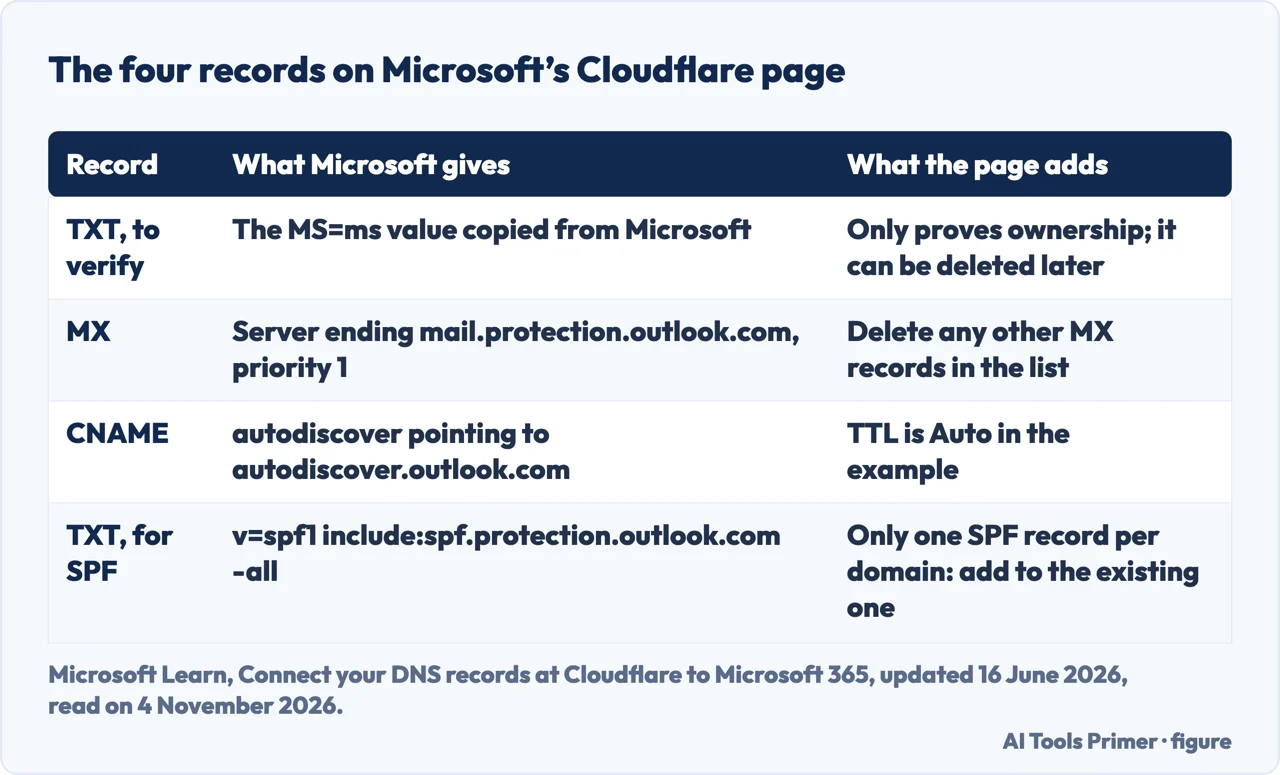
Microsoft’s page for Cloudflare, updated on 16 June 2026, shows what the hand-made records look like. They are in the figure below. The page says the verification TXT record is used only to verify ownership, does not affect anything else and can be deleted later. It says a domain cannot have more than one TXT record for SPF, because email errors, delivery problems and spam classification issues can follow, so an existing SPF record gets the Microsoft values added to it instead of a second record. It also says DNS changes typically take about 15 minutes to take effect and can occasionally take longer.
The MX record is the one that moves mail. Microsoft says that after the custom domain is set up, the MX record is updated to point to Microsoft 365 and all email for the domain starts coming there. For that reason it tells administrators to add users and set up mailboxes first, after adding the domain but before the MX record, so that email continues without interruption as it moves from the previous provider. The Cloudflare page adds that its manual steps let you choose when to add new MX records. The pages we read do not describe what happens to a message that is in transit while the records change.
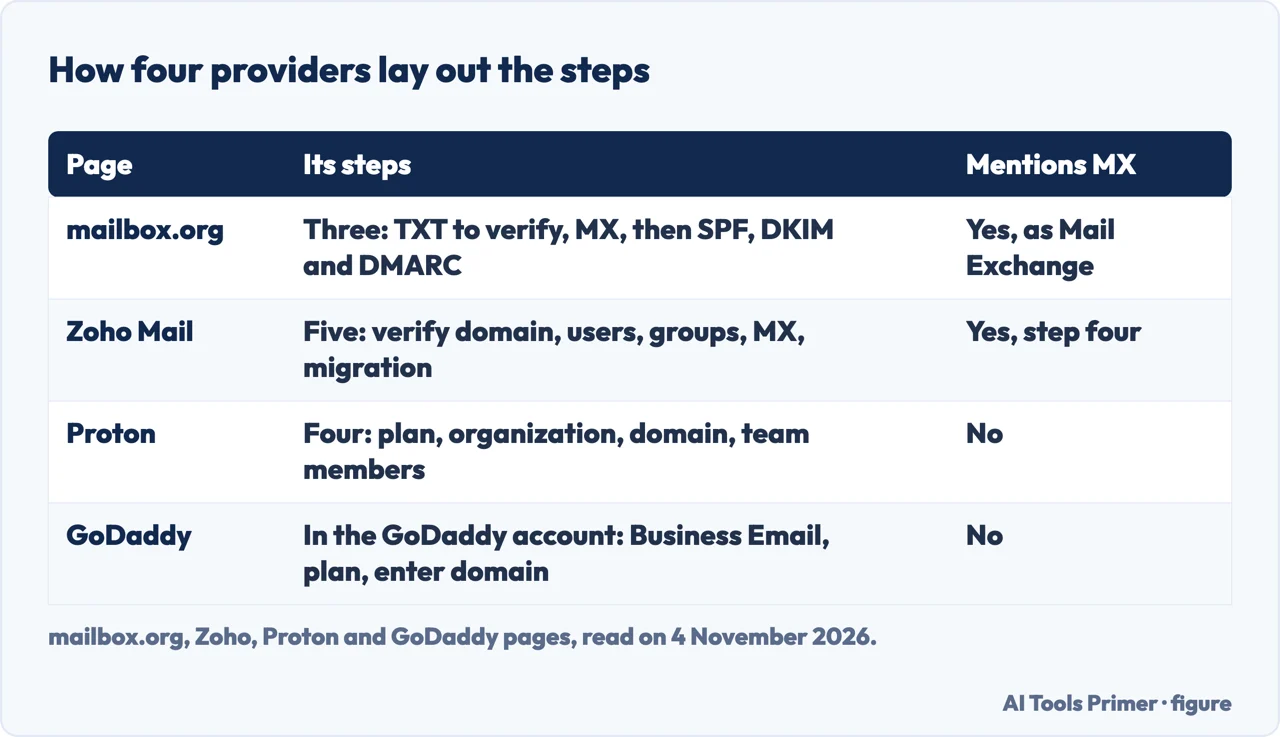
How four providers lay out the steps
Zoho gives five steps: add and verify the domain, or buy a new one with Zoho; add users, or import them from a CSV file or an Active Directory; create group accounts with distribution lists for addresses such as info@ or contact@; configure the domain’s MX records to point to Zoho Mail servers; and start the email migration at the same time. Zoho says accounts can be created with no downtime, which is the provider’s own description. mailbox.org’s migration list is shorter: create the account, transfer existing emails with its free migration service, adjust the DNS settings so new emails reach its servers, and set up SPF, DKIM and DMARC.
Proton gives four steps: select a plan, set up the organization, add and verify the domain, and add team members and create their addresses. The page says an organization can hold up to 15 unique domains and points to a tool called Easy Switch for importing from another provider. GoDaddy’s steps happen inside its own account: sign in, choose Business Email, pick a plan, then select or enter your domain. For advanced users it points to a separate Configure DNS for Email guide.
Reading across the pages, mailbox.org, Zoho and Microsoft name the MX record. Proton and GoDaddy describe their steps without naming it. The Forbes Advisor page does not name it either. Of these pages, only mailbox.org spells out the abbreviation, and Microsoft links to a separate article on MX priority that we did not read.
The pages also differ in tone. mailbox.org says setup is “easier than you might think”, and GoDaddy calls its own setup nearly automatic while saying that updating the DNS for a domain can be a longer and more complex process. Asked how long setup takes, GoDaddy answers “It depends”. Microsoft’s pages describe what goes wrong instead: email that may be interrupted if users and mailboxes are not set up before the MX record is added, or incorrect records that cause outages.
SPF, DKIM and DMARC as the pages define them
mailbox.org and GoDaddy define the three in almost the same words. SPF is a DNS record that determines which mail servers are authorized to send email on behalf of your domain. DKIM adds a digital signature to your emails, which shows that a message was sent from your domain and was not tampered with in transit. DMARC builds on both: it specifies how receiving servers should handle email that fails the checks, and GoDaddy adds that it sends you reports so you can monitor attempts to misuse your domain.
mailbox.org puts these records at the end and lists them as the last step, after the domain can receive email, under the heading of improving the domain’s spam reputation. GoDaddy says that with all three in place your emails are “far less likely to land in your recipients’ spam folders”, which is a seller’s promise and not a measurement. Forbes Advisor puts it more loosely: these tools let spam filters know you are legitimate. In Microsoft’s Cloudflare page the example records include SPF, and neither Microsoft page mentions DKIM. The Zoho and Proton pages do not mention it either.
Mailboxes, aliases, catch-all and moving later
Forbes Advisor describes an alias as an address that goes to the same mailbox as other addresses, giving sales@, customerservice@ and hr@ as examples that share one mailbox and one storage space. It adds that plans vary and some offer only five forwarding addresses per mailbox. mailbox.org says its STANDARD plan includes 50 aliases with a custom domain. GoDaddy suggests an alias for people working alone, since the messages land in the inbox of the main address. Zoho’s route to the same goal is a group account with a distribution list.
A catch-all is a different setting. mailbox.org says it catches all emails sent to addresses that do not exist under the domain, and that it can be blocked if it fills with spam. GoDaddy gives the example of a mistyped name still reaching the inbox, and warns that catch-all addresses can attract more spam because any random address at the domain lands there; it suggests pairing the setting with solid spam filtering.
On leaving, mailbox.org says you can change email providers without having to change your email address, as long as you control the domain. Three of the pages that sell email offer to bring the old mail across: a free migration service at mailbox.org, Easy Switch at Proton, a migration started in parallel at Zoho. The pages we read do not explain how to return to a previous provider.
Costs and clocks, as each page states them
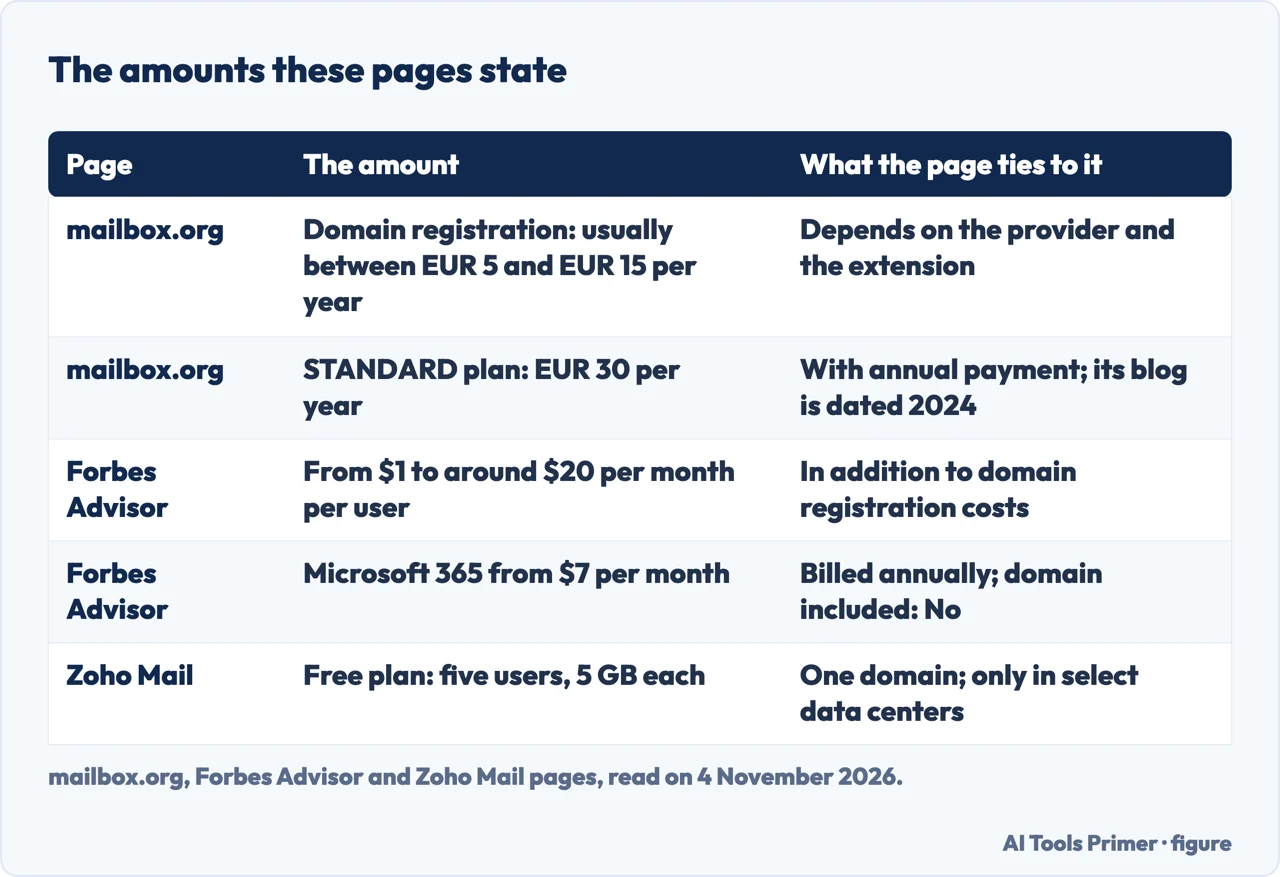
These are the amounts printed on the pages, read on 4 November 2026, and they are not a price list. mailbox.org says registering a domain usually costs between EUR 5 and EUR 15 per year, depending on the provider and the extension, and puts its STANDARD plan at EUR 30 per year with annual payment, in a blog post dated 21 November 2024. Forbes Advisor says professional email plans generally cost from $1 per month to around $20 per month per user, in addition to domain registration, and lists Microsoft 365 from $7 per month billed annually with the domain not included. Forbes says it receives compensation from advertisers, and that paid placements affect how offers appear. Zoho’s page describes a free plan for up to five users with 5 GB each and one domain, available only in select data centers. Forbes Advisor calls it the rare free professional account that works as long as you bring your own domain, and lists the domain as not included. GoDaddy, asked whether a free business address exists, answers “Maybe”: some providers advertise free email, but those plans often limit how many messages you can send in a set period, which GoDaddy says makes them unsuitable for business use.
Time is stated less often. Microsoft gives the 10 minutes and 48 hours for verification and about 15 minutes for records; GoDaddy says it depends. The mailbox.org, Zoho, Proton and Forbes Advisor pages we read do not give a time for DNS changes.
We did not set up a domain, and we did not read Google’s own setup pages, which could not be opened by our tools. We also did not open the Reddit thread, the mail.com page or the Titan page that appeared in the same results.
Where to start
Four ways in.
- “What do I change at the DNS?”
- What changes in the DNS — records
- “What does each provider say?”
- How four providers lay out the steps — providers
- “What are SPF, DKIM and DMARC?”
- SPF, DKIM and DMARC as the pages define them — authentication
- “What does it cost?”
- Costs and clocks, as each page states them — costs
The domain itself
Choosing it, moving it, and one lookup setting.
DNS and the inbox
Lookups, mailing lists and address tricks.
Questions people also ask
Do I have to buy a domain to have a custom email?
Forbes Advisor says yes: to have a truly custom email address you need to register a domain name, and some web hosting packages include a domain free for the first year but charge to renew it. GoDaddy says setup cannot be finished without owning the domain.
Can I have a custom email without a website?
Forbes Advisor says you can, with a registered domain and an email host plan. GoDaddy describes email hosting and web hosting as separate services that a domain can point to.
What happens if I want to change my email provider?
mailbox.org says you can change email providers without changing your email address, as long as you have control over the domain. Microsoft says that once the custom domain is set up, the MX record points to Microsoft 365 and all email for the domain starts coming there.
How long does it take to set up an email domain?
GoDaddy says it depends: setup is nearly automatic, but updating the DNS for a domain can take longer. Microsoft gives up to 10 minutes to verify a TXT record, up to 48 hours at some registrars, and about 15 minutes for other records.
Not covered here. We did not set up a domain. The statements come from pages by mailbox.org, Zoho, Proton, GoDaddy, Forbes Advisor and two Microsoft Learn pages, all read on 4 November 2026.
The search volume and difficulty behind this page come from a Semrush reading of 4 November 2026, inside the 60 days the site normally allows.
Sources
- mailbox.org — Email address with your custom domain: introduction and tips (21 November 2024) — mailbox.org, read 4 November 2026.
- Forbes Advisor — How To Get A Custom Email Domain — www.forbes.com, read 4 November 2026.
- Zoho Mail — Custom domain email address for your business — www.zoho.com, read 4 November 2026.
- Proton — Set up a custom email domain with Proton Mail — proton.me, read 4 November 2026.
- GoDaddy — How to create and set up an email address with your domain name — www.godaddy.com, read 4 November 2026.
- Microsoft Learn — Add a custom domain to Microsoft 365 (updated 8 May 2026) — learn.microsoft.com, read 4 November 2026.
- Microsoft Learn — Connect your DNS records at Cloudflare to Microsoft 365 (updated 16 June 2026) — learn.microsoft.com, read 4 November 2026.
Written by Alberto Gulotta
Founder and editor of AI Tools Primer, writing from Palermo, Italy. Thirty-five years of taking computers apart, starting with a Commodore 64 — the long version is on the about page.
Something wrong on this page? Write to aitoolsprimer@gmail.com and it gets fixed.
Written on 4 November 2026.
Independence and limits
No affiliate links and no paid placements anywhere on this site. Nobody pays to appear here, and no company has seen this page before you did.
This is general information, not professional advice. Where a page touches money, health, safety or the law, it names its source and the date it was read — and your situation may still differ. See the privacy page and the cookie policy.