
Temp mail · guide
Gmail plus addressing: what the pages say about the +
By Alberto Gulotta · Updated · 15 min read
Gmail plus addressing means adding a plus sign and a word before the @ sign, so mail to the longer address still reaches your inbox. Google’s Workspace guide describes it, Fastmail and Microsoft describe their own versions, and RFC 5233 names it. Sites that reject the plus, and spammers who remove it, are its limits.
| Question | Answer | Where it comes from |
|---|---|---|
| What do I type? | A plus sign and a word before the @ sign, such as cassy+news@solarmora.com | Google Workspace guide |
| Where does the mail go? | To the same inbox as the plain address, where filters can route it | Google Workspace guide |
| Can I sign in with it? | No: Microsoft says the +sitename cannot be used to sign in or to send | Microsoft Support |
| Do all websites accept it? | Fastmail says some websites wrongly consider an address with a + invalid | Fastmail Help |
| Can a sender remove it? | CNX Software says spammers could easily remove any +tag from their lists | CNX Software |
What the plus does, and who writes it down
Google’s guide in the Workspace Learning Center describes variations of your address that all deliver to your current inbox, made by adding a plus sign and any word before the @ sign. Messages sent to the current address, or to any variation with the plus sign, all arrive in the same inbox, and you can then set up filters to route or handle them by address. The guide’s example is cassy@solarmora.com, which becomes cassy+news@solarmora.com for newsletters, cassy+questions@solarmora.com for prospective clients or customers, and cassy+urgent@solarmora.com for team members with an urgent issue.
Look at the address in that example: solarmora.com is a Google Workspace domain, not an @gmail.com address, and the guide is written for Workspace. The Gmail Help page on dots, which uses john.smith@gmail.com as its example, does not mention the plus sign at all; it says that for Gmail used through work, school or another organization, dots do change your address. So when this page says what Google describes, it means the Workspace guide. Gmail Help’s page on creating a username, in its Australian English version, lists the plus sign among the characters a username cannot contain. That fits a passage that CNX Software’s 2016 post quotes from Reddit: Gmail ignores a + and everything after it, which is acceptable because Google does not allow + in its login names. Our reading of those two pages together is that the plus works as a label on one account, not as a way to open a second one.
The practice has more than one name. Verifalia, a seller of email verification, calls it plus addressing, also known as subaddressing, and says providers including Gmail, Yahoo and Microsoft Outlook offer it, with the example theodore.bagwell+newsletters@gmail.com delivered to theodore.bagwell@gmail.com. We read Microsoft’s own page for Outlook.com, which describes it; we did not read a Yahoo page, so we do not state that part ourselves. RFC 5233, a January 2008 specification for a mail-filtering language called Sieve, defines subaddressing as the practice of augmenting the local-part of an address with some detail information. It says one common way to do this is a separator such as the plus sign, and that the encoding is specific to the site or the implementation. Its examples include ken+sieve@example.org, delivered to a mailbox called sieve belonging to the user ken, and a diagram with the detail placed before a double hyphen.
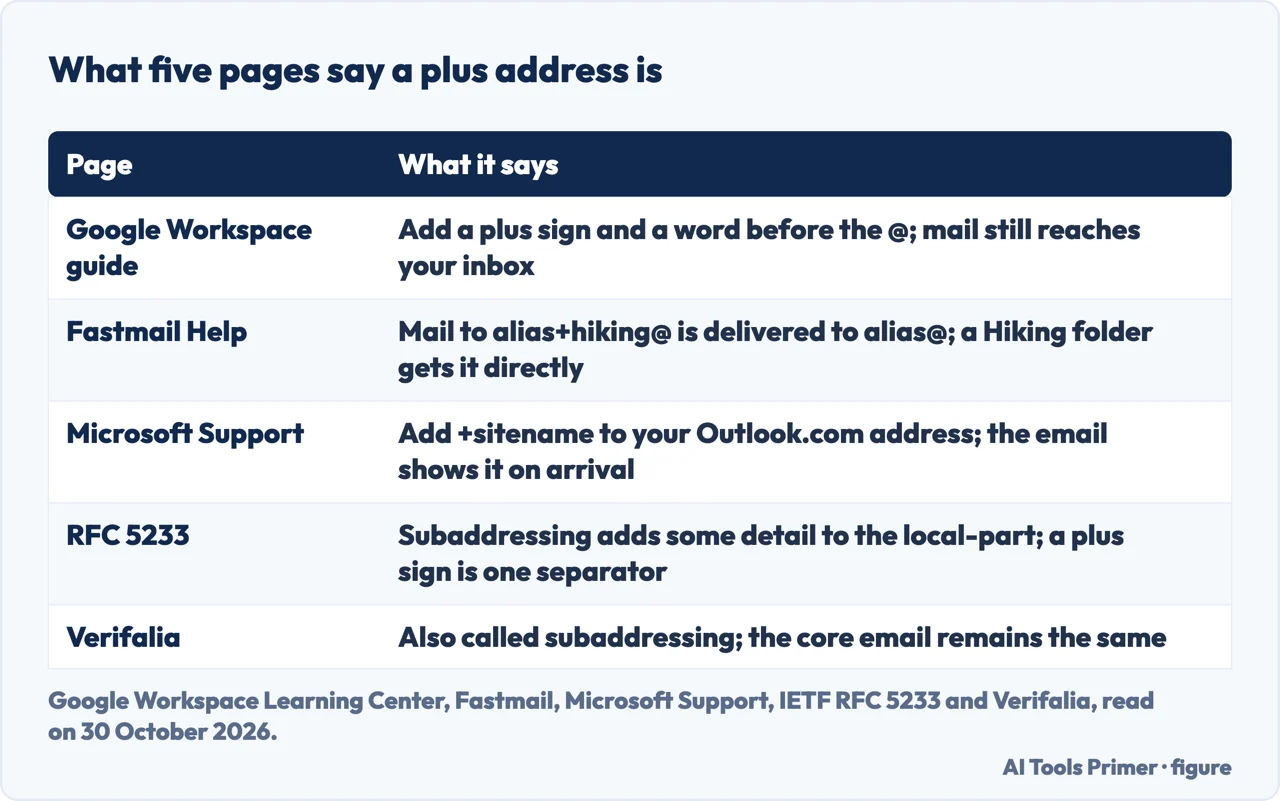
Sorting the mail: a filter, a folder or a rule
The pages we read give three ways to act on the tag, and they are not the same. The Workspace guide uses a filter. In Gmail you open the search box at the top, click Show search options, enter the task-specific address under To, click Create filter, choose what Gmail should do, such as archive, apply labels or mark as important, and click Create filter again. Its example is a filter that archives everything sent to cassy+news@solarmora.com and applies a News label, so that clicking News in your list of labels finds the newsletters when you are ready to read them.
Fastmail uses the folder names. It says plus addressing means any email sent to alias+whateveryoulike@domain.tld is still sent to your account, and that when the text after the + is the name of one of your folders, the message is delivered to that folder and not to the Inbox, with no rule needed. Its example is alias+hiking@domain.tld and a folder called Hiking. The matching is forgiving: when a regular match fails, folders are compared without regard to case, with the hyphen, underscore and space treated as the same, and a dot separates a parent folder from a subfolder. A folder called Mailing Lists.My List therefore receives mail sent to alias+mailing-lists.my_list@domain.tld, and if the subfolder does not exist the mail goes to the parent folder. Fastmail adds that a rule you create to file the message into a folder takes precedence over the folder matching, and that you do not need to set up anything extra to receive mail at a plus address.
Microsoft’s page for Outlook.com describes site-specific addresses. You add the site name to your own address, for example chester.beane+microsoft@outlook.com typed into the Promotional Communications Manager, and the email arrives showing +microsoft; the page points to rules in Outlook for filtering or redirecting what comes in at that address. The NC State Extension IT page, posted in February 2023, gives john+shopping@gmail.com and john+work@gmail.com as examples and suggests addresses for newsletters, Eventbrite notifications and work. RFC 5233 adds a technical note for people who write Sieve scripts: to sort messages by how they were addressed, the envelope “to” address is usually the one to examine, particularly when mailing lists, aliases or virtual domains are involved, because the envelope may be the only source of the detail.
Where the plus stops working
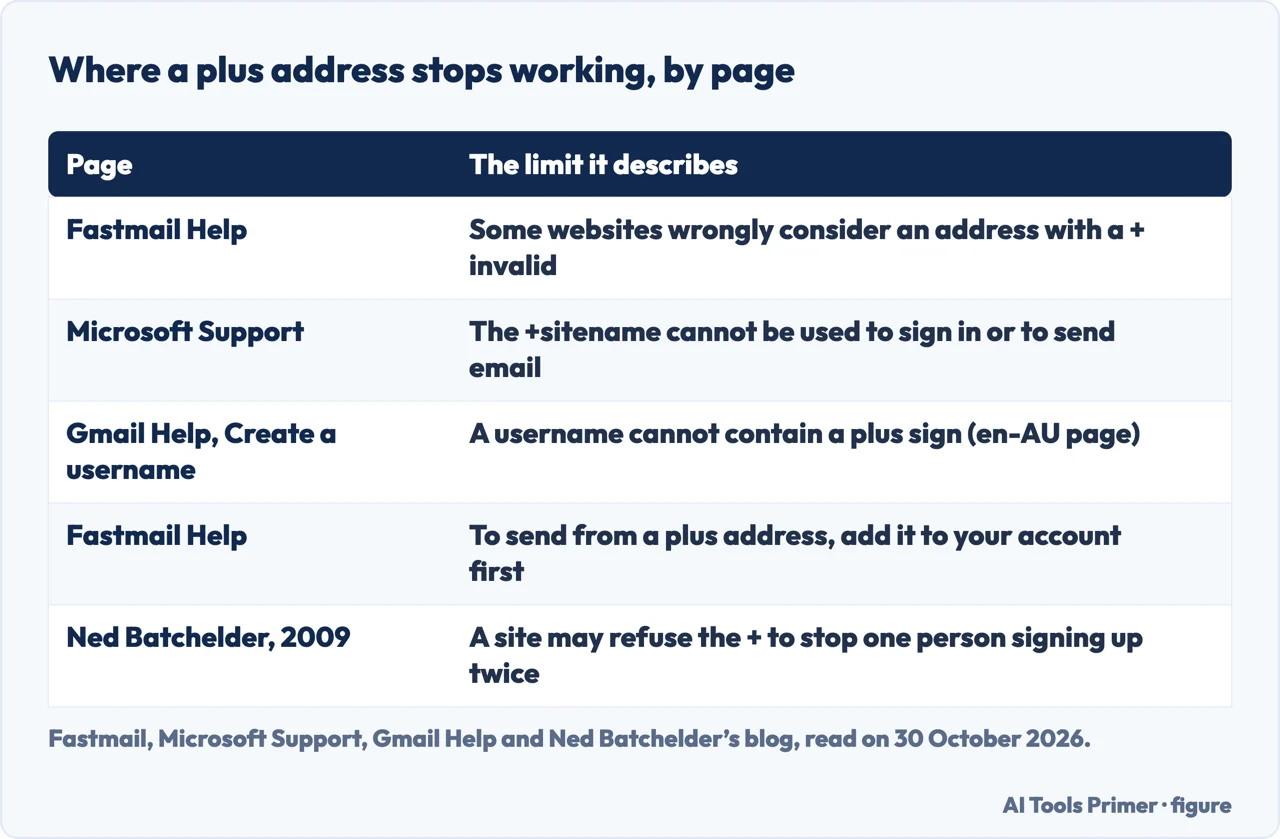
Fastmail names the main downside of plus addressing in its own help page: some websites wrongly treat an address with a + as invalid, and some registration forms may refuse it. CNX Software, relaying a Reddit commenter, adds that not all email providers support it. Fastmail’s way around the problem is subdomain addressing, where the address takes the form whateveryoulike@alias.domain.tld. That page says the address must not include an underscore or a dot, that only one level of subdomain is supported, and that messages are filed into folders with a matching name as with the plus.
Why a site would refuse the plus is a question the pages answer differently. A 2009 post on Ned Batchelder’s blog, which the page itself marks as more than 17 years old, suggests the refusal might be an intentional attempt to stop one person registering with several addresses on one site. Commenters on the post disagree: one thinks over-validation is more likely from someone who does not know the rules or does not care, and another says that if it were intentional a specific error message would be expected instead of a generic one. The post’s author replies that a vague message is what you would expect if the goal is defence. It is a blogger’s opinion from 2009 and the pages we read do not measure how many sites refuse the plus, so we report the argument and not a number.
Two limits come from Microsoft’s page. The +sitename cannot be used to sign in, and you cannot send email so that it includes the +sitename information; for either, the page points to an account alias. Fastmail is different on sending: to send from a plus address you first set it up in your account, through Settings, My email addresses, Add address and the option to add an address you already own.
The one weakness: the tag can be removed
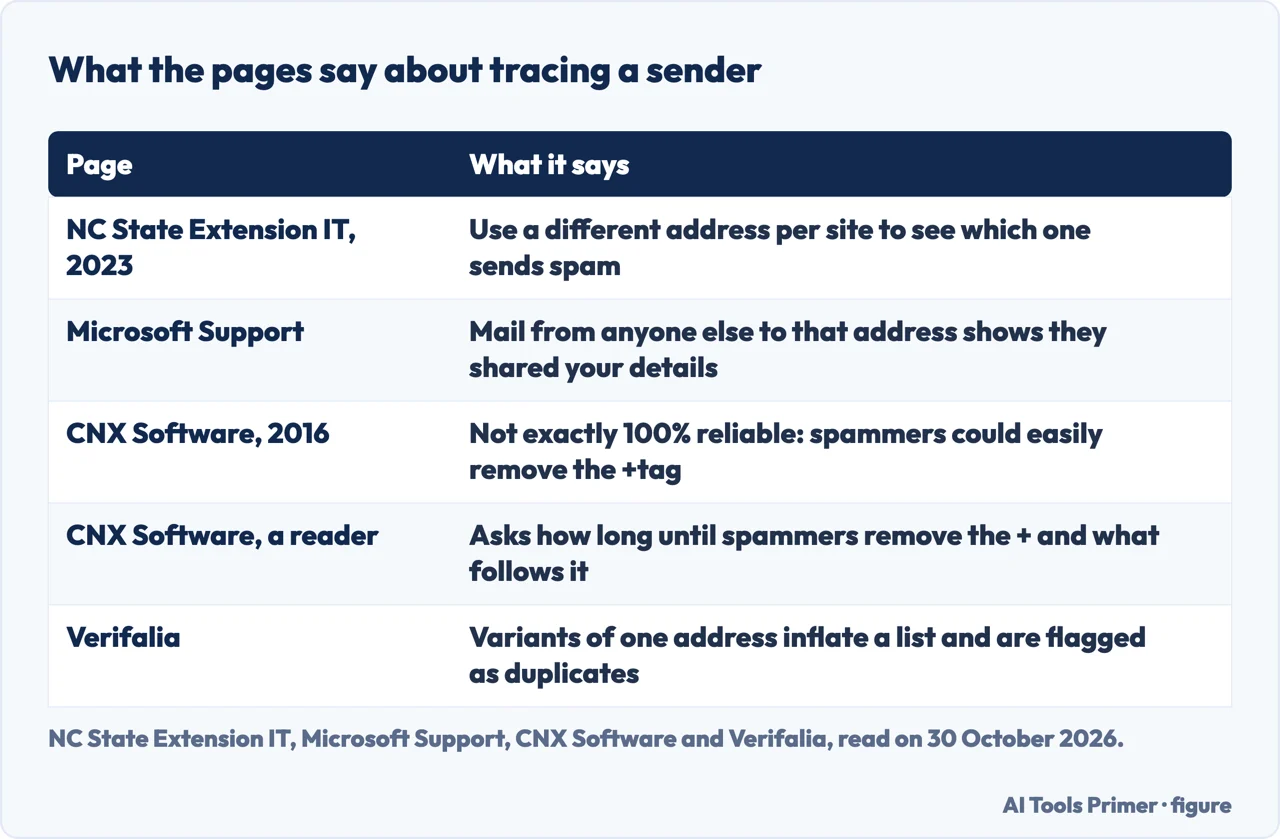
The reason several pages give for using a tag is to find out who passed your address on. NC State Extension IT says a different address for each website or service you sign up for lets you identify which one sends spam. Microsoft says that if you receive emails at that address from anyone else, you will know they have shared your details. CNX Software gives an example from its own blog: a commenter who used one tagged address only there, and later got a junk email to that exact address, would know that either the blog gathered addresses on purpose or it was hacked and others took the opportunity.
The same CNX post gives the limit. It says the method is not exactly 100% reliable, because spammers who want to hide their source could easily remove any +tag from their email databases. A reader’s comment on that post asks how long it would be before spammers catch up and remove the + and what follows. Neither the post nor the comment gives a count of how often this happens, and “could easily” is a statement of what is possible, so we do not treat it as a measurement. What the pages do show is the structure: the plain address is the part before the plus, so a sender who drops the tag is writing to the same inbox. Our reading is that the tag tells you where an address went only while it is left on.
The other side of the same property appears in the Verifalia page. For a business with a mailing list, it says, plus addressing makes duplicates harder to track, because people who sign up with several versions of one email inflate list numbers and raise the risk of sending redundant emails; its verification service flags such variations as duplicates. That is a vendor describing its own market, and we use it only for the fact. Ned Batchelder’s guess about why some sites refuse the plus concerns the same property, but the pages we read leave that reason as a guess.
Plus addressing and an alias are different things
Verifalia draws one line itself. Plus addressing, it says, is tied to a valid, long-term email account, while disposable addresses are temporary and made for short-term use. The plus address is not a separate mailbox: Google’s guide describes variations that all arrive in your current inbox, with filters to handle them, and the pages we read describe the tag as something you write rather than something you switch on at the provider. Microsoft’s page shows where the difference matters: for signing in or for sending, it sends you to an account alias instead of the +sitename.
The services on our own pages work the other way round. Our page on SimpleLogin covers how to switch off or block an alias and what deleting does, and our page on Apple Hide My Email covers switching an address off and deleting it. Those pages describe an address you can turn off at the service. For the plus address, the pages we read describe a filter on the address, not a switch, and Microsoft says the email which arrives will show the +microsoft tag. The wider question of throwaway addresses and permanent ones is on the temp mail page.
What the pages we read do not say
We sent no mail and tested nothing on a mailbox. The pages we read do not say how many websites refuse a plus address; Fastmail says some, and Batchelder’s post explains the refusals with a guess. They do not give a limit on how many variations an address can have. They do not describe, for a personal @gmail.com address, where Google writes the plus down: the one Google page that does is a Workspace guide, and the Gmail Help pages we read are about dots and usernames. CNX Software reports sending itself a test email on Gmail and receiving it, and also tried it with hotmail; NC State Extension IT states that it works on Gmail. The pages we read do not say whether a documented case exists of spammers removing the tag, and they do not mention a price: Fastmail says only that nothing extra needs to be set up to receive.
Some results were left out. Google’s own 2008 Gmail blog post opened, but only its menu reached us and not the text of the post, so we did not use it. The SixFive article stopped at an anti-bot wall. We did not open the Gmail Community thread, the Smartsheet community discussion, the Reddit thread or the Craig Peterson blog post, so we do not cite them. The Verifalia page has a Gmail screenshot that we did not read.
Where to start
Four ways in.
- “What is the plus trick?”
- What the plus does, and who writes it down — what
- “How do I sort the mail?”
- A filter, a folder or a rule — sort
- “Why did the site refuse it?”
- Where the plus stops working — stops
- “Can a spammer remove it?”
- The one weakness: the tag can be removed — weak
Aliases that switch off
The permanent-address services, one page each.
Addresses made to be dropped
The temporary side of the same question.
Questions people also ask
What is plus addressing?
Verifalia calls it plus addressing, also known as subaddressing: a + sign and a tag appended to the address without registering a new account. Google’s Workspace guide says to add a plus sign and any word before the @ sign, and all messages arrive in your current inbox.
What is the +1 Gmail trick?
The pages we read do not use +1 as an example. Google’s Workspace guide says a plus sign and any word, Fastmail says whatever you like after the +, and Microsoft says something meaningful to you.
Can you add a +1 to an email address?
The Workspace guide, Fastmail and Microsoft describe adding a plus sign and a tag before the @. Fastmail says some websites wrongly consider such an address invalid, and Microsoft says the +sitename cannot be used to sign in or to send.
What does +++ mean in email?
The pages we read do not describe +++. RFC 5233 says the encoding of detail in the local-part is specific to the site or implementation, gives the plus sign as one common separator and shows a double hyphen in a diagram.
Not covered here. We sent no mail and tested nothing on a mailbox. The statements come from the Google Workspace Learning Center, two Gmail Help pages, Fastmail Help, Microsoft Support, RFC 5233, Verifalia, NC State Extension IT, CNX Software and Ned Batchelder’s blog, all read on 30 October 2026.
The search volume and difficulty behind this page come from a Semrush reading of 29 August 2026, which expired on 28 October 2026, past the 60 days the site normally allows, and is used with the owner’s authorisation until it is read again.
Sources
- Google Workspace Learning Center — Tips to optimize your Gmail inbox — support.google.com, read 30 October 2026.
- Gmail Help — Dots don’t matter in Gmail addresses — support.google.com, read 30 October 2026.
- Gmail Help — Create a username — support.google.com, read 30 October 2026.
- Fastmail Help — Plus addressing and subdomain addressing — www.fastmail.com, read 30 October 2026.
- Microsoft Support — Send email from a different address in Outlook.com — support.microsoft.com, read 30 October 2026.
- IETF — RFC 5233, Sieve Email Filtering: Subaddress Extension — datatracker.ietf.org, read 30 October 2026.
- Verifalia — What is plus addressing? — verifalia.com, read 30 October 2026.
- NC State Extension IT — Gmail Plus Addressing: The Hidden Feature — eit.ces.ncsu.edu, read 30 October 2026.
- CNX Software — Adding Plus Sign and Tag to Email Address May Help Identify Source of Junk Emails — www.cnx-software.com, read 30 October 2026.
- Ned Batchelder — Plus signs in email addresses — nedbatchelder.com, read 30 October 2026.
Written by Alberto Gulotta
Founder and editor of AI Tools Primer, writing from Palermo, Italy. Thirty-five years of taking computers apart, starting with a Commodore 64 — the long version is on the about page.
Something wrong on this page? Write to aitoolsprimer@gmail.com and it gets fixed.
Written on 30 October 2026.
Independence and limits
No affiliate links and no paid placements anywhere on this site. Nobody pays to appear here, and no company has seen this page before you did.
This is general information, not professional advice. Where a page touches money, health, safety or the law, it names its source and the date it was read — and your situation may still differ. See the privacy page and the cookie policy.