
Temp mail · guide
Firefox Relay explained: 5 or 50 free masks and the limits
By Alberto Gulotta · Updated · 18 min read
Firefox Relay is a Mozilla service that gives you forwarding addresses, called masks, to use instead of your real email. Mozilla's pages disagree on the free limit: 5 masks on some, 50 on others. The terms add limits on attachments and phones, and Mozilla names the sign-ups where a mask is the wrong tool.
| Question | Answer | Where it comes from |
|---|---|---|
| What is a mask? | A forwarding address that keeps your real email address private | Mozilla Support |
| How many are free? | 5 on some pages and 50 on others; the newest dated pages say 50 | Mozilla Support, Relay home, terms, PCWorld |
| What does Premium add? | Unlimited masks, a Relay email domain of your own, blocking of promotional email, replies | Mozilla Support, Relay Premium page |
| What is the price? | The Relay pages show a waitlist button; two writers give figures, three years apart | Relay home, PCWorld, TechHQ |
| Where should a mask not be used? | With a bank, a doctor or a lawyer, for identity checks and for boarding passes | Mozilla Support, Relay home |
What Firefox Relay is
Mozilla’s support page, updated on 20 August 2024, says an email mask is a forwarding address that keeps your real email address private. Every email sent to the mask is forwarded to your real inbox without revealing it. You give the mask to a website in place of your address, and the page says masks can be managed from the Relay dashboard, where you choose which ones forward mail to you.
The dashboard does more than that. Mozilla’s article on the Firefox password manager says you can label masks, block senders and delete masks that get too much spam from the Relay dashboard. The Relay home page lists the same jobs and adds that calls and texts from phone masks can be blocked too. The terms of service, in effect from 16 September 2026, describe Firefox Relay as a way to keep your primary email address and phone number private by making masks that let you send and receive emails, calls and texts without revealing your real contact details, and say Mozilla Corporation offers it.
Relay is not tied to one browser. The home page FAQ answers yes to using it on other browsers or on a mobile device, by logging in to the dashboard and generating masks there. The Firefox password manager article adds that creating masks from the password manager needs a Mozilla account.
Two writers explain why masks are worth having, and they give different reasons. PCWorld’s Alaina Yee, on 3 June 2026, says using a unique address for each site makes credential stuffing attacks harder, and that hiding your real address makes it harder for fraudsters to build a profile of you for convincing scams. TechHQ’s Molly Loe, on 30 March 2023, says that if a site is compromised, the others are not put at risk when a mask was used, and that spam can be traced to its source because each mask is unique. Both are opinions of the writers, not statements by Mozilla.
If you are weighing Relay against another alias service, the SimpleLogin page sets out that service’s free plan, its switch-off and its delete rules, and this page leaves that comparison there. What follows is the Relay side: where a mask is made, what the free plan keeps, what Premium adds, and where Mozilla says to use your real address.
Where a mask is made
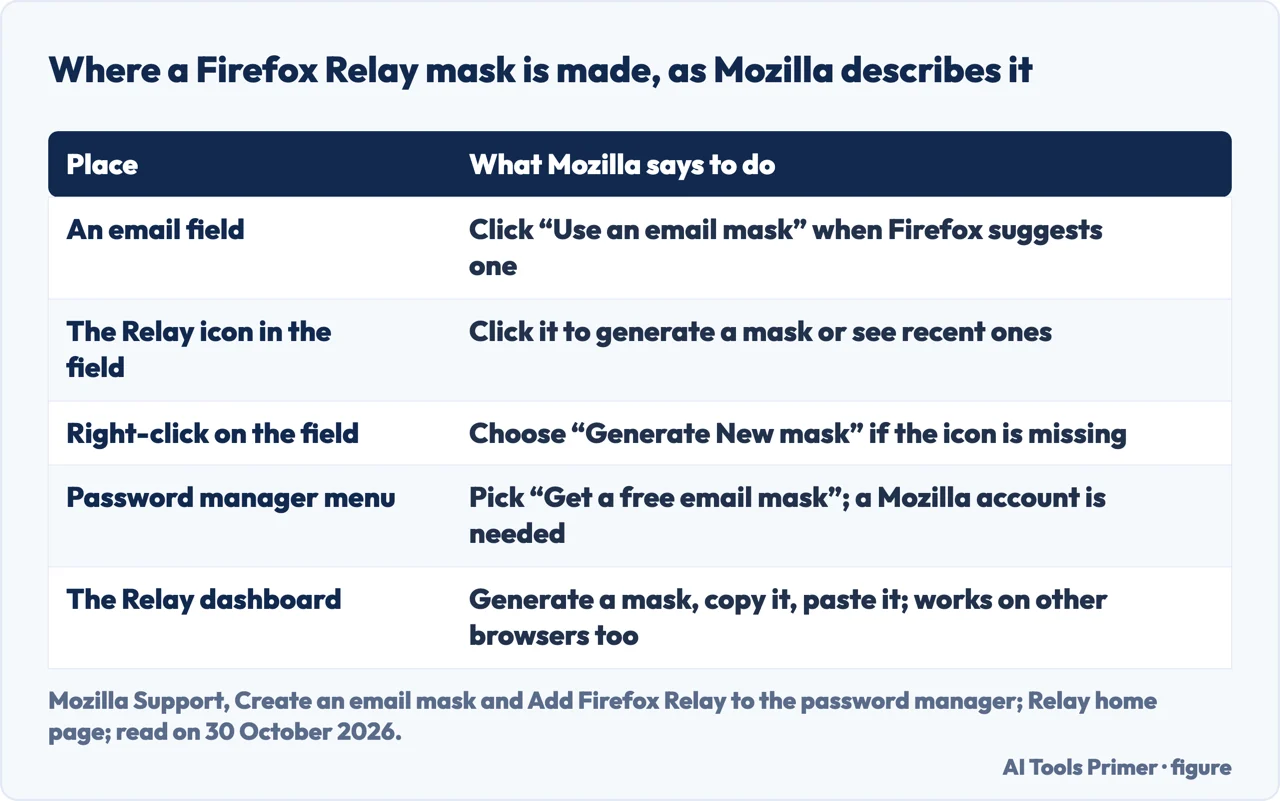
Mozilla’s article on creating a mask, updated on 21 April 2026, says that once Relay is installed you see an option to create a mask on email fields and web forms. When you visit a site with an email field, Firefox can suggest an email mask; you need to be signed in to your Mozilla account with Relay masks enabled. You click “Use an email mask” and the mask appears in the Email address box.
The Relay icon also appears in the email field. Clicking it generates a mask or shows a list of recently used ones. If the icon does not show, the article says to right-click the email field and choose “Generate New mask”. Or you can open the dashboard at relay.firefox.com, or click the Relay icon in the add-ons tray, choose to generate a new mask, copy it and paste it into the form.
The password manager article describes a third way in. When you fill in an email field, the dropdown offers a “Get a free email mask” option next to the emails from your saved logins. Mozilla says the password manager may not detect all email fields; the article then points to the dashboard, and to the Relay add-on, whose right-click menu offers “Generate new mask” or “Recent mask”. To stop the suggestions, the article says to open Settings, then Privacy & Security, scroll to Passwords and uncheck the box for suggesting Firefox Relay email masks. For what else the manager does, see the Firefox password manager page.
A mask can be reused. The password manager article says a free account’s masks can be used as many times as you like, but that using a unique mask for each account is “the most secure option”.
The free plan: 5 masks or 50
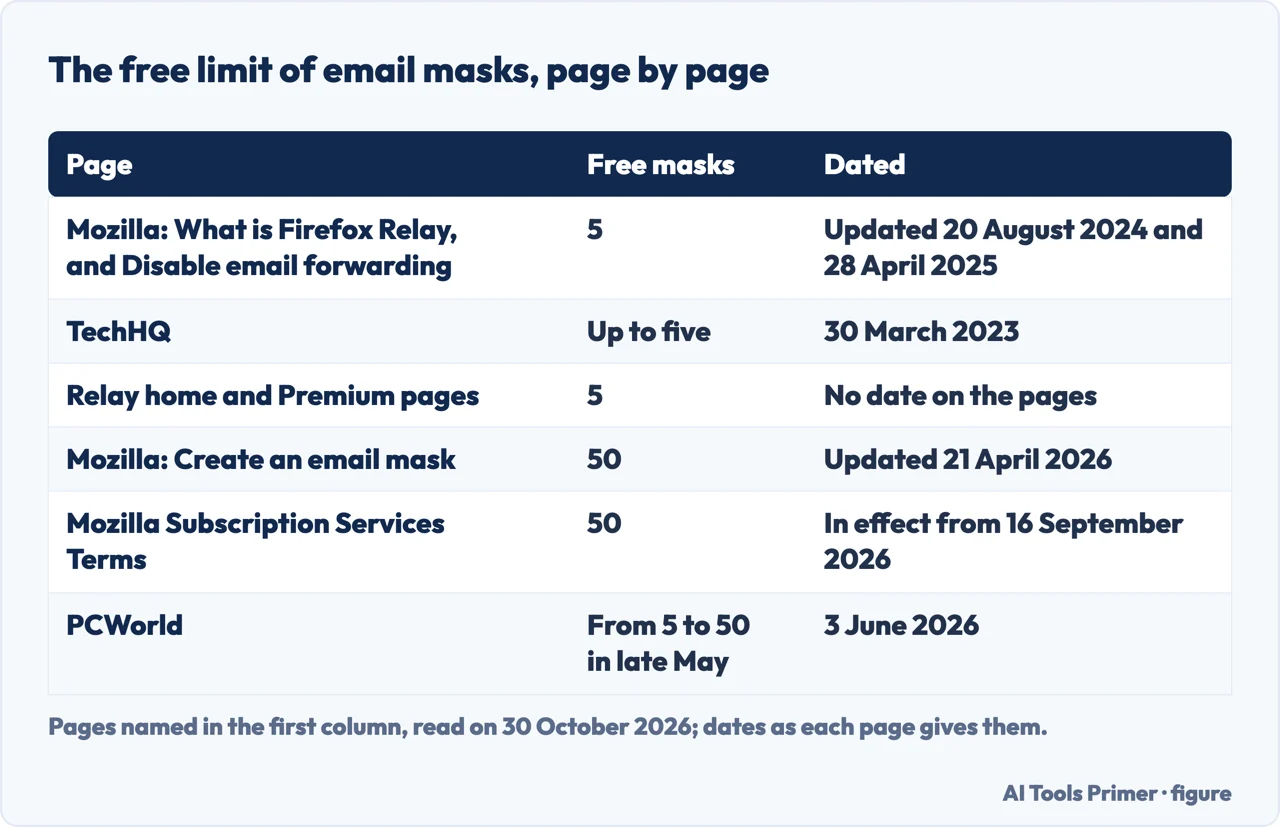
The pages we read do not agree on the free limit, and the dates explain much of the gap. Mozilla’s support page updated on 20 August 2024 says you can create up to 5 email masks, and its article on disabling forwarding, updated on 28 April 2025, says a free subscription can create up to 5 masks. TechHQ, on 30 March 2023, says up to five aliases. The Relay home page and the Premium page, which show no date, say everyone gets 5 email masks for free, and their plan table lists 5 in the free column.
The newer pages say 50. Mozilla’s article on creating a mask, updated on 21 April 2026, says free Relay users can create up to 50 free email masks. The password manager article, which showed “3 weeks ago” as its update when we read it, says a free account includes 50 and adds that this is not a free trial and that you are not charged unless you sign up for Premium. The terms, in effect from 16 September 2026, say the free service allows up to 50 random email masks and no phone masks.
PCWorld gives the change a date. Its 3 June 2026 article says the free plan was limited to five masks since the general launch in November 2021, and that in late May Mozilla quietly raised it tenfold to 50. It says the upgrade should apply to all users, though the Relay extension for Firefox had not yet caught up on the author’s own install, and that up to 50 masks can still be created through the main interface. We cannot say from the pages we read on which day 50 began, and we cannot date the home page that still says 5. The newest dated pages say 50.
At the limit, the create article says you cannot make more masks unless you delete existing ones or upgrade to a paid plan. It adds that an error before the limit may be temporary, and that creating masks at a slower pace avoids triggering rate limits.
The free plan keeps some extras. The Relay home page lists a browser extension and the removal of email trackers in the free column, and TechHQ says the same of the free plan in 2023. PCWorld says free users miss out on Premium’s best features, such as replying anonymously to emails sent to a mask and using your own subdomain.
Phone masks, and the limits in the terms
A phone mask is a Premium feature, according to Mozilla’s support page: it gives you a unique number to use instead of your own, and texts and calls to it are forwarded to your real phone. When you reply to a forwarded text, Relay sends the reply to the last number that texted you, and you can enable or disable the mask from the phone dashboard. The terms say the phone masking service is a partnership with Twilio and is available only in the United States and Canada, and the password manager article and the terms agree on that.
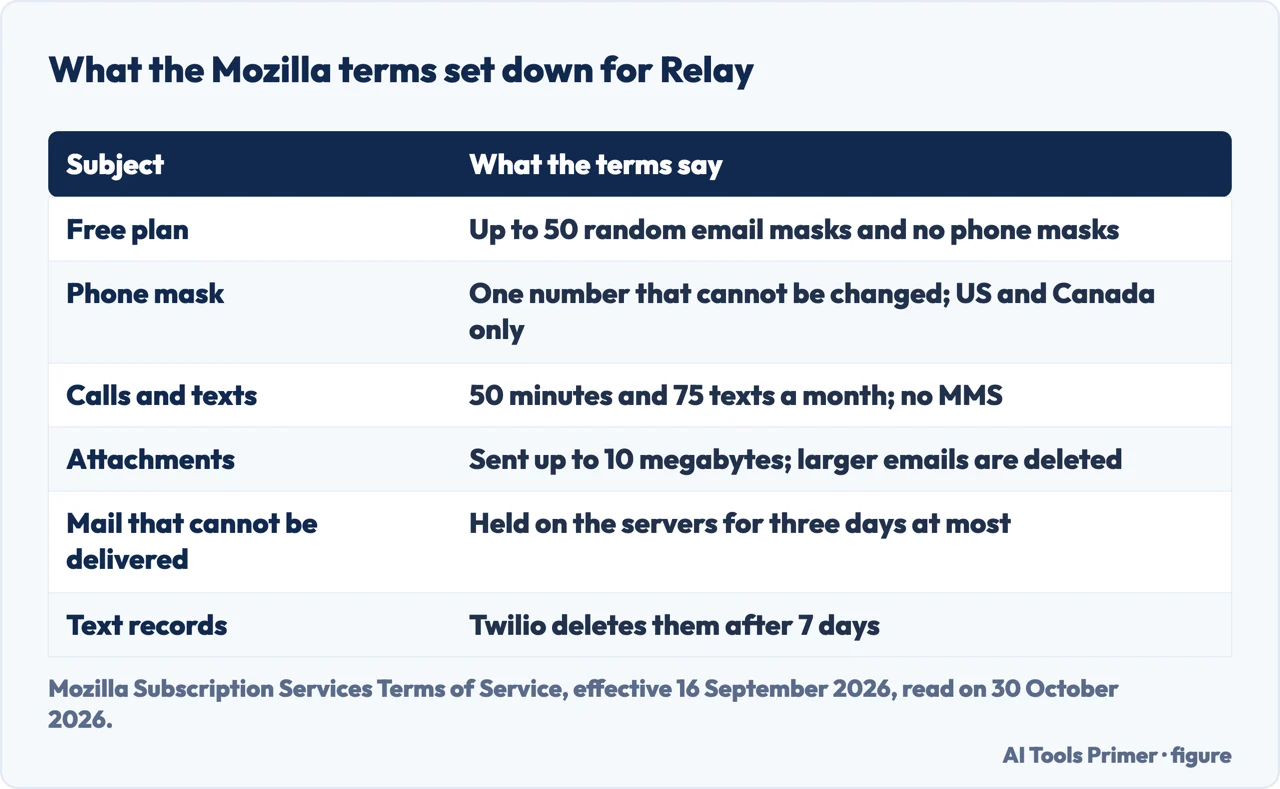
The terms set the numbers. The free service has no phone masks; the paid subscription gives you one, and once chosen it cannot be changed. Because there is only one, you can respond only to the last text you received, and Relay does not support sending other texts. The service allows up to 50 minutes of calls and up to 75 text messages a month, sent and received together. Further texts are deleted and further calls do not go through. MMS is not supported, and your carrier’s normal rates may apply.
On what is kept, the terms say Mozilla keeps a log of the phone numbers you contacted through Relay to show call and text logs, send replies and block numbers. Mozilla set Twilio to delete its records of your texts after 7 days. Mozilla does not monitor or store the content of the calls you make.
Email has limits too. The terms say Relay sends attachments only up to 10 megabytes and deletes larger emails. If an email cannot be delivered to you, Mozilla keeps it on its servers and deletes it after delivery, and says it will in no event hold it for more than three days. The terms also say Mozilla does not read or store the content of your email messages for longer than it takes to deliver them; if you use the promotional-email block, the service checks email headers to decide whether to block a message.
One more line concerns who uses it. The terms say that with a paid subscription the permission is only for your personal use, and that you may not transfer, sublicense, resell or commercially exploit Relay. TechHQ’s 2023 article, by contrast, says Relay is perhaps a better choice for groups and companies because of its centralized dashboard. That is the writer’s view, written years before these terms, and the two do not match.
Where a mask is the wrong tool, and how to switch one off
Mozilla names the sign-ups it has in mind. Its create article says to use a mask for less critical sign-ups, such as online shopping, apps or websites you do not fully trust. It says Mozilla does not recommend masks when you need your identity verified, for very important emails, or for emails where you must receive attachments, and that you would want to share your true address with your bank, your doctor and your lawyer, and when receiving concert or flight boarding passes. The Relay home page FAQ says the same. The password manager article adds that Mozilla does not recommend Relay on sites you trust, such as your bank or credit card website, and that a website may occasionally not accept a Relay mask, in which case you use your real address.
To stop a mask forwarding, Mozilla’s disable article, updated on 28 April 2025, says to open the dashboard (from the toolbar icon, choose Manage all masks), find the mask and click the arrow to expand its options. Under “What emails do you want to block?” you move the slider from None to All. Moving it from All back to None makes the mask forward to your inbox again, as the article puts it, so you receive forwarded emails from it once more. A second route is automatic: if you mark an email from a mask as spam, Relay disables forwarding for that mask and sends you an email about it, and you can re-enable the mask from the dashboard. Blocking only promotional emails is the Premium feature described above. A mask can also be permanently deleted, and the create article says deleting masks is one way to make room under the free limit.
For how Relay’s slider compares with the switch-off of two other services, see the SimpleLogin page. If the reason you are here is an address that has already leaked, the data breach page is where that starts.
PCWorld names one alternative. It says DuckDuckGo’s Email Protection first creates an @duck.com alias that forwards to your real email, then lets you generate private Duck Addresses that act like masks, with as many as you like and the option to reply from them. The author says you must have the DuckDuckGo browser installed. We did not read DuckDuckGo’s own pages, so that is PCWorld’s account.
The pages we read do not say how long Relay keeps the details of forwarded messages, whether the number of destination addresses is limited, or what happens to your masks if Premium ends. The Mozilla index page for email and messaging arrived as an empty shell, so we did not use it.
Where to start
Four ways in.
- “What does Firefox Relay do?”
- What Firefox Relay is — what
- “Is Firefox Relay free?”
- The free plan: 5 masks or 50 — free
- “What does Premium add, and what does it cost?”
- What Premium adds, and what the pages say about price — premium
- “How do I stop a mask?”
- Where a mask is the wrong tool, and how to switch one off — wrong
Other ways to keep the real address back
Aliases that last, and inboxes that are thrown away.
Around the mask
The password manager that offers it, phone numbers, and the post you can stop.
Questions people also ask
What does Firefox Relay do?
Mozilla’s support page says an email mask is a forwarding address that keeps your real address private: every email sent to the mask arrives in your real inbox without revealing it. Masks are managed from the Relay dashboard, and phone masks forward calls and texts on Premium.
Is Firefox Relay free?
There is a free plan, and the pages we read give 5 masks or 50. Mozilla’s create article of April 2026, its password manager article and the terms from 16 September 2026 say 50, PCWorld dates the rise to late May 2026, and the Relay home page still says 5. Premium, phone masks and replies to forwarded email are paid.
Is Firefox Relay safe to use?
The pages we read give no safety verdict. The terms say Mozilla does not read or store the content of your email messages for longer than it takes to deliver them. They also set limits: attachments up to 10 megabytes, undelivered mail held three days at most, and a warning about banks, doctors and lawyers.
How do I stop Firefox Relay?
To stop one mask forwarding, move its slider from None to All on the dashboard; marking a message from it as spam also switches it off. A mask can be deleted. For Premium, the terms say you can cancel at any time from Subscriptions & Payments in your Mozilla account; access ends with the billing cycle.
Not covered here. We tested nothing: we created no account and no mask. The statements come from five Mozilla Support articles, the Mozilla Subscription Services Terms, the Relay home and Premium pages, a PCWorld article and a TechHQ article, all read on 30 October 2026.
The search volume and difficulty behind this page come from a Semrush reading of 29 August 2026, older than the 60 days the site normally allows.
Sources
- Mozilla Support — Firefox Relay - Email and Phone masks — support.mozilla.org, read 30 October 2026.
- Mozilla Support — Create an email mask through Firefox Relay — support.mozilla.org, read 30 October 2026.
- Mozilla Support — Add Firefox Relay to the Firefox password manager — support.mozilla.org, read 30 October 2026.
- Mozilla Support — Disable email forwarding — support.mozilla.org, read 30 October 2026.
- Mozilla Support — Subscribe to Firefox Relay Premium — support.mozilla.org, read 30 October 2026.
- Mozilla — Subscription Services Terms of Service — www.mozilla.org, read 30 October 2026.
- Firefox Relay — home page — relay.firefox.com, read 30 October 2026.
- Firefox Relay — Premium — relay.firefox.com, read 30 October 2026.
- PCWorld — Firefox’s free email mask service got a massive update — www.pcworld.com, read 30 October 2026.
- TechHQ — Email masking with Firefox Relay — techhq.com, read 30 October 2026.
Written by Alberto Gulotta
Founder and editor of AI Tools Primer, writing from Palermo, Italy. Thirty-five years of taking computers apart, starting with a Commodore 64 — the long version is on the about page.
Something wrong on this page? Write to aitoolsprimer@gmail.com and it gets fixed.
Written on 30 October 2026.
Independence and limits
No affiliate links and no paid placements anywhere on this site. Nobody pays to appear here, and no company has seen this page before you did.
This is general information, not professional advice. Where a page touches money, health, safety or the law, it names its source and the date it was read — and your situation may still differ. See the privacy page and the cookie policy.