
Chat · guide
How to install Ollama: what the pages ask for, step by step
By Alberto Gulotta · Updated · 15 min read
How to install Ollama: the pages we read give three routes: a Mac disk image or zip file, a Windows installer, or one command in a terminal. Ollama's docs ask for macOS 14 or newer on a Mac and Windows 10 22H2 on a PC, and the first model they run is a download of about 7.2 GB.
| Question | Answer | Where it comes from |
|---|---|---|
| What does a Mac need? | macOS Sonoma (v14) or newer; an Apple M series chip uses CPU and GPU, an x86 Mac only the CPU | Ollama docs, macOS |
| What does a Windows PC need? | Windows 10 22H2 or newer, Home or Pro, and an NVIDIA driver 551.61 or newer if there is an NVIDIA card | Ollama docs, Windows |
| What do you download? | A disk image on the macOS docs page, a .zip on the ApX page, an .exe on Windows; a one-line command on the download page | Ollama docs, ApX, download page |
| How do you check it worked? | Type ollama in a terminal and look for the list of commands | ApX |
| What is the first model? | ollama run gemma4:e2b, a download of about 7.2 GB, with 8 GB of VRAM or unified memory recommended | Ollama Quickstart |
What you need before you start
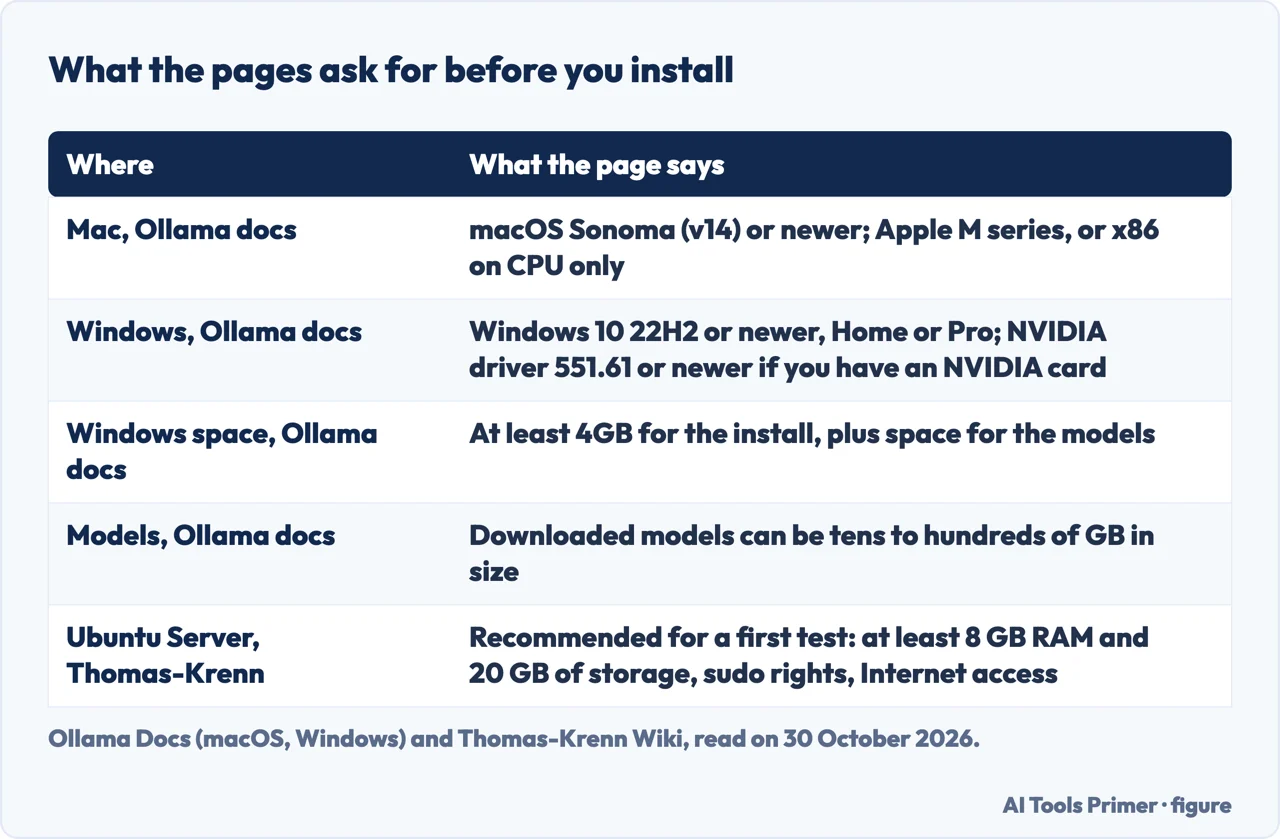
Ollama’s documentation spreads the requirements over separate pages. For a Mac, the macOS page asks for macOS Sonoma (v14) or newer, on either an Apple M series chip, which it marks as CPU and GPU support, or an x86 Mac, which it marks as CPU only. For Windows, the Windows page asks for Windows 10 22H2 or newer, Home or Pro, plus NVIDIA drivers 551.61 or newer if the PC has an NVIDIA card. For AMD Radeon cards it names either an AMD ROCm v7 driver stack or a Vulkan-capable driver.
The hardware page gives its own minimums. It lists Nvidia GPUs with compute capability 5.0 or higher and driver version 550 or newer, adds that cards from 5.0 through 6.2 need driver 570 or newer, and says Ollama supports GPU acceleration on Apple devices through the Metal API. It says Vulkan is enabled by default on Windows and Linux when the backend is installed, and that AMD on Linux needs the ROCm v7 driver. The 550 on that page and the 551.61 on the Windows page are two different numbers on two pages of the same documentation, and we give both as printed.
Space is the second requirement. The Windows page says the install does not need Administrator rights, goes into the home directory by default and needs at least 4GB for the program itself. The macOS and Windows pages both add that the downloaded language models are stored separately and can be tens to hundreds of GB in size. The Thomas-Krenn wiki, whose guide is written for Ubuntu Server 24.04 LTS, recommends for initial testing a user with sudo rights, at least 8 GB of RAM, at least 20 GB of storage and Internet access for the install and the model download.
The wiki says the installation normally works on other Ubuntu Server LTS releases and on 22.04 LTS too, and that a system with a GPU should be checked in advance for a suitable driver for its Ubuntu version. The ApX course page, which is third-party teaching material, says that for Ollama to use an NVIDIA card on Windows the latest NVIDIA drivers should be installed.
Installing on a Mac
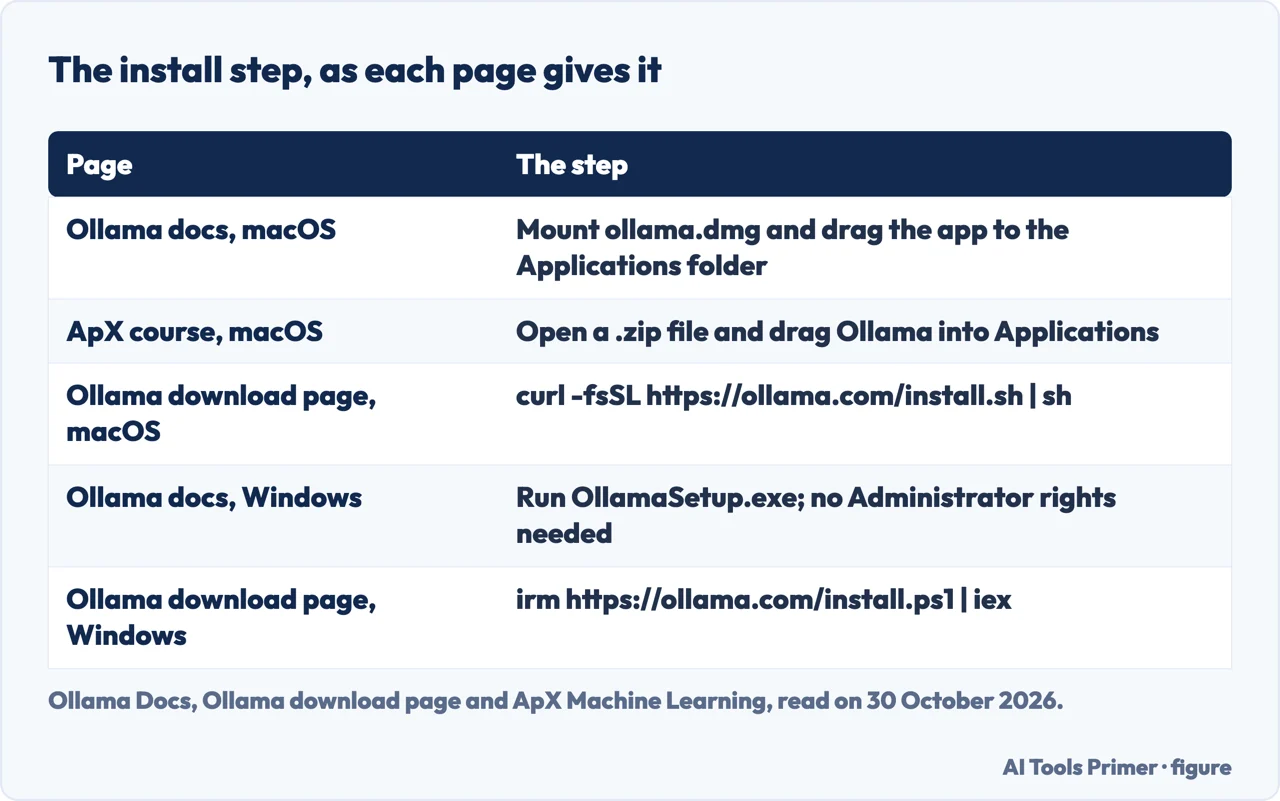
Ollama’s macOS page calls one method preferred: mount ollama.dmg and drag the Ollama application into the system-wide Applications folder. The first time the app starts, it checks that the ollama command is in your PATH, and if it is not found it asks permission to create a link in /usr/local/bin.
The pages differ on what the download is. The ApX course says that choosing Download and then Download for macOS on the Ollama site gives a .zip file; you open it, drag the app into Applications and open it from there. It adds that a small icon appears in the menu bar, that no traditional main window opens and that the first launch may offer to install the command-line tool. Ollama’s download page and the README on GitHub show a third route for macOS, a command to paste in a terminal: curl -fsSL https://ollama.com/install.sh | sh. The pages we read do not say why the three differ or which one is newest, so the table below sets them side by side.
The Quickstart picks up after the install. It says to open the app, or to start from a terminal by typing ollama, and to follow the setup prompts, where you either sign in to use cloud models or choose a local model. It goes on to connecting desktop apps, launching coding agents with ollama launch and sending API requests, and we did not follow those steps here.
The macOS page also covers putting the app somewhere other than Applications. Place the application where you want it, make sure the command-line tool at Ollama.app/Contents/Resources/ollama or a symbolic link to it can be found in your path, and decline the “Move to Applications?” request at the first start. The GitHub README lists Homebrew among its package managers, but only as a name; the pages we read give no brew command, so we give none.
Installing on Windows and Linux
Windows. Ollama’s Windows page describes a native Windows application and says that once installed it runs in the background, with the ollama command available in cmd, PowerShell or another terminal. The installer is OllamaSetup.exe. To put the program somewhere other than the home directory, start it with the /DIR flag followed by a folder. The ApX course agrees on the .exe, says the installer adds the command-line tool to your PATH and says Ollama then lives in the system tray. Ollama’s download page gives Windows a different one-liner for PowerShell, irm https://ollama.com/install.ps1 | iex.
The Windows page also mentions a standalone zip, ollama-windows-amd64.zip, which holds only the command-line tool and the GPU libraries for Nvidia. It says AMD and MLX packages are separate zips to extract into the same folder, that the zip suits embedding Ollama in other applications or running it as a service with ollama serve and a tool such as NSSM, and that anyone upgrading from an earlier version should remove the old directories first.
Linux. Ollama’s download page shows curl -fsSL https://ollama.com/install.sh | sh for Linux, next to a Download manually link. The Thomas-Krenn guide runs that script on Ubuntu Server after installing curl with sudo apt install -y curl, then checks the version with ollama -v. It says the script sets up a systemd service, which sudo systemctl status ollama should show as active (running), and that sudo systemctl enable --now ollama starts it if it is not. The Quickstart gives the other fallback: on Linux, start the server with ollama serve if it is not already running.
Two more routes appear in the sources. The README says the Ollama Docker image, ollama/ollama, is available on Docker Hub; the pages we read give no Docker command. The ApX course says that for an NVIDIA card on Linux you need the NVIDIA drivers and the NVIDIA Container Toolkit, and that a user may need to join groups such as render or docker for GPU access depending on the setup.
Checking it works, then running a first model
The ApX course checks the install by typing ollama in a terminal, Terminal on a Mac or Linux and Command Prompt or PowerShell on Windows. A working install prints a help message that lists the commands: serve, create, show, run, pull, push, list, cp and rm. If the terminal answers “command not found”, the page says to re-check the install steps, make sure Ollama is running and restart the terminal or the computer. The Thomas-Krenn guide uses ollama -v for the version.
For a first model, the Quickstart uses Gemma 4 E2B. Typing ollama run gemma4:e2b downloads the model and starts a chat on your computer, and /bye leaves it. The page can also split the steps: ollama pull gemma4:e2b downloads the model and the server then answers requests on the local machine. It states the download at about 7.2 GB and says local models need no API key. The Thomas-Krenn guide picks a smaller example, gemma3:4b, at approximately 2.2 GB, says it downloads automatically the first time it runs and may take a few minutes depending on the connection, and lists what is installed with ollama ls.
To see whether the model is running on the processor or the graphics card, the guide opens a second session while the model runs and types ollama ps. Its PROCESSOR column shows CPU, GPU or both. It also checks the local API with a curl request to the /api/tags path, which returns a JSON list of the installed models; the guide says that by default Ollama listens only on 127.0.0.1, the address of the same machine.
How much memory it really needs
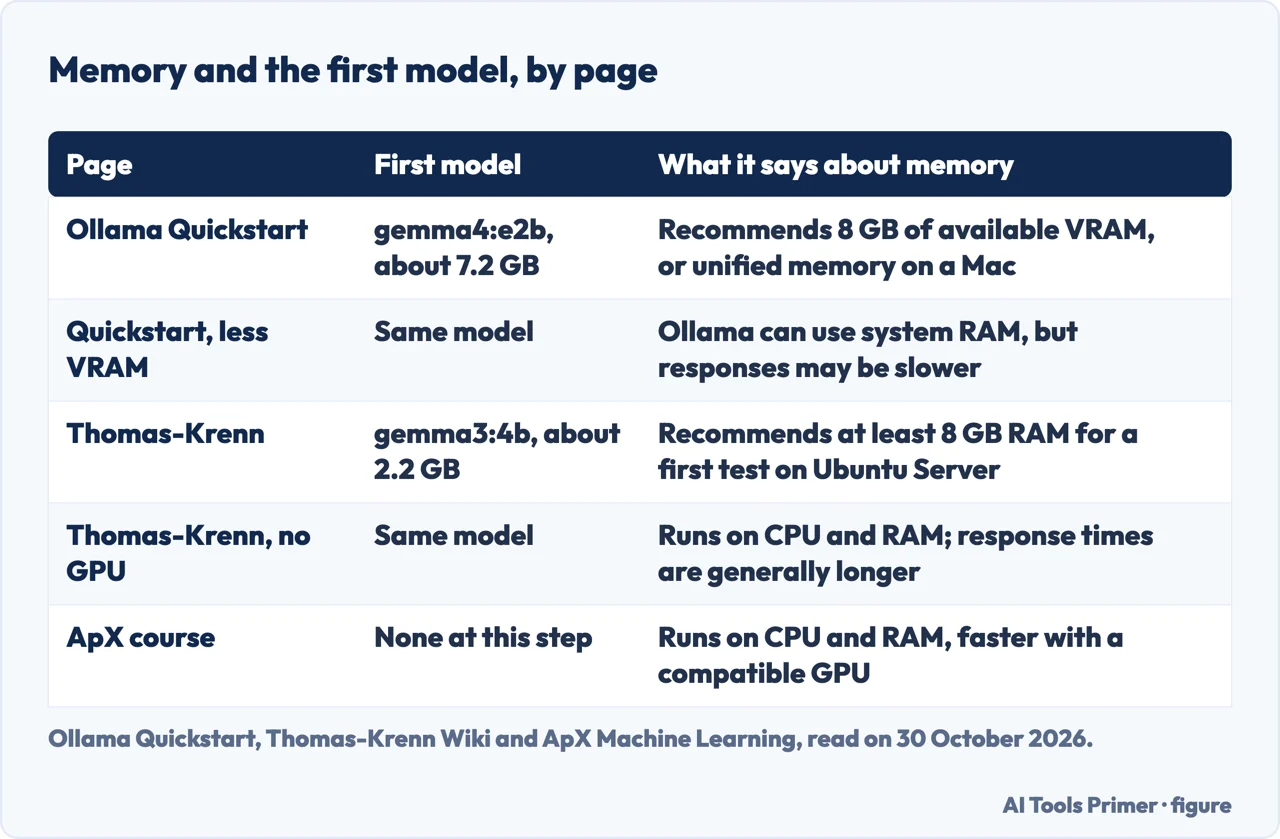
The Quickstart ties a memory figure to a download. For the 7.2 GB Gemma 4 E2B it recommends 8 GB of available VRAM, or unified memory on a Mac, and says larger context windows need more. With less VRAM, it says, Ollama can use system RAM, but responses may be slower. The Thomas-Krenn wiki also says at least 8 GB of RAM, but for an Ubuntu Server test with a model of about 2.2 GB. The two 8 GB figures belong to different models and different machines, so they are not the same claim, and the table below keeps them in separate rows.
Without a supported GPU the wiki says Ollama runs the model on the CPU and RAM, and that response times are generally longer. The ApX course says much the same: Ollama can run models on the CPU and system RAM, but speed is significantly better with a compatible GPU and enough VRAM. The pages we read do not give a memory figure for any model larger than the 7.2 GB one, and they do not give a RAM figure for the macOS or Windows install itself.
Ollama’s download page offers a second way when a computer is slow. Its text for an agent says that local models run on the computer and that large models are slow without a strong GPU, while cloud models run on Ollama’s servers, need no download and have names ending in :cloud. It tells the agent to recommend cloud models if local ones would be slow, and adds that cloud models need usage credits or a paid plan. The Quickstart says cloud models need an account and an API key and refers to its Cloud page for the limits, which we did not read, so the pages we read give no price or limit for the cloud.
Moving, updating and removing it
On Windows, the way to move the models is an environment variable. The Windows page says to open Settings (Windows 11) or Control Panel (Windows 10), search for environment variables, choose to edit them for your account and set OLLAMA_MODELS to the folder you want. If Ollama is already running, quit the tray application and start it again from the Start menu. On a Mac, the macOS page says that ~/.ollama holds models and configuration and ~/.ollama/logs holds the logs, app.log for the app and server.log for the server.
Updating depends on the system. The Thomas-Krenn guide says that on Linux you run the install script again, that models already downloaded remain, and to check ollama -v afterwards. The Windows page says Ollama is updated regularly to support the latest models and that the installer will help you keep up to date. The pages we read do not describe an update step for the Mac.
To remove it, Windows registers an uninstaller, so Ollama appears under Add or remove programs in Windows Settings; the page warns that if you changed the OLLAMA_MODELS location, the installer will not remove the downloaded models. The macOS page lists the files and folders to delete to remove Ollama fully, from /Applications/Ollama.app to ~/.ollama, which is where the models are. The same page says the models can be tens to hundreds of GB in size and that ~/.ollama contains models and configuration.
One warning comes from the Thomas-Krenn wiki. To let other computers on a local network reach the API, it sets the OLLAMA_HOST variable to 0.0.0.0 plus the port in the systemd configuration, but it says the API does not have its own user authentication for locally run models, so the port should be opened only to the systems that need it and should not be directly available from the Internet.
Where to start
Four ways in.
- “What does my computer need?”
- The requirements, page by page — need
- “How do I install it on a Mac?”
- The disk image, the zip and the one-line command — mac
- “How do I know it worked?”
- The first command and the first model — first run
- “Is my memory enough?”
- What the pages say about memory and the cloud — memory
Choosing a service
Where the free plans stop and what a paid one adds.
Using a chatbot well
How to ask, and what the pages say it gets wrong.
Questions people also ask
Is Ollama AI free to use?
The Quickstart says local models need no API key, while cloud models need an account and an API key. The GitHub README shows an MIT license, which concerns the licence, not cloud costs. Its Cloud page covers models and usage limits; we did not read it, so the pages we read give no price for the cloud.
Does Ollama require a GPU?
The Quickstart says that with less VRAM Ollama can use system RAM, but responses may be slower. Thomas-Krenn says that without a supported GPU the model runs on the CPU and RAM with longer response times, and the macOS page lists an x86 Mac as CPU only.
Can I download Ollama models manually?
The pages we read do not describe fetching a model by hand. They download models with a command: ollama run downloads and starts a chat, and ollama pull downloads without one. The download page shows a Download manually link beside the install commands, and the pages we read do not say what is behind it.
Can I install Ollama offline?
The pages we read do not say. Thomas-Krenn lists Internet access for the installation and the model download among its recommended resources, and its install script is fetched with curl.
Not covered here. We installed nothing. The statements come from Ollama’s Quickstart, macOS, Windows and hardware pages, its Linux download page and the README on GitHub, a Thomas-Krenn wiki guide for Ubuntu Server and a page of an ApX Machine Learning course, all read on 30 October 2026.
We did not read a video tutorial, the Ollama home page, a Hugging Face forum thread or Ollama’s Cloud page. The pages we read do not mention a Homebrew command, a Docker command, an offline install or a way to fetch models by hand.
The search volume and difficulty behind this page come from a Semrush reading of 29 August 2026, older than the 60 days the site normally allows.
Sources
- Ollama Docs — Quickstart — docs.ollama.com, read 30 October 2026.
- Ollama Docs — macOS — docs.ollama.com, read 30 October 2026.
- Ollama Docs — Windows — docs.ollama.com, read 30 October 2026.
- Ollama Docs — Hardware support — docs.ollama.com, read 30 October 2026.
- Ollama — Download Ollama on Linux — ollama.com, read 30 October 2026.
- GitHub — ollama/ollama (README) — github.com, read 30 October 2026.
- Thomas-Krenn Wiki — Installation of Ollama — www.thomas-krenn.com, read 30 October 2026.
- ApX Machine Learning — Install and Set Up Ollama — apxml.com, read 30 October 2026.
Written by Alberto Gulotta
Founder and editor of AI Tools Primer, writing from Palermo, Italy. Thirty-five years of taking computers apart, starting with a Commodore 64 — the long version is on the about page.
Something wrong on this page? Write to aitoolsprimer@gmail.com and it gets fixed.
Written on 3 November 2026.
Independence and limits
No affiliate links and no paid placements anywhere on this site. Nobody pays to appear here, and no company has seen this page before you did.
This is general information, not professional advice. Where a page touches money, health, safety or the law, it names its source and the date it was read — and your situation may still differ. See the privacy page and the cookie policy.