
Chat · guide
Why you’ve reached the maximum length for this conversation ChatGPT
By Alberto Gulotta · Updated · 17 min read
The You’ve reached the maximum length for this conversation message on ChatGPT is not on the OpenAI pages we read. They give context windows by plan instead, with less room for your input than the total. Anthropic explains why a long chat degrades and how a summary restarts it.
| Question | Answer | Where it comes from |
|---|---|---|
| How big is the window? | Instant: 27K on Free, 54K on Go and Plus, 128K on Pro. Reasoning: 256K on Go and Plus, 400K on Pro | OpenAI pricing page |
| Is all of it for my text? | No: the portion for user input is smaller than the total window | OpenAI pricing page |
| Why does a long chat get worse? | As token count grows, accuracy and recall degrade, which Anthropic calls context rot | Anthropic |
| What do assistants do about it? | Summarize earlier messages near the limit; ChatGPT also turns long pastes into attachments | Claude Help Center, OpenAI release notes |
| What do I do at the limit? | Claude’s help page says to start a new conversation or use projects | Claude Help Center |
The message, and what the OpenAI pages do not say about it
We went looking for the sentence in the title on the pages that OpenAI publishes about ChatGPT: the plans and pricing page and the release notes in the Help Center. The OpenAI pages we read do not contain the sentence, and they do not say when it appears or what happens to the chat when it does. What we know about the message comes from the phrase people type into Google. When we read Google’s results for the phrase on 30 October 2026, the seven organic results were three threads on OpenAI’s community forum, a Reddit thread, a question on a community site, a page on a third-party site and an article from TechRadar. We did not use any of them: the forum threads came back as shells of a few dozen words and the TechRadar article as site menus only. Google’s AI box above them said the message means a conversation has reached its length limit; we read only its opening.
So this page does what the pages we read allow. They describe the context window, the amount of text a model works with at once, and they describe it in different ways: OpenAI by plan, in a table, and Anthropic as working memory that gets worse as it fills. Reading the two side by side gives a picture of what a length limit is. It does not give ChatGPT’s own rule for when a single conversation stops. The pages we read do not say whether the cap on one conversation is the same figure as the model’s window, and we do not assume it is.
A caution about the figures below: they are the numbers on OpenAI’s pricing page on the day we read it, in a table that OpenAI can change. Our page on what ChatGPT’s Free plan includes and the one on Go against Plus cover the plans themselves.
How big the window is, plan by plan
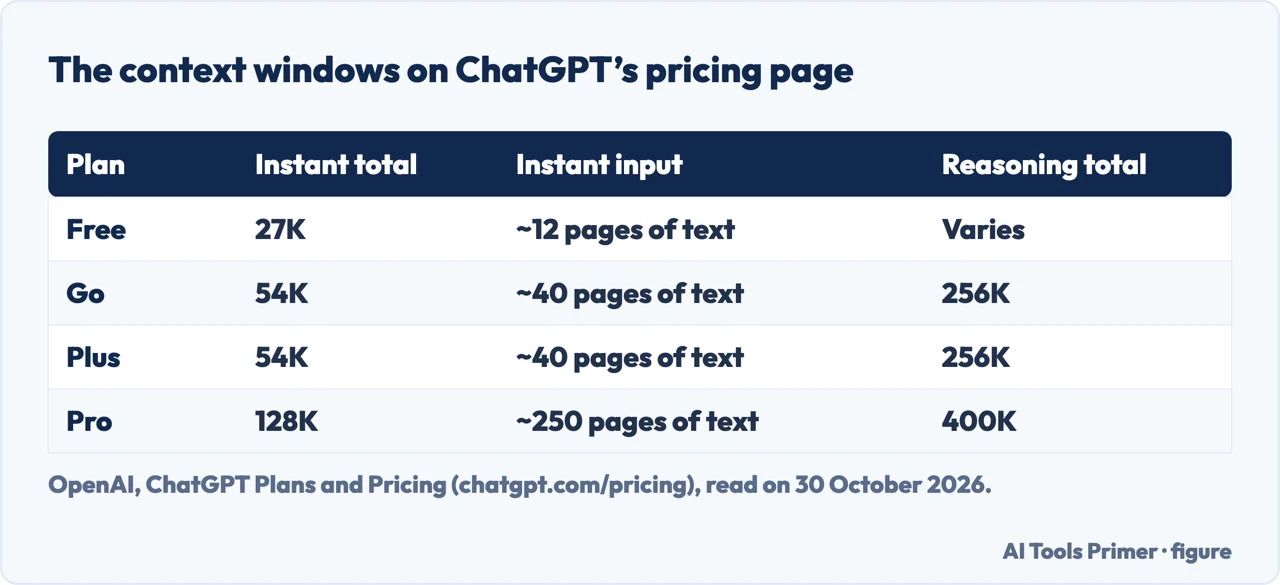
ChatGPT’s pricing page has a block of rows on context. The first two are the total window for GPT Instant and for GPT Reasoning, and each has a matching row for the largest input. For Instant the totals are 27K on Free, 54K on Go, 54K on Plus and 128K on Pro, and the input maximum is about 12 pages of text on Free, about 40 on Go and Plus, and about 250 on Pro. For Reasoning the page gives 256K on Go and Plus and 400K on Pro, with an input maximum of about 320 pages of text on Go and Plus and about 680 on Pro; on Free it says only “Varies”, for the window and for the input maximum alike, so there is no figure to quote for that cell. The rows we read do not spell out the unit. The release notes do count in tokens, which is the unit Anthropic uses too.
The plan columns use words that fit the same ladder. Free is described with “limited memory and context”, Go as “best for longer conversations”, Plus with “expanded memory and context” (and “longer memory” in another row) and Pro with “maximum memory and context”. The memory row of the same table reads Limited on Free, Yes on Go and Expanded on Plus and Pro. The page does not link those phrases to the table of window sizes, and it does not say what happens when a chat uses the whole window.
Less room than the number suggests
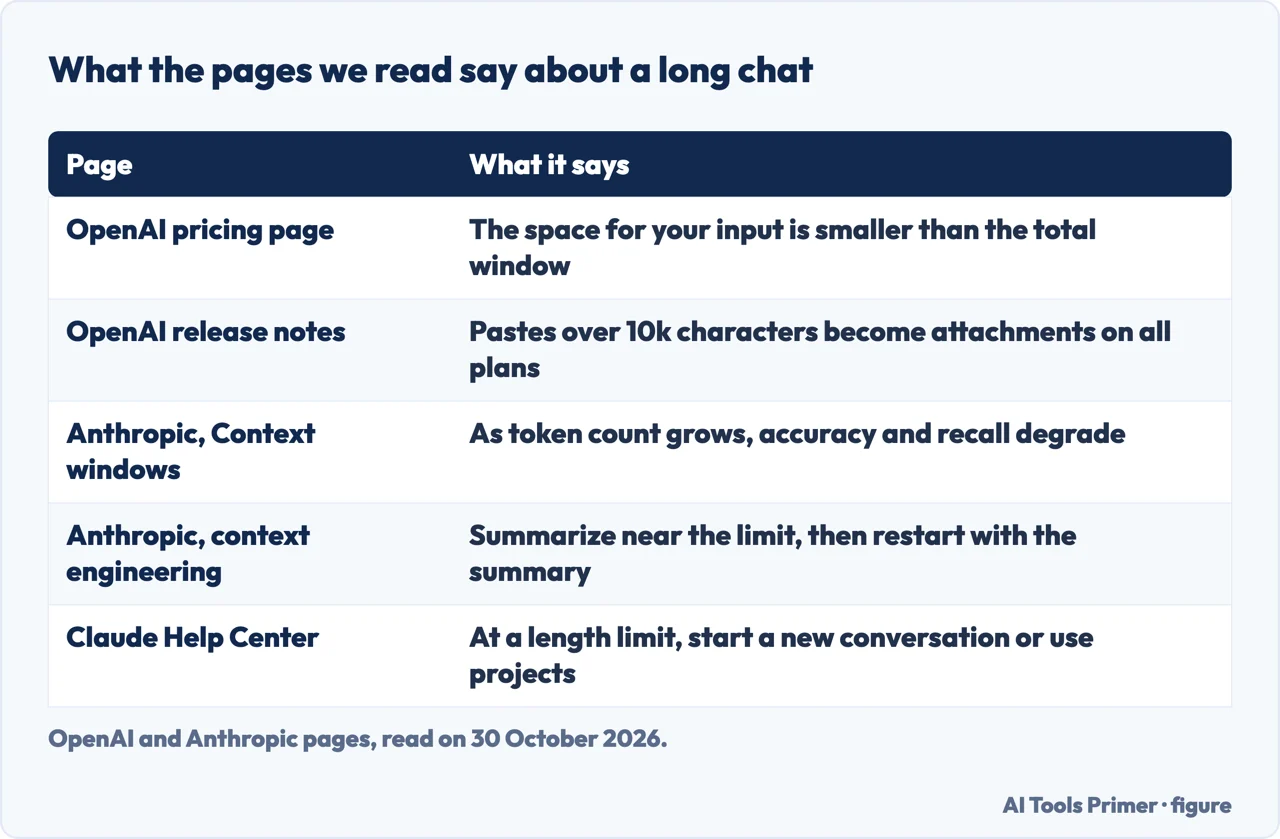
The note under the table is the part most worth reading. It says ChatGPT manages a shared context window to understand your request, track the conversation, retrieve relevant information and generate responses. The portion available for your input is smaller than the total window, it says, because the same space also holds system instructions, including tools and personality, memories if they are enabled, and internal processing: reviewing information, reasoning and generating the response. It adds that the reported space for user input is an approximation and may change dynamically with the features in use and any memory content.
Two of the lines in that note matter for a long chat. Memory counts against the window when it is enabled, and the response is generated inside the same window. The page does not say how large the instructions or the memories are, so the pricing table cannot tell you how many of your own messages fit. The page gives no equivalence between messages and a window, only the “pages of text” figures for the input maximum.
The release notes show one way OpenAI keeps your own paste from using that space. On 25 March 2026 pastes of more than 5k characters began to become attachments instead of text in the box for Plus, Pro and Business users. On 22 June 2026 the notes extended this to Free and Go and raised the threshold to 10k characters, and on 4 August 2026 they added Enterprise and Education at 10k, saying it was already available on all other plans. The stated reason is that it helps prevent large pastes from consuming the entire context window. The notes also say you can move the content back into the message by choosing Show in text field.
One more entry is about the window itself. On 20 February 2026 the notes say ChatGPT has a total context window of 256k tokens, 128k for input and 128k as the maximum output, when you manually select Thinking, up from 196k in total before. That matches the 256K that the pricing page gives for Reasoning on Go and Plus, though the pages do not say the two numbers are the same thing.
Why a long chat gets worse before it stops
Anthropic’s documentation calls the context window a working memory and says a bigger one handles longer prompts, but that more context is not automatically better. As the token count grows, it says, accuracy and recall degrade, a phenomenon known as context rot. Its engineering article on context, published on 29 September 2025, gives the account: studies that hide a fact in a long text and ask for it back found that as the number of tokens increases, the model’s ability to recall information from it decreases. The article says this emerges across all models, though some degrade more gently than others.
It explains the cause with an “attention budget”. Every token can attend to every other token, which gives n² pairwise relationships for n tokens, so the relationships get stretched thin as the context grows. Models also see shorter sequences more often in training than longer ones, and the article says this leaves them with less experience of dependencies across a whole long context. It calls the result a performance gradient rather than a hard cliff: models stay highly capable at longer contexts but may show reduced precision for retrieval and long-range reasoning.
The same article answers the obvious hope that bigger windows will fix this. Waiting for them might look like a tactic, it says, but for the foreseeable future windows of all sizes will be subject to context pollution and relevance concerns, at least where the strongest performance is wanted. The page treats context as a finite resource with diminishing returns.
Anthropic’s own announcement for Claude Opus 4.6, dated 5 February 2026, partly disagrees with that picture. It calls context rot a common complaint and says the new model performs markedly better than earlier ones: on the 8-needle, 1M version of a needle-in-a-haystack test called MRCR v2, it scores 76%, against 18.5% for Sonnet 4.5. So the sources differ in tone. The engineering article says the effect appears across all models; the announcement says one model reduces it. Neither says it has gone away, and the test is a benchmark, not a chat with a user. All of these pages are about Claude and language models in general, and the OpenAI pages we read do not describe how ChatGPT’s answers change as a chat grows.
What the assistants do about it themselves
The Claude Help Center describes the most concrete behaviour. Length limits relate to the context window, which it calls the amount of information Claude can work with in a single chat. On paid plans, it says, the newest models support up to a 1M token window while others support 500K or 200K, and part of the window is always reserved for the reply, so the longest possible conversation is slightly smaller. For users with code execution enabled, Claude automatically manages long conversations: near the limit it summarizes earlier messages to continue, and the full chat history is preserved so Claude can still refer to it. You may see Claude “organizing its thoughts” when that happens.
That has a cost, which the page states: longer conversations that trigger automatic context management use more of your usage limit, and it suggests starting a new conversation if you are approaching your usage limit in a long chat. It also says code execution must be on and that rare edge cases, such as very large first messages, may still hit context limits. The developer documentation names the same idea as the primary strategy for long-running conversations: server-side compaction summarizes earlier parts so the conversation can continue past the limit, in beta for Claude 4.6 and later models on the API. A footnote there adds that chat interfaces such as claude.ai can also manage the window on a rolling “first in, first out” basis.
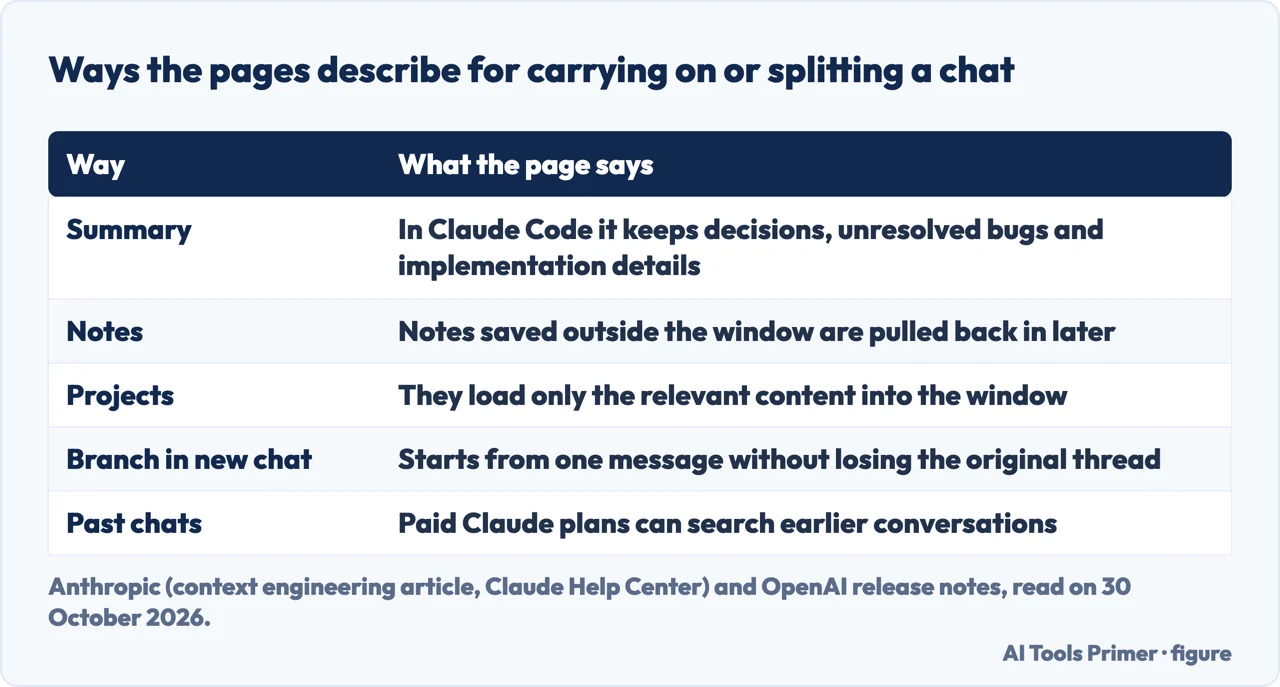
On the ChatGPT side, the pages we read show the attachment rule for long pastes, described above, and a feature from 4 September 2025 called Branch in new chat. The notes say that hovering over a message, choosing More actions and then Branch in new chat starts a separate conversation from that point without losing the original thread, for logged-in users on web. The notes present it as a way to explore different directions; they do not connect it to the length message, and we do not claim it is a fix.
The people-also-ask question about raising the limit has a different answer on each side. OpenAI’s table gives larger windows on higher plans. The Claude Help Center says you cannot increase the fixed context window size for your plan.
Starting the new chat without losing the thread
The two levels of advice sit on different pages. The Claude Help Center, written for people using the chat, says that if you hit a length limit you can start a new conversation or use features like projects. Anthropic’s engineering article, written for people building agents, says to summarize and restart. It defines compaction as taking a conversation nearing the context window limit, summarizing its contents and reinitiating a new window with the summary. In Claude Code it describes the model summarizing the message history and keeping architectural decisions, unresolved bugs and implementation details while discarding redundant tool outputs, then continuing with the five most recently accessed files.
The article also names the risk. The art of compaction, it says, is choosing what to keep and what to discard, because overly aggressive compaction can lose subtle but critical context whose importance only becomes apparent later. It lists two other techniques. Structured note-taking has the agent write notes outside the context window, such as a NOTES.md file, which are pulled back in later. Sub-agents handle focused tasks with clean windows and return a condensed summary, often 1,000 to 2,000 tokens. It matches each to a task: compaction for a lot of back-and-forth, notes for iterative work with clear milestones, sub-agents for complex research.
Those pages describe software doing the summarizing. They do not give a user a recipe for writing the summary of a ChatGPT conversation, and they do not say how much to cut. Writing your own hand-over note is our reading of the list of what Claude Code keeps, not a step either company gives.
The Claude pages add a few things that reduce the pressure before a chat fills. Projects use retrieval, which loads only the relevant content into the window. Short project instructions, removing unused project files, turning off tools and connectors that a conversation does not need, and lowering the effort level are listed as ways to use the window better; the page calls tools and connectors token-intensive. On paid plans Claude can search past conversations and use memory and project summaries to build context across conversations, and the usage-limit page suggests referring back to earlier information instead of repeating it. Our page on whether Claude is free covers its plans, and the one on using ChatGPT effectively covers custom instructions and projects in ChatGPT.
What the pages we read leave open
These are the gaps we found, and each one is a place where a forum answer may sound sure while the pages we read say nothing:
- The OpenAI pages we read do not contain the message and do not say when it appears.
- They do not say whether the cap on one conversation matches the model’s context window.
- They do not say whether ChatGPT keeps the old messages readable after the limit.
- They do not say how much to summarize before restarting, or how to write the summary.
- The pages we read give no count of messages that equals a window, only pages of text for the input maximum.
- They do not say why the same text can reach a limit sooner at one time than another; the forum threads Google listed are accounts of that, and we did not use them.
We tested nothing in ChatGPT or Claude. We did not use the forum threads, the Reddit thread, the community question or the TechRadar article that Google listed, and the numbers here come from OpenAI and Anthropic pages. The Anthropic pages describe Claude and language models in general; the Claude Help Center describes Claude’s own limits. We read the pricing table as text, not as an image. Our page on why ChatGPT is slow takes up a different problem that OpenAI’s Help Center does describe.
Where to start
Five ways in.
- “What does the message mean?”
- The message, and what the OpenAI pages do not say — message
- “How big is the window?”
- How big the window is, plan by plan — window
- “Why do long chats get worse?”
- Why a long chat gets worse before it stops — rot
- “What do the assistants do?”
- What the assistants do about it themselves — builtin
- “How do I carry on?”
- Starting the new chat without losing the thread — newchat
Making a chat work
Prompts, slow replies and the error in the message stream.
Plans and their limits
What Free, Go, Plus and Claude plans include.
Questions people also ask
How to continue a ChatGPT conversation after reaching limit?
The OpenAI pages we read do not give steps for it. Related features they do describe are Branch in new chat, which starts a separate conversation from one message, and pastes of more than 10k characters becoming attachments (the threshold was 5k until June 2026). For Claude, the Help Center says to start a new conversation or use projects.
Why does ChatGPT have conversation limits?
The pages we read do not say why ChatGPT sets the limit. OpenAI’s pricing page describes a shared context window that also holds system instructions, memories and internal processing, and Anthropic says accuracy and recall degrade as the token count grows.
What happens if a ChatGPT chat gets too long?
The OpenAI pages we read do not say. Anthropic describes the general effect, with recall falling as tokens grow, and the Claude Help Center says Claude summarizes earlier messages near the limit when code execution is on.
How to increase ChatGPT message limit?
The pricing page lists larger context windows on higher plans, from 27K on Free to 128K on Pro for Instant. It does not describe another way to raise the limit. The Claude Help Center says the window for a plan cannot be increased.
Not covered here. We tested nothing in ChatGPT or Claude. The statements come from OpenAI’s pricing page and release notes and from three Anthropic pages and two Claude Help Center pages, all read on 30 October 2026; the section above lists what the pages leave open.
The search volume and difficulty behind this page come from a Semrush reading of 29 August 2026, older than the 60 days the site normally allows.
Sources
- OpenAI — ChatGPT Plans and Pricing — chatgpt.com, read 30 October 2026.
- OpenAI Help Center — ChatGPT release notes — help.openai.com, read 30 October 2026.
- Claude Platform Docs — Context windows — platform.claude.com, read 30 October 2026.
- Anthropic — Effective context engineering for AI agents — www.anthropic.com, read 30 October 2026.
- Anthropic — Introducing Claude Opus 4.6 — www.anthropic.com, read 30 October 2026.
- Claude Help Center — How do usage and length limits work? — support.claude.com, read 30 October 2026.
- Claude Help Center — Usage limit best practices — support.claude.com, read 30 October 2026.
Written by Alberto Gulotta
Founder and editor of AI Tools Primer, writing from Palermo, Italy. Thirty-five years of taking computers apart, starting with a Commodore 64 — the long version is on the about page.
Something wrong on this page? Write to aitoolsprimer@gmail.com and it gets fixed.
Written on 30 October 2026.
Independence and limits
No affiliate links and no paid placements anywhere on this site. Nobody pays to appear here, and no company has seen this page before you did.
This is general information, not professional advice. Where a page touches money, health, safety or the law, it names its source and the date it was read — and your situation may still differ. See the privacy page and the cookie policy.