
Chat · guide
How to run LLM locally: what the docs and guides say
By Alberto Gulotta · Updated · 16 min read
To run LLM locally, the documentation pages we read state memory in three different units. Ollama's Quickstart recommends 8 GB of VRAM or Mac unified memory, LM Studio recommends 16GB of RAM on a Mac, and the llama.cpp README gives no figure. Guides add privacy, offline use and cost as the reasons to try it.
| Question | Answer | Where it comes from |
|---|---|---|
| What does it ask for? | Ollama: 8 GB of VRAM, or Mac unified memory. LM Studio: 16GB+ of RAM on a Mac. The llama.cpp README gives no figure | Ollama Quickstart, LM Studio, llama.cpp README |
| Does it need the internet? | Not to chat with a downloaded model in LM Studio; yes to search for and download models, and to update the app | LM Studio Offline Operation |
| Is it private? | Ollama says it does not see your prompts or data when you run locally; OpenHands says local alone does not make a workflow private | Ollama FAQ, OpenHands |
| Is it free? | The model weights can be; OpenHands lists engineering, infrastructure, electricity and maintenance as costs that remain | OpenHands |
| Is it as good as a cloud service? | InfoWorld says few local models may be as good as ChatGPT or Claude.ai; OpenHands says proprietary models still lead on the hardest reasoning | InfoWorld, OpenHands |
Why people run a model on their own machine
OpenHands, whose guide is dated 28 July 2026, defines a local LLM as a language model that runs inference on infrastructure you control, such as a laptop, a GPU workstation or an on-premises server. It gives four reasons teams choose one: data privacy and sovereignty, predictable cost at high volume, lower latency with no rate limits, and less dependence on a single vendor. OpenHands builds a platform for coding agents, so we use its guide for what it says and not as a neutral measurement. DataCamp, whose tutorial runs LLMs locally with GPU acceleration on Windows 11, ends by saying that in some cases using LLMs locally is essential, especially when privacy and security are critical.
The personal-blog case is simpler. A February 2025 post on dbreunig.com lists five reasons: a local model is free, it is private, it works offline and it can be customised, and, which the author calls the main reason to bother, it is educational. The post describes using a local model for a coding task on a flight without WiFi, and it says questions and answers stay on the PC. That last claim is the post’s own and we did not test it. The documentation pages make narrower statements. Ollama’s FAQ says that Ollama runs locally and that, when you run locally, it does not see your prompts or data. LM Studio’s Offline Operation page says that what you type into a chat with a downloaded model stays on your device, and that documents you drop in to chat with stay on the machine, with all the processing done locally.
OpenHands adds a warning: local does not automatically mean private. Its guide says the privacy boundary depends on the whole stack, from the model runtime and the agent to tools, telemetry settings, retrieval sources and any cloud connectors you turn on. It also says that a managed private plan in the cloud still runs on someone else’s servers, so it does not meet a requirement to keep data inside your own infrastructure. Our page on ChatGPT and confidential information covers what a cloud service says about reading and training on what you type.
What the three documentation sets ask for
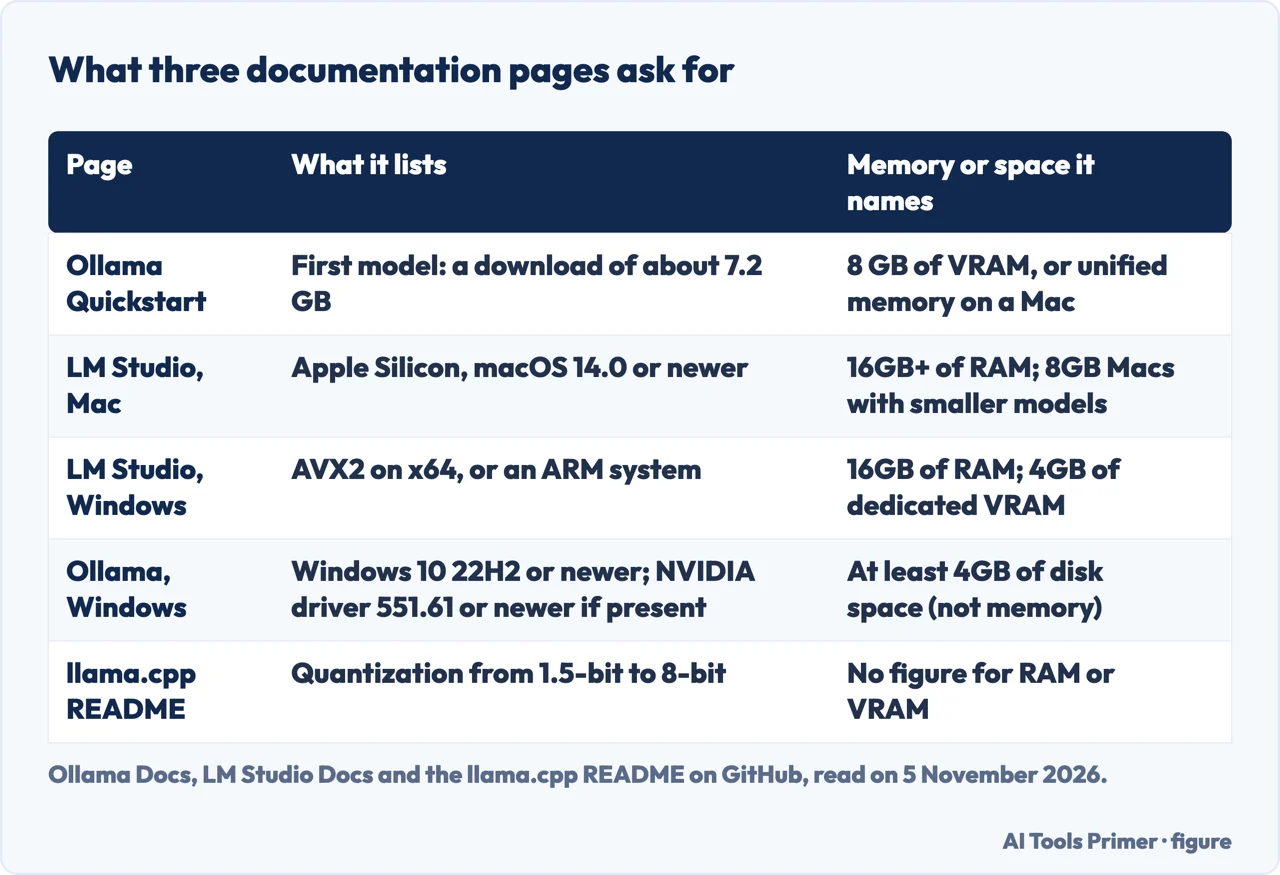
The documentation we read states its needs in different units, which makes the pages hard to set side by side. Ollama’s Quickstart says the first model it runs, Gemma 4 E2B, is a download of about 7.2 GB. It recommends 8 GB of available VRAM, or unified memory on a Mac, notes that larger context windows need more memory, and says that with less VRAM Ollama can use system RAM, but responses may be slower. Its Windows page asks for Windows 10 22H2 or newer, Home or Pro, and NVIDIA driver 551.61 or newer if you have an NVIDIA card. It says the install needs at least 4GB of space for the binary, with models that can be tens to hundreds of GB on top. Its macOS page asks for macOS Sonoma (v14) or newer, on an Apple M series chip with CPU and GPU support or an x86 Mac with CPU only.
Ollama’s Hardware support page lists Nvidia GPUs with compute capability 5.0 or higher and driver version 550 or newer, and says cards from 5.0 through 6.2 need driver 570 or newer. On Linux, AMD GPUs need the ROCm v7 driver; Apple GPUs are accelerated through Metal, and other GPUs on Windows and Linux through Vulkan. The Windows page gives 551.61 where the hardware page gives 550, so two Ollama pages carry different driver numbers, and the pages do not explain the difference.
LM Studio’s System Requirements page asks, for a Mac, for Apple Silicon (M1 to M4), macOS 14.0 or newer and 16GB+ of RAM. It adds that you may still be able to use LM Studio on 8GB Macs if you stay with smaller models and modest context sizes, and that Intel-based Macs are not supported. On Windows it supports x64 and ARM systems, requires AVX2 on x64, and recommends at least 16GB of RAM and at least 4GB of dedicated VRAM. On Linux it names x64 and ARM64, an AppImage, and Ubuntu 20.04 or newer. So the Mac figure differs by page: Ollama’s Quickstart recommends 8 GB counted as VRAM or unified memory, while LM Studio recommends 16GB of RAM and says 8GB may still work with smaller models.
The llama.cpp README on GitHub gives no RAM or VRAM figure. It says the project’s goal is LLM inference with minimal setup on a wide range of hardware, and it calls Apple silicon a “first-class citizen”. It lists integer quantization from 1.5-bit to 8-bit for faster inference and reduced memory use, backends that include CUDA, HIP, Vulkan, SYCL and Metal, and CPU+GPU hybrid inference to partly accelerate models larger than the total VRAM. Its quick start has a command that downloads a model from Hugging Face and runs it. For the install steps themselves, see our page on how to install Ollama.
Model sizes, context and the memory they leave out
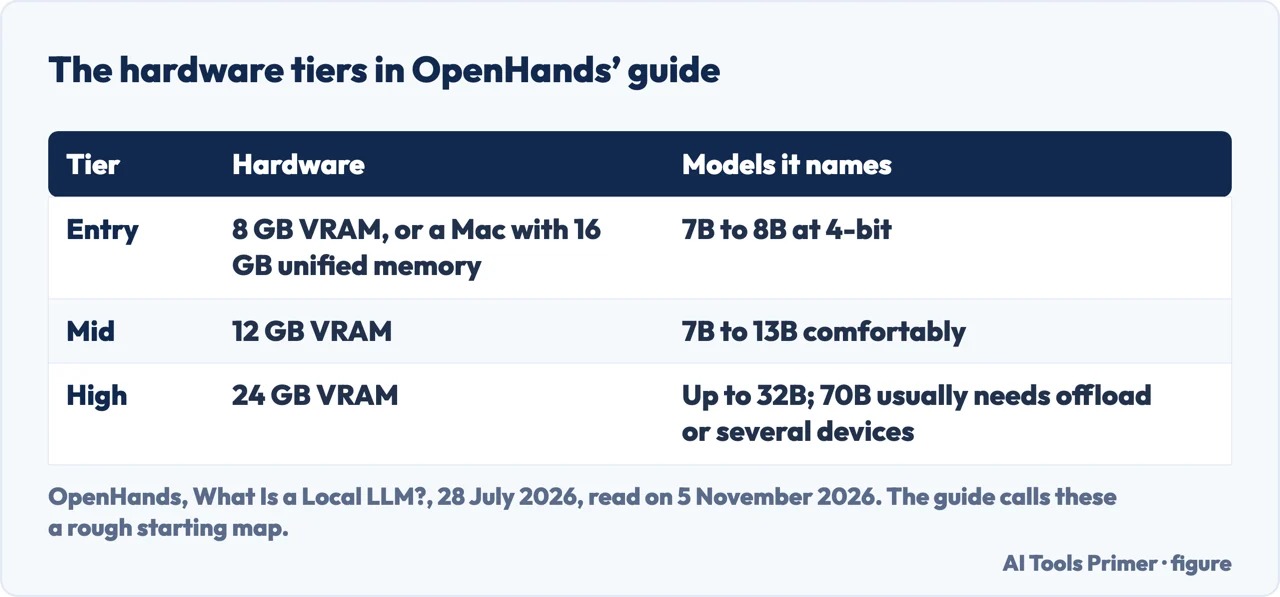
Of the pages we read, the OpenHands guide is the only one with a table of hardware tiers and model sizes, and it calls the table a rough starting map to validate against your actual model and runtime. InfoWorld, in May 2024, relays a rule of thumb from the Ollama GitHub README: at least 8GB of RAM for 3B models, 16GB for 7B models and 32GB for 13B models. Its entry tier is 8 GB of VRAM, or a Mac with 16 GB of unified memory, for 7B to 8B models at 4-bit. Its mid tier is 12 GB of VRAM for 7B to 13B models comfortably, and its high tier is 24 GB of VRAM for models up to 32B, with 70B usually needing offload or several devices. It says to treat the model file as a minimum and to leave headroom for the key-value cache, and that quantization, which compresses weights from 16-bit down to 4-bit or lower, is the lever for fitting a model on a smaller machine.
For a machine without a GPU, OpenHands says CPU-only inference works with small quantized models but runs slower, and that memory bandwidth is the usual bottleneck. Ollama’s FAQ gives a way to see what happened on your own machine: the ollama ps command shows whether a loaded model sits entirely on the GPU, entirely in system memory, or split, and the FAQ’s example of a split is 48%/52% CPU/GPU. The FAQ also says the default context window is 4096 tokens, that models stay in memory for 5 minutes by default, and that quantizing the K/V cache to q8_0, which needs Flash Attention enabled, uses approximately half the memory of f16.
Dates matter here. InfoWorld’s article, from 30 May 2024, says its author tested on a Dell PC with 64GB of RAM and a 12GB Nvidia GPU (which the author says likely was not engaged for much of the software) and on a Mac with an M1 chip and 16GB of RAM, and that a llama-2-7b-chat model ran on an M1 Pro Mac with 16GB of RAM, rather slowly. That test is more than two years older than the OpenHands table, and the model it names is not the one in Ollama’s current Quickstart. We did not run any model ourselves, so the tiers are the guide’s claim and not our measurement.
What stays on the machine and what needs the internet
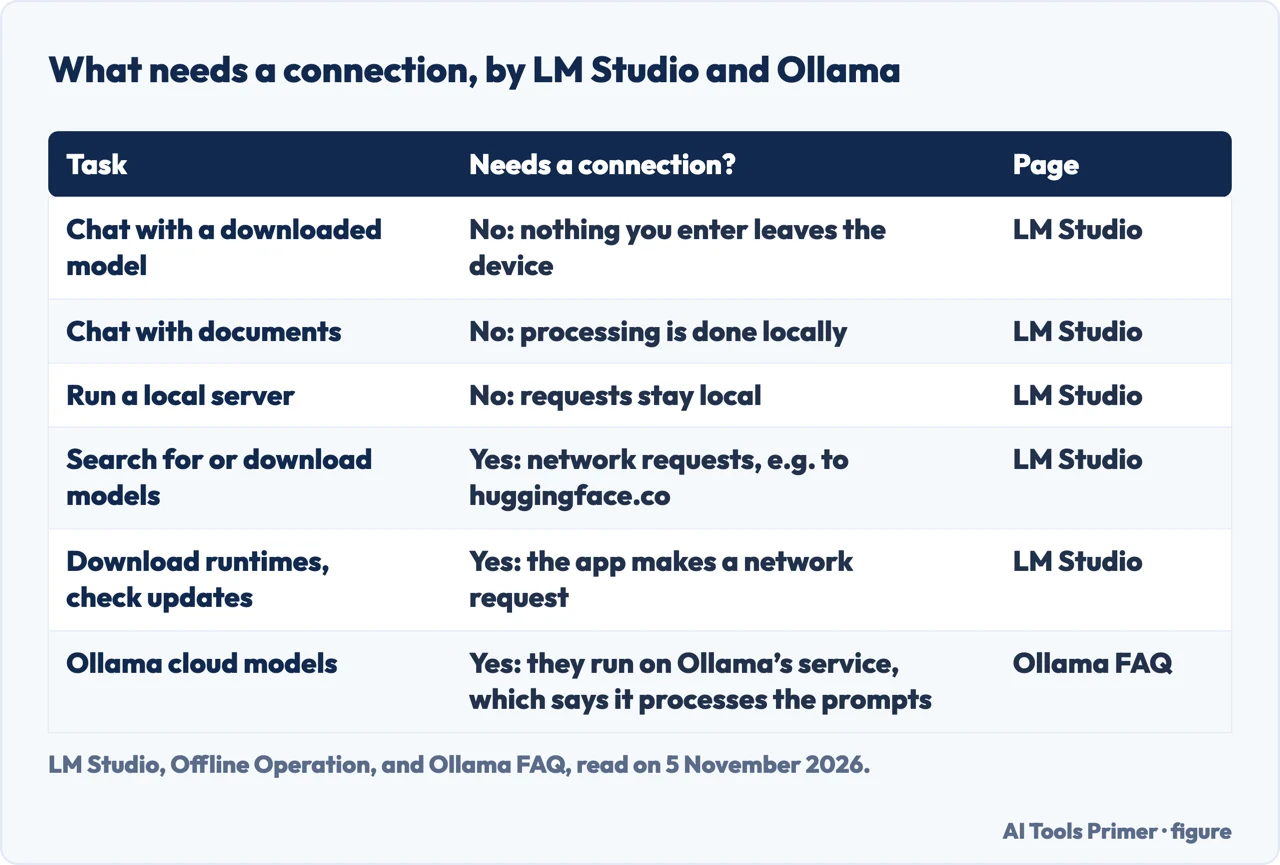
LM Studio’s Offline Operation page is the clearest on what needs a connection. It says the app can operate entirely offline once you have model files, and that chatting with downloaded models, chatting with documents and running a local server do not need the internet. The local server uses OpenAI endpoints and returns OpenAI-like response objects, but the requests stay local. Searching for models in the Discover tab makes network requests, for example to huggingface.co. Downloading new models needs a stable and decently fast connection, although models obtained elsewhere can be sideloaded. The Discover catalog needs requests to show stats and download options, runtimes need them to be downloaded, and the in-app updater makes a request when the app opens, so without a connection the app cannot update itself.
On the Ollama side, the FAQ says the server binds to 127.0.0.1 on its default port and that you change the bind address with the OLLAMA_HOST variable. The Windows page says the API is served on localhost once Ollama is installed. The Quickstart sends its local requests with no API key, while cloud models need an account and an API key, and cloud requests do not need Ollama installed. The FAQ gives the privacy difference between the two. When you run locally, Ollama says it does not see your prompts or data. When you use cloud-hosted models, it says it processes your prompts and responses to provide the service, without storing or logging that content and without training on it. Which model you pick therefore decides which of the two statements applies to what you type.
When it is not worth the trouble, and five questions
OpenHands says free model weights still leave you paying for engineering, infrastructure, electricity and maintenance. When you self-host, it says, model updates, GPU drivers, monitoring and scaling fall on you, in exchange for control. On cost it says light or unpredictable usage often justifies a cloud API, while steady, sensitive, high-volume workloads tilt toward self-hosting, and that you should run the volume math first. The pages we read do not give a break-even figure in dollars or euros, and they do not say how much electricity a local model uses.
On quality, the sources hedge in different directions. InfoWorld says it may take some research to find a model that performs well on your hardware, and that few may be as good as ChatGPT or Claude.ai. It quotes Simon Willison on laptop models hallucinating heavily, and presents that as a reason to run them: a faster way to see how they work and where they fail. OpenHands says that for production tasks local models often land close enough for structured extraction, summarization and standard code generation, while proprietary models still lead on the hardest reasoning and extended contexts, and it recommends a hybrid: local models for sensitive work, cloud APIs for top-tier reasoning. The dbreunig.com post says open, small models are good enough that more non-technical people should run them. What “open” means for a model is the subject of our page on open source AI models.
Taken together, the pages point to five questions before you start:
- Which reason is yours? OpenHands says that if compliance or data sovereignty drives you, the answer is local or self-hosted; for cost, it says to run the volume math; for latency or rate limits, it says local inference removes both.
- How much memory do you have, and in which unit? Compare it with Ollama’s 8 GB of VRAM or unified memory, LM Studio’s 16GB of RAM and the OpenHands tiers, and keep the units apart.
- Will you have a connection to set up? Models, the Discover catalog, runtimes and app updates all use the network in LM Studio.
- Does anything in the setup call the cloud? Ollama’s cloud models do, and OpenHands lists optional cloud connectors among the things that decide where data flows.
- Who will keep it running? OpenHands puts updates, drivers and monitoring on whoever installs it.
What we did not use
We ran no model and tested no hardware. We did not open a Reddit thread, the guide on adventuresincre.com or the Corsair guide for Windows, and we did not read the LM Studio home page or Ollama’s Cloud page. DataCamp’s speed figures come from one machine of its own, so we left them out, and we did not use llama.cpp’s star and fork counts because they change. The documentation pages from Ollama, LM Studio and llama.cpp that we read do not compare local use with a cloud service on cost or quality; those judgements come from OpenHands, InfoWorld and the blog post, and are attributed to them above.
Where to start
Four ways in.
- “Why would I do this?”
- Privacy, offline use and cost — why
- “What can my computer run?”
- What the three documentation sets ask for — docs
- “What still needs the internet?”
- What stays on the machine and what does not — network
- “Is it worth it?”
- When it is not worth the trouble, and five questions — cost
Getting a model running
What the docs ask for and what open means.
The cloud side of the choice
Free plans and their limits.
Questions people also ask
What can a regular computer run?
The pages we read do not define a regular computer; they give figures. Ollama’s Quickstart recommends 8 GB of VRAM or unified memory for its first model, Gemma 4 E2B, LM Studio recommends 16GB of RAM on a Mac, and OpenHands lists 7B to 8B models at 4-bit for its entry tier.
Can I run LLM models locally?
Yes, the documentation of Ollama and LM Studio describes doing so on a Mac, a Windows PC and Linux, and llama.cpp describes inference on a wide range of hardware. LM Studio asks for Apple Silicon on a Mac; Intel Macs are not supported.
Can you run LLM locally for free?
The dbreunig.com post calls local models free, and OpenHands says free model weights still leave you paying for engineering, infrastructure, electricity and maintenance. Ollama says local models need no API key; its cloud models do.
What’s the best LLM I can run locally?
OpenHands says the right model depends on your hardware and maps 8, 12 and 24 GB of VRAM to model sizes. InfoWorld says finding one that performs well on your computer can take research. The dbreunig.com post of February 2025 recommends Mistral-Small-24B-Instruct in its Q4 version (13.35GB in Jan), from its author’s own use.
Not covered here. We ran no model. The statements come from the Quickstart, Windows, macOS, Hardware support and FAQ pages of Ollama, the System Requirements and Offline Operation pages of LM Studio, the llama.cpp README on GitHub, and guides from OpenHands (28 July 2026), DataCamp, dbreunig.com (4 February 2025) and InfoWorld (30 May 2024), all read on 5 November 2026.
The search volume and difficulty behind this page come from an Ubersuggest reading of 5 November 2026 (United States), which gives search volume and its own SEO difficulty score, not Semrush’s. It is a fresh reading, within the 60 days the site normally allows.
Sources
- Ollama Docs — Quickstart — docs.ollama.com, read 5 November 2026.
- Ollama Docs — Hardware support — docs.ollama.com, read 5 November 2026.
- Ollama Docs — Windows — docs.ollama.com, read 5 November 2026.
- Ollama Docs — macOS — docs.ollama.com, read 5 November 2026.
- Ollama Docs — FAQ — docs.ollama.com, read 5 November 2026.
- LM Studio Docs — System Requirements — lmstudio.ai, read 5 November 2026.
- LM Studio Docs — Offline Operation — lmstudio.ai, read 5 November 2026.
- GitHub — ggml-org/llama.cpp (README) — github.com, read 5 November 2026.
- OpenHands — What Is a Local LLM? How to Run LLMs on Your Own Hardware (2026) — www.openhands.dev, read 5 November 2026.
- DataCamp — Run LLMs Locally: 6 Simple Methods — www.datacamp.com, read 5 November 2026.
- dbreunig.com — A Gentle Intro to Running a Local LLM — www.dbreunig.com, read 5 November 2026.
- InfoWorld — 5 easy ways to run an LLM locally — www.infoworld.com, read 5 November 2026.
Written by Alberto Gulotta
Founder and editor of AI Tools Primer, writing from Palermo, Italy. Thirty-five years of taking computers apart, starting with a Commodore 64 — the long version is on the about page.
Something wrong on this page? Write to aitoolsprimer@gmail.com and it gets fixed.
Written on 6 November 2026.
Independence and limits
No affiliate links and no paid placements anywhere on this site. Nobody pays to appear here, and no company has seen this page before you did.
This is general information, not professional advice. Where a page touches money, health, safety or the law, it names its source and the date it was read — and your situation may still differ. See the privacy page and the cookie policy.