
Devices · guide
Encrypted email: what TLS, S/MIME and PGP leave readable
By Alberto Gulotta · Updated · 18 min read
Encrypted email can mean three different things: protection while a message travels, protection on a server, and end-to-end encryption. Gmail uses the first on every message, though Google says it needs the other provider to support it. The pages we read from Google, Proton, PCMag and the IETF differ on what each kind hides, starting with the subject line.
| Question | Answer | Where it comes from |
|---|---|---|
| Is Gmail encrypted? | Every Gmail message uses TLS automatically, and both mail providers must support TLS for it to apply | Gmail Help, Google Transparency Report |
| Does TLS protect a message stored on a server? | Google says it does not encrypt email while it is stored on a server | Google Transparency Report |
| Is the subject line encrypted? | Proton says its subject lines are not end-to-end encrypted; PCMag says Tuta Mail encrypts subjects | Proton Support, PCMag |
| Who can use S/MIME in Gmail? | Google lists work or school accounts, and client-side encryption needs four named Workspace editions | Gmail Help |
| Does confidential mode encrypt a message? | Google describes an expiry date, revoked access and an SMS passcode, and says recipients can still take screenshots | Gmail Help |
“Encrypted” can mean three different things
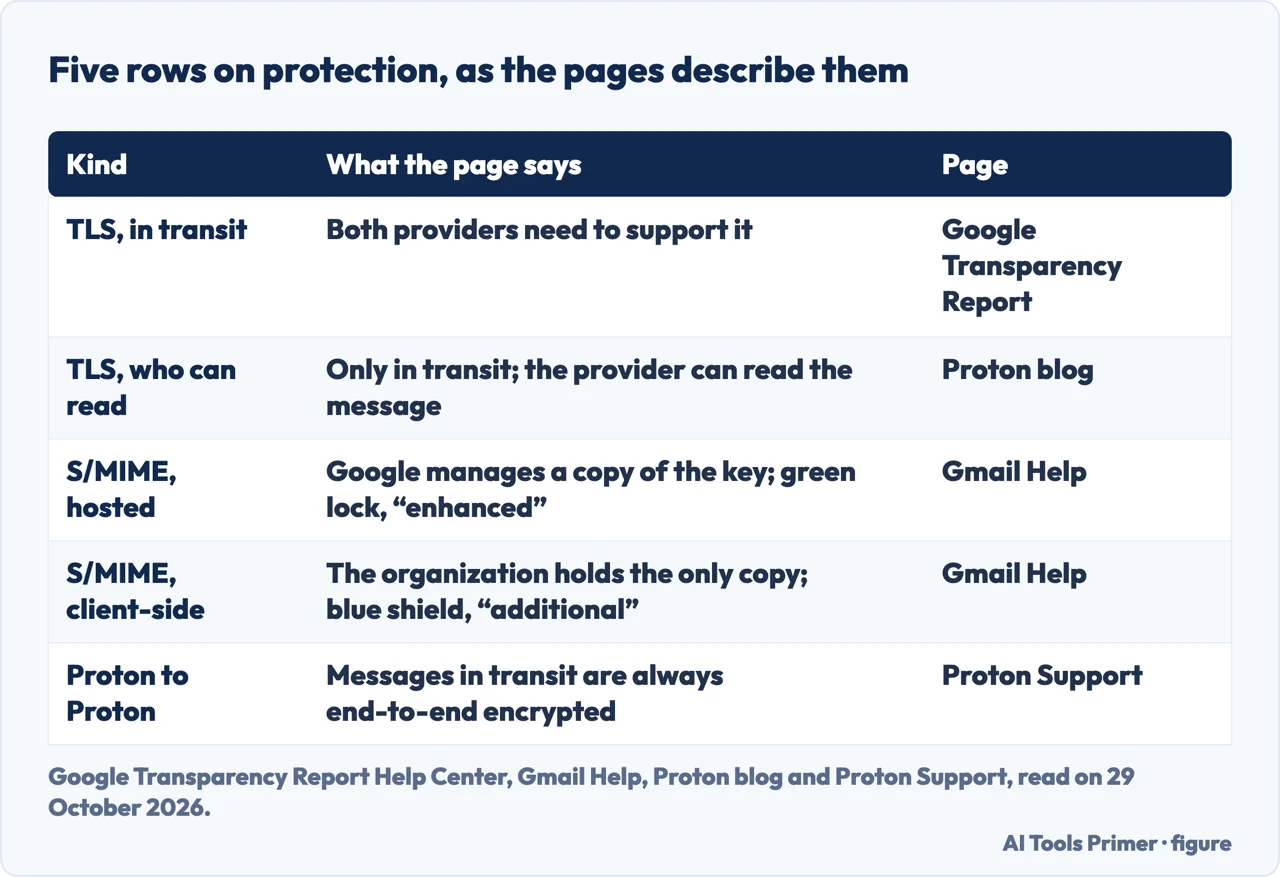
In transit. Google’s Gmail Help page says all Gmail messages use TLS automatically and compares TLS to a secure mail carrier. When you send or receive a message in Gmail, it says, the message is protected and marked with a gray lock icon, which Google calls standard encryption; the same page puts a condition on this, that the message is protected if the recipient also uses TLS. Google’s Transparency Report FAQ describes encryption in transit as protection against being read by someone with access to the networks the email travels through, a temporary envelope of security wrapped around the email. It adds that for decades the default was for email to travel “as if it was written on a postcard,” and that when email moves between different providers, both providers need to support TLS for it to be encrypted in transit. Gmail, it says, can encrypt what it sends and receives only when the other provider supports TLS, so encrypting all email would take the cooperation of all mail providers.
The same FAQ separates this from the HTTPS connection to Gmail. Since 2010, it says, HTTPS has been the default when you are signed in, which protects the message between Google’s data centers and the computer you read it on. TLS between providers is the other part: whether the message is protected as it leaves Google’s data centers for the other person’s mail server.
On a server. Google’s FAQ says what TLS does not do is encrypt data at rest: it does not encrypt email while it is stored on a server. It also says encryption in transit does not make snooping impossible, because email can be read after it is delivered, for example by an unauthorized party who installs malware on the computer used to read it. Proton, which sells an end-to-end encrypted service, makes the same point in its blog from the other side: TLS, which it says Gmail and Outlook use, encrypts only in transit, so a message “can be read by your email provider.”
End to end. Proton’s blog defines end-to-end encryption as protecting the contents of an email at every stage of its transfer: the message is encrypted on your device and decrypted only after it arrives in the recipient’s inbox. Proton Support adds a separate idea, zero-access encryption, for the inbox: Proton says messages and attachments are stored so that not even Proton can access them. For Gmail work and school accounts, Google describes S/MIME as a locked briefcase that only you and your recipient have the keys to.
Mimecast, a security vendor, describes STARTTLS as telling a mail server that the contents of an email need to be encrypted, and says that if the mail is intercepted its “contents and metadata are scrambled.” The Google FAQ above is the place the pages we read put the condition on that: both providers have to support TLS.
What stays readable when the body is locked
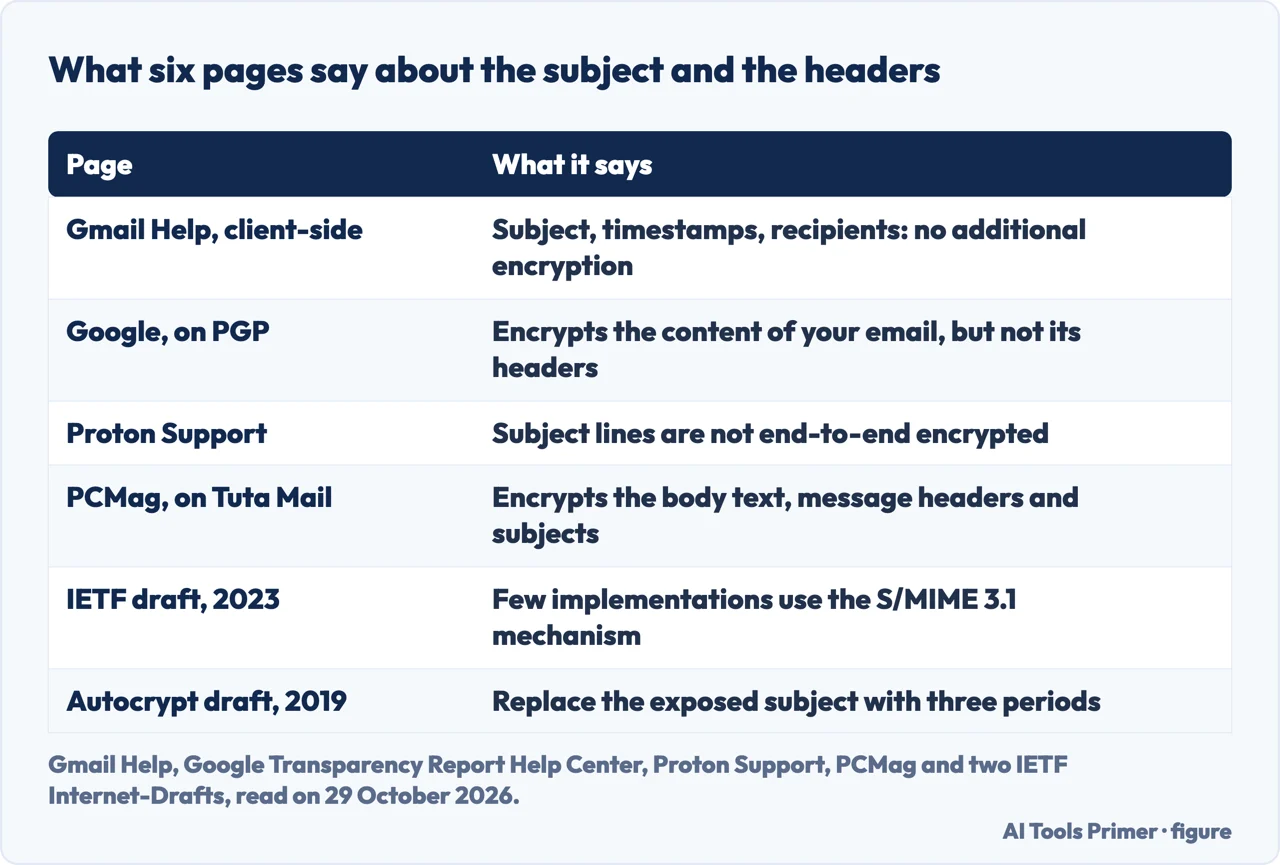
The pages we read give different answers about the subject line. Google’s page on Gmail client-side encryption says that with it turned on, the body of the email, including inline images and attachments, gets additional encryption, while the header, including subject, timestamps and recipients, does not. Google’s Transparency Report FAQ says the same of PGP: it encrypts the content of your email but not its headers, such as who is sending and receiving it. An eavesdropper who overhears the delivery of a PGP-encrypted email can see what address it was delivered to but not the content, and when TLS is also used in transit, Google says, the sender and receiver are not visible to that eavesdropper.
Proton Support says subject lines in Proton Mail messages are not end-to-end encrypted, to remain compliant with standards and ensure interoperability. It explains that Proton Mail follows the OpenPGP standard and that in PGP the subject line is part of the header packet, which is not end-to-end encrypted. It adds that a third party getting at those subject lines would need a court order approved by a Swiss judge, and suggests generic subject lines that give away little about the message. PCMag, in its 2026 list of email encryption services, says Tuta Mail uses open-source encryption on the body text, the message headers and the subjects of messages. Those two statements are about different systems, and the pages do not connect them: one describes a service that follows the OpenPGP standard so it can exchange mail with others, the other describes a service PCMag reviewed on its own.
Two IETF Internet-Drafts describe how headers could be protected, and they are drafts, not finished standards. The abstract of draft 18 on header protection, dated 30 November 2023, says S/MIME version 3.1 introduced a mechanism for end-to-end cryptographic protection of message headers, but that few implementations generate messages using it and several legacy implementations have shown rendering or security issues when handling such a message. The draft was marked Standards Track and listed an expiry of 2 June 2024. An earlier Autocrypt draft from December 2019, marked Informational, says a composing mail program that encrypts a message should obscure the Subject header by putting three periods in the exposed one, with the real subject kept in the protected part. The pages we read do not say whether either draft later became a published standard.
The options you can use today
A provider that encrypts for you. Proton Support lays out the cases. Between Proton Mail addresses, messages in transit are always end-to-end encrypted. From Proton Mail to another provider, the message is encrypted with TLS, and once it reaches the recipient it is not end-to-end encrypted by default, so the recipient’s provider may be able to access it; to send end-to-end encrypted messages to a non-Proton address, Proton points to its password-protected emails feature. From another provider to Proton Mail, messages are encrypted with TLS in transit and then stored with zero-access encryption, and Proton adds that unless the sender’s provider uses end-to-end encryption, that provider may keep a copy of messages sent from its side. To receive end-to-end encrypted messages from a contact who does not use Proton, it lists three routes: send them a password-protected email and ask them to reply, ask them to use PGP, or ask them to create a free Proton Mail address. PCMag describes Tuta Mail as another service of this kind.
S/MIME or client-side encryption in Gmail. Google’s Gmail Help page lists S/MIME as available for work or school Gmail accounts, with two ways of managing the keys. With hosted S/MIME, Google manages a copy of your key, and messages carry a green lock icon, which Google calls enhanced encryption. With client-side encryption, your organization holds the only copy of the key, and messages carry a blue shield icon, called additional encryption. The client-side page lists the Google Workspace editions that can add it: Enterprise Plus, Education Plus, Education Standard and Frontline Plus. With Assured Controls, the page says, you can send end-to-end encrypted emails to anyone without setting up S/MIME, and it describes that as a beta. Without Assured Controls and with S/MIME, you need to exchange certificates.
Outside your own domain, the page says to exchange digital signatures first. You send a signed message, and the recipient has to send a signed message back; when they do, the key is stored automatically and additional encryption becomes available for that contact. Google says you only need to do this once for each contact, unless you or the contact update certificates. S/MIME there relies on the S/MIME 3.2 IETF standard and on X.509 certificates that Gmail trusts. Turning on additional encryption also has costs, according to the same page: a 5 MB upload limit for attachments and inline images, a warning that encrypted emails cannot be scanned for viruses, blocked file types, and a list of unavailable features that includes confidential mode, delegated accounts, email signatures and smart features for Gmail.
Proton’s blog describes the same area in other words. It says Gmail’s S/MIME is available only if you pay, calls S/MIME dependent on certificate authorities, “complex and costly” to set up, and says that if it is not set up properly the email falls back to weaker TLS. That is a competitor’s description; Google’s own page gives the availability as work or school accounts.
PGP you set up yourself. Proton calls PGP the most popular encryption model and the base of its own service. Its blog says doing it yourself starts with generating a public and a private key, keeping the private one secret, and that you and your recipient must use compatible versions of PGP. It describes browser plugins such as Mailvelope, and lists their limits: most do not support email programs, so Thunderbird or Apple Mail users cannot encrypt with them, they do not work in mobile browsers, and attachments must be encrypted separately. Google’s FAQ notes a cost of its own: when a Gmail user receives a PGP-encrypted email, Gmail cannot index the content for later searching, a trade of convenience for security that Google says is especially appropriate for people who are at risk.
For Outlook, Microsoft’s own steps are on our page about encrypting email in Outlook; we added no new Outlook claims here.
Password-protected and confidential messages
Gmail’s confidential mode is a different tool from the encryption above. Google’s page says it lets you set an expiration date, revoke access at any time, disable the recipient’s options to forward, copy, print and download, and require an SMS passcode. Its warning comes first on the page: confidential mode can help prevent recipients from accidentally sharing emails, but they can still take screenshots or photos, and recipients with malicious programs may still be able to copy or download the messages.
Without an SMS passcode, the page says recipients can open the email directly in Gmail, and a recipient who does not use Gmail gets an email with the passcode. To take access away, you open the message in Sent and choose Remove access. Proton’s blog says Gmail’s version of a password-protected email is called confidential mode, that it protects sensitive emails from unauthorized or accidental sharing, and that this is “not the same” as sending an encrypted S/MIME email. The Gmail Help page we read does not describe confidential mode as end-to-end encryption, and Google’s client-side encryption page lists it among the features that are not available when additional encryption is on.
Proton describes its own password-protected emails differently: the recipient gets an email with a link to an end-to-end encrypted message and must enter a previously agreed password to open it. Of Outlook’s equivalent, Proton says the passcode goes to the same address as the encrypted message, so the message could be reached if the recipient’s account were breached. That sentence is Proton’s about a competitor, and we read nothing from Microsoft on it.
EFail, and how it was received
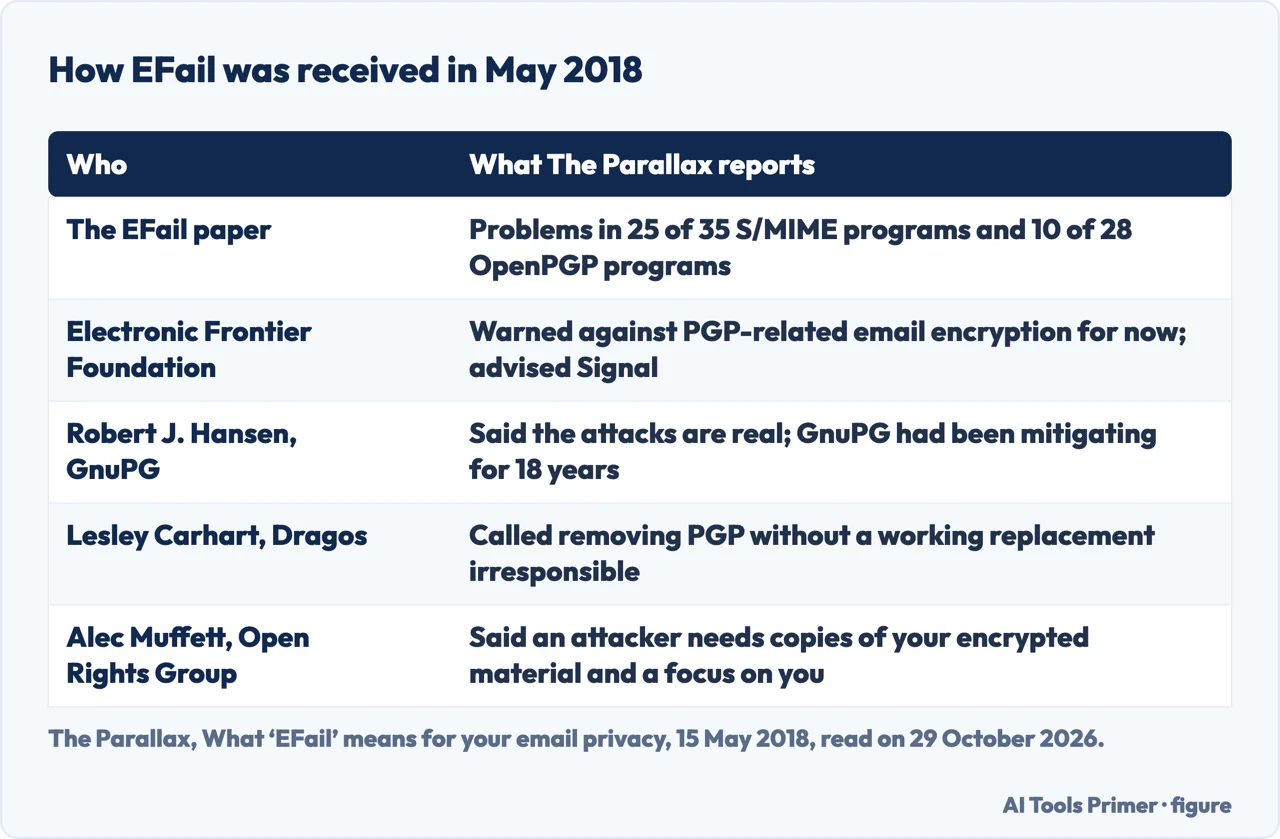
In May 2018 a research paper called EFail made the case that even the strong options have weak points. The Parallax reported on 15 May 2018 that the paper warned of exploits in 25 of the 35 S/MIME email programs it tested and 10 of the 28 OpenPGP programs. Some programs were marked safe, among them Claws and Mutt. The first attack, direct exfiltration, affected Apple Mail, iOS Mail and Mozilla Thunderbird, and let an attacker steal the contents of a message by fooling the email software into decrypting it and sending it on. The second used phrases known to be in a message to inject HTML image tags; the researchers called their techniques CBC/CFB gadget attacks. The community manager for Thunderbird told The Parallax the organization was testing a patch, and Apple did not return a request for comment.
The reactions differed. The Electronic Frontier Foundation warned against using any kind of PGP-related email encryption for now and advised the messaging app Signal, saying it was “dialing down” its own use of PGP-protected email. Robert J. Hansen, editor of the GnuPG FAQ, said the attacks are real but disputed how easy they are to apply, and said GnuPG had been mitigating this kind of attack for 18 years with a warning called the Modification Detection Code. Lesley Carhart of Dragos called it irresponsible to suggest removing PGP without a practical working replacement, and said Signal does not cover every PGP use, such as multiple attachments or complicated formatting. Alec Muffett of the Open Rights Group described the attacker as needing copies of your existing encrypted material, a focus on you as an individual, and a specific set of capabilities. The EFF’s Nate Cardozo said that even with the warning there is no guarantee a message has not been intercepted and decrypted.
The article is from 2018. The pages we read do not say which email programs have been fixed since, so this page does not either.
How to check what you are sending
Google’s Gmail Help page gives two ways to verify email security: on a computer or Android device, select Message security while composing; for a message you receive, open the recipient details. The icons mean different things. A gray lock is standard encryption, a green lock is enhanced, a blue shield is additional, and a red open lock means the message is unencrypted. For a red open lock, Google says not to send sensitive information and to let the sender know their message is unencrypted.
Two points from the pages above bear on what you put in the message. Proton Support suggests generic subject lines, which it says disclose minimal information about the message contents. And in 2018 the EFF advised Signal rather than PGP-related email, which Carhart answered by saying Signal does not cover every case. We tested none of this on an account. If your question is about phone messaging rather than mail, our pages on the encrypted phone and iMessage start from the same question of who can read what.
What we did not use
We tested nothing with an email account. We read the Entrust, Fortinet and Virtru pages and took no statements from them; from Mimecast we took only the description of STARTTLS, attributed to it. The pages we read do not say how many people use PGP, S/MIME or TLS, and they do not cover Apple Mail, iCloud Mail, Yahoo Mail or personal Outlook.com accounts beyond what is quoted above, so we say nothing more about them. A PDF version of the Autocrypt draft could not be extracted, so we used its HTML version.
Where to start
Five ways in.
- “Is Gmail encrypted?”
- Three meanings of the word — three meanings
- “Is the subject line hidden?”
- What stays readable — what stays readable
- “Which option can I use?”
- The options today — options
- “What is confidential mode?”
- Password-protected and confidential — password and confidential
- “How do I check a message?”
- What the lock icons mean — check
Messages and mail that are locked
Where a message is protected, and by what.
Email once it is sent
Hiding the list, taking a message back, and spotting a fake.
Questions people also ask
What is the safest encrypted email?
PCMag’s 2026 list gives Editors’ Choice awards to two services, and says Tuta Mail uses open-source encryption on the body text, message headers and subjects, and Proton says messages between Proton Mail addresses are always end-to-end encrypted. Both are statements about services, and we tested none of them.
Is Gmail considered an encrypted email?
Google says all Gmail messages use TLS automatically, marked with a gray lock called standard encryption, and that both providers need to support TLS for it to apply. S/MIME is listed for work or school accounts. Google says TLS does not encrypt email while it is stored on a server.
How do I open an encrypted email?
It depends on the kind. For Gmail client-side encryption, Google says the message shows “Encrypted message” below the sender’s name and is decrypted in the browser window. For a confidential-mode message, you may select Send passcode and enter the code. For a Proton password-protected email, you follow a link and enter the agreed password.
What happens if an email is encrypted?
Proton says encryption scrambles plaintext into unreadable ciphertext that only a recipient with the key can decrypt. Google adds that Gmail cannot index the content of a PGP-encrypted message for searching, and that with client-side encryption the header, including the subject, has no additional encryption.
Not covered here. We tested nothing with an email account. The statements come from Google Help and Transparency Report pages, Proton Support and its blog, PCMag, Mimecast, The Parallax and two IETF Internet-Drafts, all read on 29 October 2026, except that the EFail article is dated 15 May 2018.
The search volume and difficulty behind this page come from a Semrush reading of 29 August 2026, older than the 60 days the site normally allows.
Sources
- Google — Gmail Help: Learn how Gmail encrypts your emails — support.google.com, read 29 October 2026.
- Google — Gmail Help: Learn about Gmail Client-side encryption — support.google.com, read 29 October 2026.
- Google — Transparency Report Help Center: Email Encryption FAQs — support.google.com, read 29 October 2026.
- Google — Gmail Help: Send & open confidential emails — support.google.com, read 29 October 2026.
- Proton — How Proton Mail messages are encrypted — proton.me, read 29 October 2026.
- Proton blog — 5 ways to encrypt an email — proton.me, read 29 October 2026.
- The Parallax — What ‘EFail’ means for your email privacy (15 May 2018) — the-parallax.com, read 29 October 2026.
- IETF — Header Protection for Cryptographically Protected E-mail (Internet-Draft 18) — www.ietf.org, read 29 October 2026.
- IETF — Protected Headers for Cryptographic E-mail (Autocrypt Internet-Draft 02) — tools.ietf.org, read 29 October 2026.
- PCMag — The Best Email Encryption Services We’ve Tested for 2026 — www.pcmag.com, read 29 October 2026.
- Mimecast — What Is Email Encryption & How to Use It — www.mimecast.com, read 29 October 2026.
Written by Alberto Gulotta
Founder and editor of AI Tools Primer, writing from Palermo, Italy. Thirty-five years of taking computers apart, starting with a Commodore 64 — the long version is on the about page.
Something wrong on this page? Write to aitoolsprimer@gmail.com and it gets fixed.
Written on 29 October 2026.
Independence and limits
No affiliate links and no paid placements anywhere on this site. Nobody pays to appear here, and no company has seen this page before you did.
This is general information, not professional advice. Where a page touches money, health, safety or the law, it names its source and the date it was read — and your situation may still differ. See the privacy page and the cookie policy.