
Devices · guide
iMessage not working: what each symptom tells you
By Alberto Gulotta · Updated · 18 min read
With iMessage not working, match the symptom to one cause before you change a setting. A green bubble means the message went by RCS or MMS/SMS, for one of four reasons Apple lists. A number that will not activate needs SMS messaging and the right time zone; Apple says verification can take up to 24 hours.
| Fact | Source |
|---|---|
| A green bubble means RCS or MMS/SMS was used instead of iMessage | Apple Support, page published 18 June 2026 |
| iMessage is blue and end-to-end encrypted; SMS/MMS is green and is not | Apple Support, page published 11 May 2026 |
| A carrier can take up to 24 hours to verify a phone number | Apple Support, iPhone page published 14 September 2026 |
| On a new iPhone with iOS 26, Apple says iMessage does not activate by itself after you set up an eSIM in Settings later | Apple Support, iPhone page published 14 September 2026 |
| Encrypted RCS starts with iOS 26.5 (Beta), and only with supported carriers | Apple Support, page published 11 May 2026 |
Blue and green are three message types, not two
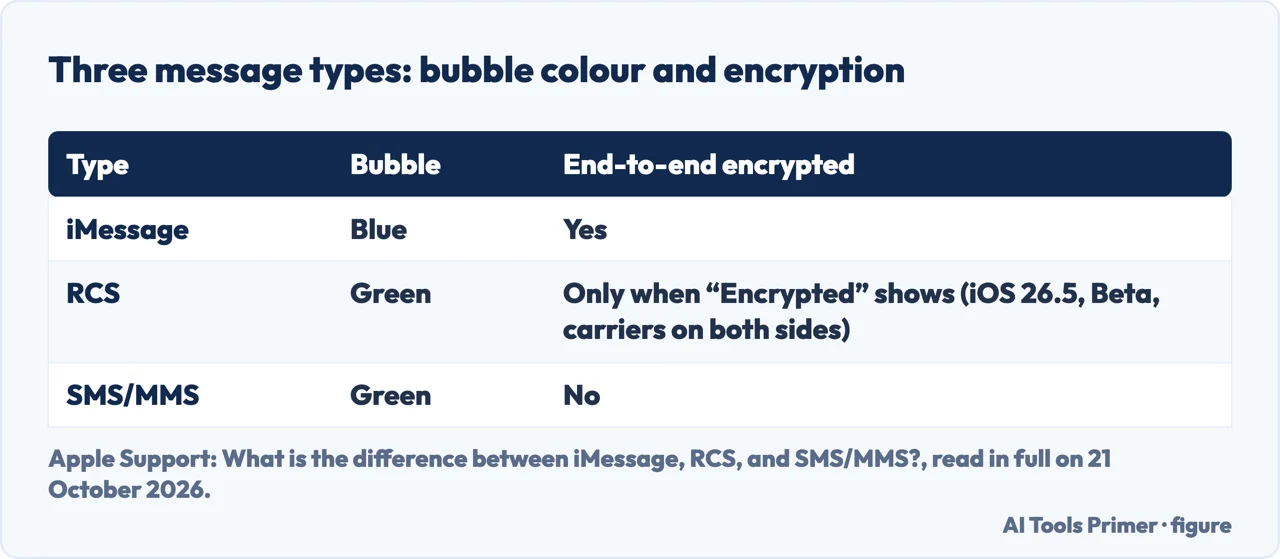
Apple’s support page on the difference between the message types, published 11 May 2026 and read in full on 21 October 2026, says the Messages app on an iPhone, iPad, Mac, Apple Watch or Apple Vision Pro sends each message as iMessage, as RCS or as SMS/MMS. Per Apple, iMessage appears in blue bubbles, while RCS and SMS/MMS both appear in green ones. So a green bubble tells you only that the message did not go as iMessage. Apple adds that iMessage conversations display a lock icon at the top. For how to tell the two greens apart, see our guide to what SMS, RCS and iMessage are, and which one is private.
The same Apple page says that to use RCS on an iPhone you need iOS 18 and a text-messaging plan from a carrier that supports RCS on iPhone, and it notes there may be a delay of a few hours in activating RCS. If you came here asking why are my texts green on a phone that should already be using RCS or iMessage, the next section lists the four reasons Apple gives.
Why one message goes green: the four reasons Apple lists
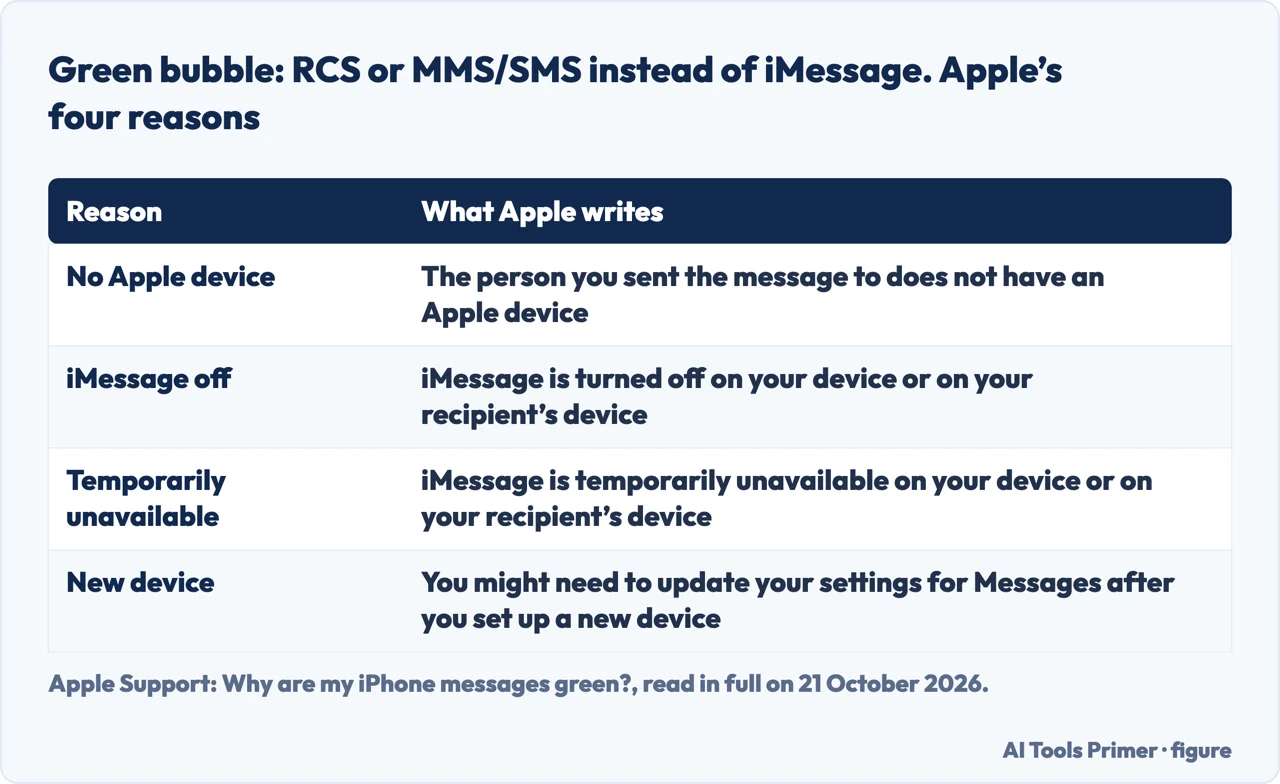
Apple’s page on green messages for the iPhone, published 18 June 2026 in its United States edition, says that when you see a green bubble instead of a blue one, the message was sent using RCS or MMS/SMS instead of iMessage. It then lists four possible reasons, and the cure depends on which one applies.
First, the person you sent it to does not have an Apple device, which is a fact about the recipient and not a setting on your phone. Second, iMessage is turned off on your device or on the recipient’s. Third, iMessage is temporarily unavailable on either device. Fourth, Apple says you might need to update your Messages settings after you set up a new device, which is the case the section on a new iPhone below follows up.
For the second reason, Apple’s page gives the route in its own wording: in the Settings app tap Apps, tap Messages, then turn on iMessage. It then says to tap Send & Receive if you need to choose whether new conversations start from your phone number or from your email address. The page does not say which version of iOS that layout belongs to, so read it as the current wording and not as a promise for older versions. The prerequisites and the full activation route are in our guide to how to enable iMessage, and the three things it needs.
None of the four reasons on Apple’s page is a block by the recipient, and the word does not appear on it. What blocking a number does stop is covered in block a number on iPhone: what it actually stops.
When iMessage will not turn on: the five messages and the checks before them
A different symptom needs a different page. Apple’s support page for iPhone, published 14 September 2026, says that when you activate iMessage or FaceTime you might see one of five messages: Waiting for activation, Activation unsuccessful, An error occurred during activation, Could not sign in, please check your network connection or Unable to contact the iMessage server. Try again.
Before anything else, Apple lists what you need. Your iPhone must be connected to a cellular data or Wi-Fi network and have the latest version of iOS, and its time zone must be set correctly, which Apple places under Settings, General, then Date & Time. On an iPhone, Apple adds, you need SMS messaging to activate your phone number with iMessage and FaceTime, and depending on the carrier you might be charged for that SMS. If a prompt says your network provider may charge for it, Apple’s instruction is to tap Turn On to allow the possible charges. If the connection itself is the doubt, read what resetting network settings on iPhone erases before trying it; Apple’s page does not ask for that reset.
Apple also offers an email address as the way in. In the Settings app tap Apps, tap Messages, tap Send & Receive and choose your email address. Apple notes that if you then use both a phone number and an email address with Messages, you might start or receive separate conversation threads with the same contacts.
The restart sequence, the 24-hour note and the spinning gear
Apple’s page for iPhone gives one sequence with a fixed order. It does not say which versions of iOS its menu names belong to, so the steps below follow its wording.
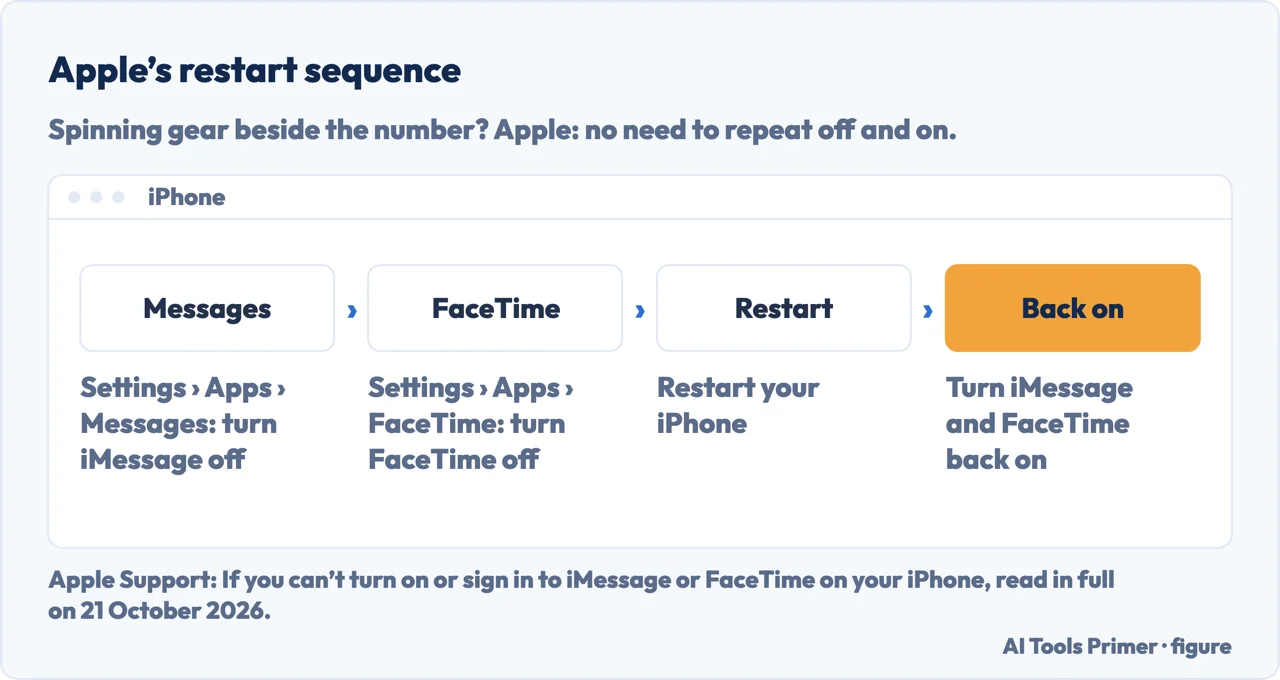
- In the Settings app, tap Apps, tap Messages, then turn off iMessage.
- Go back to Settings, tap Apps, tap FaceTime, then turn off FaceTime.
- Restart your iPhone.
- Turn iMessage and FaceTime back on.
The restart in the third step is Apple’s ordinary instruction to restart the iPhone. If the phone itself is frozen, a different procedure applies, and force restarting an iPhone sets out its sequences by model.
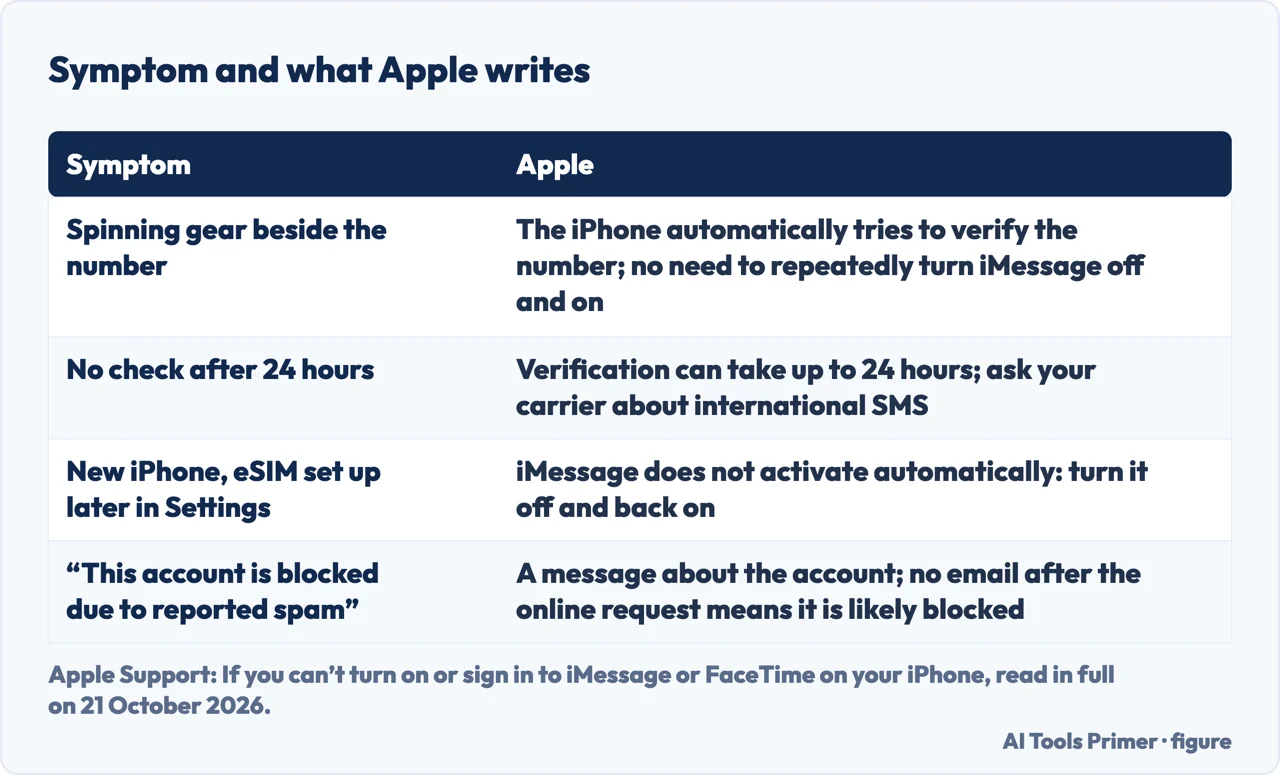
Apple then covers a number that is still waiting. Under its heading for a phone number with no check beside it in Settings after 24 hours, it says it might take up to 24 hours for your carrier to verify the number with Apple, and tells you to contact your carrier to make sure you can send and receive international SMS messages, and to wait up to 24 hours after you try the steps above. Just below, it says that if iMessage is on and a spinning gear appears next to your phone number, the device automatically attempts to verify it, and “There is no need to repeatedly turn iMessage off and on.”
From there Apple’s page goes on to an online activation request, covered in the section on the account below, and to the email route described above.
A new iPhone or an eSIM set up later: why iMessage did not start
Apple’s page has a section for a new iPhone with iOS 26. It says iMessage does not activate automatically after you set up an eSIM in Settings later. Apple names three ways this shows up: a Not Delivered alert, messages that appear as SMS/RCS in green bubbles, or messages that come from your email address instead of a phone number.
For this case Apple’s remedy is a single toggle: in the Settings app tap Apps, tap Messages, then turn iMessage off and back on. For a spinning gear, by contrast, its page says there is no need to repeat the off and on.
Apple’s heading for this case names iOS 26, so the case is scoped to that version. Apple’s green-bubble page has a related fourth reason, that Messages settings may need updating after you set up a new device. For the eSIM itself, see how to set up eSIM on iPhone, and what your carrier decides; for the move to the new phone, how to transfer data from one iPhone to another.
When it is the account, or the number left with the SIM
If you still cannot sign in, Apple’s activation page says you might see an error message with a Get Help button, or this one: “iMessage or FaceTime Activation Failed. This account is blocked due to reported spam.” The message is about your account, not about a contact blocking you. Apple’s route is an online request: go to apple.co/IMFT-mac, tap Get Started under Enable Apple Account, sign in to your Apple Account and follow the onscreen instructions, entering your phone number if you use one with FaceTime and iMessage. Apple says you will receive an email if your account is ready. If you did not receive that email, Apple says your account is likely blocked from iMessage and FaceTime and a request to remove the block was not approved.
Apple also says that on an iPhone with a cellular plan you might still be able to send and receive SMS, MMS or RCS messages with iMessage turned off, or use iMessage with your email address instead of your number. If the unwanted texts are the problem rather than iMessage, how to stop spam texts: three filters and three reports covers them.
A different problem is a number that stays registered. Apple’s deregistration page, published 12 May 2026, says that if you switched to a non-Apple phone and are not getting RCS or SMS/MMS messages, you might need to deregister iMessage. With your iPhone, put the SIM card back in it if you moved it, connect to your cellular data network, then turn off iMessage under Settings, Apps, Messages and FaceTime under Settings, Apps, FaceTime. Without the iPhone, you can deregister online; Apple says the number is then removed from iMessage services, you should receive text messages right away, and it might take a few hours for some Apple devices to recognise that you are not using iMessage.
If a message is already lost in the confusion, our guide to recovering deleted text messages on iPhone, and when sets out what can come back.
What each type protects, as Apple and Google word it
The question is iMessage encrypted has a different answer for each type, so the colour alone does not settle it. Apple says iMessage conversations are encrypted end-to-end, so they cannot be read while they are sent between devices. Apple Platform Security, in a page published 19 December 2024, adds that Apple does not store message content or attachments and cannot decrypt them. It also describes how a number is verified: the carrier network and SIM verify it, and with some networks that requires an SMS.
SMS/MMS is the plain case. Apple says SMS/MMS messages are not end-to-end encrypted, so they are not protected from a third party reading them while they are sent between devices. Google Messages Help says the same of its own app: end-to-end encryption is not available for SMS/MMS.
RCS depends on an indicator. Apple’s page, read on 21 October 2026, says that starting with iOS 26.5, end-to-end encrypted RCS in Messages is available as a Beta with supported carriers and will roll out over time, and that an RCS conversation can be encrypted when all participants have carriers that support it. Apple says an encrypted conversation shows the word Encrypted with a lock icon at the top, and “If you don't see the indicator, your RCS messages aren't protected from a third-party reading them while they're sent between devices.” So a green bubble on its own does not say whether a message was protected; the indicator does.
Google adds a note with a caveat of its own. Its help page for Google Messages on Android, which carries no date, says Google Messages supports end-to-end encryption over RCS when both people use the app with RCS chats on, and that “Currently only Google Messages supports end-to-end encrypted RCS, but the industry is working towards making end-to-end encrypted RCS available more broadly.” Because the page is undated, read that as Google’s statement on the day it was written and not as Apple’s position or today’s. The same page says text messages in Google Messages are dark blue in the RCS state and light blue in the SMS/MMS state. For what a service can and cannot read in general, see encrypted phone: what a service can and cannot read.
Where to start
Six ways in.
- “Why did that text turn green?”
- Four reasons Apple gives — why one message goes green
- “It says Waiting for activation”
- Five messages, and the checks first — imessage will not turn on
- “The gear keeps spinning”
- The steps, then the 24-hour note — restart sequence and 24 hour note
- “I just set up an eSIM”
- Why it did not start — new iphone or esim
- “It says my account is blocked”
- The account, not a contact — when the account or the number is the problem
- “What is protected?”
- Type by type — what each message type protects
Setting it up and reading the colours
Before it fails: how iMessage is turned on, and how to tell one kind of green from another.
When the phone or the SIM is changing
A new eSIM, a new iPhone, a restart or a network reset: the moments around which the symptom starts.
Questions people also ask
How do I reset my iMessage?
Apple’s sequence is: turn iMessage off in Settings › Apps › Messages, turn FaceTime off the same way, restart the iPhone, then turn both back on. Its page does not say which versions of iOS those menu names belong to.
Why isn’t iMessage working on my eSIM?
Apple says that on a new iPhone with iOS 26, iMessage does not activate automatically after you set up an eSIM in Settings later. Messages may show Not Delivered, go out as green SMS or RCS bubbles, or come from your email address. Apple’s fix is to turn iMessage off and back on in Settings › Apps › Messages.
Why is my iPhone not letting me send an iMessage?
Check whether the number is active first. Apple says an iPhone needs SMS messaging to activate a number with iMessage, which your carrier may charge for, and that the time zone must be set correctly. While a spinning gear shows, Apple says the iPhone is already trying to verify the number, which can take up to 24 hours.
Why did my iPhone go to SMS instead of iMessage?
Apple lists four reasons a message goes as RCS or MMS/SMS instead of iMessage: the recipient has no Apple device; iMessage is off on either device; iMessage is temporarily unavailable on either device; or Messages settings need updating after you set up a new device.
Do green texts mean blocked?
Apple’s page on green bubbles gives four reasons, and being blocked is not among them. The word does appear on Apple’s activation page, for a different case: an activation error saying the account is blocked due to reported spam, as quoted above. That is your own account, not a contact blocking you.
Not covered here. This page does not cover iMessage on a Mac or an iPad, because Apple’s activation page has a separate section for them that was not read as a procedure for this page, and it does not cover outages on Apple’s side, mixed group chats or Google Messages beyond the sentences attributed above, because no source read for this page describes them. Menu paths follow Apple’s iPhone pages in their current wording, and those pages do not say which versions of iOS they belong to; for a message that is already gone, how to recover deleted text messages on iPhone is the guide. What holds instead is simple: each Apple sentence above is attributed to the Apple page named in Sources, with the devices that page covers, and the one Google sentence on encrypted RCS is attributed to a help page that carries no date.
Sources
- Apple Support — What is the difference between iMessage, RCS, and SMS/MMS?, published 11 May 2026 (iPhone, iPad, Mac, Apple Watch and Apple Vision Pro; United States edition): the three message types, their colours, the iOS 18 requirement for RCS, and end-to-end encrypted RCS from iOS 26.5 (Beta) — support.apple.com, read 21 October 2026.
- Apple Support — Why are my iPhone messages green?, published 18 June 2026 (iPhone; United States edition): the four reasons a message goes as RCS or MMS/SMS instead of iMessage and the route to turn iMessage on — support.apple.com, read 21 October 2026.
- Apple Support — If you can’t turn on or sign in to iMessage or FaceTime on your iPhone, published 14 September 2026 (iPhone; United States edition): the five activation messages, the checks, the restart sequence, the 24-hour wait, the eSIM case and the blocked-account error — support.apple.com, read 21 October 2026.
- Apple Support — Deregister iMessage on your iPhone or online, published 12 May 2026 (iPhone; United States edition): the two routes and the few-hours delay for other Apple devices — support.apple.com, read 21 October 2026.
- Apple Platform Security — iMessage security overview, published 19 December 2024: that Apple does not store message content or attachments and cannot decrypt them, and how a phone number is verified — support.apple.com, read 21 October 2026.
- Google Messages Help — How end-to-end encryption in Google Messages provides more security (Google Messages on Android; the page carries no date, so its sentences are attributed to Google): encryption over RCS between Google Messages users, none for SMS/MMS, and the colours Google Messages uses — support.google.com, read 21 October 2026.
Written by Alberto Gulotta
Founder and editor of AI Tools Primer, writing from Palermo, Italy. Thirty-five years of taking computers apart, starting with a Commodore 64 — the long version is on the about page.
Something wrong on this page? Write to aitoolsprimer@gmail.com and it gets fixed.
Written on 21 October 2026.
Independence and limits
No affiliate links and no paid placements anywhere on this site. Nobody pays to appear here, and no company has seen this page before you did.
This is general information, not professional advice. Where a page touches money, health, safety or the law, it names its source and the date it was read — and your situation may still differ. See the privacy page and the cookie policy.