
Devices · guide
Is WhatsApp encrypted: where the lock stops and starts
By Alberto Gulotta · Updated · 18 min read
Is WhatsApp encrypted? WhatsApp says personal chats and calls are end-to-end encrypted with the Signal protocol, automatically, with no special settings. The lock stops at chats with businesses that use Meta services, payments and third-party agents, and backups are a separate choice. WhatsApp's own pages and EFF differ on what is on by default for backups.
| Question | Answer | Where it comes from |
|---|---|---|
| Are personal chats and calls end-to-end encrypted? | Yes, says WhatsApp, and it names messages, photos, videos, voice messages, documents, live location, status updates and calls | WhatsApp Help Center |
| Do I have to switch it on? | No: WhatsApp says it happens automatically, without any special settings | WhatsApp Help Center |
| Which protocol is it? | The Signal encryption protocol, whose developers announced the integration complete on 5 April 2016 | WhatsApp, Signal |
| Which chats are outside the lock? | Chats with businesses that use Meta services, payments and third-party agents | WhatsApp Help Center, WhatsApp privacy page |
| Are backups covered? | It depends on the backup, and the pages differ on what is on by default | WhatsApp, EFF |
| How do I check a chat? | Tap Encryption on the contact info screen: a QR code and a 60-digit number | WhatsApp Help Center |
What is locked, and with what
WhatsApp’s help page says that when a chat is end-to-end encrypted, your messages, photos, videos, voice messages, documents, live location, status updates and calls are secured. It says the encryption is used when you chat with another person using WhatsApp Messenger, and that outside the chat, not even WhatsApp can read, listen to or share them. Its explanation is that your messages are secured with a lock and only the recipient and you have the key that opens it. The page adds that all of this happens automatically, without any special settings to turn on.
Two WhatsApp pages name the protocol. The help page says every WhatsApp message is protected by the same Signal encryption protocol, and the privacy page says personal messages, one-on-one or in groups, are protected with end-to-end encryption using the Signal protocol. The Signal blog gives the history: on 5 April 2016 it announced that the integration was fully complete across chats, group chats, attachments, voice notes and voice calls, and that users on the most recent versions got end-to-end encryption for every message they sent and every call they made to each other.
The Signal post also describes a protection against downgrades. Once a client recognises a contact as fully capable of end-to-end encryption, it will not transmit plaintext to that contact, even if the contact moves to an older version of the software. WhatsApp’s help page, for its part, says the encryption and decryption of messages occurs entirely on your device, that the keys change with every single message sent, and that WhatsApp has no ability to see the content of messages or listen to calls that are end-to-end encrypted. The WhatsApp help page and the two Signal posts point to a white paper or technical document for the technical detail. We did not read it, so this page goes no further into how the protocol works than the pages we did read.
How to check a chat yourself
WhatsApp says an end-to-end encrypted chat between you and one other person has its own security code, shown as a QR code and as a 60-digit number, and that these codes are unique to each individual chat. The verification is optional, according to the help page, and is only used to confirm that the messages and calls you send are end-to-end encrypted. The steps it gives are these:
- Open the chat.
- Tap the contact’s name to open the contact info screen.
- Tap Encryption to open the verification page.
- Wait for automatic verification to complete and check the result, or verify manually by viewing the QR code or the 60-digit number.
The automatic check is what WhatsApp calls key transparency. EFF’s guide describes it as a public key kept on a server that the app can check, with each key change added to a record that can be audited publicly, and says a message appears on the verification screen when the encryption was automatically verified. For the manual route, WhatsApp says that if you and your contact are physically next to each other, one of you can scan the other’s QR code or visually compare the number. If you are apart, you can send the 60-digit number through another platform and ask your contact to write it down and compare it with the number under Encryption. If either of you uses WhatsApp on several devices, the help page says the code has to be verified on all of your and your contact’s devices.
A code can change. WhatsApp’s pages say this is likely because you or your contact reinstalled WhatsApp, changed phones, or added or removed a paired device, and that if the codes do not match you may be scanning the code of a different contact or phone number. Signal’s post of 13 January 2017 gives the same reason, that keys change every time someone gets a new device or reinstalls the app. Signal wrote it in answer to a newspaper story that called this a backdoor, which Signal called false, and said the clients are built so that the WhatsApp server has no knowledge of whether users have turned on the change notifications.
Those notifications are a setting. EFF says that by default WhatsApp does not display when a contact’s keys change, and gives this path on Android: the three-dot menu, then Settings, Account, Security Notifications. WhatsApp’s help page for the web version gives Settings, Account, Security notifications, and says the setting has to be turned on for each device where you want the notice. Signal’s 2016 post likewise described it as a preference users can opt in to.
The cases outside the lock
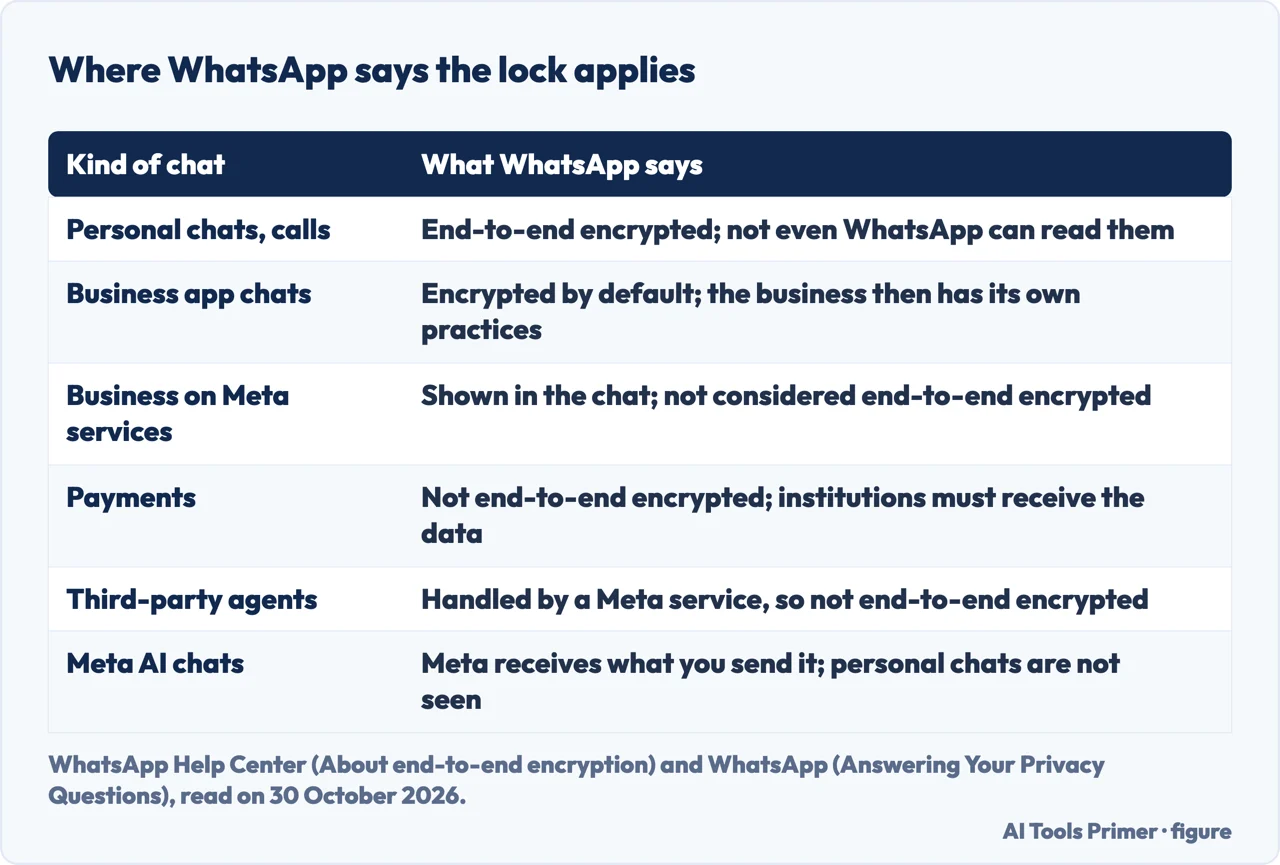
On chats with businesses, the two WhatsApp pages we read word the answer differently. The help page says WhatsApp considers chats with businesses that use the WhatsApp Business app to be end-to-end encrypted by default, but that once a message reaches a business it falls under the business’s own privacy practices: the business may have employees or vendors respond, and may use the chats for its own marketing, including advertising on Meta. It then says some businesses choose optional services, for example Meta storing messages and responding to customers, and that when they do, WhatsApp displays this in the chat and does not consider those messages end-to-end encrypted. The privacy page says many businesses choose Meta as their cloud storage provider and that, for this reason, WhatsApp does not consider these messages end-to-end encrypted; it adds that a blue system message appears in the chat when a business is using Meta services.
Read together, the pages tie the answer to the services a business uses, not to the word business. The pages we read do not list which businesses use which services. The help page also says some businesses can choose AI from Meta to help answer customers; Meta then receives those chats to improve its AI quality and generate replies, and WhatsApp says it highlights “uses AI from Meta” under the business name. For businesses using optional Meta services, the page says Meta uses automated systems to detect violations and may report account information and messages to authorities when required or permitted by law. It states that this does not apply to personal conversations.
Two more cases are on the help page. Payments, available in select countries, are not end-to-end encrypted, because the page says financial institutions cannot process transactions without receiving information about them; card and bank numbers are stored encrypted. And messages with third-party agents are not considered end-to-end encrypted, because a Meta service manages the chat on the agent’s behalf, while WhatsApp counts messages as end-to-end encrypted when they go directly between devices controlled by the people sending and receiving them.
The privacy page adds Meta AI. It says that if you choose to chat with Meta AI, directly or in your groups, Meta receives what you or others send it, and that personal messages are end-to-end encrypted and not seen by Meta AI. It also says only you or a group participant can start that conversation, not Meta or WhatsApp.
Backups: where the lock can be left open
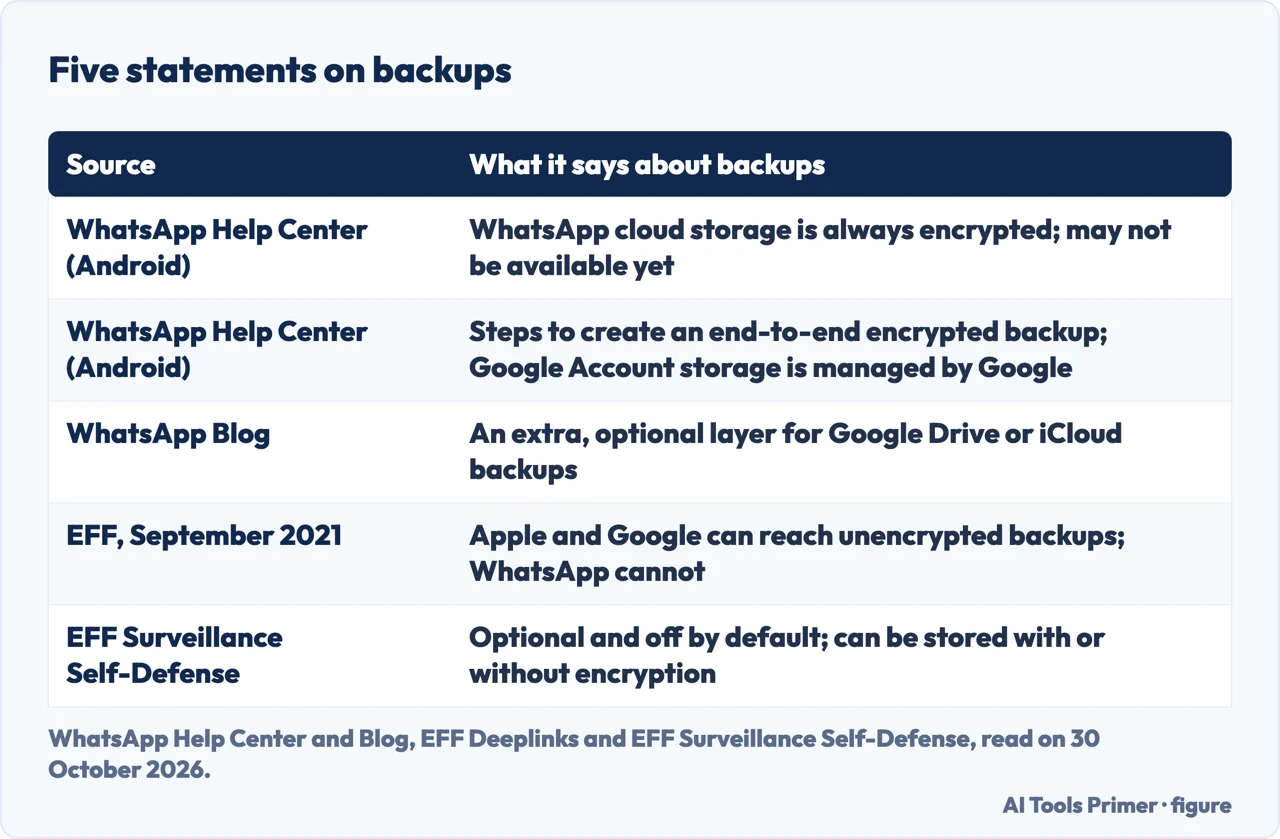
This is the topic where the sources we read differ most. EFF, writing on 16 September 2021, said users could back up their chat history to iCloud or Google Drive or never, that WhatsApp does not have access to those backups but Apple and Google do, and that unencrypted backups are open to government requests, third-party hacking and disclosure by employees. It welcomed a coming option to encrypt them with a 64-digit key generated on the device, or a recovery system protected by a password. WhatsApp’s blog post announces what looks like the same feature, as an extra “optional layer of security” for backups stored on Google Drive or iCloud, secured with a password or a 64-digit key; it says neither WhatsApp nor the backup provider can read the backup. The text we have carries no date for that post, so we do not date it.
EFF’s Surveillance Self-Defense guide, last reviewed on 10 March 2026, says backups are optional and not enabled by default, and that WhatsApp lets you store them with or without encryption; with the end-to-end encrypted option on, it says WhatsApp and Google (or Apple) cannot access the backup. The WhatsApp help page for Android describes a newer arrangement: you can back up to WhatsApp cloud storage, where it says the backup is “always end-to-end encrypted”, or to your Google Account, where the storage is provided and managed by Google. The same page says WhatsApp cloud storage is a new feature that “may not be available to you yet”. The pages we read do not say how many people have the encrypted backup on, or where cloud storage is available.
The help page’s steps for an end-to-end encrypted backup on Android are these:
- Go to WhatsApp Settings, then tap Chats, then Chat backup.
- Tap End-to-end encrypted backup.
- Tap Use passkey, or tap More options to use a 64-digit encryption key or create a password.
- Tap Create.
The page warns to remember the password or key, because it is the only way to access the backup in the future. EFF gives the same path for iPhone, under Settings, Chats, Chat Backup, and says WhatsApp will not be able to help you recover the backup if you lose the key or password. We did not read WhatsApp’s own iPhone tab, so we cannot say whether its list of options matches Android’s. Two further points: the help page says that if you change provider and did not previously have encrypted backups for your Google Account, you are prompted to create a passkey, a password or a key; and EFF notes that anyone you chat with can also back up their chats, including in a way that does not use end-to-end encryption.
What WhatsApp still sees
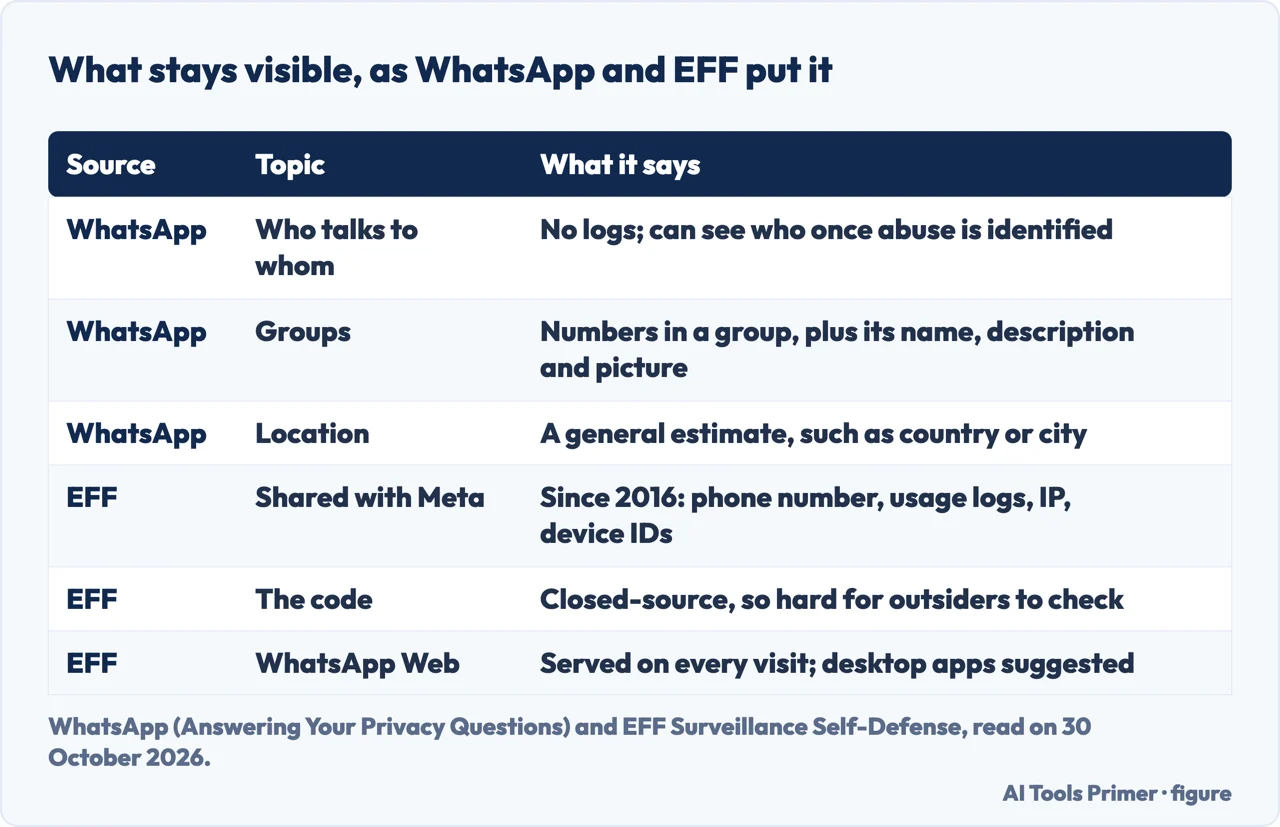
The privacy page separates content from everything around it. It says WhatsApp cannot see the content of personal messages, does not keep logs of who everyone is messaging or calling, and does not keep individual records for three billion users because it considers that bad for privacy. It also says it detects spam and abuse with automated systems and reports, and gives the example of a user sending 1,000 messages a minute; in cases of abuse, it says, WhatsApp has the ability to see who is messaging who once a problem is identified, and because of that it sometimes receives legal orders to provide the information.
On groups, the page says WhatsApp knows which phone numbers belong to which group, so it can deliver messages, and also knows the name, description and profile picture of a group. On location, it says WhatsApp relies on your IP address and phone number to estimate a general location such as country or city, while a precise location you share in a chat is protected by end-to-end encryption. On Meta, it says access to WhatsApp personal data is restricted so that other Meta apps cannot use it, including for ads, unless it serves one of three purposes: counting how many people are served, helping keep people safe, or providing optional features such as payments, Meta AI or Accounts Center.
EFF’s guide describes the Meta relationship differently. It says that since 2016 WhatsApp has shared data with Facebook, now Meta, and that this does not include the contents of messages but does include a phone number, logs of how often you use WhatsApp, IP addresses, device identifiers and similar metadata, which it calls “an uncomfortable amount of data-sharing” compared with Signal. The two accounts answer different questions, one about what WhatsApp sees and one about what it shares, and the pages we read do not set them side by side.
EFF also raises two more points. It says the app is “closed-source software”, which makes it difficult for outside experts to confirm that the company has implemented its encryption securely, while saying the encryption protocol is sound. And it says WhatsApp Web delivers the application on each visit, so it is technically possible for the web application to be modified, which is why it suggests the desktop apps for Windows and Mac. Signal’s 2017 post, written by the developers of the protocol, concluded that WhatsApp remained a good choice for people concerned about the privacy of message content.
On law enforcement, the help page says WhatsApp carefully reviews, validates and responds to requests based on applicable law and policy, and has published information for law enforcement about the limited information it collects. Beyond saying it has no ability to see the content of end-to-end encrypted messages, the pages we read do not describe what can be recovered from a phone itself.
Settings that change what stays on the phone
EFF’s guide says some of WhatsApp’s most useful security features are not enabled by default. Three it lists change what stays on a device. Disappearing messages can be set to 24 hours, seven days or 90 days, for every chat or for one; EFF says the time applies to both sides, that the recipient could take a screenshot before a message disappears, and that quoted text in a reply may remain for a short time. It calls the feature worthwhile if you are worried about someone physically accessing your phone, such as law enforcement or family members. Advanced chat privacy is set per chat and is off by default; when on, it blocks anyone in the chat from exporting it, stops media downloading automatically to participants’ phones and disables some Meta AI features, and EFF notes that anyone in the chat can turn it on or off.
“View once” lets a photo be opened one time before it is deleted; EFF says WhatsApp blocks screenshots of it but someone could still photograph the screen with another device. Two-step verification, which EFF lists among its basic account settings rather than the sensitive-situation ones, sets a PIN that is required before you can log in to WhatsApp on another phone, and EFF gives Settings, Account, Two-Step Verification as the Android path. EFF also lists a setting that limits what leaves the chat: link previews can reveal to the site you link to details such as the exact version of WhatsApp you use, and can help enumerate friends if the link carries a unique token; on Android it is the three-dot menu, Settings, Privacy, Advanced, Disable link previews, and on iPhone Settings, Privacy, Advanced.
Where does that leave the question? On personal chats, WhatsApp’s pages, EFF and Signal all describe end-to-end encryption. The differences sit at the edges: businesses that use Meta services, backups, and the data around the messages. Messaging on an iPhone raises a related question, covered on our page about iMessage not working, and email has its own, covered on the page about encrypted email.
Where to start
Five ways in.
- “Is it encrypted by default?”
- What is locked, and with what — what is locked
- “How do I check a chat?”
- How to check a chat yourself — check a chat
- “What about businesses?”
- The cases outside the lock — outside the lock
- “Are my backups encrypted?”
- Backups: where the lock can be left open — backups
- “What can WhatsApp still see?”
- What WhatsApp still sees — what whatsapp still sees
Other ways to send a message
Green bubbles and encrypted mail.
Backups and sign-in
What sits behind the chats.
Questions people also ask
Is WhatsApp secure and private?
WhatsApp says personal messages and calls are end-to-end encrypted with the Signal protocol and that it keeps no logs of who messages or calls whom. EFF says the encryption protocol is sound but calls the privacy practices of WhatsApp and Meta concerning, and says WhatsApp has shared data with Meta since 2016.
Can WhatsApp chats get leaked?
The pages we read do not use that word. They do name places where a chat can leave the lock: businesses that use Meta services, backups that are not end-to-end encrypted, which EFF says Apple and Google can reach, and a recipient who takes a screenshot.
Why is everyone leaving WhatsApp?
The pages we read do not mention people leaving WhatsApp. EFF’s guide lists its own concerns: data shared with Meta since 2016, a closed-source app and a web version delivered on each visit.
Can police recover encrypted WhatsApp messages?
WhatsApp says it has no ability to see the content of end-to-end encrypted messages, that it carefully reviews, validates and responds to law enforcement requests based on applicable law and policy, and that it has published information about the limited information it collects. The pages we read do not describe what can be recovered from a phone itself.
Not covered here. We tested nothing on a phone. The statements come from the WhatsApp Help Center, the WhatsApp privacy page, a WhatsApp blog post, two EFF pages and two Signal blog posts, all read on 30 October 2026.
We did not read the white paper that the WhatsApp help page and the 2017 Signal post point to.
The search volume and difficulty behind this page come from a Semrush reading of 29 August 2026, older than the 60 days the site normally allows.
Sources
- WhatsApp Help Center — About end-to-end encryption — faq.whatsapp.com, read 30 October 2026.
- WhatsApp — Answering Your Privacy Questions — www.whatsapp.com, read 30 October 2026.
- WhatsApp Help Center — How to back up your chat history — faq.whatsapp.com, read 30 October 2026.
- WhatsApp Help Center — About security code change notifications — faq.whatsapp.com, read 30 October 2026.
- WhatsApp Blog — End-to-End Encrypted Backups on WhatsApp — blog.whatsapp.com, read 30 October 2026.
- EFF Surveillance Self-Defense — How to: Use WhatsApp — ssd.eff.org, read 30 October 2026.
- EFF Deeplinks — What’s Up with WhatsApp Encrypted Backups (16 September 2021) — www.eff.org, read 30 October 2026.
- Signal Blog — WhatsApp’s Signal Protocol integration is now complete (5 April 2016) — signal.org, read 30 October 2026.
- Signal Blog — There is no WhatsApp ‘backdoor’ (13 January 2017) — signal.org, read 30 October 2026.
Written by Alberto Gulotta
Founder and editor of AI Tools Primer, writing from Palermo, Italy. Thirty-five years of taking computers apart, starting with a Commodore 64 — the long version is on the about page.
Something wrong on this page? Write to aitoolsprimer@gmail.com and it gets fixed.
Written on 30 October 2026.
Independence and limits
No affiliate links and no paid placements anywhere on this site. Nobody pays to appear here, and no company has seen this page before you did.
This is general information, not professional advice. Where a page touches money, health, safety or the law, it names its source and the date it was read — and your situation may still differ. See the privacy page and the cookie policy.