
Docs · guide
What does PDF stand for, and who keeps the format today
By Alberto Gulotta · Updated · 11 min read
What does PDF stand for? Portable Document Format. Adobe, which created it, describes a file format for presenting and exchanging documents whatever the software, hardware or operating system of the person who opens them. Adobe says it is now an open standard maintained by ISO, whose catalogue lists both PDF 1.7 and PDF 2.0 as current.
| Question | Answer | Source |
|---|---|---|
| What the letters stand for | Portable Document Format | Adobe |
| Who created it | Adobe; the idea was John Warnock’s Camelot Project | Adobe |
| Who maintains it now | ISO, says Adobe; almost all PDF specifications sit with ISO/TC 171/SC 2 | Adobe, Library of Congress |
| Current standards | ISO 32000-2:2020, PDF 2.0, 986 pages, confirmed in 2026; ISO 32000-1:2008, PDF 1.7, confirmed in 2023 | ISO |
| File signs | Extension .pdf, media type application/pdf, magic number %PDF | Library of Congress |
The name, word by word. None of the pages read here explains the three words one at a time; Adobe gives only the expansion. Set beside them, in our reading: Adobe’s goal was to view and print documents on any machine (Portable), the Library of Congress says PDF represents formatted, page-oriented documents (Document), and Adobe calls PDF a file format (Format). Locking one with a password is in passwords on a PDF, and changing the text inside is in editing a PDF.
When PDF began, and who looks after it
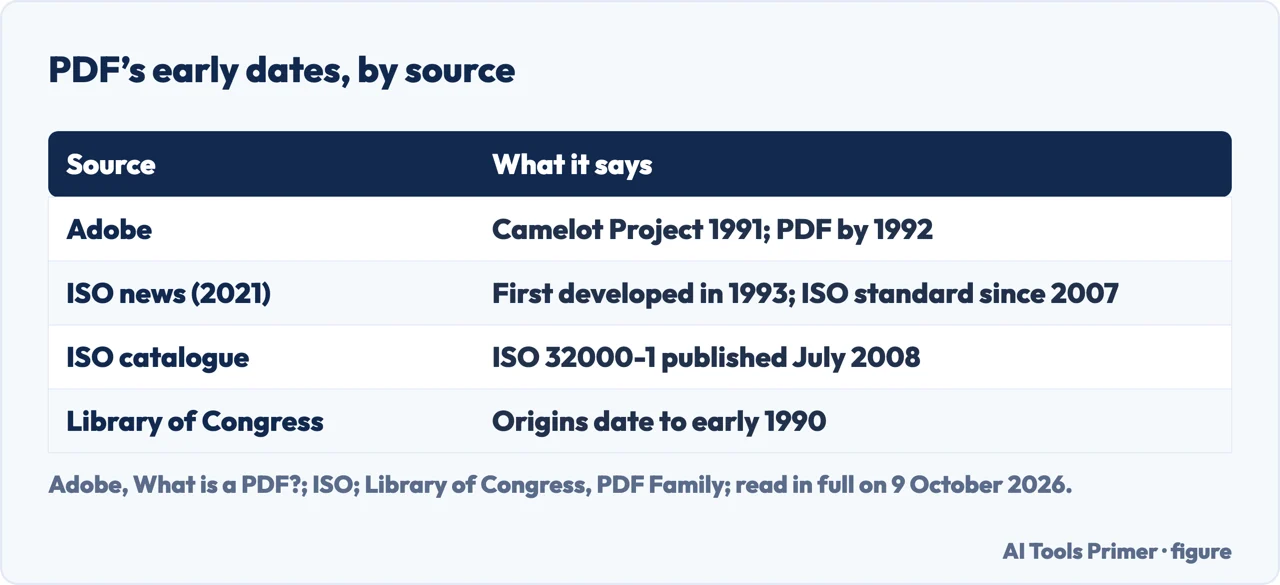
The dates, source by source
Adobe. Its page dates to 1991 an idea co-founder John Warnock called The Camelot Project, and says that by 1992 the project had developed into PDF. The goal it gives: capture documents from any application, send them anywhere, and view and print them on any machine.
ISO’s news item of 5 January 2021. It says PDF was first developed in 1993 and has been defined by an ISO standard since 2007.
ISO’s catalogue. The record of ISO 32000-1, PDF 1.7, gives the publication date as July 2008.
The Library of Congress. Its history paragraph, adapted from Adobe’s PDF Reference, Third Edition, dates the origins of PDF and of the Acrobat family to early 1990.
What we make of it. The years differ, and none of the four pages read here explains why, so this page does not pick one. Our reading, which is a deduction and not something any of them says: they do not all date the same event, since one gives the origins, one a project and what it became, one the first development and one the publication of a standard.
From Adobe to ISO. Adobe’s page says the format is now an open standard maintained by the International Organization for Standardization. The Library of Congress says that since ISO approved PDF 1.7, almost all PDF specifications have been maintained under working groups of ISO TC 171 SC 2, that PDF/X is maintained by a different committee, ISO/TC 130, and that Adobe issued a Public Patent License with the ISO adoption. ISO’s 2021 news item says ISO 32000-2 was developed by ISO/TC 171, subcommittee SC 2, whose secretariat is held by ANSI, the ISO member for the United States.
PDF versions and the ISO standards
The versions, and how a file says which one it is
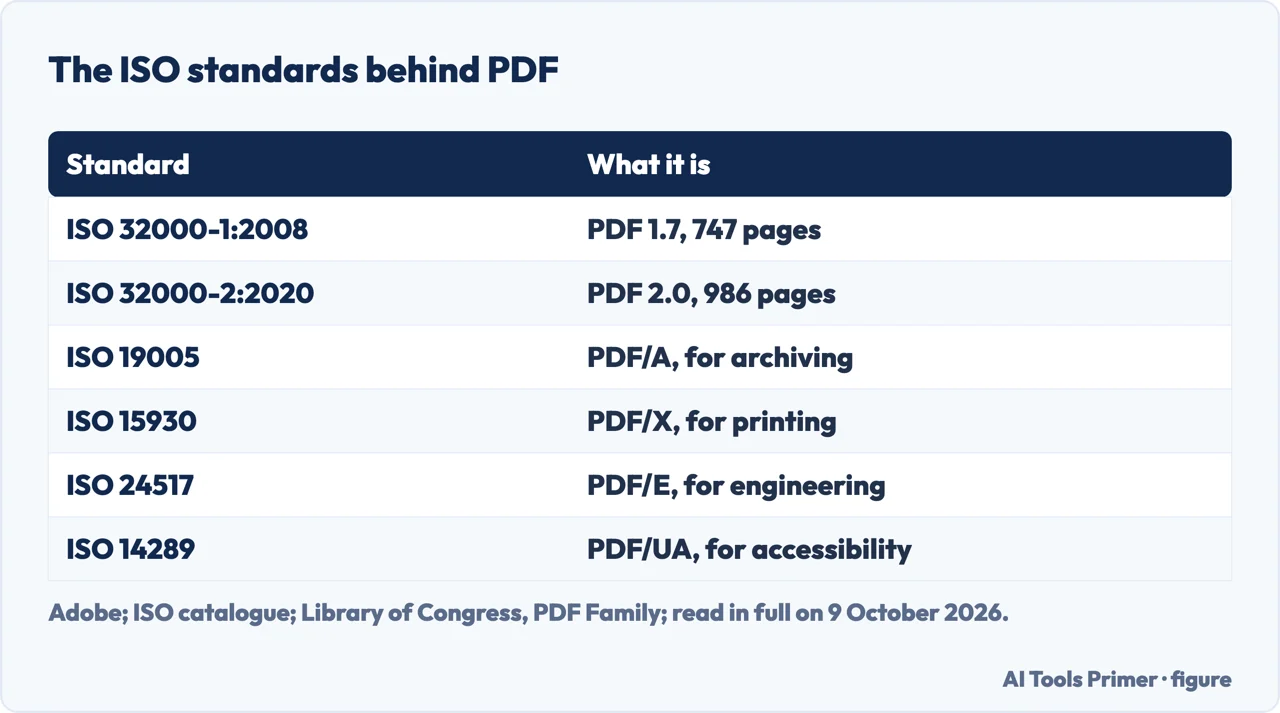
1.0 to 1.7. The Library of Congress lists PDF versions 1.0 to 1.7 among the subtypes of the PDF family, and says many members of that family were developed by Adobe, which made the specifications available openly and at no charge. PDF 1.7 became the ISO standard ISO 32000-1:2008, which ISO’s catalogue record gives as 747 pages. ISO’s record says that edition was last reviewed and confirmed in 2023 and remains current.
2.0. The Library of Congress says ISO 32000-2 was published in 2017; ISO’s catalogue lists that edition as withdrawn and the 2020 edition, the second, as the published one. ISO’s news item says the 2020 revision brought hundreds of corrections and clarifications, and the record says it was last confirmed in 2026.
Inside the file. According to the Library of Congress, a PDF should begin with %PDF- and a version number, such as %PDF-1.7, and from PDF 1.4 a value in the document’s Catalog can override it. So, in our reading, the header alone does not always give the version; the Library of Congress notes that identification tools such as DROID typically look at the beginning of a file, and that when the header and the Catalog differ there is potential for identification errors.
PDF/A, PDF/X, PDF/E and PDF/UA
Adobe’s examples. Adobe’s page gives PDF/A for archiving, PDF/E for engineering and PDF/X for printing as examples of special-purpose standards.
Their numbers. The Library of Congress gives the ISO numbers: PDF/A is ISO 19005, PDF/X is ISO 15930, PDF/E is ISO 24517, and PDF/UA, for accessibility, is ISO 14289. It adds that PDF/A, PDF/X and PDF/E-1 require the fonts to be embedded, which is what faithful rendering depends on.
Where you meet them. In Word on Windows, Microsoft’s page lists an option called ISO 19005-1 compliant (PDF/A) in the PDF options, described as an archiving standard that helps a document look the same when it is opened later on a different computer.
What a PDF can hold
Adobe’s list. Links and buttons, form fields, audio, video and business logic; PDFs can be signed electronically and viewed on Windows or macOS with Adobe Acrobat Reader, Adobe says. Filling in the fields is in filling in a PDF form.
What is inside a PDF, and why extracted text can come out garbled
Pages, not paragraphs. The Library of Congress describes PDF as a format for formatted, page-oriented documents that can hold text, images, graphics, video and audio, with annotations, metadata, links and bookmarks. Its imaging model comes from PostScript; unlike PostScript, which is a programming language, PDF is a structured binary file built for high-performance interactive viewing.
Scans. A PDF made from scanned page images does not necessarily have text that can be indexed, the Library of Congress says. Adobe’s page sets many PDFs, which it says are simply pictures of pages, against Adobe PDFs, which preserve all the data in the original file format.
Garbled text. The Library of Congress says that for most PDFs with character-based text the text can be reliably extracted and indexed, but problems can occur: text is stored mainly as glyphs in fonts, not as Unicode code points, and when those are missing, extracted text comes out unintelligible. Copying and pasting is one way of extracting text, in our reading. Structure for screen readers, called tagged PDF, arrived in PDF 1.4 and, in general, is only there if the creator, or a step during creation, adds it.
Making a PDF from a document
No extra software. Microsoft’s page, which applies to Word for Microsoft 365, Word 2021, Word 2019 and Word 2016 among other Office apps, says the Office programs can save or convert files to PDF without other software or add-ins, and recommends PDF for a file that looks the same on most computers, is smaller, or must follow an industry format: résumés, legal documents, newsletters, files meant to be read and printed rather than edited. Word for the web has its own route, which Microsoft says makes a basic PDF.
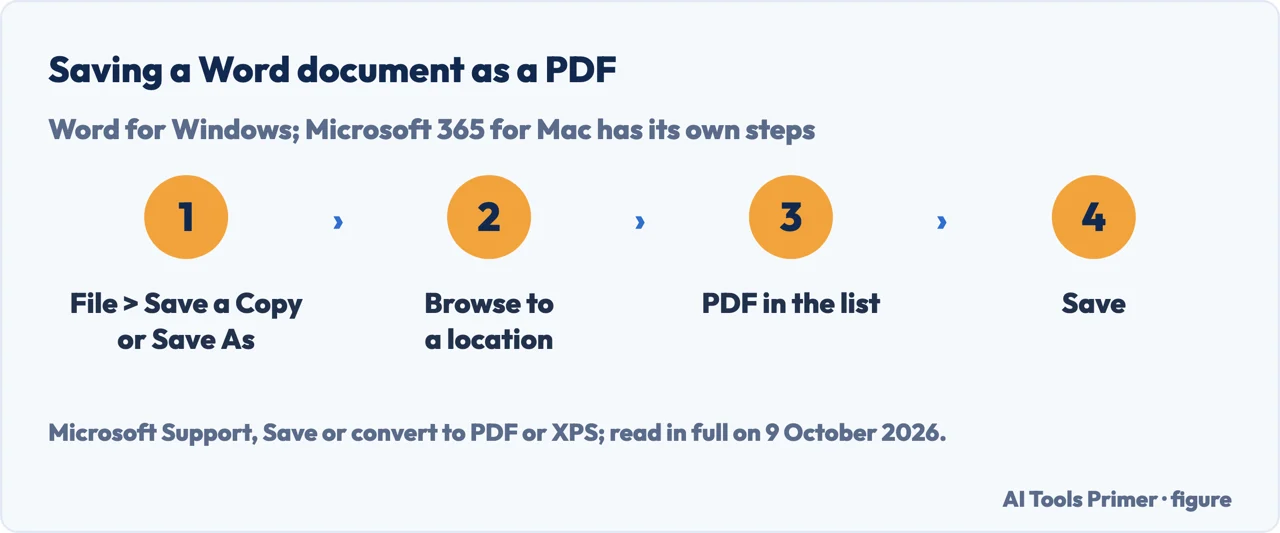
- Open the save menu. In Word for Windows, Microsoft says to select File > Save a Copy if the file was saved before, or File > Save As or Save a Copy if it was not.
- Pick the place. Select Browse and choose where on the computer the PDF should go.
- Choose PDF. In the drop-down list, select PDF.
- Save. Select Save. Microsoft’s page then gives More Options > Options to customise the PDF, for example a page range, bookmarks from headings, PDF/A or a password. In Microsoft 365 for Mac the steps are File, Save As or Save a copy, File Format at the bottom of the window, PDF from the list of available formats, then Save.
Sharing it is not locking it. Microsoft warns that “many programs, including Microsoft Word, have the ability to open and edit PDF files”, so simply sharing something as a PDF does not guarantee the recipient can’t edit it; it also says internal links in a spreadsheet are lost when it becomes a PDF. The whole route from Word is in Word to PDF, the opposite direction in PDF to Word, and a file too big to send in compress a PDF.
Where to start
Four ways in.
- “What year was it invented?”
- What each source dates — dates
- “What is PDF/A?”
- The special-purpose standards — pdf a
- “Why won’t the text copy?”
- What is inside — text inside
- “How do I make one?”
- Saving as PDF — make one
Other PDF jobs
Guides on making, locking, editing and converting a PDF.
Questions people also ask
What is the main purpose of a PDF file?
Adobe says it gives people an easy, reliable way to present and exchange documents, whatever software, hardware or operating system the reader uses. ISO’s 2021 news item puts the standard’s aim as exchanging and viewing documents independent of the environment in which they were created, viewed or printed.
How do you PDF a document?
In Word for Windows, Microsoft says: File > Save a Copy, or File > Save As or Save a Copy if the file is unsaved, then Browse, choose PDF in the drop-down list and select Save. In Microsoft 365 for Mac: File, Save As or Save a copy, File Format, PDF, then Save.
What is the difference between a PDF and a file?
A PDF is one kind of file, in our reading. The Library of Congress lists its signs: the extension .pdf, the media type application/pdf and the magic number %PDF, which a PDF should carry in its header with a version number.
Not covered here. It does not cover the content of the ISO standards beyond their catalogue records, which ISO sells, or any meaning of PDF other than the file format. What the name Wi-Fi stands for, if anything, is in what does wifi stand for.
Sources
- Adobe — What is a PDF? Portable Document Format — www.adobe.com, read 9 October 2026.
- ISO — ISO 32000-2:2020, Document management, Portable document format, Part 2: PDF 2.0 — www.iso.org, read 9 October 2026.
- ISO — ISO 32000-1:2008, Document management, Portable document format, Part 1: PDF 1.7 — www.iso.org, read 9 October 2026.
- ISO — The standard for PDF is revised (5 January 2021) — www.iso.org, read 9 October 2026.
- Library of Congress — PDF (Portable Document Format) Family, fdd000030 — www.loc.gov, read 9 October 2026.
- Microsoft Support — Save or convert to PDF or XPS in Office Desktop apps — support.microsoft.com, read 9 October 2026.
Written by Alberto Gulotta
Founder and editor of AI Tools Primer, writing from Palermo, Italy. Thirty-five years of taking computers apart, starting with a Commodore 64 — the long version is on the about page.
Something wrong on this page? Write to aitoolsprimer@gmail.com and it gets fixed.
Written on 13 October 2026.
Independence and limits
No affiliate links and no paid placements anywhere on this site. Nobody pays to appear here, and no company has seen this page before you did.
This is general information, not professional advice. Where a page touches money, health, safety or the law, it names its source and the date it was read — and your situation may still differ. See the privacy page and the cookie policy.