
Footprint · guide
How to delete Facebook account: what Meta and four guides say
By Alberto Gulotta · Updated · 17 min read
How to delete Facebook account settings: Meta’s Help Center points to Deactivation or deletion under Meta Account or Accounts Center. Meta says you can cancel if it has been less than 30 days, though that varies by region, and that removing everything can take up to 90 days from the start. Messages you sent can stay in friends’ inboxes.
| Question | Answer | Where it comes from |
|---|---|---|
| Is deleting reversible? | Within a window: Meta says you can cancel if it has been less than 30 days, and that the number of days varies by region | Meta |
| How long until everything is gone? | Meta says up to 90 days from the beginning; Consumer Reports reads it as up to 90 days more | Meta, Consumer Reports |
| Do copies remain after that? | Meta says copies may remain in backup storage; Norton puts a number on it, 180 days | Meta, Norton |
| Do friends still see my messages? | Meta says copies of messages you sent are stored in friends’ inboxes | Meta |
| Where is the setting? | Deactivation or deletion, under Meta Account or Accounts Center, reached by one of two menu routes | Meta, Norton |
Deactivate or delete: what Meta lists for each
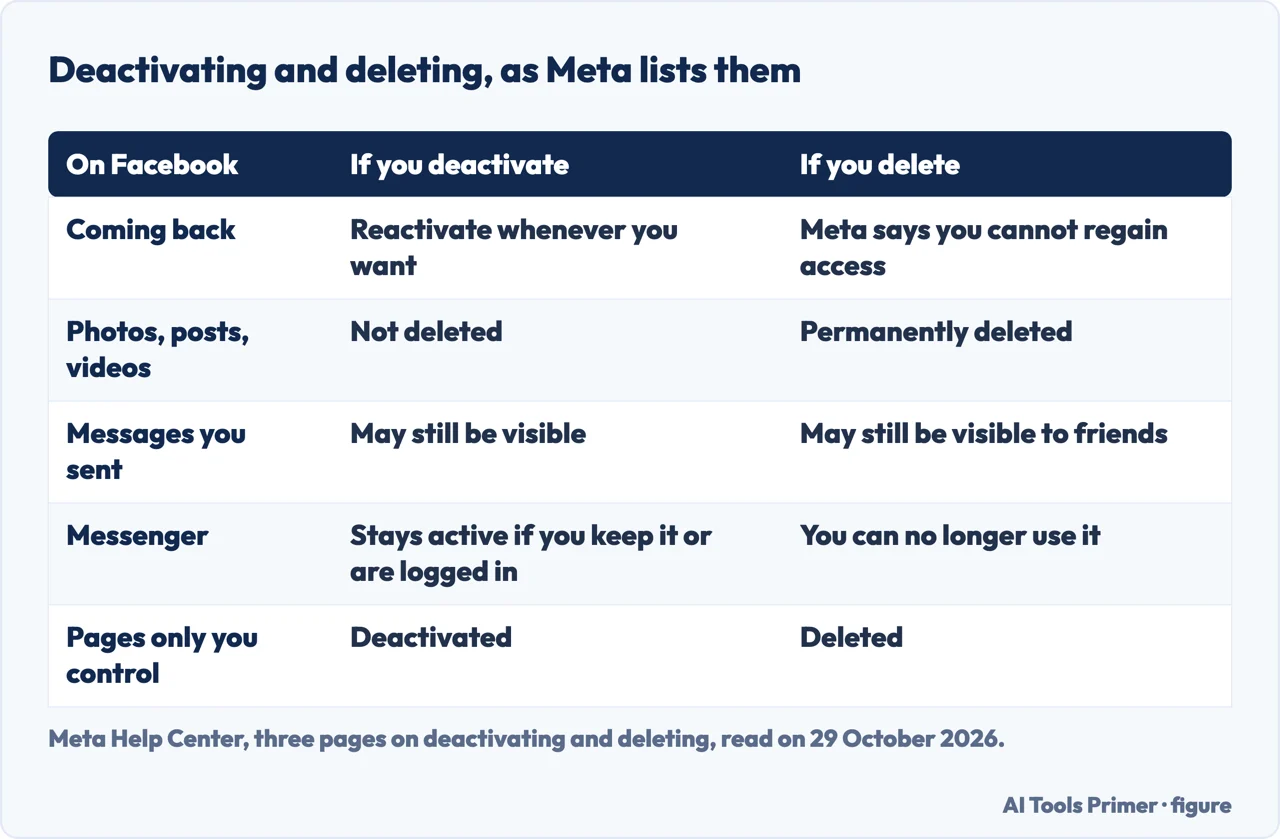
Meta’s Help Center page on the difference starts from two short lists. If you deactivate your profile, you can reactivate whenever you want, people cannot see your timeline or search for you, and your Meta Account remains active. Meta adds that some information may remain visible to others, and gives the messages you sent as its example. If you delete, Meta says you cannot regain access once the profile is gone, that the other profiles in the same Meta Account are not affected, and that messaging history is stored outside your profile, so friends may still have access to messages you sent.
The separate Meta page on deactivating adds detail. Your profile is hidden from other people, but your friends may still see your name in their friends list, which Meta describes as visible only to them and only from that list. Group admins may still be able to see your posts and comments along with your name. Pages that only you control are deactivated too, unless you give someone else full control of the Page first. To come back, you log into Facebook again or use your Facebook account to log in somewhere else, and Meta says you need access to the email address or mobile number you use to log in.
Messenger is where the pages differ. Meta’s deactivation page says that if you keep Messenger active, or are logged into it when you deactivate, Messenger remains active: you can still chat with friends, your profile picture stays visible in conversations, other people can search for you to send a message, and using Messenger does not reactivate the Facebook account. Meta’s deletion page says that after deleting you can no longer use Messenger. Norton writes that both options also deactivate or delete Messenger, while its own pros-and-cons table lists continued Messenger use under deactivating. We follow Meta’s wording for what the setting does and name Norton’s as Norton’s.
Consumer Reports describes deactivation as taking a step back: other users cannot see your timeline, view your photos or search for you, and friends may still read messages you sent them and see your name in their list. It says you must enter your password to confirm. Norton, which sells security software and promotes one of its products on the page, adds an opinion on the other side of the choice: deactivating alone, it writes, will not do much to protect your personal information, since the platform continues to store your data. Norton’s list for deactivating also says you can still use Messenger, your Facebook login still works for other apps, and you cannot access Marketplace; Meta’s deletion page adds that photos, posts and videos are not deleted when you deactivate.
Before you press anything
Download what you want to keep. Meta’s deletion page says that before deleting you may want to export your information, such as photos and posts, and that afterwards you will not be able to retrieve anything you have added. Norton gives the route: Settings & privacy, Settings, Accounts Center, Your information and permissions, Download your information, then Download or transfer information. You select the profile, choose Available information or Specific types of information, and choose Download to device or Transfer to destination. Consumer Reports names the same route and lists what the archive can hold: posts, photos and videos you have shared, messages and chat conversations, and the details in the About section.
Check what you sign in to with Facebook. Meta says you will not be able to use Facebook Login for other apps you signed up for with Facebook, naming Spotify and Pinterest, and that you may need to contact those apps and websites to recover the accounts. Consumer Reports gives the practical side: create new logins and passwords for those accounts so you do not lose access. It says the list of linked apps is in the Apps and Websites section of Settings, on a page it updated on 29 January 2025, so the menu may have moved since. It suggests a password manager or logging in with Google or Apple credentials.
Pages. Meta says Pages that only you control are deleted along with the profile, or deactivated if you deactivate. If you do not want a Page deleted, you can give someone else full control of it first and then delete the account without deleting the Page. Deleting a Page on its own is a different job, covered in deleting a Facebook Page.
Meta Quest. If you use Facebook to log into Meta Quest, Meta says deleting the profile also deletes the Meta Quest information, including app purchases and achievements, and that you can no longer return any apps and lose existing store credits. For deactivating, Meta says you cannot use Facebook to access Meta Quest products or your Meta Quest information.
Additional profiles. Meta’s page on additional profiles says you can delete or deactivate them individually, and that if you delete or deactivate your account you also delete or deactivate all profiles under it. The deletion page speaks of the other profiles in your Meta Account, which will not be affected, while the additional-profiles page speaks of additional Facebook profiles under your account. The pages we read do not say whether these are the same profiles, so check which profile the screen names before you continue. For an additional profile on its own, Meta says its data is permanently deleted after 30 days and that you can download a copy first.
The steps, under two menu names
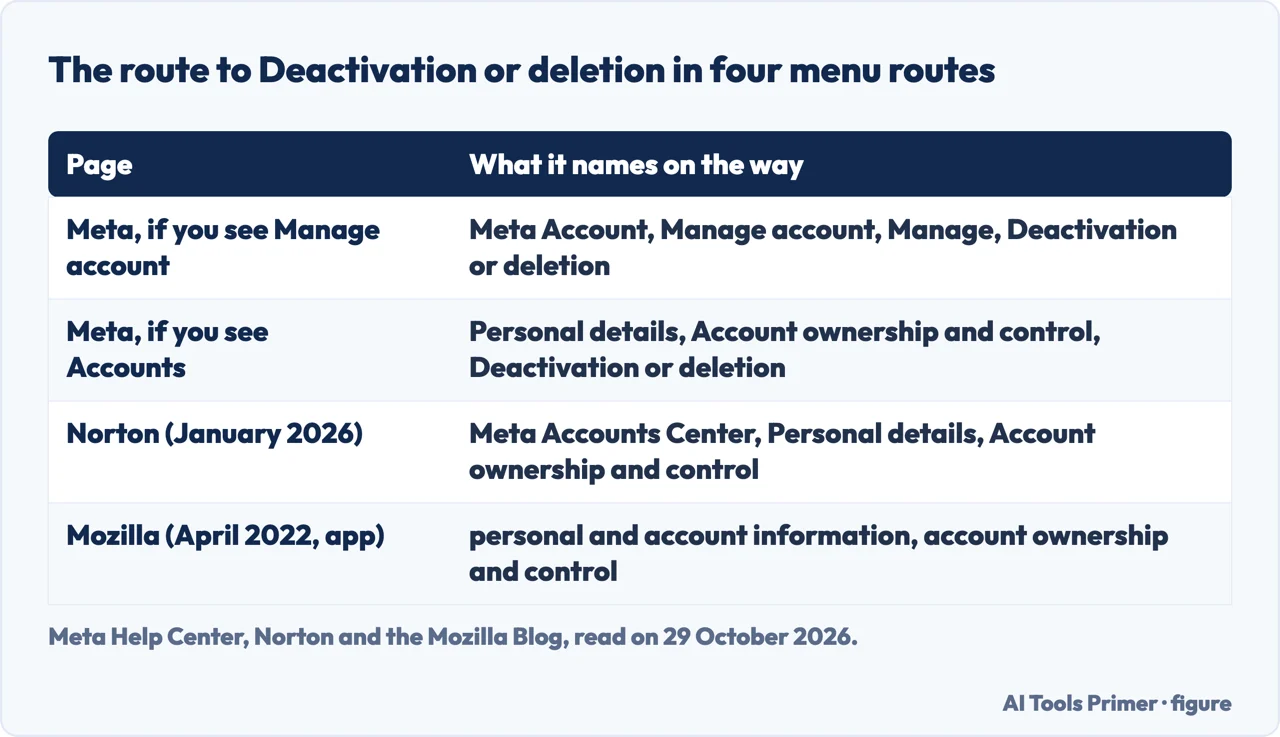
Meta says it is gradually updating people to Meta Accounts, so you may see either Accounts Center or Meta Account settings as the place to manage your account. Its deletion page therefore gives two sequences, and which one applies depends on what you see. Both begin the same way: click your profile picture at the top right of Facebook, choose Settings and privacy, then Settings.
If you see Manage account at the bottom of Meta Account:
- Click Meta Account at the top left of the screen.
- Click Manage account, then Manage.
- Click Deactivation or deletion.
- Follow the instructions, click Continue, then follow the instructions to confirm.
If you see Accounts at the bottom of Accounts Center:
- Click Meta Account, then Personal details.
- Click Account ownership and control, then Deactivation or deletion.
- Click the profile you want to delete, then Continue.
- Follow the instructions on the screen to delete the profile.
Deactivating uses nearly the same menus, though the names differ: Meta’s deactivation page says Accounts Center and Manage accounts where the deletion page says Meta Account and Manage account. That deactivation page gives both variants and ends with Deactivate account, then Continue and the confirmation. Norton says the same: follow the same instructions as for deleting, but select Deactivate account. On the phone app, Norton’s deletion steps are the three-line menu, Settings & privacy, Settings, Meta Accounts Center, Personal details, Account ownership and control, Deactivation or deletion, your account, Delete account and Continue; it then asks you to enter your password and follow the instructions to confirm. Norton says the steps are the same on iPhone, iPad and Android.
The names do move. The Mozilla Blog’s April 2022 page sends the app user through personal and account information, account ownership and control, and deactivation and deletion, and sends the browser user through your Facebook information. Those are not the menus Meta and Norton name in 2026, which is the reason to follow the labels on your own screen rather than a remembered path. Mozilla’s page also says Facebook will start deleting the account in 30 days and to make sure not to log back in before then. We did not run these steps on an account; they are taken from the pages named.
The waiting period, and the numbers that disagree
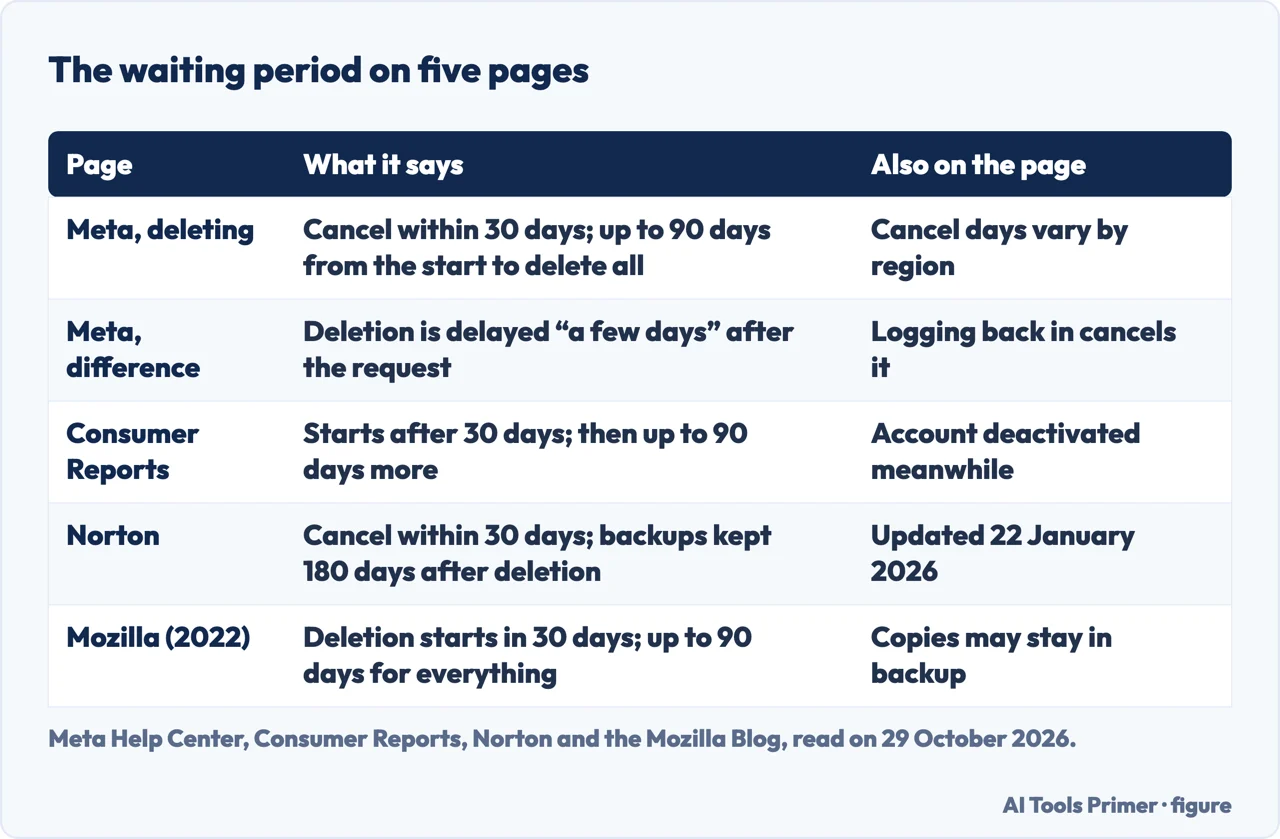
Meta’s deletion page says that if it has been less than 30 days since you started the deletion, you can cancel it. To cancel, log into your Facebook account within 30 days and click Cancel deletion. It adds a note that the number of days you can cancel varies by region, and the pages we read do not list the regions. After 30 days, Meta says, the account and all its information will be permanently deleted and you will not be able to retrieve it. Separately, it says it may take up to 90 days from the beginning of the deletion process to delete everything you have posted, and that while this is happening the information is not accessible to other people using Facebook.
Meta’s other page, the one on the difference between deactivating and deleting, gives a different delay. It says Meta delays deletion a few days after it is requested, and that a deletion request is cancelled if you log back into the profile during that time. That is shorter than 30 days, and neither Meta page says why they differ. We report both as written.
Consumer Reports, Norton and Mozilla all say 30 days. Consumer Reports adds that your account is treated as deactivated in the meantime, so its data is not accessible to other users, and that once the account is deleted it may take up to 90 days more for Meta to erase the information from its systems entirely, according to the company. That is a different reading from Meta’s own wording, which counts the 90 days from the beginning of the process. The pages do not say which reading is meant.
Backups are the other number. Meta says copies of your information may remain after the 90 days in backup storage used to recover from a disaster, a software error or another data loss event, and that it may also keep information for legal issues, terms violations or harm prevention. It gives no number of days for that. Norton does: it writes that the platform retains backup copies of accounts for 180 days after deletion. The Meta pages we read do not contain that figure, so it is Norton’s claim and not Meta’s. Meta’s page on the difference also says copies of some material, with log records as the example, may remain in its database but are disassociated from personal identifiers. The Mozilla Blog’s 2022 page describes backup storage in similar terms but is the oldest page here.
What stays after deletion
Messages you sent. Four of the pages say it in their own words. Meta says copies of messages you have sent are stored in your friends’ inboxes; Meta’s page on the difference says friends may still have access to them; Consumer Reports says messages you sent will still be visible in friends’ inboxes; and Norton says they will still be accessible on other people’s accounts.
Copies Meta may keep. Past the 90 days Meta’s wording is “may remain”, with no list of which data that covers and no number of days; the 180 days is Norton’s, and the reasons Meta gives are in the section on the waiting period.
Other Meta accounts. Consumer Reports points out that Meta also owns and operates Instagram and WhatsApp, and says that to purge yourself from Meta’s apps entirely you may need to delete other accounts as well. Meta’s deletion page says the other profiles in your Meta Account are not affected. For the Instagram side, see deleting an Instagram account.
Data collected away from Facebook. The EFF’s guide, dated 17 January 2025, makes a wider claim: that Meta’s tracking tools are embedded in millions of websites and apps, so you cannot escape the company’s tracking just by deleting Facebook and Instagram. It says the tracking pixel is found on 30% of the world’s most popular websites, and that Meta admitted in 2018 to collecting information about non-users, including contact details and browsing history. EFF gives settings for people who keep an account: under Ad preferences in Accounts Center, the Activity information from ad partners and Ads shown outside of Meta settings, and under Your information and permissions, Your activity off Meta technologies, then Manage future activity, then Disconnect future activity, which EFF says may take up to 48 hours to take effect. We did not test those settings.
If the aim is to be harder to find rather than gone, making a Facebook profile private and locking a Facebook profile are the two narrower options, and your digital footprint gathers the rest of what is findable about you.
What the pages do not say
Everything above is from help pages and guides; we deleted nothing on a live account. Some questions remain open on the pages we read.
- The exact number of days to cancel in each region. Meta says only that it varies.
- Which data remains in backups beyond the 90 days, and for how long. Meta says “may remain”; the 180 days is Norton’s.
- What to do if the confirmation email does not arrive or the password is forgotten. The pages we read do not mention either case.
- How to confirm that the deletion has finished. The pages we read do not mention a confirmation.
- How long a deactivation can last. Meta calls it temporary and the pages state no limit.
- Whether signing in to another app with Facebook during the waiting period counts as logging back in. Meta’s deactivation page says that using your Facebook account to log in somewhere else reactivates a deactivated profile, while the deletion pages say only to log into your Facebook account to cancel; the pages do not say how the two meet.
Nothing on this page comes from forum threads, from a video, or from PCMag’s guide, which returned only a few words to our reader. Other accounts have their own guides: deleting a Gmail account for the address you may have used to sign up, and deactivating Messenger if you want to stop at the chat app.
Where to start
Four ways in.
- “Is deleting the same as deactivating?”
- Deactivate or delete: what Meta lists for each — difference
- “What do I do first?”
- Before you press anything — before
- “Where is the button?”
- The steps, under two menu names — steps
- “How long until it is gone?”
- The waiting period, and the numbers that disagree — waiting
Facebook, short of deleting it
The narrower options, and the one page about a Page.
Other accounts to close
The same question asked of the rest of the Meta family and of a Google address.
Questions people also ask
How do I permanently delete all my Facebook accounts?
Meta’s page on additional profiles says that deleting or deactivating your account also deletes or deactivates all profiles under it, and that an additional profile can be deleted on its own from Deactivation or deletion, with its data permanently deleted after 30 days. Meta’s deletion page words it differently, saying the other profiles in your Meta Account are not affected.
How do I delete one of my Facebook accounts on my phone?
Norton gives the app route: the three-line menu, Settings & privacy, Settings, Meta Accounts Center, Personal details, Account ownership and control, Deactivation or deletion, your account, Delete account, Continue. For an additional profile, Meta’s page gives Accounts Center, Manage accounts, Account ownership and control, Deactivation or deletion, then that profile and Continue.
How do I permanently delete my Facebook page?
Meta says Pages that only you control are deleted with the profile unless you first give someone else full control of the Page. Deleting a Page by itself is covered in our page on deleting a Facebook Page.
How do you delete your Facebook account on an iPhone?
Norton says its app steps are the same on iPhone, iPad and Android, ending with your password and the on-screen confirmation. Consumer Reports gives the app route as Menu, Settings & Privacy, Settings, Accounts Center, Personal Details, Account Ownership and Control, Deactivation or Deletion, then your account and Delete Account.
Not covered here. We deleted nothing on a live account. The statements come from four Meta Help Center pages, Norton, Consumer Reports, the EFF and the Mozilla Blog, read on 29 October 2026; the Mozilla page dates from 2022 and is used only for comparison.
The search volume and difficulty behind this page come from a Semrush reading of 29 August 2026, older than the 60 days the site normally allows.
Sources
- Meta Help Center — Permanently delete your Facebook profile — www.facebook.com, read 29 October 2026.
- Meta Help Center — Learn the difference between deactivating and deleting your profile — www.facebook.com, read 29 October 2026.
- Meta Help Center — Temporarily deactivate your Facebook profile — www.facebook.com, read 29 October 2026.
- Meta Help Center — Delete, deactivate or reactivate an additional Facebook profile — www.facebook.com, read 29 October 2026.
- Norton — How to delete or deactivate your Facebook account (updated 22 January 2026) — us.norton.com, read 29 October 2026.
- Consumer Reports — How to Delete or Deactivate Your Facebook Account (updated 29 January 2025) — www.consumerreports.org, read 29 October 2026.
- EFF — Mad at Meta? Don’t Let Them Collect and Monetize Your Personal Data (17 January 2025) — www.eff.org, read 29 October 2026.
- The Mozilla Blog — How to delete your Facebook account (22 April 2022) — blog.mozilla.org, read 29 October 2026.
Written by Alberto Gulotta
Founder and editor of AI Tools Primer, writing from Palermo, Italy. Thirty-five years of taking computers apart, starting with a Commodore 64 — the long version is on the about page.
Something wrong on this page? Write to aitoolsprimer@gmail.com and it gets fixed.
Written on 29 October 2026.
Independence and limits
No affiliate links and no paid placements anywhere on this site. Nobody pays to appear here, and no company has seen this page before you did.
This is general information, not professional advice. Where a page touches money, health, safety or the law, it names its source and the date it was read — and your situation may still differ. See the privacy page and the cookie policy.