
Footprint · guide
How to remove personal information from Google: the sources
By Alberto Gulotta · Updated · 19 min read
How to remove personal information from Google comes down to asking it to drop a result from search, not to delete the page behind it. Google's help pages, Help Net Security, Wired and three company pages describe the request form, Results about you, the legal route and a tool for changed pages, and differ on timing.
| Question | Answer | Where it comes from |
|---|---|---|
| Does it delete the page? | No: Google can only remove things from Google Search results | Google, Wired |
| What can be reported? | Contact details, government IDs, bank and card numbers, private records, doxxing | |
| What do you send? | The addresses (URLs) of the pages; only those are reviewed | |
| What happens to the result? | Hidden from every search, or only from searches that contain your name | Google, Wired |
| How long does it take? | Google and Wired give no time for a decision; NordVPN, a seller, does | Google, Wired, NordVPN |
| What if the page has changed? | A separate tool refreshes outdated results | FMG, Quattr |
Google removes the result, not the page
Google’s help page on removing private information says Google can only remove things from Google Search results, and that taking something off the website that hosts it means contacting the website’s owner. The same page adds that even after Google removes a result, the content might still be on the internet, where people can find it through links, social media or other search engines. Help Net Security, reporting on a Google announcement in August 2023, relays the same point from Danielle Romain, Google’s VP of Trust: removing content from Google Search does not remove it from the web or from other search engines. Wired, writing in May 2024, says that getting results scrubbed will not remove web pages from the internet but will “divert a huge driver of traffic”.
NordVPN, which sells a VPN and promotes a data removal tool called Incogni on the same page, draws the same line from the other side. Google does not own websites and does not store content, it says, but only displays it, so the most effective way to remove unwanted results is to contact the owner or administrator of the site that hosts the content. It lists three ways to reach them: a “Contact us” link or an email address on the site, a “whois” search on Google to find the owner, and, if the owner cannot be reached, the hosting company that the same search shows. NordVPN is a seller. The Google page we read points to contacting the owner through a link and does not list these three ways.
A request can end in more than one way. Google’s help page says that if it removes the website from search, you get an email. In a full removal, the website no longer shows up on Google Search. In a partial removal, it does not show up for any search query that contains your name or identifier, but it might show up for a different search. The Results about you page describes the same two outcomes for approved URLs: the URL does not appear for any search query, which it says is what happens most of the time, or it does not appear for queries that contain your name, which it calls query-based removal. The second outcome, it says, applies when the page also carries content considered valuable to the public or information that belongs to other individuals or businesses. Wired adds a third possibility: it says there is no guarantee, and that the page could be removed from all searches on Google, only from searches involving your name, or from neither.
What Google will take down, and what it will not
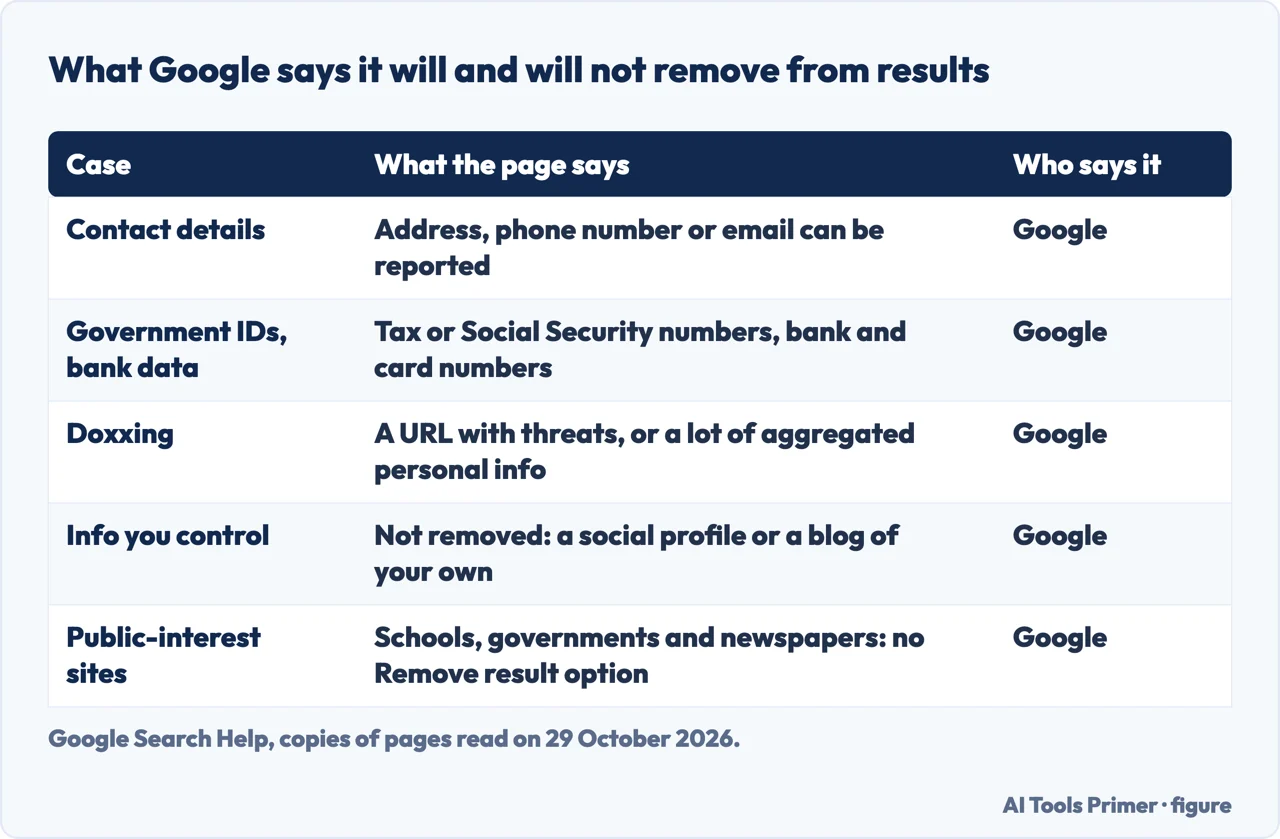
Google’s page lists what you can ask to have removed: your address, phone number or email; confidential government IDs such as Social Security or tax ID numbers and a resident ID card number; a bank account or credit card number; pictures of a signature or an ID; private records such as medical records; and confidential usernames and passwords. It adds a tip for the first group: to find results with your address, phone number or email, use the Results about you feature, which can also send notifications about new results. The page also says anyone can report nude or sexual pictures that show people under 18. Help Net Security adds explicit images: if you created and uploaded explicit content to a website, then deleted it, you can ask for its removal from Search when it is being published elsewhere without approval, and the policy does not apply to content you are currently commercializing. Wired mentions images of minors and deepfake pornography in the same list of requests Google considers.
Doxxing has its own entry. Google defines it as people sharing your private information to harm you, and says you can ask for removal as long as there is a URL with one of two things: your personal information along with threats, explicit or implicit, against you, or calls for others to harm or harass you; or a significant amount of aggregated personal information without a legitimate purpose. Our page on the first hour after doxxing covers the sequence of steps around it.
The limits come from the same pages. The Results about you help page says the contact details on the result must be your personal information, and that a request about professional information posted with the intent to harm you goes through the detailed removal form. It says you must not control the information yourself, for example on a social media page or a personal blog you own, and that Google will not remove information valuable to the public: it names web pages owned by educational or government institutions and by newspapers, and says a result from a website like these has no “Remove result” option. The private information page says Google will usually take down content that breaks its rules, but if the content is newsworthy, Google might not. Help Net Security quotes the same principle in 2023: Google evaluates the whole page so as not to limit information that is broadly useful, for instance in news articles, and does not remove content that appears as part of the public record on the sites of government or official sources.
NordVPN’s list of what cannot be removed is broader and written by a seller: publicly available information unless it contains removable personal data, information posted by others when it does not violate Google’s policies, legal and government documents, and information of public interest.
The ways to ask, and a legal route
Google’s pages describe two doors. The first is the Results about you tool, where you enter your name and the personal information you want checked. Google says you can also add a nickname, a maiden name, several phone numbers, several home addresses and several email addresses, and turn on notifications by email or in the Google app. You remove a single result with “Request to remove”, or choose “Mark as reviewed” if you do not want to start a request. Each request shows one of four states, In progress, Approved, Denied or Undone. If a request is denied, Google says you get an email and the Results about you page shows the reason it was not approved. Google also says that undoing a request does not guarantee the page will reappear for you or others, and that a request sent through Results about you on behalf of someone else from your own Google Account may be denied, so the detailed form is the route for that. A paywalled page can still be reported. Our page on Results about you goes through the tool; here it is one door among several.
The second door starts from Google Search itself. Google says to search for your name, open the About this result panel with More, and choose Remove result, then the option saying the result shows your personal information, then Contact Info. Enter your name and the contact details exactly as they appear on the result. One type of contact information is enough, and you do not need several requests for the same URL. A confirmation email arrives within the next few hours. If the request is for someone else, or you do not want to sign in, Google points to the detailed removal request form, which is also the form for results that show personal information about a person under 18.
Wired’s May 2024 walk-through describes that detailed form, and Google’s help pages we read do not list the same screens. You open Google’s support page, scroll halfway down and click “Start Removal request”, choose the option for content that contains your personal information and your country, and then say what type of information shows up, such as contact details or driver’s license information. Depending on the category, the form may ask for details such as the last four digits of a Social Security or bank account number. It asks whether the request is about doxxing, then for the URLs, up to 1,000 links at once according to Wired, and for the Search results where the content shows up. You attach a screenshot, list the search terms that make the results appear, and give your full name, country of residence and email. Wired says you can only submit requests about yourself or someone who has given you permission.
Google’s page explains the URLs and screenshots from its side. You or a representative can make the request if the information is about you; you must give the web addresses of the pages with your information, and “Only those URLs are reviewed”. Screenshots help Google find the content, since a picture or website can carry information that is relevant to you and to other individuals. Google suggests taking the screenshot on the device you use for the request, and says you can edit it to show only your face. On the data you give, the Results about you page says Google does not share it or use it to personalize other Google products; it is used to monitor, to process requests, to improve the process and to show the status of your requests over time. To stop monitoring, you select Remove all personal info in Settings.
The pages differ on where the tool is available. Help Net Security wrote in 2023 that the tool was available only in the US and only in English. Google’s page, as read on 29 October 2026, says some features are rolling out for users over 18 in certain markets. The pages we read do not list the countries.
When the content is not covered by Google’s private, sensitive or sexual content policies, which Google says apply globally, the private information page says specific local laws may apply in your country or region. In that case you create a request through the Legal Help Center; the page links this as Reporting Content for Legal Reasons. NordVPN names the same legal request for sensitive, harmful or illegal content that the site owner refuses to remove, and adds that you can report the website to its hosting provider, its domain registrar, Microsoft and law enforcement or governmental bodies. Our page on the right to be forgotten covers where a legal right to removal exists.
How long it takes: the pages do not agree
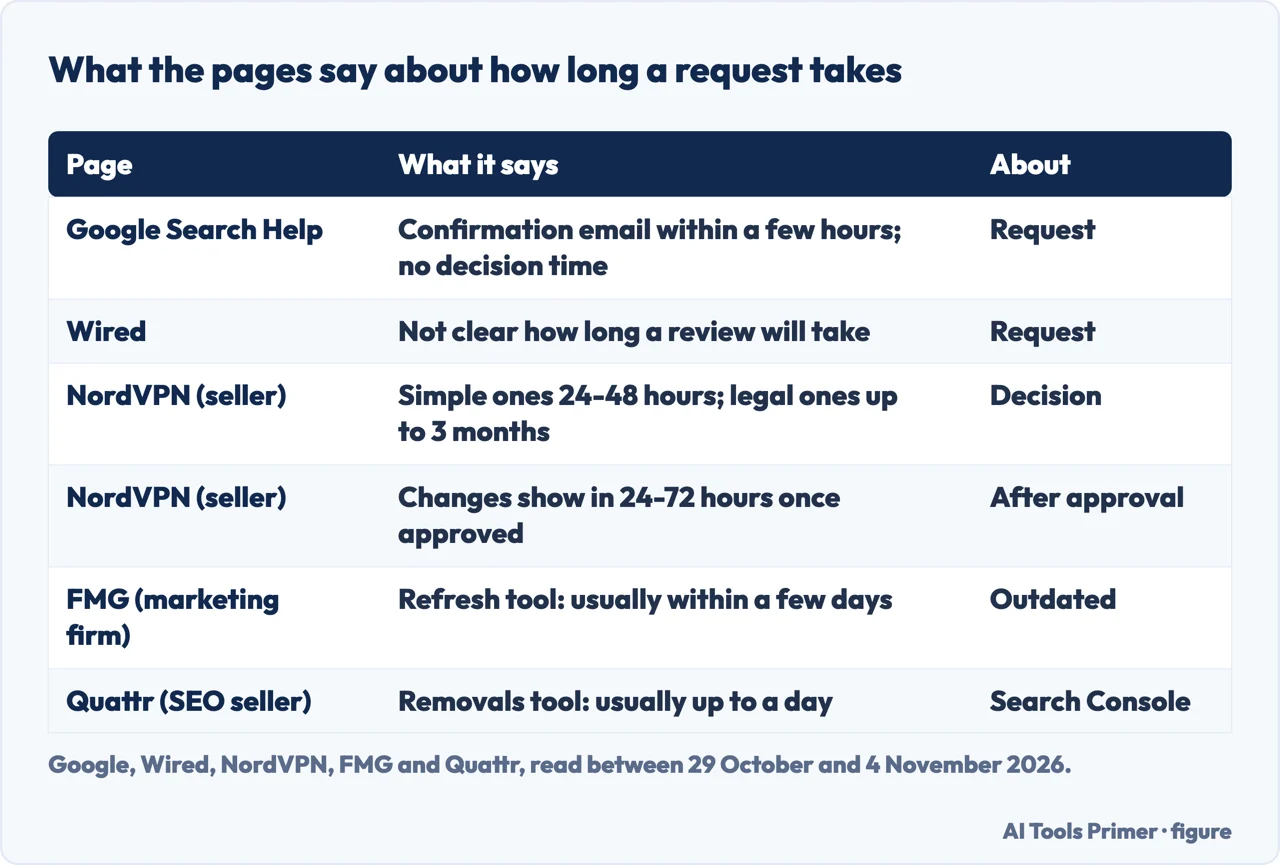
Google’s pages give two times, and neither is a decision time. The confirmation email arrives within a few hours of submitting, and after a request is approved, the Results about you page says there may be a delay before the result is removed from search; you can check whether your information is gone within a few hours after approval. The two Google pages we read give no number of days for the decision. Wired reaches the same blank from the outside: it says it is not clear how long it will take to review your case, but that Google may tell you when it has decided to take action or to do nothing, with brief explanations.
NordVPN puts numbers on it. Simple removal requests typically take 24 to 48 hours, it says, most are completed within a few days to several weeks, and complex cases or legal requests can take up to 3 months. Once a request is approved, it says, the change usually shows in Google’s results within 24 to 72 hours, though it may take longer to reach all devices and regions. For the Results about you scan, NordVPN says the search for your information can take up to 6 hours, where Google says that, if you have notifications on, you get a notification within a few hours.
The two company pages on outdated results give times for the other tools. FMG says Google reviews a request to the refresh tool and, if it accepts, updates or removes the snippet and the cached copy usually within a few days. Quattr says a Search Console removal request usually takes up to a day to process, is not guaranteed to be accepted, and that you check back in the tool for its status. These are different tools from the personal information request, so the figures are not a forecast for it.
When the page has already changed
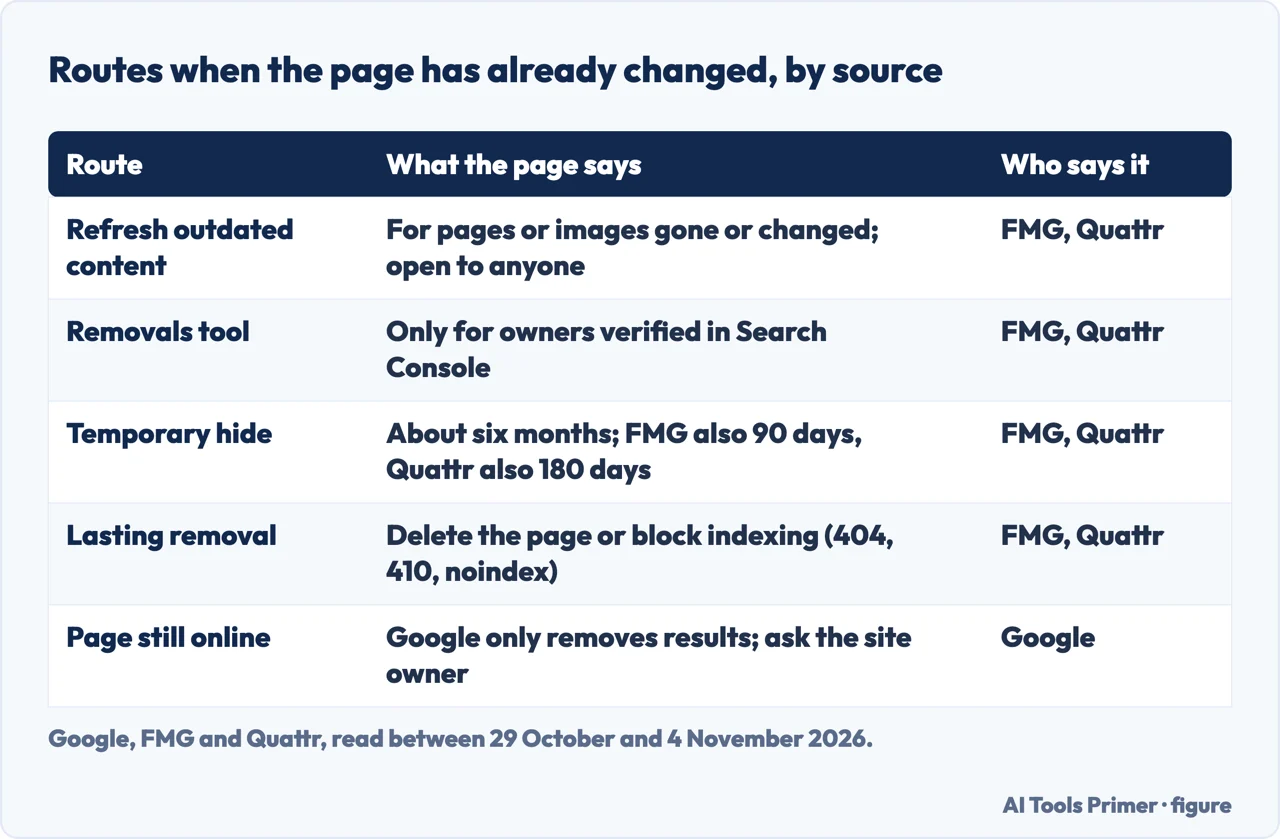
A different problem is a result that still shows old information after the website was updated. Google’s private information page says you can ask Google to refresh a search result in that case, and lists “Refreshing outdated content” among its related resources. NordVPN gives the same case for personal data: if the website owner already removed your information as you asked, you can ask Google to take the outdated information off its search by sending a webpage removal request. Our page on old social accounts already reads Google’s own page on refreshing outdated content: it says to choose Request refresh and enter the address of the page, that no form is needed if you have already updated a live page, and it does not say how long a refresh takes. For this page we did not re-read it, so the steps below come from two company pages, FMG’s knowledge base and Quattr, which promotes its own SEO service on its page.
Both describe a tool for pages or images that no longer exist or whose content changed. FMG says it is available to anyone with a Google account, not only site owners, and suggests it if you do not own the web page. You open the Remove Outdated Content page, sign in, and enter the URL. If the page still exists but the content has changed, you may be asked for one or two words that used to appear on the page and no longer do. For an image, you copy its link address from Google Images, paste it, and select Image. If Google accepts, FMG says, it updates or removes the snippet and the cached copy. Quattr adds the outcome in two cases: if the page is no longer available, it is removed from Search; if it is still available but changed, the snippet is removed and refreshed the next time Google’s crawler visits. Quattr says the effect depends on whether the page has significantly changed or been removed, and FMG says the URL may still appear in results until Google re-crawls it.
The Removals tool in Google Search Console is the other route, and both companies say it is only for people who own the property. FMG’s steps are Index, then Removals, then New Request. It offers Temporary Remove URL, which hides the URL for approximately six months and clears the cached copy, and Clear Cached URL, which clears the cached copy and the snippet until the page is crawled again. The figures are not consistent: FMG writes approximately six months and then says requests expire after about 90 days for temporary removals and six months for some cache removals, while Quattr writes about six months in its steps and 180 days in its summary of the tool, and says the page can reappear after the period. For a lasting removal, FMG says to delete the content or block it from indexing with robots.txt or a noindex tag, and Quattr lists noindex and a 404 or 410 status code.
Google’s Results about you page adds that, if you are comfortable doing so, you can contact the website owner and ask for the information to be removed from the source web page, which in turn removes it from Google Search results.
What we did not use
We tested nothing: we sent no request to Google and did not open the Results about you tool, which needs a sign-in. The two Google help pages are copies of readings from 29 October 2026; on 4 November Google answered a new read with a check for robots, which we did not get around, so the wording may have changed since. For this page we did not read Google’s own pages on refreshing outdated content (our page on old social accounts did) or on Search Console removals, and the description of both tools here rests on FMG and Quattr. The Google AI box and the answers under People also ask were not read, only the four questions. The pages we read do not list the countries where the tool works, do not say how long a decision takes (Google and Wired), do not say whether a copy stays in Google’s cache after approval beyond mentioning a delay, and do not say what happens if the same request is sent again after a refusal.
Where to start
Four ways in.
- “What will Google take down?”
- What Google will take down, and what it will not — scope
- “How do I ask?”
- The ways to ask, and a legal route — request
- “How long does it take?”
- How long it takes: the pages do not agree — time
- “The page has changed.”
- When the page has already changed — changed
Looking and asking
Finding what is there, and the rights behind a request.
Taking it down
Opt-outs, paid services and emergencies.
Questions people also ask
How do I stop Google from showing my personal information?
Google says you can ask it to remove results that show your address, phone number, email, government IDs or bank details, through Results about you or a removal form. It removes only the result: the page stays online, and the site owner has to take the content off.
Can I tell who has googled my name?
The pages we read do not say whether Google shows who searched for a name. What Google describes is Results about you, which regularly checks whether results match your name and personal information, and sends a notification if you turn notifications on.
How do I remove my personal information from the internet for free?
The Google pages we read do not mention a charge. NordVPN, a seller, says most of the methods it lists cost nothing, such as the Results about you tool, the content removal forms and contacting site owners. Removing a result from Google does not remove the page from the web.
Can you block yourself from being googled?
The pages we read do not describe a way to block it. The nearest outcome is a partial removal, where Google says the page does not show up for searches that contain your name or identifier, though it might still show up for other searches.
Not covered here. We tested nothing on a Google form. The statements come from two Google Search Help pages (copies of readings of 29 October 2026), Help Net Security, Wired, NordVPN (a seller, for its own claims only), FMG and Quattr (for the tool on outdated results only), read between 29 October and 4 November 2026.
The search volume and difficulty behind this page come from a Semrush reading of 29 August 2026, older than the 60 days the site normally allows.
Sources
- Google Search Help — Remove my private info from Google Search — support.google.com, read 29 October 2026.
- Google Search Help — Find and remove personal info in Google Search results — support.google.com, read 29 October 2026.
- Help Net Security — Google makes removal of personal user info from Search easier (4 August 2023) — www.helpnetsecurity.com, read 29 October 2026.
- WIRED — How to Remove Your Personal Info From Google’s Search Results (20 May 2024) — www.wired.com, read 4 November 2026.
- NordVPN — How to remove personal information from Google (21 December 2025, a seller) — nordvpn.com, read 4 November 2026.
- FMG — Google Search Console, how to remove outdated content (outdated results tool only) — help.fmgsuite.com, read 4 November 2026.
- Quattr — How to remove outdated content using Google tools (outdated results tool only) — www.quattr.com, read 4 November 2026.
Written by Alberto Gulotta
Founder and editor of AI Tools Primer, writing from Palermo, Italy. Thirty-five years of taking computers apart, starting with a Commodore 64 — the long version is on the about page.
Something wrong on this page? Write to aitoolsprimer@gmail.com and it gets fixed.
Written on 4 November 2026.
Independence and limits
No affiliate links and no paid placements anywhere on this site. Nobody pays to appear here, and no company has seen this page before you did.
This is general information, not professional advice. Where a page touches money, health, safety or the law, it names its source and the date it was read — and your situation may still differ. See the privacy page and the cookie policy.