
Footprint · guide
How to Google yourself: what to type and where to look
By Alberto Gulotta · Updated · 17 min read
How to Google yourself starts before you type: UT Southwestern says to use an InPrivate or Incognito window, then your name in quotes with an email address, town or phone number added. Google’s page on personalization adds that location, language, device type and current searches are still used even with personalization turned off.
| Question | Answer | Where it comes from |
|---|---|---|
| Which window do I search in? | UT Southwestern says InPrivate or Incognito; Google’s page on personalization does not mention a private window | UT Southwestern, Google Search Help |
| What do I type? | Your name in quotes, then an email address, town or phone number; Google suggests your name with your home city or address | UT Southwestern, Google Search Help |
| Which other names do I try? | Misspellings, nicknames, a middle name, and current and past names with schools, employers and places | NetReputation, Harvard Chan |
| Where else do I look? | Other search engines, social media, people-search sites and a reverse image search | Harvard Chan, NetReputation, Incogni |
| How do I keep watching? | A Google Alert for your name, and Google’s Results about you tool | Harvard Chan, NetReputation, Incogni, Google Search Help |
Before you type: the window and what it changes
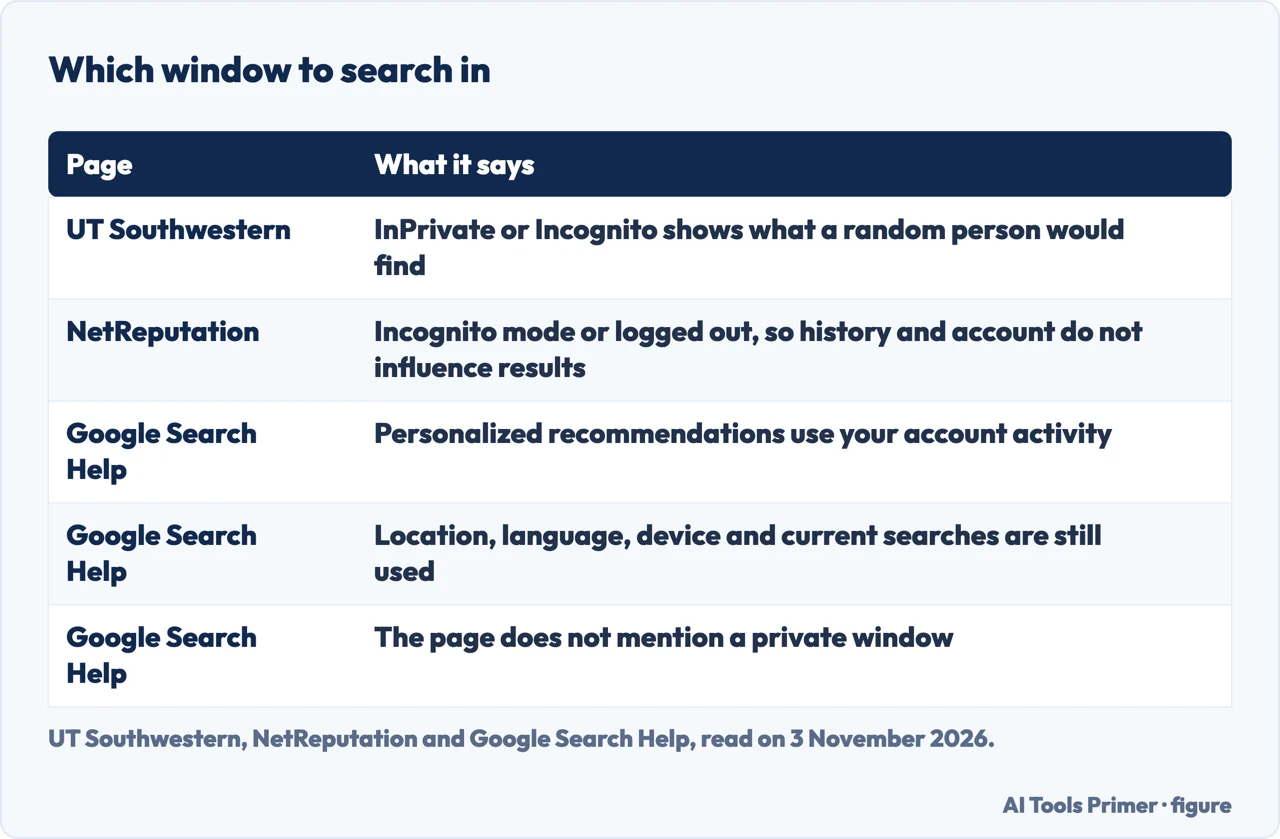
UT Southwestern’s information security page, published on 8 August 2022, gives the reason first: search the internet to see what information about you is publicly available, because the same resources are open to cybercriminals who can use what they find to target you. For the window, it says to search in InPrivate or Incognito mode, and it gives the purpose as seeing the results a random person would find. NetReputation, a reputation-management company, gives the same advice in other words: use incognito mode or log out of your accounts to ensure unbiased results, so that your search history or a logged-in account does not influence what you see. Our page on Incognito mode has more on that window.
Google’s own help page on personalization in Google Search results explains why the advice exists. With Personalized Recommendations on, Google Search shows results based on info in your Google account, like your activity. Not all results are personalized. Sometimes personalization changes the order of the results, and sometimes it changes the order in which content blocks appear: the page says that if you usually watch videos, Google puts videos at the top instead of websites. A message at the bottom of the Search page says whether the results are personalized, and a “Try without” link there shows the results without personalization. The page adds that your settings don’t change if you click it, and that results sometimes look the same with personalization off, because Google did not need to change them much.
The same page lists what stays in use. Even with personalized recommendations off, Google still uses your location, language, type of device and current searches; its example is that a search for pizza near me returns pizza places in your city. It also notes that results can vary between people for reasons other than personalization, such as language settings or localized results. To turn personalization off while signed in, the page names the setting Personalized Recommendations; while signed out, Search customization. A notice at the top says Google is updating the settings for its Search services, so the steps may not match what you see.
The sources differ here. UT Southwestern and NetReputation recommend a private window, and Google’s personalization page does not mention one. Putting the pages side by side is our reading, not a statement from any of them: because location, language and device still count, a private window may not give the view of a stranger somewhere else. The pages we read do not measure how much the results differ between a private window and a normal one, so we describe the private window as the step two pages recommend and not as a guarantee.
What to type
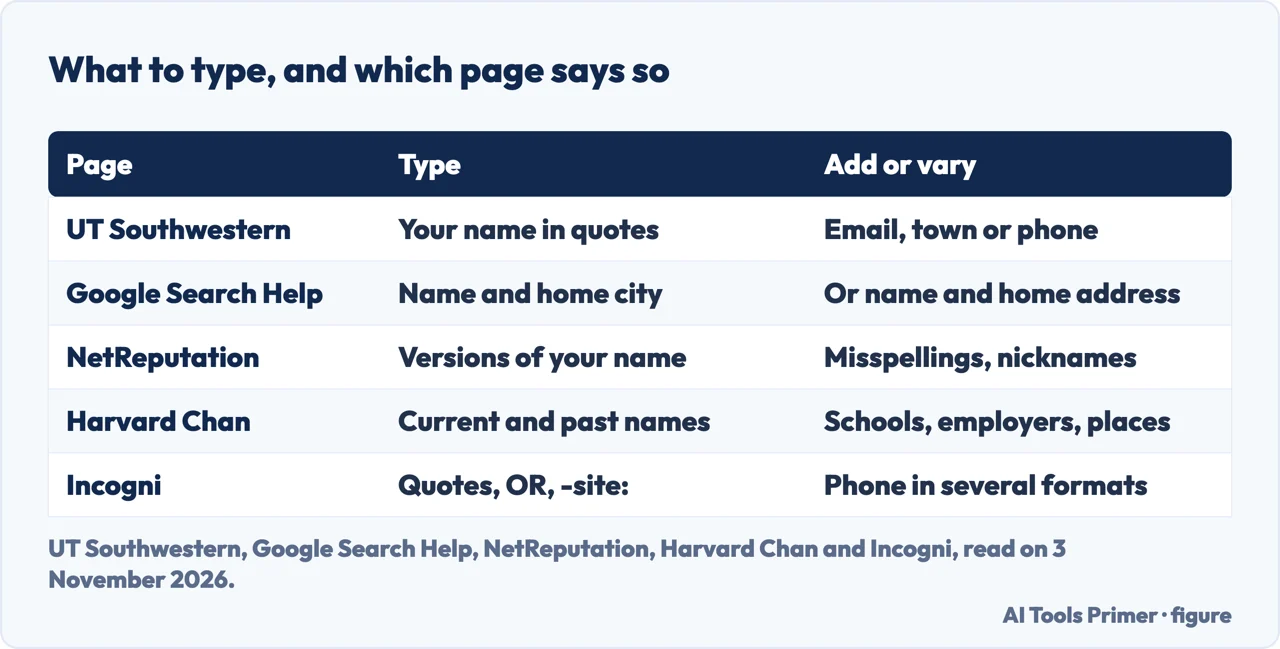
UT Southwestern’s steps are short. Open a browser search box and start by typing your name in quotes, then add more information such as your email address, the town you live in, or your phone number. Google’s help page on finding personal info gives two combinations for the case where you want results that show your contact details: your name with your home city, or your name with your home address. The two pages choose different second terms, an email, a town or a phone number on one side and a city or an address on the other, and neither page ranks them.
NetReputation and Harvard Chan add variations. NetReputation says to search for different versions of your name, including common misspellings, nicknames and middle names, and gives the example of Johnathan Smith trying “Jon Smith,” “John Smith” and “J. Smith.” It also suggests keywords from your profession, interests and activities, such as “portfolio” for a graphic designer. Harvard Chan’s Center for Health Communication takes the angle of someone looking for you: use information that could be gathered from your resume, public bios or a university directory, and try different combinations of current and past names, schools, employers and places of residence.
The search operators, as one company explains them
Among the pages we read, Incogni, a data-removal company whose page was updated on 22 October 2026, is the only one that names operators beyond quotation marks, such as OR, site: and filetype:; the UT Southwestern, WashU and Harvard Chan pages name none of them. Quotation marks, it says, tell Google to look only for exact matches. OR joins alternatives, so one query can hold a name, a variation, a username, an email address and a phone number written in several formats. Parentheses set the order. A minus sign before site: and a domain leaves a site out, and Incogni says popular platforms can flood the results, and its example leaves out Facebook, LinkedIn and X; site: on its own searches within one website. The filetype: operator looks inside downloadable documents, and the page lists PDF, Word and Excel formats and CSV. Its reason is that many recruitment and job portals store resumes as PDF or Word files, and Google may index some of them. It also names intext:, which restricts the search to words in the body of a page, and inurl:, which searches the words in a web address.
Incogni also warns that not every operator in older guides still works. It says Google retired related: in 2023 and cache: in 2024 and dropped both from its help pages, and that they are still listed in plenty of guides. Its own cheat-sheet table and one of its examples still use related: next to that warning. We did not try any operator; each one above is as Incogni describes it.
Where else to look
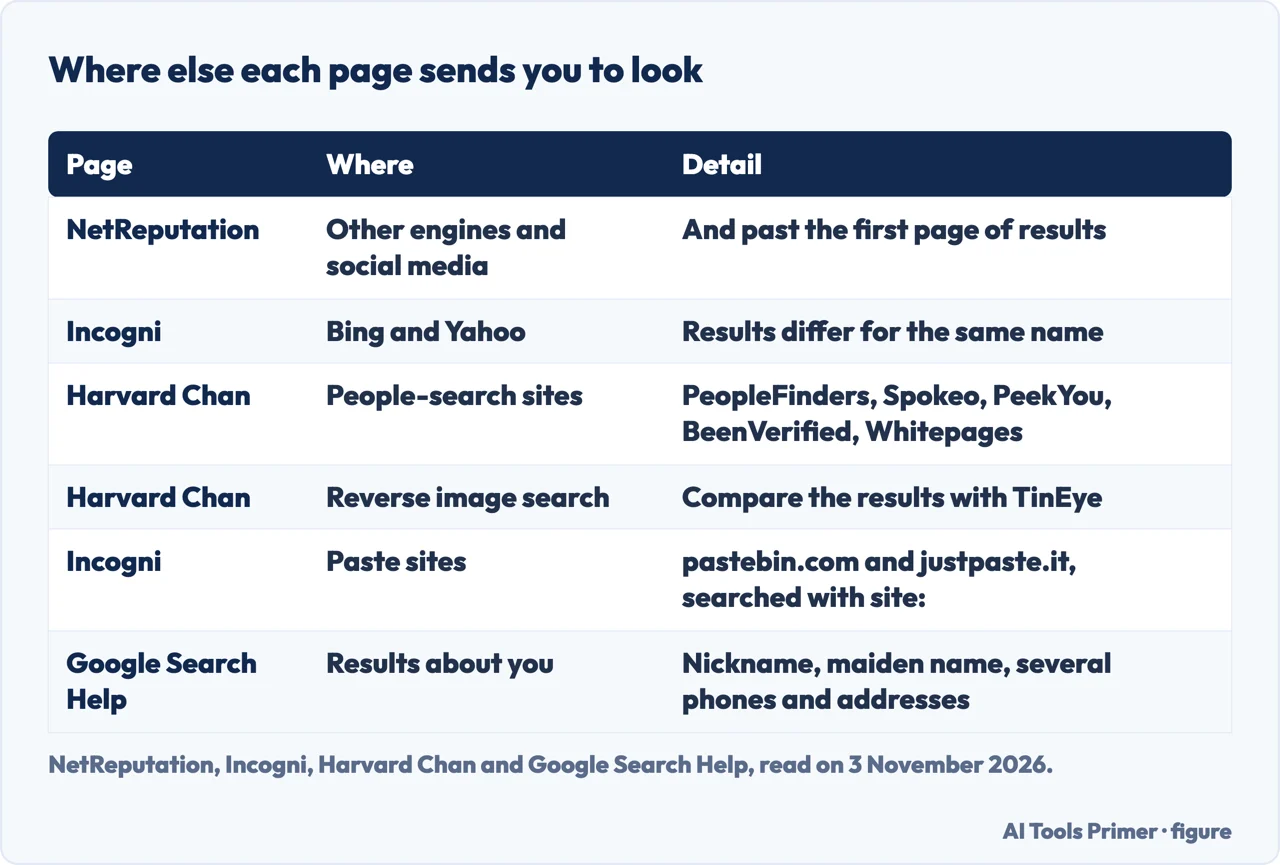
NetReputation says not to stop at the first page of results, because valuable insights may be hidden deeper in the search pages. It also says to expand beyond Google to other search engines and to social media platforms, narrowing the results with professional titles, locations or exact phrases in quotes. Harvard Chan likewise says to run the searches on multiple search engines and on social media. Incogni adds a detail: Bing and Yahoo return different results for the same name, and quotation marks, site: and filetype: work there too. Its advice is to run your best query on all three.
People-search sites are the next stop on two pages. Harvard Chan names PeopleFinders, Spokeo, PeekYou, BeenVerified and Whitepages as databases to search for yourself. Incogni describes people search sites as businesses that make money by collecting, organizing and selling personal data, uses whitepages.com, spokeo.com and beenverified.com in its example and lists more, and says hundreds of such sites operate in the United States. WashU gives the same kind of business a plain definition, organizations that collect and sell information, and says that some of what you find is available through government agencies while data brokers post other information. The removal side is on our page about data broker opt-outs.
Incogni also points at paste sites such as pastebin.com and justpaste.it, where people store and share text, often code. It says most pastes hold nothing sensitive, but personal information is sometimes uploaded, by accident or on purpose, and a paste can then be indexed by Google and become searchable. Its method is a site: search that combines your phrases with the names of those sites. It adds that ghostbin, zerobin and hastebin have shut down or stopped taking new pastes, that old pastes can stay in Google’s index long after the site behind them dies, and that you should search the phrases rather than the site list.
Harvard Chan reaches past your own name in two directions. It says you could run similar searches for the people you currently live with, or those you have lived with in the past. And it says to do a reverse image search to find where specific photos of you appear, following Google’s Help Center page on searching with an image and comparing the results with TinEye, which it describes as an alternative. It adds that if misinformation about you is circulating, authors may use headshots from a school or university website or a social media profile picture, so those are the images to start with.
What you may find, and why it matters
WashU’s Office of Information Security, in a post dated 4 October 2023, says that googling your name may turn up public information you did not expect to see, such as your phone number, email address or home address. Some of it is available through government agencies; data brokers post other parts. The page ties this to scams: cybercriminals can use public information in phishing attacks, and if your home address is public they can use it in delivery scams, sending a phishing email about a package delivery with your correct address that prompts you to click a link that looks legitimate but is malicious. UT Southwestern makes a related point in one line: do not assume an email, call or text is legitimate because it contains some accurate facts about you.
Harvard Chan gives a harsher reason. It calls doxing one common harassment tactic and defines it as widely sharing someone’s personal information, such as a home address and cell phone number. Searching for your own information, it says, helps you figure out what someone else might find, and doing it before a potential emergency gives you time to remove what you do not want easily accessible. It adds that the exercise can be a chance to change some of your own data privacy practices. If it has already happened to you, our page on doxxing: the first hour covers the order of steps.
NetReputation frames the search as a reputation habit and says potential employers often Google candidates’ names during hiring; that is a company’s statement, made by a firm that sells reputation services, and we attribute it as such. UT Southwestern also points to Have I Been Pwned to see whether an account has been involved in a data breach. The pages we read do not say that the number of results, or the position of a page in them, shows how exposed you are.
What to do with what you find
WashU says to Google yourself often and remove the information you do not want cybercriminals to know, and notes that social media apps let you customize your account’s visibility; it links to the Instagram, Meta and LinkedIn help pages for that. UT Southwestern says to verify the security and privacy settings of your social media accounts and to deactivate online accounts you no longer use. Neither page gives a schedule: WashU says often, and UT Southwestern titles its page with the question of when you last Googled yourself.
For contact details in Google results, the route is Google’s Results about you tool, described in its help page on finding and removing personal info. The tool takes your name plus contact details, and can send notifications when new results appear. Google considers some results valuable to the public, among them government or educational websites, online newspapers and business websites, and for a result from a site like that the page says you will not find a Remove result option. It lists the personal info it may approve for removal as a phone number, a home address and an email address. Our page on Results about you goes through the tool.
Google’s page is plain about the limit: removing a result that shows your personal info from Google Search does not mean the info is gone from the internet, because it still exists on the source web page, and to remove it from the source you contact the website’s owner. Help Net Security reported the same limit on 4 August 2023, quoting Google’s VP of Trust that removal from Search does not remove content from the web or other search engines. That article is a dated note: it says the tool was then available only in the United States and in English, and it says nothing about the tool today. Google’s current page says some of its features are rolling out in certain markets for users over 18.
Incogni lists four options when you find exposed data: delete it yourself, where it sits on accounts you control; ask Google to hide it from search results, which it says does not remove the data from the source; contact the websites directly, which it says can take time and does not guarantee success; or use a data removal service. Incogni sells such a service, so we use its page only for that list and for its tip to keep a list as you go, because every site you turn up becomes your removal queue. Our page on removal services looks at what that kind of service does.
One search is a snapshot, Incogni says, because data brokers refresh their listings and a profile taken down in March can reappear in June under a slightly different URL. For ongoing watching, Harvard Chan says to set up Google Alerts at google.com/alerts to automate the search: you enter different combinations of search terms, customize the notification settings to your comfort level, and receive updates when new Google results appear for them. NetReputation also tells readers to set Google Alerts for their name, and Incogni suggests one alert for your name in quotation marks and a second for your email address.
What we did not use
We did not run these searches on a real name, in a real browser or against a real account; every statement above is what a page says. Incogni and NetReputation are companies that sell removal and reputation services, and their pages are used for attributed facts only, never for their offers. We did not open the infographic, the Primerus article, the Reddit thread or the recruiting company’s post that we came across while choosing sources, and a University of Iowa page we tried to read came back empty, so we use none of them. The Google page on personalization does not mention private windows, and the pages we read give no cadence for searching, so neither appears as a rule here.
Where to start
Four ways in.
- “Which window do I use?”
- Before you type: the window and what it changes — before
- “What do I type?”
- What to type — type
- “Where else do I look?”
- Where else to look — elsewhere
- “I found something.”
- What to do with what you find — act
When you find something
Google’s tool, the data brokers and the emergency case.
Asking, and leaving less behind
Paid services, the private window and a legal right to ask.
Questions people also ask
How do I Google Search myself?
UT Southwestern says to open a browser search box, type your name in quotes and add your email address, town or phone number, in an InPrivate or Incognito window. Google suggests your name with your home city or home address to find results that show your contact details.
What happens if I Google myself?
WashU says you may find public information you did not expect, such as your phone number, email address or home address, some from government agencies and some posted by data brokers. Harvard Chan says the search shows what someone else might find.
How can I Google about myself?
Harvard Chan says to try combinations of current and past names, schools, employers and places of residence, on several search engines and on social media. NetReputation adds misspellings, nicknames and middle names, and Incogni explains quotes, OR, site: and filetype:.
Who is the #1 Googled person?
The pages we read do not say; they are about searching for your own name, not about who is searched most.
Not covered here. We tried the steps on no search engine and no account. The statements come from two Google Search Help pages, UT Southwestern, Harvard Chan, WashU, Help Net Security, Incogni and NetReputation, all read on 3 November 2026.
The search volume and difficulty behind this page come from a Semrush reading of 29 August 2026. That reading is older than the 60 days this site normally allows and was not repeated; it is used with the owner’s permission and should be measured again.
Sources
- Google Search Help — Find and remove personal info in Google Search results — support.google.com, read 3 November 2026.
- Google Search Help — Personalization & Google Search results — support.google.com, read 3 November 2026.
- UT Southwestern — When is the last time you Googled yourself? (8 August 2022) — www.utsouthwestern.edu, read 3 November 2026.
- Harvard Chan School, Center for Health Communication — Digital Safety DiscoTech: Search for yourself and set up Google alerts — hsph.harvard.edu, read 3 November 2026.
- Washington University in St. Louis, Office of Information Security — Google Yourself (4 October 2023) — informationsecurity.wustl.edu, read 3 November 2026.
- Help Net Security — Google makes removal of personal user info from Search easier (4 August 2023) — www.helpnetsecurity.com, read 3 November 2026.
- Incogni — How to find yourself on Google? (company blog) — blog.incogni.com, read 3 November 2026.
- NetReputation — How to Google Yourself: A Complete Guide (company blog) — www.netreputation.com, read 3 November 2026.
Written by Alberto Gulotta
Founder and editor of AI Tools Primer, writing from Palermo, Italy. Thirty-five years of taking computers apart, starting with a Commodore 64 — the long version is on the about page.
Something wrong on this page? Write to aitoolsprimer@gmail.com and it gets fixed.
Written on 4 November 2026.
Independence and limits
No affiliate links and no paid placements anywhere on this site. Nobody pays to appear here, and no company has seen this page before you did.
This is general information, not professional advice. Where a page touches money, health, safety or the law, it names its source and the date it was read — and your situation may still differ. See the privacy page and the cookie policy.