
Footprint · guide
Old social media posts and profiles: what the help pages say
By Alberto Gulotta · Updated · 15 min read
Old social media is the phrase this page takes in one sense only: what you may have left on Facebook, Instagram or X years ago, not the history of any network. It sets side by side what their help pages say about copying, archiving, deleting and the copies that can remain elsewhere.
| Question | Answer | Where it comes from |
|---|---|---|
| Can I archive or trash many Facebook posts at once? | Yes, in Manage Activity, which the page says works from the Android, iPhone or Facebook Lite app | Facebook Help |
| And on Instagram? | Several posts can be selected and archived together, through Your Activity | Instagram Help |
| And on X? | X says it offers no bulk delete: posts are deleted one by one | X Help |
| How long does deleted content wait? | Facebook’s Trash keeps it 30 days; Instagram says 30 days too, with the whole deletion taking up to 90 | Facebook Help, Instagram Help |
| Can I keep a copy first? | Facebook and X describe how to request an export or archive; Instagram’s page mentions an export without its steps | Facebook Help, X Help, Instagram Help |
| Does deleting remove every copy? | X says posts may stay cached on third-party sites and search engines, which it cannot remove | X Help |
What these words bring up, and who this page is for
This page does not cover the history of any network, and we read nothing about it. Its subject is narrower, and it is the one that matters to someone who left posts and profiles behind.
It covers what you posted on Facebook, Instagram or X years ago and may now want to archive, trash or delete. It sets side by side what the help pages of those three services say, then what Google and the Internet Archive say about copies outside them. The sections follow the subjects in turn: a copy, then limiting and archiving, then deleting, then what can remain elsewhere.
One vendor’s page gives a list of what to look for in old profiles. Redact, which sells a deletion tool, lists inappropriate language or jokes, political rants, complaints about past employers, personal arguments in comments, old usernames or bios that seem unprofessional, and posts that reveal too much personal information. We cite it as that company’s list. The same page attributes to a CareerBuilder survey a figure about employers checking candidates’ social media; we did not trace it to CareerBuilder, so we do not repeat it.
Take a copy before you delete
Facebook’s help page says you can export a copy of your information to a device or to an external service, from Meta Account settings. The route it gives is your profile picture, Settings & privacy, Settings, Meta Account, Your information and permissions, then Export your information and Create export. For an export to a device you choose the profile, the specific information, a date range, a format, the notification email and the media quality. The page adds that you need enough storage space on the device, and that high-quality videos make the files larger. When the export is ready, it says you have 4 days to download it from the Available downloads section. It also says you may not be able to export a profile that is deactivated or scheduled for deletion, until you reactivate it or cancel the deletion.
X describes its own archive. Under Settings and privacy, Account, Your X data, you verify your identity with a code sent to the email address or phone number on file, then choose Request data. The page says it may take a few days to prepare, that your email address must be confirmed beforehand, and that you should be logged in on the same browser you use to download. The download is a zip file, and the page lists what the HTML and JSON files include: profile information, posts, Direct Messages, Moments, media, followers, accounts you follow, Lists and more.
Instagram’s page on deleted content mentions an export only in a note: the exported file will not include messages you have unsent. The pages we read do not give Instagram’s export steps, and they do not say whether Facebook’s Archive or Trash end up in an export, so we do not claim either.
Facebook: limit, archive, trash
Facebook has three separate controls on its help pages, and they do different things. The first is the audience of one post. On your profile, the audience selector sits next to the date or time of the post, and the page gives Public, Friends and Only Me as examples of what you can choose.
The second changes every old post at once. Under Settings & privacy, Settings, then Posts, the entry Limit Past Posts turns every past post that was visible to more than your friends into a post visible only to Friends. The page warns that this cannot be reversed in one click: to go back you change the audience of each post. Posts with a custom audience, such as Friends except Acquaintances or Close Friends, are not changed. If you tagged someone, the post still reaches the person you tagged and the people they include in posts they are tagged in. And it only controls posts you shared: where you are tagged in someone else’s post, or posted on someone else’s profile, that person controls the audience.
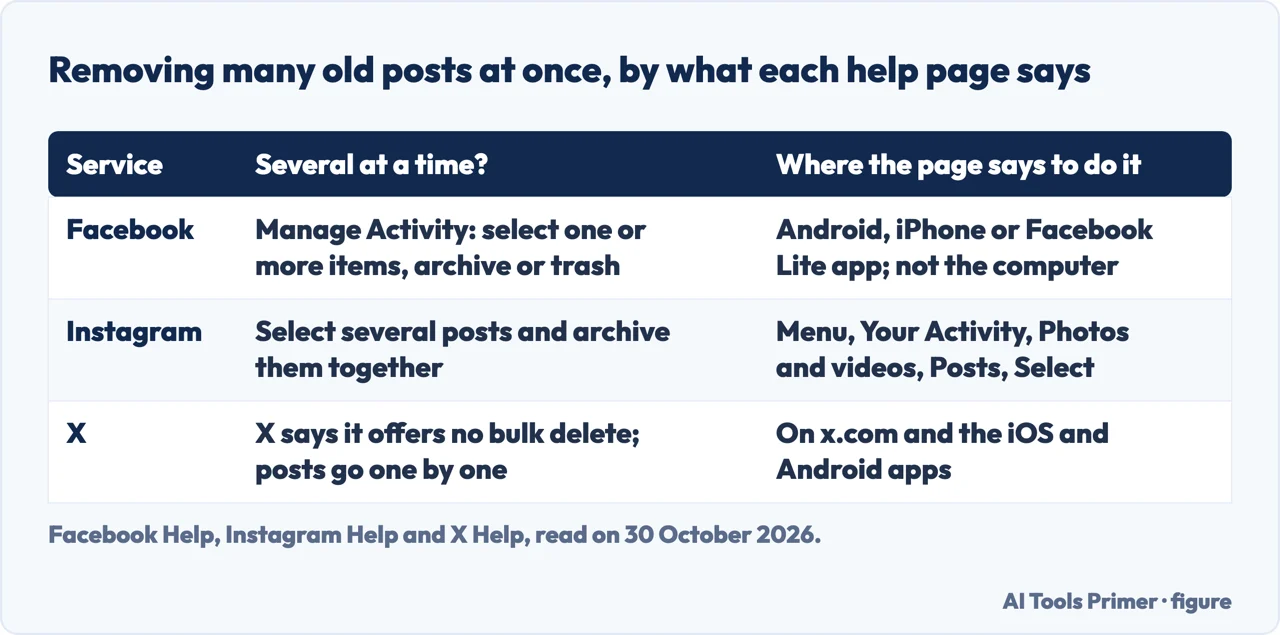
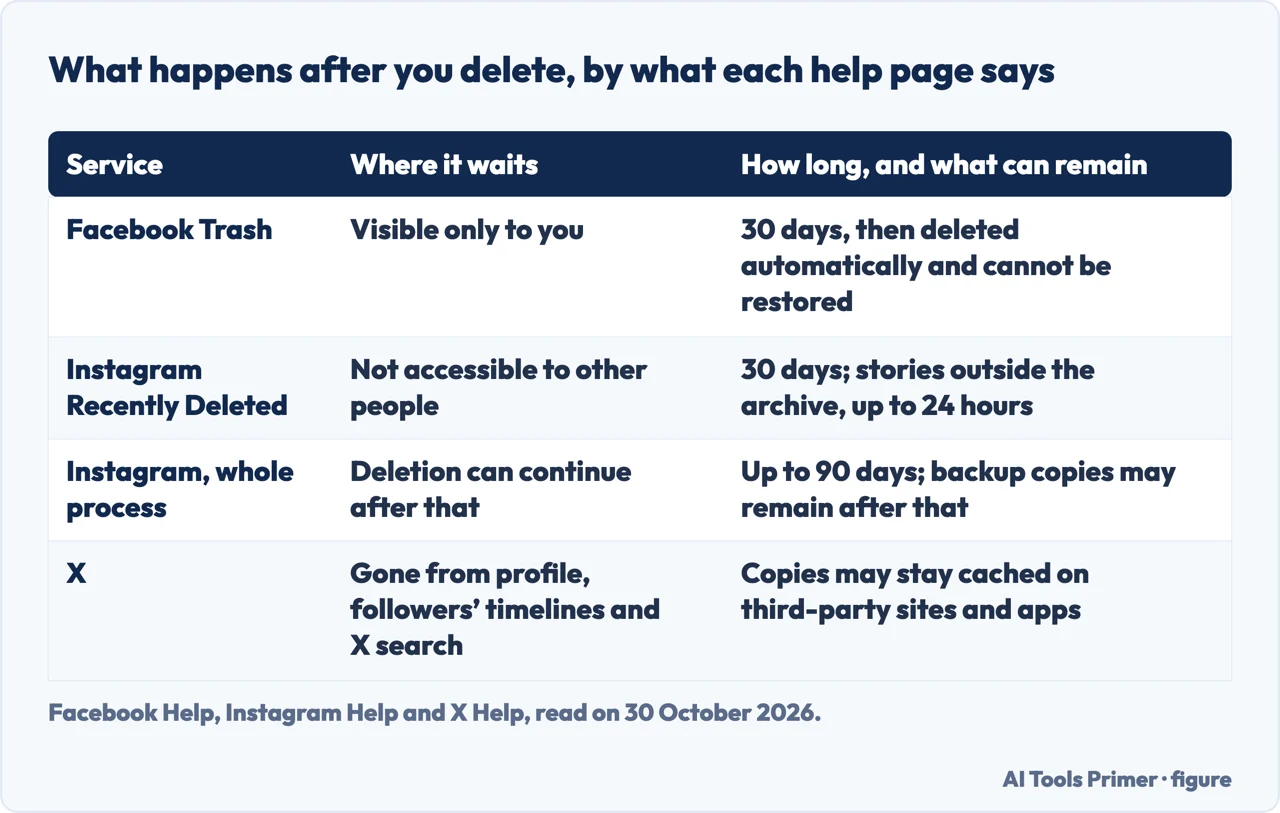
The third is Manage Activity in your Activity Log. The page says that right now it works only from the Android, iPhone or Facebook Lite app, and that from a computer you will have to use one of those apps. In it you select one or more pieces of content at a time and choose Move to Archive or Move to Trash. Archived content is visible only to you, and if you restore it, it returns to the audience selected before. Trashed content stays 30 days, visible only to you, and in that time you can restore it to where you posted it, move it to the Archive or delete it before the 30 days are over. After 30 days it is deleted automatically and cannot be restored. Until then it remains subject to Facebook’s Terms of Service and Privacy Policy.
Not everything in the Activity Log can be moved: the page says you will only see the content you are able to move. It names Facebook Stories and messages, on the computer and in Messenger, as content you can archive in other ways. The page does not say whether Facebook keeps backup copies after the 30 days, and it does not mention 90 days. Our pages on making a Facebook profile private and locking a Facebook profile cover the audience side, and deleting an account properly covers closing the whole account rather than old posts.
Instagram: archive many, delete with a long tail
Instagram’s page on archiving multiple posts says you can archive several posts you have already shared at once. The route it gives is Menu at the bottom left, Your Activity, Photos and videos on the left, then Posts at the top. You click Select, then choose the posts; to filter your posts before choosing, you click Sort & filter, set your preferences and click Apply. After picking, you click Archive at the bottom and confirm. The page gives one set of steps, written as clicks starting from a Menu at the bottom left (its tabs include Computer Help, and the text we saved does not say which tab it was), and it points to the Instagram app for undoing an archive. The pages we read do not describe how an archived post is shown afterwards, so we say no more about the archive itself.
Deleting is a different path. The page on deleted content says it covers photos and videos from your profile and story, stories from highlights and the story archive, Direct Messages, Notes and Reels. Whatever you delete is removed from your account immediately and moved to Recently Deleted. It is deleted automatically 30 days later, or after up to 24 hours for stories that are not in your stories archive. In those 30 days, the Instagram app for Android and iPhone lets you open Recently Deleted and either restore the content or delete it permanently. During that time the content remains subject to Instagram’s Terms of Use and Privacy Policy and is not accessible to other people using Instagram.
Then comes the part that differs from Facebook’s page. Instagram says it may take up to 90 days to complete the deletion once it begins. It also says copies of your content may remain after the 90 days in backup storage it uses to recover from a disaster, a software error or another data loss, and that it may keep information for legal issues, terms violations or harm prevention. Facebook’s Manage Activity page, as we read it, gives the 30 days and stops there. Both pages are from Meta, so we count them as one family rather than two independent voices, and we cannot tell from them whether the two services handle backups the same way.
X: one post at a time, and what stays behind
X’s page says you can delete any of your own posts at any time. On iOS, the steps it gives are to tap your profile icon, then Profile, find the post, tap the icon at the top of the post, tap Delete post and confirm with Delete; the page has separate tabs for Android and desktop, which we did not read. A deleted post is removed from your account, from the timeline of accounts that follow you and from X search results, and reposts of it are removed too. The post contents, metadata and analytics are no longer publicly available on X.
The page also covers doing many at once. X says it does not provide a way to bulk-delete posts, and that you can only delete them manually, one by one. For a fresh start without losing your username, it suggests creating another account with a temporary username and then switching the usernames between the two, and it points to its article on changing a username. The page says that if you reposted something and later want it off your profile, you can undo the repost.
What a deletion does not reach is listed too. If other people copied and pasted part or all of your text into their own posts, those posts are not removed. If others reposted yours with a comment of their own, those are not removed either. And posts may be cached or cross-posted on third-party websites, applications or search engines; X says it cannot remove posts that are not on x.com or in its iOS and Android apps. That sentence is the bridge to the next section.
After deleting: copies outside the network
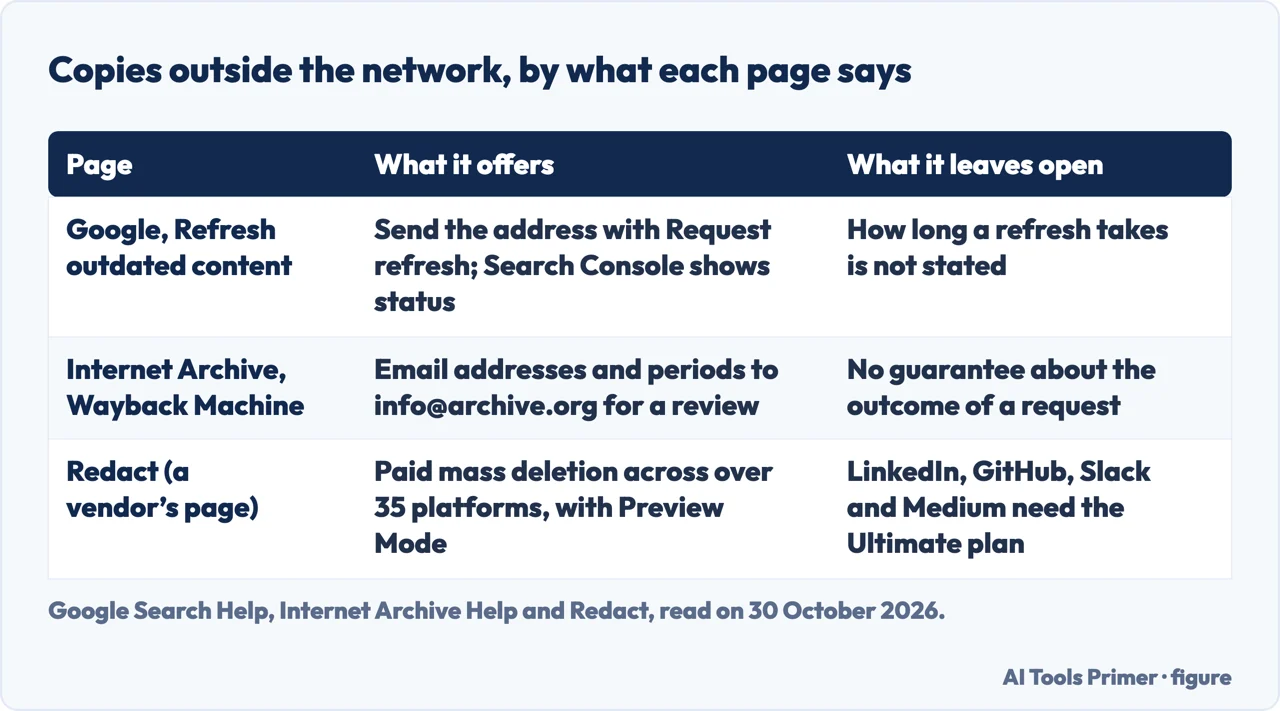
Google’s page on refreshing outdated content covers one case: content was deleted from a site but still comes up in Google Search, so the description or the cached page might be outdated. You choose Request refresh at the bottom of the page, enter the address of the page with the outdated content and select Submit. There is a separate route for images, which starts from the image search results: copy the link address of the image, choose Request refresh, then New request, Image, and paste it. The page says you do not need the form if you have already updated a live page, and that you can check the status of a request in Refresh outdated content in Google Search Console. It does not say how long a refresh takes, and neither do we.
The Internet Archive’s Wayback Machine is a different kind of copy. Its help page says that to have archives of your site or account excluded from web.archive.org you send a request to the address info@archive.org, with the addresses of the material, the time period to exclude, the period during which you controlled the site or account, and any other helpful information. That starts a review by the Archive’s team, and the page says it makes no guarantees beforehand about the outcome. The same page gives reasons a site may be missing from the archive: it was password protected, blocked by robots.txt, otherwise inaccessible to the crawlers, or excluded at the owner’s request.
Redact’s page describes a paid way to delete in bulk. It says the tool deletes posts, tweets, comments and messages across over 35 major platforms, with filters by date, keyword or content type, a Preview Mode to check what will be deleted, and a Disappearing Mode that deletes content older than a set time. It lists Twitter among them, while X’s own page says it provides no bulk delete; we did not test the tool, so we cannot say how the two statements fit together. The page says LinkedIn, GitHub, Slack and Medium need the Ultimate plan. We did not read a price and do not rate the tool.
What we did not read or try
We tried none of these steps on an account. The menus come from the help pages as written on 30 October 2026, and they can change. We did not read the app steps that the Facebook page lists under archiving and trashing, nor the Android and desktop tabs of X’s deletion page, and Instagram’s single-post archive page returned only a shell to our reader. We read Redact as a vendor’s page, not as a neutral one.
Where to start
Four ways in.
- “Can I archive or trash many Facebook posts at once?”
- Facebook: limit, archive, trash — facebook
- “Can Instagram archive many posts?”
- Instagram: archive many, delete with a long tail — instagram
- “Can X delete many posts?”
- X: one post at a time, and what stays behind — x
- “Does a copy remain somewhere?”
- After deleting: copies outside the network — after
Closing the past
The accounts, forums and profiles from years ago.
What others can still see
Audience settings and what Google shows about you.
Questions people also ask
What are some old social medias?
This page does not list networks. It covers Facebook, Instagram and X, whose help pages describe archiving and deleting your own old posts.
What social media no longer exists?
The pages we read do not say, and this page does not list defunct networks.
Is MySpace still in existence?
The pages we read do not mention Myspace. They are help pages of Facebook, Instagram, X, Google and the Internet Archive about handling old posts and copies.
What are the 10 most popular social media?
The pages we read do not rank networks. They describe what Facebook, Instagram and X say about archiving, trashing and deleting your own posts.
Not covered here. We tested nothing on an account. The statements come from help pages of Facebook, Instagram, X, Google and the Internet Archive and from one vendor’s page, Redact, all read on 30 October 2026.
The search volume and difficulty behind this page come from a Semrush reading of 29 August 2026, older than the 60 days the site normally allows.
Sources
- Facebook Help — Use Manage Activity in your Activity Log to archive or delete content — www.facebook.com, read 30 October 2026.
- Facebook Help — Choose who can see your previous posts on Facebook — www.facebook.com, read 30 October 2026.
- Facebook Help — Export a copy of your Facebook information — www.facebook.com, read 30 October 2026.
- Instagram Help — What happens to content you delete on Instagram — help.instagram.com, read 30 October 2026.
- Instagram Help — Archive multiple posts at once — help.instagram.com, read 30 October 2026.
- X Help — How to delete a Post — help.x.com, read 30 October 2026.
- X Help — How to download your X archive — help.x.com, read 30 October 2026.
- Google Search Help — Refresh outdated content — support.google.com, read 30 October 2026.
- Internet Archive Help — Using the Wayback Machine — help.archive.org, read 30 October 2026.
- Redact (a vendor) — How to Clean Up Your Social Media Before Applying for Jobs — redact.dev, read 30 October 2026.
Written by Alberto Gulotta
Founder and editor of AI Tools Primer, writing from Palermo, Italy. Thirty-five years of taking computers apart, starting with a Commodore 64 — the long version is on the about page.
Something wrong on this page? Write to aitoolsprimer@gmail.com and it gets fixed.
Written on 30 October 2026.
Independence and limits
No affiliate links and no paid placements anywhere on this site. Nobody pays to appear here, and no company has seen this page before you did.
This is general information, not professional advice. Where a page touches money, health, safety or the law, it names its source and the date it was read — and your situation may still differ. See the privacy page and the cookie policy.