
Identity · guide
Fake profiles that copy you: the report steps
By Alberto Gulotta · Updated · 18 min read
Fake profiles that copy you are reported through each platform's own menu, and the pages we read word those menus differently: Instagram says it responds only to the person copied or a representative, The Cyber Helpline says to keep screenshots or printouts of the profile, and LinkedIn says the person reporting stays anonymous.
| Question | Answer | Where it comes from |
|---|---|---|
| Who can report a copy of you on Instagram? | Instagram says it responds only to the person copied or a representative, with a parent as the example | Instagram Help Center |
| Is a photo ID asked for? | Instagram asks for a photo of a government-issued ID, and AARP says X does; the Facebook help page we read does not mention one | Instagram, AARP, Facebook |
| Can a report be made without an account? | Facebook and Instagram point to a contact form; the LinkedIn page does not say | Facebook, Instagram, LinkedIn |
| Does the person reporting stay anonymous? | Instagram and LinkedIn say the reported account does not see who reported it | Instagram, LinkedIn |
| What does The Cyber Helpline say to keep? | Screenshots, or printouts of the profile pages | The Cyber Helpline |
| How long does removal take? | The pages we read do not give a time | All the pages read |
A clone is not the same as a hacked account
AARP’s article, written by Edward C. Baig and updated on 26 March 2026, draws a line between a cloned account and one that was hacked. Of a cloned account it says the original may remain intact and untouched, and adds that a crook may hijack the profile picture, other images and biographical details from the original account. The person copied may not know: AARP says friends and followers who were not fooled start to hear highly inappropriate messages or urgent pleas for money in that person’s name, and some see a request to connect from the cloned account when they are already friends with the original.
On why the trick works, the article quotes Mona Terry, chief victims officer at the Identity Theft Resource Center in San Diego, saying that people are more open to clicking links, giving information or even sending money when the request comes from someone they know. The pages we read give no figure for cloned profiles; the only statistics in the article, on account takeovers, are about the other problem.
The Cyber Helpline names three uses for fake social media accounts: to hide the identity of someone sending bullying or threatening messages, to impersonate the victim in order to damage their reputation or cause distress, and to trick the victim’s friends and family into connecting with the profile and engaging with malicious content. LinkedIn’s help page describes a fake from the profile side: it may impersonate someone, not represent a real person, or show signs of deceptive behavior.
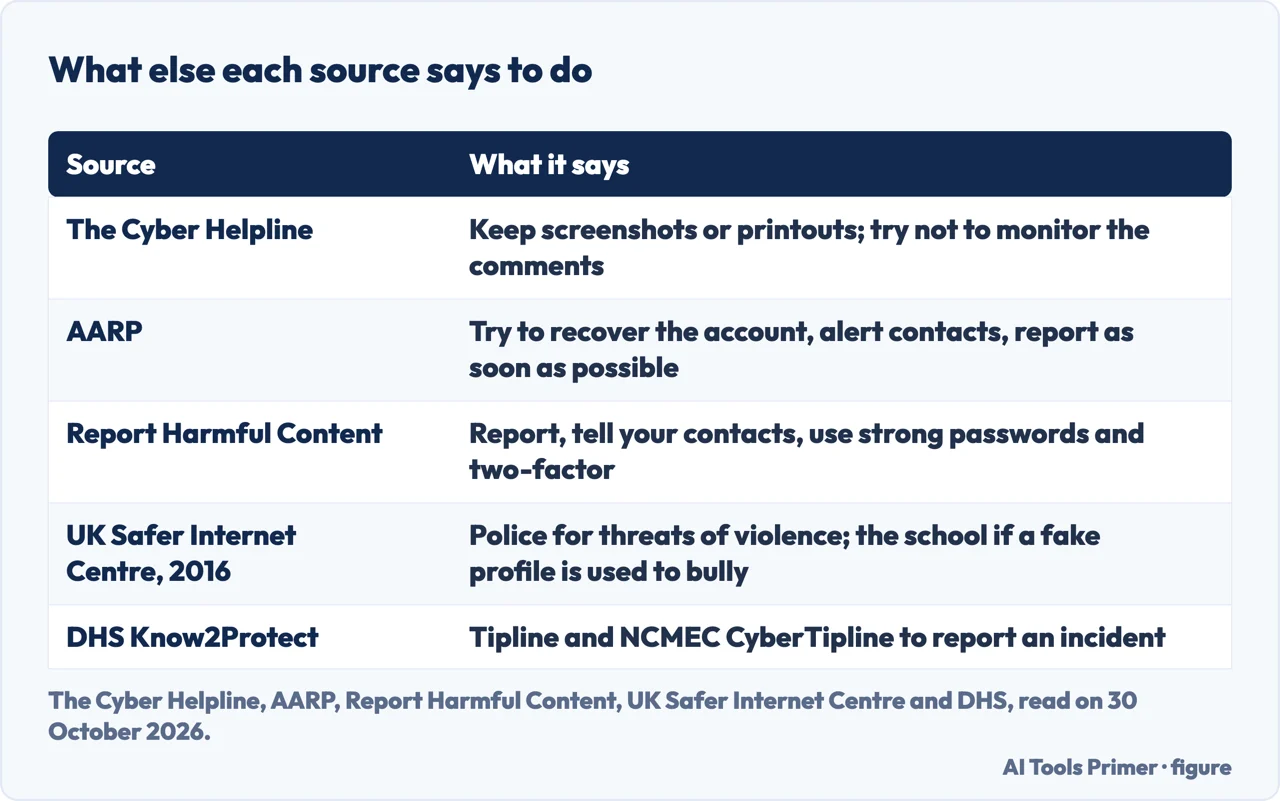
On what to do first, AARP says that if an account has been compromised or cloned, the first thing is to try to recover it, and that thieves will typically try to change the recovery email and phone number to their own. It then says to alert friends and contacts that the account has been infiltrated or copied and to report the issue to the social media company as soon as possible. Report Harmful Content gives a similar short list for someone being impersonated: report the account, tell friends and followers that the fake profile is not you, so they are not caught by a possible scam, and strengthen privacy with strong, unique passwords and two-factor authentication. If the account itself was taken over rather than copied, our pages on a hacked Facebook account and a hacked Instagram account cover the recovery routes.
What The Cyber Helpline says to keep, and what it leaves out
The Cyber Helpline lists four approaches to a fake profile. The first is to report the account. The second is to keep a copy of the evidence: it says to keep a record of the fake profile, either with screenshots or by printing the profile pages, and adds that the copies may help if the problem continues and you have to deal with the platform or the police. The third is to try not to monitor the content online and the resulting comments, because that will cause more distress. The fourth accepts that the information shared in the fake profile is public, and points to help and support for coming to terms with it. The Helpline lists reporting first and keeping a copy second, and the pages we read do not say whether the copies must be made before the report is sent; AARP, for its part, puts alerting friends and contacts before the report. So the sources do not fix one order, and the pages we read do not say what happens to the profile page once it is removed.
The Helpline’s page does not mention adding a date or the profile’s address to the screenshots. A post from the UK Safer Internet Centre dated 18 October 2016 does mention an address in one place: it says the Facebook form for people without an account asks for a full name, a contact email, the URL of the impostor profile and some form of ID. That post is ten years old, and the Facebook form we opened showed only its first question, so the current fields are not confirmed. Facebook’s help page says that if the profile cannot be found, you can search for the name or ask a friend to send a link to it.
The same 2016 post says to contact the police if any content of the account has broken the law, and names death threats, malicious communications that might be racist, sexist or homophobic, and credible threats of violence. If a fake profile is being used to bully an individual, it says to report that to your child’s school. The page of Report Harmful Content opens with a note to dial 999 if you or the person you are helping is in immediate danger; that is a UK number. Report Harmful Content, the Helpline says, is where to go for help pushing the platforms to take action, and the 2016 post describes it as a helpline for members of the public over 13.
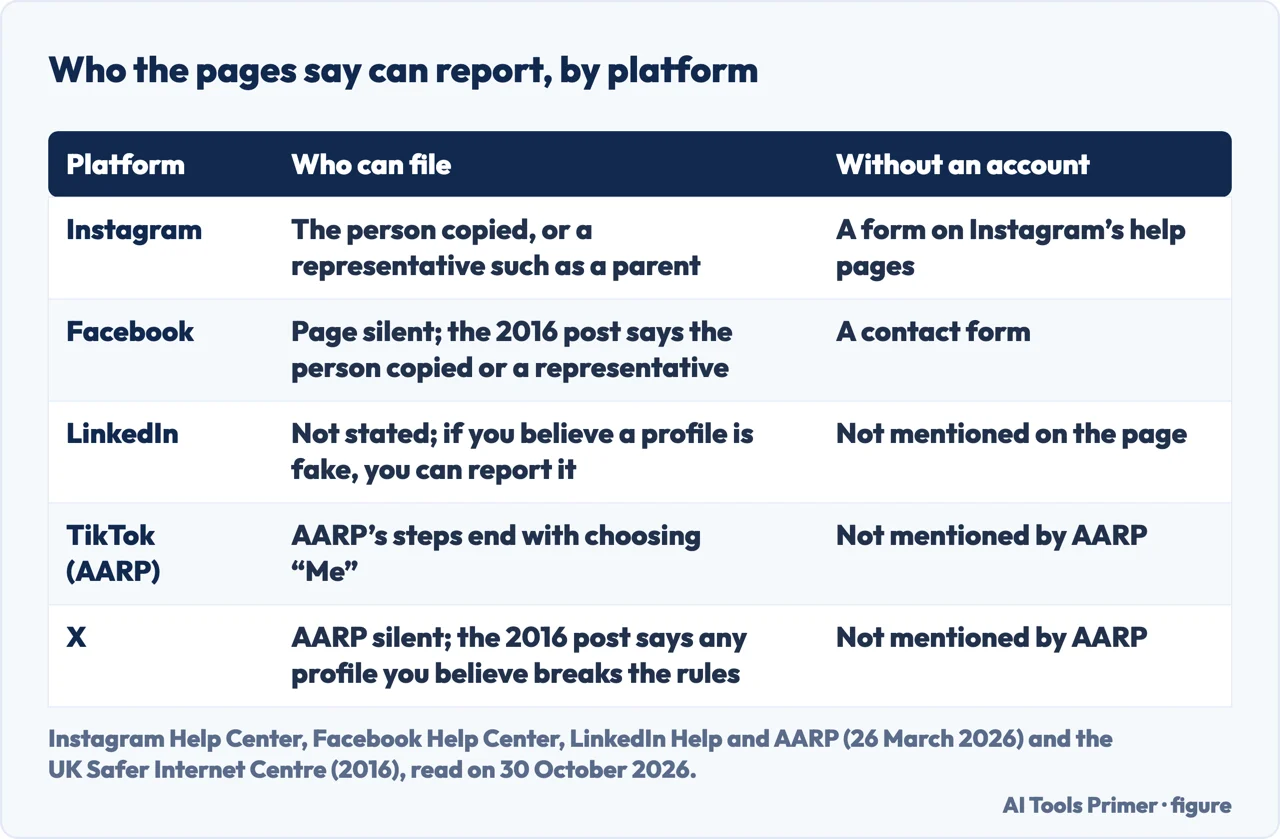
Who the pages say can report
Instagram’s help page for people who are copied says that if someone created an account pretending to be you, you can report it, and to provide all the requested information, including a photo of your government-issued ID. It adds that Instagram only responds to reports from the person being impersonated or a representative of that person, with a parent as the example. The UK Safer Internet Centre’s 2016 post describes the same requirement for the Instagram form, an official photo ID such as a driving licence or valid passport. The Instagram form lists three situations: an account pretending to be “me or a friend”, one pretending to be someone you represent, such as your child, and being unable to log into an old account. The pages we read do not explain how “a friend” on that form fits with the rule about the person impersonated.
Facebook’s help page is broader in its wording. It says profiles and Pages that impersonate other people go against its Community Standards, and that if you see a profile or Page pretending to be you, someone you know or a public figure, such as a celebrity or politician, it encourages you to say so. It says reports can be made even without a Facebook account. The 2016 post is narrower: for Facebook, it says, reports have to be made by the person being impersonated or an authorised representative, such as a parent or legal guardian. Ten years separate the two, and the pages we read do not say whether the rule changed.
LinkedIn’s help page does not say who may file. It says that if you believe a profile may be fake or violates its Professional Community Policies, you can report it. TikTok and X come only through AARP in what we read. AARP’s TikTok steps end with choosing “Me” as the person the account is pretending to be. For X, AARP describes a form that asks you to confirm identity by uploading an image of a driver’s license, passport or other government-issued photo ID, with separate proof if a trade name or pseudonym does not appear on the ID. Facebook’s help page does not name an ID at all, and the form we opened showed only its first question, so we do not list Facebook as asking for one.
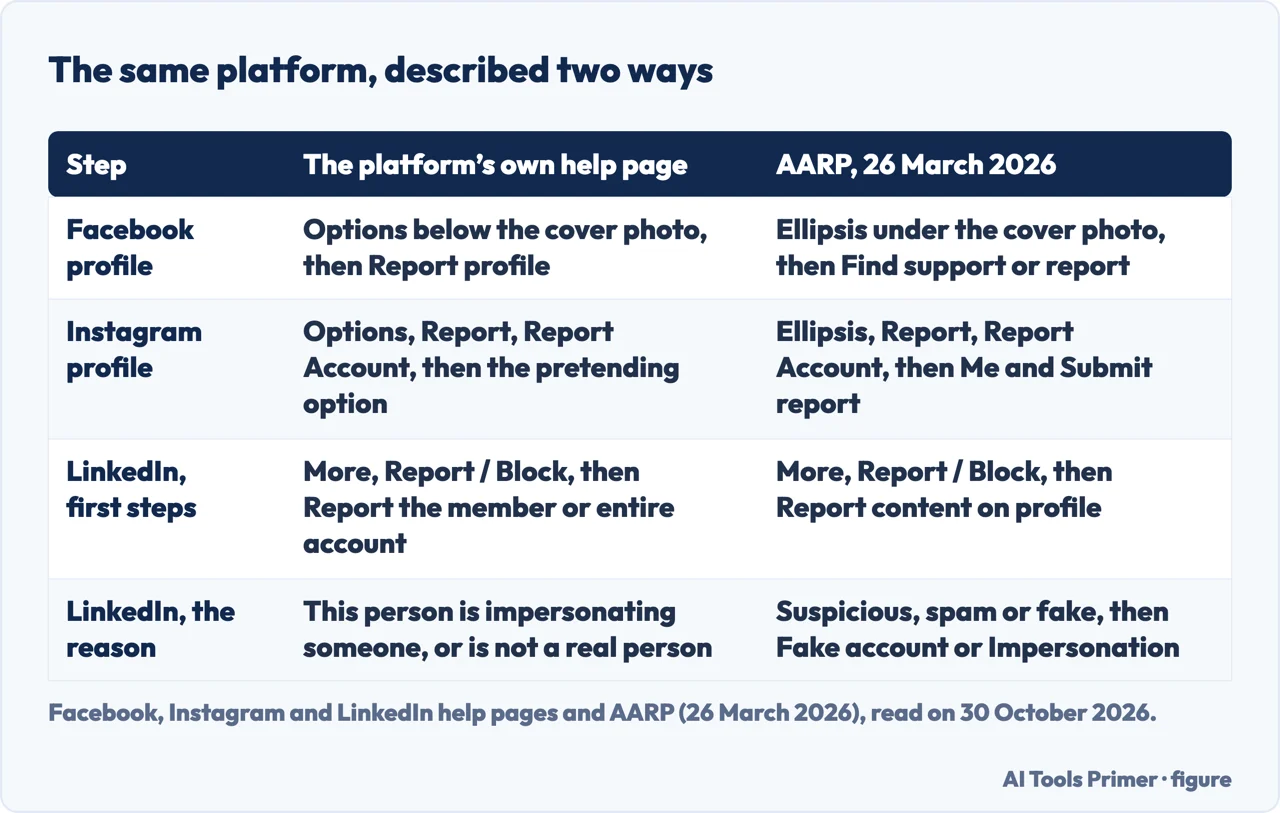
The steps on each platform, as two pages word them
Instagram. The help page says to tap or click the username, then Options next to it, then Report, then Report Account, then “It’s pretending to be someone else”, and to select the type of impersonation. The same page says an impostor account can be reported if it is pretending to be you, someone you follow, a celebrity or public figure, or a business or organization. AARP gives the phone version: the ellipsis at the top right of the profile, Report, Report Account, the same option, then Me under “Who is this account pretending to be?” and Submit report. AARP adds a second route from a post in the impostor’s feed, using the ellipsis above the post. Instagram notes that at present an account can be reported for impersonating someone or something, not for misrepresenting itself.
Facebook. The help page says to go to the impersonating profile, click Options below the cover photo, select Report profile and follow the prompts; for a Page, Options and then Report Page. It adds that impostor profiles or Pages can also be reported in Messenger. AARP describes another menu for the same job: the ellipsis in the grey rounded box under the cover photo, Find support or report, then a choice among Pretending to be someone, Fake account or Fake name. Without an account, or after losing access to it, the help page says to fill out a contact form. AARP lists the form’s three options, someone using your email address on their account, an account for your business or organization, or an account pretending to be you or a friend, followed by a yes or no on whether you have a Facebook account, and Send.
LinkedIn. The help page, which showed “Last updated: 10 months ago” when we read it, says to open More on the member’s profile, choose Report / Block, then the option to report the member or the entire account, then either “This person is impersonating someone” or “This account is not a real person”, and Submit report. AARP describes a different menu: Report content on profile, Profile information, Suspicious, spam or fake, then Fake account or Impersonation. The pages we read do not say why the two differ. The page also warns that not all incomplete profiles are fake, since some members are new, private or still building a profile, and says to look for additional signs first, among them requests for money or sensitive information and an immediate wish to move the conversation off the platform.
TikTok and X. According to AARP, TikTok does not allow accounts that pose as another person in a deceptive manner, and may ask for a profile to be revised or ban the account. Commentary, fan and parody accounts are allowed if the username says so. The steps are the three dots on the profile, Report, Report account, Pretending to be someone, Me, and submit. For X, which the article calls Twitter, AARP says pseudonyms are allowed and impersonation is not, with parody permitted when the account name and bio set it apart. The report goes through the Authenticity page: “An account is impersonating me or somebody else”, a contact email, the username, whether the account uses several elements of your identity or only your image, and a description that leaves out passwords and personal details. We did not read TikTok’s or X’s own pages. The Cyber Helpline also links to report pages for Snapchat and Pinterest, which we did not read, so this page gives no steps for either.
After the report: what the pages say, and what they leave out
Two pages speak to who learns of the report. Instagram says the report is anonymous, except for intellectual property infringement, and that the reported account will not see who reported it. LinkedIn says reported members will not know who made the report, because sharing the identity of someone who flags an item is against its Privacy Policy. On the outcome, LinkedIn says it will take action if the profile violates its policies, and The Cyber Helpline says the provider will investigate and, if the profile is found to be fake, remove the profile and its content.
The pages we read do not give a time for removal. They do not describe what happens when a report is turned down, or how to appeal. AARP gives one figure from a platform: LinkedIn’s Community Report, quoted by AARP, says its automated defenses blocked 97.1 percent of the fake accounts it shut down in the first six months of 2025, and manual investigations and restrictions stopped the remaining 2.9 percent. That figure is about accounts LinkedIn closed, not about reports from members.
Report Harmful Content adds two points on recognising an impersonation. It suggests checking whether the real account of a well-known person is verified with a blue tick, since an account without one might be an impersonated profile. And as protection it suggests periodically searching for your own name and checking social media for unauthorised accounts, while the Helpline’s advice about monitoring concerns the content and comments on a fake profile that already exists. The two pieces of advice are about different moments.
The Department of Homeland Security’s Know2Protect page, titled “Tips2Identify Fake Profiles”, is a shell around a PDF of tips for spotting a fake profile, dated 16 December 2025, with a Spanish version dated 8 April 2026. We did not read the PDF. The page also gives a Know2Protect Tipline telephone number and the NCMEC CyberTipline for reporting an incident; its site menu includes a section for kids and teens. The page does not describe how to report an impersonating account on a platform.
When the person copied is someone else
Instagram’s help page says that if someone you know is being impersonated, you should encourage that person to report it. AARP puts it more plainly: if you find an account impersonating one of your friends, you will have to tell that friend to report it, because Instagram says only the person who is the subject of the fake account can file. The UK Safer Internet Centre’s 2016 post agrees. For Instagram it says that in most cases the report has to be made from the profile of the person being impersonated, and you cannot do this on their behalf, so it recommends contacting that person and encouraging a report; for Facebook it says reports have to be made by the person being impersonated or their authorised representative, and that anyone else should encourage that person to report. If you are authorised to represent the person, such as a parent of a child, both Instagram’s page and the 2016 post point to a separate form.
Facebook’s current help page leaves more room. It invites a report when a profile is pretending to be someone you know, and AARP’s Facebook steps begin with finding the fake profile, with no word on whose profile it must be. That differs from the 2016 post, and the pages we read do not settle which describes today’s practice. For LinkedIn and TikTok, the pages we read do not say whether a friend can report the copy of an adult. For X, which the 2016 post calls Twitter, that post answers the question about someone you know being impersonated by saying you can report any impersonation profile that you believe breaks Twitter’s codes of conduct, by filling out a form.
Report Harmful Content’s suggestion for someone who suspects an impersonation is to verify with the person by contacting the real person through another known and verified method. AARP adds that the friend is often the one who notices, through connection requests from someone already connected or messages that ask for money in a hurry.
Where to start
Four ways in.
- “What should I keep?”
- What The Cyber Helpline says to keep, and what it leaves out — evidence
- “Am I the one who can report?”
- Who the pages say can report — who
- “Where is the button?”
- The steps on each platform, as two pages word them — steps
- “What happens after I report?”
- After the report: what the pages say, and what they leave out — after
Accounts taken over
A copy is one problem and a taken account is another.
Threats and children
Where a fake profile is part of something larger.
Questions people also ask
What are fake profiles?
The Cyber Helpline names three uses: hiding the identity of someone who sends bullying or threatening messages, impersonating the victim to damage their reputation or cause distress, and tricking the victim’s friends and family. LinkedIn says a profile may be fake if it impersonates someone, does not represent a real person, or shows signs of deceptive behavior.
Is making fake profiles illegal?
The pages we read do not answer that directly. Facebook says profiles and Pages that impersonate other people go against its Community Standards. The UK Safer Internet Centre’s 2016 post says to contact the police if content of the account has broken the law, and names death threats, malicious communications and credible threats of violence.
Is there a season 2 of Fake Profile on Netflix?
This page is about reporting social media profiles that copy a real person. It does not cover the television series Fake Profile, and we did not read any source about the series, so we cannot say whether it has a second season.
How many seasons of Fake Profile are there?
This page is about reporting social media profiles that copy a real person, not about the television series Fake Profile. We did not read a source about the series, so we cannot say how many seasons it has.
Not covered here. We tested nothing on a platform and filed no report. The statements come from the help pages of Instagram, Facebook and LinkedIn, an AARP article, the UK Safer Internet Centre, The Cyber Helpline, Report Harmful Content and the Department of Homeland Security, all read on 30 October 2026. We did not read security-vendor blogs on the subject, or TikTok’s or X’s own pages.
The search volume and difficulty behind this page come from a Semrush reading of 29 August 2026, older than the 60 days the site normally allows.
Sources
- Instagram Help Center — Report an account that’s impersonating you on Instagram — help.instagram.com, read 30 October 2026.
- Instagram Help Center — Report an account for impersonation — help.instagram.com, read 30 October 2026.
- Instagram Help Center — Report an Impersonation Account on Instagram or Threads (form) — help.instagram.com, read 30 October 2026.
- Facebook Help Center — Report a Facebook profile or Page pretending to be you or someone else — www.facebook.com, read 30 October 2026.
- Facebook — Report an Impostor Account (form) — www.facebook.com, read 30 October 2026.
- LinkedIn Help — Report fake profiles — www.linkedin.com, read 30 October 2026.
- AARP — What to Do If Someone Is Impersonating You on Social Media (updated 26 March 2026) — www.aarp.org, read 30 October 2026.
- UK Safer Internet Centre — Reporting impersonation on social media (18 October 2016) — www.saferinternet.org.uk, read 30 October 2026.
- The Cyber Helpline — Dealing with fake profiles — thecyberhelpline.com, read 30 October 2026.
- Report Harmful Content — Impersonation — reportharmfulcontent.com, read 30 October 2026.
- Department of Homeland Security — Tips2Identify Fake Profiles (Know2Protect) — www.dhs.gov, read 30 October 2026.
Written by Alberto Gulotta
Founder and editor of AI Tools Primer, writing from Palermo, Italy. Thirty-five years of taking computers apart, starting with a Commodore 64 — the long version is on the about page.
Something wrong on this page? Write to aitoolsprimer@gmail.com and it gets fixed.
Written on 3 November 2026.
Independence and limits
No affiliate links and no paid placements anywhere on this site. Nobody pays to appear here, and no company has seen this page before you did.
This is general information, not professional advice. Where a page touches money, health, safety or the law, it names its source and the date it was read — and your situation may still differ. See the privacy page and the cookie policy.