
Identity · guide
What to do if your email is hacked: the FTC, Google and Microsoft
By Alberto Gulotta · Updated · 16 min read
What to do if your email is hacked starts with a question the pages answer differently. The FTC and Microsoft say to scan the computer before changing the password, Experian lists the scan fourth, and Google lists the Gmail settings to correct. We compare five pages, step by step, and say where they disagree.
| Question | Answer | Where it comes from |
|---|---|---|
| Scan the computer first? | The FTC and Microsoft say before changing the password; Experian lists it fourth; Google does not say it comes first | FTC, Microsoft, Experian, Google |
| Can’t sign in? | Use the provider’s recovery page; Google and Microsoft each have one | Google, Microsoft, FTC |
| Which mail settings to check? | Google lists ten, from forwarding and filters to IMAP or POP and delegation | |
| Does a new password close everything? | Adaptive Security, a vendor, says it does not remove forwarding rules, delegation or app permissions | Adaptive Security |
| Who should be told? | Contacts, and your bank or local authorities if cards or personal documents are saved in the account | FTC, Google |
The signs, and why the mailbox comes before the rest
The FTC’s consumer advice page, dated August 2023, lists four things that can tip you off that someone hacked an account and changed the password. You cannot log in. You get a notice of a change to your username or password that you did not make. You get a notice of a login from a device you do not recognize or a place you are not. Or friends and family report emails or messages you did not send, sometimes with random links or fake pleas for help or money. Experian’s list, from a blog post dated 5 September 2025, shares the first of those and adds security alerts, account settings that changed, emails that are missing or unexpected, and password reset emails you did not request. Experian says those reset emails can mean someone is trying to get into your other accounts.
Google’s help page describes the same thing from inside Gmail. It says your Gmail activity might be suspicious if you no longer receive emails, if friends say they got spam or unusual emails from you, if your username has changed, if emails were deleted from your inbox and are not in Trash, or if you find sent emails you did not write. Google says it tells you about unusual activity through a notification of an unusual sign-in or a new device, a notification that it suspects a change to your username, password or other security settings was not yours, a red bar at the top of the screen and a Recent security activity page, and that it uses your recovery phone number and recovery email to do so.
The FTC explains why the mailbox comes first. Say you forget a password and use the reset feature: you get an email with a link, click it and set a new password. If someone hacked your email account, the FTC says, that person could request a reset link for any of your other accounts, take the link from your inbox, change the password and lock you out. Google gives a related instruction for the case where you think someone else is signed in: change the password at once not only for the Google account but for apps and sites where you use the same password, that contact you through your Google account email address, where you sign in with that address and where you saved passwords in the account.
Getting back in: the provider’s own route
All five pages send you to the company that runs the mailbox when you cannot sign in. The FTC puts it after the scan: follow the provider’s account recovery instructions, and its page links to those for a list of services that includes Google, Microsoft and Yahoo. Experian says that if you cannot log in you may need the provider’s recovery process to get access and update the password.
Google’s first step is the account recovery page, for the cases where someone changed your password or recovery phone number, someone deleted your account, or you cannot sign in for another reason. It adds a tip: to be sure you are recovering the right account, try recovering your username. Once you are in, its second step is to open your Google Account, go to Security & sign-in and, on the Recent security events panel, select Review security events. For anything that did not come from you, you select “No, it wasn’t me” and follow the screen. Under Your devices, Manage devices, you check for any you do not recognize and select “Don’t recognize a device?”. Microsoft’s page opens with a sign-in helper tool that asks for your email address or phone number and either shows self-help or offers the chance to talk to an agent. Adaptive Security, which sells anti-phishing training, describes the same recovery questions for Gmail from a different angle: it says to gather what you can before you start, among them the date you made the account and any recovery or backup codes you saved.
Security questions are where two pages part ways. Experian tells you to change any security questions tied to the account. Google’s page, in its list of settings to correct, notes that additional security questions are no longer available. Experian’s page does not say which providers still use them.
Scan first or password first: the pages differ
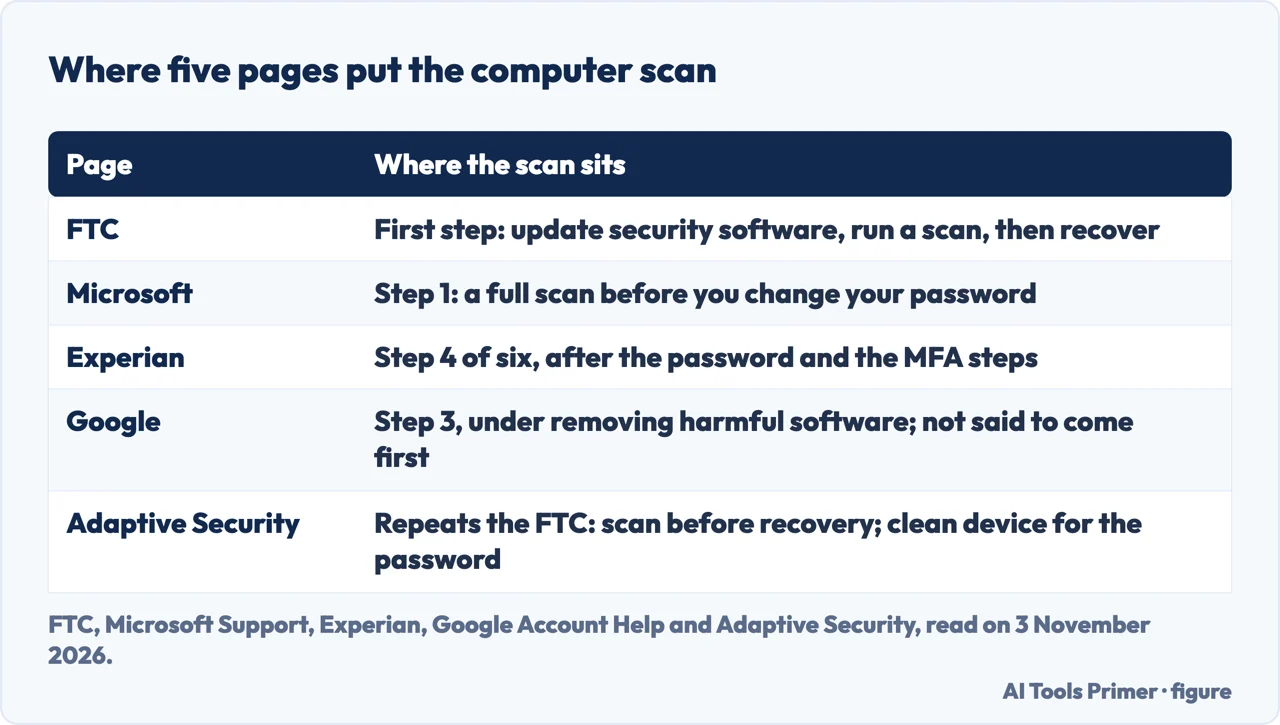
The sharpest difference between the pages is the order. The FTC begins with the computer: make sure your security software is up to date, run a scan, and if it finds suspicious software delete it and restart; only then follow the provider’s recovery instructions. Microsoft is blunter. Its first step is clearing your PC of viruses or malware before you change your password, with a full scan from Windows Security (Virus and threat protection, Scan options, Full scan, Scan now), and it repeats that you should run a full scan before you change your password, whichever antivirus app you use. Its second step is to sign in and change the password, or reset it if you cannot sign in.
Experian goes the other way. Its six steps start with recovering the account and changing the password, then multifactor authentication, then checking settings and recovery information; the scan comes fourth, with updates to the operating system and software. Google puts its advice to remove harmful software in the third of its steps, after reviewing activity and devices. It tells you to install and run trusted anti-virus software, or to reset the computer to factory settings and reinstall the operating system after backing up the files you need, and it does not say that this must come before changing the password. Our own page on whether a factory reset removes malware covers that reset step.
Adaptive Security adds a third idea: change the password from a different device that you believe is clean. Its reason is a keylogger, a program that records what is typed, which it says would capture the new password along with everything else on the compromised machine. It suggests, for example, a personal laptop you rarely use or a tablet that stays at home. The same page says the FTC advises running a malware scan before starting recovery. The pages we read do not say which order to prefer when you cannot tell whether the computer is clean.
The settings to check once you are in
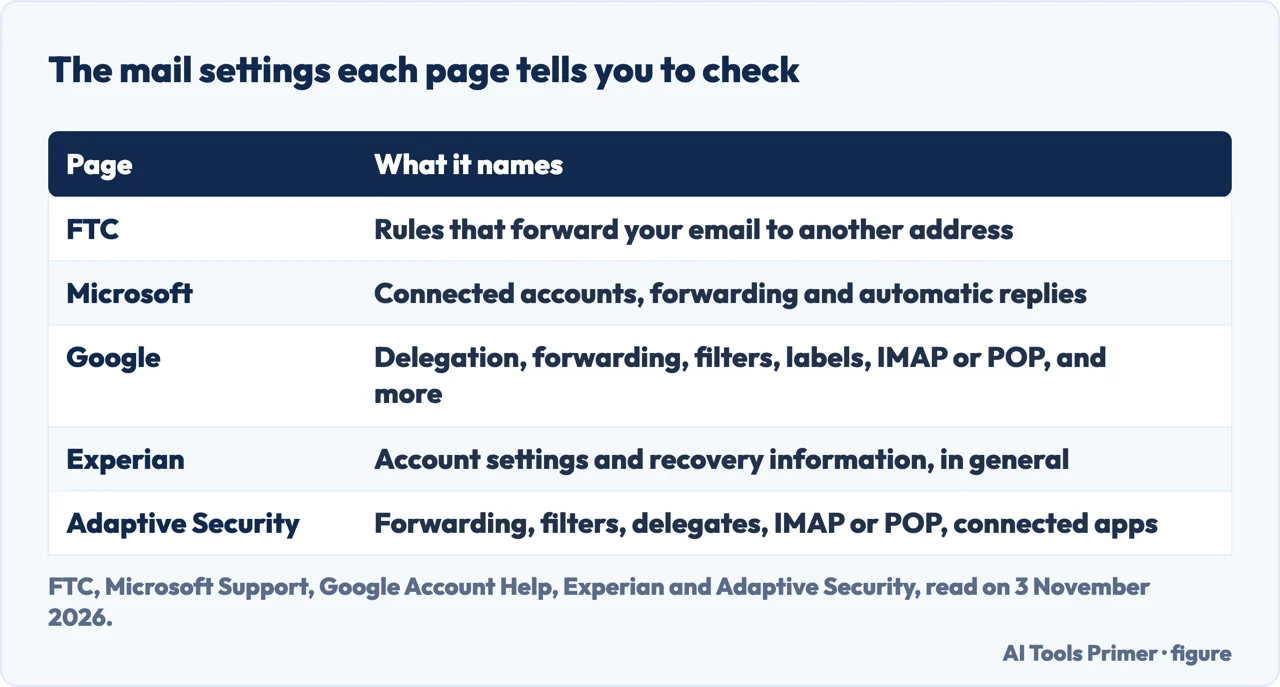
Here the pages differ in how much they list. The FTC names one thing: check your email settings for rules that forward emails, and delete any you did not set up so messages are not forwarded to someone else’s address. Microsoft says that because someone else had access, it reset some of your account settings, and sends you to connected accounts, forwarding and automatic replies. Experian asks you to check settings and recovery information in general, because recovery details are used to get you back in and the email and phone number listed should be yours.
Google gives the longest list. Its Gmail section says to correct the setting at once if you see unfamiliar changes to mail delegation (people with access to your Gmail), automatic mail forwarding, scheduled emails, your name in Gmail, the automatic reply (vacation responder), the address on outgoing mail, blocked email addresses, remote access through IMAP or POP, and the filters and labels that sort incoming mail. Elsewhere it says to remove any labels, filters or forwarding rules you did not set up. For the account as a whole it lists the recovery phone number, the recovery email address, an alternate or contact email address, the name on the account and apps with access to the account, plus a warning if two-step verification or less secure app access was turned on or off without your knowledge.
Google also describes a time limit. If it detects a suspicious sign-in method it disables it and notifies you; you then have 30 days from the date of the warning to confirm that you added the recovery method, and if you do nothing the method is deleted.
Adaptive Security goes furthest, and it is a vendor, so read it as that company’s account. It says a password change alone does not remove permissions granted to connected apps, forwarding rules or delegation, and that hidden forwarding rules and filters are the most common way attackers keep access, so it suggests checking them weekly for at least a month. It says some rules delete any message containing words such as password, security, login or verification, so that you never see the warnings, and that rules may have minimal or apparently empty names, such as a single period, "zzz" or "Rule 2". For Gmail it points to the apps listed at myaccount.google.com/permissions, to Settings, Forwarding and POP/IMAP, to Filters and Blocked Addresses, and to the “Grant access to your account” section for delegates. The term OAuth, which Adaptive Security uses for these app permissions, does not appear in the FTC, Google, Microsoft or Experian pages we read.
After the mailbox is back: sessions, second factor, contacts and money
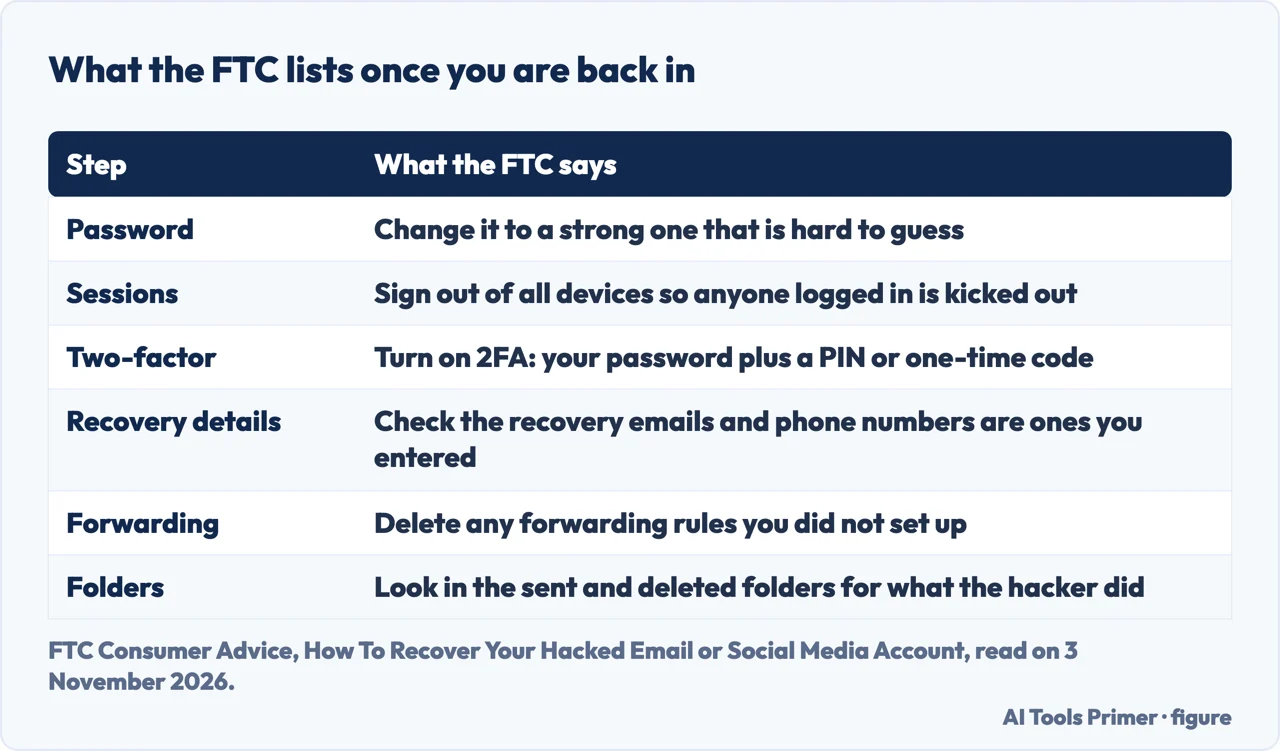
The FTC’s steps for securing the account are four. Change the password to a strong one. Sign out of all devices, so that anyone logged in on another device is kicked out. Turn on two-factor authentication where it is offered, so that you need your password and something else, such as a PIN or a one-time code by text, email or an authenticator app. Check that the recovery email addresses and phone numbers listed are ones you entered and can use. It then adds two checks for signs of access, the sent folder for emails someone sent from your account and the deleted folder for emails someone may have read and deleted, and a message to your contacts, by email, text or a post, telling them not to click links in emails from you and to ignore requests for help or money.
Google’s page calls its version 2-Step Verification: you sign in with something you know, your password, and something you have, a phone, a security key or a printed code. Google then tells you to contact your bank or local authorities if you have banking details saved in the account, such as cards in Google Pay or Chrome, or personal information such as tax or passport details, or if you think someone is using your identity. Its other advice is to check the Chrome extensions you do not recognize and to turn off access for less secure apps if it is on. Adaptive Security describes a Gmail route for sessions, under Details at the bottom of the inbox, with a button to sign out all other web sessions, and says to check the list again after two minutes. It says an authenticator app is better than text messages for the second factor, because it says text codes can be hit by a SIM swap. Our pages on authenticator apps and backup codes cover the second factor and what to keep if the phone is lost.
Experian reaches furthest from the mailbox. Its fifth step is to check bank, other financial and social media accounts, anything linked to the email address, update their passwords and turn on multifactor authentication there too. Its sixth is the credit report: it says you can get your reports from all three bureaus (Experian, TransUnion and Equifax) free once a week at AnnualCreditReport.com, and that unfamiliar inquiries or accounts you do not recognize could be a sign of fraud. Experian also gives an interval for passwords, saying it is typically advised to change them every 90 days, and mentions passkeys as a way to log in with a PIN, fingerprint or face scan. The FTC and Google pages we read do not give an interval, and the FTC page mentions credit only in its menus. Our page on identity theft protection covers credit freezes and monitoring.
What the pages do not say
The pages we read do not say whether to delete an email address that was hacked. They describe getting back into it and securing it. They do not give a time for recovery in the text we read from the FTC and Microsoft, and they do not say what to do after a recovery request is refused: the FTC points to the provider’s instructions, and Google and Microsoft point to their own recovery pages and forms. For the Gmail route in detail, see our page on resetting a Gmail password.
We tried nothing on a real mailbox. We did not read a McAfee page, which refused our reader, the FTC’s short fact sheet, a Reddit thread or a Quora question, and we read only the start of Google’s AI answer, which opens with advice to act fast and use the provider’s recovery page. The text of the Microsoft article we read does not describe a recovery code or a waiting period, so we leave both out; the Adaptive Security page runs long and is a vendor’s, so we use it only where it says something the other four do not, and we name it each time.
Where to start
Four ways in.
- “How do I know it was hacked?”
- The signs, and why the mailbox comes before the rest — signs
- “I can’t get in.”
- Getting back in: the provider’s own route — back in
- “Scan first, or password?”
- Scan first or password first: the pages differ — order
- “I’m in. What now?”
- After the mailbox is back — after
Stolen accounts
Facebook, Instagram and fake profiles: the recovery route is different on each.
Around the mailbox
The message that starts it, the account recovery runs through, and the phone number behind it.
Questions people also ask
What happens if my email address is hacked?
The FTC says some people who hack accounts want personal information to commit identity theft, and others want to spread malware or scam others. It adds that someone with your mailbox could request reset links for your other accounts and take them from your inbox.
What is the first thing you do when you get hacked?
The pages differ. The FTC and Microsoft say to scan the computer first; Experian says to recover the account and change the password; Adaptive Security says to change the password from a clean device.
Should I delete my email if it was hacked?
The pages we read do not say to delete it. They say to get back into it through the provider’s recovery route and then secure it.
Will changing my email password stop hackers?
The FTC lists a new password as one step among four. Adaptive Security, a vendor, says a password change alone does not remove forwarding rules, delegation or app permissions, and Google says to correct unfamiliar Gmail settings.
Not covered here. We tried nothing on a real mailbox. The statements come from the FTC, Google Account Help, Microsoft Support, Experian and Adaptive Security, all read on 3 November 2026.
The search volume and difficulty behind this page come from a Semrush reading of 29 August 2026, older than the 60 days the site normally allows; that reading expired on 28 October 2026 and is used here with the owner’s authorization, so the figures should be read again.
Sources
- FTC Consumer Advice — How To Recover Your Hacked Email or Social Media Account — consumer.ftc.gov, read 3 November 2026.
- Google Account Help — Secure a hacked or compromised Google Account — support.google.com, read 3 November 2026.
- Microsoft Support — How to recover a hacked or compromised Microsoft account — support.microsoft.com, read 3 November 2026.
- Experian — What to Do if Your Email Is Hacked — www.experian.com, read 3 November 2026.
- Adaptive Security — What to Do If Your Email Is Compromised — www.adaptivesecurity.com, read 3 November 2026.
Written by Alberto Gulotta
Founder and editor of AI Tools Primer, writing from Palermo, Italy. Thirty-five years of taking computers apart, starting with a Commodore 64 — the long version is on the about page.
Something wrong on this page? Write to aitoolsprimer@gmail.com and it gets fixed.
Written on 4 November 2026.
Independence and limits
No affiliate links and no paid placements anywhere on this site. Nobody pays to appear here, and no company has seen this page before you did.
This is general information, not professional advice. Where a page touches money, health, safety or the law, it names its source and the date it was read — and your situation may still differ. See the privacy page and the cookie policy.