
Malware · guide
Will a factory reset remove malware? Scan, wipe, reinstall
By Alberto Gulotta · Updated · 15 min read
Will a factory reset remove malware? Three security-product pages say a reset removes most or many kinds of malware, not all. The National Cyber Security Centre (NCSC) says to scan a PC and wipe it if the antivirus fails, and calls a reset the safest fix for a phone. The product pages name firmware, rootkits and backups as ways back.
| Question | Answer | Where it comes from |
|---|---|---|
| What does the NCSC say to try on a PC? | Update, run the antivirus and follow its advice; if that cannot clean the device, wipe it and reinstall everything, operating system first | NCSC |
| And on a phone or tablet? | Antivirus cannot usually fix these in the same way; the NCSC calls a factory reset the safest solution | NCSC |
| How long is Microsoft’s offline scan? | About 15 minutes, and the device restarts when it ends | Microsoft Learn |
| Which Windows reset does the NCSC list? | Reset your PC with Remove everything; installation media or clearing the TPM are its advanced options | NCSC |
| What can bring malware back? | Firmware, a rootkit, the recovery partition, an infected backup or a connected device | Moonlock, Aura, AllAboutCookies |
| Should I restore from a backup? | The NCSC says use the last known good one; Apple says not to when the worry is malicious software | NCSC, Apple Support |
Scan first, wipe if the scan fails: the NCSC’s order
The UK National Cyber Security Centre gives different steps for different devices. For a PC or laptop, it says to update the device and its programs, open the antivirus product, run a scan and follow the advice it gives. If the antivirus cannot clean the device up, the NCSC says you will have to wipe it entirely and reinstall everything, starting with the operating system, and that you may need expert help to do it. If the browser is so infected that you cannot download an antivirus product, it says you will probably need expert help. That page was published on 17 December 2018 and reviewed on 9 August 2021.
A second NCSC page, on erasing devices and reviewed on 13 May 2025, gives the reason a scan may not be the end of it: if a device is infected, running an antivirus scan or deleting the app that caused the infection might not be enough to remove the infection completely. Among the reasons it lists for wiping a device is suspecting that it has viruses or malware and needing to disinfect it. Our pages on how to scan for malware and on removing malware from a Windows computer cover the scan itself.
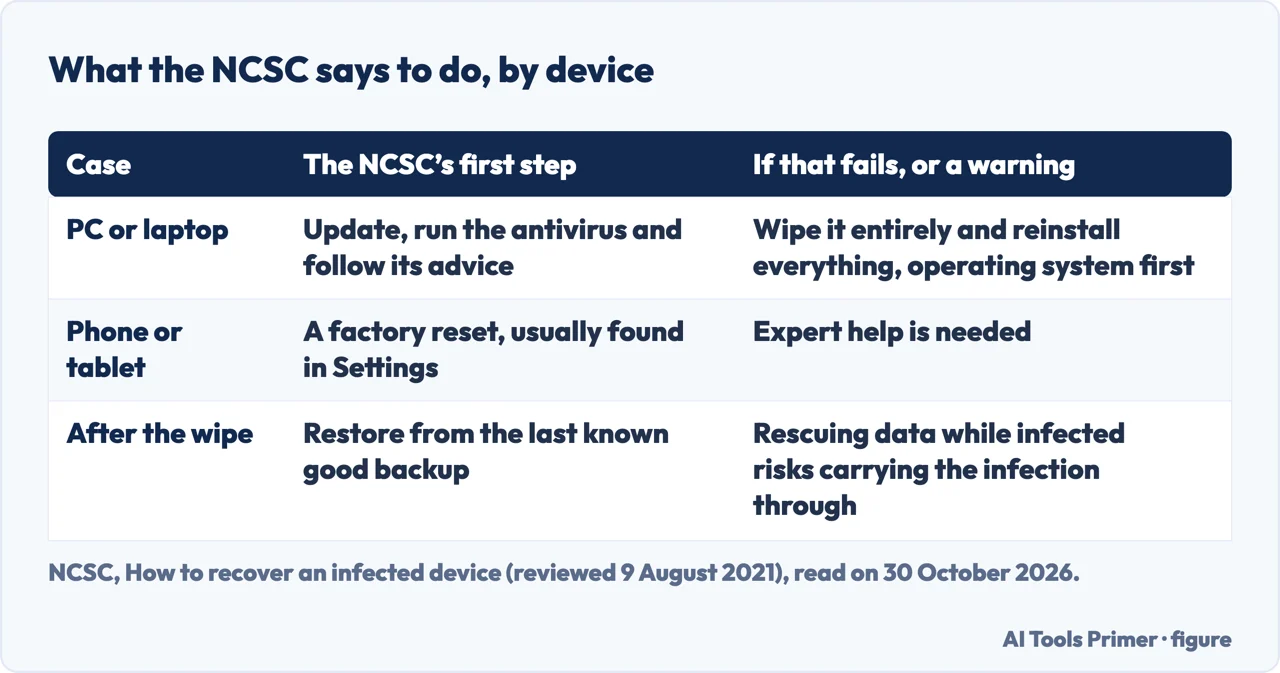
The offline scan Microsoft describes
Microsoft’s page on Microsoft Defender Offline describes a scan that boots into a trusted environment and runs from outside the normal Windows kernel. It says this lets the scan target malware that tries to bypass the Windows shell, such as viruses and rootkits that infect or overwrite the master boot record, and that the protection focuses on firmware and rootkits. Microsoft says to use it if you suspect an infection, or to confirm a thorough clean after an outbreak. On Windows 10 version 1607 or newer and on Windows 11 it runs from the Windows Security app: Virus & threat protection, Scan options, then Microsoft Defender Offline scan and Scan now.
The page lists what to know first. The scan takes about 15 minutes, signs you out, and restarts the device when it finishes, so Microsoft says to save files and close programs. If BitLocker is on for the system drive, it says to suspend BitLocker protection beforehand, or the restart may ask for the recovery key; our page on the BitLocker recovery key covers it. If the Windows Recovery Environment is disabled, the scan does not run and shows no error; Microsoft gives reagentc /info to check and reagentc /enable to switch it on. The scan applies to x64 Windows 11 and to x64 or x86 Windows 10, and not to Windows on ARM or Windows Server, and it needs local administrator rights. For older systems, Microsoft says to build the bootable media on a PC that is not infected, because malware can interfere with creating it, and to try again after a blue screen and contact Microsoft Support if it repeats.
The pages we read do not put the offline scan and the reset into one sequence. The NCSC puts the antivirus scan before the wipe for a PC, and Microsoft presents the offline scan as a tool for rootkits and boot-record malware, but neither writes the two as consecutive steps. Our page on rootkits covers the kinds of rootkit.
Phones and tablets: the reset comes first
For a phone or tablet the NCSC does not start with a scan. It says these devices cannot usually be fixed by an antivirus product in the same way as PCs and laptops, that the safest solution is a factory reset, usually found in Settings under a name that depends on the device, and that if this does not fix the problem you will need expert help. Its page on erasing devices calls the built-in Restore, Factory Reset or Erase all content and settings feature the most convenient way, warns that it erases everything including messages, contacts and photographs, and says to back up first. It adds that for erasing, this kind of reset is all that is needed in nearly all cases, and that if the device does not start properly afterwards you might have to reinstall the operating system, which it calls an advanced task.
Google’s Account Help page on Android lists signs of malware, among them pop-up ads that will not go away and a very slow device, then four steps: turn on Google Play Protect, install updates, remove apps you do not trust and run a security checkup. It ends by saying that if you still see signs of malware you might need to reset the Android device or ask the company that made it for help. Our pages on removing a virus on Android and on an iPhone go through the steps, and the one on resetting an iPhone covers the reset.
Apple’s page, in its Personal Safety guide and dated October 2025, is written for a case where someone may have had physical access to a device, tampered with its security and installed malicious software such as stalkerware. It says a factory restore erases all data, removes all apps including any installed without your knowledge, resets privacy settings and installs the latest version of the operating system. Before that it says to run Safety Check’s Manage Sharing & Access, because the problem may be a sharing setting or app access. For a Mac it names Erase All Content and Settings, which needs macOS 12.0.1 or later, or erasing with Disk Utility.
Windows: which reset the pages name
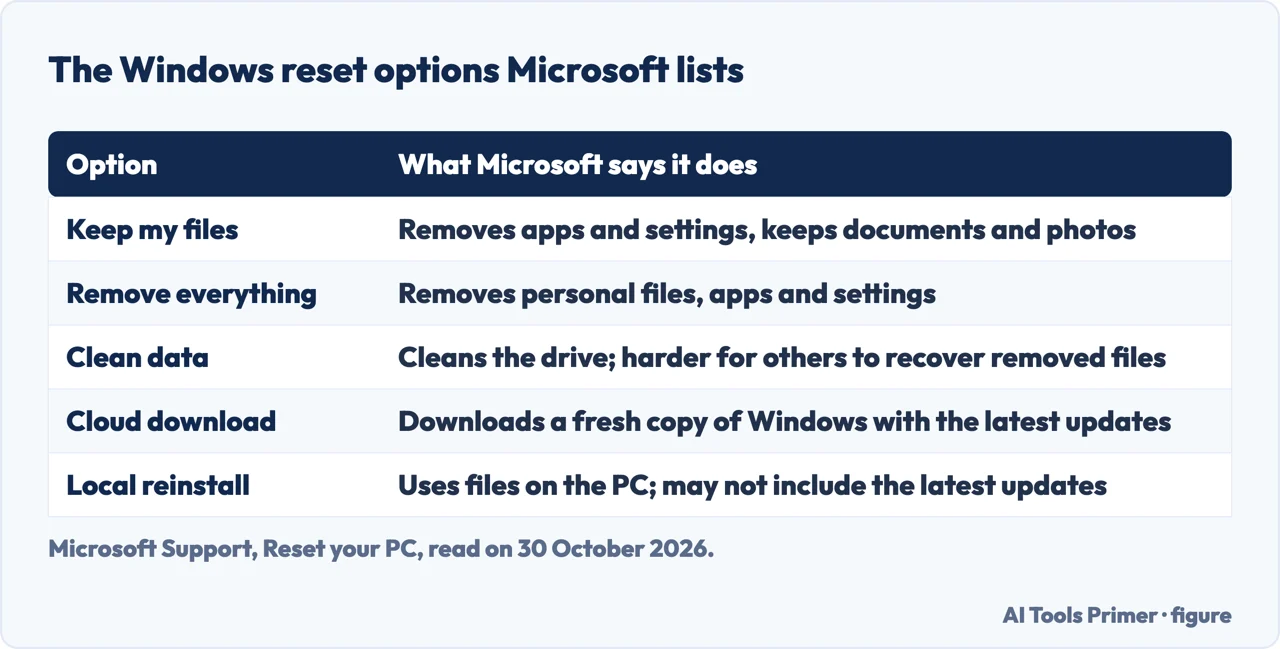
Microsoft Support’s page says resetting a PC reinstalls Windows, and that you should back up important files first and have your BitLocker recovery key if the device is encrypted. It lists five options. Keep my files, also called Refresh, removes apps and settings and keeps documents and photos. Remove everything, also called Reset, removes personal files, apps and settings. Clean data also cleans the drive and, Microsoft says, makes it harder for other people to recover removed files. Cloud download fetches a fresh copy of Windows with the latest updates, and Local reinstall uses the files already on the PC, which can be faster on a slow connection but may not include the latest updates. Microsoft adds that the erasure function is aimed at consumers and does not meet government and industry data erasure standards.
The NCSC’s table names Reset your PC with the Remove everything option as its recommended wipe for Windows. For anyone who wants to attempt to remove malware fully, it says to consider the advanced options, which for Windows are a recovery drive or installation media with Remove everything, or clearing the TPM. For Android its advanced option is reinstalling with stock images from some device makers, such as Google and Sony; for iOS it is a restore in DFU mode; for macOS the table lists erasing the disk with the Secure erase option. Our page on resetting Windows already lists the same five Microsoft options and the menus in full, so the new point here is which of them the NCSC ties to malware.
The two pages come at it from different sides. Microsoft’s reset page does not use the word malware, and the NCSC tells a PC owner whose antivirus fails to wipe the device entirely. The pages we read do not say whether Keep my files removes malware, or whether Cloud download and Local reinstall differ on malware.
What the pages we read say can survive a reset
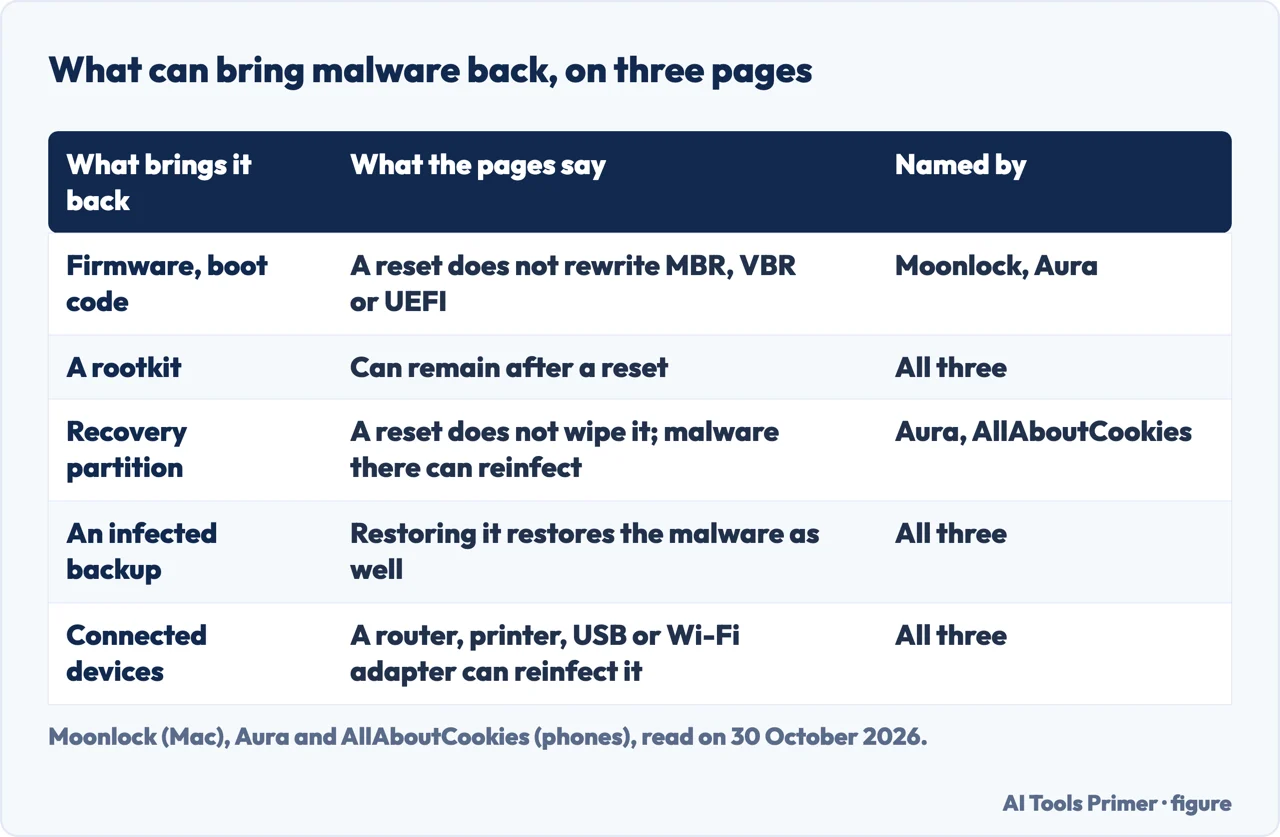
The NCSC’s recovery page and Microsoft’s reset page do not use the word firmware, and the NCSC’s erasing page does not discuss it. The firmware warnings in the pages we read come from Microsoft’s offline scan page, which names firmware and rootkits as its target, and from three pages that promote security products: Moonlock writes about Macs, Aura and AllAboutCookies about phones. Their pages are not independent of the products they promote, and we use them only for the facts they state.
Moonlock says a reset removes trojans, spyware and adware but cannot remove firmware-level threats or rootkits. It says malware in the master boot record, the volume boot record or UEFI and firmware sits in areas a standard reset does not rewrite, that a professional may reflash the firmware or replace the hardware, and that persistent firmware malware may need Apple Support. It cites Thunderstrike 2, a proof-of-concept Mac firmware worm from 2015, as showing that malicious code could survive disk wipes and macOS reinstallation. For ransomware, it says a reset can usually remove the program itself but will not restore files already encrypted.
Aura calls a reset on a phone a last resort, to use with a recent clean backup. It lists a rootkit or bootkit that affects the BIOS or other firmware and may need reflashing; malware in the recovery partition, which it says the reset leaves alone and can reinfect from; other connected devices such as external media, Wi-Fi adapters and routers; and zero-day or unpatched vulnerabilities, which it says leave the device at risk again once it boots. AllAboutCookies, which carries links to Norton products, says a reset removes a virus on a phone in most cases and calls the exceptions rare: a rootkit, an infected backup, external devices such as Wi-Fi adapters and keyboards, and malware in the recovery partition.
The pages we read do not give a count of how often a reset leaves malware behind, how to check the firmware yourself, or which consumer PCs have been hit. The only named case is Thunderstrike 2 on Macs in 2015, a proof of concept. Our page on factory resetting a MacBook covers what survives on a Mac.
Backups, passwords and what the pages leave open
On backups the pages differ. The NCSC says to restore data from the last known good backup, says data that was not backed up is lost, and warns that rescuing data while the device is still infected risks carrying the infection through the wipe and reinstall. Apple, writing about malicious software installed through physical access, says not to restore from a backup, because it may reinstall the software you are trying to remove. Moonlock names an infected Time Machine backup as the most common reason a virus returns and says iCloud can sync malware back, yet in its step-by-step part it says a backup may be the better route when you do not know where the malware came from. Aura calls an infected backup the most common cause on phones and says to scan the backup first, and AllAboutCookies also says to scan files before backing up. The pages we read do not say from which date a backup counts as clean, beyond the NCSC’s phrase.
Our page on the 3-2-1 backup rule covers copies, and the one on backing up a MacBook covers the Mac.
After the reset, the NCSC lists four things: keep the device and programs up to date, back up the data, check that the device is encrypted, and on a PC or laptop have an antivirus that updates regularly. Moonlock adds changing Apple Account and other passwords from a clean device and turning on two-factor authentication, and Aura says a reset cannot stop hackers getting into online accounts if they already have the passwords. Our malware guide has the rest of the order.
We did not open the Microsoft Q&A thread, the Reddit thread, the RSecurity page or the PCLaptops page, and Microsoft’s Virus & threat protection page, which we read, does not use the words reset or reinstall.
Where to start
Four ways in.
- “Scan or wipe first?”
- Scan first, wipe if the scan fails — order
- “It is a phone.”
- Phones and tablets: the reset comes first — phone
- “Which Windows reset?”
- Windows: which reset the pages name — windows
- “Can it come back?”
- What the pages we read say can survive a reset — survive
Before you wipe
The scan, the Windows steps and the rootkits come first.
The reset itself
How each device is wiped.
Questions people also ask
Can malware survive if I reset my PC?
Moonlock, on Macs, and Aura and AllAboutCookies, on phones, say it can in some cases: firmware or a rootkit, the recovery partition, an infected backup. Microsoft’s offline scan page names firmware and rootkits as what that scan targets. The pages we read do not say how often a reset leaves malware behind.
How to 100% get rid of a virus?
The pages we read do not promise it. For a PC the NCSC says to run the antivirus and, if it cannot clean the device, wipe it entirely and reinstall everything, operating system first, with expert help if needed. Its erasing page points to advanced options for anyone who wants to remove malware fully.
Will a factory reset remove hackers?
Moonlock says a reset removes the malware and system changes a hacker made, but not a weakness in the network that let them in. Aura says a reset cannot stop hackers from reaching online accounts if they already have the passwords.
Will a virus go away if I factory reset my phone?
The NCSC calls a factory reset the safest solution for a phone or tablet and says to get expert help if it does not work. AllAboutCookies says it removes most viruses and Aura says it works against many kinds of malware but may not cure everything. Apple says not to restore from a backup when the worry is malicious software.
Not covered here. We reset and scanned no device. The statements come from two NCSC pages, three Microsoft pages, an Apple Support page, a Google Account Help page and three pages that promote security products, all read on 30 October 2026.
The search volume and difficulty behind this page come from a Semrush reading of 29 August 2026, older than the 60 days the site normally allows.
Sources
- NCSC — How to recover an infected device — www.ncsc.gov.uk, read 30 October 2026.
- NCSC — Erasing devices — www.ncsc.gov.uk, read 30 October 2026.
- Microsoft Learn — Microsoft Defender Offline scan in Windows — learn.microsoft.com, read 30 October 2026.
- Microsoft Support — Reset your PC — support.microsoft.com, read 30 October 2026.
- Microsoft Support — Virus & threat protection in the Windows Security app — support.microsoft.com, read 30 October 2026.
- Apple Support — Restore device to factory settings — support.apple.com, read 30 October 2026.
- Google Account Help — Remove malware or unsafe software — support.google.com, read 30 October 2026.
- Moonlock — Can a factory reset remove a virus or other malware? — moonlock.com, read 30 October 2026.
- Aura — Why a factory reset won’t remove all viruses — www.aura.com, read 30 October 2026.
- AllAboutCookies — Does performing a factory reset remove viruses? — allaboutcookies.org, read 30 October 2026.
Written by Alberto Gulotta
Founder and editor of AI Tools Primer, writing from Palermo, Italy. Thirty-five years of taking computers apart, starting with a Commodore 64 — the long version is on the about page.
Something wrong on this page? Write to aitoolsprimer@gmail.com and it gets fixed.
Written on 3 November 2026.
Independence and limits
No affiliate links and no paid placements anywhere on this site. Nobody pays to appear here, and no company has seen this page before you did.
This is general information, not professional advice. Where a page touches money, health, safety or the law, it names its source and the date it was read — and your situation may still differ. See the privacy page and the cookie policy.