
Malware · guide
What are rootkits: how they hide and when to reinstall
By Alberto Gulotta · Updated · 20 min read
A rootkit is malware that hides itself and its activity on a device, and Microsoft says a successful one can stay in place for years. The vendors we read sort rootkits into five or six kinds by where they hide, and Microsoft says to reinstall the operating system and security software if the problem persists.
| Question | Answer | Where it comes from |
|---|---|---|
| What is a rootkit? | Malware that hides itself and its activity on a device, and can stay in place for years if undetected | Microsoft Learn |
| Is it a virus? | No: both vendors that ask the question say a rootkit is malware of a different kind from a virus | Malwarebytes, Fortinet |
| How many kinds are there? | Five on two pages and six on one; Microsoft does not list kinds | Kaspersky, Malwarebytes, Fortinet |
| How is one found? | A rootkit scan, run from the antivirus or from a known clean system, or Microsoft Defender Offline on Windows | Kaspersky, Fortinet, Microsoft Learn |
| What if it will not go? | Microsoft says to reinstall the operating system and security software, then restore from a backup | Microsoft Learn |
What a rootkit is
Microsoft Learn’s page on rootkits says malware authors use them to hide malware on a device so that it can persist as long as possible, and that a successful rootkit can potentially remain in place for years if it is undetected, stealing information and resources during that time. The page explains the mechanism in two sentences: rootkits intercept and change standard operating system processes, and once a device is infected, what it reports about itself can’t be trusted. Its example is a request to list the running programs, where the rootkit might quietly remove any program it does not want you to know about. Microsoft names six families that use rootkits to try to avoid detection and removal: Alureon, Cutwail, Datrahere (Zacinlo), Rustock, Sinowal and Sirefef.
The name is a compound, and two vendors explain it the same way. Kaspersky says “rootkit” derives from Unix and Linux, where the most privileged account is called root, and that the applications that allow unauthorized root or admin-level access are the kit. Malwarebytes says root, admin, superuser and system admin are interchangeable terms for a user account with the admin status of an operating system, and that a kit is a package of software tools, so a rootkit is a set of tools that gives someone the highest privileges in a system.
What that access is used for is listed a little differently on each page. Kaspersky lists stealing personal and financial information, installing other malware and using the computer in a botnet to send spam and take part in DDoS attacks; it adds that rootkits can hide keyloggers and can even disable or remove security software. Malwarebytes lists deactivating antivirus software, spying on activity, stealing sensitive data and executing other malware, and notes that a few experts call rootkits the Swiss Army Knives of malware. Fortinet lists bots for DDoS attacks, software that disables security software and steals banking details, card details and passwords, and keystroke loggers, and says a rootkit usually provides an attacker with a backdoor into a machine. Our pages on what a botnet is and on keyloggers cover two of those uses.
Kaspersky and Fortinet also say rootkits are not only used by criminals. Kaspersky mentions providing remote IT support or assisting law enforcement, then adds that rootkits are mostly used for malicious purposes. Fortinet says organizations and law enforcement use them to monitor employees and to investigate machines. Kaspersky adds that anything that runs an operating system is a potential target, and says that as the Internet of Things expands this may include a fridge or a thermostat.
Not a virus, and how one arrives
Two of the vendor pages answer the question outright. Malwarebytes says that contrary to popular perception a rootkit is not a virus but malware, because a virus is just one type of malware, and it says that while a virus only corrupts data a rootkit is far more advanced. Fortinet also says no: it describes viruses as programs or code that damage machines by corrupting files, destroying data or wasting resources, and a rootkit as malware that lets an attacker perform actions or steal data. The two definitions of a virus are not identical, since Malwarebytes names one effect and Fortinet three. Malwarebytes adds that security software using behavioral heuristics can remediate viruses, worms, ransomware, Trojans and even some rootkits. Our page on the Trojan covers another kind that is often confused with a virus.
The routes in are given as lists, and the lists overlap without matching. Kaspersky calls phishing and other social engineering attacks the most common: victims unknowingly download and install malware that hides within other processes. It adds exploiting a vulnerability in software or an operating system that has not been updated, and malware bundled with other files such as infected PDFs, pirated media or apps from suspicious third-party stores. Malwarebytes names corrupt downloads, spam emails and exploit kits, says some rootkits rely on a Trojan to breach a system, and says targeted attacks use social engineering such as phishing emails. Fortinet names known vulnerabilities in an operating system or an application, attacked with exploit code, and infected USB drives that attackers leave in public places, where the malware installs as part of a file or application that appears legitimate.
Malwarebytes also says some sophisticated attacks are harder to carry out: installing a bootloader rootkit, for example, may need an infected drive. The pages we read do not say how often any of these routes is used.
The kinds, by where they hide
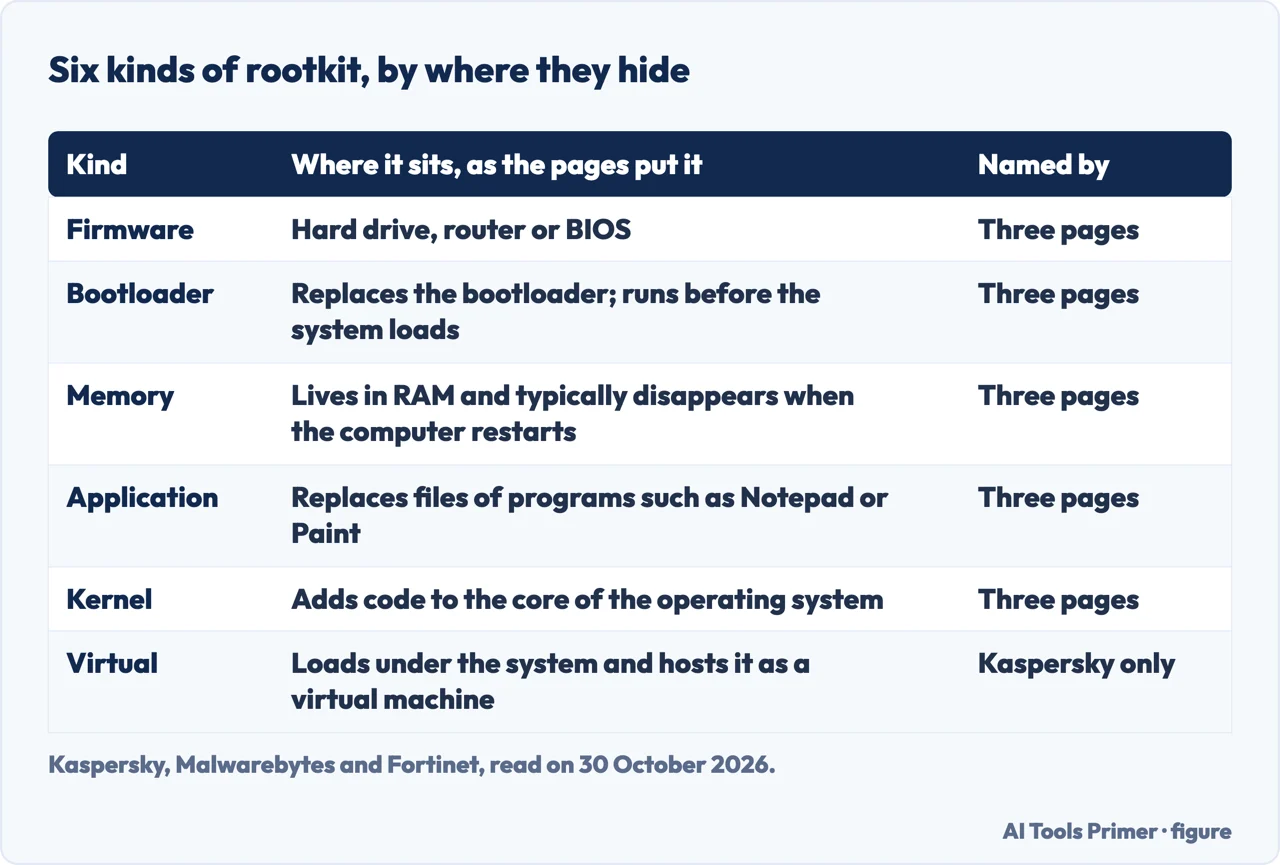
The count depends on the page. Microsoft Learn does not list kinds. Malwarebytes names five (bootloader, firmware, kernel, memory and application), Fortinet names five (firmware, bootloader, memory, application and kernel mode) and Kaspersky names six, adding a virtual rootkit that the other two do not describe. The table below puts the six side by side.
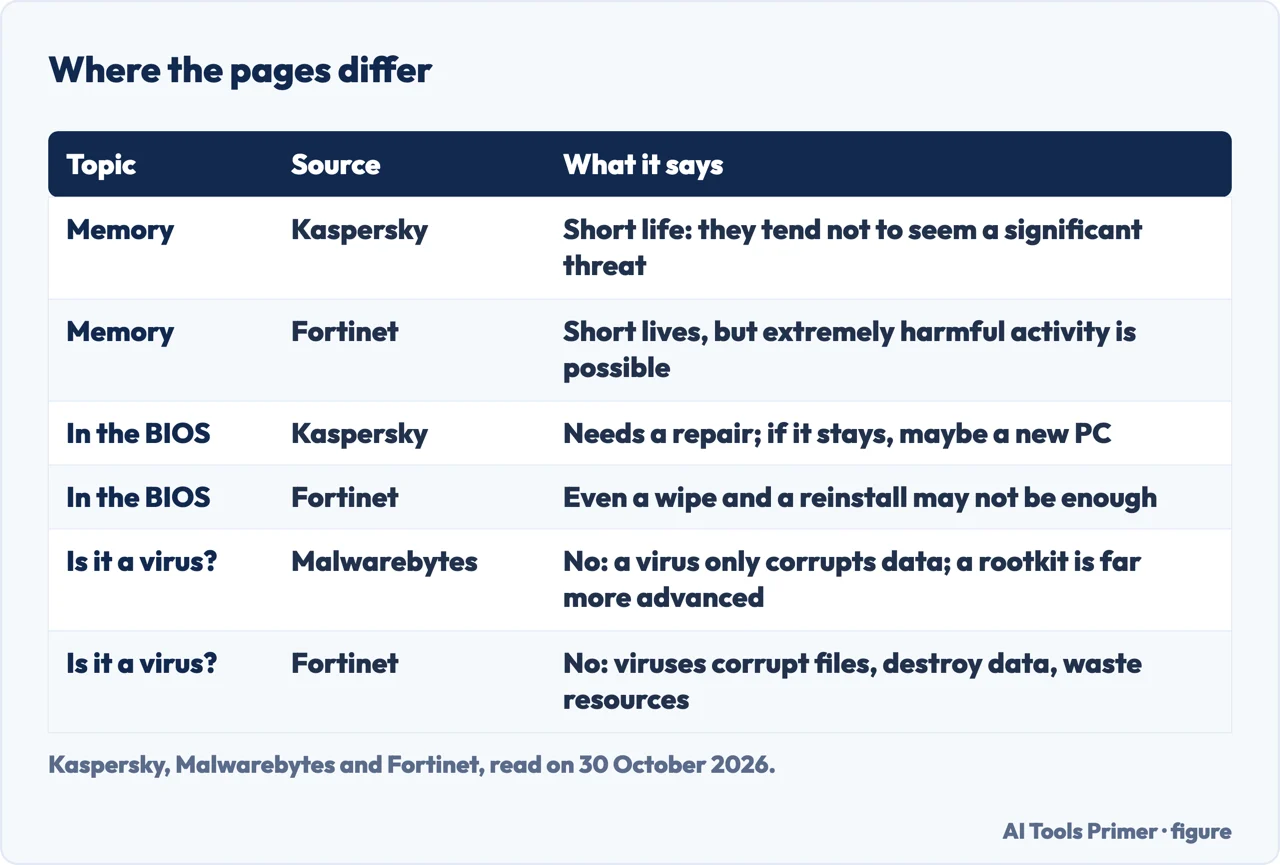
Firmware or hardware. Kaspersky says these can affect a hard drive, a router or the BIOS, the software on a small memory chip on the motherboard, and that they are less common than other types but a severe threat. Fortinet gives the hard drive and the BIOS, and says some can infect a router and intercept data written to disks. Malwarebytes says firmware can be found in everything from mobile phones to washing machines and that such a rootkit is hard to find because it hides in firmware, a place where cybersecurity tools do not tend to look for malware.
Bootloader. Kaspersky says the legitimate bootloader is replaced with a hacked one, which activates the rootkit before the operating system is fully loaded. Fortinet says it infects the master boot record or volume boot record, so it does not show up in the standard file system, and that it may modify boot records in a way that could damage a machine when removed. Malwarebytes is the only one of the three to say bootloader rootkits are less of a menace nowadays, thanks to security features like Secure boot. Microsoft’s page on Defender Offline names the same target: rootkits that infect or overwrite the master boot record.
Memory. All three vendors say a memory rootkit lives in RAM. Kaspersky says it disappears as soon as you reboot and Fortinet says it typically disappears when the system is rebooted, while Malwarebytes says you can usually clear one by restarting, because a simple restart clears the memory of all processes. Kaspersky and Fortinet add that sometimes further work is needed to get rid of one. The weight they give it differs: Kaspersky says the short lifespan means these tend not to be perceived as a significant threat, while Fortinet says they have short lifespans but can carry out extremely harmful activity in the background.
Application. Kaspersky says these replace standard files and infect programs such as Microsoft Office, Notepad or Paint, giving attackers access every time the programs run; Fortinet gives Notepad, Paint and Word. Only Malwarebytes says this kind is easier to spot than other malware. Kaspersky and Fortinet say the infected programs still run normally, which makes detection hard for users, but Kaspersky says antivirus programs can detect them because both operate on the application layer, Malwarebytes says the files can behave atypically and security tools have a better chance of identifying them, and Fortinet says good anti-rootkit or antivirus programs should discover them.
Kernel mode. Kaspersky calls these among the most severe because they target the core of the operating system and let hackers change its functionality by adding code. Malwarebytes says one can be catastrophic. Fortinet says building one takes significant technical knowledge, so a kernel rootkit laden with bugs can hurt the machine’s performance and is also easier to detect, because it leaves a trail for anti-rootkit or antivirus software.
Virtual. Only Kaspersky describes this kind: it loads itself underneath the operating system and hosts the target system as a virtual machine, which lets it intercept hardware calls without modifying the kernel. Kaspersky says it can be very difficult to detect.
The examples come from Kaspersky and Fortinet, and they describe some of them differently. Kaspersky calls Stuxnet a malicious computer worm discovered in 2010 and one of the most notorious rootkits in history; it says some believe the US and Israel created it jointly, although neither country admitted responsibility. Fortinet calls it the first known rootkit to specifically target industrial control systems. Kaspersky describes Flame, found in 2012, as a rootkit used for cyber espionage in the Middle East that could monitor traffic, capture screenshots and audio, and log keystrokes. It says ZeroAccess, discovered in 2011, was a kernel mode rootkit that infected more than 2 million computers and made them part of a botnet, and that it is in active use today; Fortinet says the botnet held up to 2 million machines, that security firms and agencies took most of it down, and that variations are still available and active. Kaspersky dates TDSS to 2008 and compares it to a bootloader rootkit because it loads in the early stages of the operating system. Fortinet gives Necurs as the rootkit behind one of the biggest active botnets, and lists Machiavelli, a 2009 attack it calls the first rootkit to target Mac OS.
Signs, and why they are weak evidence
Kaspersky lists five possible signs: a large volume of Windows error messages or blue screens while the computer keeps rebooting; unusual web browser behavior, such as unrecognized bookmarks or redirected links; slow performance, freezing, or a failure to respond to the mouse or keyboard; Windows settings that change without permission, such as the screensaver, a hidden taskbar or the wrong date and time; and web pages or network activity that is intermittent or does not work properly. Malwarebytes gives three groups: system crashes, which it says a rootkit in the bootloader, hard drive, BIOS or applications may cause, software malfunctions such as slowdowns, mysterious settings changes or browser problems, and an antivirus that deactivates without cause. For that last one it says to try an anti-rootkit scan and afterwards reinstall the security software.
The same pages say why a list cannot settle the question. Malwarebytes says a deeply concealed rootkit shows few symptoms and may even bypass security software. Kaspersky says detection is difficult because the malware is designed to stay hidden, and that rootkits can disable security software, so one could stay on a computer for a long time. The Microsoft page we read does not list signs. Our page on how to tell whether a computer has a virus separates signs that are events from signs that are only measurements.
Looking for one: scans from outside Windows
Kaspersky and Fortinet both give the rootkit scan first place. Kaspersky calls it the best way to detect an infection, started from the antivirus solution, and says that if you suspect one you can power down the computer and run the scan from a known clean system. Fortinet calls a rootkit scan the most effective method and says rootkits are difficult for the machine’s own operating system to detect, so an antivirus that can perform rootkit scans is often required. It describes two techniques: searching for known attack signatures, including through analysis of a memory dump, and behavioral analysis, which looks for rootkit-like behaviors instead of the rootkit. Kaspersky describes the second one the same way and adds that it may alert you before you realize you are under attack.
Microsoft Learn says its security software includes many technologies designed to remove rootkits, and that if you think you have one, you might need an extra tool that helps you boot to a known trusted environment. That tool is Microsoft Defender Offline, which can be launched from the Windows Security app. Microsoft says it is designed for devices that are not working correctly because of a possible malware infection. A second Microsoft page describes it as a scan that runs from outside the normal Windows kernel, so it can target malware that bypasses the Windows shell, including rootkits that infect or overwrite the master boot record. The first page also says System Guard in Windows 10 protects against rootkits and threats that affect system integrity.
On Windows 10 version 1607 or newer and on Windows 11, the second page says the scan runs with one click from Windows Security. Open Windows Security, choose Virus & threat protection and then Scan options, select the Microsoft Defender Offline scan and choose Scan now. You are asked to save your work, then for permission to make changes to the device, and then told that you will be signed out and Windows will shut down in less than a minute. The page says the scan takes about 15 minutes and restarts the computer when it finishes, after which Windows loads normally. For PowerShell, it gives the cmdlet Start-MpWDOScan. Results are in Protection history under Scan options. If a blue-screen error appears during the scan, the page says to restart and run it again, and to contact Microsoft Support if the error comes back.
The page lists conditions that decide whether the scan runs at all. Microsoft Defender Antivirus must be the primary antivirus software and not in passive mode, and you must be signed in with local administrator privileges. The page lists x64 Windows 11, x64 and x86 Windows 10, and says the scan does not apply to ARM Windows 11, ARM Windows 10 or Windows Server. If BitLocker is enabled on the system drive, it says to suspend BitLocker protection first, because otherwise you may be asked for the BitLocker recovery key when the computer restarts into the offline environment. The Windows Recovery Environment must be enabled: if it is disabled, the page says the scan does not run and no error message is displayed, and it gives reagentc /info to check the status and reagentc /enable to enable it. For Windows 7 Service Pack 1 and Windows 8.1 it describes bootable media instead, made on a PC that is not infected; a USB drive used for it is reformatted and its data erased. Our page on how to scan for malware covers the ordinary scans that come before this one.
When reinstalling wins
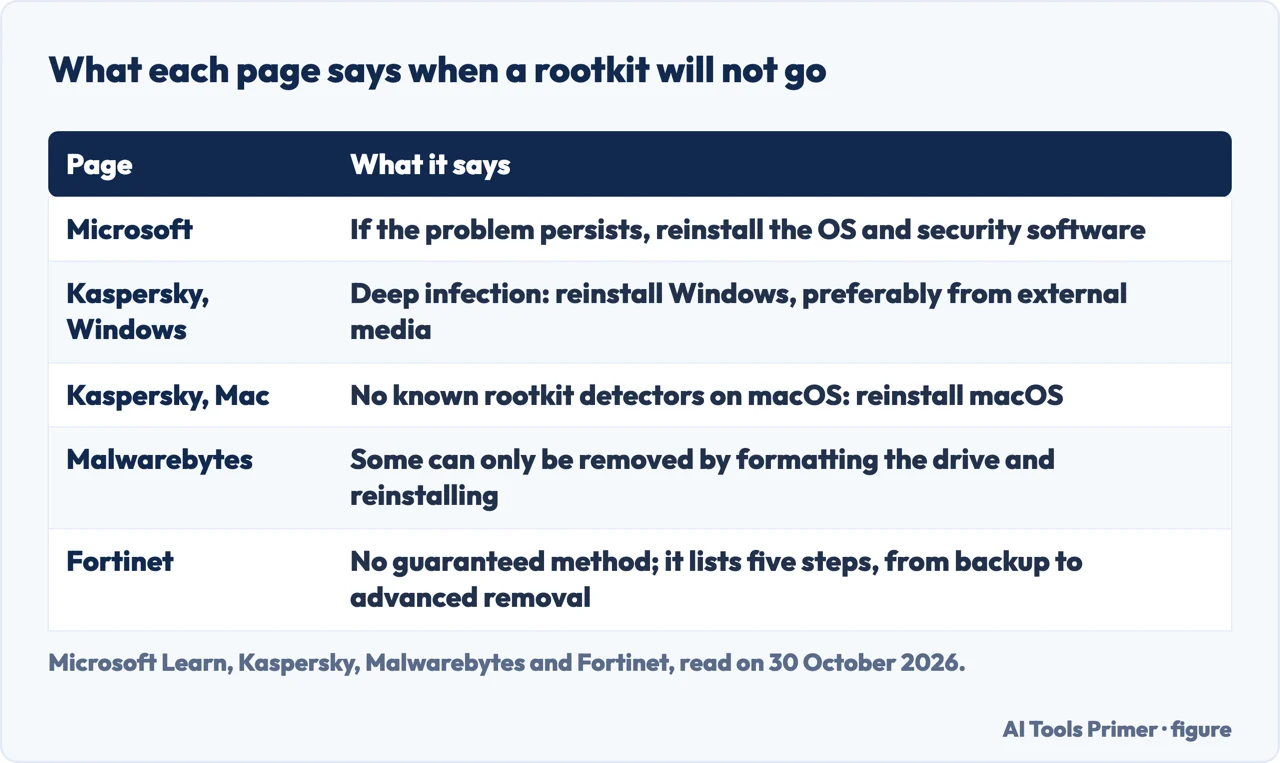
The pages do not agree on how far to try before wiping, and the third table shows each one. Microsoft Learn is the shortest: if the problem persists, it strongly recommends reinstalling the operating system and security software, then restoring your data from a backup. Kaspersky says removal is complex and typically needs specialized tools, and that sometimes the only way to eliminate a well-hidden rootkit entirely is to erase the operating system and rebuild from scratch. For Windows it says removal typically involves running a scan, and that a deep infection can only be removed by reinstalling Windows, better done from external media than with the built-in installer. For the BIOS it says a repair is needed, and that if the rootkit remains you may need to get a new PC. For a Mac it says there are no known rootkit detectors on macOS, so a suspected rootkit calls for reinstalling macOS, and it repeats the BIOS caveat. Malwarebytes says some rootkits can only be removed by formatting the storage drive and reinstalling the operating system.
Of the pages we read, Fortinet is the one that sets out a sequence of steps before the wipe, and it says there is no guaranteed method for recovering a machine. Its first step is to back up vital data, because the rootkit’s reaction on removal is unpredictable. Its second is to restart in safe mode with networking, to limit the rootkit’s access; we have not checked the key it gives for doing this against a Microsoft page, so we do not repeat it. The third is to use several rootkit scan tools together, because not all scans will discover every family; the fourth is to freeze any remaining malware with other security solutions so removal programs can clean up. The fifth is advanced removal: for a firmware or hardware rootkit it says the user may need to back up, wipe the machine and reinstall the operating system, and for a rootkit in the BIOS it says even that may not be enough, and the BIOS drive may need to be wiped and replaced along with a hard reset. Kaspersky and Fortinet agree that the BIOS is the hard case.
Microsoft’s page is also where the backup advice comes from: back up important files regularly, with the 3-2-1 rule of three backups on two different storage types and at least one offsite. Our page on the 3-2-1 backup rule looks at what that rule does and does not cover, and the page on removing malware from a Windows computer gives the full sequence.
On prevention the pages agree more. Microsoft, Kaspersky, Malwarebytes and Fortinet all say to keep the operating system and applications updated. Kaspersky, Malwarebytes and Fortinet add care with phishing, and Kaspersky adds downloading files from trusted sources only. All three vendors recommend antivirus software, and Fortinet says antivirus on its own is not a solid defense but part of an overall security solution. The pages we read do not say how many computers have a rootkit today, or how common each kind is. None of the five says at what point to stop scanning and wipe: Microsoft puts the wipe after the problem persists, Fortinet puts it after its steps, and only Kaspersky and Malwarebytes name cases where nothing short of it works.
Where to start
Four ways in.
- “What is a rootkit?”
- What Microsoft and three vendors say it is — what
- “How does one get in?”
- Phishing, updates not applied, bundled files — arrival
- “Can I find one?”
- Scans from outside Windows, and Microsoft Defender Offline — scan
- “Can it be removed?”
- Reinstalling, as four pages put it — reinstall
What rootkits are used for
A botnet and keyloggers, two uses the vendor pages name, and the Trojan that some rootkits rely on to get in.
Finding it and starting again
Signs, scans, backups and the Windows sequence.
Questions people also ask
Can rootkits be removed?
Microsoft says to reinstall the operating system and security software if the problem persists, then restore your data from a backup. Kaspersky says removal typically needs specialized tools and sometimes a rebuild from scratch, and Malwarebytes says some rootkits can only be removed by formatting the drive and reinstalling. Fortinet says there is no guaranteed method.
How do I know if I have a rootkit virus?
Kaspersky lists blue screens and reboots, odd browser behavior, slowness, changing Windows settings and intermittent web pages, and Malwarebytes lists crashes, malfunctions and an antivirus that deactivates. Malwarebytes also says a deeply concealed rootkit shows few symptoms. Kaspersky and Fortinet name a rootkit scan as the way to look.
How do rootkits get on your computer?
Kaspersky puts phishing and other social engineering first, then an unpatched vulnerability and malware bundled with files such as pirated media. Malwarebytes adds corrupt downloads, spam emails and exploit kits, and Fortinet adds infected USB drives left in public places.
Why are rootkits so dangerous?
Malwarebytes gives three reasons: they are sneaky, stealthy and capable. Microsoft says that after infection what the device reports about itself can’t be trusted. Kaspersky says the danger lies in the forms of malware they can deliver and the admin access they give to remote users.
Not covered here. We tested nothing on a computer. The statements come from two Microsoft Learn pages, Kaspersky, Malwarebytes and Fortinet, all read on 30 October 2026; all five are published by companies that sell security software, and the two Microsoft pages describe Microsoft’s own tools.
The search volume and difficulty behind this page come from a Semrush reading of 29 August 2026, older than the 60 days the site normally allows.
Sources
- Microsoft Learn — Rootkits (last updated 24 July 2024) — learn.microsoft.com, read 30 October 2026.
- Microsoft Learn — Run and review the results of a Microsoft Defender Offline scan — learn.microsoft.com, read 30 October 2026.
- Kaspersky — What is Rootkit: definition and explanation — www.kaspersky.com, read 30 October 2026.
- Malwarebytes — Rootkit — www.malwarebytes.com, read 30 October 2026.
- Fortinet — What is a rootkit? — www.fortinet.com, read 30 October 2026.
Written by Alberto Gulotta
Founder and editor of AI Tools Primer, writing from Palermo, Italy. Thirty-five years of taking computers apart, starting with a Commodore 64 — the long version is on the about page.
Something wrong on this page? Write to aitoolsprimer@gmail.com and it gets fixed.
Written on 30 October 2026.
Independence and limits
No affiliate links and no paid placements anywhere on this site. Nobody pays to appear here, and no company has seen this page before you did.
This is general information, not professional advice. Where a page touches money, health, safety or the law, it names its source and the date it was read — and your situation may still differ. See the privacy page and the cookie policy.