
Malware · guide
The 3-2-1 backup rule counts copies, not what malware can reach
By Alberto Gulotta · Updated · 14 min read
The 3-2-1 backup rule asks for three copies on two devices with one offsite, and the NCSC says it does not require any copy to be offline. Ransomware has encrypted connected backup drives and has compromised connected cloud locations, so the NCSC and CISA both ask for a copy kept apart from the live systems.
| Question | Answer | Where it comes from |
|---|---|---|
| What does the rule say? | Three copies, on two devices, with one offsite | NCSC |
| Does it ask for an offline copy? | The NCSC says it does not require any backup location to be offline | NCSC |
| Why does that matter? | The NCSC reports ransomware encrypting connected USB and network drives that held backups, and compromising connected cloud storage locations that held them | NCSC |
| What do the two agencies add? | At least one backup offline at any time (NCSC); offline, encrypted, regularly tested backups (CISA) | NCSC, CISA |
| Is 3-2-1 enough? | Backblaze calls it a starting point; Veeam says it is no longer sufficient on its own | Backblaze, Veeam |
The rule in three wordings
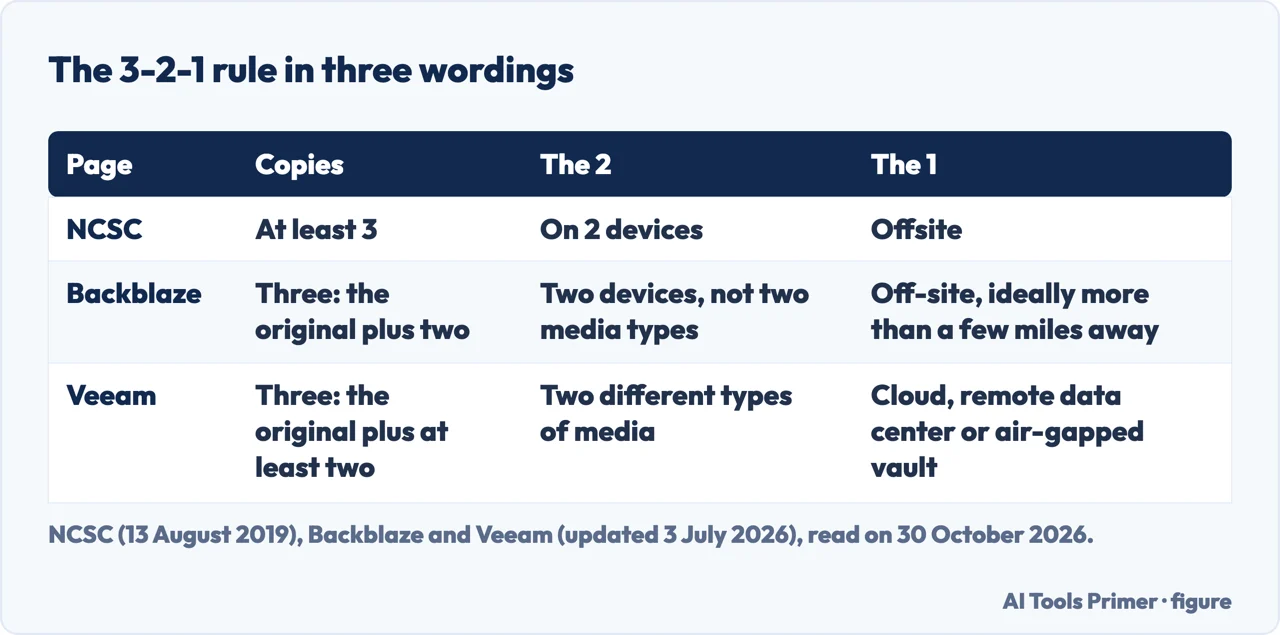
The NCSC, the United Kingdom’s National Cyber Security Centre, gives the rule in a blog post called “Offline backups in an online world”, published on 13 August 2019 and written by a cloud security researcher. It calls 3-2-1 the most common method for resilient backups and states it as at least three copies, on two devices, and one offsite. The post says the rule is popular because it scales, including the use of the cloud for the offsite copy, and because it can give confidence that critical data is safe from a localised incident.
Backblaze, a company that sells online backup and recommends its own service on the page, says three copies means the original plus two more, on two different media, with one copy off-site, ideally more than a few miles from the other two so that natural and physical disasters do not reach it. Veeam, a backup software company, updated its page on 3 July 2026. It says three copies means the original plus at least two, on two different types of media such as local storage and cloud or disk and tape, with at least one copy off-site, whether a public cloud, a remote data center or an air-gapped vault. Veeam says the rule works because it embraces redundancy, diversity and isolation.
The three wordings do not match on the “2”. Backblaze says that today you do not need two types of media but you do need two different devices, and explains that the old reasons for two media types were obsolescence and a hardware failure taking out both local copies, with cloud storage all but removing the first. Veeam keeps two different types of media. The NCSC writes two devices.
The sentence about offline copies
The NCSC post lists four rules for cloud backups: offline, recovery, 3-2-1 and regular. After giving the 3-2-1 rule it adds that the rule does not require any backup location to be offline, and that this is the reason for the first rule on its list. The offline rule asks whether one or more backups are offline at any given time. The NCSC describes an offline backup as one meant to stay unaffected if an incident hits the live environment, reached by connecting the backup to live systems only when absolutely necessary and by never having all backups connected, or “hot”, at the same time. With at least one backup offline, it says, an incident cannot affect all of your backups simultaneously.
Backblaze and Veeam reach a similar place from the vendor side. Backblaze says the rule is becoming more of a starting point than a complete data backup solution, because ransomware calls for added protections, and it names the variants 3-2-1-1-0 and 4-3-2. Veeam says the rule remains relevant but no longer sufficient on its own, and extends it to 3-2-1-1-0: one more copy that is immutable or air-gapped, and zero recovery errors, which it ties to recovery verification. Veeam says an immutable or air-gapped copy matters because ransomware increasingly targets backups and a backup connected to the network can be compromised. Both are companies that sell backup products, so we use them for how they define the rule and for what they say about themselves.
Why a connected copy can be reached
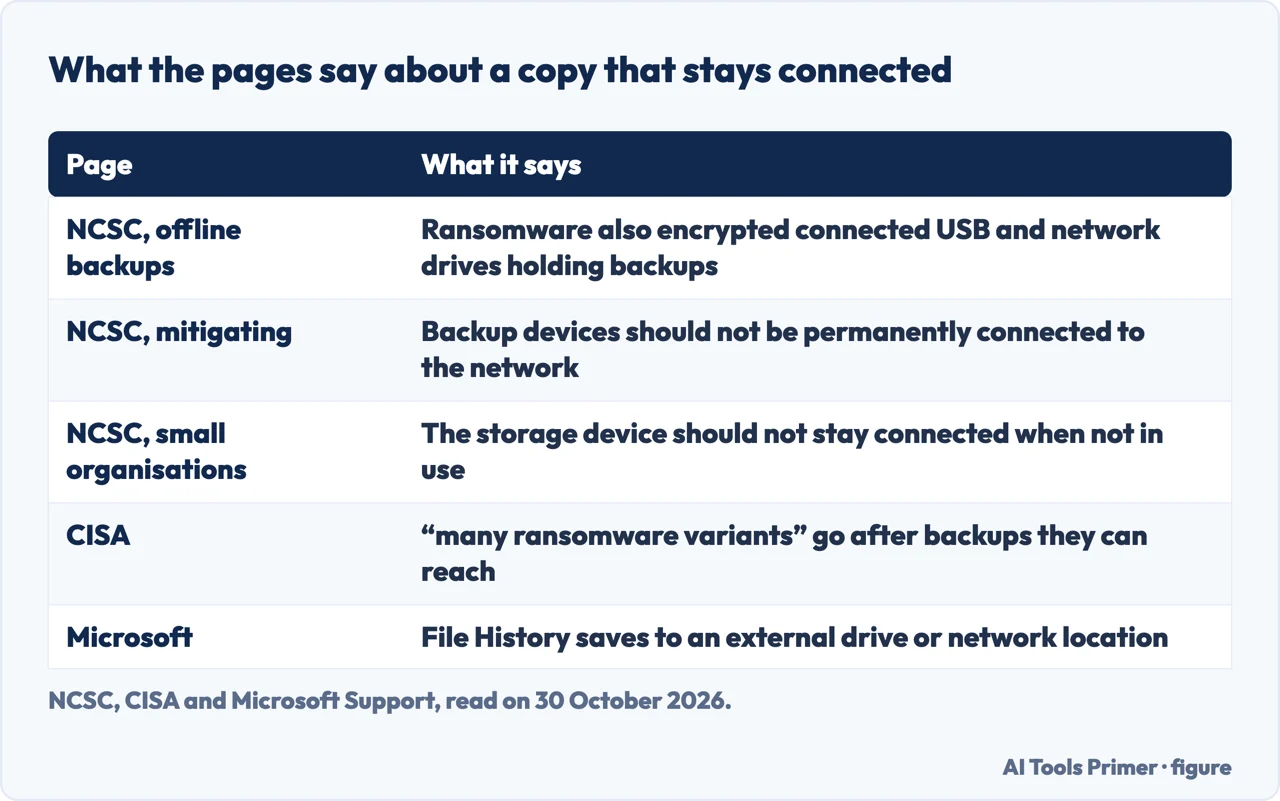
The first paragraph of the NCSC post says the agency has seen numerous incidents in which ransomware encrypted not only the original data on disk but also the connected USB and network storage drives holding backups. It adds that incidents involving ransomware have also compromised connected cloud storage locations containing backups. The NCSC’s guide on mitigating malware and ransomware attacks, published on 13 February 2020 and reviewed on 9 September 2021, says it is essential to always have a recent offline backup of your most important files and data. It also notes that malware is sometimes presented as ransomware and, after the ransom is paid, the files are not decrypted; it calls this wiper malware.
The same guide says “ransomware actively targets backups” to increase the likelihood of payment. Its first action, make regular backups, asks for offline copies kept separate from the network and systems, in a different location (ideally offsite) or in a cloud service designed for this purpose. It says not to rely on two copies on a single removable drive, nor on multiple copies in a single cloud service, and that devices holding a backup, such as external hard drives and USB sticks, should not be permanently connected to the network, because attackers target connected backup devices and solutions. For the cloud it warns that services often synchronise immediately after files have been replaced with encrypted copies, so the service should protect previous versions of the backup from being immediately deleted. It also records cases where attackers destroyed copied files or disrupted recovery before the ransomware attack.
CISA, the United States Cybersecurity and Infrastructure Security Agency, puts it in its #StopRansomware Guide: maintain offline, encrypted backups of critical data, and test them regularly. Its reason is that “many ransomware variants” attempt to find and delete or encrypt backups that can be reached, making restoration impossible unless the ransom is paid. In its list of signs to look for, CISA names endpoint changes that may impair backups and anomalous use of built-in Windows tools such as bcdedit.exe, vssadmin.exe, wbadmin.exe and wmic.exe, and calls misuse of those tools a common ransomware technique to inhibit system recovery. The CISA text we read does not use the name 3-2-1.
Unplugging, at home and in the cloud
For small organisations the NCSC says a backup can be kept online, with services such as iCloud, Google Drive and OneDrive, or on an external device such as a USB stick or external hard drive. For the device it says to keep it somewhere secure and that it should not stay connected to your device when not in use, as some viruses will also affect devices connected to an infected computer. Its tip is to use both, an online backup and a storage device, to make two backups in case one is lost, stolen or fails, and to protect the online one with 2-step verification. That guide was published on 9 April 2026 and reviewed on 21 July 2026.
The Windows and Mac pages we read describe how to make the copy. Microsoft says File History saves copies of personal files to an external drive or network location, and that to set it up you connect an external drive or configure a network location; Windows Backup signs in with a Microsoft account and syncs folders to OneDrive. Apple says Time Machine can use a USB drive or other storage device to back up automatically, that iCloud syncs data across devices signed in with the same Apple Account, and that files can be dragged by hand to a storage device connected to the Mac. The pages we read do not say to disconnect the drive afterwards, and they do not mention ransomware. Microsoft’s page mentions malware infections once, in its description of recovery.
The cloud cannot be unplugged, the NCSC says, so its post gives three steps that aim at the same protection, for services that offer them. First, secure account identity, with passwords and multi-factor authentication in line with NCSC guidance. Second, a minimum number of backup clients, meaning devices holding credentials for the storage, with no valid credentials while the storage is not in use. Third, access controls, where available, that let authorised clients create new backups or append to existing ones and deny connection requests while the storage is not in use. The NCSC says a ransomware infection with only the privilege to create new data cannot overwrite existing backups, which it likens to write-once storage. Its recovery rule adds that some cloud services restore modified data to an older version and recover deleted data for a limited time, and that you should check the provider includes these features.
Restoring, and what to check first
The NCSC, CISA and Veeam all ask for backups to be tested or checked. The NCSC’s small-organisations page says that once you have made a backup it is important to know how to restore it and to check that it contains all your important data. The NCSC’s regular rule says backups should be created frequently and regularly tested to check they work as expected. CISA asks for regular tests of the availability and integrity of backups. Veeam’s zero in 3-2-1-1-0 is about the same point, and the company says its own technology automates the check that backups are complete, bootable and ready to restore.
The NCSC’s guide on mitigating ransomware lists steps to take around a recovery. Connect backups only to known clean devices before starting. Scan the backups for malware before restoring files, because ransomware may have entered the network over a period of time and been replicated to backups before it was discovered. Patch the products used for backup, so attackers cannot exploit known vulnerabilities in them. CISA says to identify the dropper malware, the earlier malware that can precede a ransomware event, before rebuilding from backups, to prevent continuing compromises, and to restore from offline, encrypted backups in order of priority while taking care not to re-infect clean systems.
The NCSC and CISA pages we read do not say how often to test a restore or how long a test should take, and both write “regularly” and leave it there.
Where the pages part ways
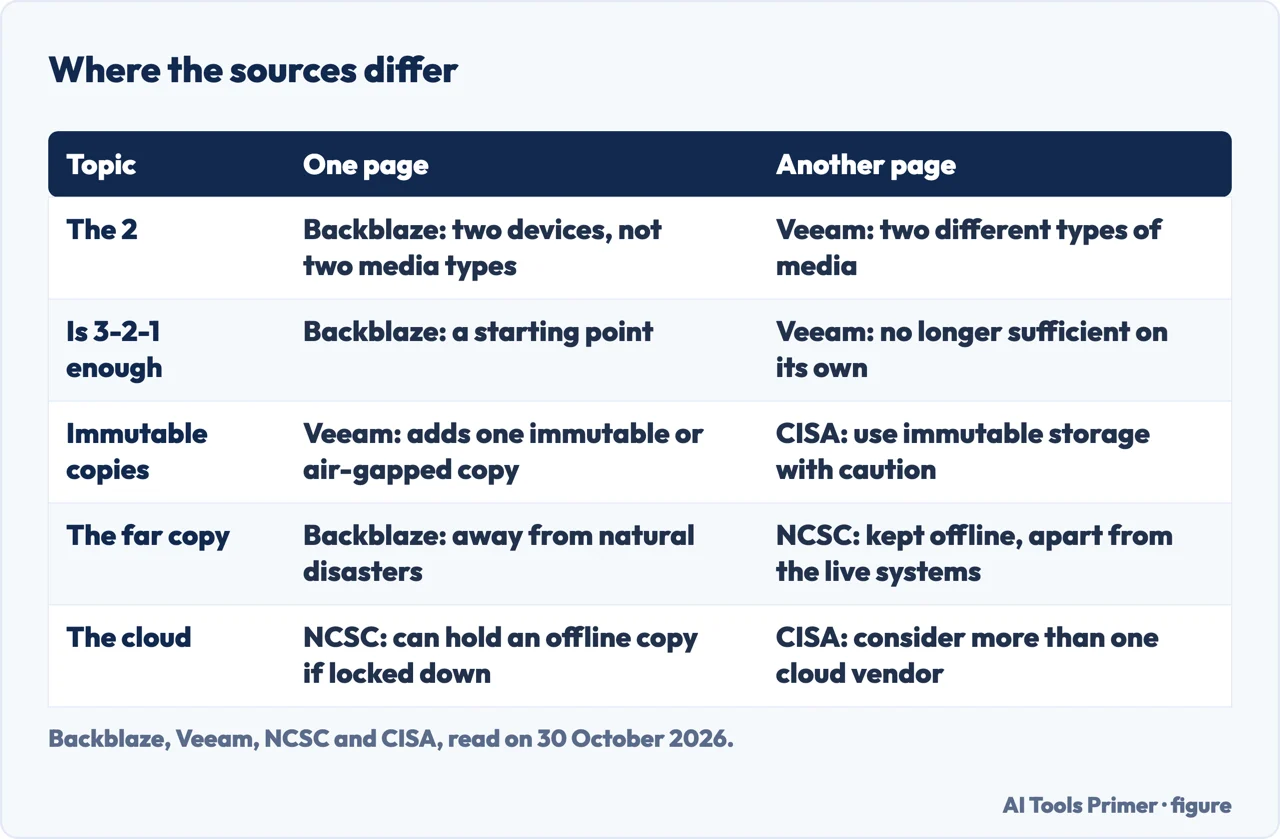
On immutable storage, Veeam presents an immutable or air-gapped copy as part of its extended rule, while CISA says to use immutable storage with caution because it does not meet the compliance criteria of certain regulations and a misconfiguration can impose significant cost. On the cloud, the NCSC treats cloud storage as a good place for an offline copy if it is digitally disconnected with the controls above, CISA suggests considering more than one cloud vendor for cloud-to-cloud backups in case all accounts under the same vendor are affected, and the NCSC’s mitigating guide says not to rely on multiple copies in a single cloud service. On the far copy, Backblaze gives distance as the protection, against natural and physical disasters, while the NCSC and CISA write about separation from the live systems: offline, not reachable.
The Backblaze and Veeam pages we read do not use the words unplug or disconnect. The NCSC’s small-organisations and mitigating guides say in plain words that a backup device should not stay connected, and its offline-backups post says never to have all backups connected at the same time. We also read pages from SentinelOne, HYCU and the U.S. Chamber of Commerce and took no claims from them. We tested nothing on a computer.
If you suspect malware is already on a machine, our guides on how to scan for malware and on removing malware from a computer come first, and backups on Windows and Mac, and how to back up a MacBook, which also quotes the NCSC sentence on offline copies from the laptop side covers the built-in tools that make the copies.
Where to start
Four ways in.
- “What is the rule?”
- The rule in three wordings — rule
- “Is it outdated?”
- The sentence about offline copies — gap
- “Does it work against ransomware?”
- Why a connected copy can be reached — reach
- “What do I do with the drive?”
- Unplugging, at home and in the cloud — unplug
Finding and cleaning
Before and during a problem.
Backups and restores
The copies themselves.
Questions people also ask
Is a 3/2/1 backup outdated?
Backblaze says the rule is becoming a starting point rather than a complete solution; Veeam says it remains relevant but is no longer sufficient on its own. The pages we read from the NCSC do not call it outdated: the NCSC says the rule does not require any copy to be offline, so it adds an offline rule.
What is the 123 backup rule?
The pages we read do not use that name. The rule they describe is 3-2-1: three copies, two devices (the NCSC, Backblaze) or two types of media (Veeam), one offsite.
Does the 3/2/1 rule work?
The NCSC says it can give confidence that critical data is safe from a localised incident, but does not require any copy to be offline, and that ransomware actively targets backups. Backblaze, which sells backup, says it protects against most cyberattacks yet calls it a starting point; the pages we read give no figure.
What is the 3/2/1 rule for cyber security?
The NCSC states it as at least three copies, on two devices, and one offsite, and sets it beside an offline rule: at least one backup offline at any given time. CISA asks for offline, encrypted, regularly tested backups.
Not covered here. We tested nothing on a computer. The statements come from three NCSC pages, the CISA #StopRansomware Guide, Backblaze, Veeam, Microsoft Support and Apple Support, all read on 30 October 2026.
The search volume and difficulty behind this page come from a Semrush reading of 29 August 2026, older than the 60 days the site normally allows.
Sources
- NCSC — Offline backups in an online world — www.ncsc.gov.uk, read 30 October 2026.
- NCSC — Mitigating malware and ransomware attacks — www.ncsc.gov.uk, read 30 October 2026.
- NCSC — Small organisations guide to cyber security, Backing up your data — www.ncsc.gov.uk, read 30 October 2026.
- CISA — #StopRansomware Guide — www.cisa.gov, read 30 October 2026.
- Backblaze — The 3-2-1 Backup Strategy of Data Protection — www.backblaze.com, read 30 October 2026.
- Veeam — 3-2-1 Backup Rule Explained: Do I Need One? — www.veeam.com, read 30 October 2026.
- Microsoft Support — Backup, restore, and recovery in Windows — support.microsoft.com, read 30 October 2026.
- Apple Support — How to back up your Mac — support.apple.com, read 30 October 2026.
Written by Alberto Gulotta
Founder and editor of AI Tools Primer, writing from Palermo, Italy. Thirty-five years of taking computers apart, starting with a Commodore 64 — the long version is on the about page.
Something wrong on this page? Write to aitoolsprimer@gmail.com and it gets fixed.
Written on 30 October 2026.
Independence and limits
No affiliate links and no paid placements anywhere on this site. Nobody pays to appear here, and no company has seen this page before you did.
This is general information, not professional advice. Where a page touches money, health, safety or the law, it names its source and the date it was read — and your situation may still differ. See the privacy page and the cookie policy.