
Identity · guide
Is my phone hacked? Account, app, stalkerware or spyware
By Alberto Gulotta · Updated · 20 min read
Is my phone hacked? The signs the pages list point at four different things: a stolen account, a compromised phone, stalkerware or targeted spyware. Apple covers the account and targeted spyware, Google the phone and the FTC stalkerware; the vendor pages mix them together, and which case it is changes what comes first.
| Question | Answer | Where it comes from |
|---|---|---|
| Which signs belong to an account? | A two-factor code you did not request, a password that no longer works, devices you did not add | Apple Support |
| Do battery and data prove a hack? | The pages say the same signs can come from an aging or failing phone | Avast, Malwarebytes |
| Where do I look on Android? | Device admin apps, battery and data use, the app list, a Play Protect scan | Android Community, Google |
| What if a person may be behind it? | The FTC says to reach a domestic violence advocate before removing stalkerware | FTC |
| How rare is targeted spyware? | Apple says the vast majority of users will never be targeted | Apple Support |
| Does the factory reset come first? | The pages disagree: second (after a backup), sixth of nine, last, or only after a call | Proton, Malwarebytes, Avast, FTC |
Start with the signs that are about an account
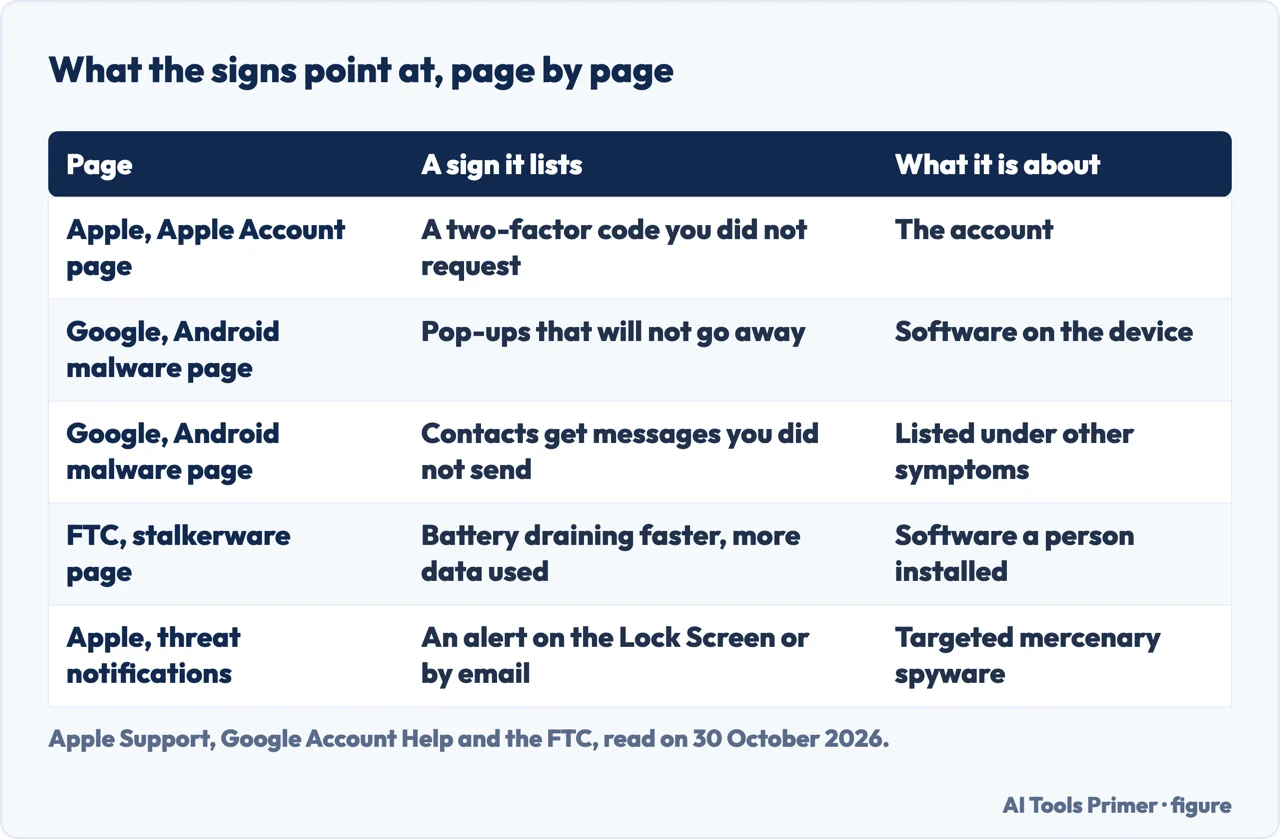
Apple’s page on an Apple Account that may be compromised, published on 5 December 2025, lists five signs. Apple notifies you by notification or email about activity you do not recognize, such as a sign-in on an unknown device or a password changed by someone else. You receive a two-factor code you did not request. You notice unusual activity: messages you did not send, deleted items you did not delete, trusted devices you did not add, or purchases you do not recognize. Your password no longer works. Or your device was locked or placed in Lost Mode by someone other than you. Apple lists every one of those as a sign of a compromised account, though the last one concerns a locked device. The page does not mention battery, data use, slowness, pop-ups or unknown apps.
The steps Apple gives are about the account too. Change the password, or reset it if it was already changed by someone else. On account.apple.com, update any details you do not recognize and, under Devices, remove the ones you do not recognize. Check with your email provider and your cellular carrier that you control every email address and phone number tied to the account; as an example, Apple says to ask the carrier whether SMS forwarding has been set up. If you cannot reset the password or sign in, iforgot.apple.com starts account recovery after a waiting period. Afterwards Apple asks for two-factor authentication, security keys for extra protection against targeted attacks such as phishing, a passcode on the device and, for the rare case in which someone else has the iPhone and knows the passcode, Stolen Device Protection.
Google’s page on removing malware from an Android phone mixes account and device. Among its signs is that Google signed you out of your Google Account to protect the device, and it warns that if the malware is not removed you might be signed out again. Under other symptoms it lists contacts who get emails or messages from you that you did not send. Apple puts messages you did not send among the signs of a compromised account. The pages we read do not say how to tell, from that sign alone, a stolen account from a compromised phone.
A reply in the Android Community, written by a Product Expert and not a Google help page, goes at it from the other side. It says that clicking a link usually leads to a phishing page or a download and rarely hacks the phone at once without something being installed, and that a pop-up announcing that the phone is hacked is almost always a lie. If the link led to a login page, for Facebook or Google, and a password was typed in, the reply says to change that password right away, because that was likely the “hack”.
Two vendors go further. Malwarebytes lists unauthorized access to online accounts as a sign that a phone has been hacked and its login credentials stolen. Avast says a compromised phone can give up saved passwords, session cookies or authentication tokens that let someone into an account without the password. Those are vendors’ claims, and Apple’s account page does not make them. If the account in question is a social one, our pages on a hacked Facebook account and a hacked Instagram account cover the recovery route.
Signs on the phone itself, and the ordinary causes
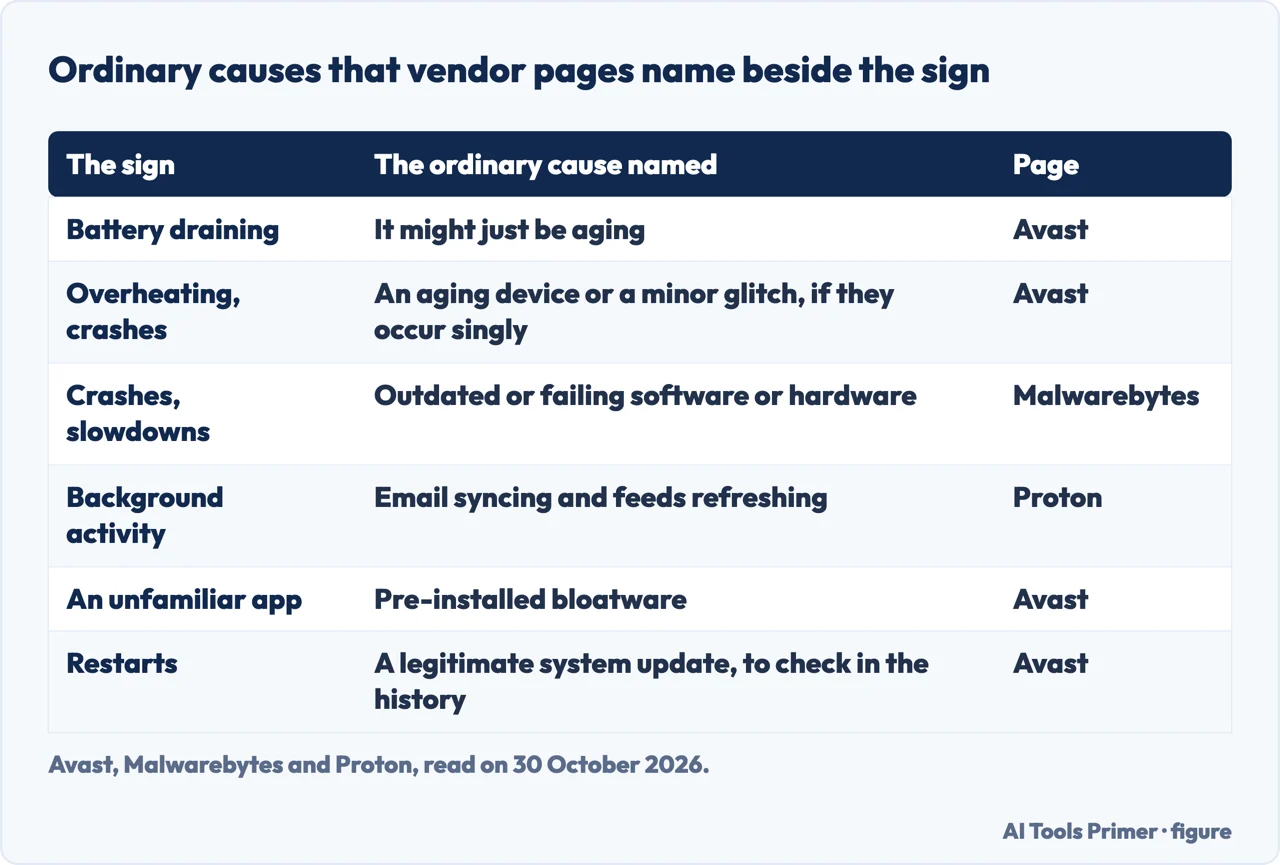
The vendor pages list the device signs, and they also say, in a line or two, that the signs have ordinary causes. Malwarebytes writes that some signs of a hacked phone can also be due to outdated or failing software or hardware, and that crashes, slowdowns and a draining battery may come from a hack or from hardware problems. Avast says a battery draining fast might just be aging, and that overheating, crashing and interference on calls may simply point to an aging device or a minor glitch when they occur individually; when several occur together, it says, they could be signs of hacking. For unexpected restarts it tells you to check the system update history to rule out a legitimate update: on an iPhone, Settings, General, Software Update; on Android, Settings, About phone, and the update history. On unfamiliar apps it adds that not all of them are harmful, since some devices come with pre-installed bloatware. Proton likewise says to check online whether an app you do not recognize could have come preinstalled.
Proton makes the same point about background activity. Apps that run in the background use battery and data even when you are not using them, and that has normal causes, like syncing email or refreshing social feeds. Malware works the same way, so Proton suggests looking at which apps are active: on Android, Settings, Battery, Battery usage; on an iPhone, Settings, Battery. An app you rarely open that keeps showing up near the top is a warning sign, and on Android so is an app that restarts on its own after you force stop it.
On data, Avast says to compare the use with what is usual for you. Spikes while the phone sits idle and high use by apps you do not recognize are the signs it names, and it adds the bill: premium-rate texts to short numbers of four to six digits, international calls, subscriptions signed up for without permission and call forwarding that was set up. On an iPhone, Avast points to Settings, Privacy & Security, App Privacy Report, which shows recent camera and microphone access; a green dot for the camera or an orange dot for the microphone when you are not recording is, in its words, a possible sign of unauthorized access.
Avast and Proton both bring up the phone number. Avast says that if you stop receiving calls or texts, or friends say they reach your voicemail, a hacker may have diverted your number. Proton says a phone that suddenly cannot connect to the carrier may point to a SIM swap. Our pages on SIM swap and on what someone can do with your phone number pick that case up. The pages we read give no percentage of how many phones with a draining battery turn out to be compromised. If the sign is one of these and nothing else, our pages on a phone that keeps restarting, a slow Android phone, an iPhone that runs hot and the orange dot on an iPhone cover the ordinary causes.
Where to look on Android, and on an iPhone
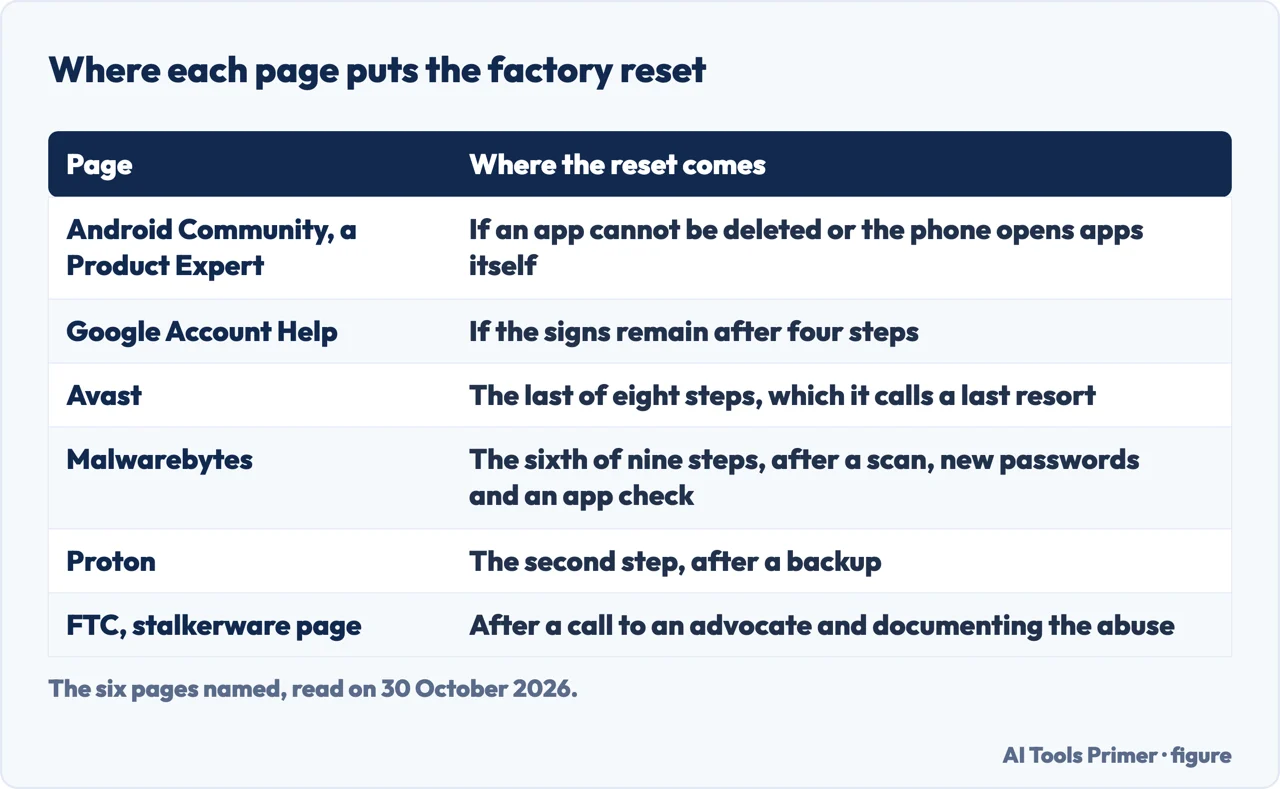
For Android the Product Expert’s reply gives a short route. In Settings, Security & Privacy, open Device admin apps, or search for it, and deactivate any app that is checked and that you do not recognize. Look in Battery usage and Data usage for an app using a lot that you have not been using. Under Settings, Apps, See all apps, scroll for blank spots, a white square for an icon, or generic names such as “Cleaner” or “Booster”. Then, in the Play Store, tap the profile icon, then Play Protect, then Scan. The reply says a factory reset is the only 100% safe fix when an app cannot be deleted or the phone opens apps on its own.
Google’s own page on Play Protect says it checks apps when you install them and scans the device from time to time. If it finds a potentially harmful app it might send a notification, disable the app until you uninstall it, or remove it automatically. It is on by default, and Google recommends keeping it on. If you install apps from outside Google Play, the Play Protect page describes an Improve harmful app detection setting that sends unknown apps to Google, and Google's malware page is the one that suggests turning it on.
Google’s page on malware gives four steps in order: turn on Play Protect; check for Android and security updates, restarting the phone if you cannot find one; uninstall apps you do not need, do not trust or did not get from Google Play; and, in a browser, run the security checkup on your Google Account and fix what it finds. If signs of malware remain, the page says you might need to reset the device or ask the company that made it for help.
For an iPhone the pages we read are thinner. Apple’s two pages are about the account and about targeted spyware, and neither gives a scan to run on the phone. What remains is the vendors’ list: the battery view, the App Privacy Report, the update history and the list of apps. Removal has pages of its own here, on removing a virus on an iPhone, on an Android phone and whether iPhones get viruses at all, so this page does not repeat those steps.
When the signs point at a person
The FTC describes stalkerware, also called spyware, as software that someone installs on your phone without your knowledge. Its page lists what it may allow: tracking your location, turning on the microphone to record conversations, reading text messages and emails, seeing photos and videos, and watching what you do online. It is designed to avoid being found, and some spying apps hide in the phone’s settings under fake names like “System Service”. The page is written about an abusive partner or ex-partner.
Because the app is hidden, the FTC says to look for two kinds of change. The first is in the phone: is the battery draining faster than usual, is more data being used, is the phone overheating, is it turning off and on unexpectedly. The second is in what the abuser knows: your exact location when you have not said where you are, details from private conversations, who you are texting or talking to, which sites you visit, and whether the abuser has had access to your phone without supervision. These are the FTC’s questions, and the page does not say how many yes answers settle the matter.
The order is where this page differs most from the vendors. The FTC says an abuser who uses stalkerware may escalate if the abuser suspects you are cutting off access, so before removing it you should reach a domestic violence advocate through the National Domestic Violence Hotline: call 1-800-799-SAFE (7233), chat live at thehotline.org, or text “START” to the short code on the FTC page (the page gives these US contacts and nothing for other countries). It says any of these steps could tip off the abuser, and that you may want to leave the phone behind when you seek help. Contact an advocate or the police from a borrowed device or a pay-as-you-go phone, not from the one that may have stalkerware on it. An advocate can help with a safety plan and with preserving evidence before you change anything.
Then the phone. The FTC suggests checking whether it has been rooted or jailbroken, since some stalkerware apps can only be installed on such a phone, and points to a guide from the Safety Net Project of the National Network to End Domestic Violence. It says to document the abuse before replacing or resetting the phone. The safest course might be a new phone with an account the abuser cannot reach; if you keep the phone, a full factory reset may remove the stalkerware. In both cases, do not reinstall apps from a backup of the old phone, which could reinstall the stalkerware; download them again from the app store. It adds a six-digit passcode at the least, changed if the abuser may know it, and new strong passwords for the accounts the abuser might use to track you.
Malwarebytes mentions the same risk in a line: many brands of stalkerware look like security tools and may have been installed by an abuser. Its list of steps, which includes changing all passwords and a factory reset, does not carry the FTC’s warning, and neither do the Avast and Proton lists we read.
The rare case: targeted spyware
Apple’s page on threat notifications describes mercenary spyware as attacks that cost millions of dollars, aimed at a very small number of people, likely because of who they are or what they do. Apple says the vast majority of users will never be targeted by them. It says such attacks have historically been associated with state actors, and have been used against people who are often journalists, activists, politicians and diplomats. Since 2021 Apple has sent threat notifications multiple times a year and has notified users in over 150 countries in total. Apple does not say what makes it send one, because that could help the attackers adapt.
The notification arrives in three places: an alert on the iPhone, on the Lock Screen and in Settings; an email to the addresses tied to the Apple Account, which as of 2026 comes from threat-notifications@email.apple.com; and a banner at the top of the account page on account.apple.com after you sign in. Apple says a genuine notification never asks you to click links, open files, install apps or profiles, or give an Apple Account password or verification code. To check one, sign in at account.apple.com. Apple recommends Lockdown Mode and the Digital Security Helpline of the nonprofit Access Now, which it says is available around the clock. Someone who has not received a notification but has good reason to believe they are a target can turn on Lockdown Mode, Apple adds.
Two vendors speak of the same case. Malwarebytes says spyware displays very few symptoms and names Pegasus from the NSO Group. Proton says Pegasus can be deployed without the device owner taking any action, and quotes an investigation by Forbidden Stories and Amnesty International that found it used against “at least 180 journalists”. Avast, by contrast, writes that phone hacking usually happens after a victim takes some action, such as clicking an infected link. Avast speaks of phone hacking in general and Proton of one named tool, so the two are not the same claim. The Malwarebytes and Proton pages we read give no figures for infections on real iPhones and Android phones.
What to do, and the order the sources disagree on
The FTC’s page on protecting a phone from hackers, from July 2022, lists no signs. It gives four measures: lock the phone with a passcode of at least six digits, update the software, back up the data, and turn on Find My or Find My Device. It says a phone in the wrong hands could be used to steal an identity, buy things with your money or break into email and social media accounts.
The vendors start somewhere else. Proton’s steps for a phone you know was hacked are a backup, a factory reset, an update, apps downloaded again by hand from the official store and not restored from the automatic backup, and then new passwords. Malwarebytes begins by disconnecting from Wi-Fi and the mobile network, then a scan with built-in security software and with an anti-malware tool, new passwords, a check of the apps, a warning to contacts, and a backup followed by a factory reset as the sixth of its nine steps. The list ends with checking financial accounts for unauthorized transactions and contacting the bank, searching your name for private information that was published, and watching credit reports; our identity theft hub covers that side. Avast opens with airplane mode, deleting unrecognized apps, a scan, signing out of linked accounts, new passwords including the unlock code, telling contacts from another device and the carrier, and puts the restore last, as a last resort, from a backup made before the suspicious activity.
The pages differ on three things. On the reset, Proton puts it second, Malwarebytes sixth of nine, Avast last, the Product Expert only when an app will not delete or the phone acts on its own, Google only if signs remain after its four steps, and the FTC not before talking to an advocate. On a security app, Malwarebytes and Avast tell you to download one, and each names its own product; Proton writes that it is unlikely you need antivirus protection on a phone; Google points to Play Protect, already built in. And on the account, Apple’s steps involve no reset of the phone at all: the password, the devices list and the carrier.
The pages we read do not say how to tell, for the same sign, a stolen account from a compromised phone. Apple treats only the account, and the vendors mix the two. The pages we read also give no code to dial, so this page offers none.
Where to start
Four ways in.
- “I got a code I did not ask for.”
- Start with the signs that are about an account — account
- “My battery drains fast.”
- Signs on the phone itself, and the ordinary causes — device
- “Someone knows where I am.”
- When the signs point at a person — person
- “Apple sent me a threat notification.”
- The rare case: targeted spyware — targeted
Accounts and the number
The account or the number is often the first thing to check.
Malware on the phone
Removal has pages of its own.
Questions people also ask
Can you remove a hacker from your phone?
It depends on the case. For Android malware Google gives four steps: Play Protect, updates, removing apps, a security checkup. For an Apple Account, Apple says to change the password and remove unknown devices. For stalkerware, the FTC says to reach an advocate first.
What is the code to check if a phone is hacked?
The pages we read do not give a code to dial. The checks they describe are in the settings: battery usage, data usage, device admin apps on Android, and the App Privacy Report on an iPhone.
Can you tell if someone has access to your phone?
For an account, Apple lists devices you did not add, found under Devices on account.apple.com. For a person, the FTC asks whether the abuser knows your location or your private conversations, and whether the phone was left unsupervised.
What are 10 signs that my phone might be hacked?
Avast lists ten: pop-ups, unrecognized texts or calls, heavy data use, fast battery drain, unusual sign-ins on linked accounts, strange behavior, odd websites, unexpected charges, changed settings and unknown apps. It says some may point to an aging phone.
Not covered here. We tested nothing on a phone. The statements come from two Apple Support pages, two FTC pages, two Google help pages, a reply in the Android Community and pages from Malwarebytes, Avast and Proton, all read on 30 October 2026.
We did not open the Dashlane, Forbes, McAfee and Microsoft pages that Google listed. The vendor pages are used for what they say and are attributed to the vendor.
The search volume and difficulty behind this page come from a Semrush reading of 29 August 2026, older than the 60 days the site normally allows; that reading expired on 28 October 2026 and is used here with the owner’s authorization.
Sources
- Apple Support — If you think your Apple Account has been compromised — support.apple.com, read 30 October 2026.
- Apple Support — About Apple threat notifications and protecting against mercenary spyware — support.apple.com, read 30 October 2026.
- FTC Consumer Advice — Stalkerware: What To Know — consumer.ftc.gov, read 30 October 2026.
- FTC Consumer Advice — How To Protect Your Phone From Hackers — consumer.ftc.gov, read 30 October 2026.
- Google Account Help — Remove malware or unsafe software (Android) — support.google.com, read 30 October 2026.
- Google Play Help — Use Google Play Protect — support.google.com, read 30 October 2026.
- Android Community — How can I check my phone is hacked — support.google.com, read 30 October 2026.
- Malwarebytes — How to know if your phone is hacked — www.malwarebytes.com, read 30 October 2026.
- Avast — How to Know If Your Phone Has Been Hacked & What to Do — www.avast.com, read 30 October 2026.
- Proton — How to know if your phone is hacked, and what to do next — proton.me, read 30 October 2026.
Written by Alberto Gulotta
Founder and editor of AI Tools Primer, writing from Palermo, Italy. Thirty-five years of taking computers apart, starting with a Commodore 64 — the long version is on the about page.
Something wrong on this page? Write to aitoolsprimer@gmail.com and it gets fixed.
Written on 30 October 2026.
Independence and limits
No affiliate links and no paid placements anywhere on this site. Nobody pays to appear here, and no company has seen this page before you did.
This is general information, not professional advice. Where a page touches money, health, safety or the law, it names its source and the date it was read — and your situation may still differ. See the privacy page and the cookie policy.