
Identity · guide
Stalkerware: safety first, then the signs and the removal
By Alberto Gulotta · Updated · 22 min read
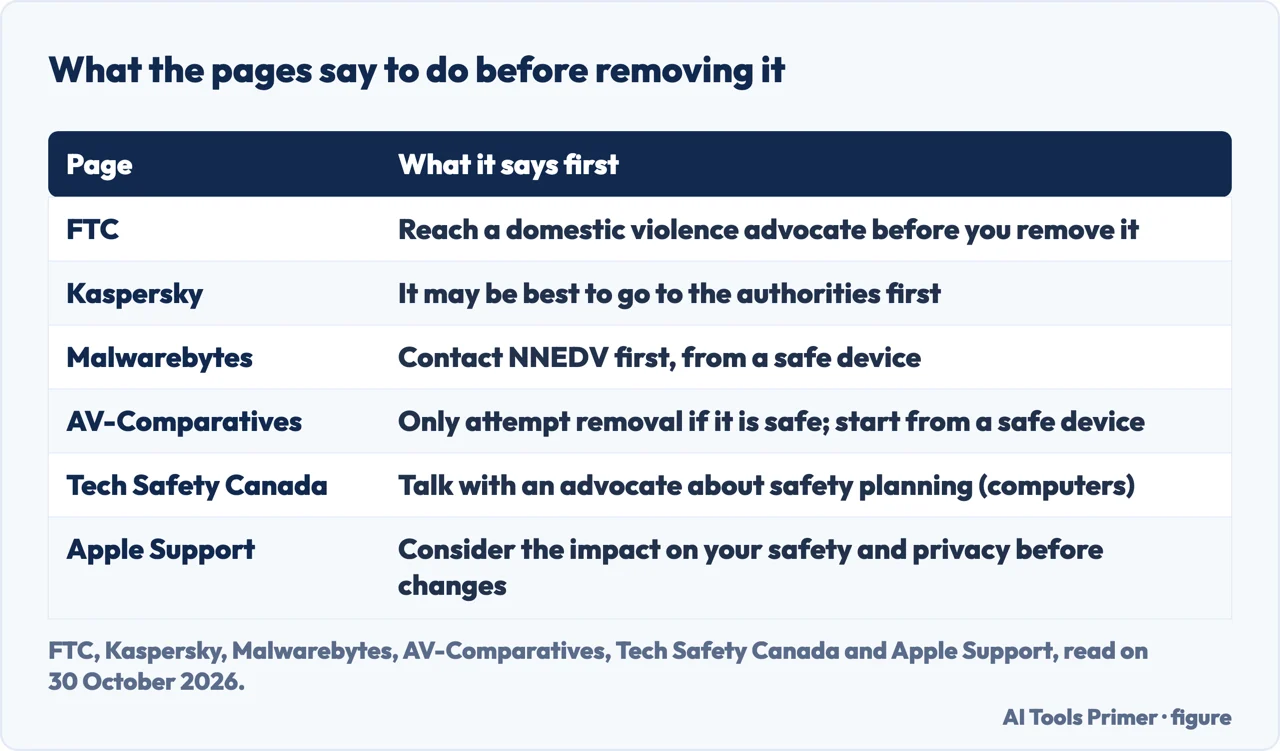
Stalkerware on a phone is a safety question before it is a technical one. The FTC says an abuser may escalate if the access is cut off, and Kaspersky says the person who installed it can see a scan or a removal. So the FTC, Malwarebytes and Tech Safety Canada each say to reach an advocate before removing it.
| Question | Answer | Where it comes from |
|---|---|---|
| Who do I reach first? | A domestic violence advocate; the FTC page, written for the United States, gives the National Domestic Violence Hotline, 1-800-799-SAFE (7233) | FTC |
| Why not remove it at once? | The FTC says an abuser may escalate; Kaspersky says its alert warns that the person who installed it will be made aware | FTC, Kaspersky |
| How does it get onto a phone? | Physical access and an internet connection, says Kaspersky; for most products, unrestricted physical access, says AV-Comparatives | Kaspersky, AV-Comparatives |
| Is a sign proof? | Both Kaspersky and Malwarebytes say the signs do not confirm it | Kaspersky, Malwarebytes |
| Does a factory reset remove it? | The FTC says a full reset may remove it, and that the safest way might be a new phone with an account the abuser cannot reach | FTC |
| Which Android app found the most? | In a September 2025 test, Malwarebytes found all 17 test cases and Google Play Protect found 53% | AV-Comparatives, EFF |
Start here: the person with access lives with you
The Federal Trade Commission’s page “Stalkerware: What To Know”, dated June 2026, describes stalkerware, also known as spyware, as a program or app that someone installs on your phone or another device without your knowledge. It lists what such programs may let an abuser do: track your location, turn on the microphone to record phone conversations, read text messages and emails, see photos and videos, and watch what you do online.
The same page puts safety before the program. An abuser who uses stalkerware may escalate the abuse if the abuser suspects the access is being cut off, so before removing it the FTC says to reach a domestic violence advocate through the National Domestic Violence Hotline. It gives three ways to reach a live advocate: call 1-800-799-SAFE (7233), chat live at thehotline.org, or text START to the short code printed on its page. If a live advocate cannot be reached, it names the Hotline’s chatbot, Ruth, at ruth.thehotline.org. These are services in the United States; the FTC page does not describe services elsewhere.
The FTC also warns that taking any of these steps could tip off the abuser, especially if you make a call, use your phone to research your options or have a conversation near your phone. It suggests considering leaving the phone behind when you seek help, and contacting an advocate or law enforcement from a borrowed device or a pay-as-you-go phone. Tech Safety Canada, published by Women’s Shelters Canada, says much the same in a page about computers: use a safer device, such as one at a library or community center or a friend’s, and use sheltersafe.ca to find an anti-violence worker. For other countries, Kaspersky’s blog points to the Get Help and Resources section of the Coalition Against Stalkerware site, which it says lists organizations in various countries.
The FTC says an advocate can help you create a personal safety plan, connect you to local support and aid groups, advise you on how to speak to law enforcement, develop a technology safety plan, help you identify tech misuse, and discuss how to preserve evidence of abuse before you make changes to your phone. That list is the reason this page puts the services first and the removal steps later.
Tech Safety Canada adds a caution: it is not always stalkerware. In its page on computers it says someone can log into email or social media accounts from another device if the username and password are known, that friends or family sharing information can explain what a person knows, and that someone with physical access to a computer may not need to install spyware. It says an anti-violence worker can help work out what is happening. This page belongs to the identity theft group, where the account side of the problem is covered.
What it is, and how it gets onto a phone
The Coalition Against Stalkerware defines stalkerware as tools, meaning software programs, apps and devices, that enable someone to secretly spy on another person’s private life via their mobile device. It adds that, regardless of how available the tools are, the abuser is accountable for using them. The coalition was founded in November 2019; the EFF’s launch release says antivirus companies and domestic-violence organizations were among its founding partners.
On how it arrives, the pages agree on the phone and differ on the computer. Kaspersky says the person installing it simply needs physical access to the device and an internet connection. AV-Comparatives writes that for most products the abuser needs unrestricted physical access to the device. The coalition’s article on Android says installation “almost always” requires physical access to the unlocked device. Tech Safety Canada says the opposite for computers: most computer spyware can be installed remotely, usually by an email or message with an attached file or link. That is a different route, and it is why this page keeps to phones.
AV-Comparatives says stalkerware can often be installed in “less than a minute”, and that even shrink-wrapped smartphones may contain pre-installed stalkerware. Tech Safety Canada tells readers to beware of gifts from the perpetrator, such as new phones. AV-Comparatives also says that most stalkerware apps are now installed directly from developer websites rather than an app store, often with instructions to switch off built-in protections. The EFF’s 2019 release gave a price for such downloads of as little as $7 a month; that is a 2019 figure.
The FTC says some stalkerware apps can only be installed on a phone that has been rooted or jailbroken, meaning that protections on the operating system were removed or bypassed, and points to a guide from the Safety Net Project of the National Network to End Domestic Violence for checking an Android phone for rooting or an iPhone for jailbreaking. Kaspersky says iOS is a closed system, so on an iPhone physical access is needed to jailbreak it first and then install the software, which is why it calls stalkerware more of a threat to Android users. Malwarebytes also says that stalkerware-type apps are more prevalent on Android than on iPhone.
Hiding is part of the design. The FTC says some stalkerware developers give instructions for disabling the notifications that could warn the owner, and some apps hide in the phone’s settings under fake names such as “System Service”. Malwarebytes says they can disguise themselves as a calculator, a calendar or system updates. AV-Comparatives says the app typically removes its icon, runs silently and sends the data to an online dashboard on the seller’s website, and that it can block access to system settings or require a password set by the abuser to uninstall it.
Parental-control tools are a separate question. Kaspersky says parental-control apps often form part of an agreement or an ongoing conversation about digital safety in a household, while stalkerware infringes on a user’s privacy without their knowledge. AV-Comparatives describes a grey market, because many stalkerware functions also exist in parental-control or employee-monitoring tools.
On the law, the sources are careful. Kaspersky says installing stalkerware on someone else’s device without consent is illegal. AV-Comparatives says legality varies by jurisdiction: buying and selling may be legal, but using it to monitor someone without their knowledge is often a crime, and it calls sellers’ permission clauses “largely meaningless”. Malwarebytes gives United States examples with the verb “could”: recording a partner’s calls without consent could violate California Penal Code 632(a) and the federal Wiretap Act. The pages do not give one rule for every country.
How to tell: the phone and the person
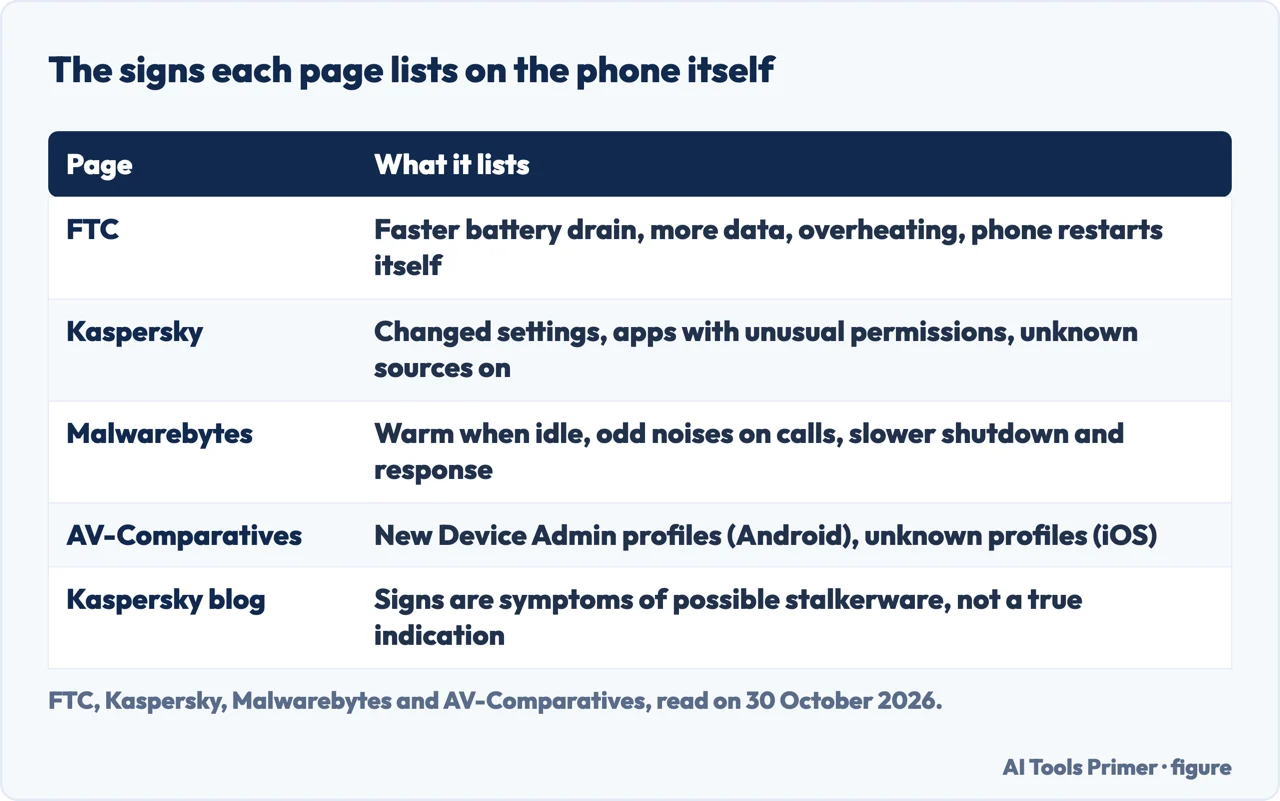
Because stalkerware is built to avoid detection, the FTC says to look at two things: changes in how your phone is performing, and things the abuser should not know. Its questions about the phone are whether the battery is draining faster than usual, whether the phone is unexpectedly using more data, whether it is overheating, and whether it is turning off and on unexpectedly. Its questions about the abuser ask whether the abuser knows your exact location when you have not said where you are, knows details from private conversations, always seems to know who you are texting or talking to, knows what sites you visit, or has had access to your phone without your supervision.
Kaspersky, Malwarebytes and AV-Comparatives add to the list for the phone. Kaspersky names changes in phone settings and suspicious apps with unusual permissions to track location or other activity, and says the “unknown sources” option being switched on can be a sign that something was installed from a third-party source. Malwarebytes lists a phone that feels warm when not in use and not charging, clicking, static or echoing voices on a call, and longer shutdown and response times. AV-Comparatives lists new Device Admin profiles on Android, unknown configuration profiles on iOS, and unfamiliar accounts or online dashboards linked to the device’s data. Tech Safety Canada, writing about computers, says to trust your instincts and look for patterns.
A sign is not proof, and the pages say so in their own words. Kaspersky’s blog calls the signs symptoms of possible stalkerware, not a true indication, and its guide says there is no foolproof method for detecting the software. Malwarebytes says the symptoms do not, in isolation or in full, guarantee that a stalkerware-type app is present. That is why the FTC’s questions about the abuser matter next to the ones about the phone.
Two ways of checking are described that avoid putting a scanner on the phone. Kaspersky released TinyCheck in November 2020 as a free tool, developed to help non-profit organizations support victims of domestic violence. It runs on a Raspberry Pi, analyzes the phone’s outgoing traffic over a normal Wi-Fi connection, installs nothing on the phone, shows no result on it, and works for iOS and Android. Kaspersky’s own limit is that its indicators do not provide complete detection, so a result with no stalkerware found cannot exclude it. Its guide calls TinyCheck a tool for organizations to use.
The second is newer. On 21 October 2026 the Coalition Against Stalkerware wrote about Intrusion Logging, an optional addition to Android’s Advanced Protection Mode that keeps track of activity such as app installation in logs that cannot be wiped. The coalition lists two caveats: it only works on Android 16 or higher, and only after it has been enabled, so it cannot detect an intrusion that already happened. It describes the feature as especially useful when someone is being given direct technical support, with an analyst setting it up and reading the activity with the device owner.
Before you change anything
The pages give two reasons to wait. The first is evidence. The FTC says that before replacing or resetting the phone you should document evidence of abuse or preserve content you want to keep, such as photos. Kaspersky says removing the stalkerware could remove significant evidence in cases that need prosecution, and that it may be best to go to the authorities first and use a different device for communication until the stalkerware has been resolved. AV-Comparatives says to preserve screenshots and logs if you plan to report. Tech Safety Canada says law enforcement or a computer forensics expert may help preserve evidence, and that forensic tools may be the only way to know for sure that spyware is on a computer.
The second is visibility. Kaspersky’s guide says the person who installed the software can see whether malware scans are being run and the app is removed, and in 2022 it expanded its own privacy alert to warn that whoever installed the software will be made aware if it is removed. A Kaspersky manager is quoted there saying that deleting it erases the proof, and that if the person loses control of the device “the situation might escalate”. Malwarebytes says the same about a scan: a stalkerware-type app can often see every action on a device, including whether a scan is run and whether it found the app. Kaspersky’s blog says scanning from the phone carries a risk that the perpetrator is alerted, and that it recommends security software for the highest detection rates only if there is no risk of escalation.
Apple has a tool for the sharing side of the problem. Safety Check, in Settings under Privacy & Security on an iPhone with iOS 16 or later, lets you review who has access to your information, including your location, and stop sharing it with individual people and apps. It has two options. Emergency Reset immediately stops sharing with all people and apps, and also lets you review emergency contacts, devices connected to your Apple Account and phone numbers used to verify your identity. Manage Sharing & Access lets you review and change sharing person by person and app by app. You need an Apple Account that uses two-factor authentication.
Apple also states what Safety Check cannot do: it cannot review or change non-Apple accounts and passwords, social media sharing, or devices where you are signed in to a different Apple Account. Its page says to consider the potential impacts on your safety and privacy before making changes or deleting information, and it adds a Quick Exit button that closes the Settings app at once, with changes made before it saved. Apple says some apps or services notify you when you resume sharing. The Apple pages we read describe Safety Check as a review of sharing and access; they do not describe it as a scan for stalkerware, and they do not say whether the other person is told when sharing stops.
Removing it, when it is safe
Kaspersky gives its steps for users who feel they can remove the software safely: use a malware scanner to scan the device and remove threats, including potentially unwanted applications, uninstall apps you do not recognize or did not install, make sure the operating system is up to date, and perform a factory reset to wipe the device. AV-Comparatives gives a longer sequence in the appendix to its test. It starts from a safe device, such as a trusted computer or a separate phone, and changes passwords for important accounts, with two-factor authentication on. On the phone it then reviews and removes unknown apps or profiles; on Android it revokes Device Admin rights for suspicious apps before uninstalling them, and it boots the phone into Safe Mode, which it says prevents many stalkerware apps from running and makes them easier to uninstall. It then runs an independently tested anti-malware or anti-stalkerware app with advanced detection settings turned on.
The pages differ on the factory reset, and it helps to read them side by side. Kaspersky lists it as one of the ways to remove the software. The FTC says the safest way to protect yourself might be to get a new phone with an account the abuser does not have access to, and that if you must keep your phone, a full factory reset may remove the stalkerware. AV-Comparatives keeps it for when removal fails or the compromise appears deep, for example hidden processes or root or jailbreak, and then says to back up essential data, reset, and reinstall trusted apps from the app store. For computers, Tech Safety Canada says wiping and reinstalling the system will not guarantee complete removal. Kaspersky words the reset as a step that wipes the device, including any stalkerware; the FTC’s wording is “may”, and AV-Comparatives keeps the reset for when removal fails or the compromise appears deep.
What you put back matters. The FTC says that whether you reset the phone or get a new one, you should not reinstall apps from a backup of the old phone, because that could reinstall the stalkerware, and should download them again from the app store. Tech Safety Canada gives the same warning for computers: do not copy files from the infected computer to a new one, and use online cloud services to store its documents.
The FTC’s section on protecting yourself is about the accounts and the phone. Create a new strong password for the social media, email and other accounts the abuser may use to track you, turn on two-factor authentication, set the phone to lock automatically with a passcode of at least six digits, change the passcode if the abuser knows it, and keep the operating system and apps updated. Tech Safety Canada says to reset passwords from a different device. For keeping it from coming back, AV-Comparatives lists locking the phone with a PIN, password or biometric known only to you, not lending it even briefly because stalkerware can often be installed in less than a minute, being cautious with new or gifted devices, keeping “install from unknown sources” disabled on Android, and reviewing installed apps now and then. The site has pages on recovering a hacked Facebook account and recovering a hacked Instagram account. If an intimate photo or video was shared without permission, the FTC page says the Take It Down Act requires online platforms to provide a way to submit a takedown request and to act within 48 hours; our page on blackmail covers that.
Do antivirus apps find it? What the independent test found
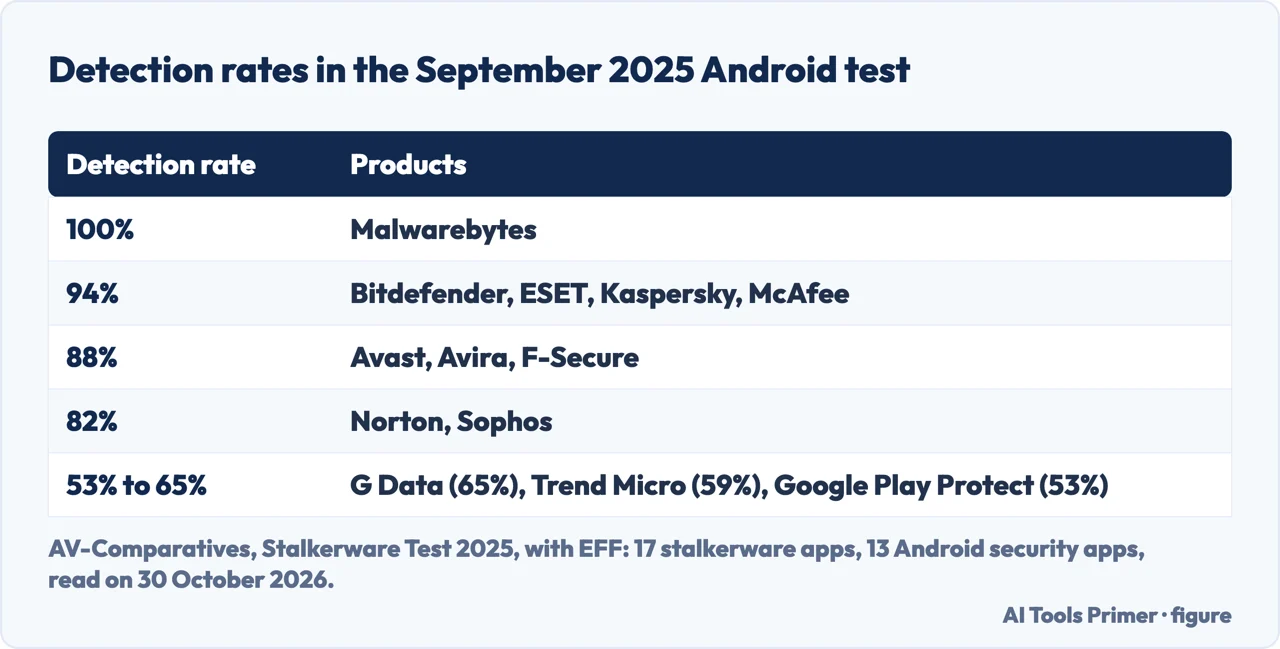
Kaspersky and Malwarebytes both recommend their own scanners on their pages, and both are vendors, so the numbers here come from a test run by AV-Comparatives with the EFF. In September 2025 it tested thirteen Android security apps against seventeen commercial stalkerware apps, on a non-rooted Samsung Galaxy A36 running Android 15. The stalkerware apps are not named in the report. The lab bought the highest-tier license for each, installed them following each vendor’s instructions, and counted an app as detected if the security product showed a clear, user-facing warning during any of up to three scan stages. AV-Comparatives says advanced full scans did not change the outcomes, and that Google Play Protect only scans installed apps, so its row is not a full-scan result like the others.
The rates ran from 100% for Malwarebytes down to 53% for Google Play Protect, with Kaspersky among the four products at 94%. The EFF’s post says the 2021 test had one product at 100%, G Data, with the next best at 80 to 85%. It adds that some stalkerware includes instructions to switch off Google Play Protect during installation, which it gives as a reason Google Play Protect’s low score was unsurprising. AV-Comparatives also reports that one stalkerware test case stopped Norton’s app from working properly.
How the products warn matters as much as whether they find anything. AV-Comparatives says a few labelled the threat as stalkerware or described it as an app that can spy on you, while most showed generic alerts such as “Malware detected” or “Threat detected”. It says most recommended immediate removal without explaining the risk, and that only Kaspersky included a warning about the possible consequences. It also reports that the products did not remove stalkerware on their own, which it calls appropriate, and that sending a detection notice through a secure channel such as email is not currently implemented in any tested product. The alerts appear in the app or as push notifications, which AV-Comparatives says risks exposing the detection if the abuser is monitoring the device in real time through screen recordings, screenshots or intercepted notifications.
Malwarebytes says a scanner on the phone is one of the most reliable ways to find a stalkerware-type app, and says its iOS app is not allowed to run full scans because of Apple’s App Store rules. The FTC page we read does not mention antivirus apps.
The numbers about how common stalkerware is have limits. Kaspersky’s guide cites its State of Stalkerware 2023 report, counting users of its own products: it names Russia, Brazil and India as the top three countries, and it says the number of new people affected has stayed fairly constant since 2021. The EFF’s 2019 release gave Kaspersky’s count of users finding stalkerware as up 35% from 2018 to 2019. These are counts of one company’s users in different years, not totals. AV-Comparatives says reports from domestic-violence shelters and researchers show that stalkerware is still common in intimate-partner abuse cases, and that sellers frequently run insecure servers, so victims’ data has been exposed on the open internet. The EFF says that AV-Comparatives tested 20 unique stalkerware products in 2020 and 2021 and that the 2025 test used 17, and that it cannot be certain why the number fell.
Where to start
Four ways in.
- “Who do I call first?”
- Start here: the person with access lives with you — start
- “How do I know if it is on my phone?”
- How to tell: the phone and the person — signs
- “Can I just remove it?”
- Before you change anything — before
- “Does antivirus find it?”
- What the independent test found — tests
The number and the threats
Where a phone number, or an image, becomes a way in.
On the iPhone itself
Settings that decide what an app or a person can see.
Questions people also ask
How do you know if stalkerware is on your phone?
The FTC says to look at how the phone is performing and at things the abuser should not know: faster battery drain, more data use, overheating, and unexpected restarts, or knowing your location or private conversations. Kaspersky and Malwarebytes both say that signs of this kind do not confirm it.
Are spywares illegal?
Kaspersky says installing stalkerware on someone else’s device without consent is illegal. AV-Comparatives says legality varies by jurisdiction: buying and selling may be legal, while using it to monitor someone without their knowledge is often a crime. Malwarebytes gives United States examples, all with “could”.
Can someone spy on my phone without me knowing?
The FTC says stalkerware is designed to avoid detection by the phone’s owner, and Kaspersky says it runs in the background without identifying activity. Kaspersky says installing it takes physical access and an internet connection; AV-Comparatives says that for most products the abuser needs unrestricted physical access.
How can I see if someone stalks me?
The FTC asks whether the abuser knows your location when you have not said where you are, knows private conversations, who you text or what sites you visit, or has had unsupervised access to your phone. Tech Safety Canada says shared account logins or friends passing on information can also explain what a person knows.
Not covered here. We tested nothing on a phone. The statements come from the FTC, Kaspersky (its guide and its blog), Malwarebytes, the Coalition Against Stalkerware, the EFF, AV-Comparatives, Tech Safety Canada and Apple Support, all read on 30 October 2026. We did not read the coalition’s page for survivors or the Wikipedia article.
The search volume and difficulty behind this page come from a Semrush reading of 29 August 2026, older than the 60 days the site normally allows.
Sources
- Federal Trade Commission — Stalkerware: What To Know (June 2026) — consumer.ftc.gov, read 30 October 2026.
- Kaspersky — What is Stalkerware? — www.kaspersky.com, read 30 October 2026.
- Kaspersky official blog — What tools and techniques can be used to detect stalkerware? — www.kaspersky.com, read 30 October 2026.
- Malwarebytes — How to find and remove Stalkerware — www.malwarebytes.com, read 30 October 2026.
- Coalition Against Stalkerware — home page — stopstalkerware.org, read 30 October 2026.
- Coalition Against Stalkerware — New Android Intrusion Logging Could Help Detect Stalkerware Installations (21 October 2026) — stopstalkerware.org, read 30 October 2026.
- EFF — EFF, Antivirus Companies, and Human Rights Groups Launch Coalition to Combat Stalkerware (19 November 2019) — www.eff.org, read 30 October 2026.
- EFF — EFF Teams Up With AV Comparatives to Test Android Stalkerware Detection (6 November 2025) — www.eff.org, read 30 October 2026.
- AV-Comparatives — Stalkerware Test 2025 — av-comparatives.org, read 30 October 2026.
- Tech Safety Canada — Spyware and Stalkerware: Computer Surveillance and Safety — techsafety.ca, read 30 October 2026.
- Apple Support — Safety Check for an iPhone with iOS 16 or later (September 2026) — support.apple.com, read 30 October 2026.
- Apple Support — Safety Check FAQ (October 2024) — support.apple.com, read 30 October 2026.
Written by Alberto Gulotta
Founder and editor of AI Tools Primer, writing from Palermo, Italy. Thirty-five years of taking computers apart, starting with a Commodore 64 — the long version is on the about page.
Something wrong on this page? Write to aitoolsprimer@gmail.com and it gets fixed.
Written on 30 October 2026.
Independence and limits
No affiliate links and no paid placements anywhere on this site. Nobody pays to appear here, and no company has seen this page before you did.
This is general information, not professional advice. Where a page touches money, health, safety or the law, it names its source and the date it was read — and your situation may still differ. See the privacy page and the cookie policy.