
Identity · guide
WhatsApp account hacked: the code, the PIN and the wait
By Alberto Gulotta · Updated · 19 min read
A hacked WhatsApp account comes back, according to WhatsApp, by registering the number again with the six-digit code, which logs every device out. A new password does not remove an intruder. If the intruder set a PIN, WhatsApp gives a wait of 7 days, while Kaspersky and ESET describe a faster route with a recovery email.
| Question | Answer | Where it comes from |
|---|---|---|
| How is someone taken out of the account? | Register the number again with the six-digit code; WhatsApp says that logs out every device | WhatsApp Help Center |
| Does a new password do it? | WhatsApp says changing the password will not remove someone else | WhatsApp Help Center |
| What if it asks for a PIN I never set? | WhatsApp says wait 7 days and try again; Kaspersky and ESET describe a faster route with a recovery email | WhatsApp, Kaspersky, ESET |
| Can the account come back without the SIM? | WhatsApp says it is not possible without a SIM card with the same number | WhatsApp Help Center |
| Should the account be reported first? | WhatsApp recommends recovering it before reporting, because a report may get it banned | WhatsApp Help Center |
The signs, and the ways in
Kaspersky’s blog post of 21 February 2025 lists eight signs that a WhatsApp account may be compromised. You get replies to messages you never sent. Friends complain about strange messages coming from your account. Chats show deleted messages you did not delete. A login verification code arrives that you did not request. There is a status or there are stories you did not create. The profile picture, name or description has changed. You have been added to groups you never joined. And WhatsApp tells you the account is in use on another device and prompts you to register again, which Kaspersky calls the most telling sign. It says to pay special attention to the first three, because criminals often use a compromised account to scam the owner’s friends and family.
ESET’s guide, dated 23 September 2025, opens with a check it says takes about 30 seconds: open Settings, tap Linked Devices, and look for a browser, computer or tablet you do not remember signing in. Its list of signs overlaps with Kaspersky’s: unfamiliar linked devices, unexpected logouts, replies to messages you did not send, profile changes, new groups and verification codes you did not ask for. ESET adds that an unrequested code is sometimes only a mistake, for instance when the number belonged to someone else before or when a number was mistyped.
The FTC’s general advice for a hacked email or social media account, dated 29 October 2024, is not written for WhatsApp, which it lists among the providers with recovery instructions. Its signs are a notification that your email address, phone number or password changed when you changed nothing, a message that someone tried to log in or did log in, and being unable to log in. A second FTC page adds friends or family reporting messages you did not send, sometimes with random links or fake pleas for help or money.
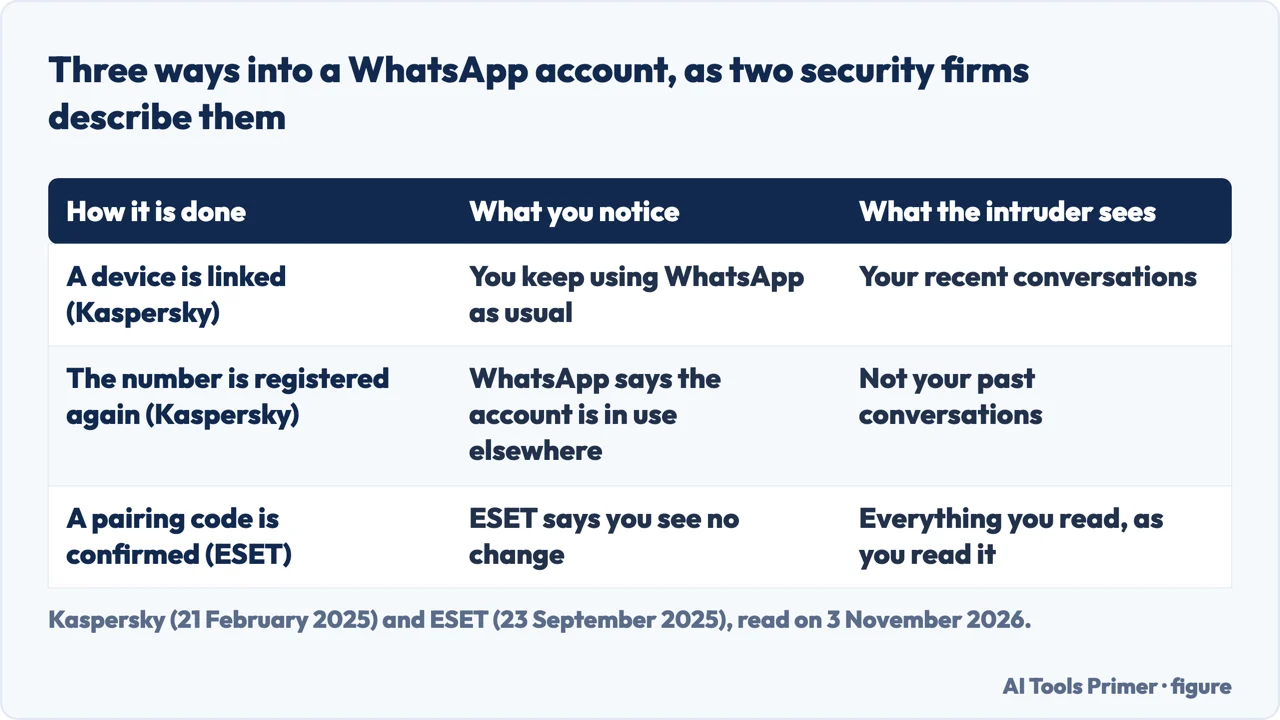
Kaspersky describes two ways in. In the first, the intruder adds another device through the Linked devices feature: you keep using WhatsApp as usual, but the intruder also has access, including to your recent conversations. In the second, the intruder registers your number on another device as if it were a new phone: you lose access and WhatsApp tells you the account is in use elsewhere, while the intruder controls the account but does not see your past conversations. ESET describes a third route it calls GhostPairing, which it attributes to researchers at Gen Digital in December 2025 and to an advisory from India’s CERT-In (the page is dated 23 September 2025 but describes events of December 2025, so that date does not apply to this passage). A message from a contact carries a link that previews as a Facebook page, the page asks for your phone number, and WhatsApp then asks you to confirm a pairing code. ESET says that with the confirmation the intruder has linked a browser to the account without a stolen password or SMS code, and that the defence is to start pairing only from inside the app. We read this description on ESET’s page alone.
Getting back in with the six-digit code
WhatsApp’s Help Center page on a compromised account starts from a condition: if your device is safe and your account is compromised, or you lost access, you can recover it. The steps are to tap Log back in, then Continue; if prompted, to enter your full international phone number and tap Next, then Ok; and to enter the six-digit code you receive by SMS or phone call. The page says the registration code must not be shared with anyone, not even friends or family. It also says that when you register again with the code, all devices logged into your account are automatically logged out, so anyone else using the account is logged out.
Kaspersky orders the same job differently. It begins by checking that the SIM card linked to the account is in your smartphone, then opening WhatsApp. If the app opens normally, you go to Linked devices, tap each device listed and tap Log Out. If the app says you are logged out and need to register, you enter the number, request a one-time code, wait for the SMS or voice call, enter the code and, if a two-step verification PIN was set, enter that too. It then says to accept an offer to restore chats and settings from a backup in iCloud, Google Drive or local storage. ESET gives the open-app case a button, Log out all linked devices, and warns that it also ends the sessions on your own devices other than the main phone. For the logged-out case it says to reinstall WhatsApp and register the number again, and that the new six-digit code removes the attacker. Before any of that, ESET notes that the phone itself may be compromised, and suggests installing the latest system updates and running a malware scan.
WhatsApp sets limits on the route. A WhatsApp account can be registered with one phone number at a time, and the page says it is not possible to recover an account without a SIM card with the same number. If you recently started using a new SIM but still use the account tied to the old number, it says you need the change number feature, and that failing to do so could permanently lose you the account. For a number that was taken over by a SIM replacement, ESET says to contact your mobile operator, ask for the SIM to be re-issued and the others assigned to the number to be locked or disabled, and then register again; our page on a SIM swap covers that attack. The WhatsApp page also says it cannot provide information about who accessed your account or the time and location, and that it cannot deactivate accounts for others because of verification constraints.
One more instruction is about order. WhatsApp says that if you report the compromised account you are trying to recover, it might ban the account for violating its terms and you could lose access to your account or data. It recommends trying to recover the account before reporting it.
A PIN you did not set
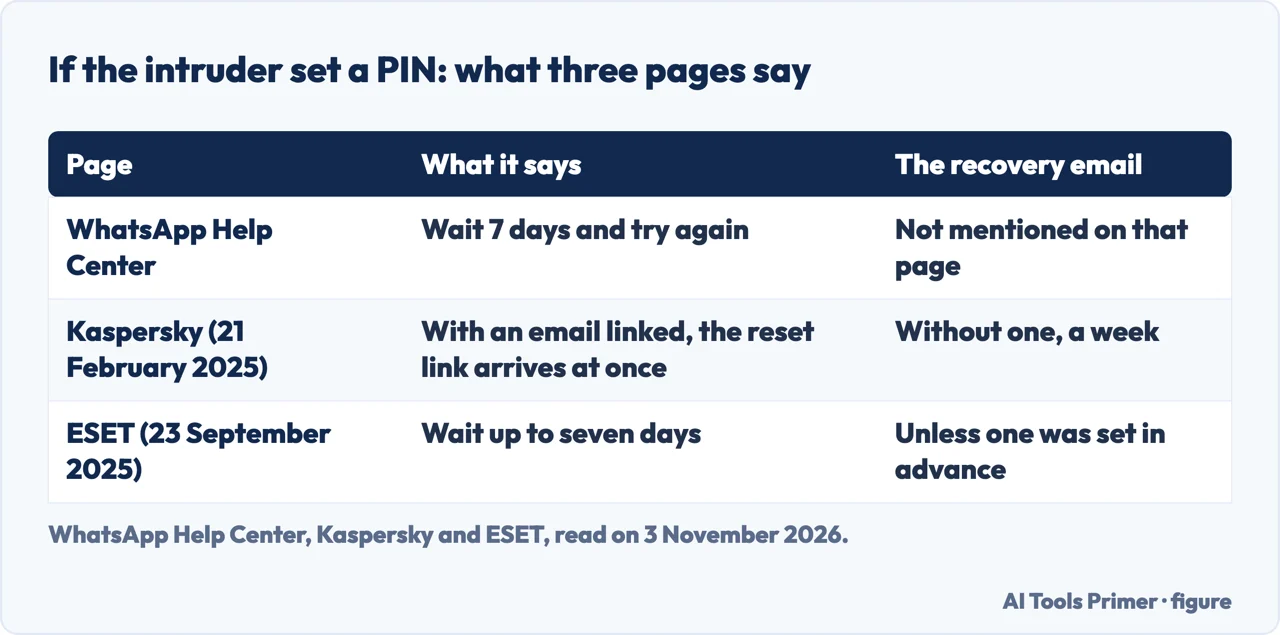
After the six-digit code, WhatsApp may ask for a two-step verification PIN. Its recovery page says that if you do not know the PIN, then in rare cases someone else using your account might have turned on two-step verification, and that if you do not have the PIN you should wait 7 days and try again. It adds that whether you know the PIN or not, anyone using your account is automatically logged out after you enter the six-digit SMS code.
Kaspersky reads the same moment from the other side. If you had never set a PIN and WhatsApp asks for one after the one-time code, it says the attackers may have set a PIN to stop you getting back in. Its answer is the Forgot PIN option. If an email address is linked to the account, it says a reset link arrives instantly: open the latest message from WhatsApp, tap the link, confirm, and set a new PIN. If no email was linked, it says you can still request a reset but must wait a week before the PIN is removed, and that the account stays inaccessible meanwhile.
ESET says that if you forgot a PIN you set yourself, you must wait at least seven days, unless a reset link goes to the email you gave when you turned on two-step verification. For a PIN the attacker enabled, it says the same logic applies: you wait up to seven days unless you had a recovery email set in advance. In its questions section it puts recovery at minutes when you still have your number and act quickly, and says the seven days apply in one specific case, an attacker-set PIN with no recovery email.
This is where the pages differ. The WhatsApp recovery page we read gives the seven days and does not mention an email at all. Kaspersky and ESET both say an email changes the wait. WhatsApp’s account security tips page does list an email as a layer that lets you recover without an SMS or a call, but that page does not tie the email to the PIN wait. We could not settle the difference from the pages, so the figure below sets out what each says.
A new password does not remove the intruder
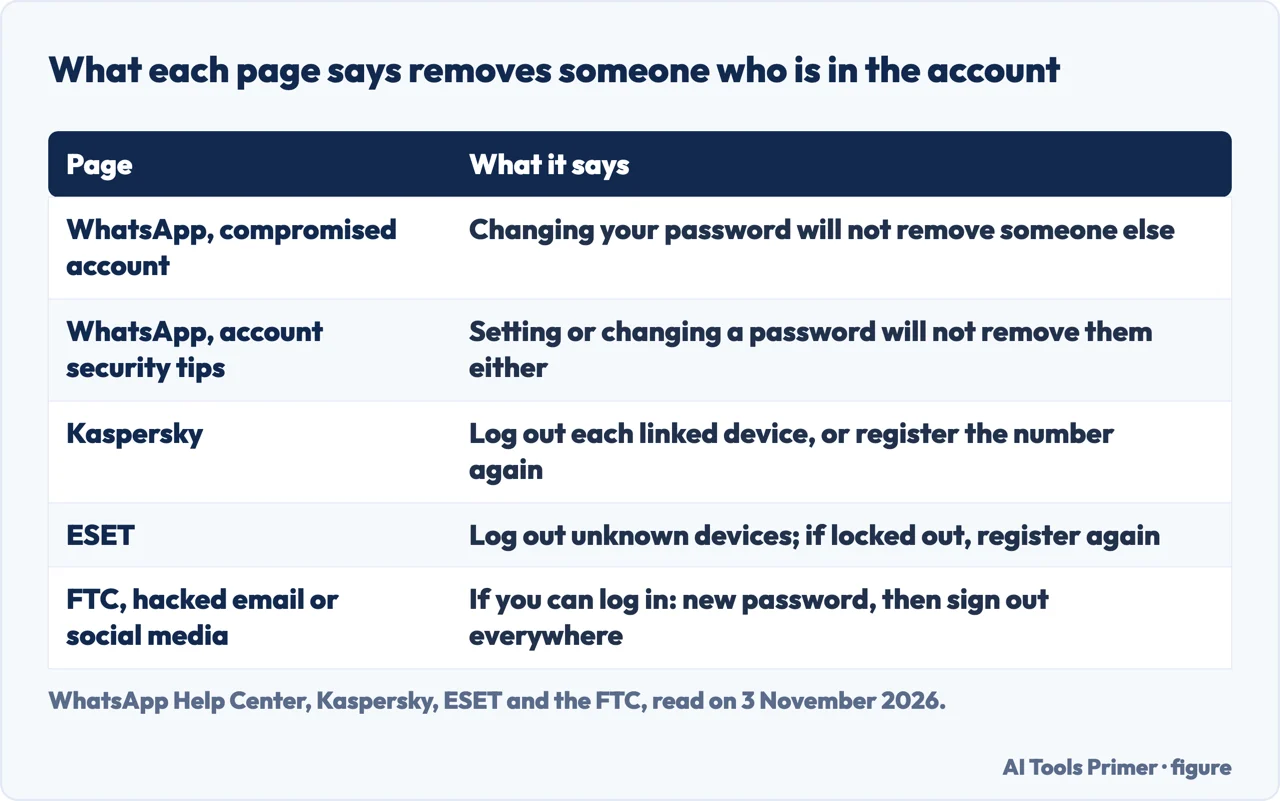
WhatsApp is plain about this on two pages. The recovery page says changing your password will not remove someone else from your account, and that passwords, two-step verification and other security features are designed to protect an account you still have access to. If someone has taken over, it says, the only way to remove them is to register again with the six-digit code sent to your number. The account security tips page repeats it for passwords: setting or changing one will not remove someone who has already taken over the account. It lists the other layers too: an email, two-step verification, a passkey, app lock, chat lock, a username key, parent PINs, an encrypted backup and strict account settings. Turning them on, it says, cannot restore lost access or remove someone already using the account, so you recover the account first.
The FTC’s general guide gives different first steps, and it is written for many providers, with WhatsApp on its list of recovery instructions. For an account you can still log in to, where a notification shows activity you do not recognize, it says to change the password to a unique one of 12 to 15 characters, or a passphrase, and then sign out of the account on all devices so anyone logged in elsewhere is kicked out. It then says to turn on two-factor authentication if the account offers it, to check that the recovery email and phone number are correct, and to look for messages the intruder sent and new friends you do not recognize. If you cannot log in, it points you to the provider’s own recovery instructions, and WhatsApp is on its list. For WhatsApp that provider route is the re-registration above. The FTC also says that if you believe personal information was stolen, you can go to IdentityTheft.gov to report it and get a personalized recovery plan.
The pages answer different cases: the FTC writes for many providers and for people who can still log in, while WhatsApp writes for its own account and for the case where someone else is already in it. The figure below puts the five pages side by side.
What the intruder could read, and what to check afterwards
WhatsApp says it is end-to-end encrypted and that messages are stored on your device, so someone registering your account on a new device cannot read your past conversations. Its security page says the same in one line. WhatsApp also says that if you made a backup with a Google Account or iCloud, you might be able to restore your chat history. Kaspersky draws the difference between the two ways in: a linked device sees recent conversations, a new registration does not see past ones. ESET agrees that an attacker with only the WhatsApp account sees new messages as they arrive, and says that, generally, old chats are at risk only if a cloud backup or a device is also compromised.
That makes the backup worth a look. ESET says to sign in to iCloud or Google directly, change the password, review recent session activity and confirm two-factor authentication is on. It adds that some services, Microsoft among them, now send login codes to WhatsApp instead of by SMS, and says any account that relies on WhatsApp this way should be treated as exposed: change its password and rotate the second factor where possible. ESET also answers a common question: deleting WhatsApp does not remove an attacker who holds an active session, so it says to reclaim the account properly first.
The linked devices list is the other check. WhatsApp’s page says you can link up to four devices to your primary phone. To log one out, you open the linked devices screen, tap the device and tap LOG OUT. Linked devices are disconnected automatically after 30 days of inactivity, and they log out if the phone goes unused for more than 14 days. With push notifications on, a notification lets you review and remove a device you do not recognize. The page also warns that linking through unofficial apps or websites may put the account at risk and may lead to a temporary or permanent ban. ESET says to open the list again after recovering and to make it a monthly habit.
The number behind the account is the last item. Kaspersky says to contact your mobile carrier, preferably in person, to check that no duplicate SIM cards were recently issued for your number and that no call forwarding was set up that you did not ask for. Our page on whether a phone is hacked covers the device side, and the one on what WhatsApp’s encryption covers covers the lock on the messages.
Telling people, and what to set up once you are back in
WhatsApp says that if you suspect your account is compromised, you should notify family and friends, because the person using it could impersonate you in chats and groups. It adds that WhatsApp will notify you when someone tries to register an account with your number. Kaspersky suggests a phone call for close friends, family and coworkers, and to reach many contacts a change to your status: Settings, tap your name, and write a warning in the About field that says to distrust messages from you and to send no money. ESET suggests the same, and the FTC suggests a quick email, text or post telling contacts not to click links and to ignore pleas for help or money.
The same pages help with the other side of it, the message you receive. WhatsApp lists clues in a suspicious message: typos, a request to tap a link or download an app, a request for personal information, a request to forward the message, a request for money, or someone pretending to be a person you know. If a suspicious message comes from a known contact, it says, that contact’s account could be compromised. It also says that someone who asks for payment to use WhatsApp, or offers to unban your account for a fee, is likely after your financial or personal information. On codes, the FTC says anyone who asks for your verification code is a scammer, and that you can report it at ReportFraud.ftc.gov; ESET says to assume a contact who asks for the code has a compromised account, and to call that person.
WhatsApp recommends turning on its security features once you are back in, and reviewing the linked devices. Kaspersky’s list is specific: two-step verification with a PIN you memorize, a passkey under Settings, Account, Passkeys, a backup email under Settings, Account, Email address, and two-factor authentication on that email account. ESET adds security notifications under Settings, Account, which it says are off by default and alert you when the encryption code in a chat changes. ESET also ties the recovery email to the wait described above. If the account sent spam, Kaspersky says WhatsApp may restrict it for hours or days; you appeal with the Request a review button, and the review can take from a couple of hours to three days, which Kaspersky says cannot be sped up.
This page takes its statements only from the pages listed under Sources, which we read. Our pages on a hacked Facebook account and a hacked Instagram account cover the other platforms.
Where to start
Four ways in.
- “Is someone in my account?”
- The signs, and the ways in — signs
- “What do I tap to get back in?”
- Getting back in with the six-digit code — back
- “It asks for a PIN I never set.”
- A PIN you did not set — pin
- “Should I change the password?”
- A new password does not remove the intruder — password
Accounts on other platforms
Facebook and Instagram each have a recovery route of their own.
The number behind the account
WhatsApp registers one phone number at a time, and the code goes to that number.
Questions people also ask
What happens if a WhatsApp account is hacked?
Kaspersky says criminals use stolen accounts for spam and scams, and that the intruder may impersonate you to ask friends for urgent money. WhatsApp says the person could impersonate you in chats and groups. What the intruder sees depends on the route: a linked device shows recent conversations, a new registration does not show past ones.
Can I check if someone is using my WhatsApp?
ESET says to open Settings, then Linked Devices, a check it puts at about 30 seconds, and to log out any device you do not recognize. Kaspersky lists signs such as replies to messages you did not send. WhatsApp says it cannot tell you who accessed the account or when and where.
How do I recover my WhatsApp account?
WhatsApp says to tap Log back in, then Continue, enter your full international number and then the six-digit code sent by SMS or call. It says this logs out every device. Without a SIM card with the same number, WhatsApp says recovery is not possible.
How do I get a hacker out of my WhatsApp?
Register the number again with the six-digit code, which WhatsApp says logs out all devices, or log out each device under Linked devices, as Kaspersky and ESET describe. WhatsApp says changing the password will not remove someone else from the account.
Not covered here. We tested nothing on a WhatsApp account. The statements come from four WhatsApp Help Center pages, the WhatsApp security page, a guide from ESET, a blog post from Kaspersky and three pages from the FTC, all read on 3 November 2026.
The search volume and difficulty behind this page come from a Semrush reading of 29 August 2026, older than the 60 days the site normally allows.
Sources
- WhatsApp Help Center — How to recover a compromised account — faq.whatsapp.com, read 3 November 2026.
- WhatsApp Help Center — Account security tips — faq.whatsapp.com, read 3 November 2026.
- WhatsApp Help Center — About linked devices — faq.whatsapp.com, read 3 November 2026.
- WhatsApp Help Center — About suspicious messages and scams — faq.whatsapp.com, read 3 November 2026.
- WhatsApp — Security — www.whatsapp.com, read 3 November 2026.
- ESET — WhatsApp account hacked. What next? (23 September 2025) — www.eset.com, read 3 November 2026.
- Kaspersky — What to do if your WhatsApp account gets hacked (21 February 2025) — www.kaspersky.com, read 3 November 2026.
- FTC Consumer Advice — Email or social media hacked? Here’s what to do (29 October 2024) — consumer.ftc.gov, read 3 November 2026.
- FTC Consumer Advice — How To Recover Your Hacked Email or Social Media Account — consumer.ftc.gov, read 3 November 2026.
- FTC Consumer Advice — What’s a verification code and why would someone ask me for it? — consumer.ftc.gov, read 3 November 2026.
Written by Alberto Gulotta
Founder and editor of AI Tools Primer, writing from Palermo, Italy. Thirty-five years of taking computers apart, starting with a Commodore 64 — the long version is on the about page.
Something wrong on this page? Write to aitoolsprimer@gmail.com and it gets fixed.
Written on 4 November 2026.
Independence and limits
No affiliate links and no paid placements anywhere on this site. Nobody pays to appear here, and no company has seen this page before you did.
This is general information, not professional advice. Where a page touches money, health, safety or the law, it names its source and the date it was read — and your situation may still differ. See the privacy page and the cookie policy.