
Malware · guide
What is adware? What Microsoft, CISA and vendors say
By Alberto Gulotta · Updated · 16 min read
What is adware? Wikipedia calls it software that earns money by showing advertisements and, in some cases, by tracking online behaviour. The security sites we read do not agree on whether it counts as malware, and Microsoft files advertising software under potentially unwanted applications. This page sets out definitions, how it arrives, the signs and removal.
| Question | Answer | Where it comes from |
|---|---|---|
| What is it? | Software that earns money by showing advertisements; some also track online behaviour | Wikipedia, Kaspersky |
| Is it malware? | The pages disagree: malware, a potentially unwanted program, or both on the same page | Malwarebytes, Security.org, Microsoft |
| How does it arrive? | Bundled with a free program, or by a drive-by download from a website | Malwarebytes, Huntress, Microsoft |
| How do I remove it? | Google says to check the computer for unwanted programs before you reset the browser settings | Google Chrome Help |
| Is it legal? | Kaspersky says it depends on consent; Security.org says it is mostly illegal in the U.S. | Kaspersky, Security.org |
Software paid for by the ads it shows
Wikipedia gives the definition we start from. Adware, often called “advertising-supported software” by its developers, is software that generates revenue by automatically displaying online advertisements in the user interface or on a screen shown during installation, and in some cases it can track online behaviour to display personalised ads. Wikipedia names two ways of being paid, one for the display of the ads and one per click. Kaspersky lists three: pay-per-click, where the makers are paid each time you open an ad; pay-per-view, each time an ad is shown to you; and pay-per-install, each time bundled software is installed on a device. Security.org uses the abbreviations PPC, PPI and PPV near the end of its page for types of online ads, and there PPI means pay per impression, not pay-per-install.
Wikipedia also says the word is used in two senses. The 2003 Microsoft Encyclopedia of Security, it says, defines adware as software that installs itself without your knowledge and shows ads while you browse, which is a form of malware. Elsewhere it means software that a developer funds with advertising, sometimes giving it away free or at a reduced price. Its examples of advertising-supported software include the Windows version of Skype, the Kindle with Special Offers and the Acceptable Ads setting of Adblock Plus.
CISA has written about it twice, and the two pages do not match. Its page “Recognizing and Avoiding Spyware” was released on 19 November 2009 and revised on 27 September 2019, and it carries a notice that the archive contains outdated information. It says spyware is also known as adware, and describes a category of software that may send you pop-up ads, redirect your browser to certain websites or monitor the sites you visit, with extreme versions that can track the keys you type. CISA’s current training page, Project Upskill, calls adware and cookies two common tracking technologies used mainly by commercial entities, and says threat actors can abuse adware with distracting pop-ups that contain malicious links. It adds that information from adware used for legitimate commercial purposes can end up in data broker profiles that can be bought and sold. The same page says not all tracking technologies constitute spyware, and that Congress defined spyware in December 2022 as software that lets unauthorised users remotely access information stored on a device or in transit.
Malware, an unwanted program, or neither? The pages disagree
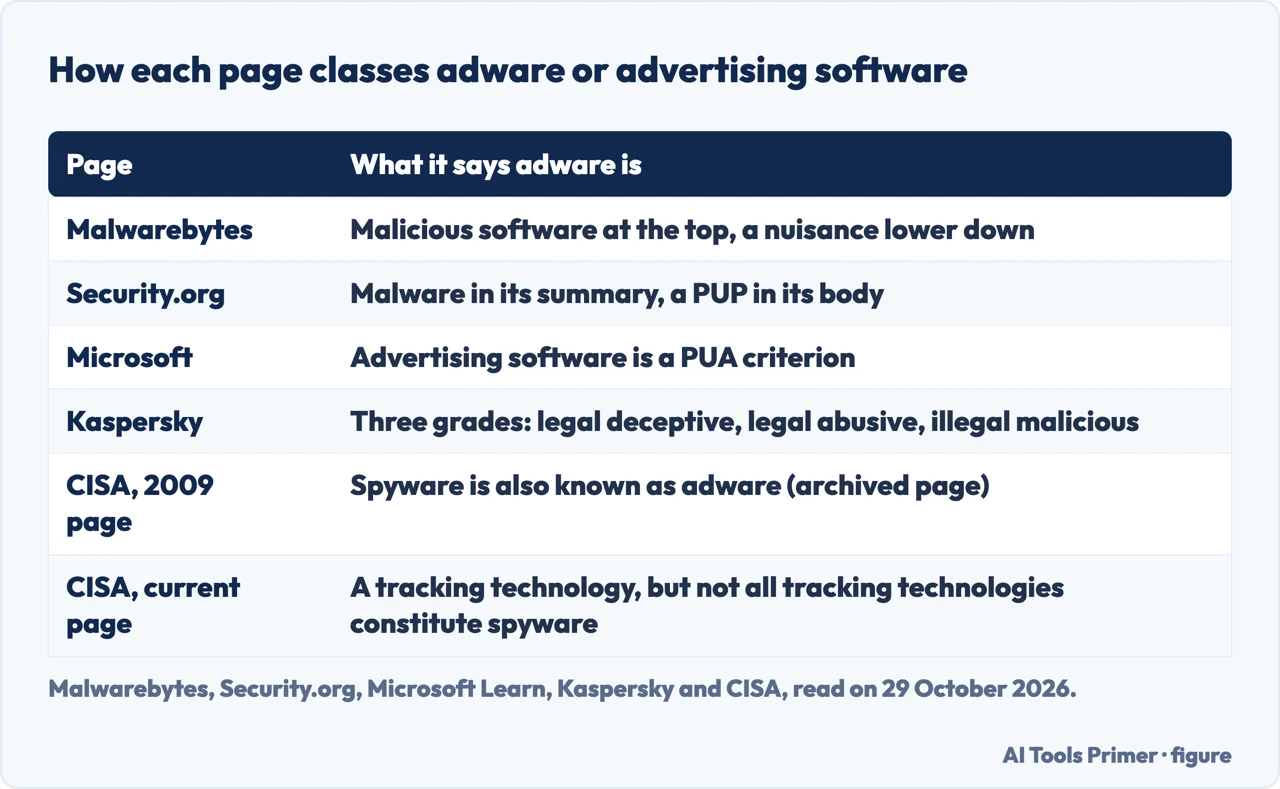
Malwarebytes opens by calling adware a type of malicious software. A few lines further down it says adware is more of a pesky nuisance than a harmful malware threat, and in its history section that today adware is usually viewed as a form of PUP, a potentially unwanted program with a threat level below malware. Security.org, a site that says it may earn compensation from some providers, has three statements on one page. Its summary says adware is a type of malware; its body says adware is not a type of virus or malware but “a potentially unwanted program”; and a note says that while adware is a type of malware, not every malware is adware, like squares and rectangles. Microsoft says a potentially unwanted application is not considered a virus, malware or other type of threat, although it can slow a machine, show unexpected ads or install other software. Among the criteria Microsoft lists for such applications is advertising software that displays advertisements or promotions, including software that inserts advertisements into webpages.
Wikipedia reports that some sources rate adware only as an irritant, others call it an online threat and others rate it as seriously as viruses and trojans, and that a workshop of the Federal Trade Commission in 2005 found no clear consensus on how to define adware or how it relates to spyware. Huntress, a security vendor, says adware sits in the gray zone of cybersecurity: not quite a virus, but not a harmless browser pop-up either. It says malicious variants can install other malware, including spyware and ransomware, steal credentials and keep access after a restart. Kaspersky splits it into grades: legitimate adware you consent to, in exchange for a free product, and unwanted applications that are legal but deceptive, legal but abusive, or illegal and malicious. It adds that when people talk about adware, they tend to mean the programs that abuse ads and open the door for malware.
The name matters for one practical reason. Kaspersky says security software might not detect and remove adware by default, and that its own products let you turn detection off or add exceptions for a program you have consented to, because there can be valid reasons for the adware to be there. Our summary table shows how each page names it.
On the law, Kaspersky says free software with some ads may be annoying but is not illegal, and that it becomes illegal if a third party adds malicious ad software to your device without your consent. Security.org says that by and large adware is illegal in the U.S., that 21 states plus Guam and Puerto Rico have spyware laws it says include adware, and it cites California’s Consumer Protection Against Computer Spyware Act and the federal Computer Fraud and Abuse Act. We did not check those laws; they are Security.org’s statements. Wikipedia reports that, in the view of FTC staff, there appears to be general agreement that software should be considered spyware only if it is downloaded or installed without the user’s knowledge and consent.
How it gets onto a device
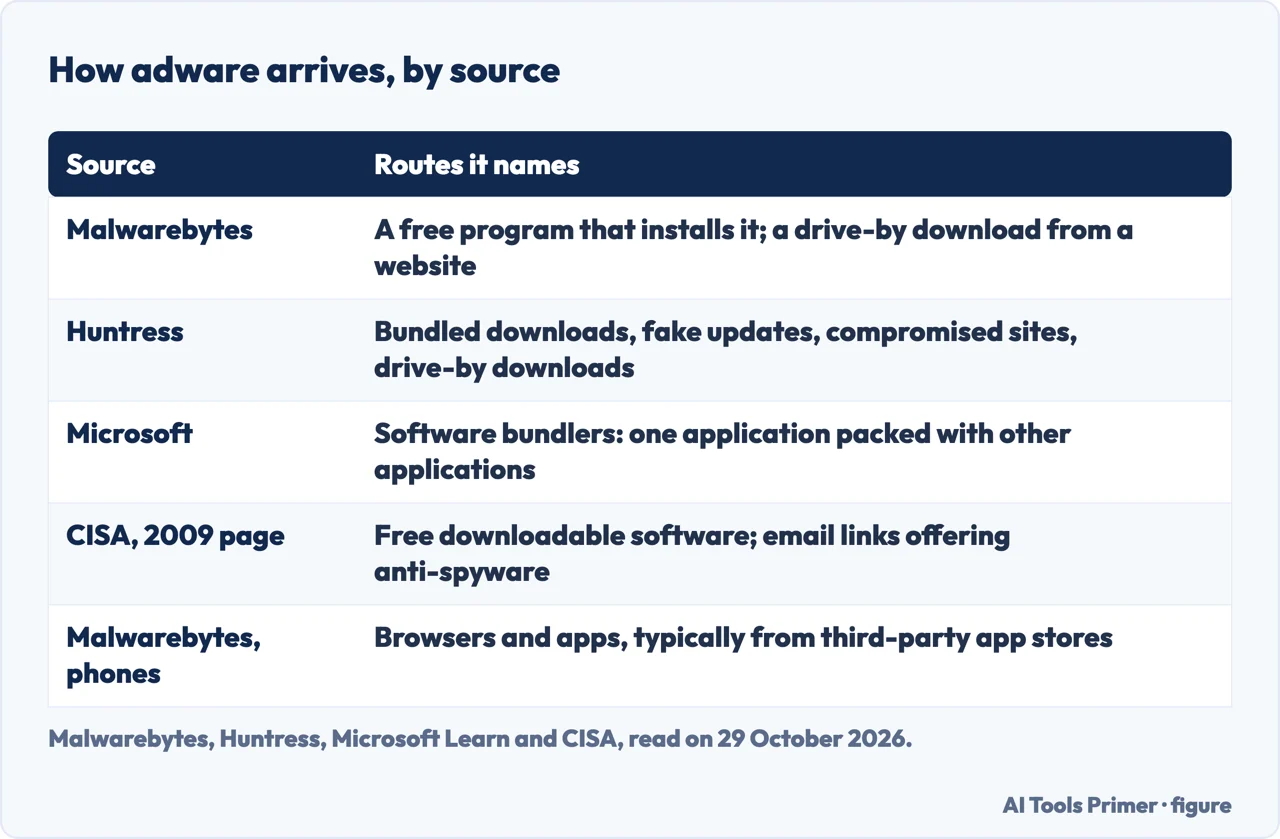
Malwarebytes, Kaspersky and Security.org each describe two routes. In the first you download a program, usually freeware or shareware, that installs the adware with it. Malwarebytes explains that the program’s author signed up with the adware vendor, and that the advertising revenue is what lets the program be offered free; Security.org says nearly the same. In the second route, Malwarebytes and Security.org say a website exploits a weakness in the browser to deliver a drive-by download, while Kaspersky says hackers exploit a vulnerability in your software or operating system to insert malware. Huntress lists four routes: bundled downloads, fake updates and installers, compromised websites serving malicious ads through third-party networks, and drive-by downloads.
Microsoft’s page on unwanted software says it can arrive when you search for and download applications from the internet, and that some applications are software bundlers, packed with other applications, so other programs can be installed by accident. CISA’s 2009 page advises being wary of free downloadable software, such as customised toolbars, and not following email links that claim to offer anti-spyware software. It also says to close a pop-up with the X icon in its title bar rather than a link inside it, and to choose “no” when asked unexpected questions.
On phones, Malwarebytes says adware arrives through the browser or through downloaded apps, typically from a third-party app store, and that even Google Play has been an unwitting source. Kaspersky describes ad fraud and ad clicker software that clicks on ads without the user knowing or subscribes people to premium services. Wikipedia reports adware found in certain low-cost Android devices, in some cases embedded in the system and boot partitions, where removal involves changes to the firmware. For Macs, Malwarebytes says adware first emerged in 2012 and mostly rides inside a trojan, but its page talks about counts for 2017, so it is dated.
What it looks like on a device
Google Chrome Help does not use the word adware. Its page on removing unwanted ads, pop-ups and malware says you might have unwanted software or malware if pop-up ads and new tabs will not go away, the homepage or search engine keeps changing without your permission, unwanted extensions or toolbars keep coming back, the browsing is hijacked and redirects to unfamiliar pages, or alerts warn of a virus or infected device. CISA’s 2009 list is similar: endless pop-up windows, redirects, new toolbars, unexpected icons in the task tray, a changed home page or search engine, a slow computer, and certain keys that fail to work in the browser, such as the tab key in a form.
Microsoft’s list for unwanted software has programs you did not install and that are hard to uninstall, browser settings that have changed and cannot be viewed or changed, excessive messages about your device’s health, and ads that cannot be closed easily. It adds that some signs are less disruptive, such as software that changes web pages to show specific ads or monitors browsing. Kaspersky adds unexplained data use, higher phone bills and apps you do not remember. Huntress adds rapid battery drain and notifications about deals or lotteries. Security.org warns that none of these signs on its own necessarily means adware, since a VPN may also slow a device, and that a combination of several may indicate an infection.
Taking it off, in the order each page gives
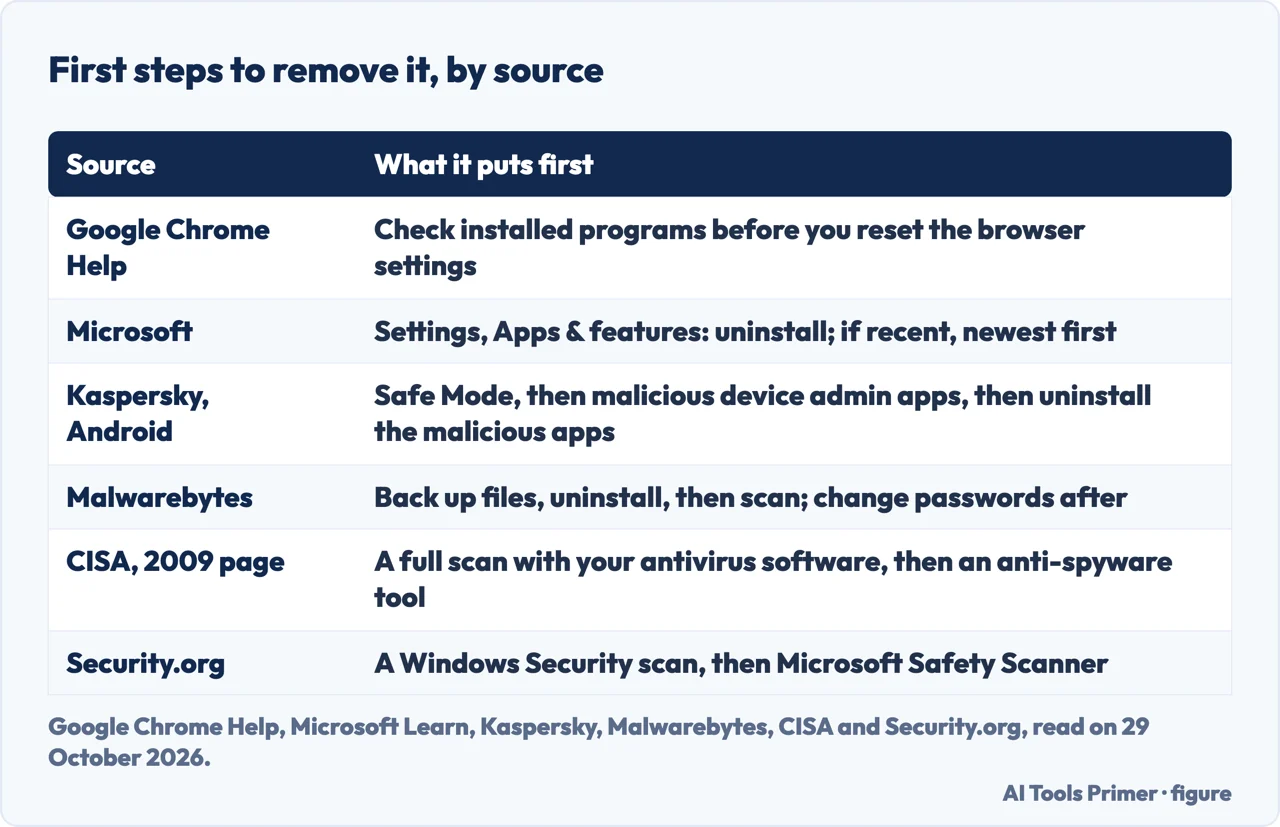
Google Chrome Help puts three things in order. Change the default setting for intrusive ads under Site settings; check the computer for unwanted programs before you reset the browser settings; then reset. On Windows, the programs step is Start, Settings, Apps, Installed apps, then Uninstall. On a Mac it is Finder, Applications, right-click the program, Move to Trash, then empty the Trash. Chrome also checks its settings every time it launches and restores important ones to safe defaults. The manual reset is under Settings, Reset settings, Restore settings to their original defaults; afterwards some extensions have to be turned on again, and Google says to turn on only extensions you trust. The page does not say how to switch single extensions off.
Microsoft says some unwanted software adds an uninstall entry, so Settings, Apps, Apps and features works; if you noticed the signs only recently, sort the apps by install date and uninstall the newest ones you did not install. It adds that you may also need to remove browser add-ons. Its page on potentially unwanted applications describes PUA protection. In Microsoft Edge, based on Chromium version 80.0.361.50, it is off by default and is turned on under Security with Block potentially unwanted apps. For Microsoft Defender Antivirus on devices that are not onboarded to Defender for Endpoint, the default is Disabled with security intelligence older than 1.329.495.0 and Audit mode with that version or later. PowerShell sets it with Set-MpPreference -PUAProtection Enabled. Blocked files go to quarantine, and the notification starts with PUA:. That page deals with Edge, PowerShell and management tools, and does not say where the switch sits in the Windows Security app on a home PC.
Kaspersky says manual removal may not find every component, and gives Android steps: Safe Mode, then removing malicious device admin apps, uninstalling the malicious apps, running antivirus and removing redirects from the browser. It also notes that some free programs with built-in adware can stop working if you remove that component. Malwarebytes says to back up your files, try the operating system’s uninstall tool, and know that a Resuscitator, a set of files designed to bring a program back after an uninstall, can defeat it; after a scan, it advises changing your passwords. CISA’s 2009 page suggests a full scan with your antivirus software, since real-time monitoring may miss spyware, and a tool designed to remove spyware. It names products from 2009, which we do not repeat as current advice.
Security.org says Google removed the built-in Clean Up Computer feature, the Chrome Cleanup Tool, starting with Chrome 111 in March 2023, and suggests Reset settings or an antivirus scan instead; the Google page we read does not mention the tool, and we did not check that date. It also suggests the Microsoft Safety Scanner as a second opinion. For keeping it off, CISA’s current page, which is about tracking technologies and spyware in general, says to download apps only from your operating system’s app store (or, as applicable, a trusted app store), reboot your device weekly because in some cases switching off removes installed spyware, disable your Ad ID and install antivirus and antimalware software. Microsoft says to download software only from official websites or the Microsoft Store, and to be wary of downloading software from third-party sites.
What the pages we read do not say
The pages we read do not say how many people are affected today. The only figure is Malwarebytes’s own, that adware placed second behind banking trojans among its consumer detections in the second half of 2018, which is old and comes from a vendor. The pages we read also do not give a way to confirm that adware is gone after a cleanup. Google’s page covers the browser and installed programs, and CISA’s 2009 page is archived, so its signs and prevention tips are a record of what was advised then, not a procedure.
We tested nothing on a computer or phone. The statements come from the pages listed below, all read on 29 October 2026, and the vendors are used only for what they claim. We read a Google Account Help page on removing malware but did not use it, and we did not open Malwarebytes’s separate article on Android.
Where to start
Four ways in.
- “Is it malware?”
- The pages disagree — name
- “How did I get it?”
- How it gets onto a device — arrives
- “Do I have it?”
- What it looks like on a device — signs
- “How do I remove it?”
- Taking it off, in the order each page gives — remove
The questions
What people ask while deciding whether they have a problem at all.
Removing it
The emergency guides, one per device.
Questions people also ask
What is an adware virus?
The pages we read do not agree that it is a virus. Microsoft says a potentially unwanted application is not considered a virus, malware or other threat; Security.org says adware is not a virus (it also calls it a type of malware elsewhere on the page); Huntress calls it not quite a virus.
How do I get rid of adware?
Google says to check installed programs, uninstall the ones you do not want, then reset the browser settings. Microsoft says some unwanted software can be uninstalled through Settings, Apps and features, and suggests starting with the most recent installs you did not make if the signs are recent. Kaspersky gives Safe Mode steps for Android.
What is an example of adware?
Wikipedia lists advertising-supported software, among them the Windows version of Skype and Kindle with Special Offers. It also reports adware in some low-cost Android devices, and Kaspersky describes ad fraud and ad clicker software on phones, which clicks on ads without the user knowing. The pages we read do not name a malicious program as an example.
Not covered here. We tested nothing on a computer or phone. The statements come from CISA (a page archived since 2009 and a current training page), Google Chrome Help, two Microsoft Learn pages, Wikipedia, and pages by Malwarebytes, Kaspersky, Huntress and Security.org, all read on 29 October 2026. The security vendors and Security.org are used only for what they claim.
The search volume and difficulty behind this page come from a Semrush reading of 29 August 2026, older than the 60 days the site normally allows.
Sources
- CISA — Recognizing and Avoiding Spyware (released 19 November 2009, revised 27 September 2019, archived) — www.cisa.gov, read 29 October 2026.
- CISA — Follow Cybersecurity Best Practices to Protect Yourself from Tracking Technologies and Spyware — www.cisa.gov, read 29 October 2026.
- Google Chrome Help — Remove unwanted ads, pop-ups & malware — support.google.com, read 29 October 2026.
- Microsoft Learn — Block potentially unwanted applications with Microsoft Defender Antivirus (last updated 15 September 2026) — learn.microsoft.com, read 29 October 2026.
- Microsoft Learn — Unwanted software (last updated 24 April 2024) — learn.microsoft.com, read 29 October 2026.
- Wikipedia — Adware — en.wikipedia.org, read 29 October 2026.
- Malwarebytes — Adware: what is adware and how to remove adware — www.malwarebytes.com, read 29 October 2026.
- Kaspersky — What is adware? — www.kaspersky.com, read 29 October 2026.
- Huntress — What is adware? — www.huntress.com, read 29 October 2026.
- Security.org — What Is Adware and How Do You Prevent It in 2026? — www.security.org, read 29 October 2026.
Written by Alberto Gulotta
Founder and editor of AI Tools Primer, writing from Palermo, Italy. Thirty-five years of taking computers apart, starting with a Commodore 64 — the long version is on the about page.
Something wrong on this page? Write to aitoolsprimer@gmail.com and it gets fixed.
Written on 29 October 2026.
Independence and limits
No affiliate links and no paid placements anywhere on this site. Nobody pays to appear here, and no company has seen this page before you did.
This is general information, not professional advice. Where a page touches money, health, safety or the law, it names its source and the date it was read — and your situation may still differ. See the privacy page and the cookie policy.