
Malware · guide
Malwarebytes as a second scanner: what the sources say
By Alberto Gulotta · Updated · 13 min read
Malwarebytes offers a free scanner that Wikipedia says works only on demand and paid plans that add real-time protection; the company calls the free one a cleanup for what is already on a device, the two 2026 AV-Comparatives reports we read tested the paid one, and Cybernews’s own test gave lower numbers.
| Question | Answer | Where it comes from |
|---|---|---|
| What is it? | A scanner and security suite for Windows, macOS, ChromeOS, Android and iOS, first released in January 2006 | Wikipedia |
| What does the free version do? | It scans when started and removes existing infections; real-time protection is in the paid plans | Malwarebytes, Wikipedia, Cybernews |
| Did a lab test it in 2026? | Yes, the paid Premium: 99.65% in September and 99.59% in March | AV-Comparatives |
| Did the lab count false alarms? | Yes: 32 in September and 23 in March, both in its “very many” band | AV-Comparatives |
| Do all the tests agree? | Not in the numbers: Cybernews’s own 150-sample test found 59.33% in a full scan | Cybernews |
What Malwarebytes is, and what it scans
Wikipedia describes Malwarebytes, formerly Malwarebytes Anti-Malware and abbreviated MBAM, as a cybersecurity software suite for Windows, macOS, ChromeOS, Android and iOS that finds and removes malware. It says the software is made by Malwarebytes Corporation, was first released in January 2006 and is licensed as freemium, and that it removes malicious software including rogue security software, adware and spyware. The company’s own page says the product began as a manual virus cleanup utility and that it now offers both a free scanner and a premium subscription.
The company’s page for the free scanner says it supports Windows, Mac, Android and iOS and gives four steps: download the scanner, install and open it, click Scan, then review the results and quarantine what it finds, restarting the device if prompted. The same page adds that scanning finds threats that are already on the device. The company calls its detection engine Katana and lists four layers: signature scanning, behavioral analysis, heuristics and cloud telemetry.
Cybernews, whose review was updated on 2 July 2026, lists four scan modes: Quick Scan, Custom Scan, Threat Scan and Deep Scan. It says the Quick Scan lasts up to a minute and checks memory and startup objects, that the Threat Scan runs daily for Premium users, and that Deep Scan is available only on Windows. Its FAQ also says Malwarebytes is not the best antivirus for Mac users, because they get only a fraction of what Windows users get; that is Cybernews’s view, and the company pages we read do not say the same. In its own Windows 11 virtual machine it timed the quick scan at 1 minute 5 seconds and the full scan at 39 minutes 22 seconds.
Free and paid, as three sources put it
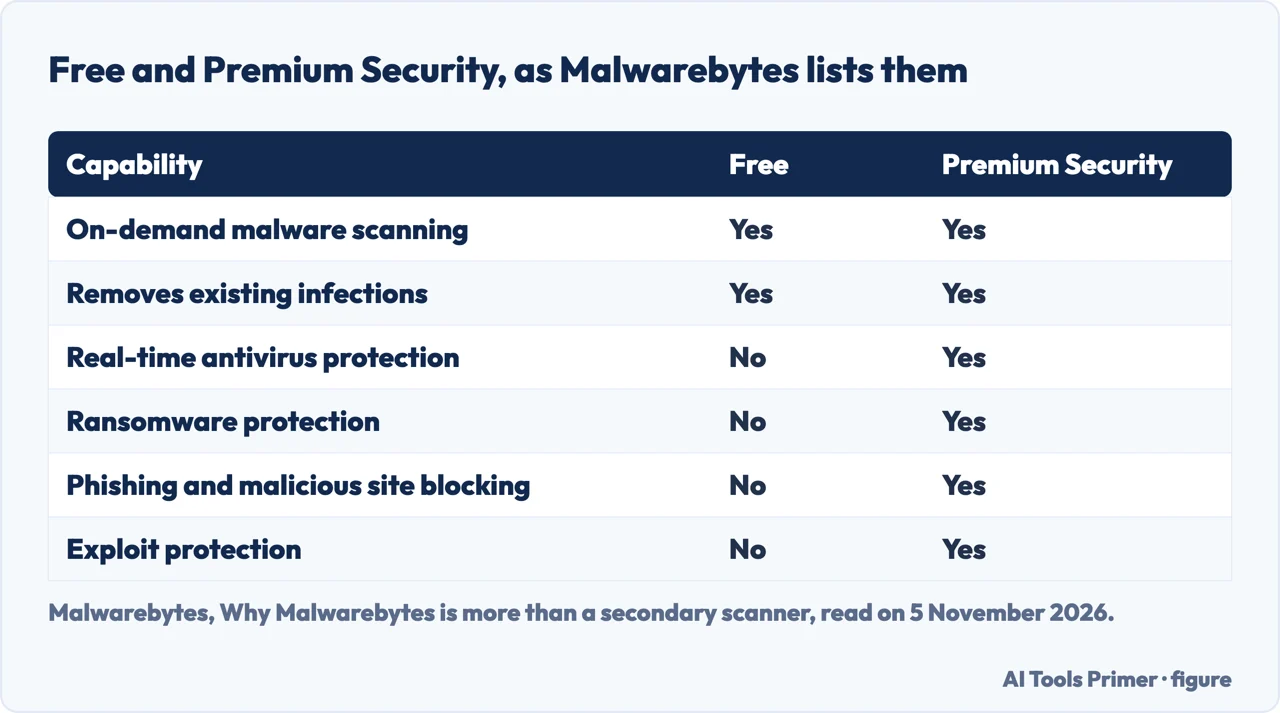
The company’s comparison table has two columns, Free and Premium Security. Both have on-demand malware scanning and removal of existing infections. Only Premium Security has real-time antivirus protection, ransomware protection, phishing and malicious site blocking, exploit protection, brute force attack prevention and uninstall protection. Its Premium page sums up the gap in a sentence of its own: Free is a cleanup tool for attacks that have already damaged a device, while Premium Security aims to stop them from happening.
The company also says Premium scans downloaded files as part of real-time protection, while Free needs a manual scan once the download is complete. It lists scheduled scans, a VPN, identity theft protection, a digital footprint scan and personal data removal among what Premium Security adds, and it presents Browser Guard, AdwCleaner and a Digital Footprint Scanner as free tools.
Wikipedia and Cybernews count differently: four plans named Free, Standard, Plus and Ultimate. Wikipedia says the free edition works only as an on-demand scanner that can remove existing malware but has no continuous real-time protection, so scans must be started by hand. Cybernews says the same of the free plan, and describes Standard as real-time protection and daily threat scans for one device, Plus as adding a VPN, and Ultimate as adding identity protection, credit monitoring, dark web alerts and personal data removal. It also says you will not find parental controls or a password manager in the package. The pages we read do not map the company’s Premium Security onto the three paid names one for one, and we have left prices out because they change.
The second-opinion role, and who describes it
The company’s own page acknowledges the role: it describes Malwarebytes as a free malware removal tool, a secondary scanner that cleans up infections other antivirus programs miss, and then argues that it is now more than that. Its page on Windows Defender goes further. It says the free scanner suits a second opinion after Defender has run and pairs with Defender for on-demand scans, and it also tells readers to keep Defender active as a baseline.
On running two products, the company says the engine is built to complement, not conflict with, other protection tools, and that it is compatible with Windows Defender and most other antivirus programs. Its FAQ says it works safely with other antivirus software. That is a statement by the company, and the pages we read do not include a test of the two running side by side. Wikipedia gives a mechanism: it says Malwarebytes scans in batch mode rather than checking every file that is opened, which reduces interference if another on-demand anti-malware program is also running. That describes how the scan works; it is not a test either. Whether running a second product leaves Defender active is a separate question, which Microsoft’s own compatibility documentation settles for Windows and which our page on whether MBAM is safe sets out; the company’s compatibility statement above does not answer it.
On what a clean result means, the company says a one-time scan can be reassuring but does not provide lasting protection, because a scan only detects what is on the device at that moment and a bad link or fake update can follow the same day. Its summary is that Free cleans up and Premium keeps threats out. These statements sit on pages that also make the case for the paid plan: the scanner page ends with plan options, and the Defender page argues that Defender has gaps, citing an AV-TEST result of 6 out of 6 for Defender’s protection against widespread malware in December 2025. For the other side of that argument, our page on Microsoft Defender gives what Microsoft says it does, and our page on how to scan for malware covers where Microsoft says to start.
What a laboratory measured
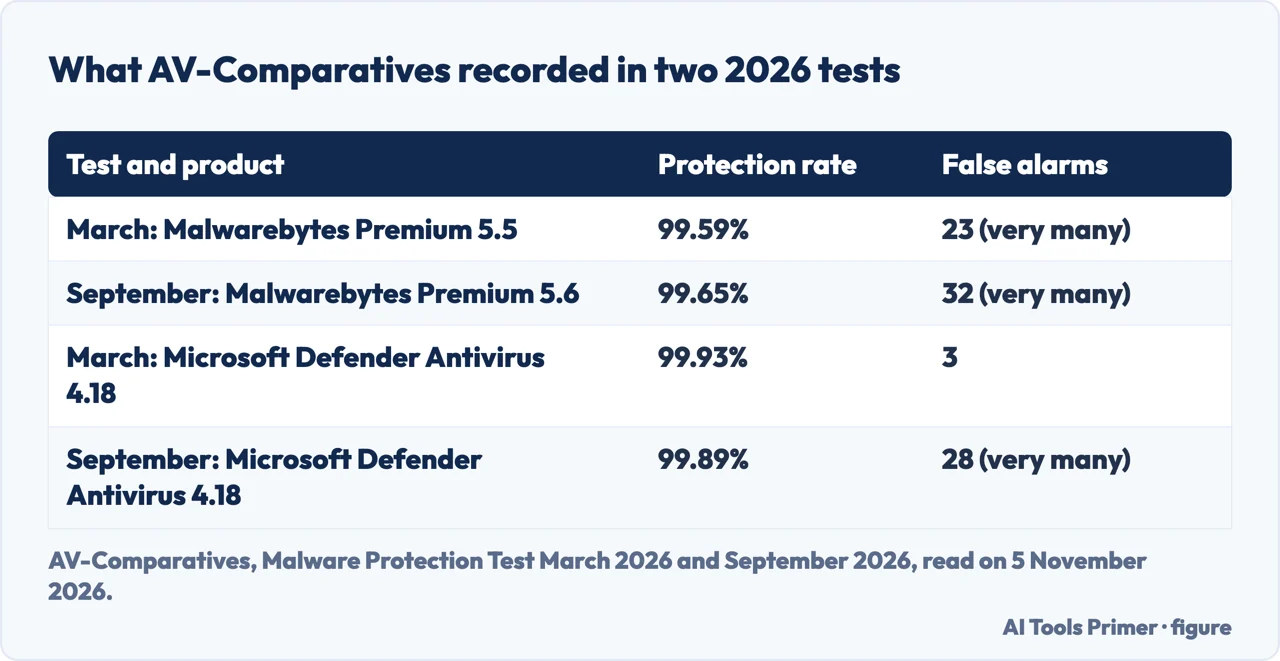
AV-Comparatives runs a Malware Protection Test in which malicious files are executed on a Windows system, with cloud connectivity allowed. Its September 2026 report was released on 15 October 2026 and revised on 7 October, and it used ten thousand samples. In it, Malwarebytes Premium 5.6 had 9965 samples blocked and 35 compromised, a protection rate of 99.65%, placed in the second of four clusters. The March 2026 report, released on 15 April 2026, tested Malwarebytes Premium 5.5 and gives 99.59%, with 41 compromised.
The same reports count false alarms, meaning clean files flagged as malicious. Malwarebytes had 32 in September and 23 in March, and AV-Comparatives places both counts in its “very many” band. In the same September test Microsoft Defender Antivirus 4.18 scored 99.89% with 28 false alarms, also in that band, while in March the Defender row shows 99.93% and 3. AV-Comparatives says false alarms can sometimes cause as much trouble as a real infection, and that a product prone to them may reach higher detection rates more easily. In March it marks Malwarebytes among the products that received lower awards because of false alarms.
Two limits come from the reports themselves. The product tested is Malwarebytes Premium, not the free scanner, and the pages we read do not show a laboratory result for the free version. And AV-Comparatives says it does not recommend buying a product on the strength of one test or one type of test, and points readers to price, ease of use, compatibility and support as well.
Where the sources do not agree
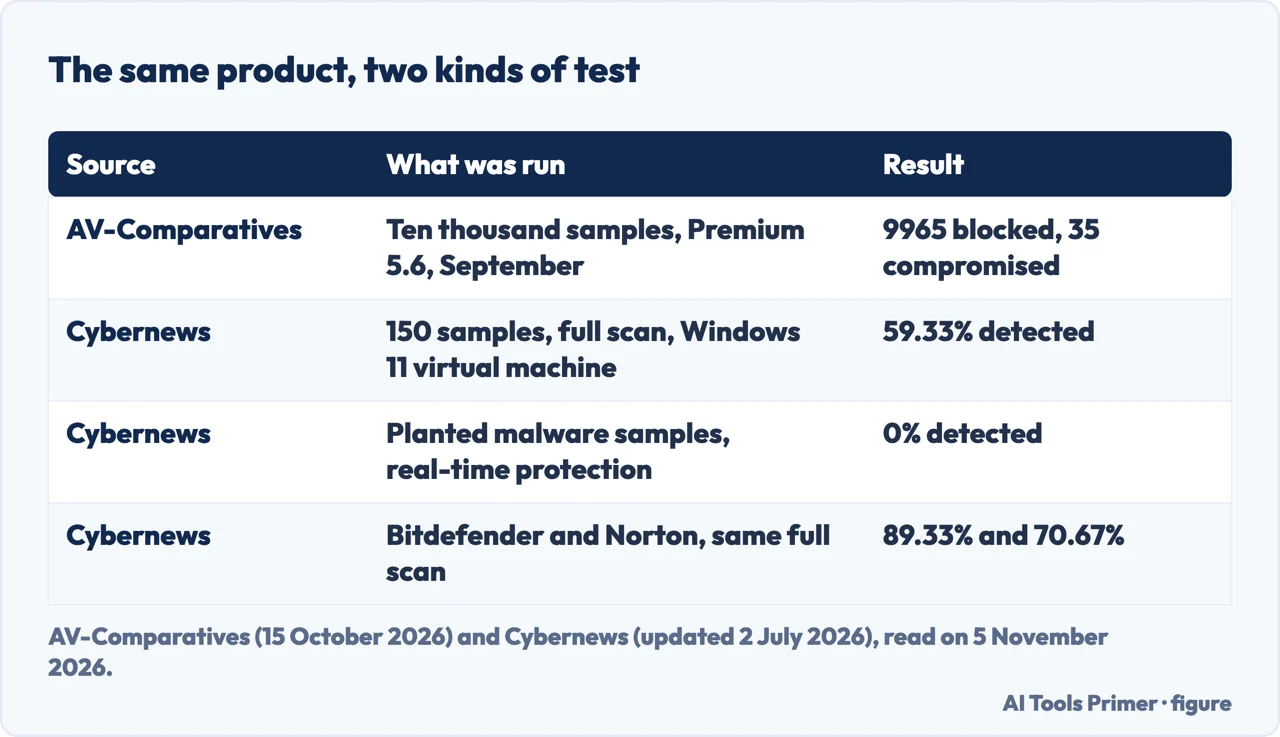
Cybernews tested Malwarebytes in its own Windows 11 Home virtual machine, using 150 active samples from bazaar.abuse.ch and the product’s Custom Scan for the full scan. It reports 59.33% detected in the full scan and 0% with real-time protection, and says Bitdefender reached 89.33% and Norton 70.67% in the same full scan. It concludes that the real-time detection needs further refinement. The same review also cites a February to March 2026 real-world protection test in its AV-Comparatives section, in which it says Malwarebytes Premium blocked 100% of threats, and adds that the product also produced 20 false positives there, which it calls one of the highest results among the tested providers.
Set beside the laboratory’s 99.65%, these are not the same measurement. The laboratory used ten thousand samples, executed them with cloud connectivity, and counted a case as a miss if the changes were not prevented or reversed. Cybernews used a set of 150, a virtual machine and, for the full scan, a manual Custom Scan. The pages we read do not say which method matches how a person uses the program, and we do not pick a side.
The company’s pages are a third kind of source: they describe what each version is for, saying real-time protection blocks threats before they run and a scan finds what is already on the device. So the page holds three separate claims. The company says what each version is for, the laboratory counts what a paid version blocked and flagged, and the reviewer reports what happened in one set-up. Cybernews also says that, in its set-up, Malwarebytes finished its scans faster than Bitdefender and Norton, which each took over an hour for a full scan.
What the pages we read do not say
We ran no scan and installed nothing for this page. The pages we read do not include a laboratory test of the free version or its catch rate as a second scan. They do not say when one extra scan is enough or how long to wait before running it, and they do not describe what to do when a scanner flags a file you believe is clean. The company’s page footers list a link labelled Report a False Positive, and the pages we read do not explain where it leads. Current prices and the details of a free trial were not checked.
For the questions this page leaves out, our page on whether MBAM is safe covers what the company says it collects and what Windows does when it is installed. If a computer is already infected, our pages on removing malware from a Mac and from an Android phone give the steps their sources list.
Where to start
Four ways in.
- What is Malwarebytes?
- What Malwarebytes is, and what it scans — what
- “Free or paid?”
- Free and paid, as three sources put it — free
- “Does a lab test it?”
- What a laboratory measured — lab
- “Why do the numbers differ?”
- Where the sources do not agree — differ
Around the same question
Safety, Defender and scanning sit next to this page.
Other programs, and adware
Two free names, a suite two labs measured, and what adware is.
Questions people also ask
What is Malwarebytes?
Wikipedia calls it a cybersecurity software suite for Windows, macOS, ChromeOS, Android and iOS that finds and removes malware, first released in January 2006. It has a free version that scans when started, and paid plans that add real-time protection, according to the company, Wikipedia and Cybernews.
Is Malwarebytes really safe?
This page gives no verdict. What the company says it collects and what Windows does when it is installed are on our page about MBAM. On protection, AV-Comparatives recorded 99.65% for the paid Premium in September 2026 with 32 false alarms.
Is it worth installing Malwarebytes?
The pages we read give facts, not a recommendation. The company says the free scanner cleans up and Premium keeps threats out. AV-Comparatives tested Premium, and Cybernews found much lower numbers in its own test. AV-Comparatives advises against buying on one test alone.
Is Malwarebytes.com a legitimate website?
The pages we read do not test this directly. The company pages we read are on malwarebytes.com, and Wikipedia gives malwarebytes.com as the website of the software. The pages we read do not discuss look-alike addresses.
Not covered here. We ran no scan and tested nothing on a computer. The statements come from four Malwarebytes pages, two AV-Comparatives reports, the Wikipedia article and a Cybernews review, all read on 5 November 2026.
The interest behind this page comes from an Ubersuggest reading of 5 November 2026 for the United States, not Semrush’s difficulty score; it is still to be confirmed with Semrush, and no figure from it is shown here.
Sources
- Malwarebytes — Why Malwarebytes is more than a secondary scanner — www.malwarebytes.com, read 5 November 2026.
- Malwarebytes — Free Virus Scanner — www.malwarebytes.com, read 5 November 2026.
- Malwarebytes — Premium Security — www.malwarebytes.com, read 5 November 2026.
- Malwarebytes — When Defender is not enough — www.malwarebytes.com, read 5 November 2026.
- AV-Comparatives — Malware Protection Test September 2026 — av-comparatives.org, read 5 November 2026.
- AV-Comparatives — Malware Protection Test March 2026 — av-comparatives.org, read 5 November 2026.
- Wikipedia — Malwarebytes (software) — en.wikipedia.org, read 5 November 2026.
- Cybernews — Malwarebytes Review 2026 — cybernews.com, read 5 November 2026.
Written by Alberto Gulotta
Founder and editor of AI Tools Primer, writing from Palermo, Italy. Thirty-five years of taking computers apart, starting with a Commodore 64 — the long version is on the about page.
Something wrong on this page? Write to aitoolsprimer@gmail.com and it gets fixed.
Written on 5 November 2026.
Independence and limits
No affiliate links and no paid placements anywhere on this site. Nobody pays to appear here, and no company has seen this page before you did.
This is general information, not professional advice. Where a page touches money, health, safety or the law, it names its source and the date it was read — and your situation may still differ. See the privacy page and the cookie policy.