
Malware · guide
How to prevent ransomware, and what to do if it hits
By Alberto Gulotta · Updated · 18 min read
How to prevent ransomware is a short list that the FBI, the Center for Internet Security, No More Ransom and Kaspersky share: updates and a backup that is not connected. Three of the four, all but IC3, add care with email attachments and links. CISA’s page points to a guide instead. The pages differ on paying a ransom.
| Question | Answer | Where it comes from |
|---|---|---|
| What do the lists share? | Updates and a backup kept out of reach of the computer (all four pages); care with email attachments and links (No More Ransom, Kaspersky, and CIS through staff training) | FBI IC3, CIS, No More Ransom, Kaspersky |
| Where are CISA’s measures? | In its #StopRansomware Guide, from page five; the page we read points there and lists free services | CISA |
| Should I pay? | The FBI and No More Ransom advise against; one No More Ransom page adds that paying sometimes works | FBI IC3, No More Ransom |
| Switch the infected device off? | For businesses, disconnect it but do not switch it off; the home-user page says to disconnect it | No More Ransom |
| Is there a free way to get files back? | No More Ransom lists free decryption tools by ransomware name, and says to remove the malware first | No More Ransom |
Where the lists overlap
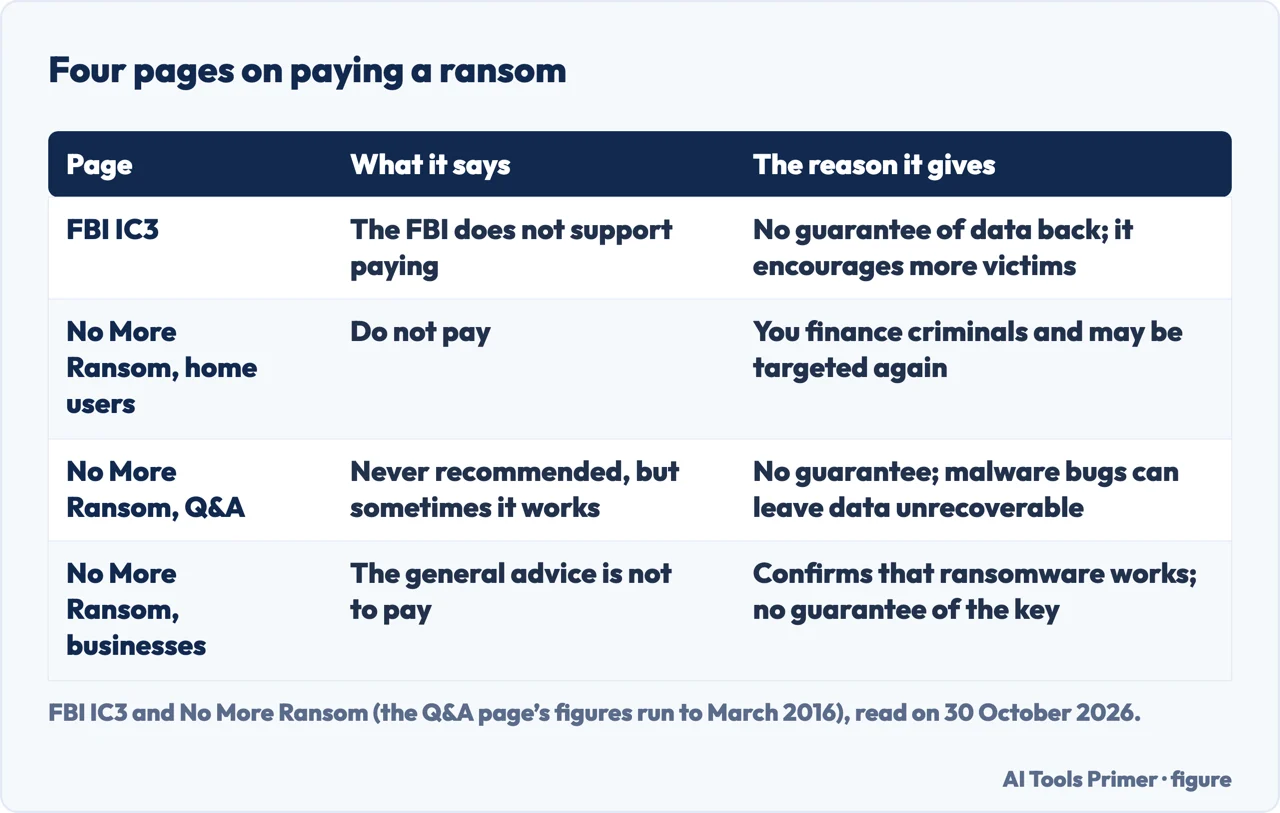
Four of the pages we read give a list of measures: the FBI’s Internet Crime Complaint Center (IC3), the Center for Internet Security (CIS), No More Ransom and Kaspersky, a company that sells security software. Two items appear on all four pages, and a third on three of them: the IC3 page gives no email advice among its tips. The first is updates. IC3 puts it at the head of its list, No More Ransom says to install a new version when one is released and to take automatic updates if offered, CIS says to turn on auto-updates where possible, and Kaspersky says regular updates make it harder to exploit vulnerabilities. The second is a backup that the ransomware cannot reach: IC3 says backups should not be connected to the computers and networks they back up, CIS says to keep them offline or out of band, No More Ransom says to disconnect the copies when you are done, and Kaspersky says a drive that is connected when the ransomware becomes active will be encrypted too. The third, on three of the four, is care with email; IC3 lists no email step among its tips and names attachments and links only as ways the malware gets in. No More Ransom says not to click links in spam or unexpected emails and never to open attachments from someone you do not know, Kaspersky says to avoid dubious attachments, and CIS wants staff trained to spot a malicious email before they click or download.
CISA’s page is a different kind of page. It lists no-cost resources and points to its Ransomware Prevention Best Practices, which it says start on page five of the updated #StopRansomware Guide and rest on insight from CISA, the FBI, the NSA and the MS-ISAC. We did not read that guide, so the measures themselves are not in this article. The page adds one step of its own: identify assets that are searchable through online tools and reduce that exposure. It also offers free scanning services under the name Cyber Hygiene Services, which it says organizations of any size can request.
Two more items come from the No More Ransom pages. Do daily work through a standard account rather than one with administrator rights, which it says helps if you click a malicious file or someone gets into the network. And switch on multi-factor authentication, which the page describes as a second step after the password, such as a code sent by text or generated by an authenticator. CIS also asks for multi-factor authentication on a VPN client and on any portal reached remotely.
How it arrives, and why it is found late
IC3 describes ransomware as malware that prevents you from reaching your files, systems or networks and demands a ransom for their return. It says you can download it without knowing, by opening an email attachment, clicking an ad, following a link or visiting a website that carries malware, and that the more menacing versions can encrypt files on local drives, attached drives and networked computers. Most of the time, IC3 says, you do not know the computer is infected until you can no longer reach your data or a message demands payment.
The No More Ransom Q&A page gives the same picture and adds detail. The attachment can be an executable file, an archive or an image. The malware works silently in the background until its locking step starts, and the page says that by then it is too late to save the data with any security measure. It sorts ransomware into five types: encryption of personal files, usually with a text file of payment instructions left in the same folder; a lock screen called WinLocker, which encrypts no personal files; changes to the Master Boot Record that interrupt the normal start-up; attacks on web servers, often through known weaknesses in content management systems; and mobile ransomware, mostly on Android, through drive-by downloads or fake apps posing as Adobe Flash or an antivirus product. It also says any consumer and any business can be a victim, because the criminals are not selective and want to hit as many users as possible.
That Q&A page names CryptoLocker, Petya and TeslaCrypt, and its figures run to March 2016, so we use it for how the types work and not for how common they are today. Kaspersky, which sells security software, lists insecure websites, software downloads and spam as routes and says VPN vulnerabilities and botnets are now common as well.
The checklist, for a home computer and for an office
For one person at home, No More Ransom gives the longest list. Its items include:
- Two backup copies. One in the cloud, with a service that backs up your files automatically, and one physical, such as a portable drive or a thumb drive. The page says to disconnect these copies from your computer when you are done. The page notes that Windows and Apple ship backup tools, the regular Windows backup and Time Machine. Our page on the 3-2-1 backup rule goes through how backups are counted.
- Email. No links in spam or unexpected emails and no attachments from strangers. The page warns that an account of a friend or colleague can be compromised, and suggests asking the sender on a trusted channel such as a phone call.
- Personal data. Do not give it to a caller or sender you cannot verify, and contact the company yourself through the details on its own website. The page says criminals gather personal data in advance to make the trap more convincing.
- Passwords. Unique and strong; the page says to consider a password manager, plus multi-factor authentication on important accounts. The page says it may sometimes be called two-step verification.
- Downloads. Only official versions of software from trusted websites, and on a phone or tablet only the App Store or Google Play. The page adds that the HTTPS padlock is a sign of a secure connection but does not mean you can trust the site.
- Security software. Use a robust product and do not switch off its “heuristic functions”, which the page says help catch ransomware samples that are not yet formally detected.
- USB sticks and public Wi-Fi. Never connect an unfamiliar stick, which may have been infected and left in a public place, and use a VPN on public Wi-Fi.
- File extensions. Turn on “Show file extensions” in Windows so a name such as hot-chics.avi.exe shows its real ending.
- Firewall. Turn on the local firewall: on Apple devices under System Preferences, Security & Privacy; on Windows under Windows Security, Firewall & network protection.
For an office, No More Ransom and CIS add measures that need someone in charge of the network:
- Patching and backups. No More Ransom suggests a centralised patch system and backups both online and offline, the offline ones in a different place, ideally offsite, or in a cloud service designed for this. It says ransomware actively targets backups so that victims are more likely to pay. CIS adds that backups should be tested routinely and checked for infection. It also notes that some environments need out-of-date software for operational reasons, and says to address those systems as soon as possible.
- Remote access. CIS says many ransomware variants use Remote Desktop Protocol on port 3389 and Server Message Block on port 445, and asks whether those ports need to be open at all, with connections limited to trusted hosts, in the cloud as well. No More Ransom says to restrict Remote Desktop and, if it is truly needed, to restrict where connections come from and require multi-factor authentication. Only the CIS page we read gives the port numbers.
- Segmentation and privilege. Keep sensitive data in separate compartments and limit the movement from one part of the network to another. Give accounts the least access they need, and restrict who can install software.
- Scripts and macros. No More Ransom says to disable scripting environments and macros, and to disable Windows PowerShell if it is not used, because some variants use it to run. Kaspersky says never to open an attachment that asks you to run macros to view it. Our page on enabling macros in Excel shows where that setting sits.
- Data leaving the network. No More Ransom says to watch for it, since many campaigns threaten to release data. The earlier it is detected, it says, the less damage a release can do.
- Plans and practice. CIS asks for an incident response plan that names IT, legal and administrative teams and lists partners, insurers and vendors to call, tested in a tabletop exercise and reviewed each quarter. IC3 asks for a continuity plan. No More Ransom adds tests of the restore process, penetration tests and cyber liability insurance to explore.
- People. No More Ransom suggests training with simulated spear-phishing and a simple way to report suspicious emails, with a thank-you for those who do.
CIS cites IBM’s 2023 Cost of a Data Breach report: organizations took 204 days to identify a breach and 73 days to contain it. That is a second-hand figure from a page that also promotes its own monitoring services, which we leave out. CIS adds that as of 23 June 2025 the MS-ISAC has a fee-based membership, so earlier mentions of its no-cost services no longer apply.
If it already hit
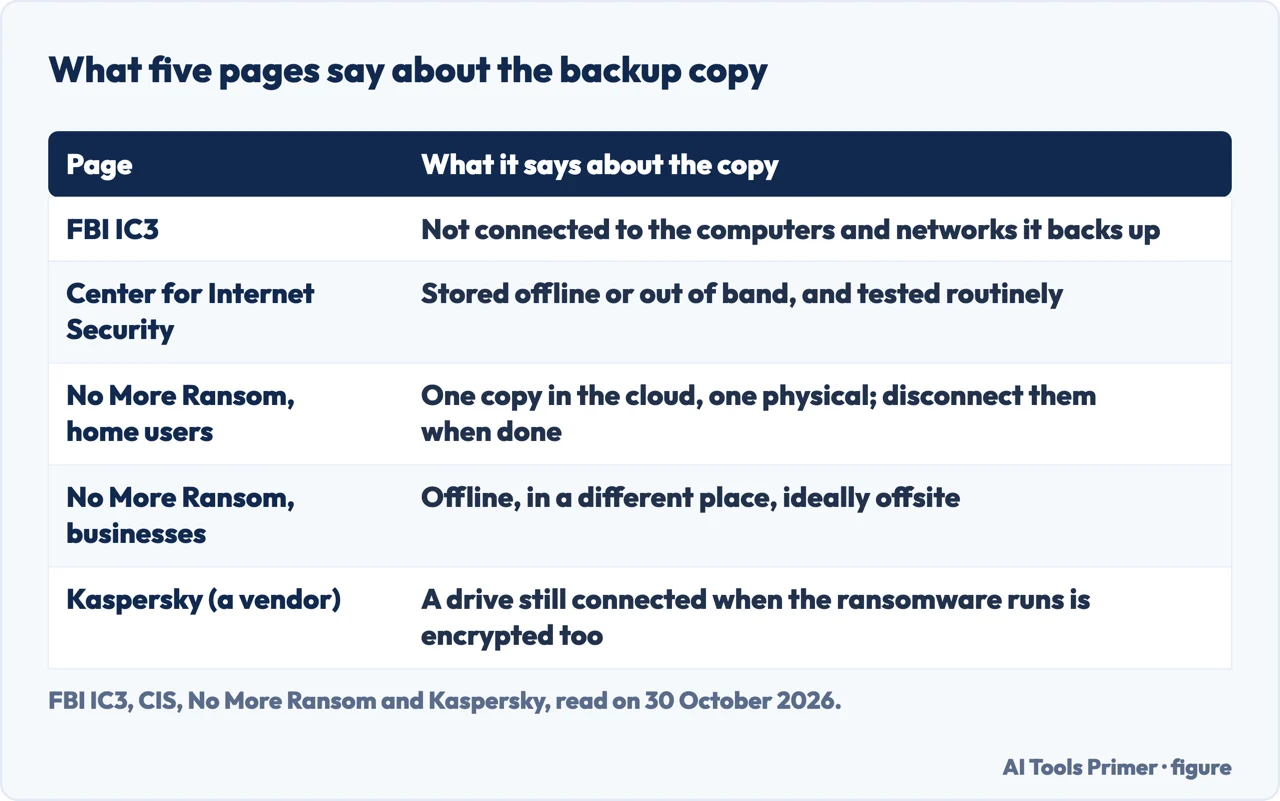
No More Ransom gives home users eight steps. Disconnect the device at once from the internet and other networks, including the home Wi-Fi, to stop the infection spreading. Do not pay. Photograph or screenshot the ransom note. Use antivirus or anti-malware software to clean the device, which may mean restarting in Safe Mode. The page says removing the ransomware will not decrypt the files, but lets you carry on without new files being encrypted. If you have a backup, restore it. If you do not, check nomoreransom.org for a free tool for your variant, where the note will be useful. Finally, report it to your national police.
Its page for businesses is longer. It says to disconnect the infected devices from every network connection, wired, wireless or mobile, but not to switch them off. The pages we read do not say why. In very serious cases it suggests turning off Wi-Fi, disabling core network connections including switches and disconnecting from the internet. It then asks you to reset credentials, especially administrator and system accounts, while checking you are not locking yourself out of systems needed for recovery; to report to the national police or other authority; and to preserve evidence with the authorities, meaning a forensic image or snapshot, a RAM dump and any network traffic logs. If nomoreransom.org has no tool for the variant, the page says to go on with the recovery steps: wipe the devices and reinstall the operating system, verify that a backup is free of malware before restoring from it, rebuild on a clean network, update and run antivirus, reconnect, and keep monitoring traffic and scanning for leftover infection.
IC3 asks for a detailed complaint at ic3.gov. The page lists what the complaint should hold: the ransomware variant name if known, the file extension of the encrypted files, the cryptocurrency type and address, the email address the attackers used, any websites or URLs they gave, the amount demanded, and whether a ransom was paid and how much.
Should you pay? The pages do not say the same thing
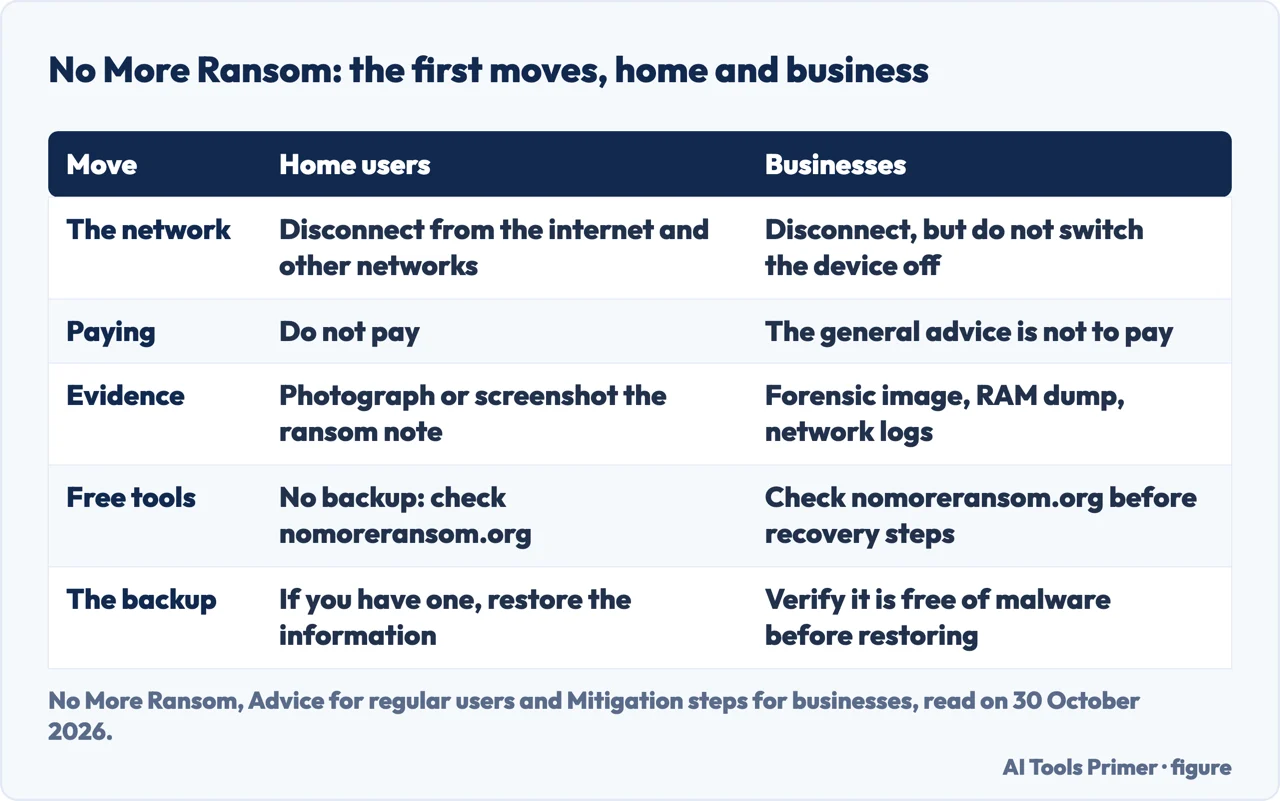
IC3 says the FBI does not support paying a ransom. Its reasons are that payment does not guarantee you or your organization will get data back, that it encourages the criminals to target more victims, and that it gives others an incentive to join in. The No More Ransom page for home users says not to pay because you finance criminals, there is no guarantee you will get your data or device back, and you are more likely to be targeted again.
The No More Ransom Q&A page goes further in both directions. It says paying is never recommended, because it does not guarantee a solution and the malware can have bugs that leave the data unrecoverable even with the right key. Yet it also says that paying sometimes works, without a guarantee, and it explains the growth of attacks on businesses in part by saying that organizations pay more readily and that restoring backups can cost more than paying. Its figures run to March 2016, so we read what it says about businesses and paying as dated. The business page adds a point that applies whichever way you go: there is no guarantee the attacker will not release the data or reuse it for more blackmail, so treat both as possible whether or not the ransom is paid.
The pages we read do not say whether paying a ransom is legal, or give a rule for when a business should pay.
The free decryption tools
No More Ransom keeps a Decryption Tools page. It opens with a warning: read the how-to guide and remove the malware from the system first, otherwise it will repeatedly lock the system or encrypt files, and any reliable antivirus solution can do the removal. The list is alphabetical, with a quick search box, and each entry names the ransomware, the decryptor and the company that made it. We counted 223 tool listings marked “Tool made by” on 30 October 2026 (one ransomware name can carry more than one tool, as AES_NI Ransom does): 68 from Emsisoft, 34 from Kaspersky Lab, 28 from Avast, 27 from Trend Micro and 14 from Bitdefender, with smaller counts for other makers. An example is 777 Ransom, for which the page offers a Trend Micro decryptor, and AES_NI Ransom, for which it offers Kaspersky’s Rakhni Decryptor and an Avast AES_NI Decryptor.
The Q&A page explains when decryption becomes possible: the authors made an implementation mistake, as with Petya and CryptXXX; the authors publish the keys, as with TeslaCrypt; or law enforcement seizes a server holding keys and shares them, as with CoinVault. It adds that sometimes the project gets only a subset of the keys, and tells users whose tool does not work to keep checking the website. The pages we read do not say how many ransomware families have a free tool or how often one works.
Where to start
Four ways in.
- “Where do I start?”
- Where the lists overlap — start
- “What do I do at home and at work?”
- The checklist, for a home computer and for an office — checklist
- “What if it already hit?”
- If it already hit — hit
- “Should I pay?”
- Should you pay? The pages do not say the same thing — pay
Before it hits
The copies, the scan and the program that watches.
The way in, and the signs
The disguise, the macro and the signs of an infection.
Questions people also ask
What is the best protection against ransomware?
The pages we read do not name a single best protection. CIS and No More Ransom call a backup the most effective way of recovering from an infection, and Kaspersky calls backups of particular importance. For preventing one, they give lists: updates, a backup kept apart, care with email, and limited accounts.
What is the 3/2/1 rule for ransomware?
The pages we read for this article do not use the term. No More Ransom suggests two backup copies, one in the cloud and one physical, both disconnected when you are done. Our page on the 3-2-1 backup rule covers how the rule is worded.
What are 5 ways to prevent cyber attacks?
IC3 gives five tips against ransomware: keep operating systems, software and applications current; set antivirus and anti-malware to update automatically and scan regularly; back up data regularly and check the backups finished; keep backups unconnected to what they back up; and make a continuity plan.
How can I block ransomware attacks?
No More Ransom lists steps for home users, from unexpected links and unknown USB sticks to a standard account and a local firewall, and for businesses, from Remote Desktop limits to disabling macros. CIS names ports 3389 and 445 as ones to review.
Not covered here. We tested nothing on a computer. The statements come from CISA, the FBI’s IC3, the Center for Internet Security, four No More Ransom pages and one Kaspersky page, all read on 30 October 2026. We did not read the #StopRansomware Guide that CISA points to. We did not read pages from Fortinet, Prolion and DataCore, a Reddit thread, or the Europol page, whose address we could not read in full; the No More Ransom pages carry the same advice. Kaspersky sells security software, so we used its page only for facts and say so where we do.
The search volume and difficulty behind this page come from a Semrush reading of 29 August 2026, older than the 60 days the site normally allows.
Sources
- CISA — How Can I Protect Against Ransomware? — www.cisa.gov, read 30 October 2026.
- FBI Internet Crime Complaint Center — Ransomware — www.ic3.gov, read 30 October 2026.
- Center for Internet Security — Steps to Help Prevent & Limit the Impact of Ransomware — www.cisecurity.org, read 30 October 2026.
- No More Ransom — Advice for regular users — www.nomoreransom.org, read 30 October 2026.
- No More Ransom — Mitigation steps for businesses — www.nomoreransom.org, read 30 October 2026.
- No More Ransom — Ransomware: Q&A — www.nomoreransom.org, read 30 October 2026.
- No More Ransom — Decryption Tools — www.nomoreransom.org, read 30 October 2026.
- Kaspersky — Ransomware protection: How to keep your data safe in 2026 — www.kaspersky.com, read 30 October 2026.
Written by Alberto Gulotta
Founder and editor of AI Tools Primer, writing from Palermo, Italy. Thirty-five years of taking computers apart, starting with a Commodore 64 — the long version is on the about page.
Something wrong on this page? Write to aitoolsprimer@gmail.com and it gets fixed.
Written on 30 October 2026.
Independence and limits
No affiliate links and no paid placements anywhere on this site. Nobody pays to appear here, and no company has seen this page before you did.
This is general information, not professional advice. Where a page touches money, health, safety or the law, it names its source and the date it was read — and your situation may still differ. See the privacy page and the cookie policy.