
Password · guide
The 1Password Secret Key, from its support pages and blog
By Alberto Gulotta · Updated · 18 min read
Your 1Password Secret Key is 34 letters and numbers that 1Password says it never receives and cannot recover. It works with your account password to encrypt your data. This page sets out what the support pages and the company blog say it is, where to find it, and which routes give you a new one.
| Question | Answer | Where it comes from |
|---|---|---|
| What is it? | 34 letters and numbers separated by dashes, created on your own device | 1Password Support |
| Can 1Password recover it? | The page says it has no record of the key and cannot recover it | 1Password Support |
| Is it a backup code? | No: it does not let you sign in if you forget your account password | 1Password Support |
| Where is it kept? | On devices you have signed in with, and in your Emergency Kit | 1Password Support |
| Password forgotten? | After the page’s own checks, a recovery code or a family organizer or team administrator; both give a new password and a new key | 1Password Support |
The Secret Key in 1Password’s own words
The support page About your Secret Key, dated 6 October 2026, says the Secret Key adds another level of security on top of your account password. You use it when you sign in to your account for the first time on a new device, and it works with the password, which the page says only you know, to encrypt your data. The page gives its form: 34 letters and numbers, separated by dashes, stored on the devices you have used to sign in and in your Emergency Kit.
The page describes it by what it is and what it is not.
- Yours. Everyone has their own unique Secret Key.
- Secret. It was created on your own device, and the page says 1Password has no record of it and cannot recover it.
- Not a license key or serial number. The page calls it an encryption key that has nothing to do with your purchase.
- Not a backup code. It does not let you sign in if you forget your account password. The support page on finding the key repeats this in a box marked Important.
The same pages state the stakes plainly: without the Secret Key, no one can access your 1Password data, and the page adds that this includes you. Its advice is to keep the key secret, which means not sending it to 1Password and not making it public, and to keep it safe by saving the Emergency Kit that contains it, so that you can find it even if something happens to your devices.
Two details help with support. The key starts with eight characters that 1Password knows and uses for troubleshooting: the first two are the version number and the next six the identifier, as in the page’s example, A3-ABC123. And in earlier versions of the app the Secret Key was called the Account Key; the page says the Emergency Kit may still use that label and that the two are one and the same.
Why there are two secrets
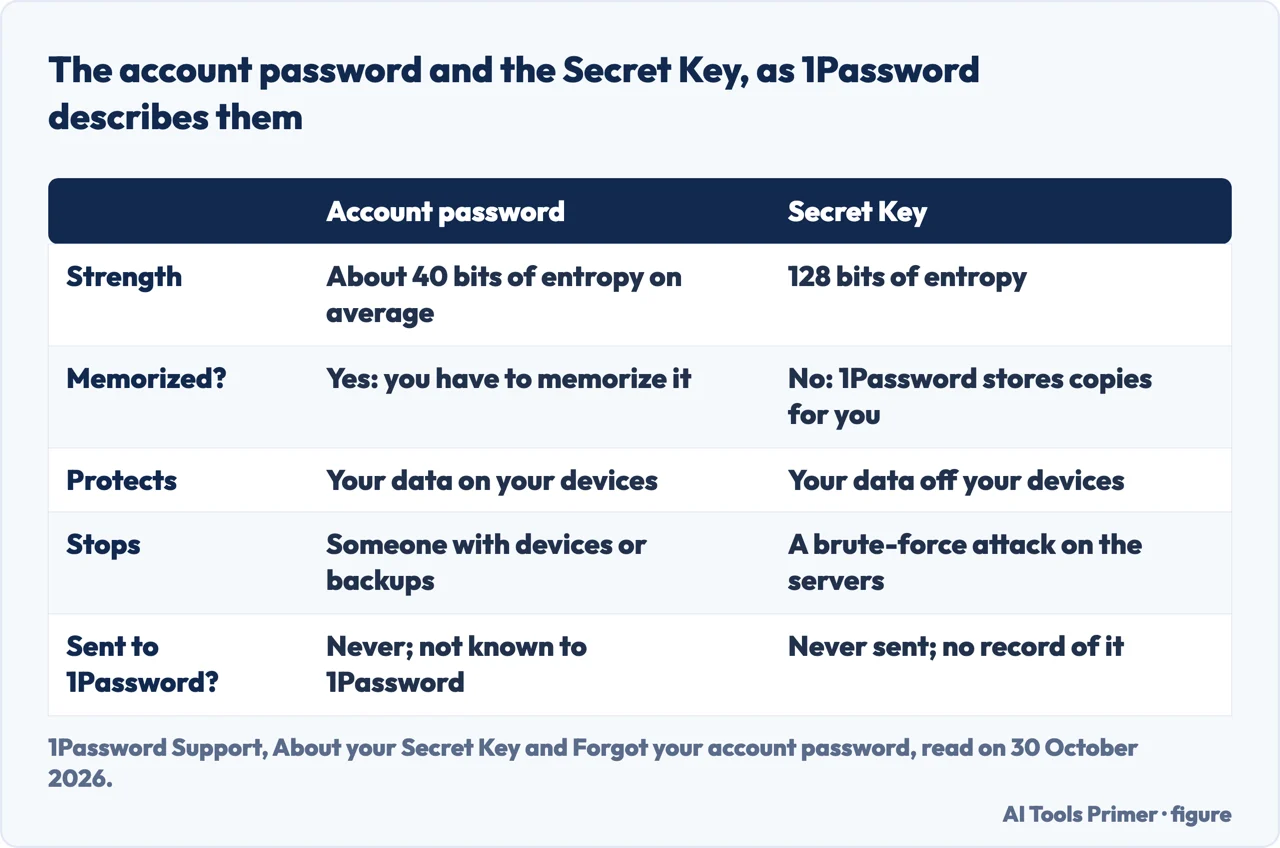
According to the same page, the account password and the Secret Key are combined to create the full encryption key for everything you store in 1Password. The two differ in strength. Because you have to memorize the password, the page says it can only be so strong, about 40 bits of entropy on average. The Secret Key does not need to be memorized, so it has 128 bits, which the page calls infeasible to guess however much money or computing power an attacker has. The security model page lists the 128-bit Secret Key beside the PBKDF2 strengthening of the password and the fact that the account password is never stored with your data or sent over the network.
The page then gives each secret its own job. The account password protects your data on your devices: someone who has your devices or backups cannot unlock 1Password without it. The Secret Key protects your data off your devices: someone who attempts a brute-force attack on 1Password’s servers cannot decrypt your data without a key that, the page says, 1Password never has.
Never sent, yet stored for you
According to the support page, the Secret Key, like the password, is never sent to 1Password. Because you cannot memorize your Secret Key, the support page says 1Password stores copies for you, and it names two places. One is the 1Password apps and the browsers you have used to sign in on 1Password.com, which is why you do not have to type the key every time you unlock. The other is device backups and keychains, where the copies are encrypted. The page’s example: with iCloud Keychain turned on, if you lose a Mac, iPhone or iPad you can restore from a backup and unlock 1Password with just your account password, and it says Android backups work the same way.
A footnote on the same page adds a limit for one browser: you will not be able to find your Secret Key in Safari unless you sign in to your account at least once every 7 days.
What the 2021 blog post adds
Jeffrey Goldberg’s post for 1Password, Secret Key: What is it, and how does it protect you?, is dated 6 December 2021 and runs eleven minutes. It argues that the useful question is not whether the key is like a second factor or a key file, but what it does: it protects you if 1Password were breached. The post builds the case in steps. When an ordinary service is breached, the attacker holds a database of password hashes and can test guesses offline, as fast as the attacker’s own machine computes, with no login page to limit attempts. The post says 1Password uses a password-authenticated key exchange so that no secrets cross the network at sign-in, but that its servers still store something it calls the SRP verifier, which behaves like a hash for cracking purposes. It says 1Password uses PBKDF2 to harden the password and that there are limits to what that buys.
The Secret Key, the post says, makes the stored verifiers useless for cracking: the 128-bit key is combined with the password on the user’s own machine, and 1Password never has even the chance to acquire it. It adds that the key is created in your browser or in the 1Password client when you create the account, so 1Password does not have it even for a moment. To describe the effort an attacker would need, the post uses an exaggeration about the age of the universe rather than a figure, and we do not repeat one.
The post also states, in its own voice, that, as of 2021, the service had never been breached, and adds that one could attribute that to many things, including luck. That is 1Password’s claim about itself, and we did not check it. The author says he presented the idea of the Secret Key at PasswordsCon in 2015.
Not a second factor, and a view from outside
An appendix to the post takes up the label directly and says the Secret Key is not a second factor. It quotes a Consumer Reports review that called it another authentication factor, and names two things the review gets wrong: that 1Password provides the key, when it is created on your machine, and that it is a factor at all. The appendix explains the difference with a toy box and its key. A second factor means an attacker must launch two different attacks, one for each. Here, the post says, the distance is between the data stored on 1Password’s systems and your own copies of the key, so someone who obtains your encrypted data from the servers still cannot decrypt it without the key from your systems. We did not read the Consumer Reports review itself; it reaches us only as the post quotes it.
For a description that does not come from 1Password’s own site we read the README of lib1password-unofficial on GitHub, a TypeScript library that models the design. Its README says it is published with the 1Password team’s blessing but is not an official product of AgileBits, and that it follows the white paper closely. It describes a chain: your vault items are encrypted with a vault key, the vault key with your keyset, and the keyset with an Account Unlock Key. The server stores all of these encrypted. The Account Unlock Key is never stored or sent; your device derives it from your password and your Secret Key, which the README describes as 128 bits of randomness generated on your device. So someone who steals the server’s data cannot brute-force the password alone, because every password guess would also be a guess at the key. The README shows the dashed format as A3 followed by a placeholder.
Where to find it
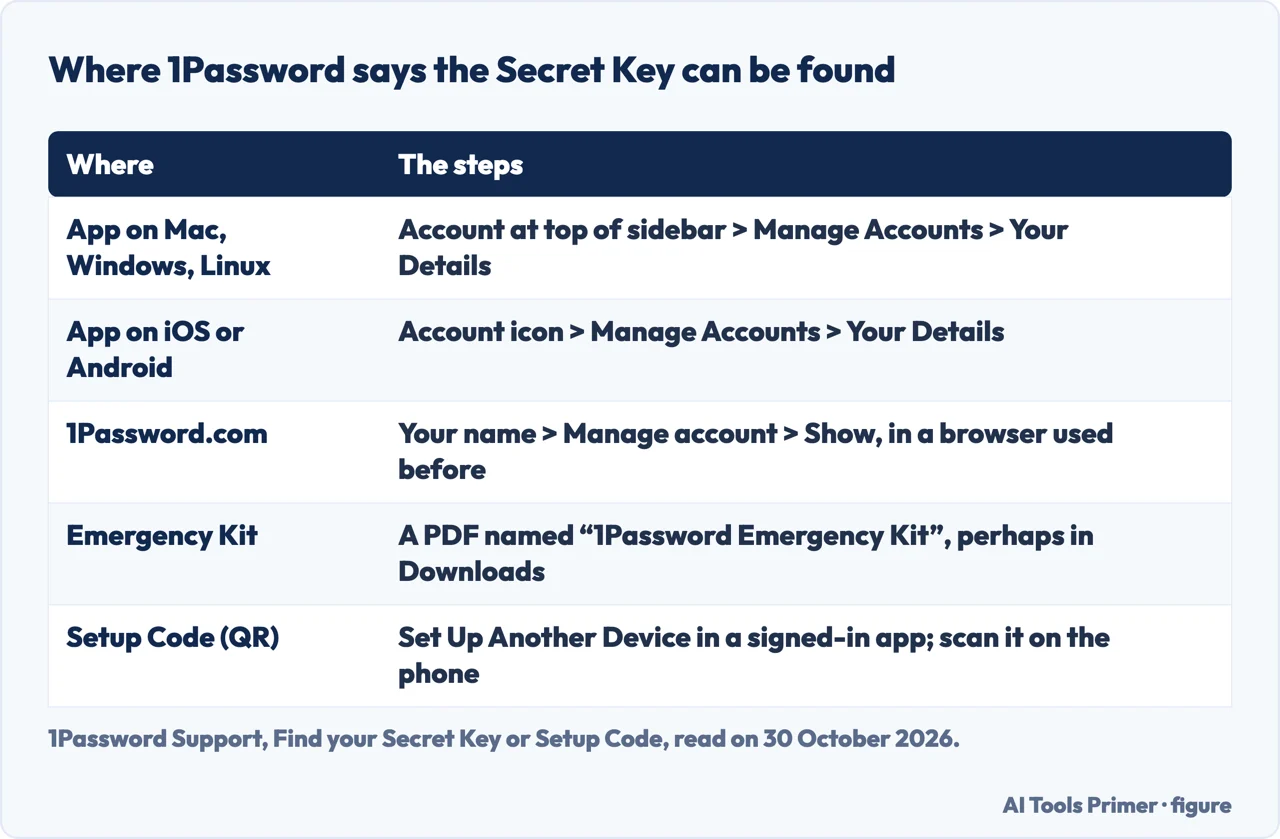
The support page Find your Secret Key or Setup Code, dated 28 August 2026, says you need one of three things: the 1Password app on a device where you are already signed in, a browser you have used to sign in before, or your Emergency Kit. In 1Password 8 for Mac, Windows and Linux, the steps are to select your account or collection at the top of the sidebar, then Manage Accounts, then Your Details, and select the Secret Key field to copy it. To show it so you can type it on another device, hover over it, choose the down arrow and select Reveal. On iOS and Android the account icon is at the top left and top right respectively, and a tablet or iPad uses the sidebar; Reveal comes from the ellipsis on iOS and from selecting the field on Android.
On the web, sign in at 1Password.com, select your name at the top right, then Manage account, and select Show in the Secret Key field, from a browser you have used before. The page warns that in Safari you will not find the key unless you sign in at least every 7 days, and advises setting up the app and downloading the Emergency Kit. The page also notes that 1Password 7 will be retired starting in early 2027, so these steps are for version 8; the page gives separate steps for 1Password 7 that we do not repeat.
The Emergency Kit is a PDF. If you do not remember saving it, the page suggests looking in the Downloads folder for a file named 1Password Emergency Kit. It adds two cases: in a 1Password Business organization, Emergency Kits may be turned off, and if you unlock with SSO you will not have one. The Setup Code is the QR code for signing in to the mobile app. In an app, choose your account, then Set Up Another Device; on 1Password.com, choose your name, then Set up another device and Show code. Once the phone is set up, the page says, its app can scan QR codes to sign in elsewhere.
For one example of what keeping the kit can look like, Troy Hunt’s post about setting up 1Password for a friend says they printed the Emergency Kit and wrote his master password on it by hand, and that it would then go into a safe. The post is an invitation to a discount offer, and its author says in it that he is on 1Password’s Board of Advisors, so it is not a fully independent view of the product; we use only that single detail, not its opinions or its offer.
If the device is lost, or the password is
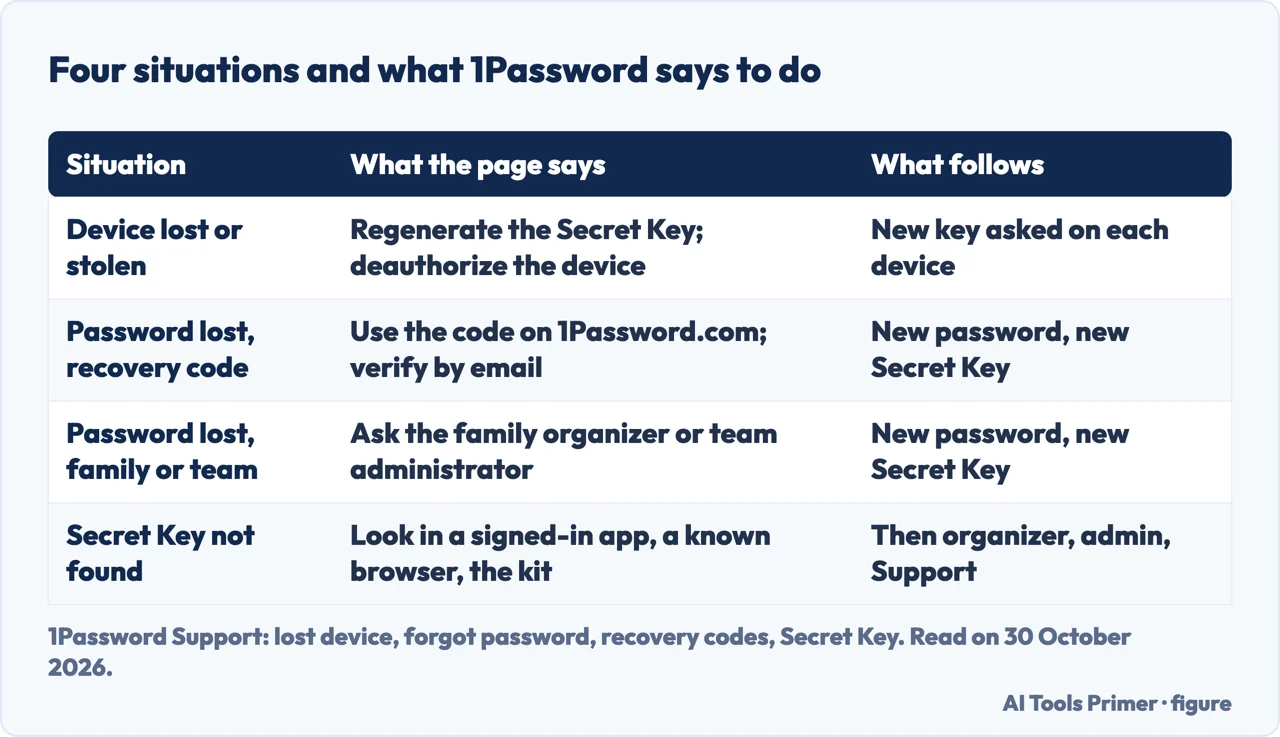
A lost or stolen device. The support page, dated 28 July 2026, says your data is encrypted with your account password, so as long as the password is strong, someone with the device cannot view your passwords, cards or anything else in 1Password. It says you do not need to change the password unless you have a specific reason to believe someone else knows it, and that the password is never stored on the device. You can regenerate your Secret Key and deauthorize the device on 1Password.com: select your name, then Manage Account, then Regenerate Secret Key, enter your password, download the new Emergency Kit and select Got It, then use the gear next to the device and choose Deauthorize Device. Each device you are signed in to will then ask for the new Secret Key and the account password. The page also tells you to change the passwords of other accounts you used on that device.
A forgotten password. Here the Secret Key does not help, and the support page on forgotten passwords says why: the account password is never transmitted, never logged locally, never known to 1Password and the only way to decrypt your data, so no one can reset it. Before any reset, the page lists checks that cost nothing: look at the password field of your Emergency Kit if you prepared one; try the password on your other devices and on 1Password.com; and if an app still unlocks with Touch ID, Face ID, Apple Watch or Windows Hello, use it at once, because the page warns that this ability will eventually expire and says to look in your Personal vault for a Login item named 1Password Account, which may contain your password, or to export your data while you still have access. Only then does it name two ways to recover access to the data. One is a recovery code, if you generated one. The other is a family organizer or team administrator. In both, you choose a new password and receive a new Secret Key. If you tried all of its steps and still cannot unlock 1Password, the page says you will need to start over and contact Support.
The recovery code. The recovery code page, dated 17 August 2026, says codes on 1Password.com are for individual and family accounts; for a team or business account, the page says your team administrators can help recover your account. Using the code requires access to the email address on the account. You receive a new Secret Key and a new password, regain all your data, and sign in again on every device; two-factor authentication stays on and the code stays valid. The steps are Having trouble signing in, then Use Recovery Code, the code, the email verification code, a new password, and a download of the Emergency Kit holding the new key. The page also carries a warning with two numbers: wait at least one hour after creating a code before using it, because a recovery attempted after a recent sign-in is blocked and leaves the code unusable for 24 hours. If you delete the code you cannot recover the account if you lose your account details, and if you unlock with a passkey you must always have one. Our page on backup codes covers a different kind of code, for two-factor sign-in, and our page on a forgotten password covers Google, Apple and Microsoft.
What the pages we read do not say
The support pages give 34 characters in all, with the first eight known to 1Password. The pages we read do not say how the remaining characters are made up or which characters they can be, and the README shows only the beginning of the format. The blog post names PBKDF2 but the pages we read do not give its number of iterations, so we do not either. The pages do not say what happens if you lose the Secret Key and have no device, browser, Emergency Kit, family organizer, team administrator or recovery code to fall back on; the find page ends with contacting Support and does not promise an outcome. They do not say whether to store the key inside the vault itself. And the pages we read do not compare how other password managers handle this; our page on Bitwarden covers one of them, and our page on passkeys covers another way of signing in.
We tested nothing: we did not create an account, generate a recovery code or regenerate a key. We did not open the Reddit thread, the 1Password community thread, the product pages or the blog post on passkeys, nor the 1Password white paper and Emergency Kit page that the support pages point to. We read the Wikipedia article on 1Password and it says nothing about the Secret Key, so we did not use it. Beyond the support pages, we used the blog post, the GitHub README and one detail from the Troy Hunt post, and the README is not 1Password’s own product.
Where to start
Four ways in.
- “What is a Secret Key?”
- The Secret Key in 1Password’s own words — what
- “Why two secrets?”
- Why there are two secrets — two
- “Where do I find it?”
- Where to find it — find
- “What if I lose something?”
- If the device is lost, or the password is — lost
Getting back in
When a password or a code is gone, and what comes next.
Other locks on the same door
Passkeys, the second factor and the move to another manager.
Questions people also ask
Can I login to 1Password without a secret key?
The support page says you use the Secret Key the first time you sign in on a new device, and that without it no one can access your data, including you. On a device you have already used, 1Password stores the key so you do not type it each time. It is not a backup code.
Should I save my secret key in 1Password?
The pages we read do not say whether to store it inside the vault. Support says to keep it secret and to save the Emergency Kit, which contains it, so that you can find it even if something happens to your devices. Troy Hunt’s post describes a printed kit that goes into a safe.
How to find a secret key?
In 1Password 8, open an app where you are signed in, select your account, then Manage Accounts and Your Details. On 1Password.com, choose your name, then Manage account and Show. The Emergency Kit PDF holds it too, and the find page suggests the Downloads folder if you do not remember saving it.
How to use secret key to get into 1Password?
Enter it with your account password when you sign in on a new device or browser. Copy it from an app where you are signed in, use Reveal to see it, or scan the Setup Code with the mobile app. The pages we read describe a new key being issued through a recovery route or when you regenerate the key.
Not covered here. We tested nothing in an account. The statements come from six 1Password Support pages, the 1Password blog, the README of a GitHub project and a post on troyhunt.com, all read on 30 October 2026.
The search volume and difficulty behind this page come from a Semrush reading of 29 August 2026, older than the 60 days the site normally allows.
Sources
- 1Password Support — About your Secret Key — support.1password.com, read 30 October 2026.
- 1Password Support — Find your Secret Key or Setup Code — support.1password.com, read 30 October 2026.
- 1Password Support — About the 1Password security model — support.1password.com, read 30 October 2026.
- 1Password Support — If your device was lost or stolen — support.1password.com, read 30 October 2026.
- 1Password Support — If you forgot your account password — support.1password.com, read 30 October 2026.
- 1Password Support — Generate and use recovery codes — support.1password.com, read 30 October 2026.
- 1Password blog — Secret Key: What is it, and how does it protect you? — 1password.com, read 30 October 2026.
- GitHub — edeckers/lib1password-unofficial (README) — github.com, read 30 October 2026.
- Troy Hunt — A Password Manager Isn’t Just for Christmas — www.troyhunt.com, read 30 October 2026.
Written by Alberto Gulotta
Founder and editor of AI Tools Primer, writing from Palermo, Italy. Thirty-five years of taking computers apart, starting with a Commodore 64 — the long version is on the about page.
Something wrong on this page? Write to aitoolsprimer@gmail.com and it gets fixed.
Written on 30 October 2026.
Independence and limits
No affiliate links and no paid placements anywhere on this site. Nobody pays to appear here, and no company has seen this page before you did.
This is general information, not professional advice. Where a page touches money, health, safety or the law, it names its source and the date it was read — and your situation may still differ. See the privacy page and the cookie policy.