
Password · guide
Bitwarden free vs premium: the plans, prices and dates
By Alberto Gulotta · Updated · 16 min read
Bitwarden free vs premium comes down to a list Bitwarden writes out itself: Premium adds file attachments, an integrated authenticator, emergency access, vault health reports and two more two-step login methods. The price differs by page, $10 a year in 2024 and $19.80 in 2026, and the sources disagree on hardware keys.
| Question | Answer | Where it comes from |
|---|---|---|
| What does Free include? | Unlimited storage of logins, notes, cards and identities, on any device, with a password generator | Bitwarden |
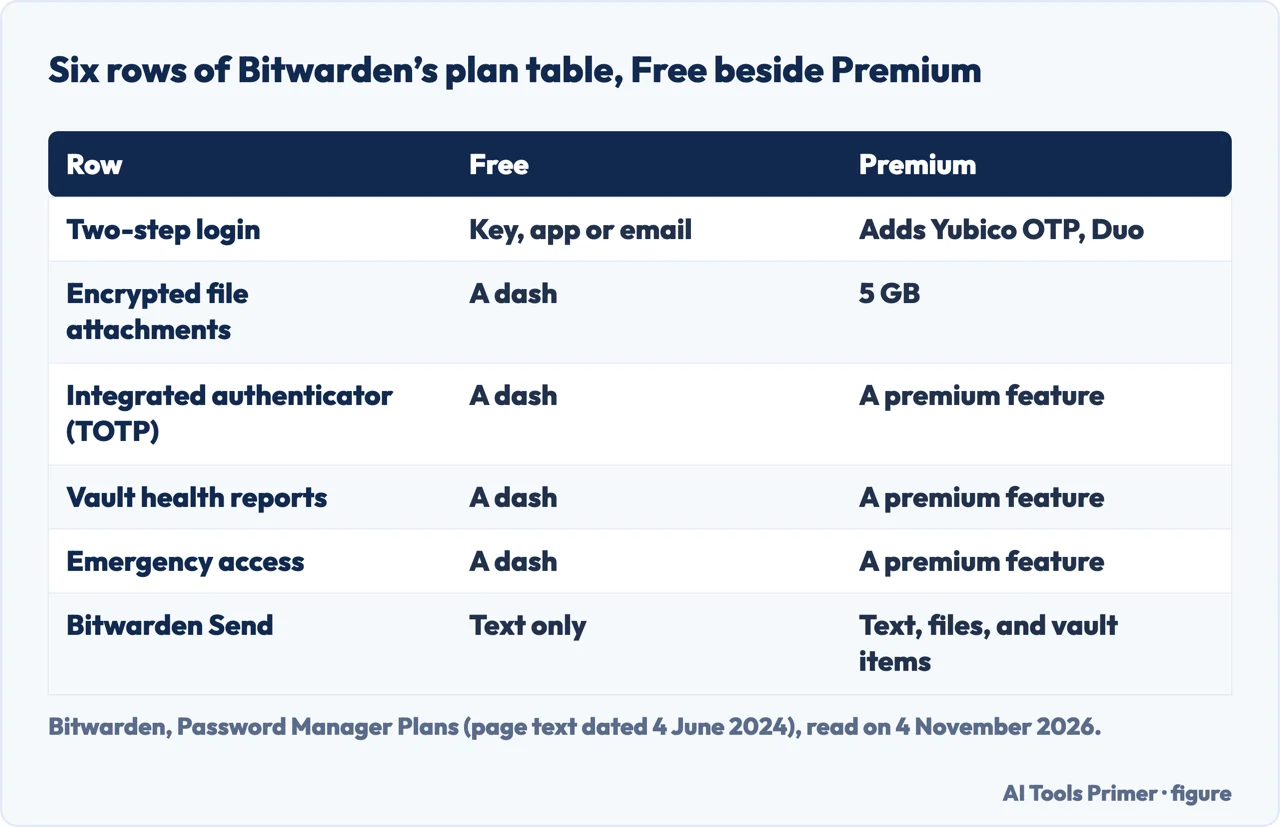
| What does Premium add? | Advanced two-step login, the integrated authenticator, file attachments, emergency access and more | Bitwarden |
| What does Premium cost? | $1.65 a month, billed annually at $19.80; TechRepublic gave $10 a year in 2024 | Bitwarden, TechRepublic |
| Are hardware keys free? | Bitwarden says yes for FIDO2 keys; PanicVault says they need Premium | Bitwarden, PanicVault |
| Who is Families for? | Up to six users, each with the Premium features, $47.88 a year | Bitwarden |
What the free plan holds
Bitwarden’s plans page says the core features of its password manager are free. It lists unlimited storage of logins, notes, cards and identities, access to Bitwarden on any device and a secure password generator. The same page sets Free, Premium, a Free organization and a Families organization side by side in one table, and the row for secure storage reads “Unlimited” in all four columns. The row for the maximum number of users reads 1 for Free, 1 for Premium, 2 for a Free organization and 6 for Families.
A Free organization is the way Bitwarden lets two people share. The page says it stores and shares data with one other user, with secure sharing in up to two collections, and that a user of any plan can own one Free organization. The page adds a note that Premium does not include organization data sharing: to share you need a subscription to an organization, and a paid organization (Families, Teams or Enterprise) includes the premium features for every user enrolled in it. The January 2026 Bitwarden blog post lists what stays free in much the same terms: basic password and passkey management with unlimited logins on unlimited devices, a free Bitwarden Authenticator for standalone two-factor authentication, and a free organization for two people.
TechRepublic’s guide of 9 February 2024 describes Free as a secure vault for credentials, credit cards, identification documents and text files, installable on an unlimited number of devices, with username and password generation and sharing with one other user. PanicVault, whose page also promotes its own KeePass-compatible password app, calls the free tier a plan with no expiry date and lists cloud sync, browser extensions, mobile and desktop apps, passkey storage, and export in CSV and encrypted JSON. Bitwarden’s own blog post answers the question “Will the free plan change?” with a flat no, and says the basic free plan will keep unlimited logins across unlimited devices; that is a promise from the seller, not something we could check.
The price, with the dates
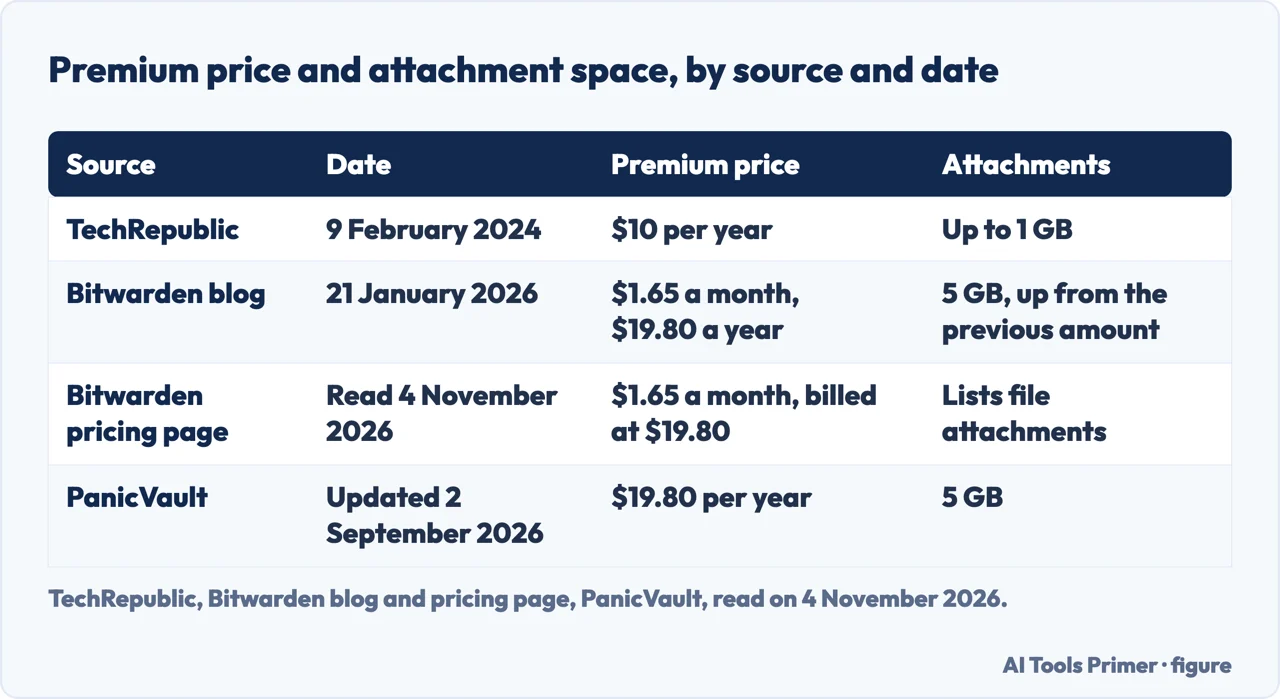
Bitwarden’s pricing page, read on 4 November 2026, gives Premium as $1.65 per month, billed annually at $19.80, and Families as $3.99 per month for up to six users, billed annually at $47.88. It says the prices are in US dollars, based on an annual subscription, and exclude taxes. The monthly figures are the annual ones divided by twelve: 19.80 over 12 is 1.65, and 47.88 over 12 is 3.99.
The same figure is not on every page. TechRepublic’s guide, dated 9 February 2024, says the Premium plan costs $10 per year and that upgrading is worth the $10 per year if you also want file sharing, stronger multi-factor options or advanced vault health reports. Bitwarden’s blog post of 21 January 2026 says Premium for individuals is now available at $1.65 per month, billed annually at $19.80 a year. The post does not state the earlier price, so the $10 in this comparison comes only from TechRepublic. The gap between the two figures is $9.80 a year, which is our subtraction and not a number from either page.
The blog post presents the change as part of a bigger Premium. Its list of new features is vault health alerts, password coaching, five times the attachment storage (now 5 GB in total), and up to ten security keys. It also names a phishing blocker as coming soon, so that one is not counted here as something Premium has today. For people already subscribed, the post says current subscribers get a 15-day notice before their next renewal, and that all existing Premium subscribers and a few subscribers to an older Families 2019 plan get a one-time 25% discount on their first renewal.
Families, in Bitwarden’s words, includes all premium features for all six users and unlimited secure data sharing. Dividing $47.88 by six gives $7.98 a person, a figure PanicVault also prints; it adds that Families costs less than individual Premium when three or more family members need accounts. The plans page says paid organizations include premium features for every enrolled user, so a Families member does not buy Premium on top. For two people the arithmetic is ours: two Premium subscriptions are 2 x $19.80 = $39.60 a year against $47.88 for Families, which is why PanicVault puts the break-even at three or more family members. One more date matters when reading the plans page: it still opens by saying it describes the plans as of June 4, 2024, while its table lists 5 GB of attachments, a size the January 2026 blog post presents as new.
Where the sources disagree
The pages differ in age and in who wrote them. Bitwarden’s help pages and blog are the plan’s seller describing itself. TechRepublic’s guide is from February 2024, says it reviewed Bitwarden’s website and tested the Free version, and carries a notice that it may earn from vendors through affiliate links or sponsorships. PanicVault’s page was updated on 2 September 2026 and sells a different password app. We lean on Bitwarden where the question is what Bitwarden offers, and report the others with their dates.
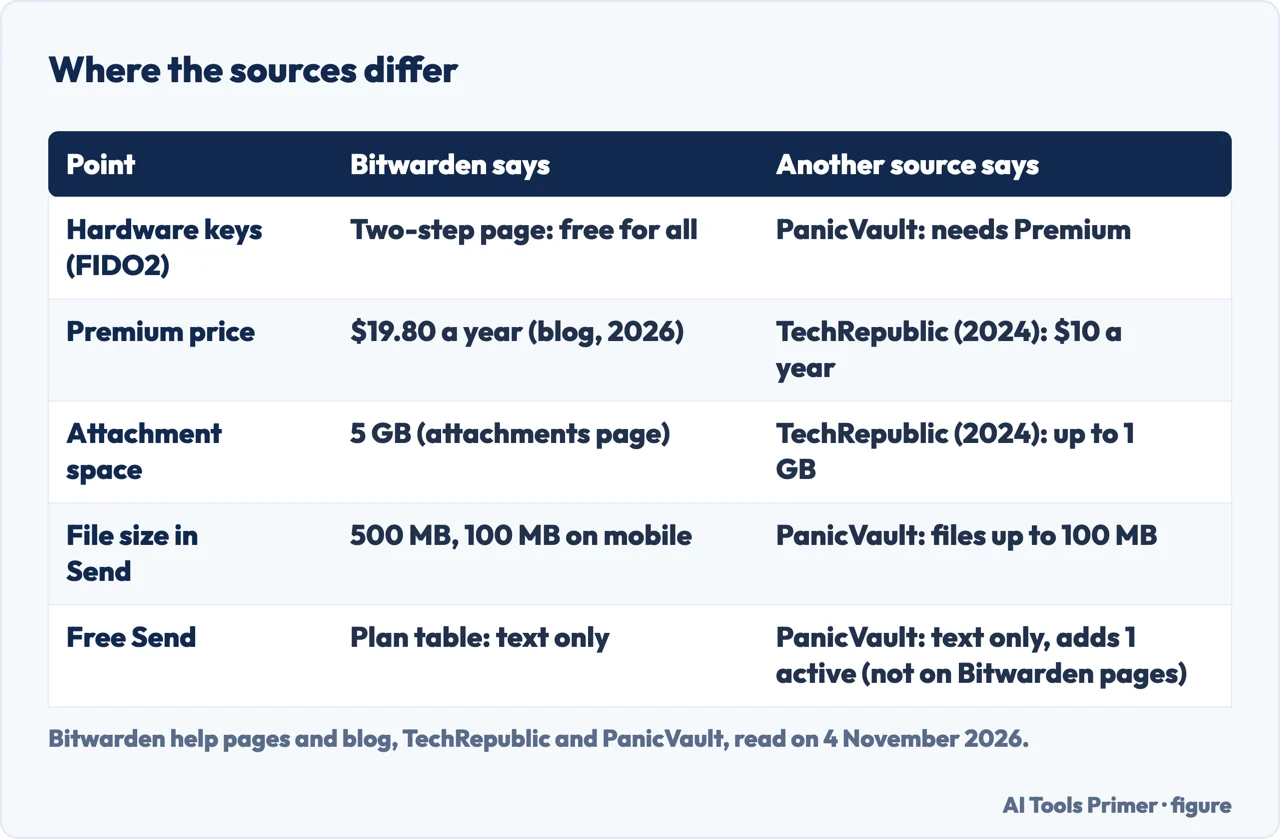
Hardware keys. This is the largest gap. Bitwarden’s two-step login page marks FIDO2 WebAuthn credentials as free for all, and its plan table lists a hardware security key under Free. PanicVault’s comparison table gives YubiKey and FIDO2 support as a No for Free and a Yes for Premium, and its text says that if you own a YubiKey or another FIDO2 hardware key you need Premium. Bitwarden’s page puts the Premium requirement on Duo and YubiKey OTP. TechRepublic, in 2024, says Premium supports integrations with Yubikey and Duo, and the guide, as read for this page, does not mention FIDO2.
Inside Bitwarden. The plan-choice page also names “Yubikey and Duo” as advanced two-step options that justify Premium. The pages we read do not say whether Yubikey there means the one-time-password mode or hardware keys in general, so we do not resolve it. The two-step page is the more detailed of the two.
Attachments and price. TechRepublic says Premium can send up to 1 GB of encrypted file attachments and costs $10 per year. Bitwarden’s attachments page and blog post say 5 GB and $19.80 a year. The blog’s “5x” and “5 GB” are consistent with a 1 GB figure before, but the post does not print the old numbers, and these differences are a matter of date more than of dispute.
Send. Bitwarden says a file Send can be up to 500 MB, or 100 MB on mobile. PanicVault says Premium can send files up to 100 MB, and that Free allows one active text-only Send with no limit on active Sends for Premium. The Bitwarden pages we read do not mention a cap on the number of active Sends, and the 100 MB figure matches the mobile limit that Bitwarden gives.
What Bitwarden says about choosing
Bitwarden’s What Plan is Right for Me? page is a flowchart in words. The first question is whether you need to share data. If your answer is that your logins are yours, it points to an individual plan, and then asks whether you will use Premium features. It names five: advanced two-step options such as Yubikey and Duo, 5 GB of encrypted file attachments, the Bitwarden Authenticator (TOTP), emergency access and vault health reports. If the answer is “Absolutely”, it recommends Premium; if it is “Not yet”, it recommends staying on the free individual plan.
If you have shared resources, the page asks whom you will share with. For family and friends, up to six users, it recommends a Families organization, with premium features for up to six users and unlimited sharing between them. For a business it points to Teams or Enterprise. If you are not sure, it suggests a Free organization, described as core Bitwarden features for two users and limited sharing between two.
The comparison guides end differently, and each ending belongs to its author. TechRepublic says Free provides what you need to save, generate and autofill passwords on all your devices, and that Premium is worth the price if you also want secure file sharing, enhanced multi-factor authentication or advanced vault health reports. PanicVault’s verdict is yes for users already committed to Bitwarden, and it suggests starting on Free for a month, then upgrading if you miss the authenticator, the health reports or attachments. We give no verdict of our own: the pages above list what each plan holds, and which items matter is your call.
What the pages do not say
We tested nothing: no Bitwarden account was opened, no plan was bought and no feature was tried. The pages we read do not say how many people pay for Premium or how many stay on Free. The blog post does not state the earlier Premium price, as noted above. PanicVault states that encryption is the same on both plans, but it is a competitor and Bitwarden’s pages that we read do not repeat the point, so we left it out.
The plan table’s ticks did not survive in the text we read, so every row described here comes from the words and dashes the page keeps. We did not read the Reddit thread, the Bitwarden product page or the page on licensing for self-hosted installations, so nothing from them is used here. The plan table’s self-hosting row is not described here, because its cells were empty in the text we read. The search volume and difficulty behind this page come from a Semrush reading of 29 August 2026, which is older than the 60 days the site normally allows.
Where to start
Four ways in.
- “What does free hold?”
- What the free plan holds — free
- “What does Premium add?”
- What Premium adds, row by row — premium
- “What does it cost?”
- The price, with the dates — price
- “Do the pages agree?”
- Where the sources disagree — disagree
Other password managers
Three more managers read the same way.
Around Bitwarden
Safety, generator and the second factor.
Questions people also ask
Is Bitwarden Premium worth it?
We give no verdict. Bitwarden’s plan-choice page names five reasons to take Premium: advanced two-step options, 5 GB of attachments, the Bitwarden Authenticator, emergency access and vault health reports. If none applies yet, it recommends staying on the free individual plan. Premium is $1.65 a month, billed annually at $19.80.
Is the free version of Bitwarden good?
Bitwarden says the core features are free: unlimited storage of logins, notes, cards and identities, access on any device and a password generator. TechRepublic, in 2024, says Free provides what you need to save, generate and autofill passwords on all your devices. Hardware keys are a point of disagreement between Bitwarden and PanicVault.
What are the limitations of Bitwarden Free?
On Bitwarden’s plan table, Free has a dash for file attachments, the integrated authenticator, vault health reports, emergency access and priority support. Send is text only, and two-step login covers a hardware key, authenticator apps and email, not Yubico OTP or Duo. TechRepublic adds that Free has the data breach check only.
Do you need to share a vault with family members (which requires the Families Plan)?
Bitwarden offers two routes. A Free organization shares with one other user, in up to two collections. Families covers up to six users, each with the premium features, with unlimited sharing, at $3.99 a month billed annually at $47.88. Bitwarden’s page says Premium alone does not include organization sharing.
Not covered here. We tested nothing in a Bitwarden account. The statements come from six Bitwarden help pages, the Bitwarden pricing page, a Bitwarden blog post, a TechRepublic guide and a PanicVault comparison, all read on 4 November 2026.
The search volume and difficulty behind this page come from a Semrush reading of 29 August 2026, older than the 60 days the site normally allows.
Sources
- Bitwarden — Password Manager Plans — bitwarden.com, read 4 November 2026.
- Bitwarden — Password Manager Pricing & Plans — bitwarden.com, read 4 November 2026.
- Bitwarden blog — Bitwarden launches enhanced premium plan (21 January 2026) — bitwarden.com, read 4 November 2026.
- Bitwarden — Two-Step Login Methods — bitwarden.com, read 4 November 2026.
- Bitwarden — About Emergency Access — bitwarden.com, read 4 November 2026.
- Bitwarden — File Attachments — bitwarden.com, read 4 November 2026.
- Bitwarden — About Send — bitwarden.com, read 4 November 2026.
- Bitwarden — What Plan is Right for Me? — bitwarden.com, read 4 November 2026.
- TechRepublic — Bitwarden Free vs. Premium: Which Plan Is Best For You? (9 February 2024) — www.techrepublic.com, read 4 November 2026.
- PanicVault — Bitwarden Free vs Premium (updated 2 September 2026) — www.panicvault.org, read 4 November 2026.
Written by Alberto Gulotta
Founder and editor of AI Tools Primer, writing from Palermo, Italy. Thirty-five years of taking computers apart, starting with a Commodore 64 — the long version is on the about page.
Something wrong on this page? Write to aitoolsprimer@gmail.com and it gets fixed.
Written on 4 November 2026.
Independence and limits
No affiliate links and no paid placements anywhere on this site. Nobody pays to appear here, and no company has seen this page before you did.
This is general information, not professional advice. Where a page touches money, health, safety or the law, it names its source and the date it was read — and your situation may still differ. See the privacy page and the cookie policy.