
Password · guide
Proton Pass, read from Proton and two reviews
By Alberto Gulotta · Updated · 17 min read
Proton Pass is Proton’s password manager. Proton and TechRadar describe end-to-end encryption, Tom’s Guide calls the service zero-knowledge, and all three describe a free plan with unlimited passwords, yet they differ on cards, vaults and prices. This page sets each claim beside its source and date, then follows the keys and the recovery routes.
| Question | Answer | Where it comes from |
|---|---|---|
| Is there a free plan? | Yes: unlimited logins and devices and 10 hide-my-email aliases | Proton product page |
| What does Pass Plus cost? | Proton lists $35.88 billed every 12 months; the reviews give other figures | Proton, Tom’s Guide, TechRadar |
| Does it need a Proton account? | Yes: Pass opens from the app switcher of one Proton account | Tom’s Guide |
| Who holds the keys? | Proton says the key comes from your account password, which it never knows | Proton vault page |
| What if the password is lost? | Proton cannot reset it; recovery methods have to be set up beforehand | Proton recovery page |
One Proton account, and Pass opens from it
Tom’s Guide, in a review published on 13 November 2024, says setting up Proton Pass can be confusing at first because the password manager is one of several apps offered when you sign up for Proton. You create a universal Proton account, which the review says can reach any of the tools in the Proton suite, and then choose which app to open. It places the global account settings at account.proton.me and the Pass web app and vault at pass.proton.me, and says the app switcher is how you move between them. From the Pass web app you can add a second password for your vault, and the mobile app asks for it too if you created one.
Proton’s product page, read on 3 November 2026, sells the same idea as a bundle: Proton Unlimited at $9.99 a month, billed $119.88 every 12 months, covers Pass, Mail, Calendar, VPN and Drive, with a 30-day money-back guarantee. The listings on the Apple App Store and the Chrome Web Store, both published under the developer name Proton AG, describe Pass as coming from the people behind Proton Mail (the App Store says the team behind Proton Mail, the Chrome Web Store the former scientists who met at CERN behind Proton Mail). The App Store lists it as free with in-app purchases and shows 4.8 from 8.9K ratings; the Chrome Web Store shows 4.7 from 6.7K ratings, about a million users and version 1.43.0, updated on 26 October 2026. Those are store listings that Proton AG writes about its own product, so they say what Proton says. Our page on Proton VPN covers another service that sits on the same account.
What the free plan holds, and where the pages disagree
Proton’s product page lists Proton Free at $0 a month, with no credit card required, and counts among its contents unlimited logins, notes and credit cards, unlimited devices, browser, mobile and desktop apps, a password generator, 10 hide-my-email aliases, alerts for weak and reused passwords, passkeys on all devices and easy import. Pass Plus is shown at $2.99 a month, down from $4.99, with the line “Billed at $35.88 every 12 months.” It adds unlimited aliases, a built-in 2FA authenticator, vault and link sharing, Dark Web Monitoring, file attachments, advanced account protection, Emergency Access, a custom domain for aliases and a command line interface.
Two reviews describe the plans on other dates. Tom’s Guide (13 November 2024) gives Pass Plus as $59.98 per year and Pass Family, launched in October 2024, as $83.88 for up to six accounts; elsewhere in the same review it says an annual subscription brings the price to just under $24 for an individual. TechRadar (updated 22 July 2025) gives Plus at $2.99 a month with an annual subscription, Family at $4.99 a month for up to six people, Unlimited at $9.99, and business plans from $1.99 per user per month with a three-seat minimum. The price therefore depends on the page and its date, and Proton’s own figure is the one read on 3 November 2026.
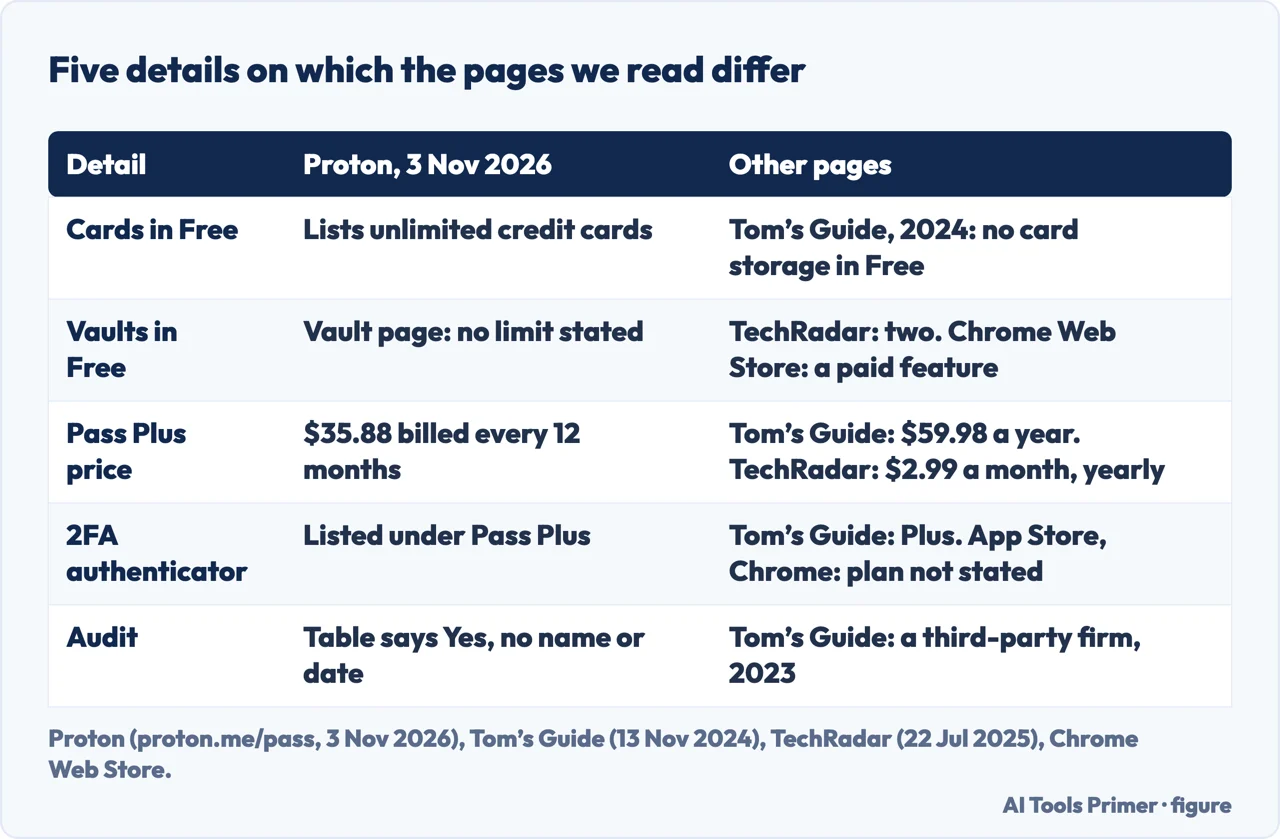
The figure below sets the disagreements side by side. On cards, Proton lists unlimited credit cards in the free plan, while Tom’s Guide says that tier does not come with credit card storage or secure item sharing. On vaults, TechRadar counts two in the free plan and the Chrome Web Store marks vaults as a paid feature, while the Proton vault page we read states no limit. The same Chrome listing says sharing vaults will arrive in the next version, which sits beside Proton’s current listing of vault sharing under Pass Plus. On the authenticator, Proton and Tom’s Guide put it in Plus, while the App Store and Chrome listings include it among the features without naming a plan. The pages we read do not settle these differences, and we did not open an account to check.
On overall judgement, Tom’s Guide’s verdict praises the free tier and the security features and lists confusing navigation and limited features on some platforms as drawbacks. TechRadar lists a lack of support options as its drawback.
Tom’s Guide adds practical limits the plan comparison leaves out: biometric login with Face ID, Touch ID and Windows Hello, an offline mode for paid subscribers, desktop apps for Windows 10 and up, macOS 13 and up and Linux, and mobile apps for iOS 16 or later and Android 8.1 and up. Those figures are from a review dated 13 November 2024, so they may have changed.
What a vault is, and how to make, hide or hand one over
Proton’s help page defines a vault as an encrypted digital container that holds your items, and an item can be a login, an alias or a secured note. A login includes the username, the password, the URL of the website, 2FA codes and any notes saved for it. The page says Pass creates a default vault when you start using it. In the browser extension you open the Pass menu, choose Create vault and pick a title, color and icon; in the mobile apps you open Vaults at the top left and tap Create vault.
A vault can also be hidden. The page says to select the three-dot icon next to All items, choose Organize vaults, remove the tick next to the vault and save; the vault then leaves the Vaults list and its content is not available for search or autofill, and ticking the box again restores it. Ownership can move only to a member already added to the vault: the current owner signs in to the web app at pass.proton.me, opens the vault’s share settings, chooses Make admin for that member, and then the option Transfer ownership appears. Tom’s Guide describes a left-hand menu in the desktop and web apps for switching between vaults and a trash folder where items stay until permanently deleted, and says that on the family plan each user has private vaults and can also join shared ones, with up to two accounts set as admins.
Where the keys live, and who holds them
Proton’s security article of 20 April 2023, written before release, says Pass applies end-to-end encryption to all fields, including usernames, web addresses and the contents of encrypted notes, and that all cryptographic operations happen on your device. The Chrome Web Store listing makes the same point as a contrast: it says many other password managers only encrypt the password, while Pass encrypts all stored login details. That is Proton’s claim about other managers, and we did not check it.
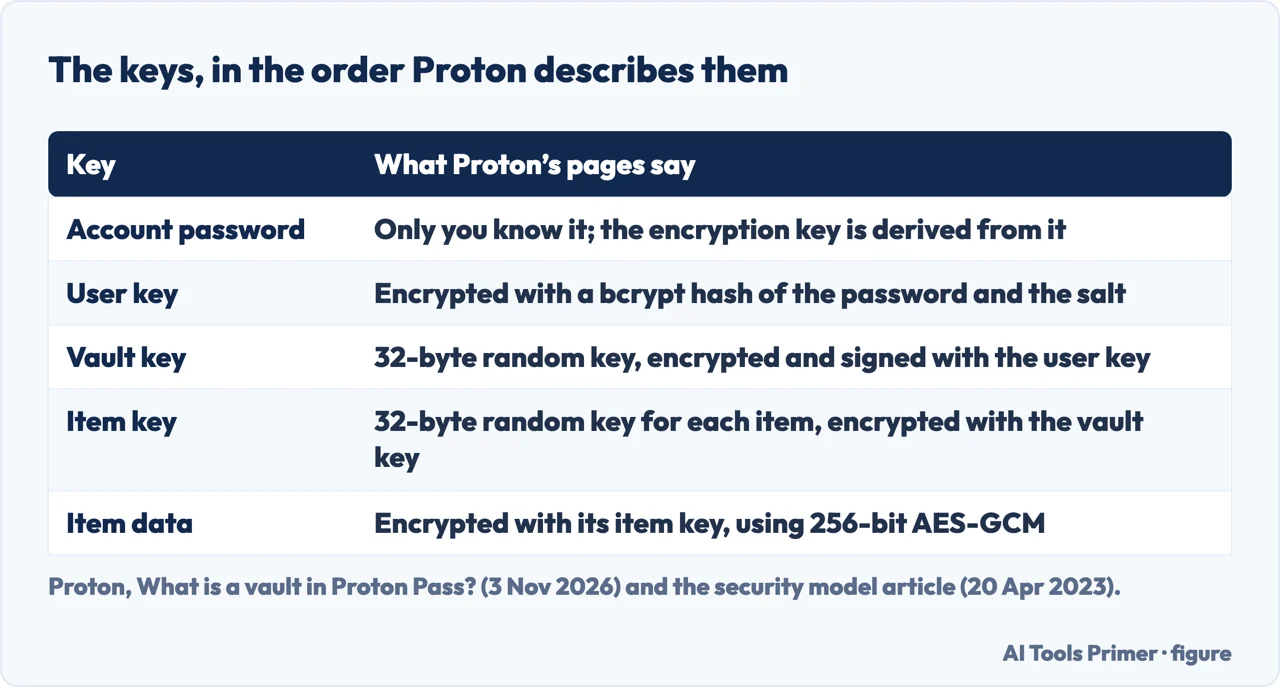
The vault page gives the first link of the chain: data in your vaults is encrypted with AES-256 symmetric-key encryption, each vault has its own key, and the key comes from a password that only you know, which in Pass is your Proton Account password. Proton says it never knows that password and so cannot access your Pass data, and it advises turning on two-factor authentication on the account. The security article adds the rest. Every user has an asymmetric user key, encrypted with a bcrypt hash of the account password and the account salt. Creating a vault generates a random 32-byte vault key, encrypted and signed with the user key. Each item gets its own random 32-byte item key, encrypted with the vault key, and items and keys are encrypted with 256-bit AES-GCM. Because every item has its own key, Proton says, a single item can be shared without handing over the vault key.
The article also says sign-in uses a hardened version of the Secure Remote Password protocol, the one used for Proton Mail, so that an attacker able to read and alter the traffic between Proton and a user is limited to one password guess per login attempt. Proton adds that its bcrypt implementation is more robust than PBKDF2, which it says has led to breaches in other password managers. These are Proton’s statements about its own design, and we did not test them. The article’s closing section says Pass “will be open source upon release”; the App Store and Chrome listings of 2026 say it is open source.
The reviews describe the same design in their own words. TechRadar says Pass uses both asymmetric and symmetric algorithms, among them AES256 and OpenPGP, encrypts stored passkeys with Curve25519, and that much of the code is open source. Tom’s Guide calls the service zero-knowledge, says the code is open source and reports an independent audit by a third-party security firm in 2023.
The day you cannot produce the key
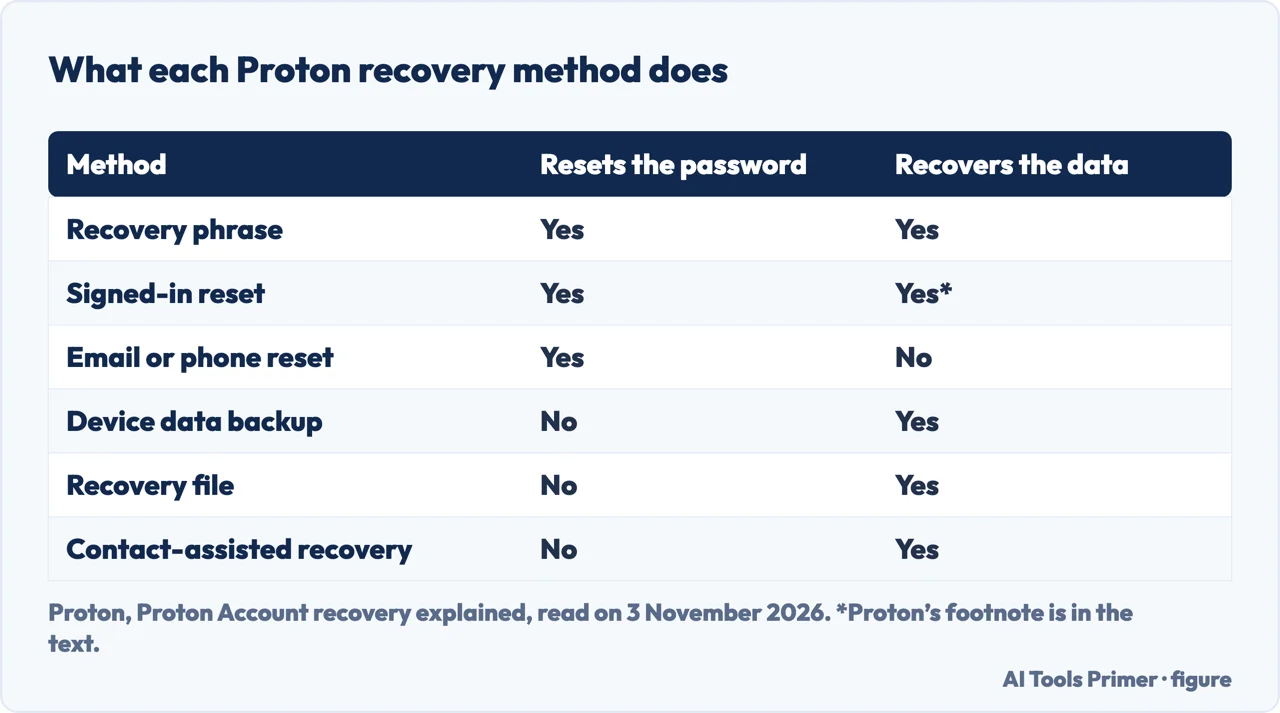
Proton’s recovery page says it keeps no user passwords on its systems and so cannot reset a lost one for you; to avoid being locked out permanently you need a recovery method already in place. It names two steps. A password reset lets you set a new password without the old one, and data recovery decrypts the data on the account so you can read it again. A recovery phrase, a sequence of twelve terms, covers both, while most other methods cover one. With a reset method and no data recovery method, you lose access to everything that was on the account before the reset, unless you remember the old password. With a data recovery method and no reset method, you cannot get back into the account at all.
The figure below follows Proton’s table. The signed-in reset carries a footnote there: technically, it prevents your data from being locked in the first place, and its data column reads Yes*. Proton says that method only works while you are signed in and should not be your only one. At a minimum Proton recommends the recovery phrase, an extra password reset method and an extra data recovery method, and it asks you to set up two-factor authentication with an authenticator app first.
For Pass itself, Proton has a short page on the signed-in reset. On Android you open the app, select the profile icon at the bottom right, select your email address and the three-dot icon, then Manage account, Change password and “Don’t know your current password?”, and choose a recovery method or Request password reset. On iOS the page says you cannot currently make a signed-in reset request directly from an iPhone, so you need a QR code sign-in to reach another device. The recovery page adds that an active session on another device can use the signed-in reset, and that QR code sign-in transfers a session to an app that supports it.
The same page lists three more points. Some methods can be used only once, so after recovering you regenerate those that show an outdated notice. Non-private users in a Proton for Business or Proton Visionary organization cannot use recovery methods and are told to contact their administrator. If a security key for two-factor authentication is lost, a recovery code given when you set it up can be used. TechRadar’s setup section also tells you to write down or print that recovery code, and Tom’s Guide says that without account recovery you may not be able to get into your account after losing the password. The pages we read do not mention how long a recovery takes when no method was set.
Where to start
Four ways in.
- “Is it completely free?”
- What the free plan holds, and where the pages disagree — free
- “What is a vault?”
- What a vault is, and how to make, hide or hand one over — vault
- “Why is it safe?”
- Where the keys live, and who holds them — keys
- “What if I lose the key?”
- The day you cannot produce the key — lost
Other managers
Three more managers, read the same way.
Around the vault
Passkeys, the move to another manager and email aliases.
Questions people also ask
What is a vault in Proton Pass?
Proton’s help page defines it as an encrypted digital container for your items: logins, aliases and secured notes. Each vault has its own key, Pass creates a default vault, more can be made in the extension and the mobile apps, and one can be hidden from the list, search and autofill.
Is Proton Pass worth it?
The pages we read answer by plan and by date rather than with one verdict. Tom’s Guide praises the free tier and the security features and lists confusing navigation and limited features on some platforms as drawbacks; TechRadar lists a lack of support options.
Is Proton Pass completely free?
Proton lists a free plan at $0 with unlimited logins, notes, credit cards and devices and 10 aliases, and the App Store lists the app as free with in-app purchases. Pass Plus, billed $35.88 every 12 months, adds items such as the 2FA authenticator and vault sharing. The reviews differ on cards and vaults in the free plan.
Why is Proton Pass safe?
Proton says the data is encrypted end to end on your device, with a key that comes from your account password, which Proton says it never knows, and that every field is encrypted, not only the password. Tom’s Guide reports a third-party audit in 2023; the pages we read do not name the auditor.
Not covered here. We tested nothing in the app. The statements come from Proton’s help and product pages, the Apple App Store and Chrome Web Store listings, and reviews by Tom’s Guide and TechRadar, read on 3 November 2026.
The search volume and difficulty behind this page come from a Semrush reading of 29 August 2026, older than the 60 days the site normally allows.
Sources
- Proton — Proton Pass: pricing and plans — proton.me, read 3 November 2026.
- Proton — What is a vault in Proton Pass? — proton.me, read 3 November 2026.
- Proton — Proton Pass security model (20 April 2023) — proton.me, read 3 November 2026.
- Proton — Proton Account recovery explained — proton.me, read 3 November 2026.
- Proton — Request a signed-in reset on Proton Pass — proton.me, read 3 November 2026.
- Tom’s Guide — Proton Pass password manager review (13 November 2024) — www.tomsguide.com, read 3 November 2026.
- TechRadar — Proton Pass review (updated 22 July 2025) — www.techradar.com, read 3 November 2026.
- Apple App Store — Proton Pass — apps.apple.com, read 3 November 2026.
- Chrome Web Store — Proton Pass: Free Password Manager — chromewebstore.google.com, read 3 November 2026.
Written by Alberto Gulotta
Founder and editor of AI Tools Primer, writing from Palermo, Italy. Thirty-five years of taking computers apart, starting with a Commodore 64 — the long version is on the about page.
Something wrong on this page? Write to aitoolsprimer@gmail.com and it gets fixed.
Written on 4 November 2026.
Independence and limits
No affiliate links and no paid placements anywhere on this site. Nobody pays to appear here, and no company has seen this page before you did.
This is general information, not professional advice. Where a page touches money, health, safety or the law, it names its source and the date it was read — and your situation may still differ. See the privacy page and the cookie policy.