
Password · guide
Family password manager: what each way of sharing hands over
By Alberto Gulotta · Updated · 14 min read
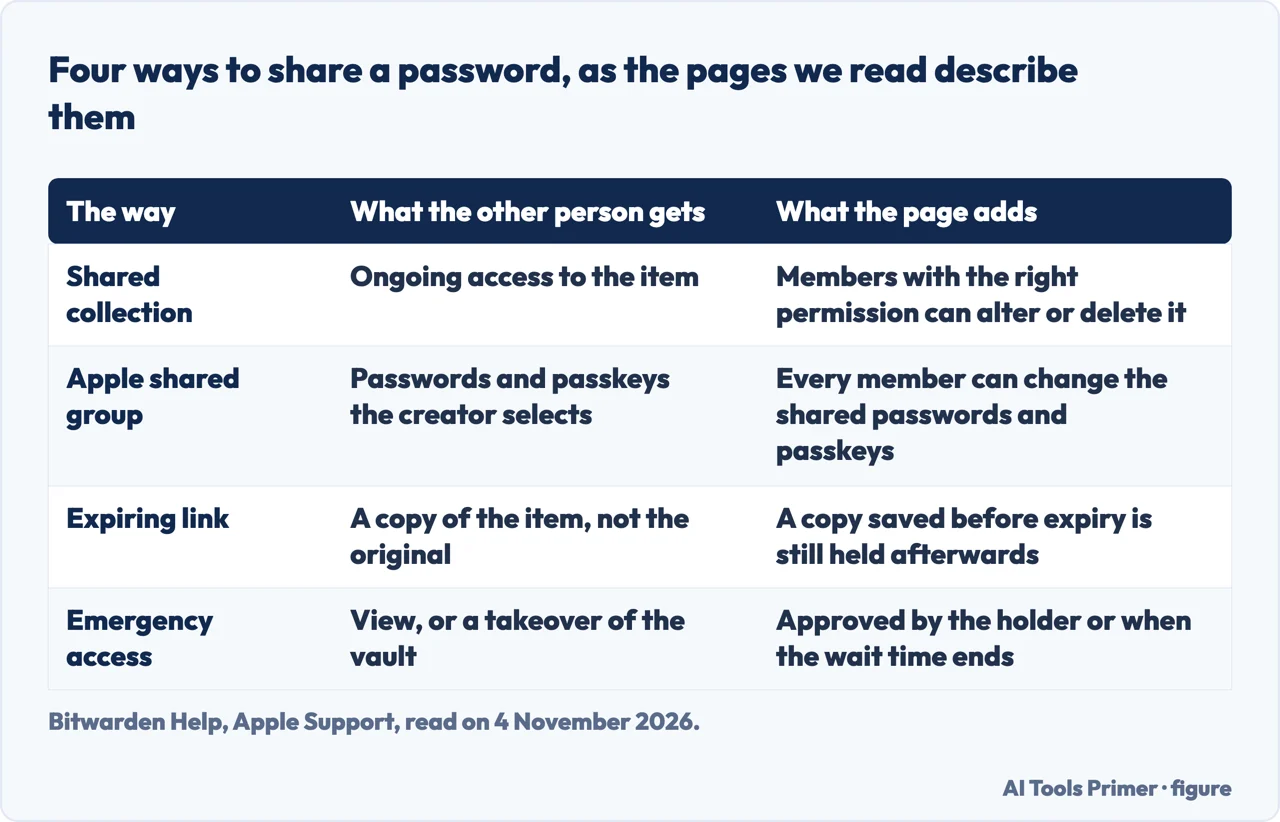
A family password manager shares a login in four ways, and the pages we read set different terms for each: a shared vault or collection is one copy that members may change, an Apple group lets every member edit, an expiring link hands over a copy, and emergency access waits for approval.
| Question | Answer | Where it comes from |
|---|---|---|
| What ways does a family have? | A shared vault or collection, an Apple shared group, an expiring link, and emergency access | Bitwarden, 1Password, Apple Support |
| Can every member change a shared item? | In an Apple group, yes; in a Bitwarden collection, members with the right level of permission can | Apple Support, Bitwarden Help |
| What does an expiring link hand over? | A copy of the item, not the original; attachments and passkeys are left out | Bitwarden Help |
| Can the person who gets a link pass it on? | Wirecutter says they could also share the link, and points to the access controls | Wirecutter |
| How many people does a plan cover? | Bitwarden Families and NordPass Family six, 1Password Families five | The three vendors’ pages |
A shared vault or collection: one copy that members with the right permission can change
Security.org, Bitwarden and 1Password describe a similar layout. Security.org says family plans typically include a private vault for each member and a shared vault for common logins, such as streaming services or household accounts. Bitwarden’s Families page names its version shared collections: you make collections for categories such as streaming, banking and household, add passwords to them, and assign the family members who should have access. When you update a password, the page says, it syncs to everyone with access, and each person sees the shared passwords in their own vault next to their personal ones.
1Password describes the same idea with different names. Each family member has a Private vault, and families can create shared vaults for household logins, documents and other information they choose to share. A shared vault can include the entire family or only selected people. NordPass says its Family plan gives six separate encrypted vaults, and that each member can store credentials in their own vault and share passwords with family members. Security.org says it created a shared folder in RoboForm for its family streaming accounts, and that updating the shared vault meant the family did not have to be told about a new password.
The Bitwarden Help page adds the part a family will want to know before moving a login in. Sharing an item through a collection means adding it to an organization, and that transfers ownership of the item to the organization. The same page reminds readers that members with the right level of permission have the ability to alter or delete a shared item, so collection permissions should be managed well. In other words, a shared vault is one copy, and the people who can see it may also be able to change it. Our pages on whether Bitwarden is safe and on the 1Password Secret Key cover those two products in more depth.
What stays private when a family shares
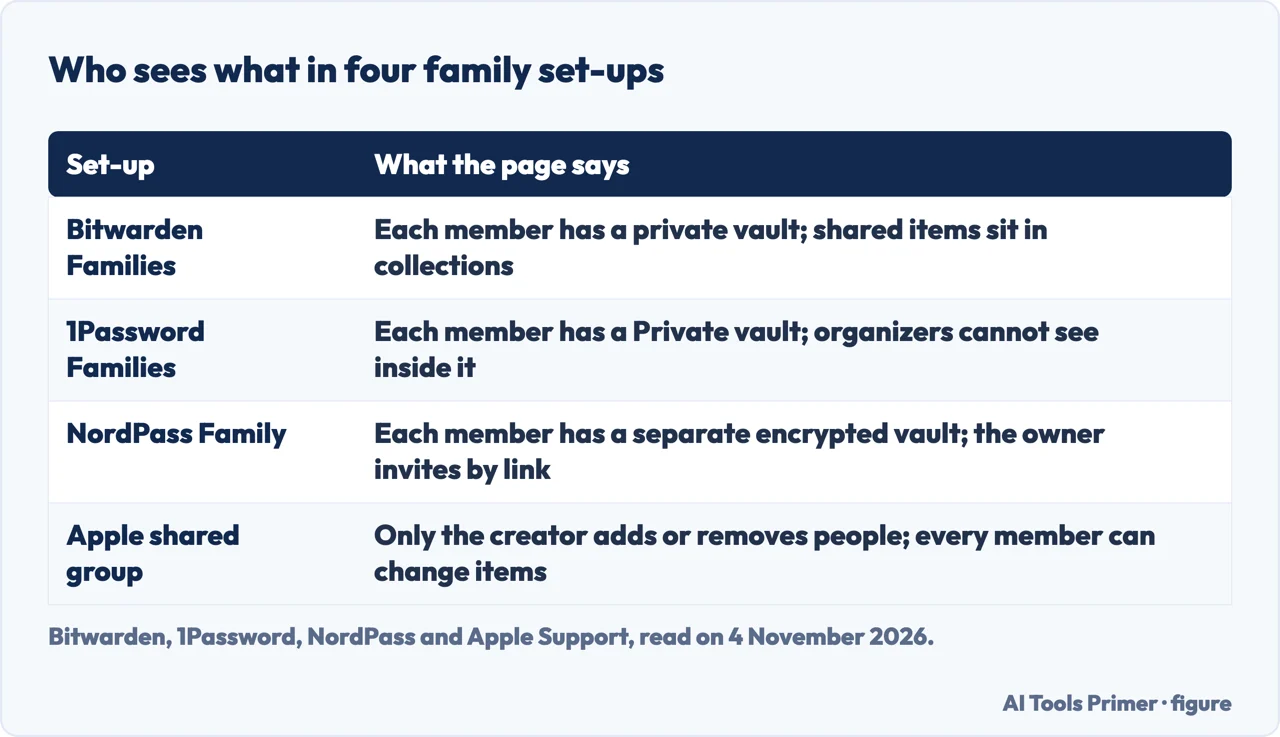
The question the plans answer directly is whether sharing lets relatives read each other’s logins. Bitwarden’s page says each member has a private vault that only they can access, that shared passwords live in a separate shared collection, and that members see only what is explicitly shared with them. 1Password says family organizers can manage members, vault access and account recovery, but they cannot see items stored in another member’s Private vault. NordPass says that once the family plan is in use each member has a separate encrypted vault.
Security.org says family password managers typically let the main account holder manage permissions, and gives an example of why: a 16-year-old probably does not need access to a parent’s bank login. Two other points from NordPass are specific. A family member who already uses NordPass can be invited to the Family plan and keeps their data, and a Premium account that switches to Family keeps its passwords. NordPass also calls it highly discouraged for two people to share one set of credentials and keep both people’s items in one vault, and suggests the Family plan instead.
Apple’s shared group: every member can edit
Apple’s Passwords app has its own way to share a login. Apple Support says you can share account passwords or passkeys with roommates, family members or anyone listed in your contacts, and that everyone must have a device with iOS 17, iPadOS 17, macOS 14 or later. Sharing a Sign in with Apple account needs iOS 18, iPadOS 18, macOS 15 or later. After you choose the accounts, the people in the group are prompted to accept or decline the invitation the next time they open Passwords settings.
The rules differ from the vault plans above. Apple says that as the person who creates the group, only you can add and remove people, rename the group and delete it. A password, passkey or Sign in with Apple account can be shared with only one group. And Apple says all people in the group can change the account passwords and passkeys you share, and can also share their own with the group. Bitwarden’s Help page ties editing to the level of permission; the Apple pages we read do not mention a setting that limits it.
Two more lines from Apple matter for families. If you turn off iCloud Keychain or sign out of iCloud, you lose access to your shared password groups, while other members keep the passwords and passkeys you shared. And for a single password, Apple says you can share it securely with AirDrop. For a Wi-Fi password the Passwords page says it can go from your device to another person’s without actually telling them the password; our page on sharing a Wi-Fi password has the conditions. The Apple password manager page covers the app itself, and our page on Family Sharing covers who sets up that group and a child’s own account.
A link that expires: what the other person keeps
For someone outside the family, the plan pages point to a link rather than a seat. Bitwarden’s Families page suggests expiring links with Bitwarden Send for temporary access, naming babysitters, housesitters and contractors. Its Help page says there are two methods for sharing a vault item: add it to an organization collection for ongoing access, or create a link that gives anyone temporary access to a copy of the item. Recipients can look at the copy until the link expires, and the original stays out of their reach. 1Password says it can share securely with anyone, even those who do not use a password manager, and lists automatic expirations.
The Bitwarden Help page is exact about the limits. Attachments and passkeys are not included in the shared item. The expiration date affects only the share link: a recipient who saved the item while the link was valid still has it afterwards. The page also lists a maximum access count, which sets how many times the link can be opened. It adds that a link shared this way sends a copy as it existed when the link was created, so later edits to the original do not reach the recipient, and that the recipient opens it by entering an email address the sender listed and a code sent there. Wirecutter, which updated its review on 2 November 2026, describes the controls as an expiration date, a limit on views or a password, and warns that the person who gets the link could also share it, so it advises using those controls.
The pages we read do not say how long a Bitwarden link lasts by default, so a family should read the setting on the screen before sending. They also do not say which way suits people who use different password managers, apart from the routes that Bitwarden and 1Password describe for people outside the plan.
If someone cannot get in: emergency access and recovery
Bitwarden’s emergency access lets an account holder appoint trusted contacts who can request access to the vault. A contact can be given View, which is read access to all items in the individual vault including passwords and attachments, or Takeover, where the contact creates a master password that replaces the previous one and removes the two-step login methods set up before. The holder adds the contact in advance, the contact requests access, and the request is approved by the holder or when the wait time expires. Bitwarden says the feature is available to Premium users, including members of paid organizations such as Families, Teams and Enterprise.
1Password takes another route. Every account comes with an Emergency Kit, and recovery codes can be created for the case where the account password or Secret Key is lost; the page adds that a family administrator can help other members recover their accounts with the admin tools. Wirecutter agrees that 1Password family organizers can recover the accounts of other members who forget a master password or Secret Key, and says that for sharing an account after death, a printed Emergency Kit in a shared safe or shared emergency backup codes are the only ways to do so.
What the plans cost on 4 November 2026
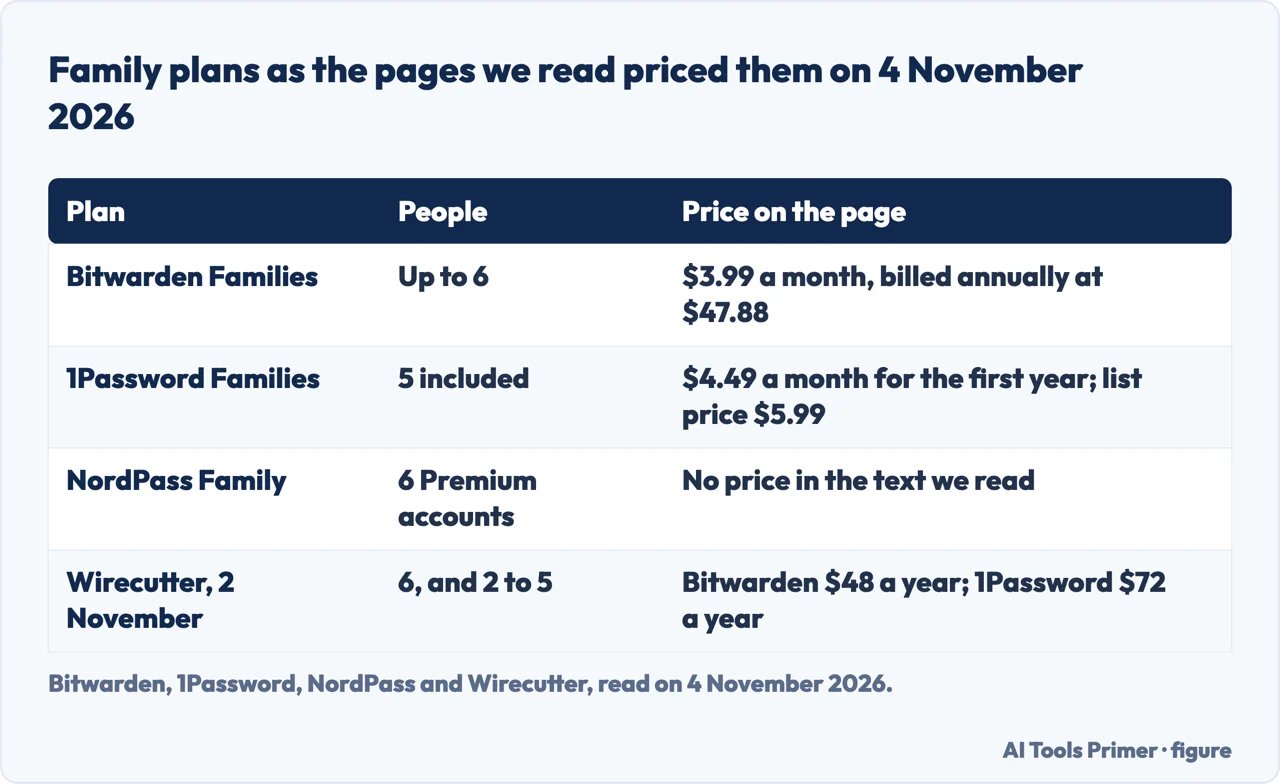
Prices are dated facts here, not a ranking. Bitwarden’s page lists Families at $3.99 a month, up to six users, billed annually at $47.88, with a 14-day free trial; each person gets their own Premium account. 1Password lists Families with five users included at a current price of $4.49 a month against an original price of $5.99, billed yearly. Its note says the promotional price applies to new customers subscribing directly through 1Password.com, for the first year with annual billing. NordPass says Family gives six Premium accounts and a 30-day money-back guarantee; its own page text shows no price, but Wirecutter’s table, with prices current as of 26 January 2026, lists NordPass Family at $72 a year for up to six people.
The sources do not agree on every figure. Wirecutter, updated on 2 November 2026, lists Bitwarden Families at $48 a year for sharing among six people and 1Password at $72 a year for families of two to five, and $5.99 a month over twelve months comes to $71.88. It also says Bitwarden’s free plan shares with one other user. Bitwarden’s own page says $47.88, so we use that figure; Wirecutter reports that Bitwarden’s family plan went from $40 to $48 a year, so a $40 figure looks like the old price. For the non-paying cases, Wirecutter says password sharing is common in paid password managers but rare in free ones. A plan that moves a family’s logins also needs an exit: our page on moving between managers covers exports, and our page on Proton Pass reads one more manager.
What we did not use
We shared no password on any account, so everything above is what the pages say. Google’s help page on sharing a password in a family group answered with a robot check and was not read, so this page does not describe it. We did not read ranked lists, forum threads or any page from Dashlane or Keeper; for those two we have only Wirecutter’s table, prices current as of 26 January 2026, which lists Dashlane family at $90 a year for up to ten people and Keeper at $85 for up to five. The pages we read do not say how many times a person can be sent the same link, beyond the access count Bitwarden mentions, and they do not quantify the risk of sending a password in a chat. Bitwarden’s page says only that texting passwords to family is risky.
Where to start
Four ways in.
- “Can my family see my passwords?”
- A shared vault or collection — vault
- “We all use iPhones.”
- Apple’s shared group — apple
- “It is for the babysitter.”
- A link that expires — link
- “What if someone is locked out?”
- Emergency access and recovery — emergency
The managers
Three managers, read one at a time.
Sharing and moving
Wi-Fi, Apple and the way out.
Questions people also ask
What is the best family password manager in 2026?
Wirecutter’s test of seven managers picks 1Password and Bitwarden overall. The pages give the terms: Bitwarden Families covers six people, 1Password Families five and NordPass Family six. Each member has a private vault, and shared items sit in a collection or shared vault.
What is the cheapest family password manager?
Wirecutter’s table, with prices current as of 26 January 2026, lists family plans at $48 a year for Bitwarden Families and RoboForm, $60 for Proton Pass, $72 for NordPass and 1Password, $85 for Keeper and $90 for Dashlane, Bitwarden’s own page lists Families at $47.88 a year.
Can I share my passwords with my family members?
Yes, in the ways the pages describe: a shared collection or vault, an Apple shared group for contacts on recent Apple software, or an expiring link. Texting a password is what Bitwarden calls risky.
How to see family passwords?
Shared items appear in each member’s own vault, Bitwarden says. Another member’s private vault is not shown: 1Password says organizers cannot see inside it. Bitwarden’s emergency access gives a trusted contact View or Takeover.
Not covered here. We shared no password on any account. The statements come from pages by Bitwarden, 1Password, NordPass, Apple Support, Security.org and Wirecutter, all read on 4 November 2026.
The search volume and difficulty behind this page come from a Semrush reading of 29 August 2026, which expired on 28 October 2026, past the 60 days the site normally allows, and is used with the owner’s authorisation until it is read again.
Sources
- Bitwarden — Family Password Manager — bitwarden.com, read 4 November 2026.
- Bitwarden Help — Share Items — bitwarden.com, read 4 November 2026.
- Bitwarden Help — About Emergency Access — bitwarden.com, read 4 November 2026.
- 1Password — Personal and Family Security — 1password.com, read 4 November 2026.
- NordPass — Family password manager — nordpass.com, read 4 November 2026.
- Apple Support — Share passwords or passkeys with people you trust on Mac — support.apple.com, read 4 November 2026.
- Apple Support — Set up iCloud Keychain — support.apple.com, read 4 November 2026.
- Apple Support — Use the Passwords app to create, manage, and share passwords and passkeys — support.apple.com, read 4 November 2026.
- Security.org — The Best Password Managers for Families — www.security.org, read 4 November 2026.
- Wirecutter — The Best Password Managers — www.nytimes.com, read 4 November 2026.
Written by Alberto Gulotta
Founder and editor of AI Tools Primer, writing from Palermo, Italy. Thirty-five years of taking computers apart, starting with a Commodore 64 — the long version is on the about page.
Something wrong on this page? Write to aitoolsprimer@gmail.com and it gets fixed.
Written on 4 November 2026.
Independence and limits
No affiliate links and no paid placements anywhere on this site. Nobody pays to appear here, and no company has seen this page before you did.
This is general information, not professional advice. Where a page touches money, health, safety or the law, it names its source and the date it was read — and your situation may still differ. See the privacy page and the cookie policy.