
Devices · guide
Family Sharing for a child: Apple and Google compared
By Alberto Gulotta · Updated · 18 min read
Family Sharing is Apple’s name for a group of up to six people, and Google calls its version a family group. In both, one adult runs the group, a child has an account of their own, and apps can need a parent’s approval. The ages 13 and 18 change what applies, and the two companies word that differently.
| Question | Answer | Where it comes from |
|---|---|---|
| How many people can be in the group? | Apple says you and up to five other family members; Google says up to 6 people | Apple Support, Google Help |
| Who runs the group? | Apple calls that person the family organizer, Google the family manager | Apple Support, Google Help |
| Can a child share another person’s account? | Apple says the child needs their own Apple Account | Apple Support |
| What happens at 13? | Google sends an email to the parent and the child; the Apple pages we read give no step for it | Google Help |
| Who approves stopping supervision? | Google says children under 18 need a parent’s approval | Google Help |
A family group, and what it is not
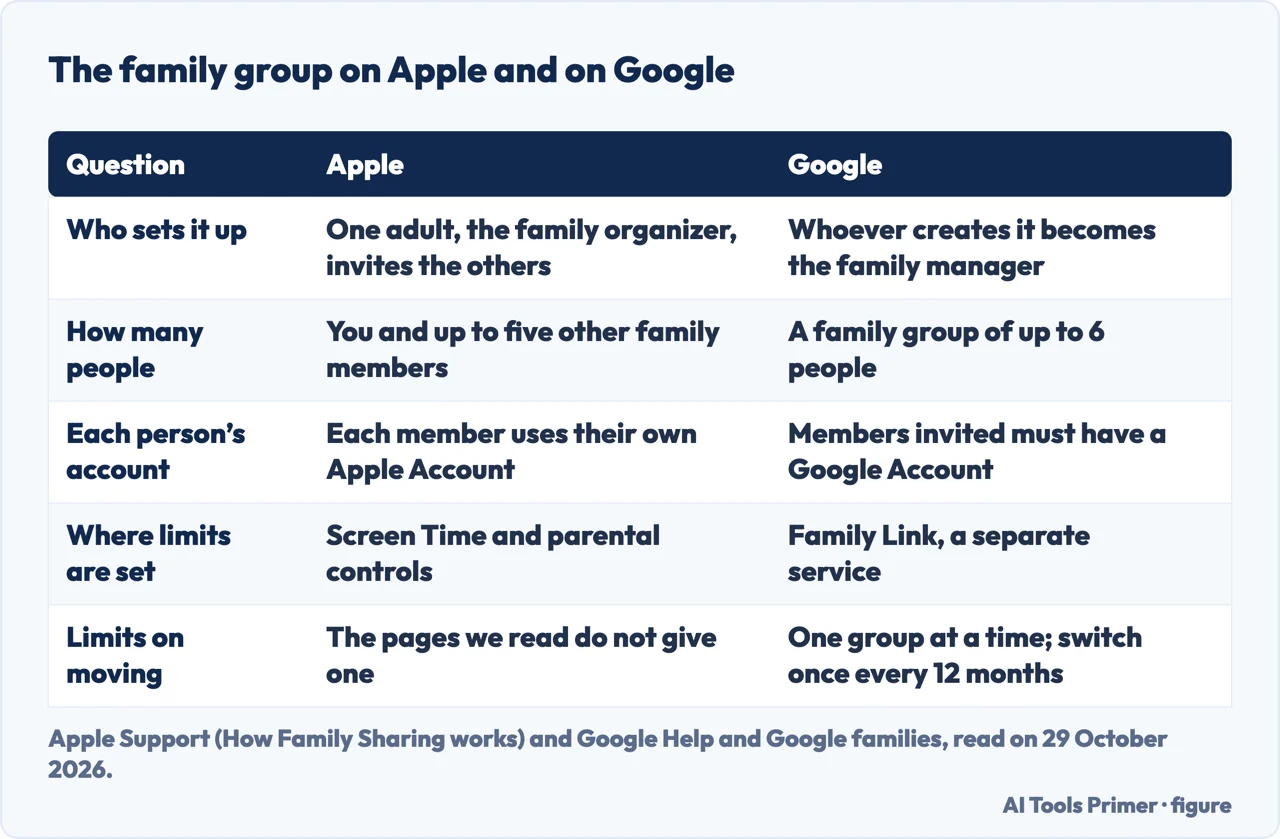
Apple Support’s page on how Family Sharing works, published on 14 September 2026, opens with the group itself: you and up to five other family members can share access to Apple services such as iCloud+, Apple Music and Apple TV. To set it up, one adult, the family organizer, invites the other family members, and each member uses their own Apple Account. Eligible subscriptions can be shared with the group, but the page says some of them, iCloud+ among them, need additional steps. When Purchase Sharing is turned on, everyone in the group gets access to the apps, music, movies, TV shows and books that family members buy, though the page adds that some items can’t be shared. It covers location as well: people in the group can share locations through the Find My app, and the page says you can temporarily stop sharing yours if you need privacy.
Google’s help page on creating a family says that whoever creates a family group becomes the family manager, and that a group can have up to 6 people. Google’s family page adds that the manager can invite up to 5 other people, that the creator must be 18 or older, or the applicable age of consent in the country, and that the people invited must have a Google Account. A person can be in one family group at a time and can switch to another only once every 12 months. A Google Account from work, school or another organization can’t be used to create a family group, and the help page says the manager and the members need the same Google Play country.
Google draws a line that the Apple page does not draw in the same words. Its family page says that a family group and Family Link are two different services that can work together. The group is for sharing apps and services, YouTube and Play Family Library among them, and Family Link comes in when a child account is created, to restrict content, approve app downloads and purchases and set screen time. Apple’s page puts Screen Time and parental controls under the Family Sharing heading itself, as the way the organizer or a parent/guardian manages a child’s device. The pages we read do not set the two services side by side, so the rows in the figure below are our arrangement of each company’s own wording.
The child’s own account
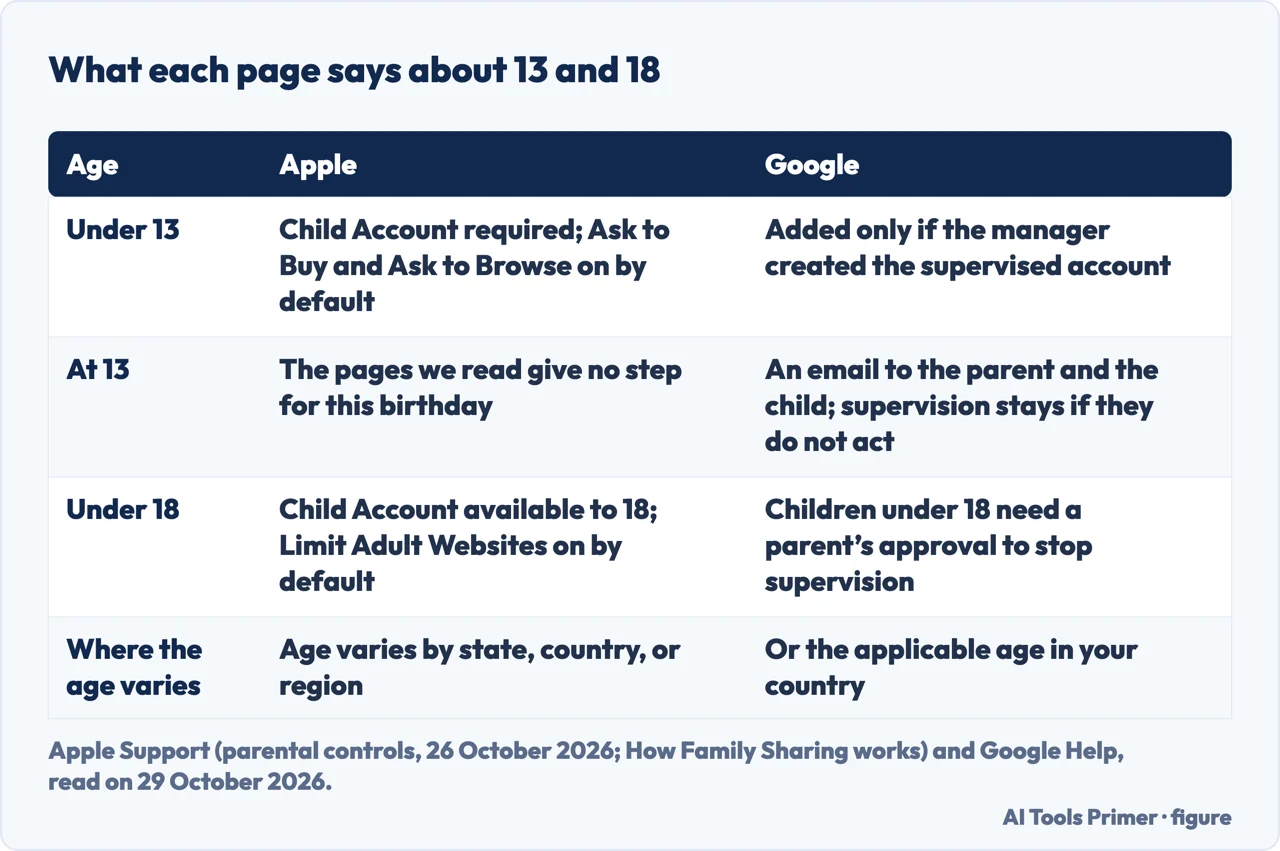
Apple’s page says the Family Sharing organizer or a parent/guardian can create a Child Account for a child in the group, and that with a Child Account of their own a child can use their own device and even make their own purchasing decisions. It states that a Child Account is required for children under 13 and available for children up to 18, and a footnote says the age varies by state, country or region. The pages on Ask to Buy and on parental controls, published on 14 September and 26 October 2026, add a condition: the child should have their own Apple Account and should not share one with anyone else, another family member for example, and that account should be part of the Family Sharing group. The Ask to Buy page also asks that the organizer or a parent/guardian be added to the child’s contacts list, so that the child’s requests can be sent for approval.
A third Apple page, published on 14 September 2026, is about consent. It says Apple allows children to have an Apple Account and use Apple services with parental consent, that the age at which consent is required depends on the state, country or region, and that these laws sometimes change. For a child who already has an account without consent, the steps are in Settings: tap Family, tap Add Member, tap Invite Others and select Invite in Person; enter the email address or phone number the child uses with their Apple Account; have the child enter their Apple Account password; agree to the Parental Privacy Disclosure; and choose whether to turn on Ask to Buy and Location Sharing. The page says a parent without an Apple Account might still be able to give verified consent, by having the child sign in at account.apple.com/parentalconsent and entering the parent’s information and a verified payment method. A footnote adds that where legally required, an Apple Account created for a child under 18 must be part of a Family Sharing group.
Google’s rules for who can be added are different. Its page on managing a family says a member must live in the same country as the manager and be at least 13 years old, or the applicable age in that country, and that kids under 13 can only be added if the family manager created the child’s supervised Google Account. The page on creating a family lists what only the family manager can do: create accounts for children under 13, add supervision to a child’s existing Google Account, provide consent, add or remove members, delete the group, decide which Google services the family uses, and set up the family payment method. It lists separately what a parent, someone the manager designates, can do: create, upgrade and delete child accounts, start and stop supervision, approve Google Play purchases and change parental controls and purchase approval settings. The page on managing a family adds that a parent cannot invite family members but can create and update child accounts, and the help page says anyone the manager designates as a parent must be above the age of majority in their country.
App approvals, step by step
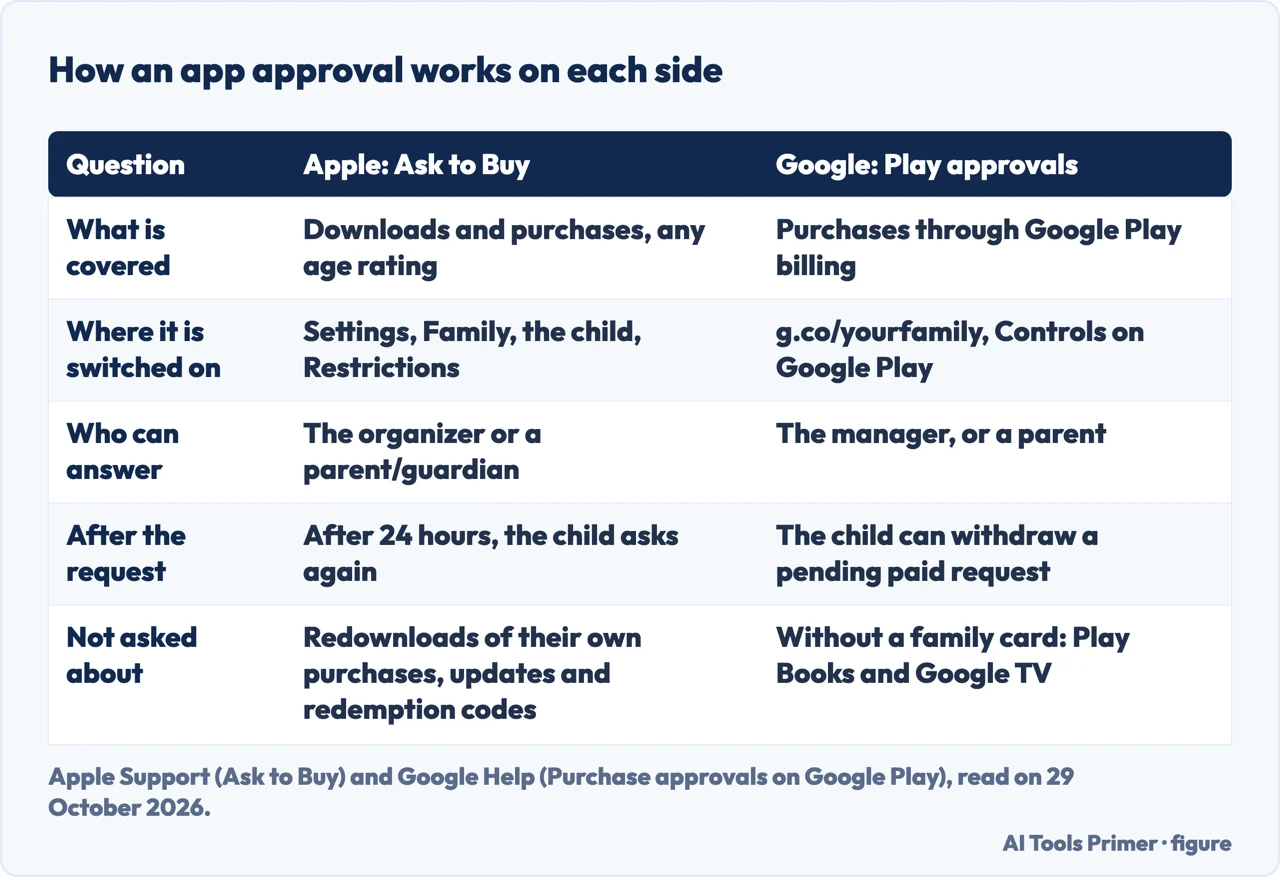
On Apple, the feature is Ask to Buy. Apple’s page, published on 14 September 2026, starts with four things to have in place: Family Sharing set up, a Child Account that belongs to the group, all devices in the group updated to the latest software version so that settings sync, and the organizer or a parent/guardian in the child’s contacts. The organizer or a parent/guardian then turns it on from their own device: on an iPhone or iPad, open Settings, tap Family, tap the child’s name, tap Apps & Websites, tap Restrictions, tap Ask to Buy and turn on Require Purchase Approval. On a Mac the page gives System Settings, then Family, with the same sequence of names. Our page on content and privacy restrictions covers the neighbouring switches on the same screen.
When the child wants an eligible purchase or download, such as an app from the App Store, an in-app purchase or a redownload of a shared app, the adult gets a notification with the request. Approving means signing in with an Apple Account or using Face ID, and the item then downloads to the child’s device; declining means the purchase or download does not take place, and the child gets a notification. The page says the request is needed regardless of the app’s age rating. If you dismiss the request or do not approve within 24 hours, the child has to make the request again, and a missed notification can be found in Messages. Three things do not produce a request, according to the page: a child redownloading their own purchase, installing an update, or using a redemption code. The organizer can also let another adult handle requests by tapping the family member’s name, then Parent/Guardian, then Set as Parent/Guardian. The notification then goes to the organizer and to any parent/guardian, but only one adult needs to manage them.
Two more Apple details are attributed to dates and device versions. Depending on your state, country or region, the page says, you might be notified when an app has introduced a significant change, such as a new feature or an updated age rating, and asked to approve before the child continues. In iOS 26 and iPadOS 26 and later, a child can ask for an exception to an app restriction set in Screen Time, and the adult can see the apps granted and remove access at any time.
Google’s equivalent sits in Google Play. Its page on purchase approvals says a parent in a family group can require family members to get permission to purchase or download content on Google Play, and that the settings only apply to purchases made through Google Play’s billing system. The family manager can choose the setting for any member, and a parent can choose it for members whose accounts are managed with Family Link. On a computer: go to g.co/yourfamily, select the child, click Controls on Google Play, and under Purchase & download approvals click Require approval for. The choices are all content, all purchases that use the family payment method, only in-app purchases, or no approval required.
For content at no charge, a child whose account is managed with Family Link sees a screen with two options. With “Ask in a message” the parent gets a notification and clicks Approve request or Deny. With “Ask now” the parent reviews the request on the child’s device and enters their Google Account password there. The page warns that if you turn off notifications for the Family Link app or the Play Store app, you won’t get notified when there is a request. A child can withdraw a pending paid request from the Order History tab on an Android device. If the manager did not add a family payment method, family members can ask for approval to buy paid apps, make in-app purchases or sign up for prepaid subscriptions, and the page says this does not include Play Books, Google TV or non-prepaid subscriptions.
What changes with age
The numbers 13 and 18 come back on both sides, worded differently. Apple’s parental-controls page, published on 26 October 2026, says Ask to Buy and Ask to Browse are on by default for children under 13, and that Limit Adult Websites is on by default for children under 18. A footnote on the same page says certain settings are turned on automatically for accounts under 18, and that in some places settings like Screen Time, Ask to Buy, Ask to Browse and content restrictions for apps can’t be turned off. The Ask to Buy page from 14 September says that, depending on the child’s state, country or region, Ask to Buy is on by default and can’t be turned off if the child is under 18. The page of 26 October also describes new parental controls in iOS 27 and the other version 27 systems, with an upgrade step, and says Ask to Browse is available in Safari and other supported browser apps after upgrading Screen Time. The pages of 14 September do not describe that upgrade, which is one reason to note the date of each page.
Google handles the birthday differently. Its help page says that when a child turns 13, or the applicable age in their country, Google sends an email to the parent who supervises the account and to the child, to let them know the account can be updated. There are two options. The first is to continue the current supervision by not acting on the email, and the page says the supervision settings remain the same until the child decides to update the account. The second is to update the account with supervision for children over 13: the child opens the email titled “Ready to update your Google Account?”, selects Update your account, reviews the account settings and selects I agree.
The same page then sets the rule for ending supervision. Parents of children over 13 can choose to stop supervision at any time, it says, while children need parent approval to stop supervision until they turn 18, and parents and children both get notified when supervision is stopped. The Apple pages we read cover the ages as defaults and as requirements, and do not describe what happens to a Child Account when the child turns 13 or 18. One age-related control does appear, in Apple’s page on how Family Sharing works (14 September 2026): the organizer can update the birthday associated with the child’s Apple Account and can allow the child to share an age range with certain apps, though we read only the headings of the guides behind those two steps.
Leaving, removing, and the 12-month rule
Google’s page on managing a family is the one that spells out removal. The family manager can remove people from the group. To remove a child under 13, or the applicable age in the country, the manager must either delete the child’s supervised Google Account or transfer supervision to another parent. To remove a supervised user who is above that age, the manager must stop supervision for that user, and the page adds that the user can later choose to start supervision again. For anyone else, the manager goes to g.co/YourFamily, selects the person and selects Remove member. A parent, the page says, cannot remove regular family members but can delete child accounts.
The page lists what a removed person loses and keeps. They keep their Google Account and any content on their device purchased with the family payment method; they can’t make new purchases with the family payment method or use the services the group shares; they get an email alert; and they lose access to the Family Library and, where the family shares a Google One membership, to the shared storage. If they added content to a Family Library, that content is removed and the other members lose access to it. Deleting the whole group first requires transferring supervision of children under 13, or deleting their supervised accounts, and stopping supervision for supervised users above that age. A deleted group can’t be restored, and after deleting one you can only create or join another family group once in the next 12 months. The creation page repeats the 12-month limit as a cause of errors, for the manager and for a member who already changed groups.
On the supervision rule, Bitdefender, which sells parental-control software, published an account on 15 January 2026. It reports that Google had emailed children approaching the age of 13 to tell them they would soon be eligible to remove parental supervision, that critics objected, and that Google then announced teens would need explicit parental approval before they can remove Family Link supervision, a change the article says would roll out globally. Bitdefender also reports that Google had maintained the policy had been in place for years and varied by country. That matches the sentence on Google’s own help page, where the text we read carries no date, so we cannot say when its wording was written.
What the pages we read do not say
Some questions a parent might bring are not answered in the text we read, and we have not filled them in.
- The Apple pages we read do not say what happens to a Child Account when the child turns 13 or 18, and do not describe how a child leaves a Family Sharing group.
- The Google pages we read do not say whether a child who stops supervision stays in the family group.
- The pages we read do not put the two services side by side, and do not say which of the two is preferable.
- The pages we read do not list the countries where the age changes; each says only that it varies.
- The pages we read do not say how the two groups relate when a child has both an iPhone and a Google Account.
On Apple, the neighbouring pages on this site cover content and privacy restrictions, the Screen Time passcode and blocking websites on an iPhone. For the messages a child sends and receives, see iMessage.
Where to start
Four ways in.
- “How many people can join?”
- A family group, and what it is not — group
- “Does my child need an account of their own?”
- The child’s own account — account
- “How do the approvals work?”
- App approvals, step by step — approvals
- “What happens at 13 and 18?”
- What changes with age — age
Controls on the iPhone
Restrictions, Screen Time and websites.
Messages and the phone
What an iMessage does and does not protect.
Questions people also ask
How many people can be in a Family Sharing group?
Apple says you and up to five other family members. Google says a family group can have up to 6 people, and that the manager can invite up to 5 others.
Does a child need an account of their own?
Apple says a Child Account is required for children under 13 and available up to 18, and that the child should not share an account. Google says kids under 13 can only be added if the manager created the child’s supervised Google Account.
Who approves what a child downloads?
On Apple, the organizer or a parent/guardian answers Ask to Buy requests, and only one adult needs to manage them. On Google, the manager or a parent sets the approvals in Google Play, which cover purchases made through its billing system.
What happens when a child turns 13?
Google sends an email to the parent and the child, and supervision stays the same unless the child updates the account. The Apple pages we read do not describe a step at 13.
Not covered here. We tested nothing on a phone. The statements come from four Apple Support pages, four Google Help pages, Google’s family page and a Bitdefender article, all read on 29 October 2026.
The search volume and difficulty behind this page come from a Semrush reading of 29 August 2026, older than the 60 days the site normally allows.
Sources
- Apple Support — How Family Sharing works (14 September 2026) — support.apple.com, read 29 October 2026.
- Apple Support — Set up parental controls to manage your child’s iPhone or iPad (26 October 2026) — support.apple.com, read 29 October 2026.
- Apple Support — Approve what your child can purchase and download with Ask to Buy (14 September 2026) — support.apple.com, read 29 October 2026.
- Apple Support — Use Family Sharing to provide parental consent for your child’s Apple Account (14 September 2026) — support.apple.com, read 29 October 2026.
- Google Account Help — How Google Accounts work when children turn 13 — support.google.com, read 29 October 2026.
- Google For Families Help — Create a family on Google — support.google.com, read 29 October 2026.
- Google For Families Help — Manage your family on Google — support.google.com, read 29 October 2026.
- Google For Families Help — Purchase approvals on Google Play — support.google.com, read 29 October 2026.
- Google families — Create a family group — families.google, read 29 October 2026.
- Bitdefender blog — Google Backtracks on Teen Parental Controls After Public Backlash (15 January 2026) — www.bitdefender.com, read 29 October 2026.
Written by Alberto Gulotta
Founder and editor of AI Tools Primer, writing from Palermo, Italy. Thirty-five years of taking computers apart, starting with a Commodore 64 — the long version is on the about page.
Something wrong on this page? Write to aitoolsprimer@gmail.com and it gets fixed.
Written on 29 October 2026.
Independence and limits
No affiliate links and no paid placements anywhere on this site. Nobody pays to appear here, and no company has seen this page before you did.
This is general information, not professional advice. Where a page touches money, health, safety or the law, it names its source and the date it was read — and your situation may still differ. See the privacy page and the cookie policy.